回顾 -> 问题引出
- DeepRearchSystem 0x00:初识
- DeepRearchSystem 0x01:Agent 基础
- DeepRearchSystem 0x02:Graph 构建
- DeepRearchSystem 0x03:HITL
- DeepResearchSystem 0x04:MAS 进阶
- DeepResearchSystem 0x06:LLM as Judge
前面经过几轮改造,DeepRearchSystem 已经算是一个接近生产级的深度搜索研报 Agent。但是,想象一下现在有一个这样的 case: 100 个用户搜索同一个问题,会发生什么?成本是怎样的?
- 触发 100 * N 次 WebSearch,LLm 调用 100 +次;整体成本成倍,同时还会产生延迟。
那么怎么办呢?能不能设置一个缓存系统来来解决以上问题。
兵来将挡
当然可以,其实方案也简单。从我们客户端架构 的视角看,之前有个 SDWebImage 的图片库,对下载的图片就做了二级缓存。这样短时间内请求同样的图片就不会发出真实请求,而是直接从缓存里拿。
SDWebImage 借鉴
-
二级缓存
- P0:内存缓存,优先访问
- P1:磁盘缓存,内存访问不到再访问
- 以上都无,再直接发起请求
-
存储方式
- key:image_url 或其 md5
- value:Nsdata(image)
research_cache 设计
本质上这个缓存是一个服务端架构 的缓存机制,那么他是否能完全复用 SDWebImage 的缓存机制呢。
-
二级缓存
- P0:
Redis,优先访问- Redis 在本身就可以理解为服务端的 "磁盘存储",处理相对友好
- 如果直接使用磁盘内存,高并发场景下可能把磁盘瞬间打爆
- 为什么是一级缓存?理论上内存缓存应该更快啊❓❓❓
- 吞吐量 :Redis 多实例共享
- 一致性:
- Redis 在本身就可以理解为服务端的 "磁盘存储",处理相对友好
- P1:内存缓存,
Redis不可用再访问,完全的兜底缓存,容灾手段 - 以上都无,再直接发起请求
- P0:
-
存储方式
- key:(prompt, count) 作为业务维度的唯一标识,通过 MD5 哈希生成固定的 Redis Key
- value:search_result
-
双写双读机制
-
主路径 (Redis) :利用
setex原子操作写入数据并设置 TTL,利用get读取数据并通过ttl命令监控剩余时间。 -
降级路径 (In-Memory) :当 Redis 连接失败(
ping不通或读写异常),系统自动切换至基于dict和threading.Lock的本地缓存。
-
-
TTL 生命周期
- 通过 Redis 的 TTL 机制或本地的时间戳比对,自动处理缓存过期,并提供
clear_cache用于测试隔离,cache_stats用于可观测性。
- 通过 Redis 的 TTL 机制或本地的时间戳比对,自动处理缓存过期,并提供
-
回填机制 (新增)
-
读 Redis :获取
result_redis和timestamp_redis。 -
**读 In-Memory **:获取
result_local和remaining_local。 -
决策:
-
如果
remaining_local>remaining_redis(说明 Redis 宕机期间本地更新过,且 Redis 还没被纠正):- Action :立即用
result_local覆盖 Redis(异步或同步)。 - Log :打印
WARN日志,标记发生了"数据回填"。
- Action :立即用
-
否则:正常返回 Redis 数据。
-
-
全链路异常隔离:回写失败仅打日志,绝不阻断主业务流程,符合 AP 可用性优先原则。
-
-
可观测性
- 缓存命中率
- 兜底成功率
- 内存泄露
整体架构
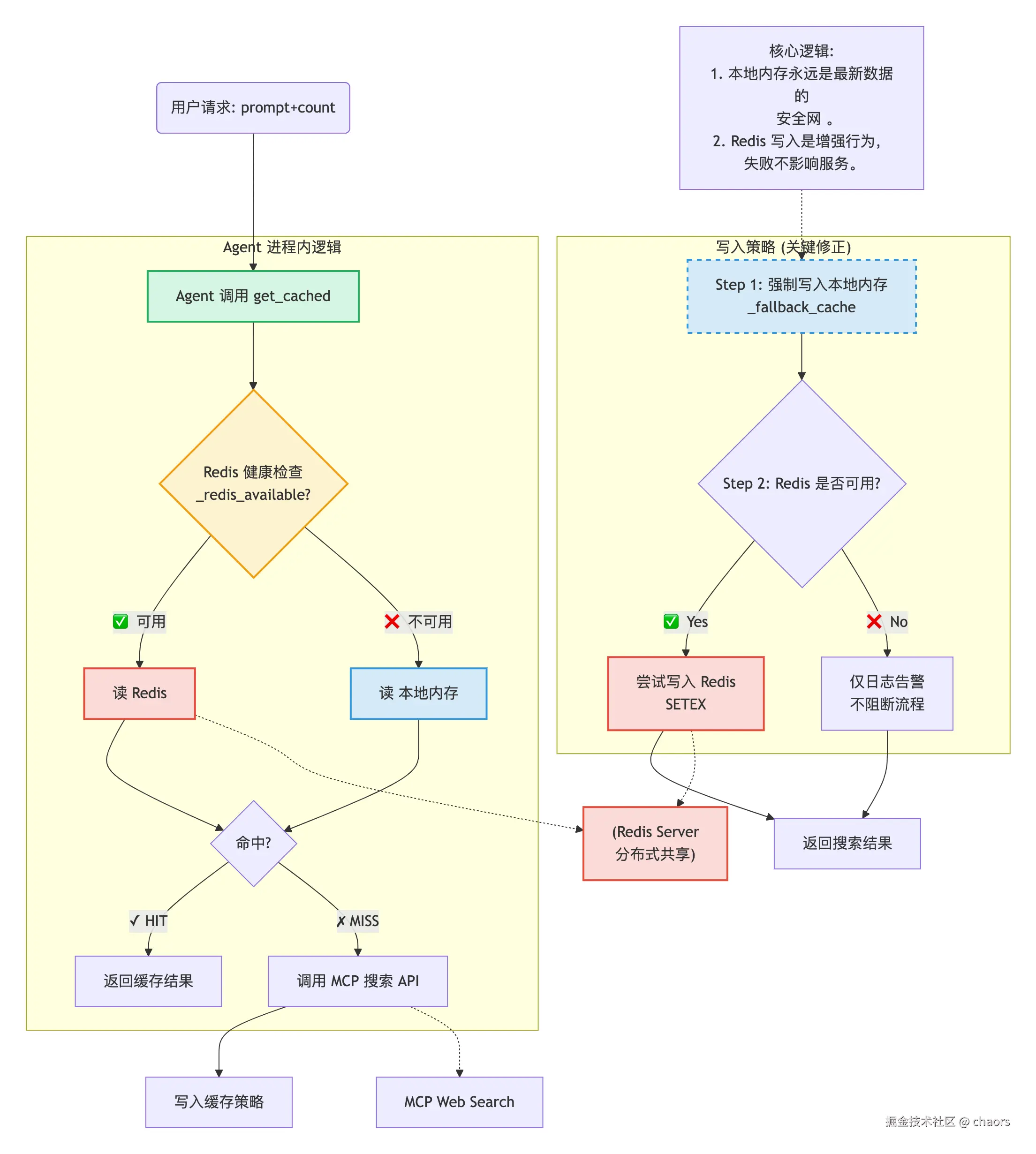
Coding
基础配置
注意,我们这里内存缓存 _fallback_cache 存储的是缓存内容的过期时间戳。
Python
# ── configuration ─────────────────────────────────────────────────────
DEFAULT_TTL = 7200  # 秒(2 小时)
TRUNCATE_LEN = 100   # 日志中截断 query / title 时的最大字符数
REDIS_KEY_PREFIX = "search_cache"
REDIS_URL = os.getenv("REDIS_URL", "redis://localhost:6379/0")

# ── Redis 连接(惰性初始化)───────────────────────────────────────────
_redis_client: redis.Redis | None = None
_redis_available: bool | None = None  # None=未检测, True=可用, False=不可用

# ── 降级:内存缓存(Redis 不可用时使用)────────────────────────────────
# 对齐 Redis 结构,float 存储 ttl 过期时间戳
_fallback_cache: dict[str, tuple[float, list[dict]]] = {}
_fallback_lock = threading.Lock()
get_cached
基础代码
优先访问 redis,当且仅当 redis 不可用时,才使用本地内存缓存兜底。
Python
def get_cached(prompt: str, count: int = 10) -> Optional[list[dict]]:
    """
    返回缓存的搜索结果(如果存在且未过期),否则返回 None。
    命中时打印前 3 条结果的标题,未命中时打印简要日志。
    """
    key = _make_key(prompt, count)
    r = _get_redis()

    if r is not None:
        # ── Redis 路径 ────────────────────────────────────────────
        try:
            raw = r.get(key)
            if raw is None:
                logger.info(f"[Cache] ✗ MISS --- '{prompt[:TRUNCATE_LEN]}' 未命中,将通过MCP搜索")
                return None

            result_redis = json.loads(raw)
            # key 距离被删除还有多少时间(s)
            remaining_redis = r.ttl(key)

            # 回填机制:从本地缓存更新数据(加锁保证线程安全)
            with _fallback_lock:
                if key in _fallback_cache:
                    ttl, result_local = _fallback_cache[key]
                    remaining_local = ttl - time.time()
                    # 核心逻辑:本地数据比 Redis 更新,触发回写
                    if remaining_local > remaining_redis:
                        logger.info(
                            f"[Cache] 🔄 检测到本地缓存更新于 Redis "
                            f"(本地ts={remaining_local:.0f}, Redis ts={remaining_redis:.0f}),触发回写 → Redis"
                        )
                        try:
                            # 用本地最新数据覆盖 Redis,重置 TTL
                            payload_to_write = {
                                "data": result_local,
                                "ts": time.time()
                            }
                            # 宽松重置,直接使用 DEFAULT_TTL 重置。搜索场景下可用
                            r.setex(key, DEFAULT_TTL, json.dumps(payload_to_write, ensure_ascii=False))
                            logger.info(f"[Cache] ✅ 回写 Redis 成功 (key={key[:TRUNCATE_LEN]})")
                            # 使用本地最新数据返回
                            result = result_local
                        except Exception as write_exc:
                            logger.warning(f"[Cache] ❌ 回写 Redis 失败: {write_exc},返回本地数据")
                            # 回写失败不影响返回本地数据,保证可用性
                            result = result_local
                    else:
                        # Redis 数据更新或持平,同步到本地缓存,保持数据一致
                        logger.debug(
                            f"[Cache] Redis 数据更新于本地,同步到本地缓存 "
                            f"(Redis ts={remaining_redis:.0f}, 本地ts={remaining_local:.0f})"
                        )
                        _fallback_cache[key] = (remaining_redis + time.time(), result_redis)
                        result = result_redis
                else:
                    # 本地无缓存,直接写入本地,实现双向同步
                    logger.debug(f"[Cache] Redis 命中,写入本地缓存 (key={key[:TRUNCATE_LEN]})")
                    _fallback_cache[key] = (remaining_redis + time.time(), result_redis)
                    result = result_redis

            titles = [
                r.get("title", r.get("snippet", "?"))[:TRUNCATE_LEN]
                for r in result[:3]
            ]
            logger.info(
                f"[Cache] ✓ HIT --- '{prompt[:TRUNCATE_LEN]}' 命中缓存 "
                f"({len(result)} 条结果, 剩余TTL={remaining_redis}s)"
            )
            logger.info(f"[Cache]   Top results: {', '.join(titles)}")
            return result
        except Exception as exc:
            logger.warning(f"[Cache] Redis 读取失败 ({type(exc).__name__}): {exc}")
            return None

    # ── 降级:内存缓存路径(Redis 不可用或读取失败时执行) ─────────────────────────────────────────
    with _fallback_lock:
        if key not in _fallback_cache:
            logger.info(f"[Cache] ✗ MISS --- '{prompt[:TRUNCATE_LEN]}' 未命中,将通过MCP搜索")
            return None

        ts, result = _fallback_cache[key]
        remaining = ts - time.time()

        if remaining <= 0:
            logger.info(
                f"[Cache] ✗ EXPIRED --- '{prompt[:TRUNCATE_LEN]}' 缓存已过期(TTL={DEFAULT_TTL}s),将重新搜索"
            )
            del _fallback_cache[key]
            return None

    titles = [
        r.get("title", r.get("snippet", "?"))[:TRUNCATE_LEN]
        for r in result[:3]
    ]
    logger.info(
        f"[Cache] ✓ HIT --- '{prompt[:TRUNCATE_LEN]}' 命中缓存 "
        f"({len(result)} 条结果, 剩余TTL={remaining:.0f}s)"
    )
    logger.info(f"[Cache]   Top results: {', '.join(titles)}")
    return result
回填机制
值得注意的是,这里的兜底机制不是简单 "单向兜底"。我特地做了 "双向同步" 的回填机制。因为在生产级应用中数据一致性显得尤为重要。回填机制的整体流程如下:
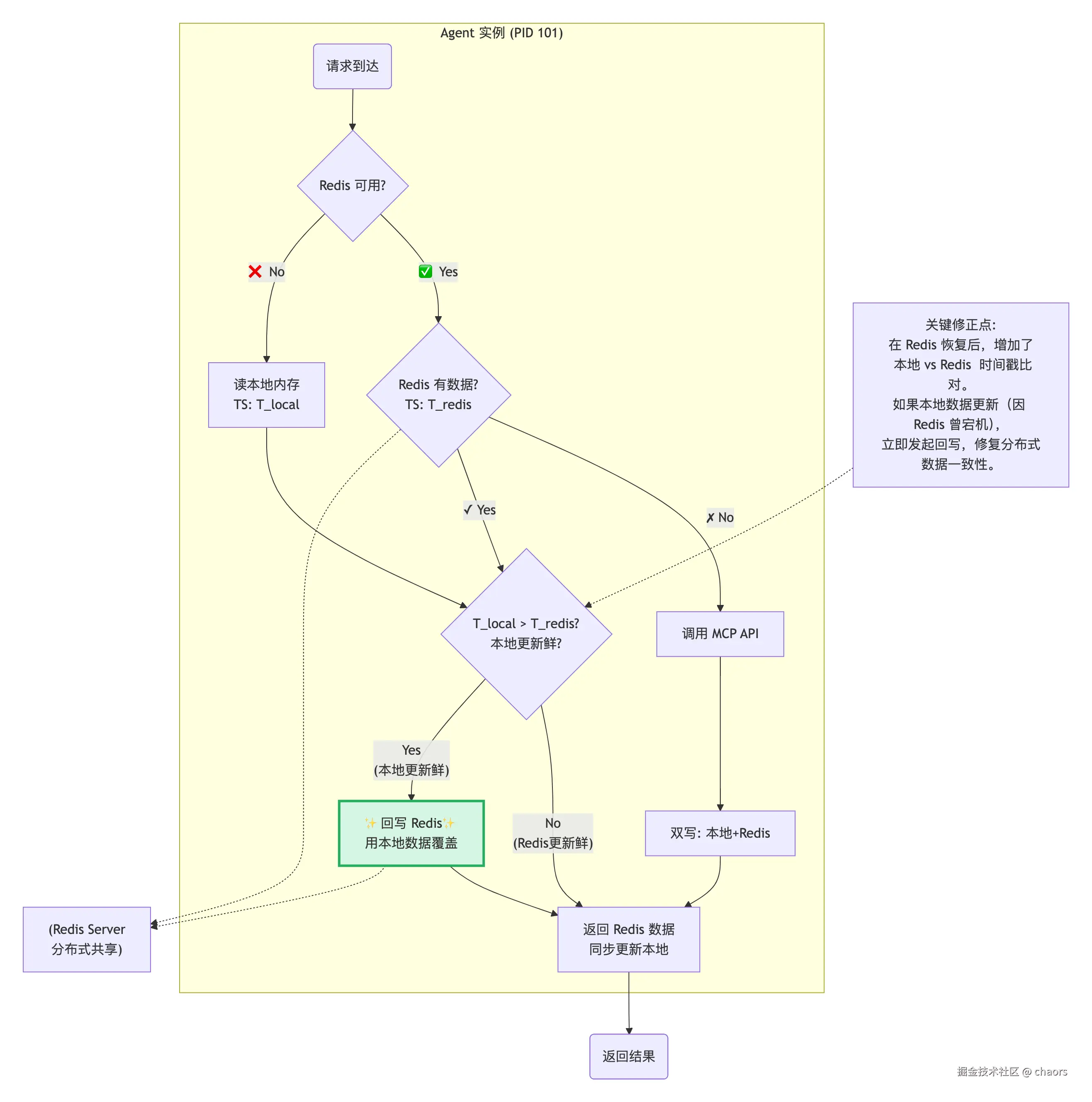
但是,我在测试中回填机制中发现一个 TTL 语义歧义 的问题:
- 🌰:TTL = 100s
- T = 0s,首次写入,TTL_local = 100s,TTL_redis = 100s
- T = 50s, Redis 宕机,TTL_local = 50s,redis 不可用
- T = 60s,Redis 恢复,触发回填,TTL_local = 50s,回填后 redis 终止TTL,TTL_redis = 100s
原本本地 TTL = 50s 的数据在回填 redis 后变成了 100s,这个到底是不是问题呢?时效性变化的影响取决于时效敏感性有多强。其实,对于这个搜索项目还好,因为并不是强一致性 case。但是如果是价格、库存、股市 等这类时效性敏感的 case 就不能这么宽容处理了。
其实也简单,针对 TTL 做动态性传入:回写时不用完整的 DEFAULT_TTL,而是用 min(DEFAULT_TTL, 剩余TTL)。
🤔🤔🤔:针对这个问题,在生产级应用里还有哪些更优的解决方案呢?
set_cached
set 这里和 get 不同的是:get 优先访问 redis,兜底使用本地缓存,但是 set 要始终将缓存内容写入了本地,以保障后续 Redis 失败时本地有数据可用。
Python
def set_cached(prompt: str, count: int, result: list[dict]) -> None:
    """
    将搜索结果存入缓存。
    """
    key = _make_key(prompt, count)

    # 第一步:始终先写本地内存(兜底,保证当前实例可访问最新数据)
    with _fallback_lock:
        _fallback_cache[key] = (time.time() + DEFAULT_TTL, result)
    logger.info(
        f"[Cache] stored --- '{prompt[:TRUNCATE_LEN]}' "
        f"({len(result)} items, TTL={DEFAULT_TTL}s)→ 内存"
    )

    # 第二步:尝试写 Redis(共享,失败不影响主流程)
    r = _get_redis()
    if r is not None:
        # ── Redis 路径:SETEX 自带 TTL ────────────────────────────
        try:
            r.setex(key, DEFAULT_TTL, json.dumps(result, ensure_ascii=False))
            logger.info(
                f"[Cache] stored --- '{prompt[:TRUNCATE_LEN]}' "
                f"({len(result)} items, TTL={DEFAULT_TTL}s)→ Redis"
            )
        except Exception as exc:
            logger.warning(f"[Cache] Redis 写入失败 ({type(exc).__name__}): {exc}")
        return
clean_cached
清理逻辑很简单,没什么可说的。
Python
def clear_cache() -> None:
    """
    清空所有缓存条目(用于测试)。
    """
    r = _get_redis()
    if r is not None:
        try:
            # SCAN 遍历所有 search_cache 前缀的 key 并删除
            cursor = 0
            deleted = 0
            while True:
                cursor, keys = r.scan(cursor, match=f"{REDIS_KEY_PREFIX}:*", count=100)
                if keys:
                    deleted += r.delete(*keys)
                if cursor == 0:
                    break
            logger.info(f"[Cache] cleared all {deleted} entries (Redis)")
        except Exception as exc:
            logger.warning(f"[Cache] Redis 清空失败 ({type(exc).__name__}): {exc}")
        return

    with _fallback_lock:
        count = len(_fallback_cache)
        _fallback_cache.clear()
    logger.info(f"[Cache] cleared all {count} entries (内存)")
cache_stats
就像我们之前做 iOS 开发,一个优秀 App 的产生,其代码必须具备可观测性 。同样我们也为我们的 search_cache 模块设计了观测函数,用于监控。
-
redis:看规模
total_entries:总共有多少热点数据。就好比 iOS App 的活跃用户
-
memory:看健康度
oldest_ttl:最老数据还有多久到期。如果这个值是 0,说明最老一批内存缓存可能要开始批量失效了,如果此时 Redis 也挂了,系统将面临"缓存雪崩"的风险。- 分布式系统,有的缓存可能近乎是同一时间创建的
- 缓存雪崩:缓存批量失效后,短时间很多重复 query 集中打向 MCP,而MCP通常有QPS限流(比如每秒100次),直接就被打爆了
avg_results:平均每条缓存包含多少结果。如果这个值暴涨,可能预示着 MCP 返回了异常庞大的数据,可能导致网络拥堵或序列化失败。
-
监控作用
- 故障诊断与警告
- 🌰:凌晨 3 点,MCP 搜索 API 的调用量突然飙升
- 看板诊断:
cache_stats异常total_entries急剧下降,或者backend从redis变成了memory - 结论:Redis 连接闪断,系统自动降级。虽然整体服务没挂,但 API 成本在增加。需要安排人员迅速介入排查:重启 Redis 或检查网络。但是完全不用捞日志。
- 容量规划与性能优化
- Redis 容量 :通过
total_entries的增长趋势,可以预估 Redis 的内存需求,提前扩容,防止因 Redis 内存满了触发 LRU 淘汰导致缓存命中率下降。 - 内存风险 :通过
total_entries(memory) 和avg_results,可以估算出每个 Pod 占用多少 MB 内存。如果avg_results很大,说明缓存对象过大,可能需要优化数据结构或压缩 JSON,防止 Pod 因 OOM(内存溢出)被 Kubernetes 杀掉。
- Redis 容量 :通过
- 容灾(兜底降级)验证
- 发布新版本,需要验证"降级机制"是否真的有效。
- 1.手动切断 Redis 网络,然后调用
cache_stats()。 - 2.返回
{"backend": "memory", ...},降级代码正常走了,系统具备容灾能力。 -
- 无
{"backend": "memory", ...},降级代码没走,需要 check 降级逻辑。
- 无
- 如果没有这个接口,你只能等到真的发生故障才能知道降级是否有效(这不就是一个灾难级大坑🐴)。
- 1.手动切断 Redis 网络,然后调用
- 发布新版本,需要验证"降级机制"是否真的有效。
- 故障诊断与警告
Python
def cache_stats() -> dict:
    """
    返回当前缓存统计信息(用于监控)。
    """
    r = _get_redis()
    if r is not None:
        try:
            # 统计 search_cache 前缀的 key 数量
            count = 0
            cursor = 0
            while True:
                cursor, keys = r.scan(cursor, match=f"{REDIS_KEY_PREFIX}:*", count=100)
                count += len(keys)
                if cursor == 0:
                    break
            return {
                "total_entries": count,
                "backend": "redis",
            }
        except Exception as exc:
            logger.warning(f"[Cache] Redis 统计失败 ({type(exc).__name__}): {exc}")
            return {"total_entries": "unknown", "backend": "redis"}

    now = time.time()
    with _fallback_lock:
        entries = []
        for key, (ts, res) in _fallback_cache.items():
            entries.append({
                "remaining_ttl": max(0, now - ts),
                "result_count": len(res),
            })
    return {
        # 缓存数
        "total_entries": len(entries),
        # 平均每条缓存包含多少结果
        "avg_results": sum(e["result_count"] for e in entries) / max(len(entries), 1),
        # 最老数据还有多久到期
        "oldest_ttl": min((e["remaining_ttl"] for e in entries), default=0),
        "backend": "memory",
    }
_get_redis
Python
def _get_redis() -> redis.Redis | None:
    """
    获取 Redis 连接。不可用时返回 None。
    """
    global _redis_client, _redis_available
    if _redis_available is False:
        return None
    if _redis_client is not None:
        return _redis_client
    try:
        _redis_client = redis.from_url(REDIS_URL, decode_responses=True)
        _redis_client.ping()
        _redis_available = True
        logger.info("[Cache] Redis 连接成功,缓存跨实例共享")
        return _redis_client
    except Exception as exc:
        _redis_available = False
        _redis_client = None
        logger.warning(f"[Cache] Redis 不可用 ({type(exc).__name__}: {exc}),降级为进程内缓存")
        return None
缓存 key
典型的确定性映射的字典 key 设计。
Python
def _make_key(prompt: str, count: int) -> str:
    """
    生成确定性的缓存 key。
    """
    # 防御性编程:去除首尾空白字符
    payload = f"{prompt.strip()}:{count}"
    return f"{REDIS_KEY_PREFIX}:{hashlib.md5(payload.encode('utf-8')).hexdigest()}"
cache 调用
我们在之前 WebSearchAgent-astep中查询的入口和 WebSearchMCP 返回结果的地方分别插入 get 和 set。
Python
# WebSearchAgent.astep 函数内
...
# 优先访问缓存
count = kwargs.get("count", 10)
cache = get_cached(prompt, count=count)
if cache is not None:
    return cache

...
# 发起真正的 WebSearchMCP 请求
Python
# 获取到令牌后,再切换到线程池执行阻塞的 HTTP 请求
# 此时当前协程让出 CPU,但 rate_limiter 的锁已释放,其他协程可申请令牌
response = await asyncio.to_thread(
    Application.call,
    api_key=api_key,
    app_id=app_id,
    prompt=step_prompt,
    biz_params=kwargs,
    )
response = self.extract_pages_from_mcp_response(response, None)

# 缓存结果
if response is not None:
    set_cached(prompt, count, result=response)

return response
至此,我们的 DeepRearchSystem 就具备了查询缓存机制。
更多 AI 技术干货 请订阅 AI技术手札专栏。