Debian Apache2 实战:自定义站点目录、运行用户与 Basic Auth 认证
1. 服务介绍
Apache HTTP Server 是常用 Web 服务软件,可发布静态网页、配置域名虚拟主机、提供 HTTPS、反向代理,并与 PHP 等后端程序协作。本实验在 Debian 上部署 www.sdskills.com,把站点目录改为 /data/share/htdocs/skills,调整 Apache 工作进程用户,并为 staff.html 增加 HTTP Basic Auth 认证。
原实验文字提到"账号存储在 LDAP",但现有截图实际使用 htpasswd 本地密码文件,不是 LDAP 认证。本文按截图实现本地 Basic Auth;若必须连接 LDAP,应改用 mod_authnz_ldap,不能把密码文件命名为 ldap 后当作 LDAP。
2. 准备运行环境
• 操作系统:Debian 10/11 或同类 Debian 系统。
• 操作账号:root 或具备 sudo 权限的管理员。
• 站点域名:www.sdskills.com。
• 站点目录:/data/share/htdocs/skills。
• Apache 工作进程用户:webuser,组为 www-data。
• 认证账号:zsuser、lsus。
确认系统、地址和端口占用:
bash
cat /etc/os-release
ip -br addr
getent hosts www.sdskills.com
ss -lntp | grep -E ':80|:443'
实验环境没有 DNS 时,可在客户端 /etc/hosts 中临时添加服务器地址与域名映射。
3. 相关知识与注意事项
3.1 Debian Apache2 配置结构
• 主配置:/etc/apache2/apache2.conf。
• 运行环境变量:/etc/apache2/envvars。
• 可用站点:/etc/apache2/sites-available/。
• 已启用站点:/etc/apache2/sites-enabled/。
• 模块管理:a2enmod、a2dismod。
• 站点管理:a2ensite、a2dissite。
• 日志:/var/log/apache2/access.log、/var/log/apache2/error.log。
不要长期直接修改 sites-enabled 中的符号链接目标不明文件。推荐在 sites-available 新建独立虚拟主机,再用 a2ensite 启用。
3.2 DocumentRoot 与 Directory 权限
DocumentRoot 决定 URL 根目录对应的文件路径;<Directory> 决定 Apache 是否允许访问该目录、是否允许目录索引、符号链接和 .htaccess 覆盖。仅修改 DocumentRoot 而未授权目录,常导致 403 Forbidden。
3.3 Basic Auth 与 LDAP 的区别
• Basic Auth + AuthUserFile:账号密码保存在 htpasswd 文件,部署简单。
• LDAP 认证:账号位于目录服务器,需要 libapache2-mod-ldap-userdir 或 mod_authnz_ldap 相关模块、LDAP URI、Base DN 和查询规则。
• Basic Auth 只进行 Base64 编码,不加密传输;生产环境必须配合 HTTPS。
3.4 修改运行用户的影响
Debian Apache 工作进程默认使用 www-data。改为 webuser 会影响所有虚拟主机和模块对文件、日志、套接字的访问权限。生产环境若只需隔离单个站点,应评估 mpm-itk、容器或后端进程池,而不是全局修改运行用户。
4. 实验步骤
4.1 安装 Apache2 和认证工具
bash
apt update
apt install -y apache2 apache2-utils
systemctl enable --now apache2
检查版本:
bash
apache2ctl -v
systemctl status apache2 --no-pager
4.2 创建站点目录和页面
bash
mkdir -p /data/share/htdocs/skills
cat > /data/share/htdocs/skills/index.html <<'EOF'
This is the front page of sdskills's website.
EOF
cat > /data/share/htdocs/skills/staff.html <<'EOF'
Staff Information
EOF

4.3 创建 Apache 运行用户并设置目录权限
bash
id webuser >/dev/null 2>&1 || useradd --system --no-create-home --shell /usr/sbin/nologin --gid www-data webuser
chown -R webuser:www-data /data/share/htdocs/skills
find /data/share/htdocs/skills -type d -exec chmod 0750 {} \;
find /data/share/htdocs/skills -type f -exec chmod 0640 {} \;
编辑 /etc/apache2/envvars:
bash
cp -a /etc/apache2/envvars /etc/apache2/envvars.bak
vi /etc/apache2/envvars
设置:
bash
export APACHE_RUN_USER=webuser
export APACHE_RUN_GROUP=www-data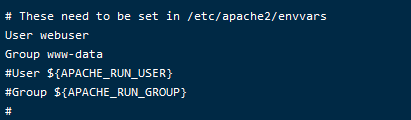
4.4 创建虚拟主机
bash
vi /etc/apache2/sites-available/sdskills.conf写入:
apache
<VirtualHost *:80>
    ServerName www.sdskills.com
    DocumentRoot /data/share/htdocs/skills

    <Directory /data/share/htdocs/skills>
        Options FollowSymLinks
        AllowOverride None
        Require all granted

        <Files "staff.html">
            AuthType Basic
            AuthName "Staff Area"
            AuthUserFile /etc/apache2/staff.htpasswd
            Require user zsuser lsus
        </Files>
    </Directory>

    ErrorLog ${APACHE_LOG_DIR}/sdskills-error.log
    CustomLog ${APACHE_LOG_DIR}/sdskills-access.log combined
</VirtualHost>
旧实验直接修改默认站点的 DocumentRoot:


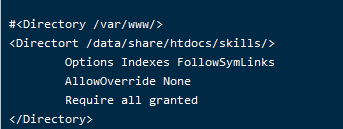
本文使用独立虚拟主机,便于回退且不会混入全局配置。
4.5 创建 Basic Auth 用户
首次创建密码文件时使用 -c:
bash
htpasswd -c /etc/apache2/staff.htpasswd zsuser
htpasswd /etc/apache2/staff.htpasswd lsus
chown root:www-data /etc/apache2/staff.htpasswd
chmod 0640 /etc/apache2/staff.htpasswd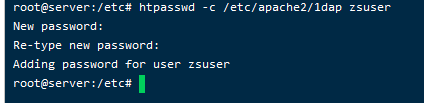
只有第一次使用 -c。为第二个用户再次使用 -c 会覆盖原密码文件。
旧实验配置使用 AuthUserFile 保护页面,但把文件名写成 /etc/apache2/ldap:
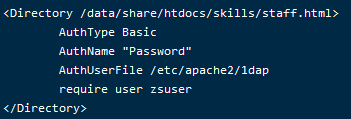
该配置仍是本地密码文件认证,不是 LDAP。
4.6 启用站点并加载配置
bash
a2dissite 000-default.conf
a2ensite sdskills.conf
apache2ctl configtest
systemctl restart apache2
修改前后都应执行语法检查。只有返回 Syntax OK 才重启服务。

确认进程用户:
bash
ps -eo user,group,pid,cmd | grep '[a]pache2'主进程通常仍为 root,工作进程应为 webuser。

5. 验证结果
5.1 验证虚拟主机和首页
bash
apache2ctl configtest
apache2ctl -S
systemctl status apache2 --no-pager
ss -lntp | grep ':80'
curl -i -H 'Host: www.sdskills.com' http://127.0.0.1/
响应应为 200 OK,正文包含:
text
This is the front page of sdskills's website.
5.2 验证 staff.html 认证
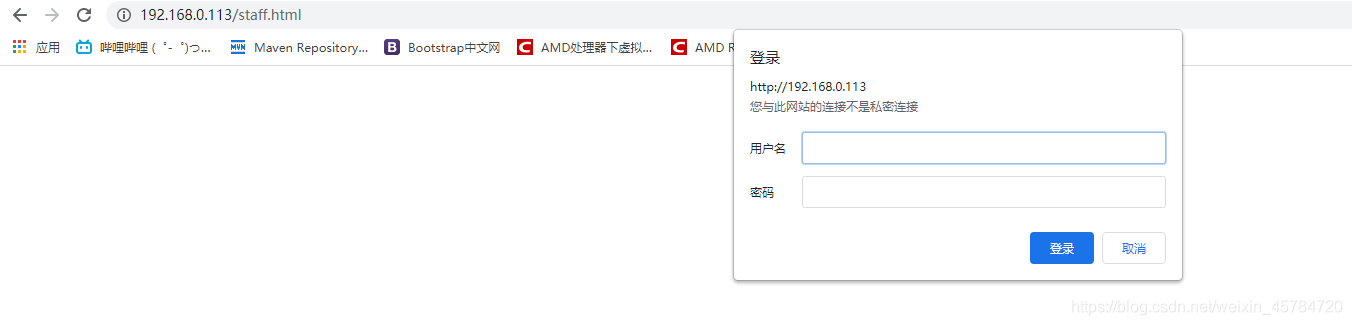
未携带账号时应返回 401 Unauthorized:
bash
curl -I -H 'Host: www.sdskills.com' http://127.0.0.1/staff.html使用正确账号时应返回 200 OK:
bash
curl -i -u zsuser -H 'Host: www.sdskills.com' http://127.0.0.1/staff.html
curl -i -u lsus -H 'Host: www.sdskills.com' http://127.0.0.1/staff.html
浏览器访问时应弹出账号密码窗口。
5.3 查看日志
bash
tail -n 50 /var/log/apache2/sdskills-access.log
tail -n 50 /var/log/apache2/sdskills-error.log
journalctl -u apache2 -n 50 --no-pager
首页返回 200、未认证访问返回 401、正确账号返回 200、工作进程显示 webuser,说明配置生效。
6. 常见问题与回退
6.1 返回 403
bash
namei -l /data/share/htdocs/skills/index.html
sudo -u webuser test -r /data/share/htdocs/skills/index.html && echo readable
tail -n 50 /var/log/apache2/sdskills-error.log
检查父目录执行权限、文件读取权限和 <Directory> 的 Require all granted。
6.2 认证一直失败
bash
apache2ctl configtest
ls -l /etc/apache2/staff.htpasswd
htpasswd -v /etc/apache2/staff.htpasswd zsuser
确认 AuthUserFile 路径一致、Apache 工作进程组可读密码文件,并检查用户名是否写入 Require user。
6.3 域名进入错误站点
bash
apache2ctl -S
getent hosts www.sdskills.com
curl -I -H 'Host: www.sdskills.com' http://127.0.0.1/
检查 ServerName、DNS 或 hosts 映射以及默认虚拟主机顺序。
6.4 回退配置
bash
a2dissite sdskills.conf
a2ensite 000-default.conf
cp -a /etc/apache2/envvars.bak /etc/apache2/envvars
apache2ctl configtest
systemctl restart apache2
删除站点目录和密码文件前先保留配置与日志,便于审计和复盘。