方法一:
导航栏Windows---package manager ---unity registr安装cinemachine
点击导航栏gameobject----ciinemachine---2d camera。
点击virtual camera,将所要跟随的人物物体拖到follow那里。
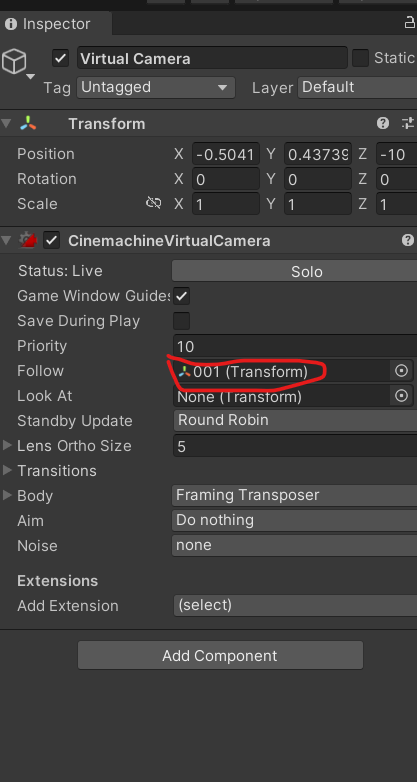
挂载001物体移动脚本move:
using UnityEngine;

public class move : MonoBehaviour
{
    public float speed = 5f;
    private Animator animator;

    void Start()
    {
        animator = GetComponent<Animator>();
    }

    void Update()
    {
        // 获取水平(A/D)、垂直(W/S)输入
        float x = Input.GetAxisRaw("Horizontal");
        float y = Input.GetAxisRaw("Vertical");

        // 判断是否正在移动(任意方向有输入就播放走路动画)
        bool isMoving = (x != 0 || y != 0);
        animator.SetBool("isWalk", isMoving);

        // 构建移动向量
        Vector3 moveDir = new Vector3(x, y, 0);
        // 归一化:防止斜向移动速度变快
        if (moveDir.magnitude > 1)
        {
            moveDir.Normalize();
        }

        transform.Translate(moveDir * speed * Time.deltaTime);

        // 左右翻转(只有左右输入的时候翻转角色朝向)
        if (x > 0)
        {
            transform.localScale = new Vector3(1, 1, 1);
        }
        else if (x < 0)
        {
            transform.localScale = new Vector3(-1, 1, 1);
        }
    }
}
move2脚本可替换成move脚本。
move2脚本:
using UnityEngine;

public class move2 : MonoBehaviour
{
    public float speed = 5f;

    private Animator animator;


    void Start()
    {
        animator = GetComponent<Animator>();
    }


    void Update()
    {
        Vector3 moveDir = Vector3.zero;


        // 手机触摸
        if (Input.touchCount > 0)
        {
            Touch touch = Input.GetTouch(0);

            Vector2 touchPos = touch.position;


            // 屏幕中心点
            Vector2 center =
                new Vector2(
                    Screen.width / 2,
                    Screen.height / 2
                );


            // 手指相对屏幕中心方向
            Vector2 direction =
                touchPos - center;


            // 转换成方向向量
            moveDir =
                new Vector3(
                    direction.x,
                    direction.y,
                    0
                ).normalized;
        }


        // 是否移动
        bool isMoving =
            moveDir.magnitude > 0;


        animator.SetBool(
            "isWalk",
            isMoving
        );


        // 移动
        transform.Translate(
            moveDir *
            speed *
            Time.deltaTime
        );


        // 左右翻转
        if (moveDir.x > 0)
        {
            transform.localScale =
                new Vector3(1, 1, 1);
        }
        else if (moveDir.x < 0)
        {
            transform.localScale =
                new Vector3(-1, 1, 1);
        }

    }
}
测试:鼠标操作左右键摄像头跟着移动。
方式二:
直接使用脚本让摄像头跟随。
脚本camerafollow
using UnityEngine;

public class CameraFollow : MonoBehaviour
{
    public Transform player;
    public float smoothSpeed = 5f;

    void LateUpdate()
    {
        // 同时跟随 X、Y;Z保持相机自身不变(适合2D游戏)
        Vector3 target = new Vector3(
            player.position.x,
            player.position.y,    // ← 这里改成玩家Y,实现上下跟随
            transform.position.z
        );

        transform.position = Vector3.Lerp(
            transform.position,
            target,
            smoothSpeed * Time.deltaTime
        );
    }
}
测试:鼠标操作左右键摄像头跟着移动。
配置apk信息:
软件图标:
导航栏edit---project settings ----Player选中default icon
软件名称:
导航栏edit---project settings ----Player选中product name
构建运行apk:
点击导航栏file----build and run