0. 什么是micro-compact
本地消息不变,通过 cache_edits 精确删除服务端缓存中的旧工具结果。
代码入口与调用位置:
主循环在 query.ts:L369-L426 :
ini
messagesForQuery = await applyToolResultBudget(...)
snipCompactIfNeeded(...)
const microcompactResult = await deps.microcompact(
  messagesForQuery,
  toolUseContext,
  querySource,
)
messagesForQuery = microcompactResult.messages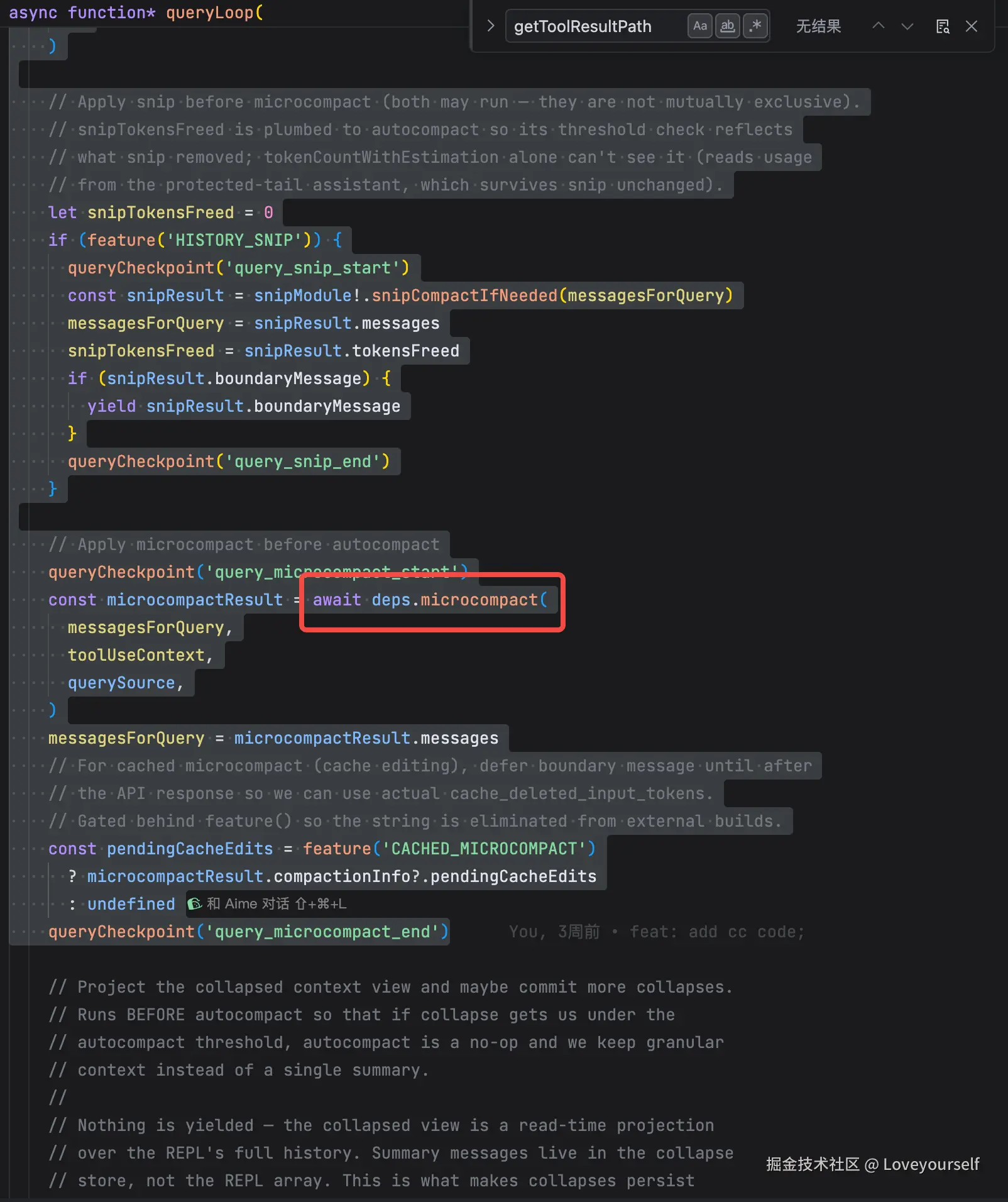
rust
大结果落盘预览 -> History Snip -> microCompact -> Collapse -> AutoCompact -> API所以 microCompact 是一次 API 请求前的轻量清理,并先于重型摘要压缩。
1. 可被 microCompact 清理的结果
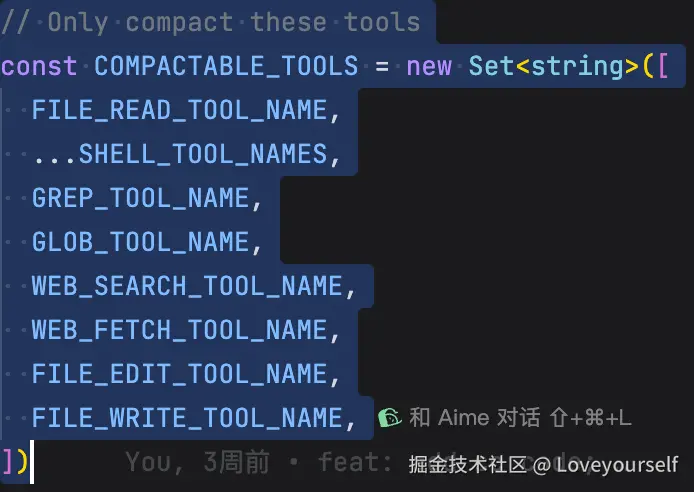
在 microCompact.ts:L40-L50 :
候选工具包括 Read 、 Bash 、 Grep 、 Glob 、网络搜索/抓取、 Edit 、 Write 。
然后 microCompact.ts:L226-L240 扫 assistant 消息,按出现顺序收集这些工具的 tool_use.id:
ts
/**
 * Walk messages and collect tool_use IDs whose tool name is in
 * COMPACTABLE_TOOLS, in encounter order. Shared by both microcompact paths.
 */
function collectCompactableToolIds(messages: Message[]): string[] {
  const ids: string[] = []
  for (const message of messages) {
    if (
      message.type === 'assistant' &&
      Array.isArray(message.message.content)
    ) {
      for (const block of message.message.content) {
        if (block.type === 'tool_use' && COMPACTABLE_TOOLS.has(block.name)) {
          ids.push(block.id)
        }
      }
    }
  }
  return ids
}
ini
if (block.type === 'tool_use' && COMPACTABLE_TOOLS.has(block.name)) {
  ids.push(block.id)
}
这就是"年龄"的真实含义: 候选工具调用在历史中的顺序 ,不是按内容语义、时间戳或结果大小判断。
2. 主路径:Cached Microcompact
入口为 microCompact.ts:L253-L292 。
它必须同时满足:
scss
mod.isCachedMicrocompactEnabled()
mod.isModelSupportedForCacheEditing(model)
isMainThreadSource(querySource)
即:
- 功能开关打开;
- 模型支持 cache editing;
- 仅主 REPL 线程,不对 session memory 等 fork agent 生效。 进入后, microCompact.ts:L313-L332 会扫描 user message 中的 tool_result :
rust
const compactableToolIds = new Set(collectCompactableToolIds(messages))
// Second pass: register tool results grouped by user message
for (const message of messages) {
if (message.type === 'user' && Array.isArray(message.message.content)) {
const groupIds: string[] = []
for (const block of message.message.content) {
if (
block.type === 'tool_result' &&
compactableToolIds.has(block.tool_use_id) &&
!state.registeredTools.has(block.tool_use_id)
) {
mod.registerToolResult(state, block.tool_use_id)
groupIds.push(block.tool_use_id)
}
}
mod.registerToolMessage(state, groupIds)
}
}
const toolsToDelete = mod.getToolResultsToDelete(state)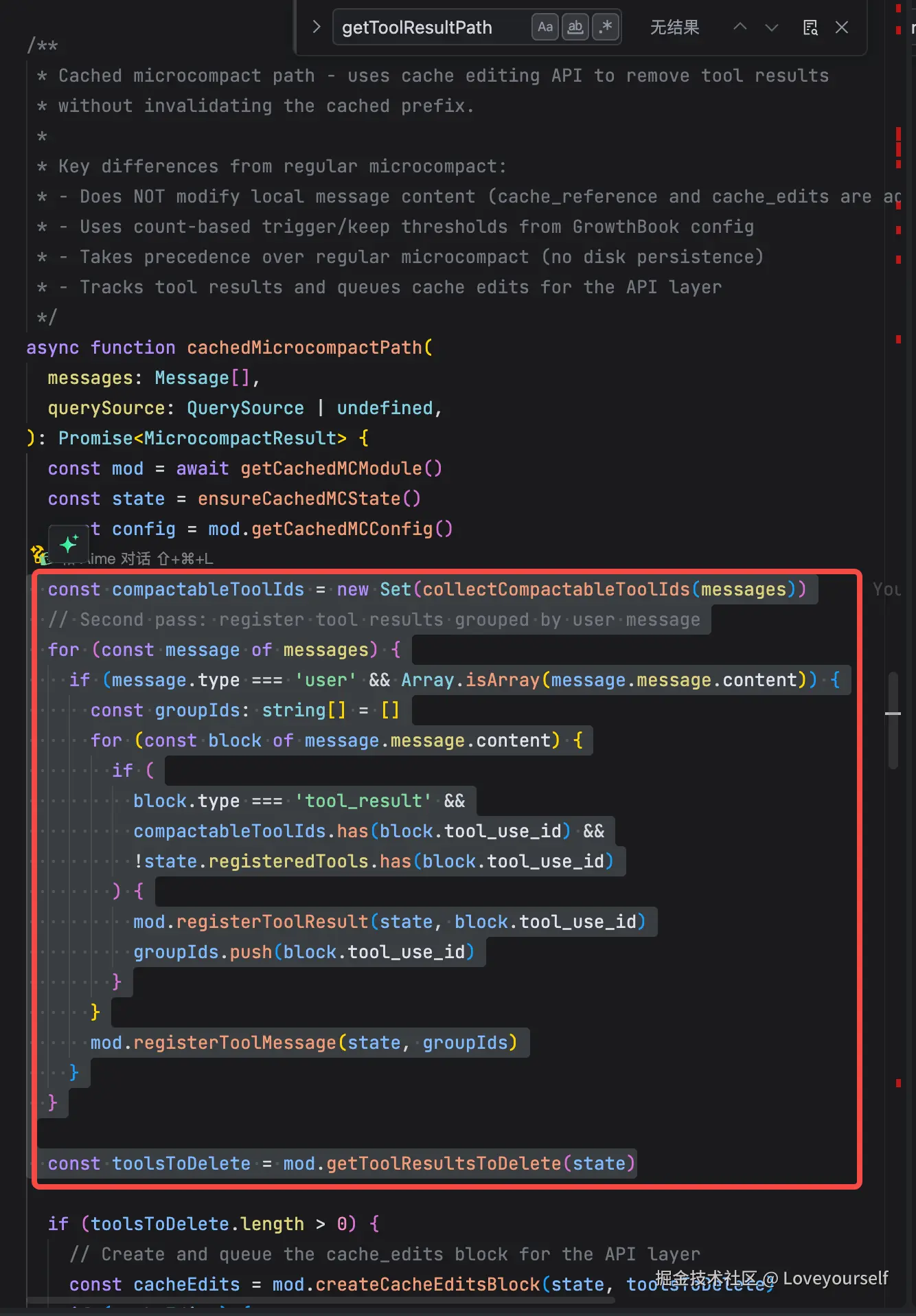 含义是:只有能与前面白名单 tool_use 对上的 tool_result ,才进入可删除队列。
随后:
ini
const toolsToDelete = mod.getToolResultsToDelete(state)state 里维护工具出现顺序、已登记结果、已发送到 API 的状态与已删除引用。当前仓库缺失 cachedMicrocompact.ts ,因此无法逐行展示该函数的具体阈值实现;从其配置字段和提示语可确定规则是:
rust
达到 triggerThreshold
  -> 从较旧的、已发送至 API 的候选结果中选取
  -> 删除至至少保留 keepRecent 个最近结果
注意"已发送至 API"是必要条件。API 成功返回后才会标记结果可删除,见 claude.ts:L2833-L2835 :
scss
markToolsSentToAPIState()这避免把当前轮尚未进入服务端缓存的工具结果拿去删。
3. 它如何压缩,而不是如何修改历史
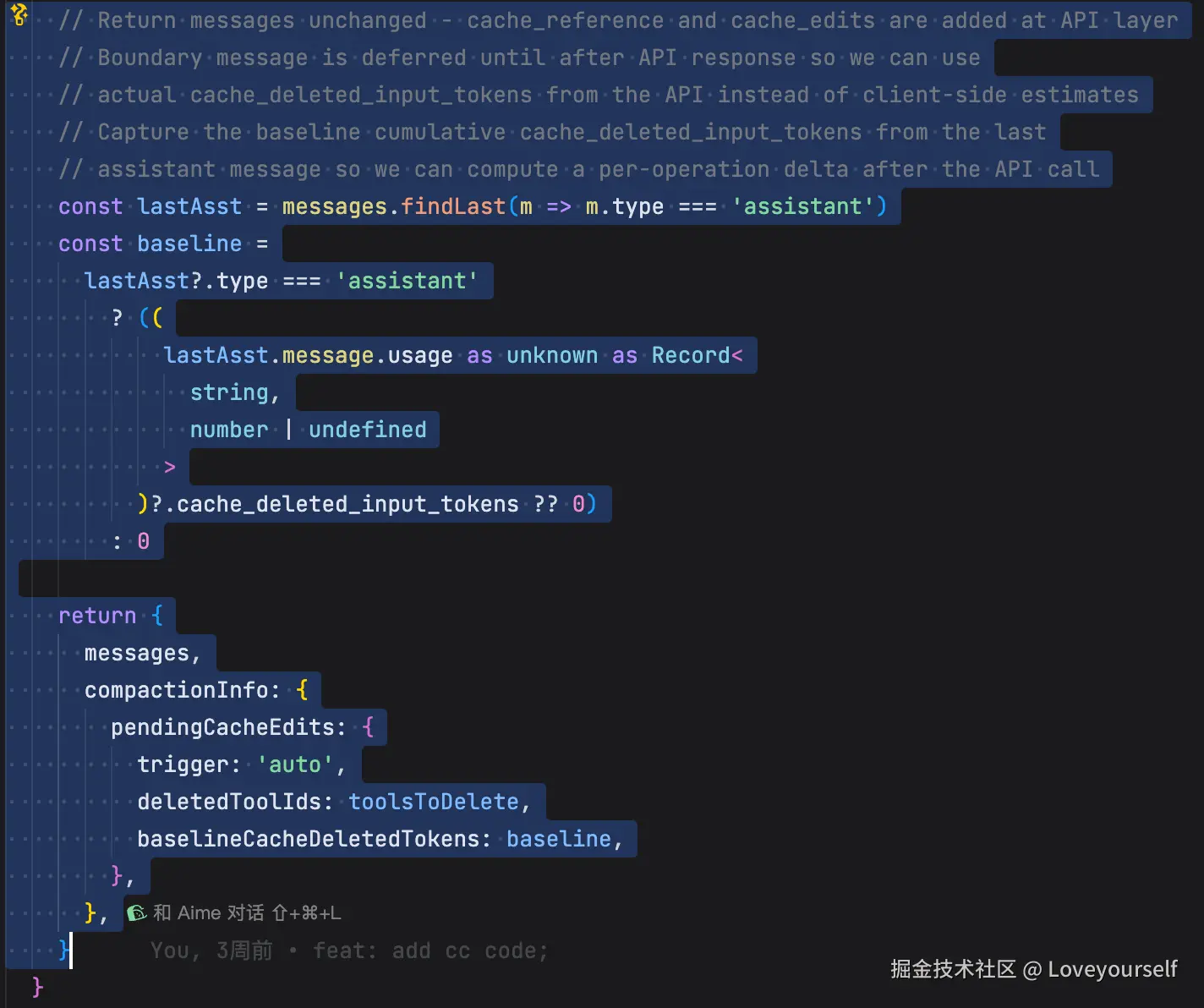
主路径 不修改 messages ,见 microCompact.ts:L369-L394 :
css
return {
  messages,
  compactionInfo: {
    pendingCacheEdits: {
      deletedToolIds: toolsToDelete,
    },
  },
}
API 层随后把删除指令插到最后一个 user message:
bash
{
  type: 'cache_edits',
  edits: [
    { type: 'delete', cache_reference: 'toolu_xxx' }
  ]
}
对应 claude.ts:L3141-L3160 。
同时,历史 tool_result 被加上可定位引用:
makefile
cache_reference: block.tool_use_id对应 claude.ts:L3164-L3207 。
因此主路径的模型视角是:
本地 transcript:完整保留 tool_result
API 请求:tool_result 有 cache_reference
服务端 cache:删除指定 reference 对应的缓存内容
/**
- Cached microcompact path - uses cache editing API to remove tool results
- without invalidating the cached prefix.
- Key differences from regular microcompact:
- Does NOT modify local message content (cache_reference and cache_edits are added at API layer)
- Uses count-based trigger/keep thresholds from GrowthBook config
- Takes precedence over regular microcompact (no disk persistence)
- Tracks tool results and queues cache edits for the API layer */
uses cache editing API to remove tool results without invalidating the cached prefix 见 microCompact.ts:L295-L303 。
它当然会使服务端缓存 token 总量下降,且代码专门通知 cache-break detector 不要把这当作异常 cache miss,见 promptCacheBreakDetection.ts:L668-L682 。
csharp
/**
 * Call when cached microcompact sends cache_edits deletions.
 * The next API response will have lower cache read tokens --- that's
 * expected, not a cache break.
 */
export function notifyCacheDeletion(
  querySource: QuerySource,
  agentId?: AgentId,
): void {
  const key = getTrackingKey(querySource, agentId)
  const state = key ? previousStateBySource.get(key) : undefined
  if (state) {
    state.cacheDeletionsPending = true
  }
}
4. 另一条路径:空闲后直接清空内容
microCompact.ts:L446-L529 是 time-based microcompact。
javascript
function maybeTimeBasedMicrocompact(
  messages: Message[],
  querySource: QuerySource | undefined,
): MicrocompactResult | null {
  const trigger = evaluateTimeBasedTrigger(messages, querySource)
  if (!trigger) {
    return null
  }
  const { gapMinutes, config } = trigger

  const compactableIds = collectCompactableToolIds(messages)

  // Floor at 1: slice(-0) returns the full array (paradoxically keeps
  // everything), and clearing ALL results leaves the model with zero working
  // context. Neither degenerate is sensible --- always keep at least the last.
  const keepRecent = Math.max(1, config.keepRecent)
  const keepSet = new Set(compactableIds.slice(-keepRecent))
  const clearSet = new Set(compactableIds.filter(id => !keepSet.has(id)))

  if (clearSet.size === 0) {
    return null
  }

  let tokensSaved = 0
  const result: Message[] = messages.map(message => {
    if (message.type !== 'user' || !Array.isArray(message.message.content)) {
      return message
    }
    let touched = false
    const newContent = message.message.content.map(block => {
      if (
        block.type === 'tool_result' &&
        clearSet.has(block.tool_use_id) &&
        block.content !== TIME_BASED_MC_CLEARED_MESSAGE
      ) {
        tokensSaved += calculateToolResultTokens(block)
        touched = true
        return { ...block, content: TIME_BASED_MC_CLEARED_MESSAGE }
      }
      return block
    })
    if (!touched) return message
    return {
      ...message,
      message: { ...message.message, content: newContent },
    }
  })

  if (tokensSaved === 0) {
    return null
  }

  logEvent('tengu_time_based_microcompact', {
    gapMinutes: Math.round(gapMinutes),
    gapThresholdMinutes: config.gapThresholdMinutes,
    toolsCleared: clearSet.size,
    toolsKept: keepSet.size,
    keepRecent: config.keepRecent,
    tokensSaved,
  })

  logForDebugging(
    `[TIME-BASED MC] gap ${Math.round(gapMinutes)}min > ${config.gapThresholdMinutes}min, cleared ${clearSet.size} tool results (~${tokensSaved} tokens), kept last ${keepSet.size}`,
  )

  suppressCompactWarning()
  // Cached-MC state (module-level) holds tool IDs registered on prior turns.
  // We just content-cleared some of those tools AND invalidated the server
  // cache by changing prompt content. If cached-MC runs next turn with the
  // stale state, it would try to cache_edit tools whose server-side entries
  // no longer exist. Reset it.
  resetMicrocompactState()
  // We just changed the prompt content --- the next response's cache read will
  // be low, but that's us, not a break. Tell the detector to expect a drop.
  // notifyCacheDeletion (not notifyCompaction) because it's already imported
  // here and achieves the same false-positive suppression --- adding the second
  // symbol to the import was flagged by the circular-deps check.
  // Pass the actual querySource: getTrackingKey returns the full source string
  // (e.g. 'repl_main_thread:outputStyle:custom'), not just the prefix.
  if (feature('PROMPT_CACHE_BREAK_DETECTION') && querySource) {
    notifyCacheDeletion(querySource)
  }

  return { messages: result }
}
触发条件:
arduino
gapMinutes >= config.gapThresholdMinutes配置默认值在 timeBasedMCConfig.ts:L30-L42 :
vbnet
enabled: false,
gapThresholdMinutes: 60,
keepRecent: 5,
启用且空闲超过阈值后:
javascript
const keepSet = new Set(compactableIds.slice(-keepRecent))
const clearSet = new Set(compactableIds.filter(id => !keepSet.has(id)))
即保留最近 N 个候选,旧的全部替换为:
arduino
'[Old tool result content cleared]'因为超过一小时,服务端 cache 大概率已过期。此时直接改本地内容不会额外损失一个本来可复用的热缓存。这条路径才最接近你图里"缓存已失效,直接清理历史"的解释。
5. 最后举一个demo说明
我用一段具体的对话历史来走一遍 cached microcompact 的判定与改写。假设 keepRecent = 2 ,会话里已经发生了 4 次白名单工具调用。
起点:本地 transcript(state.messages)
ini
[0] user      : "帮我看下 config.ts 有没有硬编码端口"
[1] assistant : tool_use  Read  id=toolu_A   (读 config.ts)
[2] user      : tool_result tool_use_id=toolu_A  "export const PORT = 8080 ...(2KB)"
[3] assistant : tool_use  Grep  id=toolu_B   (搜 8080)
[4] user      : tool_result tool_use_id=toolu_B  "config.ts:12: PORT = 8080 ...(1.5KB)"
[5] assistant : tool_use  Bash  id=toolu_C   (grep -r 8080 src)
[6] user      : tool_result tool_use_id=toolu_C  "...一大堆匹配(6KB)"
[7] assistant : tool_use  Read  id=toolu_D   (读 server.ts)
[8] user      : tool_result tool_use_id=toolu_D  "app.listen(PORT) ...(3KB)"
[9] assistant : "端口在 config.ts:12 硬编码为 8080,被 server.ts 引用"
[10] user     : "把它改成从环境变量读"
第 1 步:收集候选并排序
collectCompactableToolIds 扫 assistant 消息,按出现顺序拿到白名单工具的 id:
ini
compactableToolIds = [toolu_A, toolu_B, toolu_C, toolu_D]
                      ↑最老                        ↑最新
这 4 个都在白名单(Read/Grep/Bash/Read)。这就是"年龄": 列表里越靠前越老 。
第 2 步:登记结果并判定要删谁
microCompact.ts:L313-L332 再扫 user 消息,把能对上白名单 tool_use 的 tool_result 登记进 state 。然后:
ini
getToolResultsToDelete(state):
  keepRecent = 2   -> 保留 toolu_C, toolu_D
  candidates 中较老且"已发送过 API"的 -> toolu_A, toolu_B
  toolsToDelete = [toolu_A, toolu_B]
注意 toolu_D 是本轮刚产生的结果,只有在成功返回一次后经 markToolsSentToAPIState() 标记才可能进入删除资格,避免删掉尚未进缓存的结果。
第 3 步:本地 transcript 不动,只回传删除意图
microCompact.ts:L369-L394 返回原样 messages :
css
return {
  messages,                       // [0]~[10] 一字不改
  compactionInfo: {
    pendingCacheEdits: {
      trigger: 'auto',
      deletedToolIds: ['toolu_A', 'toolu_B'],
      baselineCacheDeletedTokens: 0,
    },
  },
}
所以 UI 和磁盘里 toolu_A 、 toolu_B 的 2KB / 1.5KB 内容 仍然完整 。
第 4 步:API 层组装线上请求(关键差异)
这一步才真正"压缩"。 addCacheBreakpoints 做两件事:
(a) 给缓存前缀内的旧 tool_result 打上 cache_reference ( L3164-L3207 ):
json
// wire 上的 [2]
{ "role": "user", "content": [
  { "type": "tool_result", "tool_use_id": "toolu_A",
    "content": "export const PORT = 8080 ...",
    "cache_reference": "toolu_A" }   // ← 加上引用锚点
]}
(b) 把删除指令插进最后一个 user message ( L3141-L3160 ):
json
// wire 上的 [10] "把它改成从环境变量读"
{ "role": "user", "content": [
  { "type": "text", "text": "把它改成从环境变量读" },
  { "type": "cache_edits", "edits": [
      { "type": "delete", "cache_reference": "toolu_A" },
      { "type": "delete", "cache_reference": "toolu_B" }
  ]}
]}
对比:模型这一轮实际"看到"的内容
| 消息 | 本地 transcript | 发给 API 的 wire | 模型有效上下文 |
|---|---|---|---|
| toolu_A 结果 (2KB) | 完整保留 | 带 cache_reference,被 delete | 命中删除,不计费不可见 |
| toolu_B 结果 (1.5KB) | 完整保留 | 带 cache_reference,被 delete | 命中删除,不计费不可见 |
| toolu_C 结果 (6KB) | 完整保留 | 正常缓存 | 可见(最近 2 个之一) |
| toolu_D 结果 (3KB) | 完整保留 | 正常缓存 | 可见(最近 2 个之一) |
净效果:这轮向服务端省掉 toolu_A + toolu_B ≈ 3.5KB 对应的缓存 token,而 toolu_C 、 toolu_D 之前的缓存前缀 不被打断 ,这正是它区别于你截图里"移除点之后缓存失效"的地方。
对照另一条路径:time-based
如果走的是空闲超时路径( microCompact.ts:L469-L492 ),同样是删 toolu_A 、 toolu_B ,但做法是 改本地内容 、不发 cache_edits :
ini
[2] user : tool_result tool_use_id=toolu_A  "[Old tool result content cleared]"
[4] user : tool_result tool_use_id=toolu_B  "[Old tool result content cleared]"
一句话区分:cached 路径 留本地、删缓存、保前缀 ;time-based 路径 缓存反正凉了,直接改本地历史 。