文章目录
- [Spring AI 2.0 实战: MCP Client / Server](#Spring AI 2.0 实战: MCP Client / Server)
-
- [一、Cursor 快速上手](#一、Cursor 快速上手)
- [二、Spring MCP Client](#二、Spring MCP Client)
-
- [1. 依赖(三种协议共用)](#1. 依赖(三种协议共用))
- [2. 公共 yml](#2. 公共 yml)
- [3. ChatClient(三种协议共用)](#3. ChatClient(三种协议共用))
- [4)stdio ------ 差异点](#4)stdio —— 差异点)
- [5)SSE ------ 差异点](#5)SSE —— 差异点)
- [6)Streamable HTTP ------ 与 SSE 的差异](#6)Streamable HTTP —— 与 SSE 的差异)
- [三、自定义 MCP Server](#三、自定义 MCP Server)
-
- [1)Spring AI 2.0(注解)](#1)Spring AI 2.0(注解))
- [四、Spring AI 1.1.x vs 2.0(只记变化)](#四、Spring AI 1.1.x vs 2.0(只记变化))
- [五、MCP 使用风险](#五、MCP 使用风险)
- 小结
Spring AI 2.0 实战: MCP Client / Server
MCP(Model Context Protocol)让大模型用统一协议 调用外部工具。类似于客户端服务器结构
可参考spring-ai-MCP官方文档
本文版本:
| 组件 | 版本 |
|---|---|
| Spring Boot | 4.1.x |
| Spring AI | 2.0.0 |
| Java | 21 |
| Client Starter | spring-ai-starter-mcp-client |
| Server Starter | spring-ai-starter-mcp-server-webmvc |
一、Cursor 快速上手
设置 → Tools & MCP → New MCP Server ,编辑 mcp.json。
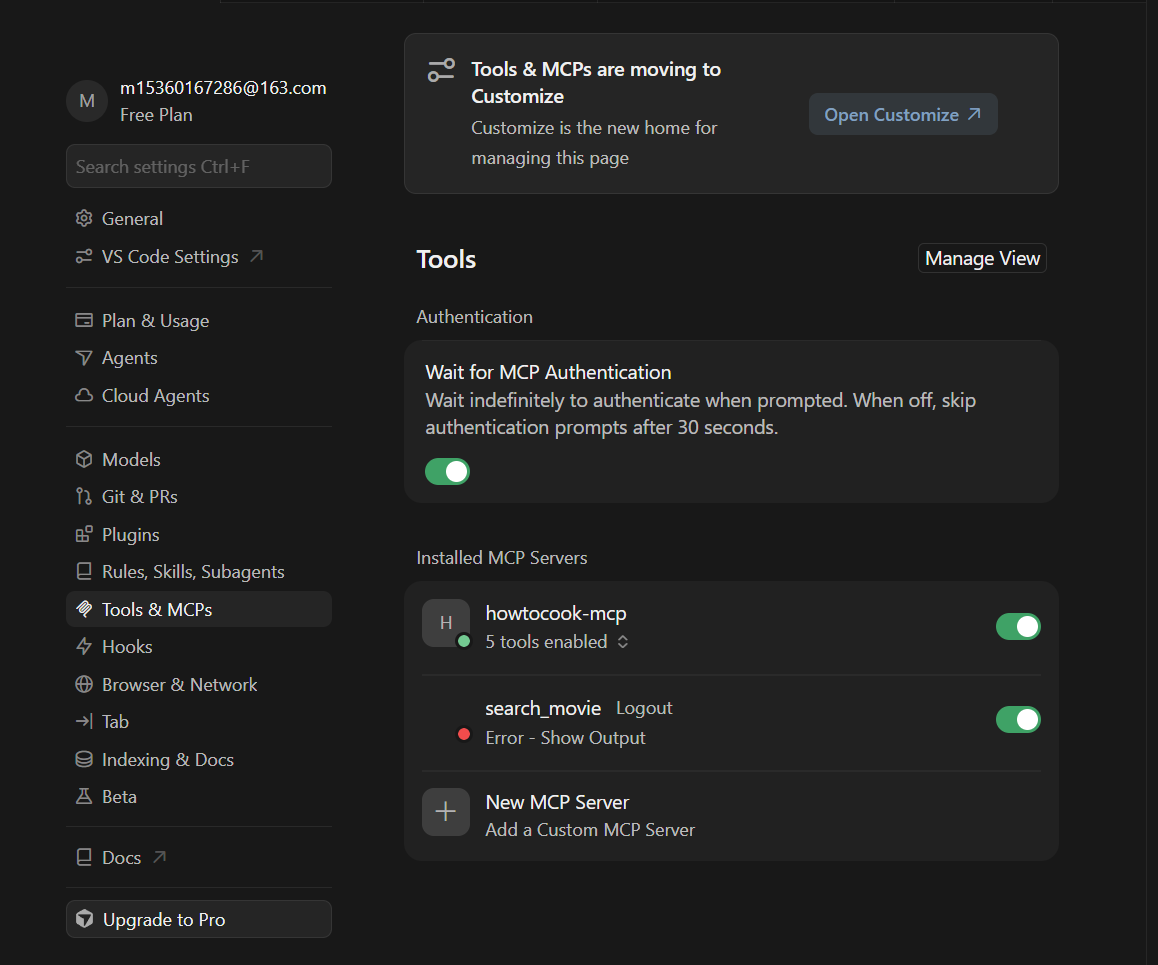
| 类型 | 含义 | 例子 |
|---|---|---|
| stdio | 本机起进程(stdin/stdout) | npx -y howtocook-mcp |
| remote | 连厂家 Server | SSE(.../sse)或 Streamable HTTP(.../mcp) |
远程协议由服务端指定 。需要 API Key 时按该 MCP 文档填 headers 或 env。
为什么不 clone 也能用 stdio?
npx / uvx 会在本地执行远程包中的进程,源码在 npm/PyPI,不必先 git clone。
获取MCP Json 服务
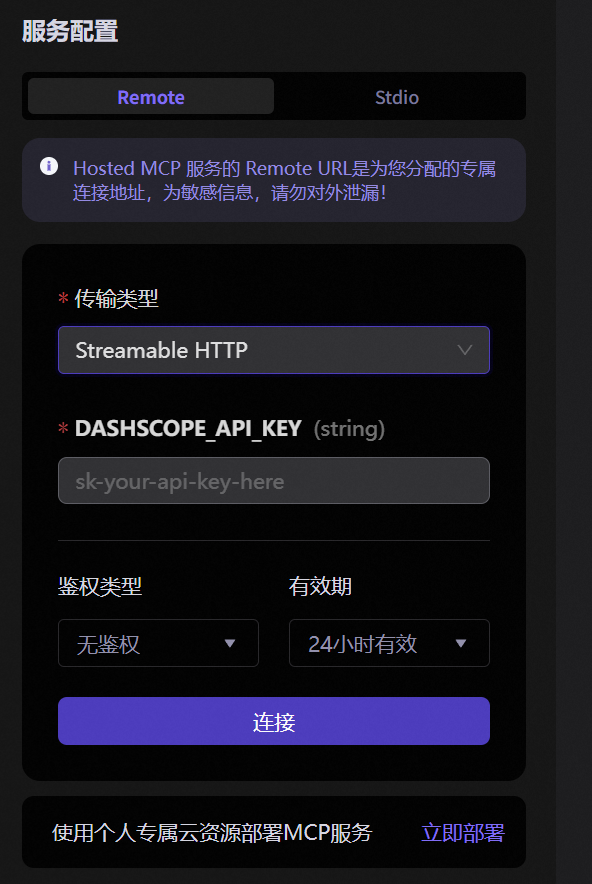
多个工具合并进同一个 mcpServers,不要重复套两层
json
{
  "mcpServers": {
    "howtocook-mcp": {
      "command": "npx",
      "args": ["-y", "howtocook-mcp"]
    },
    "search_movie": {
      "type": "sse",
      "url": "https://mcp.api-inference.modelscope.net/你的id/sse",
      "headers": {
        "Authorization": "Bearer ms-xxxx"
      }
    }
  }
}
打开开关后,用自然语言提问即可
二、Spring MCP Client
此标题下展示 Stdio SSE Streamable HTTP 三种协议下的spring客户端代码
对于属性配置等需要具体问题具体分析,可借助AI进行配置
1. 依赖(三种协议共用)
xml
<dependencyManagement>
  <dependencies>
    <dependency>
      <groupId>org.springframework.ai</groupId>
      <artifactId>spring-ai-bom</artifactId>
      <version>2.0.0</version>
      <type>pom</type>
      <scope>import</scope>
    </dependency>
  </dependencies>
</dependencyManagement>

<dependency>
  <groupId>org.springframework.ai</groupId>
  <artifactId>spring-ai-starter-mcp-client</artifactId>
</dependency>
<!-- 学习用:DashScope 里程碑版即可,用来对话并触发 MCP 工具 -->
<dependency>
  <groupId>com.alibaba.cloud.ai</groupId>
  <artifactId>spring-ai-alibaba-starter-dashscope</artifactId>
  <version>2.0.0-M1.1</version>
</dependency>
2. 公共 yml
yaml
spring:
  ai:
    mcp:
      client:
        enabled: true          # 是否启用 MCP Client
        type: SYNC             # SYNC 同步客户端 / ASYNC 异步(全局统一,不要混用)
        request-timeout: 60s   # 单次 MCP 请求超时;stdio 冷启动建议 120s
可选日志:
yaml
logging:
  level:
    org.springframework.ai.mcp: DEBUG   # 打印 MCP 连接 / 工具调用相关日志,便于排错
3. ChatClient(三种协议共用)
自动配置会把已连接 MCP 的工具做成 SyncMcpToolCallbackProvider:
java
@Configuration
public class McpClientConfig {

    @Bean
    @Primary
    public ChatClient chatClient(ChatModel chatModel,
                                 SyncMcpToolCallbackProvider toolCallbackProvider) {
        return ChatClient.builder(chatModel)
                .defaultToolCallbacks(toolCallbackProvider)
                .build();
    }
}
java
@GetMapping("/client")
public String chat(@RequestParam String msg) {
    return chatClient.prompt()
    				 .user(msg)
    				 .call()
    				 .content();
}
4)stdio ------ 差异点
- 连的是本机进程,不是 URL
- 可用 yml 直写 或 JSON + classpath(JSON 主要管 stdio)
- Windows 上
npx常失败:用cmd.exe /c,或node+ 绝对路径
只配置 yml 实现连接
yaml
spring:
  ai:
    mcp:
      client:
        stdio:
          connections:
            howtocook-mcp:           # 连接名(自定义),日志里用来区分多个 Server
              command: cmd.exe       # 要启动的可执行文件(Windows 用 cmd 包装 npx)
              args:                  # 传给 command 的参数列表
                - /c                 # cmd:执行完后面命令
                - npx                # 用 npx 拉起 npm 包
                - -y                 # npx:缺包时自动确认安装
                - howtocook-mcp      # 要运行的 MCP 包名
JSON 文件 + yml 配置连接(src/main/resources/mcp-servers.json):
只适合stdio
yaml
spring:
  ai:
    mcp:
      client:
        stdio:
          # 从 classpath 读 Claude Desktop / Cursor 风格的 stdio JSON(仅适合 stdio)
          servers-configuration: classpath:mcp-servers.json
json
{
  "mcpServers": {
    "howtocook-mcp": {
      "command": "cmd.exe",
      "args": ["/c", "npx", "-y", "howtocook-mcp"]
    }
  }
}
5)SSE ------ 差异点
- 完整 URL 拆成
url+sse-endpoint(框架要用 base 拼接握手后的 message 路径) - Cursor 能直接配置
headers参数,但是Spring yml 没有 headers 字段 只能用McpSyncHttpClientRequestCustomizer来设置headers参数 如API_KEY 、env - 典型地址带
/sse
yml:
yaml
spring:
  ai:
    mcp:
      client:
        sse:
          connections:
            search_movie:            # 连接名(自定义)
              # 完整 SSE 地址 = url + sse-endpoint
              url: https://mcp.api-inference.modelscope.net   # 主机(base URL)
              sse-endpoint: /sse                       # SSE 路径;平台提供什么就写什么

# 自定义配置:给 McpAuthConfig 读,用来拼 Authorization(yml 本身配不了 SSE headers)
mcp:
  modelscope:
    token: ${MODELSCOPE_MCP_TOKEN}   # 优先读环境变量;也可用字面量 ms-xxxx(勿提交仓库)
配置注入spring
java
@Configuration  // 声明为配置类,启动时加载
public class McpAuthConfig {

    /**
     * 注册「发 HTTP 请求前」的定制器。
     * Spring AI 的 SSE / Streamable 传输会自动找到这个 Bean 并调用。
     * 作用:补上 yml 配不了的 Authorization 头(等价于 Cursor mcp.json 里的 headers)。
     */
    @Bean
    public McpSyncHttpClientRequestCustomizer mcpAuthHeaderCustomizer(
            // 从配置读取 token;冒号后为空表示没配时用 ""
            @Value("${mcp.modelscope.token:}") String token) {
        // 每次向 MCP Server 发请求时回调;参数依次为:
        // builder=请求构建器, method=GET/POST, uri=地址, body=请求体, context=传输上下文
        return (builder, method, uri, body, context) -> {
            if (token != null && !token.isBlank()) {
                // 写成:Authorization: Bearer ms-xxxx
                builder.header("Authorization", "Bearer " + token.trim());
            }
        };
    }
}
等价于 写入 Cursor 的 头配置:
text
"headers": { "Authorization": "Bearer ms-xxxx" }6)Streamable HTTP ------ 与 SSE 的差异
在 MCP 远程模式里,Streamable HTTP 已取代原先的 HTTP + SSE,成为官方推荐与未来标准,可看作「旧标准 vs 新标准」。核心对比如下:
| 对比维度 | 旧方式:HTTP + SSE | 新标准:Streamable HTTP |
|---|---|---|
| 一句话总结 | 「两人组」:两条独立通道协作 | 「全能选手」:一个入口灵活处理多种场景 |
| 核心差异 | 两个端点:/sse(收消息)+ /message(发消息) |
单一统一端点 (如 /mcp),所有操作都走它 |
| 连接方式 | 需长期维持有状态 SSE 长连接 | 按需连接,可无状态;多请求可复用连接 |
| 消息流向 | 服务端推送(SSE)与客户端请求(POST)分离 | 真正双向:Client POST 请求;Server 可回普通 HTTP,也可升级为 SSE 流 |
| 可靠性 | 连接易断且难恢复,高并发成功率下降 | 支持重连与消息恢复,高并发更稳 |
| 性能 | 每客户端一条长连接,高并发占资源 | 更高效:TCP 更少,响应更快 |
| 地位 | 已弃用,仅为兼容保留 | 官方推荐,新项目应优先使用 |
选型仍以服务端实际提供的协议 为准:对方只给
/sse,Client 就配 SSE;对方是 STREAMABLE/mcp,再配 Streamable HTTP。不要把旧 SSE 地址硬改成 streamable。
Spring AI 配置差异(只记这些):
| SSE | Streamable HTTP | |
|---|---|---|
| 配置前缀 | client.sse |
client.streamable-http |
| 路径字段 | sse-endpoint |
endpoint(默认 /mcp) |
| Header | yml 不行,Customizer | 同样不行,可复用同一 Customizer |
yaml
spring:
  ai:
    mcp:
      client:
        streamable-http:
          connections:
            local-server:              # 连接名(自定义)
              url: http://localhost:8090   # Server 的 base URL(不要带 /mcp)
              endpoint: /mcp               # Streamable 统一入口;默认一般也是 /mcp
依赖、ChatClient、鉴权方式与 SSE 相同。
三、自定义 MCP Server
1)Spring AI 2.0(注解)
xml
<dependency>
  <groupId>org.springframework.ai</groupId>
  <artifactId>spring-ai-starter-mcp-server-webmvc</artifactId>
</dependency>
yaml
server:
  port: 8090   # HTTP 端口;Client 连 http://localhost:8090/mcp

spring:
  ai:
    mcp:
      server:
        enabled: true                 # 是否启用 MCP Server
        name: demo-mcp-server         # 服务名,握手时告诉 Client「我是谁」
        version: 1.0.0                # 服务版本号(协议里的 serverInfo)
        type: SYNC                    # SYNC 同步 / ASYNC 异步(与业务写法一致,不要混用)
        protocol: STREAMABLE          # 传输协议:STREAMABLE(推荐)| SSE(旧)| STATELESS 等
        annotation-scanner:
          enabled: true               # 扫描 @McpTool / @McpResource / @McpPrompt 等注解并自动注册
        capabilities:                 # 对外声明「我支持哪些能力」(Client 可见)
          tool: true                  # 支持工具调用(@McpTool)
          resource: true              # 支持资源(@McpResource)
          prompt: true                # 支持提示词模板(@McpPrompt)
        streamable-http:
          mcp-endpoint: /mcp          # Streamable HTTP 统一入口路径(配合 protocol: STREAMABLE)
java
@Component
public class CalculatorTools {

    @McpTool(name = "add", description = "两数相加")
    public int add(
            @McpToolParam(description = "第一个加数", required = true) int a,
            @McpToolParam(description = "第二个加数", required = true) int b) {
        return a + b;
    }
}
jar包作为工具
bash
mvn -DskipTests package
# 得到 target/你的模块-1.0-SNAPSHOT.jar
工具jar包可以在本地或云服务器中服务
- 在本地使用jar包必须是
stdio协议(服务端与客户端都是)
| 场景 | Server 怎么跑 | Client / Cursor 怎么连 |
|---|---|---|
| 本地 | java -jar target/xxx.jar(监听 8090) |
url: http://localhost:8090,endpoint: /mcp |
| 部署 | 服务器上同命令,或 Docker/K8s;开放端口或反代 | 把 url 改成公网/内网地址,如 https://mcp.example.com |
Cursor(本地 stdio):
json
{
  "mcpServers": {
    "demo-spring-stdio": {
      "command": "java",
      "args": [
        "-jar",
        "D:/path/to/你的模块-1.0-SNAPSHOT.jar"
      ]
    }
  }
}
Spring Client(本地 stdio):
yaml
spring:
  ai:
    mcp:
      client:
        stdio:
          connections:
            demo-spring:
              command: java
              args:
                - -jar
                - D:/path/to/你的模块-1.0-SNAPSHOT.jar   # 本机绝对路径
对照小结:
| Streamable HTTP | stdio | |
|---|---|---|
| jar 角色 | 常驻 HTTP 服务 | 被 Client 拉起的子进程 |
| 本地 | localhost:8090/mcp |
java -jar ... |
| 部署/远程 | 改 URL 为域名/IP | 不适用,改用 HTTP |
| 与本文示例 | 直接匹配 | 需改 Server 为 stdio 模式 |
四、Spring AI 1.1.x vs 2.0(只记变化)
| 1.1.x | 2.0 | |
|---|---|---|
| Boot | 3.4 / 3.5 常见 | 官方 starter 偏 Boot 4 |
| Server 取向 | SSE 很常见 | 更推 STREAMABLE |
| Server 注解 | 已有 | 更完整,文档更偏注解 |
| Client yml headers | 无 | 仍无(别为这个升级) |
| stdio JSON | 支持 | 仍支持 |
五、MCP 使用风险
- 工具即权限:可能读文件、跑命令、访问内网,只装可信来源。
- Token 勿进仓库:用环境变量;本地 yml 不要提交密钥。
- 供应链 :
npx -y/uvx等于执行别人的代码。 - 提示词注入:恶意内容可能诱导模型滥用已挂载工具;生产要白名单与鉴权。
- 超时与协议:stdio 冷启动、远程抖动可导致启动失败;SSE / Streamable 选错会连不上。
小结
- Cursor 改
mcp.json最快体验。 - Spring:依赖和 ChatClient 写一次;stdio / SSE / Streamable 只换连接配置。
- Header:Cursor 可写 JSON;Spring 用 Customizer。
- 协议跟 Server;2.0 学注解 Server 更值,不为「Header 进 yml」强升。
- 安全第一:最小权限、可信来源、密钥外置。