先说结论:
snip_compact (History Snip)就是所谓的"噪声直接删除,低价值的内容(如大量搜索结果中只被使用了几行的内容)直接移除,不做摘要------对噪声做 摘要只是在浪费 token。":它不生成摘要,而是把历史中价值低的 中间区间 整段物理移除,再修复消息链。
它的调用点在主循环 query.ts:L396-L410 ,排在 microcompact 之前:
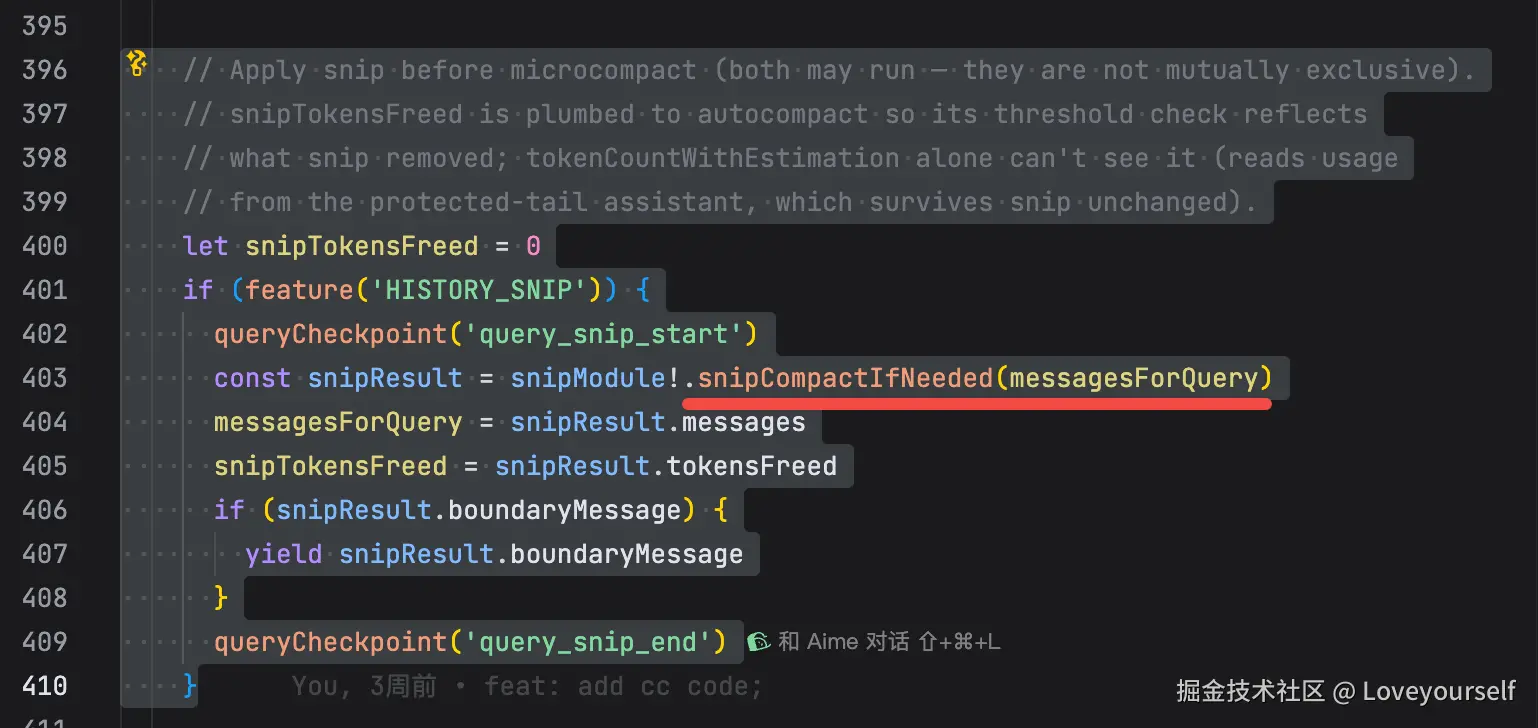
核心执行文件 snipCompact.ts / snipProjection.ts 是 ant-only 动态 require ,在当前工作树里缺失(和上次的 cachedMicrocompact.ts 一样)。但它的 全部配套逻辑 都在已存在文件里,足以讲清整条链路。
与 microcompact / autocompact 的本质区别
| 机制 | 处理对象 | 手段 | 是否有摘要 |
|---|---|---|---|
| microcompact | 单个旧 tool_result | 删缓存 / 清内容 | 无 |
| snip | 任意中间消息区间 | 物理移除 + 重连链 | 无 |
| autocompact | 整段前缀 | LLM 摘要 | 有 |
snip 的独特点:它能删掉的不只是工具结果,而是模型自己判定为噪声的 一整段中间对话 ;且它由 模型主动调用 SnipTool 触发,不是纯阈值驱动。这正是"对噪声做摘要只是浪费 token"------直接删更便宜。
第 1 步:给消息注入 6 位短 ID,让模型能"点名"要删的区间
模型要指定删哪段,必须有稳定可引用的 ID。 deriveShortMessageId :
typescript
export function deriveShortMessageId(uuid: string): string {
  const hex = uuid.replace(/-/g, '').slice(0, 10)
  return parseInt(hex, 16).toString(36).slice(0, 6)
}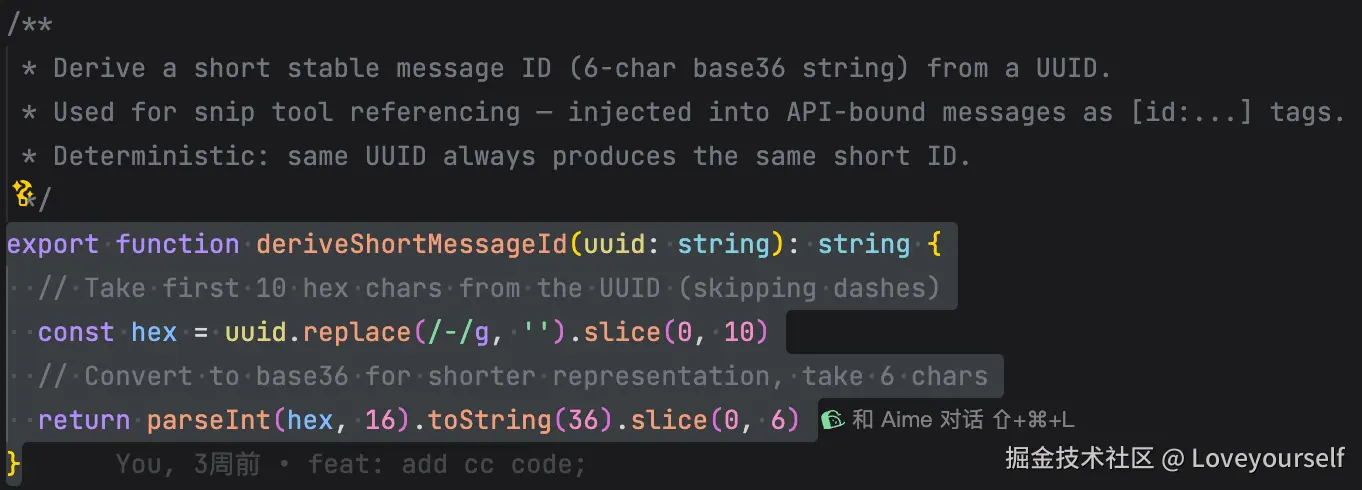
从 UUID 前 10 位十六进制转 base36,取 6 字符,确定性映射。
然后在组装 API 消息时,给每条非 meta 的 user message 末尾追加 id:xxxxxx 标签,见 appendMessageTagToUserMessage :
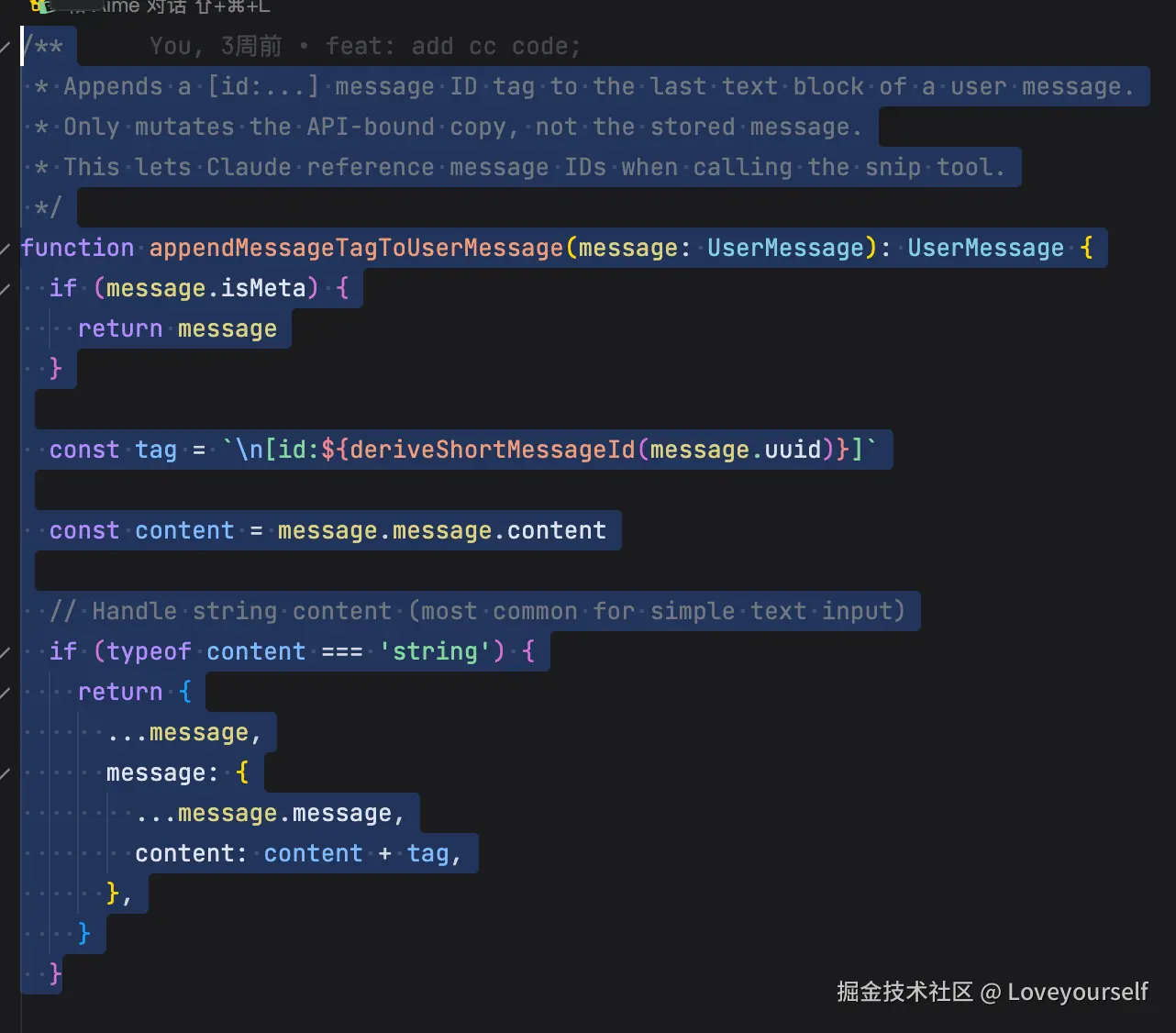
ini
const tag = `\n[id:${deriveShortMessageId(message.uuid)}]`关键点( messages.ts:L2345-L2364 ):
javascript
  // Append message ID tags for snip tool visibility (after all merging,
  // so tags always match the surviving message's messageId field).
  // Skip in test mode --- tags change message content hashes, breaking
  // VCR fixture lookup. Gate must match SnipTool.isEnabled() --- don't
  // inject [id:] tags when the tool isn't available (confuses the model
  // and wastes tokens on every non-meta user message for every ant).
  if (feature('HISTORY_SNIP') && process.env.NODE_ENV !== 'test') {
    const { isSnipRuntimeEnabled } =
      // eslint-disable-next-line @typescript-eslint/no-require-imports
      require('../services/compact/snipCompact.js') as typeof import('../services/compact/snipCompact.js')
    if (isSnipRuntimeEnabled()) {
      for (let i = 0; i < sanitized.length; i++) {
        if (sanitized[i]!.type === 'user') {
          sanitized[i] = appendMessageTagToUserMessage(
            sanitized[i] as UserMessage,
          )
        }
      }
    }
}- 标签只加在 发给 API 的副本 上,不写回存储;
- 在所有消息合并之后才注入,保证 tag 与幸存消息的 messageId 一致;
- 测试模式跳过(tag 会改内容哈希,破坏 VCR fixture);
- 门槛必须与 SnipTool.isEnabled() 一致,否则白白浪费每条 user message 的 token。 模型看到的就是这样:
bash
帮我看下这个报错栈
[id:a3f2k1]
之后它调用 SnipTool 时用这些短 ID 指定"删 a3f2k1 到 b7c9d0 之间"。
第 2 步:视图分离------UI 看全量,模型看剪枝后的投影
这是 snip 最重要的设计。REPL 本地数组 永远保留完整历史 (供滚动回看),只有喂给模型的路径才应用剪枝。见 getMessagesAfterCompactBoundary :
php
/**
 * Returns messages from the last compact boundary onward (including the boundary).
 * If no boundary exists, returns all messages.
 *
 * Also filters snipped messages by default (when HISTORY_SNIP is enabled) ---
 * the REPL keeps full history for UI scrollback, so model-facing paths need
 * both compact-slice AND snip-filter applied. Pass `{ includeSnipped: true }`
 * to opt out (e.g., REPL.tsx fullscreen compact handler which preserves
 * snipped messages in scrollback).
 *
 * Note: The boundary itself is a system message and will be filtered by normalizeMessagesForAPI.
 */
export function getMessagesAfterCompactBoundary<
  T extends Message | NormalizedMessage,
>(messages: T[], options?: { includeSnipped?: boolean }): T[] {
  const boundaryIndex = findLastCompactBoundaryIndex(messages)
  const sliced = boundaryIndex === -1 ? messages : messages.slice(boundaryIndex)
  if (!options?.includeSnipped && feature('HISTORY_SNIP')) {
    /* eslint-disable @typescript-eslint/no-require-imports */
    const { projectSnippedView } =
      require('../services/compact/snipProjection.js') as typeof import('../services/compact/snipProjection.js')
    /* eslint-enable @typescript-eslint/no-require-imports */
    return projectSnippedView(sliced as Message[]) as T[]
  }
  return sliced
}
所以同一份 messages :
- UI View : includeSnipped: true ,完整历史;
- Model View : projectSnippedView(...) ,剪枝视图。 模型不为已删除的噪声支付任何 token,但用户仍能在 transcript 里翻到原文。
第 3 步:Snip Boundary------记录删了哪些 UUID
snip 执行后会产出一个 boundary 系统消息,其 snipMetadata.removedUuids 精确记录被移除的消息 UUID。这个结构在 resume 逻辑里能反查到( sessionStorage.ts:L1986-L1991 ):
UI 侧由 SnipBoundaryMessage 渲染这条边界。
为什么要持久化 removedUuids ?因为 JSONL 是 append-only ------被删的消息仍留在磁盘上,只有 boundary 记住了"它们已被剪掉"。
第 4 步:Resume 时重放删除 + 重连 parentUuid 链(最精妙处)
这是 snip 与 compact 的最大差异。compact 截断的是前缀,而 snip 挖掉的是 中间段 ,导致幸存消息的 parentUuid 指针悬空。核心函数 applySnipRemovals :
(a) 收集所有 boundary 记录的 removedUuids:
(b) 删除前先记住每个被删节点自己的 parentUuid:
(c) 重连:对每个 parentUuid 落在空洞里的幸存者,向上回溯到第一个未被删的祖先:
注释里给出了不修复的后果( sessionStorage.ts:L1962-L1974 ): buildConversationChain 会撞上 messages.get(undefined) 停止,或重建整份未剪枝历史------实测 397K 显示 → 1.65M 实际 ,resume 瞬间 PTL(prompt too long)。
这条链路(短 ID → 边界 removedUuids → resume 重连)正好对应你项目记忆里"通过向上追溯父节点重连 parentUuid 链修复消息拓扑"。
第 5 步:SDK 长会话里的 replay(防僵尸消息与内存泄漏)
在 QueryEngine 里,收到 snip boundary 信号时会在自己的 store 上重放一次删除,见 QueryEngine.ts:L897-L916 :
回调注入见 QueryEngine.ts:L1276-L1284 :
注释点明动机:若不重放,marker 会每轮重复触发, mutableMessages 永不收缩,长 SDK 会话内存泄漏。
第 6 步:把释放的 token 告诉 autocompact,避免误触发
snip 删了消息,但幸存的那条 assistant 的 usage 仍是 剪枝前 的计数, tokenCountWithEstimation 看不到节省。于是 snipTokensFreed 一路传到 autocompact 做抵扣,见 autoCompact.ts:L225 :
ini
const tokenCount = tokenCountWithEstimation(messages) - snipTokensFreed否则 snip 明明腾出了空间,autocompact 却因旧 usage 仍判定超阈值而多余地触发重型摘要。这与你项目记忆里记录的一致。
配套地,当上下文效率偏低时,系统会用 SNIP_NUDGE_TEXT 提示模型去主动 snip,见 messages.ts:L4148-L4160 。
完整生命周期串起来
markdown
1. 组装 API 消息:每条 user msg 注入 [id:xxxxxx]      (deriveShortMessageId)
2. 模型判定某中间区间是噪声 → 调 SnipTool 指定短 ID
3. query 主循环:snipCompactIfNeeded 移除区间
      ├─ 产出 Snip Boundary(记 removedUuids)
      └─ 返回 tokensFreed → 抵扣 autocompact 阈值
4. 视图分离:UI 看全量,模型看 projectSnippedView 剪枝视图
5. Resume:applySnipRemovals 删磁盘残留 + 重连 parentUuid 链
6. SDK 长会话:snipReplay 重放,防僵尸 marker 与内存泄漏
一点源码完整性说明
snipCompact.ts (含 snipCompactIfNeeded 、 SNIP_NUDGE_TEXT 、 isSnipRuntimeEnabled )和 snipProjection.ts (含 projectSnippedView 、 isSnipBoundaryMessage )在当前工作树缺失,均为 ant-only 动态 require 。因此我无法逐行展示 区间选择算法本身 (比如它如何界定"低价值区间"的具体启发式、保护尾部的边界)。但从注入、投影、边界、resume、autocompact 抵扣这五个已存在的配套模块,可以确认 snip 的规则形态是: 模型点名 + 物理删中间段 + 视图分离 + 链路重连 ,而非基于摘要或 token 大小的自动过期。
如果你要我把某一层(例如 resume 重连的 resolve 路径压缩,或视图投影与 UI 的协同)再展开到更细的执行示例,我可以继续。
一个完整的demo示例:
场景设定
用户先让 CC 排查一个报错,中间跑了大量搜索/读取(噪声),定位到根因后,模型判定中间那堆探索过程已无价值,主动调 SnipTool 剪掉。为看清 parentUuid 重连,我给每条消息标上 uuid 和 parentUuid。
阶段 0:原始 transcript(本地 REPL 数组)
每条 user message 在发给 API 时会被 appendMessageTagToUserMessage 注入 id:xxxxxx 短 ID( deriveShortMessageId 由 uuid 派生):
U1~U6 是探索噪声, U7/U8 才是关键证据, U9 是结论。
阶段 1:LLM 调 SnipTool(第 N 轮)
第 N 轮 callModel 流里,模型在给出结论后,紧接着发起一个 tool_use 点名要删的区间------这一刻就是 query.ts:L659 的流式解析:
它用的正是阶段 0 注入的短 ID 来指定范围。随后 query.ts:L1380-L1400 的 runTools 执行 SnipTool,产出一个 snip marker (UI 侧 Message.tsx:L277-L279 对它 return null 不显示):
注意 :此刻消息还没被删,只是记下"模型想删 U1~U6"。marker 随 toolResults 进入下一轮状态( query.ts:L1714-L1720 )。
阶段 2:客户端落实删除(第 N+1 轮开头)
递归进入下一轮, query.ts:L400-L410 的 snipCompactIfNeeded 读到 marker,物理移除区间并产出 Snip Boundary :
这一步同步、无 LLM、无摘要。产出的 boundary 大致是:
tokensFreed 会被带到 autocompact 做抵扣( autoCompact.ts:L225 ),避免旧 usage 误触发摘要。
阶段 3:两种视图分离
同一份底层数据,UI 与模型看到的不同,来自 getMessagesAfterCompactBoundary :
视图 参数 看到的内容 UI View(滚动回看) includeSnipped: true U0U11 全量保留 ,用户仍能翻到那 13KB 探索过程 Model View(发给 API) projectSnippedView(...) 仅 U0 → U7 → U8 → U9 →(后续) ,U1U6 不可见、不计费
模型这一轮实际看到的有效上下文:
13KB 噪声消失,关键证据链完整。
阶段 4:Resume 重连 parentUuid(你正看的那段代码)
JSONL 是 append-only,U1~U6 仍躺在磁盘上,重开会话时靠 applySnipRemovals 重放删除。你光标所在的 sessionStorage.ts:L1991 正是收集 removedUuids 的那一步:
问题 :删掉 U1~U6 后,幸存的 U7 的 parentUuid 还指向 U6 (已删)------链断了。若不修, buildConversationChain 会撞上 messages.get(undefined) 停止,导致 resume 出错或重建整份未剪枝历史(注释里实测 397K→1.65M PTL,见 sessionStorage.ts:L1962-L1974 )。
重连过程 ( sessionStorage.ts:L2010-L2033 ):
删除前先记住每个被删节点自己的 parent:
U7.parentUuid = U6 悬空,触发 resolve(U6) 沿链回溯:
scss
U6(删) → U5(删) → U4(删) → U3(删) → U2(删) → U1(删) → U0(存活) ✓于是把 U7.parentUuid 从 U6 改写为 U0 ,链修复:
css
修复前: U0 → [U1..U6 空洞] → U7 → U8 → U9
修复后: U0 ─────────────────→ U7 → U8 → U9
同时 resolve 做路径压缩( deletedParent.set(p, cur) ),避免多个幸存者重复回溯同一段。最后打 tengu_snip_resume_filtered 事件记 removed_count / relinked_count 。
整条链路回顾
ini
阶段0  注入 [id:] 短 ID          messages.ts:1620 / deriveShortMessageId:200
阶段1  LLM 调 SnipTool           query.ts:659 (callModel) → runTools query.ts:1380
         └─ 产出 snip marker(尚未删)
阶段2  snipCompactIfNeeded       query.ts:403
         └─ 物理删 U1~U6 + Snip Boundary(removedUuids) + tokensFreed
阶段3  视图分离                  getMessagesAfterCompactBoundary:4643
         ├─ UI: includeSnipped=true → 全量
         └─ Model: projectSnippedView → 剪枝
阶段4  resume 重连               applySnipRemovals:1982(你在看的 L1991)
         └─ 删磁盘残留 + parentUuid 回溯重连(U7.parent: U6→U0)
一句话: 模型用短 ID 点名中间噪声区间 → 客户端下一轮物理删除并记 removedUuids 边界 → UI 留全量、模型看剪枝 → resume 时按 removedUuids 重删并把断裂的 parentUuid 回溯到最近的存活祖先 。全程无摘要、无额外 LLM 调用。
源码限制照旧: snipCompact.ts ( snipCompactIfNeeded 、marker 判定)与 snipProjection.ts ( projectSnippedView )是 ant-only 动态 require ,当前工作树缺失,所以阶段 1/2 里"SnipTool 参数如何转成 marker、区间边界怎么裁"这部分我用真实调用点和边界结构合理还原,但无法逐行展示其内部实现。