前言:利用前面总结的继承,接口的知识,以及UI设计,设计一个线程游戏,会涉及多线程知识,类似于网页上的飞机大战,2d小游戏
1.设计UI界面,利用之前学习的UI设计知识,先设计基础界面,即窗体,标题,窗体大小等
java
 JFrame jf=new JFrame("射击游戏");
        jf.setSize(1000,1000);
        jf.setDefaultCloseOperation(3);
        jf.setLocationRelativeTo(null);

        JPanel gamepanel=new JPanel();
        gamepanel.setBackground(Color.WHITE);
        jf.add(gamepanel,BorderLayout.CENTER);

        jf.setVisible(true);
1.我们这里选择使用JPanel组件来专门承载整个游戏载体,是因为JFrame无法让监听器正常被接收,而键盘监听器需要JPanel组件去接受
2.设置可见
2.我们需要各个组件有反应,让飞机可以在组件上动,释放技能,我们需要利用键盘监听器,我们可以弄一个键盘监听器接口
1.由于要讲东西画上面板,则我们需要画笔对象,再利用构造函数实现画笔在类与类之间的传递
java
Graphics g= gamepanel.getGraphics();
        GameListener listener=new GameListener(g);
        gamepanel.addMouseListener(listener);

        gamepanel.addKeyListener(listener);
        gamepanel.requestFocus();
java
        public GameListener(Graphics g){
        this.g=g;
    }
其中requestFocus是为了让键盘能够正确输出
2.要让各个功能都独立执行,我们需要使用多线程,即利用一个Thread类去继承自带的Thread类,从而实现我们想要的功能效果
1.整个游戏,由玩家对象,敌机对象,子弹对象构成,我们需要创建各自对应的类,去分别实现
2.关于玩家类,我们可以单独实现玩家对应的属性和方法
java
 public int x,y,size;
    public int speedX,speedY;
    public Image image;
java
 public MPlayer(int x,int y){
        this.x=x;
        this.y=y;
        size=100;

        image=new ImageIcon("image\\img.png").getImage();
    }

    public void drawPlayer(Graphics g){

        // 左右边界限制
        if (x < 0) x = 0;
        if (x > 1000 - size) x = 1000 - size;

        g.drawImage(image,x,y,size,size,null);
        move();

    }
    public void move(){
        x+=speedX;
        y+=speedY;
    }
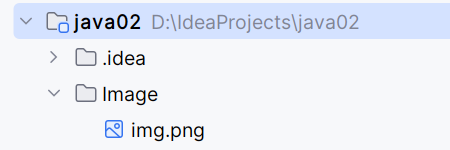
注意:该图片路径是相对路径,这样做可以避免图片被删除后,程序就崩溃了,在左上角的项目那里新建文件夹即可
3.设计子弹类,和前面的玩家类的实现一个逻辑
但是还没有加图片素材,我们用矩形代替,子弹本身的创建依旧是用画笔去画,也就是给对应函数传画笔参数,实现子弹的绘制,为了避免出现连续矩形,我们可以先画白色,再画子弹颜色,但是这样做的缺点是无法更换背景以及会出现闪烁,我们后面再修改
java
public class Bullet {
    public int x;
    public int y;
    public int width=10;
    public int height=8;
    public int speedY=-8;

    public Bullet(){}

    public Bullet(int startX,int startY){
        this.x=startX;
        this.y=startY;
    }

    public void move(){
        y+=speedY;
    }

    public void drawBullet(Graphics g){
        g.setColor(Color.WHITE);
        g.fillOval(x,y,width,height);

        g.setColor(Color.blue);
        g.fillOval(x,y,width,height);
    }


}
4.接下来是敌机,逻辑和之前的一样
java
public class Enemy {
    public int x,y;
    public int width=60;
    public int height=60;

    public int speedY=3;
    public Random random=new Random();

    public Enemy(){
        this.x=random.nextInt(940);
        this.y=-height;
    }

    public void move(){
        y+=speedY;
    }

    public void drawEnemy(Graphics g){
        g.setColor(Color.RED);
        g.fillRect(x,y,width,height);
    }
}
这个random表示的是随机的创建,因为敌机一般是随机出现嘛
3.设计几个键来控制游戏开始,以及飞机本体,在线程类中创建即可,这样就是多线程,单线程的话就无法执行其他操作,会卡顿
1.先创建两个可扩容数组来存放敌机和子弹,因为需要一直有嘛,肯定要自动扩容
java
public Graphics g;
    public MPlayer mp;
    public Enemy enemy;
    public ArrayList<Bullet> arrayList=new ArrayList<>();
    public ArrayList<Enemy> enemyList=new ArrayList<>();
2.设计几个变量控制游戏的开始,暂停
java
public boolean isrunning=false;//R键表示启动
 public boolean gameThreadStarted=false;//游戏渲染线程
 public boolean bulletThreadStarted=false;//自动发射子弹线程是否启动
 public boolean enemyThreadStarted=false;
3.写一个敌人生成的专线程
java
class EnemySpawnThread implements Runnable{
        private GameListener listener;
        public EnemySpawnThread(GameListener listener){
            this.listener=listener;
        }
        @Override
        public void run() {
            while(true){
                try {
                    Thread.sleep(800);
                } catch (InterruptedException e) {
                    e.printStackTrace();
                }
                if(listener.isrunning){
                    listener.enemyList.add(new Enemy());
                }
            }
        }
    }
4.空格键表示游戏开始,游戏开始时启动,在里面创建线程对象,start()表示线程开始
java
case KeyEvent.VK_SPACE :
                if(!gameThreadStarted) {
                    mp = new MPlayer(350, 600);
                    GameThread gt = new GameThread(g, mp, arrayList,enemyList,this);
                    gt.start();
                    gameThreadStarted=true;
                    isrunning=true;
5.A表示向左移动,D表示向右移动
java
 case KeyEvent.VK_A:
                mp.speedX=-5;
                break;

            case KeyEvent.VK_D:
                mp.speedX=5;
                break;
6.按J创建子弹对象,并存进数组,然后传递到线程类,再利用循环画出子弹
java
case KeyEvent.VK_J:
                if(mp !=null && isrunning) {
                    Bullet bullet = new Bullet(mp.x, mp.y);
                    arrayList.add(bullet);

                }
                break;
java
for (int i=0;i<arrayList.size();i++){
                      Bullet bullet=arrayList.get(i);
                      bullet.move();
                      bullet.drawBullet(g);
                      if(bullet.y<0){
                          arrayList.remove(i);
                      }
                 }
7.创建一个时间类线程,控制子弹的定时发动
java
public class TimeThread implements Runnable{
    public long time=200;
    public MPlayer mp;
    public ArrayList<Bullet> arrayList;
    public GameListener gameListener;

    public TimeThread(MPlayer mp, ArrayList<Bullet> arrayList,GameListener gameListener){
        this.mp=mp;
        this.arrayList=arrayList;
        this.gameListener=gameListener;
    }
    @Override
    public void run() {
        while (true){
            try {
                Thread.sleep(time);
            } catch (InterruptedException e) {
                throw new RuntimeException(e);
            }
            // 暂停状态不生成子弹
            if (!gameListener.isrunning || mp == null) {
                continue;
            }
            Bullet bullet=new Bullet(mp.x, mp.y);
            arrayList.add(bullet);
        }

    }
}
8.按Q则是启动这个时间类线程
java
case KeyEvent.VK_Q:
                if(!bulletThreadStarted && mp !=null) {
                    TimeThread timeThread = new TimeThread(mp, arrayList,this);
                    new Thread(timeThread).start();
                    bulletThreadStarted=true;

                }
                break;
易错总结:1.如果不使用线程类,则就是单线程,这样会使得程序卡顿
2.再传递画笔的时候,要注意空指针异常
3.后面我们将使用缓冲区去绘制画面,就不会出现闪烁等问题
以下是完整代码:
java
public class GameUI {
    public void initUI(){
        JFrame jf=new JFrame("射击游戏");
        jf.setSize(1000,1000);
        jf.setDefaultCloseOperation(3);
        jf.setLocationRelativeTo(null);

        JPanel gamepanel=new JPanel();
        gamepanel.setBackground(Color.WHITE);
        jf.add(gamepanel,BorderLayout.CENTER);

        jf.setVisible(true);

        Graphics g= gamepanel.getGraphics();
        GameListener listener=new GameListener(g);
        gamepanel.addMouseListener(listener);

        gamepanel.addKeyListener(listener);
        gamepanel.requestFocus();
    }

    public static void main(String[] args) {
        GameUI ui=new GameUI();
        ui.initUI();
    }
}
public class GameListener extends MouseAdapter implements KeyListener{
    public Graphics g;
    public MPlayer mp;
    public Enemy enemy;
    public ArrayList<Bullet> arrayList=new ArrayList<>();
    public ArrayList<Enemy> enemyList=new ArrayList<>();
    public GameListener listener;

    //游戏标识================
    public boolean isrunning=false;//R键表示启动
    public boolean gameThreadStarted=false;//游戏渲染线程
    public boolean bulletThreadStarted=false;//自动发射子弹线程是否启动
    public boolean enemyThreadStarted=false;

    class EnemySpawnThread implements Runnable{
        private GameListener listener;
        public EnemySpawnThread(GameListener listener){
            this.listener=listener;
        }
        @Override
        public void run() {
            while(true){
                try {
                    Thread.sleep(800);
                } catch (InterruptedException e) {
                    e.printStackTrace();
                }
                if(listener.isrunning){
                    listener.enemyList.add(new Enemy());
                }
            }
        }
    }


    public GameListener(Graphics g){
        this.g=g;
    }
    public void mouseClicked(MouseEvent e) {
        System.out.println("点击!");
        int x = e.getX();
        int y = e.getY();


    }

    @Override
    public void keyTyped(KeyEvent e) {

    }

    @Override
    public void keyPressed(KeyEvent e) {
        int key=e.getKeyCode();
        System.out.println("key"+key);

        switch (key){
            case KeyEvent.VK_SPACE :
                if(!gameThreadStarted) {
                    mp = new MPlayer(350, 600);
                    GameThread gt = new GameThread(g, mp, arrayList,enemyList,this);
                    gt.start();
                    gameThreadStarted=true;
                    isrunning=true;

                }
                // 启动敌机生成线程
                if(!enemyThreadStarted){
                    new Thread(new EnemySpawnThread(this)).start();
                    enemyThreadStarted=true;
                }
                break;
            case KeyEvent.VK_A:
                mp.speedX=-5;
                break;

            case KeyEvent.VK_D:
                mp.speedX=5;
                break;
            case KeyEvent.VK_J:
                if(mp !=null && isrunning) {
                    Bullet bullet = new Bullet(mp.x, mp.y);
                    arrayList.add(bullet);

                }
                break;
            case KeyEvent.VK_Q:
                if(!bulletThreadStarted && mp !=null) {
                    TimeThread timeThread = new TimeThread(mp, arrayList,this);
                    new Thread(timeThread).start();
                    bulletThreadStarted=true;

                }
                break;
            case KeyEvent.VK_R:
                isrunning=!isrunning;
                if(isrunning){
                    JOptionPane.showMessageDialog(null,"游戏继续");

                }else {
                    JOptionPane.showMessageDialog(null,"游戏暂停");
                }
                break;

        }

    }

    @Override
    public void keyReleased(KeyEvent e) {
             int key=e.getKeyCode();
             if(key==KeyEvent.VK_A || key==KeyEvent.VK_D){
                 if(mp !=null)
                     mp.speedX=0;
             }
    }

}
public class Enemy {
    public int x,y;
    public int width=60;
    public int height=60;

    public int speedY=3;
    public Random random=new Random();

    public Enemy(){
        this.x=random.nextInt(940);
        this.y=-height;
    }

    public void move(){
        y+=speedY;
    }

    public void drawEnemy(Graphics g){
        g.setColor(Color.RED);
        g.fillRect(x,y,width,height);
    }
}
public class MPlayer {
    public int x,y,size;
    public int speedX,speedY;
    public Image image;

    public MPlayer(int x,int y){
        this.x=x;
        this.y=y;
        size=100;

        image=new ImageIcon("image\\img.png").getImage();
    }

    public void drawPlayer(Graphics g){

        // 左右边界限制
        if (x < 0) x = 0;
        if (x > 1000 - size) x = 1000 - size;

        g.drawImage(image,x,y,size,size,null);
        move();

    }
    public void move(){
        x+=speedX;
        y+=speedY;
    }
}
public class TimeThread implements Runnable{
    public long time=200;
    public MPlayer mp;
    public ArrayList<Bullet> arrayList;
    public GameListener gameListener;

    public TimeThread(MPlayer mp, ArrayList<Bullet> arrayList,GameListener gameListener){
        this.mp=mp;
        this.arrayList=arrayList;
        this.gameListener=gameListener;
    }
    @Override
    public void run() {
        while (true){
            try {
                Thread.sleep(time);
            } catch (InterruptedException e) {
                throw new RuntimeException(e);
            }
            // 暂停状态不生成子弹
            if (!gameListener.isrunning || mp == null) {
                continue;
            }
            Bullet bullet=new Bullet(mp.x, mp.y);
            arrayList.add(bullet);
        }

    }
}
public class GameThread extends Thread{
         public Graphics g;
         public MPlayer mp;

         public GameListener listener;
         public int x;
         public ArrayList<Bullet> arrayList;
         public ArrayList<Enemy> enemyList;
         public GameThread(Graphics g, MPlayer mp, ArrayList<Bullet> arrayList,ArrayList<Enemy> enemyList,GameListener listener){
             this.g=g;
             this.mp=mp;
             this.arrayList=arrayList;
             this.enemyList=enemyList;
             this.listener=listener;
         }
         public void run(){
             System.out.println(Thread.currentThread().getName()+"线程启动");
             while (true){
                 try {
                     Thread.sleep(50);
                 } catch (InterruptedException e) {
                     throw new RuntimeException(e);
                 }
                 if(!listener.isrunning){
                     continue;
                 }
                 mp.drawPlayer(g);

                 for (int i=0;i<arrayList.size();i++){
                      Bullet bullet=arrayList.get(i);
                      bullet.move();
                      bullet.drawBullet(g);
                      if(bullet.y<0){
                          arrayList.remove(i);
                      }
                 }

                 for (int i = enemyList.size() - 1; i >= 0; i--) {
                     Enemy enemy = enemyList.get(i);
                     enemy.move();
                     enemy.drawEnemy(g);
                     if (enemy.y > 1000) {
                         enemyList.remove(i);
                     }
                 }
             }
         }
}
public class Bullet {
    public int x;
    public int y;
    public int width=10;
    public int height=8;
    public int speedY=-8;

    public Bullet(){}

    public Bullet(int startX,int startY){
        this.x=startX;
        this.y=startY;
    }

    public void move(){
        y+=speedY;
    }

    public void drawBullet(Graphics g){
        g.setColor(Color.WHITE);
        g.fillOval(x,y,width,height);

        g.setColor(Color.blue);
        g.fillOval(x,y,width,height);
    }


}