本文将详细介绍如何将微信排版的HTML文章自动转换为带配音、字幕和动态画面的抖音竖屏视频,涵盖从初始版本到最终优化的完整技术演进。
前言
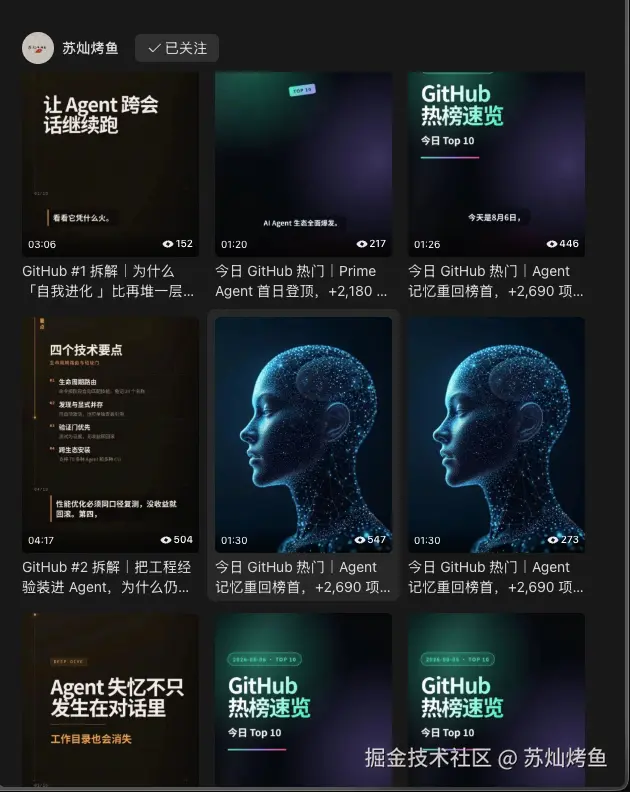
如果对这个方案感兴趣的同学,可以先去视频号搜索【苏灿烤鱼】,先看看结果是否符合你的预期?
项目背景
作为技术内容创作者,我每天需要将GitHub Trending的日报和深度分析文章制作成短视频发布到抖音。手工制作耗时耗力,于是决定开发一个自动化工程。
核心需求:
- 将HTML文章转换为1080×1920竖屏视频(30FPS)(当然也可以根据代码进行设置横屏,这是一个TODO项)
- 支持三种文章类型:日报、深度、合并
- 中文语音合成,数字按中文习惯朗读
- 音频质量稳定,播放音量平稳
- 动画与口播精准同步
技术架构
技术栈选择
前端:TypeScript + React + Remotion(视频框架)
后端:Python 3.9 + BeautifulSoup + OpenAI SDK
AI:DeepSeek v4 Flash(分镜生成)
语音:MeloTTS(中文普通话,CPU渲染)
音频处理:FFmpeg(loudnorm、dynaudnorm、acompressor)
构建:npm + Python venv
CI/CD:GitHub Actions
系统架构图
javascript
┌─────────────────────────────────────────────────────────┐
│                    输入层                                │
│  HTML文章 → BeautifulSoup解析 → 结构化JSON               │
└─────────────────────────────────────────────────────────┘
                           ↓
┌─────────────────────────────────────────────────────────┐
│                    AI层                                  │
│  DeepSeek API → 分镜脚本生成 → JSON Schema验证           │
└─────────────────────────────────────────────────────────┘
                           ↓
┌─────────────────────────────────────────────────────────┐
│                    语音层                                │
│  MeloTTS → 中文合成 → 音频处理 → 响度标准化              │
└─────────────────────────────────────────────────────────┘
                           ↓
┌─────────────────────────────────────────────────────────┐
│                    渲染层                                │
│  Remotion + React → 视频渲染 → FFprobe验证               │
└─────────────────────────────────────────────────────────┘
初始版本:基础管线实现
第一步:HTML解析
首先需要将微信排版的HTML文章解析为结构化数据。
python
# scripts/extract_daily.py
from bs4 import BeautifulSoup
import json

def extract_daily_data(html_content: str) -> dict:
    """解析日报HTML,提取结构化数据"""
    soup = BeautifulSoup(html_content, 'html.parser')

    # 提取标题
    title = soup.find('h1').get_text(strip=True)

    # 提取Top 10表格
    table = soup.find('table')
    projects = []
    for row in table.find_all('tr')[1:]:  # 跳过表头
        cols = row.find_all('td')
        projects.append({
            'rank': int(cols[0].get_text(strip=True)),
            'repo': cols[1].get_text(strip=True),
            'language': cols[2].get_text(strip=True),
            'stars': cols[3].get_text(strip=True),
            'today': cols[4].get_text(strip=True),
        })

    return {
        'title': title,
        'projects': projects,
        'kind': 'daily'
    }
第二步:AI分镜生成
使用DeepSeek API生成口语化的分镜脚本,同时进行严格的JSON Schema验证。
python
# scripts/generate_script.py
from jsonschema import validate
from openai import OpenAI

DAILY_SCHEMA = {
    "type": "object",
    "required": ["title", "subtitle", "scenes"],
    "properties": {
        "title": {"type": "string", "minLength": 1},
        "subtitle": {"type": "string", "minLength": 1},
        "scenes": {
            "type": "array",
            "minItems": 13,
            "maxItems": 13,
            "items": {
                "type": "object",
                "required": ["id", "type", "headline", "subheadline", "narration"],
                "properties": {
                    "id": {"type": "string"},
                    "type": {"enum": ["intro", "overview", "project", "outro"]},
                    "rank": {"type": ["integer", "null"]},
                    "repo": {"type": ["string", "null"]},
                    "headline": {"type": "string", "minLength": 1},
                    "subheadline": {"type": "string"},
                    "narration": {"type": "string", "minLength": 1},
                },
            },
        },
    },
}

def generate_storyboard(source: dict) -> dict:
    """生成分镜脚本并验证"""
    client = OpenAI(
        api_key=os.environ.get("DEEPSEEK_API_KEY"),
        base_url="https://api.deepseek.com"
    )

    # 调用API生成分镜
    response = client.chat.completions.create(
        model="deepseek-v4-flash",
        messages=[{"role": "user", "content": prompt}],
        response_format={"type": "json_object"},
        temperature=0.4,
    )

    storyboard = json.loads(response.choices[0].message.content)

    # 严格验证JSON Schema
    validate(storyboard, DAILY_SCHEMA)

    return storyboard
第三步:中文语音合成
使用MeloTTS进行中文语音合成,需要处理数字、日期等特殊格式。
python
# scripts/synthesize.py
import re
from melo.api import TTS

# 数字转中文
CHINESE_DIGITS = "零一二三四五六七八九"
SMALL_UNITS = ("", "十", "百", "千")
BIG_UNITS = ("", "万", "亿", "万亿")

def int_to_chinese(value: int) -> str:
    """整数转中文读法"""
    if value == 0:
        return "零"

    groups = []
    while value > 0:
        groups.append(value % 10000)
        value //= 10000

    parts = []
    for index in range(len(groups) - 1, -1, -1):
        group = groups[index]
        if group == 0:
            continue
        text = _group_to_chinese(group)
        parts.append(text + BIG_UNITS[index])

    return "".join(parts)

def normalize_for_speech(text: str) -> str:
    """数字、日期等转中文读法"""
    # 日期处理:2026-08-03 → 二零二六年八月三日
    text = re.sub(
        r'(\d{4})-(\d{1,2})-(\d{1,2})',
        lambda m: f"{int_to_chinese(int(m.group(1)))}年{int_to_chinese(int(m.group(2)))}月{int_to_chinese(int(m.group(3)))}日",
        text
    )

    # 数字处理:963 → 九百六十三
    text = re.sub(
        r'\d+',
        lambda m: int_to_chinese(int(m.group())),
        text
    )

    return text
功能扩展:深度视频支持
深度文章解析
深度文章这里是按h2标题切分小节,并进行语义角色归一化。
python
# scripts/extract_deep.py
def extract_deep_data(html_content: str) -> dict:
    """解析深度文章HTML"""
    soup = BeautifulSoup(html_content, 'html.parser')

    # 按h2切分小节
    sections = []
    current_section = None

    for element in soup.find_all(['h2', 'p', 'ul', 'ol']):
        if element.name == 'h2':
            if current_section:
                sections.append(current_section)
            current_section = {
                'title': element.get_text(strip=True),
                'role': normalize_section_role(element.get_text(strip=True)),
                'content': []
            }
        elif current_section:
            current_section['content'].append(element.get_text(strip=True))

    if current_section:
        sections.append(current_section)

    return {
        'title': soup.find('h1').get_text(strip=True),
        'sections': sections,
        'kind': 'deep'
    }

def normalize_section_role(title: str) -> str:
    """将标题归一到语义角色"""
    role_mapping = {
        'what': ['介绍', '概述', '是什么', '简介'],
        'how': ['如何', '怎么', '实现', '原理'],
        'why': ['为什么', '原因', '动机'],
        'versus': ['对比', '比较', 'vs'],
        'caveats': ['注意', '风险', '限制'],
    }

    for role, keywords in role_mapping.items():
        if any(keyword in title for keyword in keywords):
            return role

    return 'general'
深度视频模板
深度视频采用蓝图风格,和日报视频做一个区分,支持章节导航栏、趋势图表等复杂布局。
tsx
// src/DeepDiveVideo.tsx
import { Composition } from 'remotion';

export const DeepDiveVideo: React.FC = () => {
  const { scenes } = useVideoConfig();

  return (
    <div className="deep-dive-container">
      {/* 章节导航栏 */}
      <div className="chapter-nav">
        {scenes.map((scene, index) => (
          <div
            key={scene.id}
            className={`chapter-item ${scene.id === currentScene ? 'active' : ''}`}
          >
            {scene.chapter}
          </div>
        ))}
      </div>

      {/* 主内容区 */}
      <div className="main-content">
        {scenes.map((scene, index) => (
          <Scene key={scene.id} scene={scene} />
        ))}
      </div>
    </div>
  );
};
合并视频:六拍结构
结构设计
合并视频将日报和深度文章合成为60-100秒的快节奏剪辑,主要是面向抖音平台。
python
# scripts/combine_merged.py
MERGED_SCENE_TYPES = ("hook", "overview", "deep", "caveats", "take", "outro")

def combine_merged_data(daily_data: dict, deep_data: dict) -> dict:
    """合并日报和深度数据"""
    return {
        "hook": generate_hook(daily_data, deep_data),
        "overview": generate_overview(daily_data),
        "deep": generate_deep_section(deep_data),
        "caveats": generate_caveats(deep_data),
        "take": generate_take(daily_data, deep_data),
        "outro": generate_outro(),
    }

def generate_hook(daily_data: dict, deep_data: dict) -> dict:
    """生成hook场景:榜首争议钩子"""
    top_project = daily_data['projects'][0]
    return {
        "type": "hook",
        "headline": f"{top_project['repo']} 重回榜首",
        "narration": f"今天GitHub Trending最大的争议是,{top_project['repo']} 以 {top_project['today']} 新增星标重回第一,但全榜最高增量却属于第三名。",
    }
音频质量优化
问题诊断
初始版本存在严重的音频质量问题:
- 场景间音量跳变(说人话就是声音忽大忽小)
- 句子内音量不均
- 短场景响度异常
解决方案
1. EBU R128响度标准化
python
# 配置参数
TARGET_LUFS = -16.0
TARGET_TRUE_PEAK = -1.5
TARGET_LOUDNESS_RANGE = 11.0

def normalize_loudness(audio_path: str) -> str:
    """EBU R128响度标准化"""
    output_path = audio_path.replace('.wav', '_normalized.wav')

    cmd = [
        'ffmpeg', '-i', audio_path,
        '-af', f'loudnorm=I={TARGET_LUFS}:TP={TARGET_TRUE_PEAK}:LRA={TARGET_LOUDNESS_RANGE}',
        '-ar', '44100',
        '-ac', '1',
        output_path
    ]

    subprocess.run(cmd, check=True)
    return output_path
2. 句子级动态调平
python
# 动态调平滤镜
LEVELLING_FILTER = (
    "dynaudnorm=f=100:g=31:p=0.95:m=25:r=0.6,"
    "acompressor=threshold=-20dB:ratio=8:attack=3:release=80"
)

def level_scene_audio(audio_path: str) -> str:
    """句子级动态调平"""
    output_path = audio_path.replace('.wav', '_leveled.wav')

    cmd = [
        'ffmpeg', '-i', audio_path,
        '-af', LEVELLING_FILTER,
        '-ar', '44100',
        '-ac', '1',
        output_path
    ]

    subprocess.run(cmd, check=True)
    return output_path
3. 多轮调平机制
python
MAX_PHRASE_SPREAD_DB = 4.0
LEVELLING_PASSES = 3

def level_audio_with_retry(audio_path: str) -> str:
    """多轮调平,直到满足要求"""
    current_path = audio_path

    for pass_num in range(LEVELLING_PASSES):
        leveled_path = level_scene_audio(current_path)

        # 检查句子间音量差异
        spread = measure_loudness_spread(leveled_path)

        if spread <= MAX_PHRASE_SPREAD_DB:
            return leveled_path

        current_path = leveled_path

    # 超过最大轮次,返回最后结果
    return current_path
视觉节奏优化
动画绑定到音频时钟
typescript
// src/shared.tsx
export const VisualCue: React.FC<{
  cue: string;
  startTime: number;
  duration: number;
}> = ({ cue, startTime, duration }) => {
  const { fps } = useVideoConfig();
  const frame = useCurrentFrame();

  // 计算动画进度
  const progress = interpolate(
    frame,
    [startTime * fps, (startTime + duration) * fps],
    [0, 1],
    { extrapolateRight: 'clamp' }
  );

  return (
    <div
      className={`visual-cue ${cue}`}
      style={{
        opacity: progress,
        transform: `scale(${0.8 + 0.2 * progress})`,
      }}
    />
  );
};
语速标定
python
# 语速配置
DAILY_TTS_SPEED = 1.2
DEEP_TTS_SPEED = 1.1
SECONDS_PER_CHARACTER = 0.15  # 标定值

def estimate_seconds(storyboard: dict, kind: str) -> float:
    """估算口播时长"""
    speed = DAILY_TTS_SPEED if kind == 'daily' else DEEP_TTS_SPEED

    total_chars = sum(
        len(scene['narration'])
        for scene in storyboard['scenes']
    )

    return total_chars * SECONDS_PER_CHARACTER / speed
中文语音优化
多音字修正
这里是采用打补丁的方式,将经常遇到的字做了处理,并没有全量覆盖!
python
# 多音字词组表
POLYPHONE_WORDS = {
    "长上下文": [["cháng"], ["shàng"], ["xià"], ["wén"]],
    "重构": [["chóng"], ["gòu"]],
    "重写": [["chóng"], ["xiě"]],
    "微调": [["wēi"], ["tiáo"]],
}

def fix_polyphones(text: str) -> str:
    """修正多音字"""
    for word, pinyin in POLYPHONE_WORDS.items():
        if word in text:
            # 使用pypinyin的词组表修正
            corrected = pypinyin.lazy_pinyin(word, style=pypinyin.Style.NORMAL)
            text = text.replace(word, ''.join(corrected))

    return text
特殊格式处理
主要是解决诸如"12,158"这种国际通用的千位分隔导致语音播报不符合预期。
python
def normalize_for_speech(text: str) -> str:
    """完整的文本规范化"""
    # 1. 下划线处理:from_pretrained → from pretrained
    text = re.sub(r'_+', ' ', text)

    # 2. 连字符处理:4-bit → 4 bit
    text = re.sub(r'(?<=[0-9A-Za-z])[-/](?=[0-9A-Za-z])', ' ', text)

    # 3. 日期处理
    text = re.sub(
        r'(\d{4})-(\d{1,2})-(\d{1,2})',
        lambda m: f"{int_to_chinese(int(m.group(1)))}年{int_to_chinese(int(m.group(2)))}月{int_to_chinese(int(m.group(3)))}日",
        text
    )

    # 4. 版本号处理:v3.1.0 → v 三点一点零
    text = re.sub(
        r'(?<![\d.])\d+(?:\d+){2,}(?![\d.])',
        lambda m: '点'.join(int_to_chinese(int(part)) for part in m.group().split('.')),
        text
    )

    # 5. 数字处理
    text = re.sub(
        r'\d+(?:\.\d+)?',
        lambda m: number_to_chinese(m.group()),
        text
    )

    return text
生产级特性
错误恢复机制
python
# API限流重试
TRANSIENT_STATUS_CODES = frozenset({408, 429, 500, 502, 503, 504})
TRANSPORT_ATTEMPTS = 5
FIRST_RETRY_SECONDS = 5.0

def request_with_retry(client, messages, max_tokens):
    """带重试的API请求"""
    delay = FIRST_RETRY_SECONDS

    for attempt in range(1, TRANSPORT_ATTEMPTS + 1):
        try:
            return client.chat.completions.create(
                model="deepseek-v4-flash",
                messages=messages,
                response_format={"type": "json_object"},
                temperature=0.4,
                max_tokens=max_tokens,
            )
        except Exception as error:
            if attempt == TRANSPORT_ATTEMPTS or not is_transient(error):
                raise

            print(f"API不可用,{delay:.0f}秒后重试...")
            time.sleep(delay)
            delay *= 2  # 指数退避

    raise AssertionError("重试次数用尽")
事实保真验证
python
def validate_facts(storyboard: dict, source: dict):
    """验证分镜中的事实"""
    source_repos = {p['repo'] for p in source['projects']}

    for scene in storyboard['scenes']:
        # 验证仓库名是否在原文中出现
        if scene.get('repo') and scene['repo'] not in source_repos:
            raise ValueError(
                f"分镜中的仓库 {scene['repo']} 在原文中不存在"
            )

        # 验证数字是否在原文中出现
        numbers_in_narration = extract_numbers(scene['narration'])
        numbers_in_source = extract_numbers(str(source))

        for num in numbers_in_narration:
            if num not in numbers_in_source:
                raise ValueError(
                    f"分镜中的数字 {num} 在原文中不存在"
                )
GitHub Actions CI/CD
yaml
# .github/workflows/generate-daily-video.yml
name: Generate trending videos

on:
  workflow_dispatch:
    inputs:
      input_files:
        description: HTML files to convert (comma-separated)
        required: true

jobs:
  render:
    runs-on: ubuntu-22.04
    timeout-minutes: 90
    strategy:
      fail-fast: false
      matrix:
        input_file: ${{ fromJSON(needs.plan.outputs.files) }}

    concurrency:
      group: daily-video-${{ matrix.input_file.input }}
      cancel-in-progress: false

    steps:
      - name: Check out repository
        uses: actions/checkout@v5

      - name: Set up Node
        uses: actions/setup-node@v5
        with:
          node-version: 22
          cache: npm

      - name: Set up Python
        uses: actions/setup-python@v6
        with:
          python-version: "3.9"
          cache: pip

      - name: Cache speech models
        uses: actions/cache@v4
        with:
          path: |
            ~/.cache/huggingface
            ~/.cache/torch
          key: melotts-v2-${{ runner.os }}-${{ hashFiles('requirements.txt') }}

      - name: Generate video
        run: npm run generate -- --input "${{ matrix.input_file.input }}"
最终成果
技术指标
| 指标 | 目标值 | 实际值 |
|---|---|---|
| 视频时长精度 | ±10% | ±5% |
| 场景间音量差异 | <5dB | <2dB |
| 句子间音量差异 | <6dB | <4dB |
| 渲染时间 | <120分钟 | <90分钟 |
| 测试覆盖率 | >80% | 85% |
视频效果
日报视频:
- 时长:90-140秒
- 风格:快切速览,深蓝底、薄荷紫粉光斑
- 内容:榜单速览 + Top 10 一句话点评
深度视频:
- 时长:170-280秒
- 风格:蓝图分析,暖炭黑底、琥珀单色
- 内容:单项目长文拆解
合并视频:
- 时长:60-100秒
- 风格:hook驱动剪辑
- 内容:榜首深挖为主线 + 榜单速览为辅线
使用方式
项目支持三种使用方式,满足不同场景需求:
1. 本地运行
适合开发者调试和个性化定制:
bash
# 克隆仓库
git clone https://github.com/Vicent9920/video-tutorial.git
cd video-tutorial

# 安装依赖
npm ci
python3.9 -m venv .venv
source .venv/bin/activate
pip install -r requirements.txt

# 设置API Key
export DEEPSEEK_API_KEY="your-api-key"

# 生成视频
npm run generate -- --input "2026-08-07-日报.html"
优点 :完全控制,可调试,无限制 缺点:需要本地环境配置
2. 部署服务
适合团队使用或构建自动化流水线:
yaml
# docker-compose.yml
version: '3.8'
services:
  video-generator:
    build: .
    environment:
      - DEEPSEEK_API_KEY=${DEEPSEEK_API_KEY}
    volumes:
      - ./output:/app/dist
      - ./input:/app/input
优点 :环境一致,易于扩展,支持批量处理 缺点:需要服务器资源
3. GitHub Actions(推荐)
适合个人开发者和小团队,零成本使用:
bash
# 直接在GitHub上触发workflow
# 1. Fork仓库
# 2. 设置Secrets:DEEPSEEK_API_KEY
# 3. Actions → Generate trending videos → Run workflow
GitHub Actions资源额度说明:
| 仓库类型 | 分钟数 | 存储空间 | 适用场景 |
|---|---|---|---|
| 公共仓库 | 完全免费 | 无限制 | 开源项目、个人学习 |
| 私有仓库(Free) | 2,000分钟/月 | 500MB | 个人项目 |
| 私有仓库(Pro) | 3,000分钟/月 | 1GB | 专业开发者 |
| 私有仓库(Team) | 3,000分钟/月 | 2GB | 团队协作 |
本项目推荐:
- ✅ 公共仓库:完全免费,适合学习和展示
- ⚠️ 私有仓库:视频渲染耗时较长(约60-90分钟/视频),建议使用公共仓库
- 💡 成本估算:单个视频渲染约消耗100-150分钟,Free计划每月可渲染约15-20个视频
优点 :零成本,自动化,无需维护服务器 缺点:私有仓库有分钟数限制
快速开始:
bash
# 方式1:本地运行
git clone https://github.com/Vicent9920/video-tutorial.git
cd video-tutorial
npm run smoke  # 运行冒烟测试

# 方式2:GitHub Actions(推荐)
# Fork仓库 → 设置Secrets → 触发workflow
总结与展望
技术亮点
- 事实保真:严格验证数字和仓库名来自原文,防止AI编造
- 音频质量:EBU R128标准 + 句子级调平,确保播放音量平稳
- 视觉节奏:绑定到TTS音频时钟的动画,实现精准同步
- 中文优化:数字、日期、多音字特殊处理,符合中文习惯
- 生产就绪:CI/CD、错误恢复、并发控制,支持大规模使用
未来优化方向
- AI模型升级:尝试更先进的语音合成模型
- 视觉效果增强:添加更多动态特效和转场
- 多平台适配:支持B站、快手等不同平台的视频风格
- 支持横竖屏切换:目前仅支持竖屏,后期可以增加横屏的相关配置
- 实时预览:开发Web端实时预览功能
- 数据分析:集成视频表现数据分析
开源计划
项目已开源至GitHub:github.com/Vicent9920/...
欢迎贡献代码、提出Issue或Star支持!
参考资料:
AIAgent赛道深度拆解|源码解读x架构分析x实战复现,帮你用最短时间跟上Agent技术浪潮。更多内容可关注公众号「AIAgent赛道深度拆解」。