HTML页面可以通过文件选择控件和浏览器媒体接口调用安卓设备的相机、摄像头、麦克风及文件选择器。完成页面代码后,再通过HTML一键打包APK工具配置相机和麦克风权限,即可生成支持拍照、录像、录音和文件选择的安卓APP。
如果你不了解HTML打包APK工具,想要进一步了解,可以查看官网:
创建文件采集页面
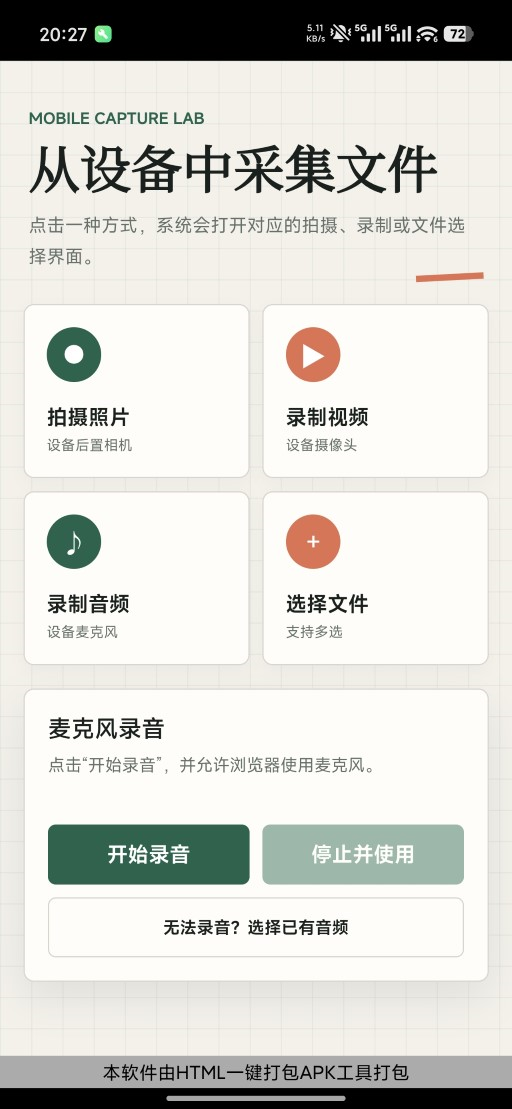
在HTML项目入口目录中创建 index.html,加入拍摄照片、录制视频、录制音频和选择文件四个入口。
- 拍摄照片:调用设备相机并优先进入后置摄像头拍照页面。
- 录制视频:调用设备摄像头并进入视频录制页面。
- 录制音频:申请麦克风权限,在网页内录制音频并生成可下载的音频文件。
- 选择文件:打开系统文件选择界面,并支持一次选择多个文件。也可以选择相机进行拍照或者录频
一个完整的html示例代码如下:
html
<!doctype html>
<html lang="zh-CN">
<head>
  <meta charset="utf-8">
  <meta name="viewport" content="width=device-width, initial-scale=1, viewport-fit=cover">
  <meta name="theme-color" content="#f4f1ea">
  <title>移动端文件采集</title>
  <style>
    :root {
      color-scheme: light;
      --ink: #18201d;
      --muted: #65706b;
      --paper: #f4f1ea;
      --surface: #fffdf8;
      --line: #d8d5cd;
      --green: #18634b;
      --green-dark: #104b39;
      --coral: #e56f51;
      --shadow: 0 12px 32px rgba(24, 32, 29, 0.09);
    }

    * {
      box-sizing: border-box;
      letter-spacing: 0;
    }

    body {
      min-width: 320px;
      min-height: 100vh;
      margin: 0;
      color: var(--ink);
      background:
        linear-gradient(rgba(24, 99, 75, 0.055) 1px, transparent 1px),
        linear-gradient(90deg, rgba(24, 99, 75, 0.055) 1px, transparent 1px),
        var(--paper);
      background-size: 24px 24px;
      font-family: "Noto Sans SC", "Microsoft YaHei UI", sans-serif;
    }

    button,
    input {
      font: inherit;
    }

    [hidden] {
      display: none !important;
    }

    .shell {
      width: min(100%, 560px);
      min-height: 100vh;
      margin: 0 auto;
      padding: max(24px, env(safe-area-inset-top)) 18px max(32px, env(safe-area-inset-bottom));
    }

    header {
      position: relative;
      padding: 12px 4px 25px;
    }

    header::after {
      position: absolute;
      right: 4px;
      bottom: 18px;
      width: 52px;
      height: 5px;
      background: var(--coral);
      content: "";
      transform: rotate(-3deg);
    }

    .eyebrow {
      margin: 0 0 8px;
      color: var(--green);
      font-size: 12px;
      font-weight: 800;
      text-transform: uppercase;
    }

    h1 {
      margin: 0;
      font-family: "STSong", "SimSun", serif;
      font-size: clamp(32px, 10vw, 48px);
      font-weight: 700;
      line-height: 1.08;
    }

    .subtitle {
      max-width: 360px;
      margin: 12px 0 0;
      color: var(--muted);
      font-size: 14px;
      line-height: 1.7;
    }

    .actions {
      display: grid;
      grid-template-columns: repeat(2, minmax(0, 1fr));
      gap: 10px;
    }

    .picker {
      position: relative;
      min-width: 0;
      min-height: 132px;
      overflow: hidden;
      border: 1px solid var(--line);
      border-radius: 8px;
      background: var(--surface);
      box-shadow: 0 4px 12px rgba(24, 32, 29, 0.035);
    }

    .picker:focus-within {
      outline: 3px solid rgba(24, 99, 75, 0.2);
      outline-offset: 2px;
    }

    .picker input {
      position: absolute;
      width: 1px;
      height: 1px;
      opacity: 0;
      pointer-events: none;
    }

    .picker label {
      display: flex;
      width: 100%;
      min-height: 132px;
      padding: 17px;
      cursor: pointer;
      flex-direction: column;
      justify-content: space-between;
      -webkit-tap-highlight-color: transparent;
    }

    .picker-button {
      display: flex;
      width: 100%;
      min-height: 132px;
      padding: 17px;
      border: 0;
      color: inherit;
      background: transparent;
      cursor: pointer;
      flex-direction: column;
      justify-content: space-between;
      text-align: left;
      -webkit-tap-highlight-color: transparent;
    }

    .picker label:active,
    .picker-button:active {
      background: #f2f7f3;
    }

    .icon {
      display: grid;
      width: 42px;
      height: 42px;
      border-radius: 50%;
      color: #fff;
      background: var(--green);
      font-size: 20px;
      place-items: center;
    }

    .picker:nth-child(2) .icon,
    .picker:nth-child(4) .icon {
      background: var(--coral);
    }

    .label-title {
      display: block;
      margin-bottom: 4px;
      font-size: 16px;
      font-weight: 800;
    }

    .label-meta {
      display: block;
      overflow: hidden;
      color: var(--muted);
      font-size: 11px;
      text-overflow: ellipsis;
      white-space: nowrap;
    }

    .result {
      margin-top: 18px;
      overflow: hidden;
      border: 1px solid var(--line);
      border-radius: 8px;
      background: var(--surface);
      box-shadow: var(--shadow);
      animation: rise 240ms ease-out;
    }

    .result-header {
      display: flex;
      min-height: 52px;
      padding: 12px 14px;
      border-bottom: 1px solid var(--line);
      align-items: center;
      justify-content: space-between;
      gap: 12px;
    }

    .result-header h2 {
      margin: 0;
      font-size: 15px;
    }

    .clear {
      width: 34px;
      height: 34px;
      padding: 0;
      border: 1px solid var(--line);
      border-radius: 50%;
      color: var(--ink);
      background: transparent;
      cursor: pointer;
      font-size: 20px;
      line-height: 1;
    }

    .file-list {
      margin: 0;
      padding: 0;
      list-style: none;
    }

    .file-list li {
      display: flex;
      gap: 8px;
      min-height: 68px;
      padding: 10px 14px;
      border-top: 1px solid var(--line);
      align-items: center;
      font-size: 12px;
    }

    .file-list li:first-child {
      border-top: 0;
    }

    .file-info {
      min-width: 0;
      flex: 1;
    }

    .file-name {
      display: block;
      overflow: hidden;
      font-weight: 700;
      text-overflow: ellipsis;
      white-space: nowrap;
    }

    .file-size {
      display: block;
      margin-top: 4px;
      color: var(--muted);
    }

    .download-button {
      min-width: 76px;
      min-height: 40px;
      padding: 0 12px;
      border: 1px solid var(--green);
      border-radius: 6px;
      color: #fff;
      background: var(--green);
      cursor: pointer;
      font-weight: 800;
      flex-shrink: 0;
    }

    .recorder {
      margin-top: 18px;
      padding: 18px;
      border: 1px solid var(--line);
      border-radius: 8px;
      background: var(--surface);
      box-shadow: var(--shadow);
    }

    .recorder h2 {
      margin: 0 0 6px;
      font-size: 18px;
    }

    .recorder-status {
      min-height: 42px;
      margin: 0 0 14px;
      color: var(--muted);
      font-size: 13px;
      line-height: 1.6;
    }

    .recorder-controls {
      display: grid;
      grid-template-columns: 1fr 1fr;
      gap: 10px;
    }

    .recorder-controls button,
    .audio-fallback {
      min-height: 46px;
      border: 1px solid var(--green);
      border-radius: 6px;
      color: #fff;
      background: var(--green);
      cursor: pointer;
      font-weight: 800;
    }

    .recorder-controls button:disabled {
      cursor: not-allowed;
      opacity: 0.45;
    }

    .audio-fallback {
      display: grid;
      margin-top: 10px;
      border-color: var(--line);
      color: var(--ink);
      background: transparent;
      font-size: 13px;
      place-items: center;
    }

    @keyframes rise {
      from { opacity: 0; transform: translateY(8px); }
      to { opacity: 1; transform: translateY(0); }
    }

    @media (min-width: 480px) {
      .shell { padding-inline: 26px; }
      .picker label { min-height: 144px; }
    }

    @media (prefers-reduced-motion: reduce) {
      .result { animation: none; }
    }
  </style>
</head>
<body>
  <main class="shell">
    <header>
      <p class="eyebrow">Mobile capture lab</p>
      <h1>从设备中采集文件</h1>
      <p class="subtitle">点击一种方式,系统会打开对应的拍摄、录制或文件选择界面。</p>
    </header>

    <section class="actions" aria-label="文件采集方式">
      <div class="picker">
        <input id="camera" type="file" accept="image/*" capture="environment">
        <label for="camera">
          <span class="icon" aria-hidden="true">●</span>
          <span><span class="label-title">拍摄照片</span><span class="label-meta">设备后置相机</span></span>
        </label>
      </div>

      <div class="picker">
        <input id="video" type="file" accept="video/*" capture="environment">
        <label for="video">
          <span class="icon" aria-hidden="true">▶</span>
          <span><span class="label-title">录制视频</span><span class="label-meta">设备摄像头</span></span>
        </label>
      </div>

      <div class="picker">
        <button id="openRecorder" class="picker-button" type="button">
          <span class="icon" aria-hidden="true">♪</span>
          <span><span class="label-title">录制音频</span><span class="label-meta">设备麦克风</span></span>
        </button>
      </div>

      <div class="picker">
        <input id="files" type="file" multiple>
        <label for="files">
          <span class="icon" aria-hidden="true">+</span>
          <span><span class="label-title">选择文件</span><span class="label-meta">支持多选</span></span>
        </label>
      </div>
    </section>

    <section id="recorder" class="recorder" aria-live="polite" hidden>
      <h2>麦克风录音</h2>
      <p id="recorderStatus" class="recorder-status">点击"开始录音",并允许浏览器使用麦克风。</p>
      <div class="recorder-controls">
        <button id="startRecording" type="button">开始录音</button>
        <button id="stopRecording" type="button" disabled>停止并使用</button>
      </div>
      <input id="audioFallback" type="file" accept="audio/*" hidden>
      <label class="audio-fallback" for="audioFallback">无法录音?选择已有音频</label>
    </section>

    <section id="result" class="result" aria-live="polite" hidden>
      <div class="result-header">
        <h2 id="resultTitle">处理完成</h2>
        <button id="clearButton" class="clear" type="button" aria-label="清除选择" title="清除选择">×</button>
      </div>
      <ul id="fileList" class="file-list"></ul>
    </section>
  </main>

  <script>
    const inputs = document.querySelectorAll('input[type="file"]');
    const result = document.getElementById('result');
    const resultTitle = document.getElementById('resultTitle');
    const fileList = document.getElementById('fileList');
    const clearButton = document.getElementById('clearButton');
    const openRecorder = document.getElementById('openRecorder');
    const recorderPanel = document.getElementById('recorder');
    const recorderStatus = document.getElementById('recorderStatus');
    const startRecording = document.getElementById('startRecording');
    const stopRecording = document.getElementById('stopRecording');
    let activeInput = null;
    let microphoneStream = null;
    let recordingAudioContext = null;
    let recordingSource = null;
    let recordingProcessor = null;
    let recordingGain = null;
    let pcmChunks = [];
    let pcmSampleCount = 0;
    let isRecording = false;
    let recordingTimer = null;
    let recordingStartedAt = 0;

    function formatSize(bytes) {
      if (bytes === 0) return '0 B';
      const units = ['B', 'KB', 'MB', 'GB'];
      const unitIndex = Math.min(Math.floor(Math.log(bytes) / Math.log(1024)), units.length - 1);
      return `${(bytes / (1024 ** unitIndex)).toFixed(unitIndex ? 1 : 0)} ${units[unitIndex]}`;
    }

    function clearSelection() {
      if (activeInput) activeInput.value = '';
      activeInput = null;
      fileList.replaceChildren();
      result.hidden = true;
    }

    function downloadFile(file) {
      const reader = new FileReader();
      reader.addEventListener('load', () => {
        const link = document.createElement('a');
        link.href = reader.result;
        link.download = file.name || `文件_${Date.now()}`;
        document.body.appendChild(link);
        link.click();
        document.body.removeChild(link);
      });
      reader.addEventListener('error', () => {
        resultTitle.textContent = '下载失败,请重试';
      });
      reader.readAsDataURL(file);
    }

    function displayFiles(files, input = null) {
      if (!files.length) return;
      if (activeInput && activeInput !== input) activeInput.value = '';
      activeInput = input;
      resultTitle.textContent = files.length > 1 ? `${files.length} 个文件处理完成` : '处理完成';
      fileList.replaceChildren(...files.map((file) => {
        const item = document.createElement('li');
        const info = document.createElement('span');
        const name = document.createElement('span');
        const size = document.createElement('span');
        const downloadButton = document.createElement('button');
        info.className = 'file-info';
        name.className = 'file-name';
        name.textContent = file.name;
        size.className = 'file-size';
        size.textContent = formatSize(file.size);
        downloadButton.className = 'download-button';
        downloadButton.type = 'button';
        downloadButton.textContent = '↓ 下载';
        downloadButton.addEventListener('click', () => downloadFile(file));
        info.append(name, size);
        item.append(info, downloadButton);
        return item;
      }));
      result.hidden = false;
      result.scrollIntoView({ behavior: 'smooth', block: 'nearest' });
    }

    function stopMicrophone() {
      if (recordingTimer) clearInterval(recordingTimer);
      recordingTimer = null;
      isRecording = false;
      if (recordingProcessor) recordingProcessor.disconnect();
      if (recordingSource) recordingSource.disconnect();
      if (recordingGain) recordingGain.disconnect();
      recordingProcessor = null;
      recordingSource = null;
      recordingGain = null;
      if (microphoneStream) microphoneStream.getTracks().forEach((track) => track.stop());
      microphoneStream = null;
      if (recordingAudioContext && recordingAudioContext.state !== 'closed') {
        recordingAudioContext.close().catch(() => {});
      }
      recordingAudioContext = null;
    }

    function createWavFile(chunks, sampleCount, sampleRate) {
      const buffer = new ArrayBuffer(44 + sampleCount * 2);
      const view = new DataView(buffer);

      function writeText(offset, text) {
        for (let index = 0; index < text.length; index += 1) {
          view.setUint8(offset + index, text.charCodeAt(index));
        }
      }

      writeText(0, 'RIFF');
      view.setUint32(4, 36 + sampleCount * 2, true);
      writeText(8, 'WAVE');
      writeText(12, 'fmt ');
      view.setUint32(16, 16, true);
      view.setUint16(20, 1, true);
      view.setUint16(22, 1, true);
      view.setUint32(24, sampleRate, true);
      view.setUint32(28, sampleRate * 2, true);
      view.setUint16(32, 2, true);
      view.setUint16(34, 16, true);
      writeText(36, 'data');
      view.setUint32(40, sampleCount * 2, true);

      let offset = 44;
      chunks.forEach((chunk) => {
        for (let index = 0; index < chunk.length; index += 1) {
          const sample = Math.max(-1, Math.min(1, chunk[index]));
          view.setInt16(offset, sample < 0 ? sample * 0x8000 : sample * 0x7fff, true);
          offset += 2;
        }
      });

      return new File([buffer], `recording-${Date.now()}.wav`, { type: 'audio/wav' });
    }

    inputs.forEach((input) => {
      input.addEventListener('change', () => {
        const files = Array.from(input.files || []);
        displayFiles(files, input);
      });
    });

    openRecorder.addEventListener('click', () => {
      recorderPanel.hidden = false;
      recorderPanel.scrollIntoView({ behavior: 'smooth', block: 'nearest' });
    });

    startRecording.addEventListener('click', async () => {
      const AudioContextClass = window.AudioContext || window.webkitAudioContext;
      if (!navigator.mediaDevices?.getUserMedia || !AudioContextClass) {
          recorderStatus.textContent = '当前浏览器不支持网页录音,请使用下方按钮选择已有音频。';
        return;
      }

      try {
        microphoneStream = await navigator.mediaDevices.getUserMedia({
          audio: { channelCount: 1, echoCancellation: true, noiseSuppression: true }
        });
        recordingAudioContext = new AudioContextClass();
        await recordingAudioContext.resume();
        recordingSource = recordingAudioContext.createMediaStreamSource(microphoneStream);
        recordingProcessor = recordingAudioContext.createScriptProcessor(4096, 1, 1);
        recordingGain = recordingAudioContext.createGain();
        recordingGain.gain.value = 0;
        pcmChunks = [];
        pcmSampleCount = 0;
        isRecording = true;
        recordingProcessor.onaudioprocess = (event) => {
          if (!isRecording) return;
          const samples = new Float32Array(event.inputBuffer.length);
          event.inputBuffer.copyFromChannel(samples, 0);
          pcmChunks.push(samples);
          pcmSampleCount += samples.length;
        };
        recordingSource.connect(recordingProcessor);
        recordingProcessor.connect(recordingGain);
        recordingGain.connect(recordingAudioContext.destination);
        recordingStartedAt = Date.now();
        recorderStatus.textContent = '正在录音 00:00';
        recordingTimer = setInterval(() => {
          const elapsed = Math.floor((Date.now() - recordingStartedAt) / 1000);
          const minutes = String(Math.floor(elapsed / 60)).padStart(2, '0');
          const seconds = String(elapsed % 60).padStart(2, '0');
          recorderStatus.textContent = `正在录音 ${minutes}:${seconds}`;
        }, 1000);
        startRecording.disabled = true;
        stopRecording.disabled = false;
      } catch (error) {
        stopMicrophone();
        const insecure = !window.isSecureContext;
        recorderStatus.textContent = insecure
          ? '浏览器只允许 HTTPS 页面使用麦克风,请通过 HTTPS 打开本页。'
          : '未能使用麦克风,请检查浏览器的网站麦克风权限。';
      }
    });

    stopRecording.addEventListener('click', () => {
      if (!isRecording || !recordingAudioContext || !pcmSampleCount) return;
      isRecording = false;
      const sampleRate = recordingAudioContext.sampleRate;
      const duration = pcmSampleCount / sampleRate;
      const recording = createWavFile(pcmChunks, pcmSampleCount, sampleRate);
      stopMicrophone();
      displayFiles([recording]);
      recorderStatus.textContent = `录音处理完成(${duration.toFixed(1)} 秒),可在下方下载。`;
      startRecording.disabled = false;
      stopRecording.disabled = true;
    });

    clearButton.addEventListener('click', clearSelection);
    window.addEventListener('pagehide', () => {
      stopMicrophone();
    });
  </script>
</body>
</html>
页面中的拍照和录像入口可以分别使用带有 capture 属性的文件控件。拍照入口设置 accept="image/*",录像入口设置 accept="video/*",安卓APP会根据文件类型打开对应的系统采集页面。
拍摄照片:
html
<input type="file" accept="image/*" capture="environment" />录制视频:
html
<input type="file" accept="video/*" capture="environment" />音频录制可以通过 navigator.mediaDevices.getUserMedia() 获取麦克风音频流,再使用浏览器音频接口处理并生成音频文件。普通文件入口不设置 capture,因此会保留系统提供的文件、照片和视频选择方式。
打包APK并配置权限
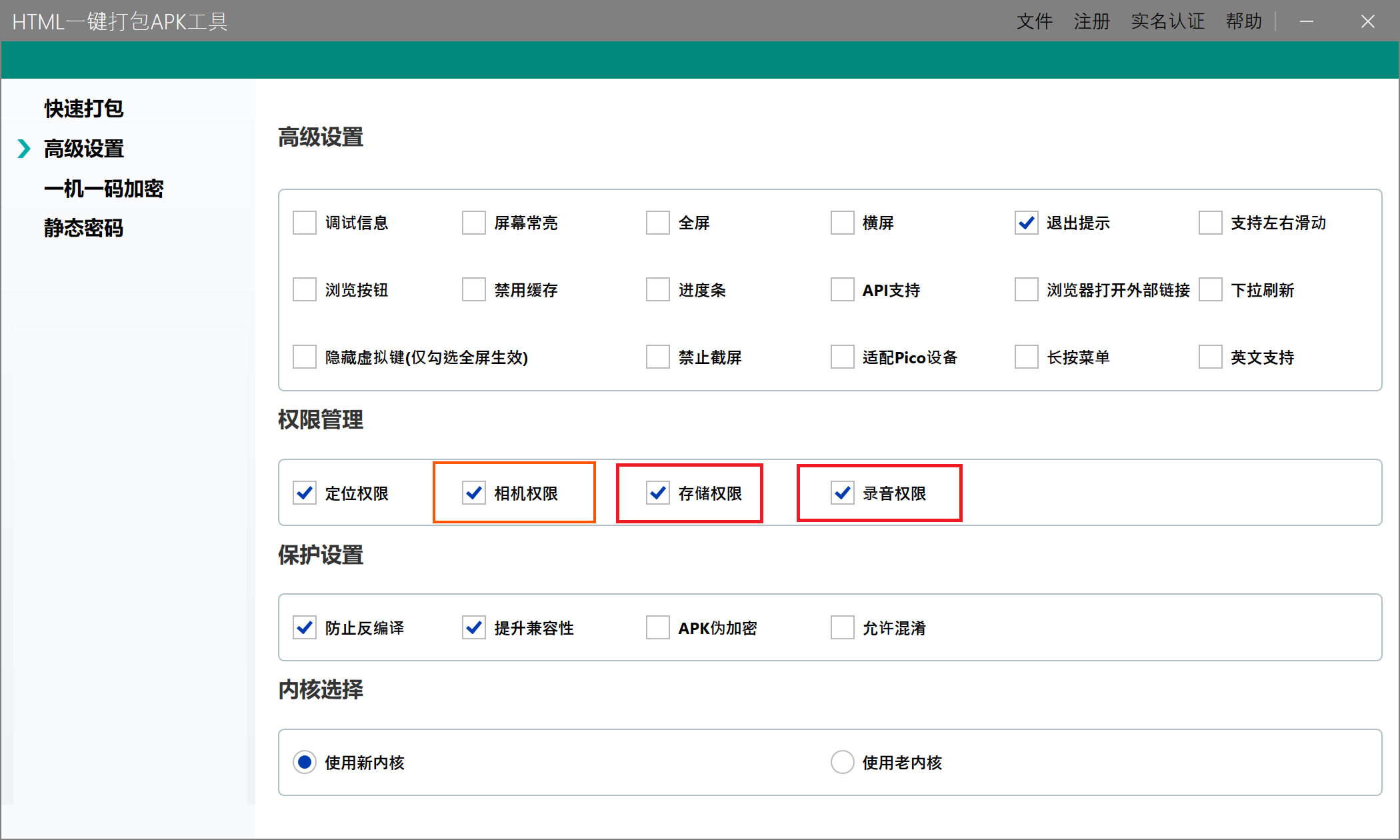
打开HTML一键打包APK工具,选择包含 index.html 的项目目录,填写应用名称、包名等打包信息。
在权限设置中勾选"相机权限"和"麦克风权限":
- 相机权限用于拍摄照片、录制视频以及网页调用摄像头。
- 麦克风权限用于网页录音;录制带声音的视频时也需要该权限。
- 普通文件选择通过安卓系统文件选择器完成,用户只会授权当前选择的文件。
确认配置后开始打包,等待工具生成APK文件。
安装并测试功能
将生成的APK安装到安卓手机,依次测试页面中的四个入口:
- 点击"拍摄照片",确认APP直接打开相机拍照页面。
- 点击"录制视频",确认APP直接打开视频录制页面,并且能够正常保存视频。
- 点击"录制音频",首次使用时允许APP访问麦克风,停止录音后确认页面能够显示并下载录音文件。
- 点击"选择文件",确认系统文件选择界面正常打开,并且可以选择一个或多个文件。
不同品牌手机使用的相机和文件管理应用可能不同,因此系统界面的样式会有差异。capture 属性用于告诉安卓当前需要拍照还是录像,但最终的采集界面由手机系统和默认相机应用提供。
如果拍照或录像入口没有打开对应页面,请先检查APP的相机权限;如果网页无法开始录音,请检查麦克风权限。对于在线页面,网页录音通常还要求通过HTTPS加载;打包到APP内的本地页面则由WebView和APP权限共同控制。