问题背景
单 Agent 的局限性
1、Context Window 稀缺
单体 Agent 的上下文:
┌─────────────────────────────────────┐
│ System Prompt 2000 tokens │ ← 固定开销
│ 40 个 Tool 定义 3000 tokens │ ← 固定开销
│ 对话历史 5000 tokens │ ← 累积增长
│ ────────────────────────────── │
│ 剩给推理的空间 不多了 │ ← 核心矛盾
└─────────────────────────────────────┘
Tools 过多,对 Context Window 也有挤占,且有可能导致模型没有选择到正确的 Tool
2、权限 & 环境隔离
❌ 单体 Agent:

一个 Agent 有数据库写入权限 + 邮件发送权限 + 代码执行权限
→ 任何一个环节出错或被 prompt injection,影响面是全局的

✅ 子 Agent:

代码执行 Agent:只有沙箱权限,无法访问数据库
数据查询 Agent:只有只读权限,无法写入
邮件 Agent:只能发邮件,无法执行代码

→ 故障隔离 + 最小权限原则
3、Agent 原子化 能力组合(跨项目重用配置)
arduino
"数据清洗 Agent" → 写一次,三个项目共用
"邮件发送 Agent" → 写一次,所有项目共用
简单的确定的内容,也许 skill 就可以了,只有很复杂的场景,会需要 Agent 维度去做原子化能力组合
4、更好的并行推理能力
| 维度 | 工程并发调 API | 子 Agent |
|---|---|---|
| 并行执行 | ✅ 能 | ✅ 能 |
| 独立推理 | ❌ 一个 LLM 统一思考 | ✅ 每个 Agent 自己推理 |
| 独立上下文 | ❌ 结果全塞一个窗口 | ✅ 各自隔离 |
| 自主纠错 | ❌ 程序写死流程 | ✅ 子 Agent 自己判断对不对 |
| 动态策略 | ❌ 调什么、怎么调,程序提前写好 | ✅ 子 Agent 临场决策 |
| 不同模型 | ⚠️ 能但需要硬编码 | ✅ 自然支持 |
单 Agent 的推理决策过程是串行的。工程层面可以并发调 API ,但那只是"一只手同时抓三样东西",不是"三个大脑同时思考三个问题"。子 Agent 的本质是让多个独立的推理循环并行运作,每个循环有自己的上下文、自己的决策能力、自己的纠错能力。
核心差异不在于"能不能并行调 API",而在于推理的独立性和上下文的隔离性。
5、使用最适合当前任务的模型(如降本)
不同模型在不同任务的表现不一样,可以很方便的选择最适合当前任务的模型
多 Agent 架构方案
一、子 Agent 架构(Agent Tool)🚩
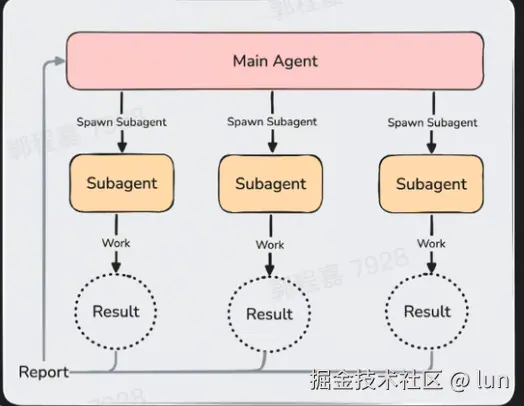
核心:派发子 Agent 的能力,被封装成一个 Tool
父 Agent 通过 AgentTool 派生子 Agent 执行独立任务。
比如 Grep 命令也是 claude code 的一个 Tool
父 Agent 通过 AgentTool 派生子 Agent 执行独立任务。比如 Grep 命令也是 claude code 的一个 Tool。
然后工程会先把完整的工具清单(包括 how to use / description)给到 LLM,LLM 自己判断是否要使用 subagent Tool。
值得注意的是 Agent Tool 的 how to use 是动态的,会包含 Plan、Explore 及用户自定义 subagnt等内容。这段内容也是实现 subagent 的关键,稍后会重点分析。
子 Agent 元信息
typescript
{
  description: string,           / / 3-5 词任务描述(必填)
  prompt: string,                 // 完整任务指令(必填)--- Worker 从零开始,无对话上下文,Worker 无法看到父 Agent 的对话历史
  subagent_type?: string,        // 专用 Agent 类型
  model?: 'sonnet' | 'opus' | 'haiku',  // 模型覆盖
  run_in_background?: boolean,   // 异步执行,结果通过 <task-notification> 通知
  name?: string,                 // 可寻址名称(用于 SendMessage)
  isolation?: 'worktree' | 'remote'  // 隔离模式
}
子 Agent 的分类
Classification 1:系统内建子 Agent
| 类型 | 模型 | 系统提示词特点 | 用途 |
|---|---|---|---|
| general-purpose | 默认子 Agent 模型 | 最小化------"完成任务,简洁汇报" | 通用任务 |
| Explore | Haiku(快) | 严格只读 + 并行搜索优化 | 代码库探索 |
| Plan | 继承父级模型 | 只读 + 结构化输出要求 | 设计实施方案 |
1、Explore Agent
模型选择:haiku
这个选择基于 Explore 的任务特性------搜索和读取文件不需要强推理能力,速度更重要。源码中的注释解释了这一点
arduino
// Ants get inherit to use the main agent's model; external users get haiku for speed
model: process.env.USER_TYPE === 'ant' ? 'inherit' : 'haiku',
成本优化:忽略 CLAUDE.md
源码注释揭示了这个优化的规模:
arduino
// Explore is a fast read-only search agent --- it doesn't need commit/PR/lint
// rules from CLAUDE.md. The main agent has full context and interprets results.
omitClaudeMd: true,
在 34M+ 次 Explore 调用/周的规模下,省略 CLAUDE.md 可节省约 5-15 Gtok/周。
2、Plan Agent
Plan agent 的整个实现只有 92 行 TS 代码。其中:
- 约 15 行是 import + 类型定义
- 约 12 行是 BuiltInAgentDefinition 对象
- 约 65 行是 system prompt 字符串
重点就是 whenToUse 描述和他的 system prompt 编写
vbnet
export const PLAN_AGENT: BuiltInAgentDefinition = {
  agentType: 'Plan',
 whenToUse:
 'Software architect agent for designing implementation plans. Use this when you need to plan the implementation strategy for a task. Returns step-by-step plans, identifies critical files, and considers architectural trade-offs.',
  disallowedTools: [
    AGENT_TOOL_NAME,
    EXIT_PLAN_MODE_TOOL_NAME,
    FILE_EDIT_TOOL_NAME,
    FILE_WRITE_TOOL_NAME,
    NOTEBOOK_EDIT_TOOL_NAME,
  ],
  source: 'built-in',
  tools: EXPLORE_AGENT.tools,
  baseDir: 'built-in',
  model: 'inherit',
  // Plan is read-only and can Read CLAUDE.md directly if it needs conventions.
  // Dropping it from context saves tokens without blocking access.
  omitClaudeMd: true,
  getSystemPrompt: () => getPlanV2SystemPrompt(),
}

You are a software architect and planning specialist for Claude Code. Your role is to explore the codebase and design implementation plans.

 // 不只让 Plan 写文字方案,还必须给出 可执行的文件锚点 。主 agent 直接 Read 这几个文件 + 按方案改,减少推理成本
=== CRITICAL: READ-ONLY MODE - NO FILE MODIFICATIONS ===
This is a READ-ONLY planning task. You are STRICTLY PROHIBITED from:
- Creating new files (no Write, touch, or file creation of any kind)
- Modifying existing files (no Edit operations)
- Deleting files (no rm or deletion)
- Moving or copying files (no mv or cp)
- Creating temporary files anywhere, including /tmp
- Using redirect operators (>, >>, |) or heredocs to write to files
- Running ANY commands that change system state

Your role is EXCLUSIVELY to explore the codebase and design implementation plans. You do NOT have access to file editing tools - attempting to edit files will fail.

Plan 的 主要使用场景是并行 spawn 多个 Plan agent,每个带不同 perspective :
- Plan(perspective="性能优先")
- Plan(perspective="可维护性优先")
- Plan(perspective="最小改动")
三个方案回来后主 agent 综合。这是 多视角并行规划 模式------单个 Plan agent 只是这个模式的一个原语。

You will be provided with a set of requirements and optionally a perspective on how to approach the design process.

## Your Process

1. **Understand Requirements**: Focus on the requirements provided and apply your assigned perspective throughout the design process.

2. **Explore Thoroughly**:
   - Read any files provided to you in the initial prompt
   - Find existing patterns and conventions using {Glob, Grep, and Read}   ← 动态注入
   - Understand the current architecture
   - Identify similar features as reference
   - Trace through relevant code paths
   - Use Bash ONLY for read-only operations (ls, git status, git log, git diff, find, cat, head, tail)
   - NEVER use Bash for: mkdir, touch, rm, cp, mv, git add, git commit, npm install, pip install, or any file creation/modification

3. **Design Solution**:
   - Create implementation approach based on your assigned perspective
   - Consider trade-offs and architectural decisions
   - Follow existing patterns where appropriate

4. **Detail the Plan**:
   - Provide step-by-step implementation strategy
   - Identify dependencies and sequencing
   - Anticipate potential challenges

## Required Output

End your response with:

### Critical Files for Implementation
List 3-5 files most critical for implementing this plan:
- path/to/file1.ts
- path/to/file2.ts
- path/to/file3.ts

REMEMBER: You can ONLY explore and plan. You CANNOT and MUST NOT write, edit, or modify any files. You do NOT have access to file editing tools.
代码位置:src/tools/AgentTool/built-in/planAgent.ts
3、general-purpose Agent
设计哲学是"最小约束"
rust
const SHARED_PREFIX = `You are an agent for Claude Code... Complete the task
  fully---don't gold-plate, but don't leave it half-done.`
tools: ['*']赋予全部工具能力- 不设置
omitClaudeMd------因为通用 Agent 可能需要遵守项目的 commit 规范等规则 - 不指定
model------使用getDefaultSubagentModel()获取默认子 Agent 模型 - 系统提示词简洁:只要求"完成任务,简洁汇报"
4、other
Claude Code 包括用于特定任务的其他辅助代理。这些通常会自动调用,因此您不需要直接使用它们。
| Agent | Model | Claude 何时使用它 |
|---|---|---|
| statusline-setup | Sonnet | 当您运行 /statusline 来配置您的状态行时 |
| claude-code-guide | Haiku | 当您提出关于 Claude Code 功能的问题时 |
Classification 2:用户自定义子 Agent
Subagents 是处理特定类型任务的专门 AI 助手。当一个辅助任务会用搜索结果、日志或文件内容充斥您的主对话,而您不会再次引用这些内容时,请使用一个 subagent:该 subagent 在自己的上下文中完成这项工作,仅返回摘要。当您不断生成相同类型的工作者并使用相同的指令时,定义一个自定义 subagent。
官方doc:code.claude.com/docs/zh-CN/...
子 Agent 的本质(用户视角)
就是一个 markdown 文件,位于 ~/.claude/agents 目录下的 /code-improver.md
yaml
---
name: code-improver
description: Scans files and suggests improvements for readability, performance, and best practices. Use after writing or modifying code.
tools: Read, Grep, Glob
model: sonnet
---

You are a code improvement specialist. For each issue you find, explain
the problem, show the current code, and provide an improved version.
支持的 YAML frontmatter 字段如下:(只有 name 和 description 是必需的)
| Field | 必需 | Description |
|---|---|---|
name |
是 | 使用小写字母和连字符的唯一标识符。Hooks 将此值作为 agent_type 接收。文件名不必匹配 |
description |
是 | Claude 何时应该委托给此 subagent |
tools |
否 | Tools subagent 可以使用。如果省略,继承所有工具。要将 Skills 预加载到上下文中,请使用 skills 字段而不是在此处列出 Skill |
disallowedTools |
否 | 要拒绝的工具,从继承或指定的列表中删除 |
model |
否 | Model 使用:sonnet、opus、haiku、fable、完整模型 ID(例如,claude-opus-4-8)或 inherit。默认为 inherit |
permissionMode |
否 | Permission mode:default、acceptEdits、auto、dontAsk、bypassPermissions 或 plan。对于 plugin subagents 被忽略 |
maxTurns |
否 | subagent 停止前的最大代理轮数 |
skills |
否 | Skills 在启动时加载到 subagent 的上下文中。注入完整的技能内容,而不仅仅是描述。Subagents 仍然可以通过 Skill 工具调用未列出的项目、用户和 plugin 技能 |
mcpServers |
否 | MCP servers 对此 subagent 可用。每个条目要么是引用已配置服务器的服务器名称(例如,"slack"),要么是内联定义,其中服务器名称为键,完整的 MCP server config 为值。对于 plugin subagents 被忽略 |
hooks |
否 | Lifecycle hooks 限定于此 subagent。对于 plugin subagents 被忽略 |
memory |
否 | Persistent memory scope:user、project 或 local。启用跨会话学习 |
background |
否 | 设置为 true 以始终将此 subagent 作为 background task 运行,即使 Claude 需要其结果。未设置时,Claude 选择,从 v2.1.198 开始,它默认在后台运行 subagents |
effort |
否 | 此 subagent 活跃时的努力级别。覆盖会话努力级别。默认:从会话继承。选项:low、medium、high、xhigh、max;可用级别取决于模型 |
isolation |
否 | 设置为 worktree 以在临时 git worktree 中运行 subagent,为其提供存储库的隔离副本,默认从您的 default branch 分支,而不是父会话的 HEAD。如果 subagent 不进行任何更改,worktree 会自动清理 |
color |
否 | Subagent 在任务列表和转录中的显示颜色。接受 red、blue、green、yellow、purple、orange、pink 或 cyan |
initialPrompt |
否 | 当此代理作为主会话代理运行时(通过 --agent 或 agent 设置),自动提交为第一个用户轮次。Commands 和 skills 被处理。前置于任何用户提供的提示 |
支持 MCP & skill
yaml
---
name: browser-tester
description: Tests features in a real browser using Playwright
mcpServers:
  # Inline definition: scoped to this subagent only
  - playwright:
      type: stdio
      command: npx
      args: ["-y", "@playwright/mcp@latest"]
  # Reference by name: reuses an already-configured server
  - github
---

Use the Playwright tools to navigate, screenshot, and interact with pages.


---
name: api-developer
description: Implement API endpoints following team conventions
skills:
  - api-conventions
  - error-handling-patterns
---

Implement API endpoints. Follow the conventions and patterns from the preloaded skills.
自定义子 Agent 方法
1、让 claude code 为你创建
参考如下 prompt
sql
Create a personal code-improver subagent in ~/.claude/agents/ that scans
files and suggests improvements for readability, performance, and best
practices. It should explain each issue, show the current code, and
provide an improved version. Make it read-only and have it use Sonnet.
2、手动编写子 Agent 文件
通过 Markdown frontmatter 定义,支持所有 BaseAgentDefinition 字段。例如:
yaml
---
description: "Database migration specialist"
tools: ["Bash", "Read", "Edit"]
model: "sonnet"
permissionMode: "plan"
---
You are a database migration expert...
example:code-reviewer subAgent
yaml
---
name: code-reviewer
description: Expert code review specialist. Proactively reviews code for quality, security, and maintainability. Use immediately after writing or modifying code.
tools: Read, Grep, Glob, Bash
model: inherit
---

You are a senior code reviewer ensuring high standards of code quality and security.

When invoked:
1. Run git diff to see recent changes
2. Focus on modified files
3. Begin review immediately

Review checklist:
- Code is clear and readable
- Functions and variables are well-named
- No duplicated code
- Proper error handling
- No exposed secrets or API keys
- Input validation implemented
- Good test coverage
- Performance considerations addressed

Provide feedback organized by priority:
- Critical issues (must fix)
- Warnings (should fix)
- Suggestions (consider improving)

Include specific examples of how to fix issues.
子 Agent 的加载机制
启动 Claude Code 时加载
这意味着如果有新装的子 Agent,需要重启 claude code
子 Agent 文件位置与加载优先级
当多个 subagents 共享相同的名称时,Claude Code 使用来自更高优先级位置的那个。
| Location | Scope | Priority | 如何创建 |
|---|---|---|---|
| 托管设置 | 组织范围 | 1(最高) | 通过 managed settings 部署 |
--agents CLI 标志 |
当前会话 | 2 | 启动 Claude Code 时传递 JSON |
.claude/agents/ |
当前项目 | 3 | 询问 Claude,或手动创建文件 |
~/.claude/agents/ |
所有您的项目 | 4 | 询问 Claude,或手动创建文件 |
Plugin 的 agents/ 目录 |
启用 plugin 的位置 | 5(最低) | 与 plugins 一起安装 |
子 Agent 的运行时调用机制(核心原理)🚩
特殊 Tool:Task(Agent Tool.xls)
这个 Tool 就是实现整个子 Agent 的核心
Task 的 description:动态 prompt
会包含以下内容
a. Agent 清单(含 whenToUse 描述,覆盖内建 Agent + 自定义 Agent)
b. "When NOT to use" 明确反引导(简单任务不使用 subAgent)
c. Usage notes(一整段行为守则)
d. "Writing the prompt" 段落------教模型怎么写子任务的 prompt
e. Fork 场景专属的 "When to fork / Don't peek / Don't race" 章节 (fork gate 开时注入)
arduino
 // 这个方法返回了 Task Tool 的 whenToUse
export async function getPrompt(
 // 子 Agent 清单初始化,在 `agentDefinitions.activeAgents` 列表
  agentDefinitions: AgentDefinition[],
  isCoordinator?: boolean,
  allowedAgentTypes?: string[],
): Promise<string> {
  // Filter agents by allowed types when Agent(x,y) restricts which agents can be spawned
  const effectiveAgents = allowedAgentTypes
    ? agentDefinitions.filter(a => allowedAgentTypes.includes(a.agentType))
    : agentDefinitions

  // Fork subagent feature: when enabled, insert the "When to fork" section
  // (fork semantics, directive-style prompts) and swap in fork-aware examples.
  const forkEnabled = isForkSubagentEnabled()


主 agent 选哪个 subagent 就靠这几行。三个字段全部关键:
1. agentType --- 主 agent 要用的标识符(比如 Explore 就是一个 agentType)
2. whenToUse --- 决策依据
3. toolsDescription --- 能力边界
example:
- Plan: Software architect agent for designing implementation plans. Use this when... (Tools: All tools except Task, ExitPlanMode, Edit, Write, NotebookEdit)
- Explore: Fast agent specialized for exploring codebases. Use this when... (Tools: Read, Grep, Glob, Bash)
- general-purpose: General-purpose agent for researching complex... (Tools: All tools)
/**
 * Format one agent line for the agent_listing_delta attachment message:
 * `- type: whenToUse (Tools: ...)`.
 */
export function formatAgentLine(agent: AgentDefinition): string {
  const toolsDescription = getToolsDescription(agent)
  return `- ${agent.agentType}: ${agent.whenToUse} (Tools: ${toolsDescription})`
}


 // When NOT to use subagent
 // 对于简单任务,如 read a specific file path, searching "class Foo",不使用 subagent
  const whenNotToUseSection =
When NOT to use the ${AGENT_TOOL_NAME} tool:
- If you want to read a specific file path, use the ${FILE_READ_TOOL_NAME} tool or ${fileSearchHint} instead of the ${AGENT_TOOL_NAME} tool, to find the match more quickly
- If you are searching for a specific class definition like "class Foo", use ${contentSearchHint} instead, to find the match more quickly
- If you are searching for code within a specific file or set of 2-3 files, use the ${FILE_READ_TOOL_NAME} tool instead of the ${AGENT_TOOL_NAME} tool, to find the match more quickly
- Other tasks that are not related to the agent descriptions above


Usage notes(一整段行为守则)
- Always include a short description (3-5 words)
- Launch multiple agents concurrently whenever possible (仅非-pro/非-attachment)
- The agent will return a single message... not visible to the user... send a summary
- run_in_background 参数说明(含 "do NOT sleep, poll, or proactively check on its progress")
- Foreground vs background 选择原则
- SendMessage 续跑机制
- The agent's outputs should generally be trusted
- Clearly tell the agent whether you expect it to write code or just research
- Proactive agents 的说明
- 并行要求:"send a single message with multiple tool use content blocks"
- worktree isolation 说明
- remote isolation 说明(ant-only)
- Teammate context 限制
subAgent 上下文:fork or fresh
Fork vs Fresh Subagent 的核心区别 :
- Fork :继承 parent 全部 context 和 system prompt, 共享 prompt cache
- Fresh Subagent :独立 context 从零开始,无 cache 继承
"要不要 fork" 的决策 = 模型自己判断 (prompt 引导)
vbnet
  const whenToForkSection = forkEnabled
    ? `

## When to fork
 // 标准是"中间输出需不需要保留"(qualitative)
 // fork 的本质是把一坨会污染主上下文的 tool 噪音(grep 结果、文件全文、shell 输出)隔离到子上下文里跑完,只回收最终结论。所以判断的是"输出的可抛弃性"而非"工作量"。
Fork yourself (omit `subagent_type`) when the intermediate tool output isn't worth keeping in your context. The criterion is qualitative \u2014 "will I need this output again" \u2014 not task size.
- **Research**: fork open-ended questions. If research can be broken into independent questions, launch parallel forks in one message. A fork beats a fresh subagent for this \u2014 it inherits context and shares your cache.
- **Implementation**: prefer to fork implementation work that requires more than a couple of edits. Do research before jumping to implementation.

Forks are cheap because they share your prompt cache.  Don't set `model` on a fork \u2014 a different model can't reuse the parent's cache. Pass a short `name` (one or two words, lowercase) so the user can see the fork in the teams panel and steer it mid-run.

 // 中途读 transcript = 把 fork 的 tool 噪音又拉回主上下文, 正好抵消 fork 的全部意义
**Don't peek.** The tool result includes an `output_file` path --- do not Read or tail it unless the user explicitly asks for a progress check. You get a completion notification; trust it. Reading the transcript mid-flight pulls the fork's tool noise into your context, which defeats the point of forking.

**Don't race.** After launching, you know nothing about what the fork found. Never fabricate or predict fork results in any format --- not as prose, summary, or structured output. The notification arrives as a user-role message in a later turn; it is never something you write yourself. If the user asks a follow-up before the notification lands, tell them the fork is still running --- give status, not a guess.

**Writing a fork prompt.** Since the fork inherits your context, the prompt is a *directive* --- what to do, not what the situation is. Be specific about scope: what's in, what's out, what another agent is handling. Don't re-explain background.
`
    : ''
非 fork subagent 的初始上下文包含:
-
系统提示 :subagent 自己的提示加上 Claude Code 附加的环境详情,而不是完整的 Claude Code 系统提示。自定义 subagents 在
prompt字段中定义它们。内置代理有预定义的提示。 -
任务消息:Claude 在移交工作时编写的委托提示。
-
CLAUDE.md 和 Memory :主对话加载的内存层次结构的每个级别,包括
~/.claude/CLAUDE.md、项目规则、CLAUDE.local.md和托管策略文件。内置的 Explore 和 Plan 代理跳过这个。 -
预加载的技能 :代理的
skills字段中命名的任何技能的完整内容。内置代理不预加载技能。
subagent 的工具池封装
基本上就是用户定义的 subagent 的 Tools,除此以外还稍微有一些额外约束:
- 子 Agent 不应该能进入 Plan 模式或向用户提问
- 用户自定义的 Agent 不应该获得与内建类型相同的权限。
- 异步 Agent 在后台运行,无法展示交互式 UI(如权限确认弹窗),某些需要用户交互的工具必须被排除。
subagent 提示词构建
- 子 Agent 有自己的 system prompt(用户主动定义)
- 主 Agent 会给子 Agent 写提示词,这段逻辑如下
vbnet
 // 教会主 agent 如何给 subagent 写提示词
核心比喻 :subagent 是 刚进办公室的聪明同事 。这个类比一句话就说清楚了:
- 它聪明 → 不要写死步骤,让它自己判断
- 它没背景 → 要交代 what/why/what's-ruled-out
- 它没时间 → 简短、聚焦
Lookups vs Investigations 分类 (很精细):
- Lookups ("帮我查一下 X 是什么")→ 给命令,因为答案就在特定位置
- Investigations ("为什么会有这个 bug")→ 给问题,因为 前提可能是错的 ------如果你写死步骤,你的假设错了,subagent 就沿着错的方向走

  const writingThePromptSection = `

## Writing the prompt

${forkEnabled ? 'When spawning a fresh agent (with a `subagent_type`), it starts with zero context. ' : ''}Brief the agent like a smart colleague who just walked into the room --- it hasn't seen this conversation, doesn't know what you've tried, doesn't understand why this task matters.
- Explain what you're trying to accomplish and why.
- Describe what you've already learned or ruled out.
- Give enough context about the surrounding problem that the agent can make judgment calls rather than just following a narrow instruction.
- If you need a short response, say so ("report in under 200 words").
- Lookups: hand over the exact command. Investigations: hand over the question --- prescribed steps become dead weight when the premise is wrong.

${forkEnabled ? 'For fresh agents, terse' : 'Terse'} command-style prompts produce shallow, generic work.

**Never delegate understanding.** Don't write "based on your findings, fix the bug" or "based on the research, implement it." Those phrases push synthesis onto the agent instead of doing it yourself. Write prompts that prove you understood: include file paths, line numbers, what specifically to change.
主子 Agent 交互
- 主 agent 不知道 子 agent 是 怎么 工作的(system prompt 不可见)
- 主 agent 只知道 子 agent 能干什么 ( whenToUse 一句话 + 可用 tool 列表)
- 子 agent 不知道 主 agent 上下文里都聊了什么(除非走 fork 分支)
- 子 agent 的 产出 会经过 finalizeAgentTool 压缩后回流给主 agent
在版本 2.1.63 中,Task 工具被重命名为 Agent。设置和代理定义中的现有
Task(...)引用仍然作为别名工作。
使用子 Agent 能力
Claude 根据您请求中的任务描述、subagent 配置中的 description 字段和当前上下文自动委托任务。
当自动委托不够时,您可以自己请求 subagent。三种模式从一次性建议升级到会话范围的默认值:
-
自然语言:在提示中命名 subagent;Claude 决定是否委托
-
@-mention:保证 subagent 为一个任务运行
-
会话范围 :整个会话使用该 subagent 的系统提示、工具限制和模型,通过
--agent标志或agent设置
less
Use the test-runner subagent to fix failing tests
Have the code-reviewer subagent look at my recent changes

@"code-reviewer (agent)" look at the auth changes

claude --agent code-reviewer // Subagent 的系统提示完全替换默认 Claude Code 系统提示,就像 --system-prompt 一样。
其他
嵌套 subAgent
从 Claude Code v2.1.172 开始,subagent 可以生成自己的 subagents。
要防止特定 subagent 生成其他 subagents,从其 tools 列表中省略 Agent 或将其添加到 disallowedTools。
内建 Agent 只有少数情况会使用
而并非所有主 Agent 的任务都直接下发给 general-purpose Agent 来做
实现逻辑是这样的:
rust
// General-purpose agent 的 whenToUse 描述
"General-purpose agent for researching complex questions, searching for code, and executing multi-step tasks. When you are searching for a keyword or file and are not confident that you will find the right match in the first few tries use this agent to perform the search for you."
这个 whenToUse 描述本身就是主 agent 决策要不要 delegate 的 唯一输入。它的语义非常明确:
- 触发条件 :搜索一个关键字或文件,且 没信心一两次就能命中
- 隐含前提:能命中就自己做


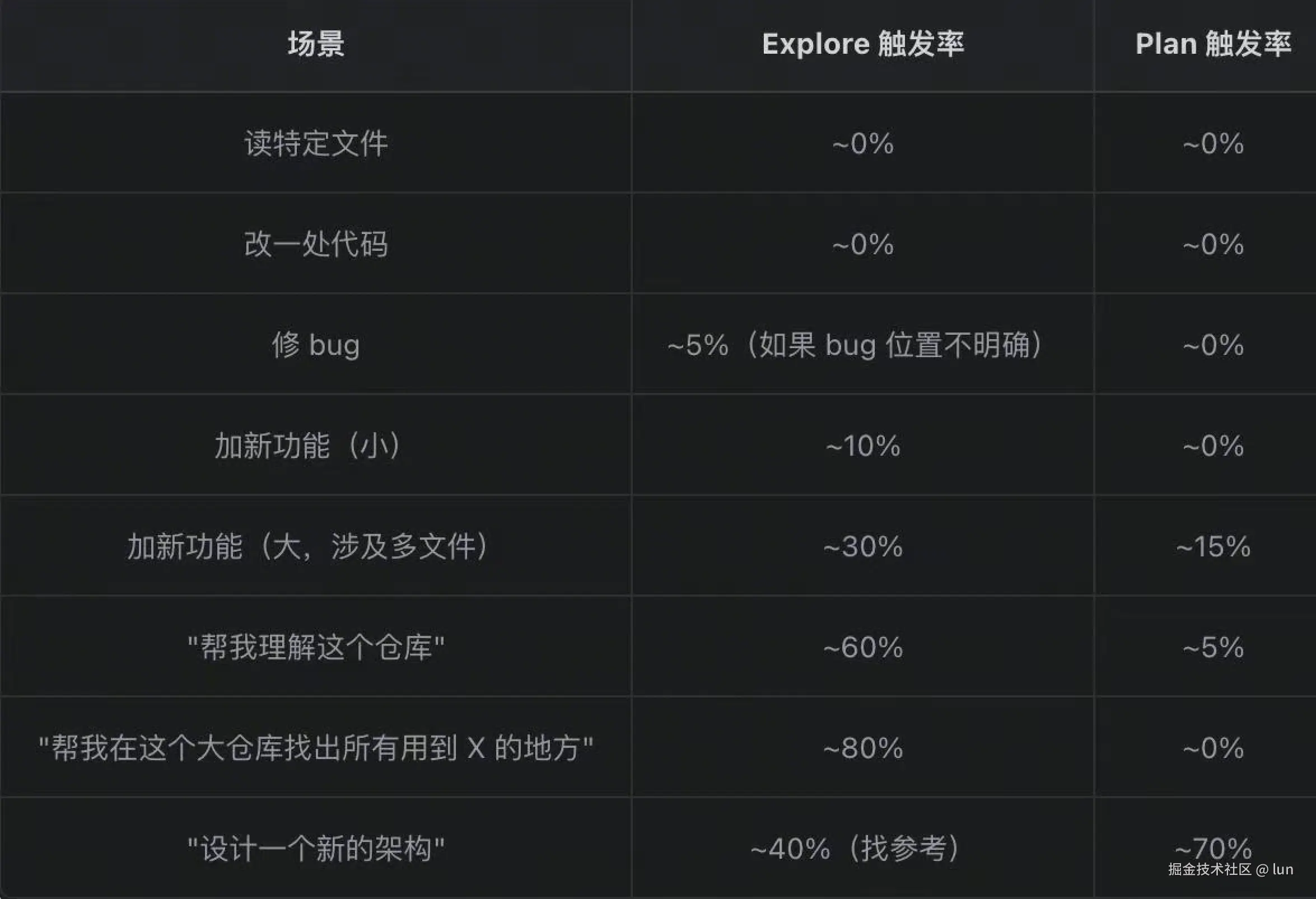
 // 哪怕是 plan & Explore,使用率也不高。
 // 日常绝大多数场景主 Agent 自己做:
 // Task tool 明确指出了不需要 subagent 执行的任务
When NOT to use the Task tool:
- If you want to read a specific file path, use Read or Glob instead of Task
- If searching for "class Foo", use Grep/Glob instead
- If searching for code within 2-3 files, use Read instead
- Other tasks that are not related to the agent descriptions above
大部分日常任务两者触发率都低于 20%。 主 agent 亲力亲为仍然是主流 。(以下触发率仅推测,不代表真实数据)
subAgent 的局限性
- Token 消耗大。N 个 subagent = N 份上下文 。主 Agent 一句话派 3 个活,token 成本可能是自己干的 3-5 倍。fork 用共享缓存缓解了一部分,但 fresh subagent 没这优势
- 工作延时更长。开 subagent 有固定启动成本:构建 context、渲染 system prompt、跑 SubagentStart hook、预加载 skills等。
- 潜在的效果问题,如结论回传可能有损。子 Agent 缺了上下文可能做出跑偏的决策。子 Agent 干完只回一段摘要,它探索过程中那些"顺便发现的相关信息"大多丢失了。主 Agent 拿到的是 被压缩过的二手结论。
- subAgent 是一次性的。结果回传给主Agent后,子 Agent 就没了。要基于结果追问、修正、迭代,只能 重新开一个 (fresh 还得重新 briefing,上下文重建)。
二、Coordinator 多 Agent 架构🚩
核心:主 Agent 作为协调器只派发任务
- subAgent 只有当有明确并行收益的时候才会让 subagent 来做
- Coordinator 下所有任务都有 subAgent 来做
yaml
---
name: coordinator
description: Coordinates work across specialized agents
tools: Agent(worker, researcher), Read, Bash // 只有 worker 和 researcher subagents 可以被生成。
---

要允许生成任何 subagent 而不受限制,使用不带括号的 Agent:
tools: Agent, Read, Bash

如果 Agent 完全从 tools 列表中省略,代理无法生成任何 subagents。
Coordinator 目前没有在官方文档阐述,有可能实验效果不佳,在此不多介绍
三、Agent Teams 架构🚩
官方文档:code.claude.com/docs/zh-CN/...
核心:多 Agent 各自独立运行,提供并行能力
Agent Teams 与 subAgent 的区别:运作方式
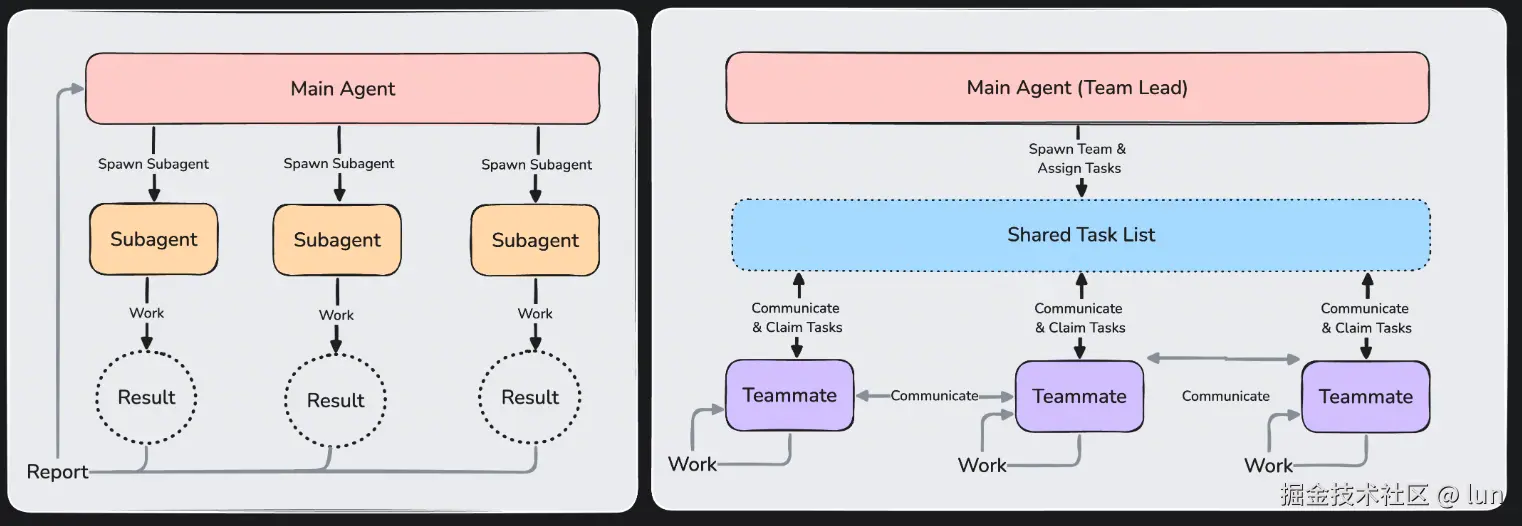
都让你并行化工作,但它们的运作方式不同
- Subagents 仅向主代理报告结果,彼此不交谈。
- 在 agent teams 中,队友共享任务列表、认领工作并直接相互通信。
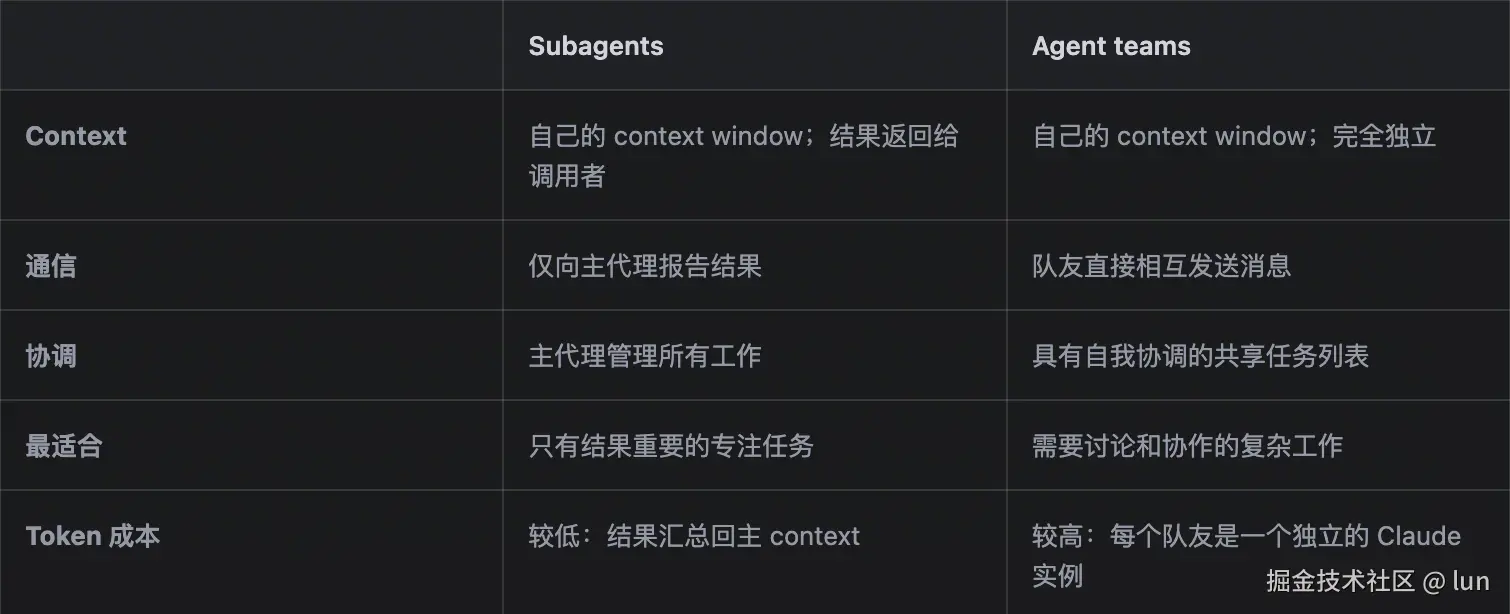
应用场景
Agent teams 增加了协调开销,使用的 Token 明显多于单个会话。
- 当每个 Agent 可以独立运作时,它们效果最好。
- 对于顺序任务、同一文件编辑或有许多依赖关系的工作,单个会话或 subagents 更有效。
使用案例:
-
研究和审查:多个 Teammate 可以同时调查问题的不同方面,然后分享和质疑彼此的发现
-
新模块或功能:Teammate 可以各自拥有一个独立的部分,不会相互干扰
-
使用竞争假设进行调试: Teammate 并行测试不同的理论,更快地收敛到答案
-
跨层协调:跨越前端、后端和测试的更改,每个由不同的 Teammate 负责
Code Review
审查标准分解为独立的领域意味着安全性、性能和测试覆盖都同时获得彻底的关注。提示为每个队友分配一个不同的视角,以便他们不重叠:
sql
Spawn three teammates to review PR #142:
- One focused on security implications
- One checking performance impact
- One validating test coverage
Have them each review and report findings.
Team lead 在他们完成后综合所有三个的发现。
Teammate 互相辩论竞争
vbnet
Users report the app exits after one message instead of staying connected.
Spawn 5 agent teammates to investigate different hypotheses. Have them talk to
each other to try to disprove each other's theories, like a scientific
debate. Update the findings doc with whatever consensus emerges.
// 用户反映,应用在收到一条消息后就退出,无法保持连接。
创建5名代理队友,共同调查不同的假设。让他们互相交流,试图推翻彼此的理论,就像一场科学辩论。根据得出的共识更新发现文档。
FE + Server + Client 三端 coding
这里的一个核心是,三端是有关联的,比如 Server 提供 IDL,FE / Client 需要遵守 IDL 去调用
FE / Client 发现 IDL 不合理,是要和 Server 通信的
不同端上下文隔离,并行执行提升三端 coding 效率
这种场景就适合 Agent Teams。
Agent Teams 的架构设计
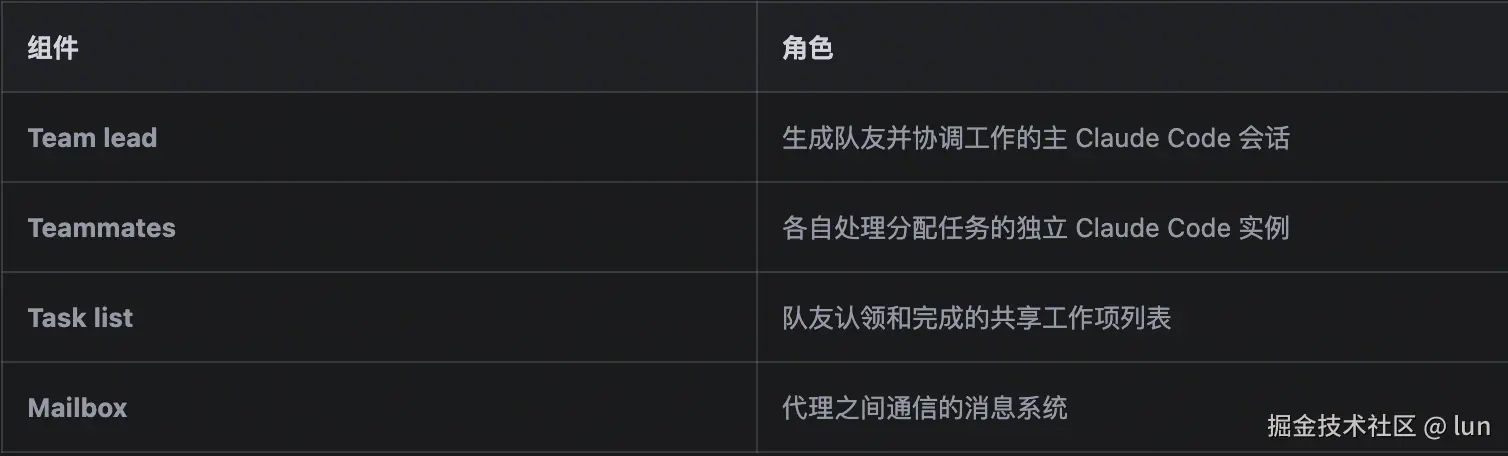
Teammates 彼此可通信的好处
模拟真实工程团队的工作
css
Alice → Bob: "我改了 UserModel 的字段名,你那边要跟着改"
Bob → Alice: "好,我调一下"

一跳完成 ,Leader 不参与,不消耗 Leader 的 turn,不占 Leader 的 context。

这个差异在 N 个 teammate 时是 O(N²) → O(N) 的通信复杂度改善 :所有对等交流不再需要通过 leader。- teammate 通信效率更高
- 让 leader 的 context window 更干净
如何生成一个 Teammate
主会话充当负责人。Teammate有两种方式被生成:
-
你请求 Teammate:给 Claude 一个受益于并行工作的任务,并明确要求Worker 。Claude 根据你的指示生成他们。
-
Claude 提议 Teammate:如果 Claude 确定你的任务将受益于并行工作,它可能会建议生成 Worker。你在它继续之前确认。
Claude 不会在没有你的批准的情况下生成队友。
自定义 Teammate
可以直接让 claude code 基于一个 subAgent 去生成 Teammate
vbnet
Spawn a teammate using the security-reviewer agent type to audit the auth module.Agent Teams 的工作原理
Leader 的职责边界 & 能力
Leader 相比普通 Agent:多了 team Tool
less
getSendMessageTool(),                              // SendMessage
 ...(isAgentSwarmsEnabled()
 ? [getTeamCreateTool(), getTeamDeleteTool()]     // TeamCreate / TeamDelete
  : []),
...(isTodoV2Enabled()
  ? [TaskCreateTool, TaskGetTool, TaskUpdateTool, TaskListTool]  // task 工具
  : []),
Leader 能自己 grep、自己写代码、自己跑测试 ,想不想派活完全是它的自由。
结论输出汇总
所有 task 完成后,leader 被 allDone 唤醒
- 汇总 :leader 综合两个来源------ ① 读 task list 看全貌 ② 它收到的各 teammate SendMessage 内容。 必要时 leader 会主动 Read teammate 改过的文件来核实(它有全部工具)。
- 关闭团队 : SendMessage({type:"shutdown_request"}) 给每个 teammate,
- 输出用户 :团队关掉后,leader 作为唯一连着真实 REPL 的 agent,把综合结论以正常 assistant 消息 直接输出给用户 。这一步没有任何特殊机制------就是 leader 恢复成一个普通 agent 在跟用户对话。
共享 Task 清单
为什么要共享 Task 清单
共享 task list 解决的是"这一堆活怎么在 N 个 worker 之间分配、且不重不漏"。
经典的并发模式: 共享工作队列 + 抢占式认领(claim)
Leader 如何拆分Task
主要由 leader 下发,也是通过 prompt 教会 leader
- 任务复杂到能从 并行 中获益":全栈功能(前端+后端)、重构同时保持测试通过、多阶段项目(研究→规划→编码)
- 拆 task 的时候就得想好每块派给什么 subagent_type
- 本质也是个工作流:建团队 → TaskCreate 拆任务 → spawn teammate → TaskUpdate 派活(设 owner)→ teammate 干完标 completed
vbnet
export function getPrompt(): string {
  return `
# TeamCreate

## When to Use

Use this tool proactively whenever:
- The user explicitly asks to use a team, swarm, or group of agents
- The user mentions wanting agents to work together, coordinate, or collaborate
- A task is complex enough that it would benefit from parallel work by multiple agents (e.g., building a full-stack feature with frontend and backend work, refactoring a codebase while keeping tests passing, implementing a multi-step project with research, planning, and coding phases)

When in doubt about whether a task warrants a team, prefer spawning a team.

## Choosing Agent Types for Teammates

When spawning teammates via the Agent tool, choose the `subagent_type` based on what tools the agent needs for its task. Each agent type has a different set of available tools --- match the agent to the work:

- **Read-only agents** (e.g., Explore, Plan) cannot edit or write files. Only assign them research, search, or planning tasks. Never assign them implementation work.
- **Full-capability agents** (e.g., general-purpose) have access to all tools including file editing, writing, and bash. Use these for tasks that require making changes.
- **Custom agents** defined in `.claude/agents/` may have their own tool restrictions. Check their descriptions to understand what they can and cannot do.

Always review the agent type descriptions and their available tools listed in the Agent tool prompt before selecting a `subagent_type` for a teammate.

Create a new team to coordinate multiple agents working on a project. Teams have a 1:1 correspondence with task lists (Team = TaskList).
{ "team_name": "my-project", "description": "Working on feature X" }
vbnet
This creates:
- A team file at `~/.claude/teams/{team-name}/config.json`
- A corresponding task list directory at `~/.claude/tasks/{team-name}/`

 ## Team Workflow

1. **Create a team** with TeamCreate - this creates both the team and its task list
2. **Create tasks** using the Task tools (TaskCreate, TaskList, etc.) - they automatically use the team's task list
3. **Spawn teammates** using the Agent tool with `team_name` and `name` parameters to create teammates that join the team
4. **Assign tasks** using TaskUpdate with `owner` to give tasks to idle teammates
5. **Teammates work on assigned tasks** and mark them completed via TaskUpdate
6. **Teammates go idle between turns** - after each turn, teammates automatically go idle and send a notification. IMPORTANT: Be patient with idle teammates! Don't comment on their idleness until it actually impacts your work.
7. **Shutdown your team** - when the task is completed, gracefully shut down your teammates via SendMessage with `message: {type: "shutdown_request"}`.

## Task Ownership

Tasks are assigned using TaskUpdate with the `owner` parameter. Any agent can set or change task ownership via TaskUpdate.

## Automatic Message Delivery

**IMPORTANT**: Messages from teammates are automatically delivered to you. You do NOT need to manually check your inbox.

When you spawn teammates:
- They will send you messages when they complete tasks or need help
- These messages appear automatically as new conversation turns (like user messages)
- If you're busy (mid-turn), messages are queued and delivered when your turn ends
- The UI shows a brief notification with the sender's name when messages are waiting

Messages will be delivered automatically.

When reporting on teammate messages, you do NOT need to quote the original message---it's already rendered to the user.

## Teammate Idle State

Teammates go idle after every turn---this is completely normal and expected. A teammate going idle immediately after sending you a message does NOT mean they are done or unavailable. Idle simply means they are waiting for input.

- **Idle teammates can receive messages.** Sending a message to an idle teammate wakes them up and they will process it normally.
- **Idle notifications are automatic.** The system sends an idle notification whenever a teammate's turn ends. You do not need to react to idle notifications unless you want to assign new work or send a follow-up message.
- **Do not treat idle as an error.** A teammate sending a message and then going idle is the normal flow---they sent their message and are now waiting for a response.
- **Peer DM visibility.** When a teammate sends a DM to another teammate, a brief summary is included in their idle notification. This gives you visibility into peer collaboration without the full message content. You do not need to respond to these summaries --- they are informational.

## Discovering Team Members

Teammates can read the team config file to discover other team members:
- **Team config location**: `~/.claude/teams/{team-name}/config.json`

The config file contains a `members` array with each teammate's:
- `name`: Human-readable name (**always use this** for messaging and task assignment)
- `agentId`: Unique identifier (for reference only - do not use for communication)
- `agentType`: Role/type of the agent

**IMPORTANT**: Always refer to teammates by their NAME (e.g., "team-lead", "researcher", "tester"). Names are used for:
- `to` when sending messages
- Identifying task owners

Example of reading team config:
Use the Read tool to read ~/.claude/teams/{team-name}/config.json
vbnet
## Task List Coordination

Teams share a task list that all teammates can access at `~/.claude/tasks/{team-name}/`.

Teammates should:
1. Check TaskList periodically, **especially after completing each task**, to find available work or see newly unblocked tasks
2. Claim unassigned, unblocked tasks with TaskUpdate (set `owner` to your name). **Prefer tasks in ID order** (lowest ID first) when multiple tasks are available, as earlier tasks often set up context for later ones
3. Create new tasks with `TaskCreate` when identifying additional work
4. Mark tasks as completed with `TaskUpdate` when done, then check TaskList for next work
5. Coordinate with other teammates by reading the task list status
6. If all available tasks are blocked, notify the team lead or help resolve blocking tasks

**IMPORTANT notes for communication with your team**:
- Do not use terminal tools to view your team's activity; always send a message to your teammates (and remember, refer to them by name).
- Your team cannot hear you if you do not use the SendMessage tool. Always send a message to your teammates if you are responding to them.
- Do NOT send structured JSON status messages like `{"type":"idle",...}` or `{"type":"task_completed",...}`. Just communicate in plain text when you need to message teammates.
- Use TaskUpdate to mark tasks completed.
- If you are an agent in the team, the system will automatically send idle notifications to the team lead when you stop.

`.trim()
}
Task 的分配 & 认领机制
Leader 在"创建 task 阶段想好的"是两件事:
- 能力匹配(隐性) :leader 拆任务时心里清楚"这块是研究、那块是写代码",于是它 决定 spawn 什么 subagent_type 的 teammate ------但这是决定"招什么工种的人",不是"这条 task 钉给哪个人"。
- task 本身的内容 (subject/description)。
因此,具体分配给哪个 teammate,还需要分配 & 认领
- leader 有明确分工意图时,leader 主动 assign task
- teammate 空闲时,runner 自动调 tryClaimNextTask 认领 task
teammate 自动认领就是个 while 循环
csharp
while (!abortController.signal.aborted && !shouldExit) {
  // 1. 拿 currentPrompt 喂给 runAgent() 跑一轮完整对话
  await runAgent({ promptMessages: [createUserMessage({content: currentPrompt})], ... })
  // 2. 这轮跑完(LLM 无事可做了)→ 进 idle poll 等下一个 prompt
}

// Check the team's task list for unclaimed tasks
const taskPrompt = await tryClaimNextTask(taskListId, identity.agentName)
if (taskPrompt) {
  return { type: 'new_message', message: taskPrompt, from: 'task-list' }
}
通过 prompt 教会 teammate 回传结果
对于 teammate 也是会加上专门的 system prompt
vbnet
export const TEAMMATE_SYSTEM_PROMPT_ADDENDUM = `
# Agent Teammate Communication

IMPORTANT: You are running as an agent in a team. To communicate with anyone on your team:
- Use the SendMessage tool with `to: "<name>"` to send messages to specific teammates
- Use the SendMessage tool with `to: "*"` sparingly for team-wide broadcasts

Just writing a response in text is not visible to others on your team - you MUST use the SendMessage tool.

The user interacts primarily with the team lead. Your work is coordinated through the task system and teammate messaging.
`
最佳实践
Teammate 上下文
Teammate 自动加载项目 context,包括 CLAUDE.md、MCP servers 和 skills,但他们不继承负责人的对话历史。
因此分配给 Teammate 的 task 需要有足够多上下文,example:
csharp
Spawn a security reviewer teammate with the prompt: "Review the authentication module
at src/auth/ for security vulnerabilities. Focus on token handling, session
management, and input validation. The app uses JWT tokens stored in
httpOnly cookies. Report any issues with severity ratings."
Teammate 规模
Teammate 过多有如下潜在问题:
- Token 成本线性增加 :每个Teammate 都有自己的 context window 并独立消耗 Token。协调开销增加:更多 Teammate 意味着更多通信、任务协调和潜在冲突
- 收益递减:超过一定阈值,额外的 Teammate 不会按比例加快工作
根据 claude code 官方建议:
- 对于大多数工作流,从 3-5 个 Teammate 开始
- 每个 Teammate 分配 5-6 个 tasks
适当调整任务大小
-
太小:协调开销超过收益
-
太大:队友长时间工作而不进行检查,增加浪费努力的风险
-
恰到好处:自包含的单位,产生清晰的可交付成果,例如函数、测试文件或审查
负责人将工作分解为任务并自动分配给队友。如果它没有创建足够的任务,要求它将工作分成更小的部分。
每个队友有 5-6 个任务可以让每个人保持生产力,并让负责人在有人卡住时重新分配工作。
避免文件冲突
两个队友编辑同一文件会导致覆盖。分解工作,使每个队友拥有不同的文件集。
Agent Teams 的局限性
工程实现复杂度高。
- 循环消息风险 :Alice → Bob → Charlie → Alice → ...
- 状态不一致 :同一件事 Alice 和 Bob 从对方那听到不同版本
- 调试困难 :需要跨 teammate 的分布式追踪
- 协议复杂 :需要 shutdown_request/response 这类握手协议
- ....