接着上一节
【Linux】【busybox】经典软件busybox的介绍-CSDN博客
一、根文件系统的简介
1.1 什么是根文件系统
最直观的是就是
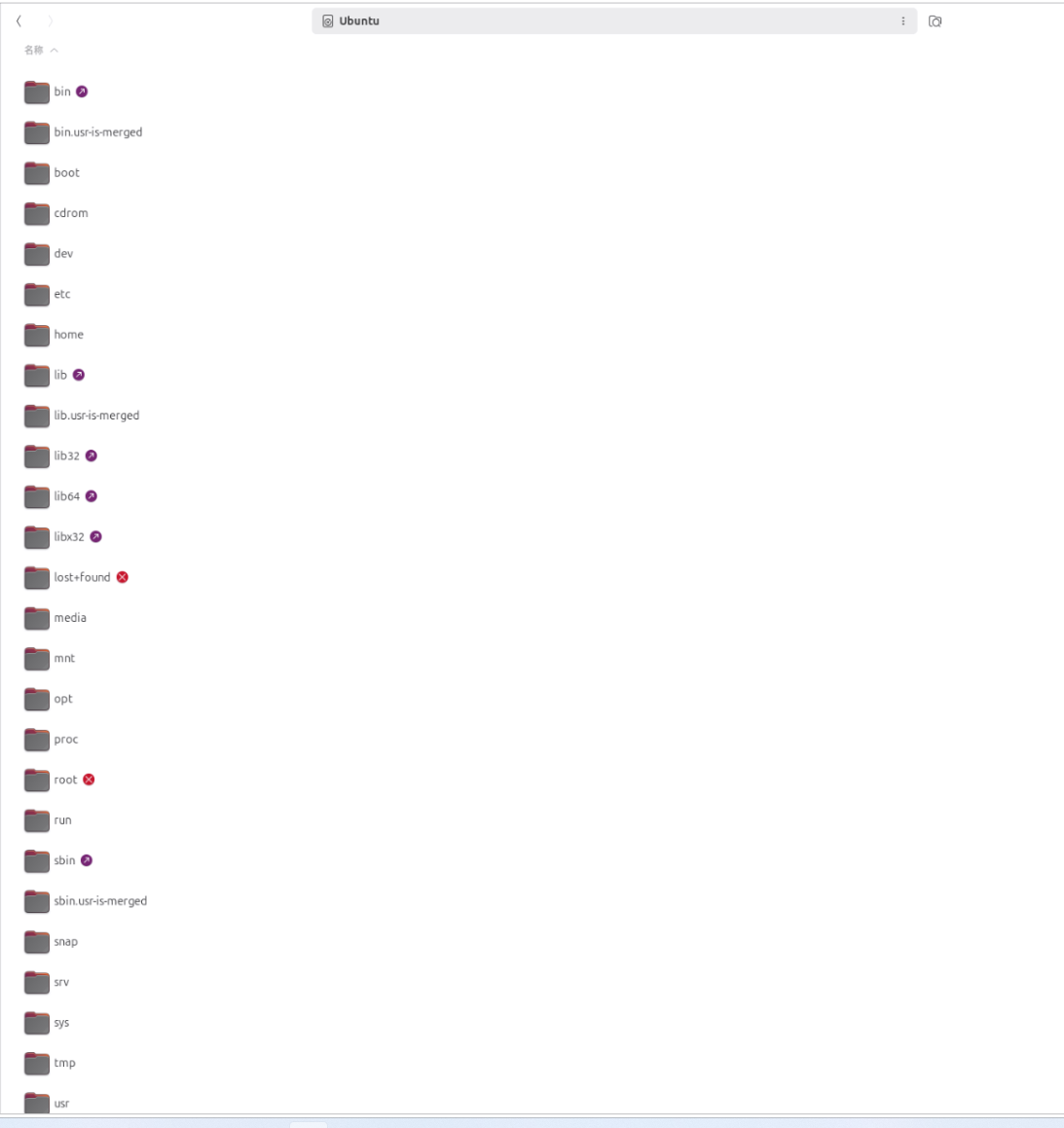
用户日常直接交互的那一层所有文件夹是根文件系统,内核作为底层支撑,运行在后台,不直接以文件夹的形式呈现给用户。

1.1.1 为什么需要根文件系统
(1)内核的局限性
Linux 内核本身只负责:
-
硬件管理(CPU调度、内存管理、设备驱动)
-
系统调用接口(为上层程序提供 API)
-
进程管理和网络协议栈
内核并不包含任何用户应用程序 ,它甚至连 ls、cp、cd 这样的基础命令都没有,也无法理解 /etc/passwd 这样的配置文件。
(2)系统 vs 内核
一个完整的 Linux 操作系统,应当包括:
-
内核空间:负责与硬件打交道,是系统的"发动机"。
-
用户空间:包含所有应用程序、配置文件、库文件、脚本等,是系统的"驾驶室"。
用户空间就存放在根文件系统中 ,它是一个目录树结构,从 /(根目录)开始,包含了 /bin、/etc、/home、/lib、/usr 等一系列子目录。内核启动后,必须挂载根文件系统,才能进入用户空间,加载 init 进程,从而启动完整的系统。
(3)"一切皆文件"与根文件系统的关系
"一切皆文件"并不只是指的是Linux抽象现实硬件设备的口号,同时它依赖于根文件系统提供的目录结构:
| 目录 | 作用 | 体现"一切皆文件"之处 |
|---|---|---|
/bin/ |
存放基本用户命令 | ls、cp 本身就是文件 |
/dev/ |
设备文件 | 硬盘 /dev/sda、终端 /dev/tty 都是文件 |
/proc/ |
进程信息(虚拟) | cat /proc/cpuinfo 查看 CPU 信息 |
/sys/ |
内核参数和设备信息(虚拟) | echo 1 > /sys/class/leds/.../brightness 控制 LED |
/etc/ |
配置文件 | 系统所有配置都是文本文件 |
/tmp/、/var/ |
临时数据和日志 | 运行时数据以文件形式存在 |
Linux 通过 VFS(虚拟文件系统) 这一层抽象,让用户可以用 统一的文件操作接口 (open、read、write)去访问任何资源------无论是普通文件、硬件设备,还是内核数据结构。
这一切的基础,就是一个完整挂载、结构正确的根文件系统。
(4)根文件系统是怎么"诞生"的
在嵌入式 Linux(如你正在制作的 D1s 开发板)中,根文件系统通常需要手动构建。过程大致如下:
-
创建目录骨架 :在某个空目录下创建
/bin、/dev、/etc、/lib、/proc、/sys、/tmp等目录。 -
添加核心工具 :编译 BusyBox,它用单个二进制文件提供了
ls、sh、mount等上百个常用命令,是嵌入式系统的"瑞士军刀"。 -
配置启动脚本 :编写
/etc/inittab、/etc/init.d/rcS等,让系统启动时自动挂载虚拟文件系统、设置主机名、启动登录进程。 -
打包或直接烧录 :将整个目录树制作成镜像文件(如
ext4、squashfs),或者直接复制到 SD 卡分区中。
你之前遇到的 /etc/profile 提示符显示问题,本质上就是在"构建用户空间"环节中,由于 BusyBox 的 ash shell 不支持 \u 和 \h 转义,导致 PS1 无法正常显示用户名和主机名。这恰好说明了 内核不关心这些细节,用户空间的工具和配置才决定了系统的"长相"和"手感"。
(5)根文件系统的"生长"过程
系统启动时,根文件系统的典型加载顺序如下:
-
内核启动,加载驱动,初始化硬件。
-
内核挂载初始根文件系统(initramfs),这是一个临时的小型根文件系统,用于加载真正的根文件系统驱动(比如 SD 卡驱动)。
-
内核切换到真正的根文件系统 (你烧录的
/dev/sdb1分区),执行/sbin/init(或 BusyBox 的 init)。 -
init 根据
/etc/inittab依次执行挂载 proc、devpts、sysfs、启动 rcS 脚本、最终弹出getty登录提示符。 -
整个 Linux 系统就此"活"了起来。
1.2 根文件系统的模样
这个是ubuntu的/

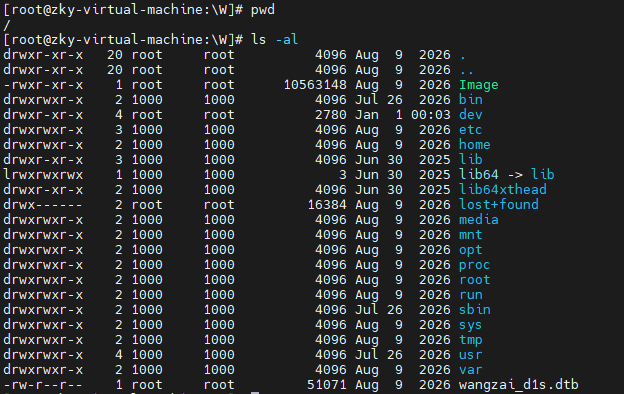
这个是开发板上的/
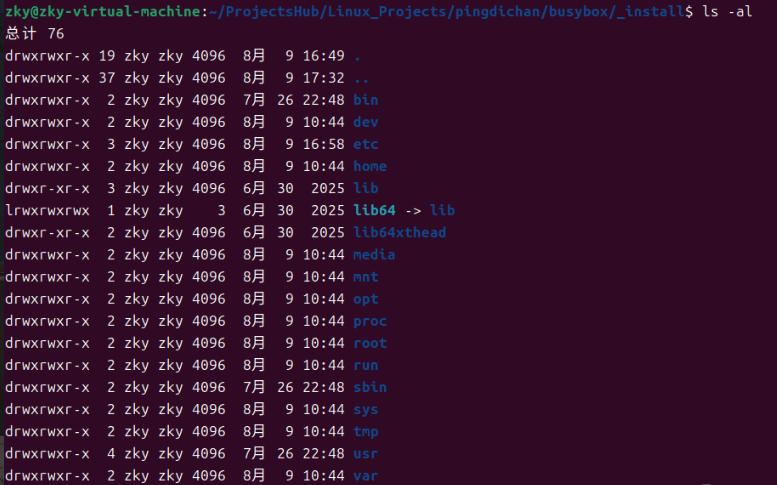
这个是busybox制作时的/
1.3 根文件系统(Root Filesystem)目录结构
| 目录 | 作用 |
|---|---|
/ |
根目录 |
/bin/ |
基本命令(如 ls、cp、mv) |
/boot/ |
内核和引导文件 |
/dev/ |
设备文件 |
/etc/ |
配置文件 |
/home/ |
用户目录 |
/lib/ |
共享库 |
/proc/ |
进程信息(虚拟文件系统) |
/root/ |
root 用户目录 |
/sbin/ |
系统命令(如 init、mount) |
/sys/ |
系统信息(虚拟文件系统) |
/tmp/ |
临时文件 |
/usr/ |
用户程序和数据 |
/var/ |
可变数据(日志、缓存等) |
这是典型的 Linux 根文件系统布局(FHS 标准),涵盖了系统启动、运行和管理所需的核心目录。
1.4 查询根文件系统类型
bash
df -T /


文件系统       类型    1K的块     已用      可用 已用% 挂载点
/dev/sda3      ext4 206231528 34317416 161411968   18% /


cat /proc/filesystems
nodev	sysfs
nodev	tmpfs
nodev	bdev
nodev	proc
nodev	cgroup
nodev	cgroup2
nodev	cpuset
nodev	devtmpfs
nodev	configfs
nodev	debugfs
nodev	tracefs
nodev	securityfs
nodev	sockfs
nodev	bpf
nodev	pipefs
nodev	ramfs
nodev	hugetlbfs
nodev	devpts
	ext3
	ext2
	ext4
	squashfs
	vfat
nodev	ecryptfs
	fuseblk
nodev	fuse
nodev	fusectl
nodev	efivarfs
nodev	mqueue
nodev	pstore
nodev	autofs
nodev	binfmt_misc
nodev	overlay
	ntfs3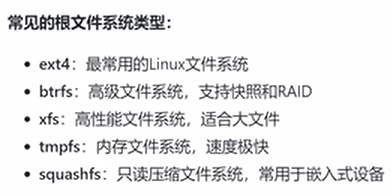
1.5 内核如何找到根文件系统
内核通过启动参数(bootargs)来确定根文件系统的位置。
1.5.1 内核启动参数
bash
cat /proc/cmdline


BOOT_IMAGE=/boot/vmlinuz-6.8.0-136-generic root=UUID=9a578349-6a7b-d349-b060-e5ae7fe025d3 ro quiet splash vt.handoff=7
1.5.2 根文件系统的指定方式
| 方式 | 格式 | 示例 | 特点 |
|---|---|---|---|
| 设备路径 | root=/dev/xxx |
root=/dev/sda2 |
直观,但设备名可能因顺序变化而改变 |
| UUID | root=UUID=xxx |
root=UUID=24868fb9-e7cd-4fd0-991b-699fd00c6c9e |
推荐使用,设备顺序变化不影响 |
| LABEL | root=LABEL=xxx |
root=LABEL=root |
通过分区标签指定,便于识别 |
| 网络文件系统(NFS) | root=/dev/nfs nfsroot=... |
root=/dev/nfs nfsroot=192.168.1.1:/nfs/rootfs ip=dhcp |
适用于无盘启动/嵌入式开发 |
1.5.3 initrd 的作用
初始 RAM 磁盘(initrd)是一个临时文件系统,包含挂载根文件系统所需的驱动。
查看 initrd 内容:
bash
lsinitramfs /boot/initrd.img-$(uname -r) | head -20常见的 initrd 内容:
-
设备驱动模块
-
文件系统工具(
mount、mkfs等) -
初始化脚本
1.6 根文件系统挂载流程
1.6.1 挂载流程概述
bash
1. 内核启动
   ↓
2. 解析 bootargs 中的 root 参数
   ↓
3. 加载 initrd 到内存
   ↓
4. 执行 initrd 中的 init 脚本
   - 加载必要的驱动
   - 检测存储设备
   - 挂载根文件系统
   ↓
5. 切换根文件系统(pivot_root)
   ↓
6. 启动 init 进程(PID 1)
   ↓
7. init 进程执行系统初始化
1.6.2 initrd 中的初始化脚本
bash
#!/bin/sh
# 简化的 initrd 初始化脚本

# 挂载虚拟文件系统
mount -t proc proc /proc
mount -t sysfs sysfs /sys
mount -t tmpfs tmpfs /tmp

# 加载必要的驱动模块
modprobe sd_mod
modprobe ext4

# 检测并挂载根文件系统
mount -o ro /dev/sda2 /new_root

# 切换根文件系统
exec switch_root /new_root /sbin/init
1.6.3 补充说明
-
initrd 的
init脚本与真正的init进程不同:- initrd 中的
init脚本(通常是 shell 脚本)在内存中运行,作用是加载驱动、挂载根文件系统,然后退出自己 ,将控制权交给真正的根文件系统里的/sbin/init(PID 1)。
- initrd 中的
-
switch_rootvspivot_root:-
switch_root是 BusyBox 提供的工具,用于在 initramfs 中切换到新的根文件系统,它会删除旧根目录中的所有文件以释放内存。 -
pivot_root是更标准的系统调用,用于将当前根移动到某个挂载点下,再挂载新的根。两者目标相同,但实现方式略有差异。
-
-
为什么先
ro(只读)挂载?启动时以只读方式挂载根文件系统,是为了防止在
fsck文件系统检查之前有写入操作导致数据损坏。待fsck检查完成后,通常会重新挂载为rw(读写)模式。 -
在嵌入式 D1s 系统中,你是否需要 initrd?
如果你将根文件系统放在 SD 卡的一个分区中,且内核已编译进 SD 卡驱动(
mmc_block)和 ext4 支持,则不需要 initrd ,直接通过 U-Boot 传递root=/dev/mmcblk0p1即可。如果你需要根文件系统位于网络 NFS 或复杂的 RAID/LVM 上,才需要 initrd 来加载额外驱动。
1.6.4 pivot_root vs switch_root
-
pivot_root:将新根文件系统移动到根目录,旧根目录移动到old_rootpivot_root /new_root /new_root/old_root -
switch_root:更简单的方式,直接切换并执行init(推荐)switch_root /new_root /sbin/init
1.7 init进程的诞生(根文件系统之后的知识补充后续)
1.7.1 init 进程的职责
init 进程是 Linux 系统的第一个用户空间进程(PID 1),负责:
查看 init 进程:
bash
ps -p 1 -o comm=示例输出:systemd 或 init
查看进程详情:
bash
ps aux | grep "^root.*1"init 进程的核心职责:
-
启动系统服务
-
管理运行级别(runlevel)
-
监控子进程(回收孤儿进程)
-
处理系统关机和重启
1.7.2 从 SysVinit 到 Systemd
| 特性 | SysVinit | Systemd |
|---|---|---|
| 启动方式 | 串行启动(按顺序一个一个来) | 并行启动(同时启动多个) |
| 依赖管理 | 手动配置 | 自动依赖解析 |
| 服务管理 | service 命令 |
systemctl 命令 |
| 日志管理 | /var/log/* 文本日志 |
journald 二进制日志 |
| 启动速度 | 较慢 | 较快 |
1.7.3 Systemd 的目标(Target)
查看当前默认目标:
bash
systemctl get-default示例输出:graphical.target
查看所有可用目标
bash
ls /lib/systemd/system/*.target | grep -E "(multi-user|graphical|rescue)"常用目标:
| 目标 | 说明 |
|---|---|
rescue.target |
救援模式(单用户) |
multi-user.target |
多用户模式(无图形界面) |
graphical.target |
图形界面模式 |
shutdown.target |
关机 |
reboot.target |
重启 |
1.7.4 Systemd 的目标的补充说明
-
在 Systemd 中,Target 是一组同步点的集合,用于将多个服务聚合在一起统一控制。它类似于 SysVinit 中的运行级别(Runlevel),但更灵活。
-
对应关系(供参考):
-
poweroff.target≈ 运行级别 0 -
rescue.target≈ 运行级别 1 -
multi-user.target≈ 运行级别 3 -
graphical.target≈ 运行级别 5 -
reboot.target≈ 运行级别 6
-
1.8 系统初始化的核心逻辑
1.8.1 Systemd 的启动流程
查看系统启动时间分析:
bash
systemd-analyze示例输出:
Startup finished in 2.314s (kernel) + 3.456s (userspace) = 5.770s查看服务启动耗时排行:
bash
systemd-analyze blame | head -101.8.2 关键系统服务
查看关键服务状态:
bash
systemctl status systemd-journald   # 日志服务
systemctl status systemd-udevd      # 设备管理
systemctl status network.target     # 网络服务
systemctl status sshd               # SSH服务
服务说明:
| 服务 | 说明 |
|---|---|
systemd-journald |
日志服务 |
systemd-udevd |
设备管理 |
network.target |
网络服务 |
sshd |
SSH 服务 |
1.8.3 运行级别与 Target 的对应关系
传统运行级别与 Systemd 目标的对应:
| SysVinit 运行级别 | Systemd Target | 说明 |
|---|---|---|
| 0 | runlevel0.target → poweroff.target |
关机 |
| 1 | runlevel1.target → rescue.target |
单用户模式(救援模式) |
| 2 | runlevel2.target → multi-user.target |
多用户模式 |
| 3 | runlevel3.target → multi-user.target |
多用户模式(无图形) |
| 4 | runlevel4.target → multi-user.target |
自定义 |
| 5 | runlevel5.target → graphical.target |
图形模式 |
| 6 | runlevel6.target → reboot.target |
重启 |
1.9 嵌入式系统的特殊特性
1.9.1 嵌入式操作系统特点
嵌入式系统常用的根文件系统类型:
| 类型 | 说明 |
|---|---|
| initramfs | 内存根文件系统,启动时加载到内存中运行 |
| squashfs | 只读压缩文件系统,节省存储空间 |
| ext4 | 可读写文件系统,适合需要持久化存储的场景 |
查看嵌入式系统的根文件系统:
bash
cat /proc/mounts | grep "/"示例输出:
/dev/root / squashfs ro,relatime 0 01.9.2 嵌入式系统的初始化
嵌入式系统常用的 init 方案:
| 方案 | 说明 |
|---|---|
| BusyBox init | 轻量级,最常用,配置文件为 /etc/inittab |
| systemd | 功能丰富,出现在较新的嵌入式系统中 |
| 自定义 init 脚本 | 极简方案,完全自主控制 |
BusyBox init 的配置文件示例
bash
cat /etc/inittab


::sysinit:/etc/init.d/rcS
ttyS0::respawn:/sbin/getty -L ttyS0 115200 vt100
::shutdown:/etc/init.d/rcK
1.9.3 initramfs 的构建
构建 initramfs 的步骤:
1. 创建目录结构
bash
mkdir -p initramfs/{bin,sbin,etc,proc,sys,dev,lib}2. 复制必要的二进制文件
bash
cp /bin/busybox initramfs/bin/
cp /sbin/init initramfs/sbin/
3. 创建 init 脚本
bash
cat > initramfs/init << 'EOF'
#!/bin/busybox sh
mount -t proc proc /proc
mount -t sysfs sysfs /sys
exec /sbin/init
EOF
chmod +x initramfs/init
4. 打包成 cpio 格式
bash
cd initramfs
find . | cpio -o -H newc | gzip > ../initramfs.gz
1.9.4 补充说明
-
生成的
initramfs.gz是一个压缩的 cpio 归档文件,内核在启动时可以直接将其加载到内存中作为临时根文件系统。 -
该 initramfs 的核心作用是挂载
proc和sysfs,然后执行/sbin/init,将控制权交给真正的 init 进程。 -
在实际的 D1s 项目中,如果根文件系统直接存储在 SD 卡上且内核已包含必要驱动,通常不需要单独构建 initramfs ,U-Boot 直接传递
root=/dev/mmcblk0p1即可。但在需要网络启动、加密根分区或复杂存储场景下,initramfs 是必不可少的。
1.10 实战:调试根文件系统问题
1.10.1 无法挂载根文件系统
常见错误:
kernel panic - not syncing: VFS: Unable to mount root fs on unknown-block(0,0)排查步骤:
-
检查 bootargs 中的 root 参数
bashcat /proc/cmdline -
检查 initrd 是否包含必要的驱动
bashlsinitramfs /boot/initrd.img-$(uname -r) | grep sd_mod -
检查磁盘设备
bashlsblk -
尝试手动挂载
bashmount /dev/sda2 /mnt
1.10.2 进入紧急模式
步骤:
-
在 GRUB 菜单中按
e编辑启动项 -
在 Linux 行末尾添加:
init=/bin/bash -
挂载根文件系统为可读写
bashmount -o remount,rw / -
修复问题后重启
bashexec /sbin/init
1.10.3 查看启动日志
查看最近一次启动的日志:
bash
journalctl -b查看启动失败的服务:
bash
systemctl --failed查看特定服务的日志:
bash
journalctl -u sshd1.10.4 补充说明
1. 关于 unknown-block(0,0) 错误
-
这是内核最常见的启动错误之一,表示内核根本找不到指定的根文件系统设备。
-
常见原因:
-
root=参数指定了错误的设备(设备名不对,或设备不存在) -
内核缺少访问该存储设备所需的驱动(如 SD 卡驱动未编译进内核)
-
存储设备尚未准备好(如 SD 卡需要更长的初始化时间,可以尝试添加
rootwait参数) -
使用了 UUID 或 LABEL 方式,但对应的分区不存在或标签不匹配
-
1.11 根文件系统的优化
1.11.1 使用 tmpfs 优化性能
将 /tmp 挂载为 tmpfs:
bash
echo "tmpfs /tmp tmpfs defaults,noatime,mode=1777 0 0" >> /etc/fstab将 /var/log 挂载为 tmpfs(仅适合特定场景):
bash
echo "tmpfs /var/log tmpfs defaults,noatime,size=100M 0 0" >> /etc/fstab1.11.2 启用文件系统检查
/etc/fstab 配置示例:
bash
UUID=24868fb9-e7cd-4fd0-991b-699fd00c6c9e / ext4 defaults,noatime 0 1
UUID=8a7b3c2d-1e4f-5678-90ab-cdef12345678 /home ext4 defaults,noatime 0 2
字段说明(以第 6 字段 pass 为主):
| 值 | 含义 |
|---|---|
0 |
不检查(跳过 fsck) |
1 |
优先检查(仅根文件系统使用) |
2 |
次要检查(其他分区) |
1.11.3 补充说明
1. 关于 tmpfs 优化的注意事项
| 挂载点 | 推荐程度 | 说明 |
|---|---|---|
/tmp |
✅ 推荐 | 临时文件存于内存,速度更快,重启自动清空 |
/var/log |
⚠️ 谨慎使用 | 日志存于内存,重启后日志会丢失,适合调试/测试环境,不适合生产环境 |
2. 关于 noatime 挂载选项
-
noatime表示不更新文件的访问时间戳(atime),可以减少磁盘写入操作,提升性能,在嵌入式设备中非常常用。 -
相比
defaults,defaults,noatime是嵌入式环境下的更优选择。
3. 在你的 D1s 项目中的实际 fstab(你之前的配置):
fstab
/dev/root  /  ext2  rw,noauto  0  1
proc       /proc proc defaults 0  0
devpts     /dev/pts devpts defaults,gid=5,mode=620,ptmxmode=0666 0 0
tmpfs      /dev/shm tmpfs mode=0777 0 0
tmpfs      /tmp tmpfs mode=1777 0 0
tmpfs      /run tmpfs mode=0755,nosuid,nodev 0 0
sysfs      /sys sysfs defaults 0 0
对比优化建议:
-
你的
/tmp已经是 tmpfs,✅ 符合优化方案。 -
如果你希望进一步优化,可以给 tmpfs 挂载点加上
noatime选项,例如:fstab
tmpfs /tmp tmpfs mode=1777,noatime 0 0 -
pass字段:你的 fstab 中只有根分区设置了1,其余为0,这符合嵌入式系统的典型做法(减少启动时的 fsck 耗时)。需要注意的是,在实际嵌入式系统中,由于根文件系统通常通过 SD 卡或 NAND 启动,且可能使用squashfs等只读文件系统,fsck 实际上很少被执行。
二、根文件系统的完善
正常来说,一般不使用静态编译作为产品发布的版本,因为存储空间成本较高,所以一般使用动态编译busybox,不勾选静态编译就默认为动态编译,动态编译后,可执行程序在运行时才会链接动态库才能继续正常运行
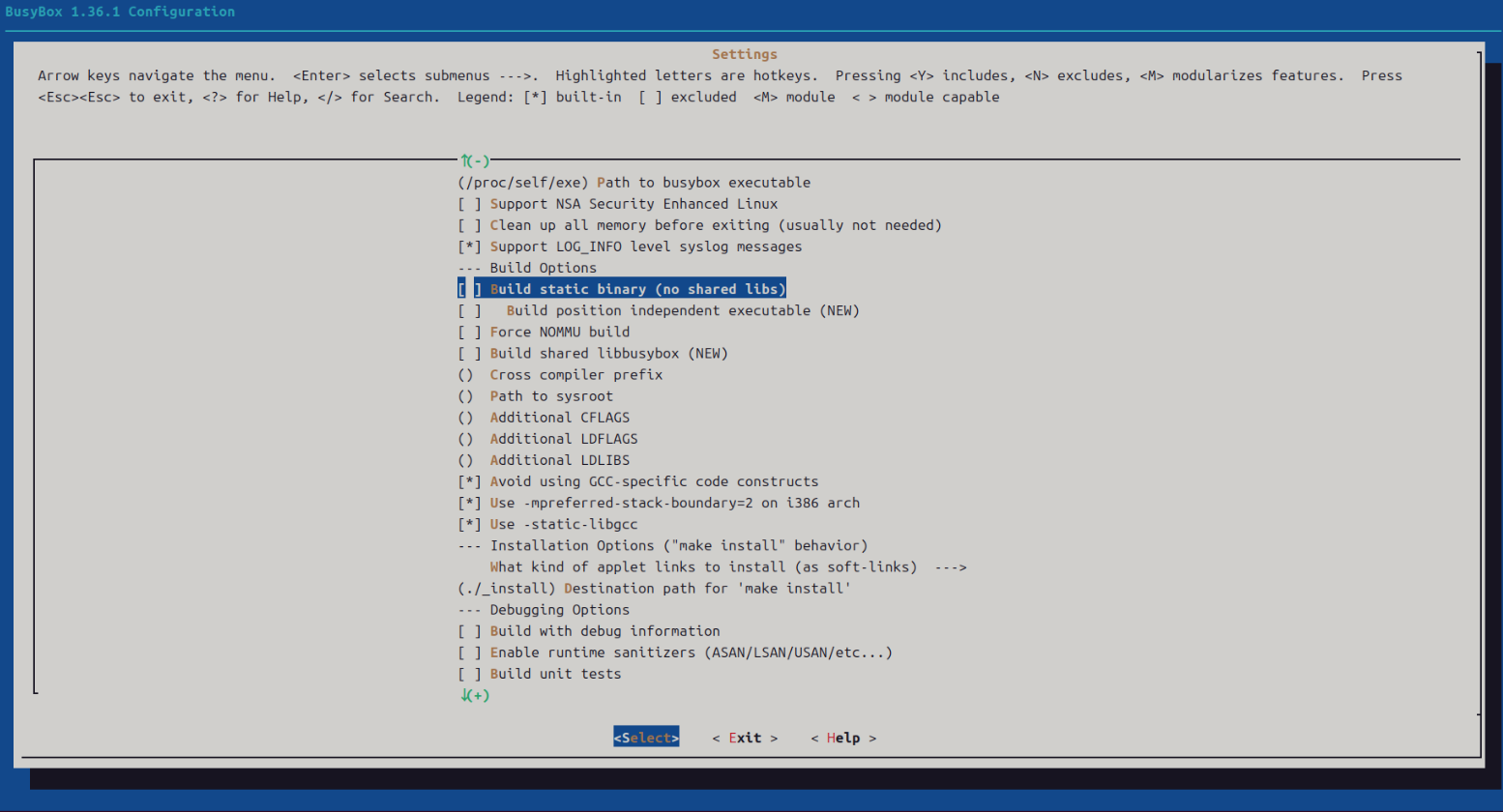
2.1 除了动态编译,其余流程选择指定工具,然后进行编译即可,编译完了记得make install安装加载到_install文件夹下
bash
export CROSS_COMPILE=/home/zky/ProjectsHub/Linux_Projects/pingdichan/riscv64-wangzai-linux-gnu-gcc/bin/riscv64-unknown-linux-gnu-

make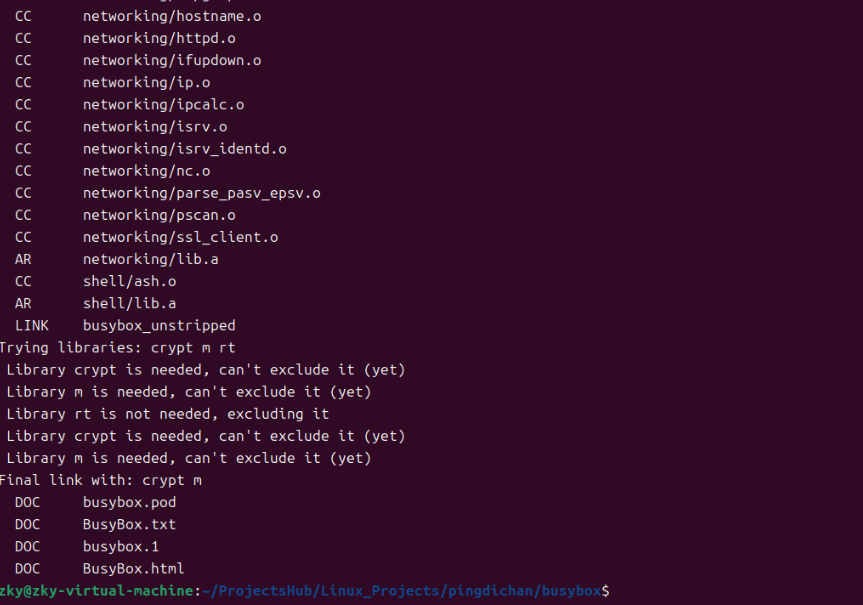
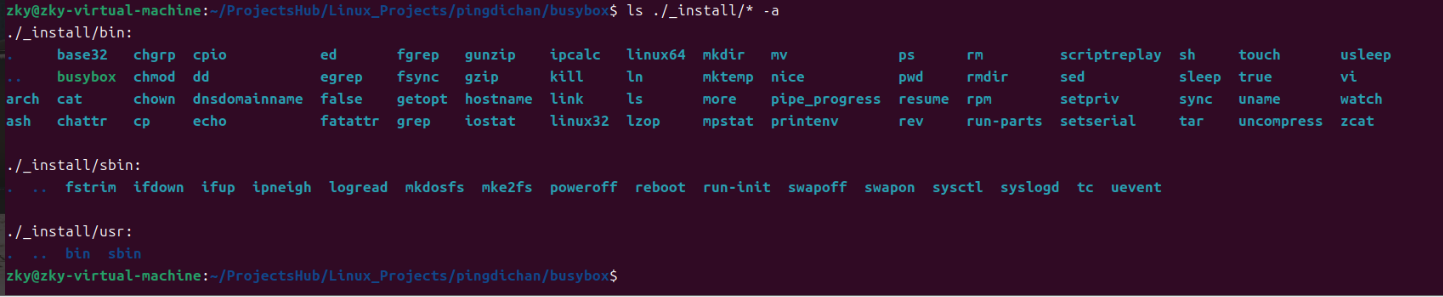
2.2 进入根文件系统"_install"目录下,并执行如下命令
bash
mkdir dev home media mnt opt proc root run sys tmp var
2.3 创建etc文件夹,补全etc目录,创建inittab文件,fstab文件
2.3.1 inittab
bash
#!/bin/sh
# /etc/inittab
#
# Copyright (C) 2001 Erik Andersen <andersen@codepoet.org>
#
# Note: BusyBox init doesn't support runlevels. The runlevels field is
# completely ignored by BusyBox init. If you want runlevels, use
# sysvinit.
#
# Format for each entry: <id>:<runlevels>:<action>:<process>
#
# id == tty to run on, or empty for /dev/console
# runlevels == ignored
# action == one of sysinit, respawn, askfirst, wait, and once
# process == program to run

# Startup the system
::sysinit:/bin/mount -t proc proc /proc
::sysinit:/bin/mount -o remount,rw /
::sysinit:/bin/mkdir -p /dev/pts /dev/shm
::sysinit:/bin/mount -a
::sysinit:/sbin/swapon -a
null::sysinit:/bin/ln -sf /proc/self/fd /dev/fd
null::sysinit:/bin/ln -sf /proc/self/fd/0 /dev/stdin
null::sysinit:/bin/ln -sf /proc/self/fd/1 /dev/stdout
null::sysinit:/bin/ln -sf /proc/self/fd/2 /dev/stderr
::sysinit:/bin/hostname -F /etc/hostname
# now run any rc scripts
::sysinit:/etc/init.d/rcS

# Put a getty on the serial port
#console::sysinit:/sbin/getty -L console 0 vt100 # GENERIC_SERIAL
#::respawn:/sbin/getty 115200 ttyS0
console::respawn:/sbin/getty -L console 115200 vt100 # GENERIC_SERIAL
#console::askfirst:-/bin/sh

# Stuff to do for the 3-finger salute
#::ctrlaltdel:/sbin/reboot

# Stuff to do before rebooting
::shutdown:/etc/init.d/rcK
::shutdown:/sbin/swapoff -a
::shutdown:/bin/umount -a -r
2.3.2 fstab
bash
# File system    <mount pt>    <type>    <options>                         <dump> <pass>
/dev/root        /              ext2      rw,noauto                        0      1
proc             /proc          proc      defaults                         0      0
devpts           /dev/pts       devpts    defaults,gid=5,mode=620,ptmxmode=0666 0 0
tmpfs            /dev/shm       tmpfs     mode=0777                        0      0
tmpfs            /tmp           tmpfs     mode=1777                        0      0
tmpfs            /run           tmpfs     mode=0755,nosuid,nodev           0      0
sysfs /sys sysfs defaults 0 0<设备/分区> <挂载点> <文件系统类型> <挂载选项> <dump> <pass>-
dump :
0表示不被dump备份工具处理(通常都是0)。 -
pass :
0表示启动时不检查;1表示根文件系统优先检查;2表示其他分区检查(这里只有根是1,其余为0,即不检查)。
在制作根文件系统(rootfs)的目录树时,你必须预先创建这些作为挂载点的空文件夹 ,否则系统启动时 mount -a 会因找不到目录而挂载失败。
(1)具体需要创建的文件夹清单
根据你给出的 fstab,你需要在根文件系统的顶层目录下创建以下文件夹:
| 需要创建的目录 | 对应 fstab 条目 | 备注 |
|---|---|---|
/ |
/dev/root 挂载点 |
根目录本身,制作 rootfs 时天然存在,无需额外创建 |
/proc |
proc 挂载点 |
必须创建 |
/dev/pts |
devpts 挂载点 |
注意:必须先创建 /dev,再在 /dev 下创建 pts 子目录 |
/dev/shm |
tmpfs 挂载点 |
同样需要 /dev 存在,再创建 shm 子目录 |
/tmp |
tmpfs 挂载点 |
直接创建 /tmp |
/run |
tmpfs 挂载点 |
直接创建 /run |
/sys |
sysfs 挂载点 |
必须创建 |
(2)实际操作命令(假设你的 rootfs 暂存目录为 ~/rootfs)
在制作 BusyBox 根文件系统时,你可以用一条命令批量创建这些必需的目录:
# 进入你的根文件系统制作目录
cd ~/rootfs

# 创建顶层目录
mkdir -pv proc sys tmp run dev

# 创建 /dev 下的子目录(pts 和 shm)
mkdir -pv dev/pts dev/shm
(3) 重要细节(避免踩坑)
-
挂载点的权限会被覆盖 :虽然你先创建了空目录,但挂载后,目录的权限和属性完全由 fstab 中的
mode选项决定 (如/tmp的1777、/run的0755)。你预先设置的权限在挂载后无效,但目录必须存在。 -
/dev目录的特殊性 :除了你手动创建的/dev/pts和/dev/shm,设备节点(如/dev/console、/dev/null)通常在启动时由内核devtmpfs自动创建,或者需要在制作 rootfs 时用mknod静态创建(视你的内核启动参数而定)。但最基础的/dev空目录是必需的。 -
注意区分 :
<设备/分区>(第一列)是你挂载的来源 (如/dev/root、proc等),不需要你手动创建成文件夹(它们是设备文件或虚拟文件系统类型)。你只需要关心第二列的路径是否存在。
如果你在制作过程中遇到启动时提示 mount: mounting xxx on /yyy failed: No such file or directory,那就是漏掉了对应的挂载点目录,回头 mkdir 补上即可。
2.3.3 hostname
写入主机机器名字

2.3.4 profile
bash
# Set PS1
if [ "$PS1" ]; then
	if [ "`id -u`" -eq 0 ]; then
		export PS1='[\u@\h:\W]# '
	else
		export PS1='[\u@\h:\W]$ '
	fi
fi

# Set terminal env
export PATH=/bin:/sbin:/usr/bin:/usr/sbin
export PATH=/system/bin:$PATH
export LD_LIBRARY_PATH=/system/lib

# Set directoty and file default create permission
umask 022
2.3.5 passwd
bash
root:x:0:0:root:/:/bin/sh2.3.6 去资料拷贝一份/etc/shadow文件
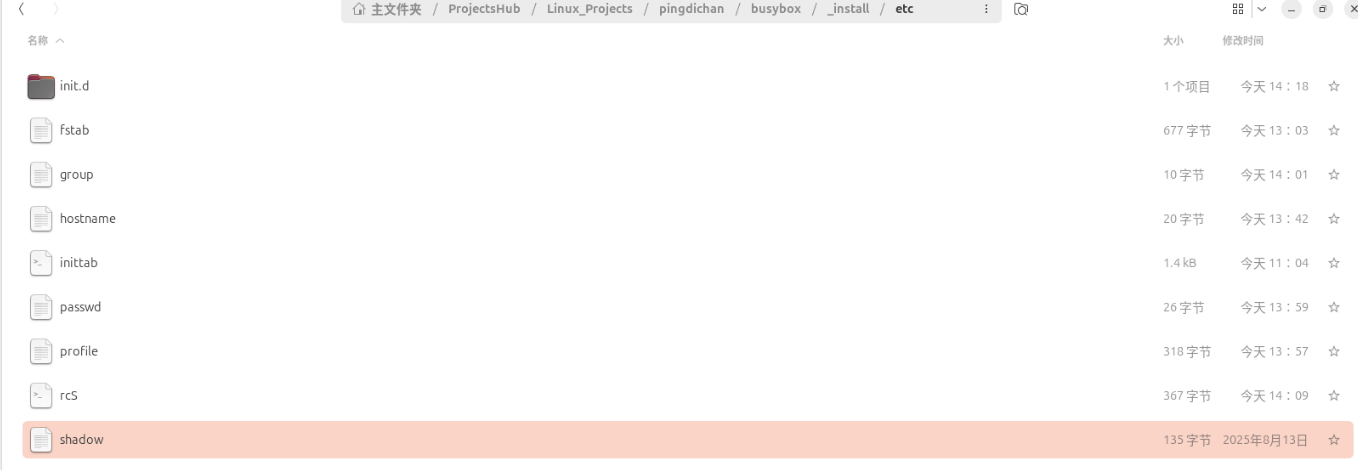
2.3.7 group
bash
root:x:0:2.3.8 创建开机自启动文件 rcS
bash
mkdir init.d

touch rcS
rcS
bash
#!/bin/sh
# Start all init scripts in /etc/init.d
# executing them in numerical order.
#
for i in /etc/init.d/S??* ;do

	# Ignore dangling symlinks (if any).
	[ ! -f "$i" ] && continue

	case "$i" in
	*.sh)
		# Source shell script for speed.
		(
		trap - INT QUIT TSTP
		set start
		. $i
		)
		;;
	*)
	# No sh extension, so fork subprocess.
	$i start
	;;
	esac
done
2.3.9 rcK
现在需要切换到init.d下

bash
#!/bin/sh
# Stop all init scripts in /etc/init.d
# executing them in reversed numerical order
#
for i in $(ls -r /etc/init.d/S??*) ; do
    # Ignore dangling symlinks (if any).
    [ ! -f "$i" ] && continue
    case "$i" in
    *.sh)
        # Source shell script for speed.
        (
            trap - INT QUIT TSTP
            set stop
            . $i
        )
        ;;
    *)
        # No sh extension, so fork subprocess.
        $i stop
        ;;
    esac
done
2.3.10 在到_install下补全lib库
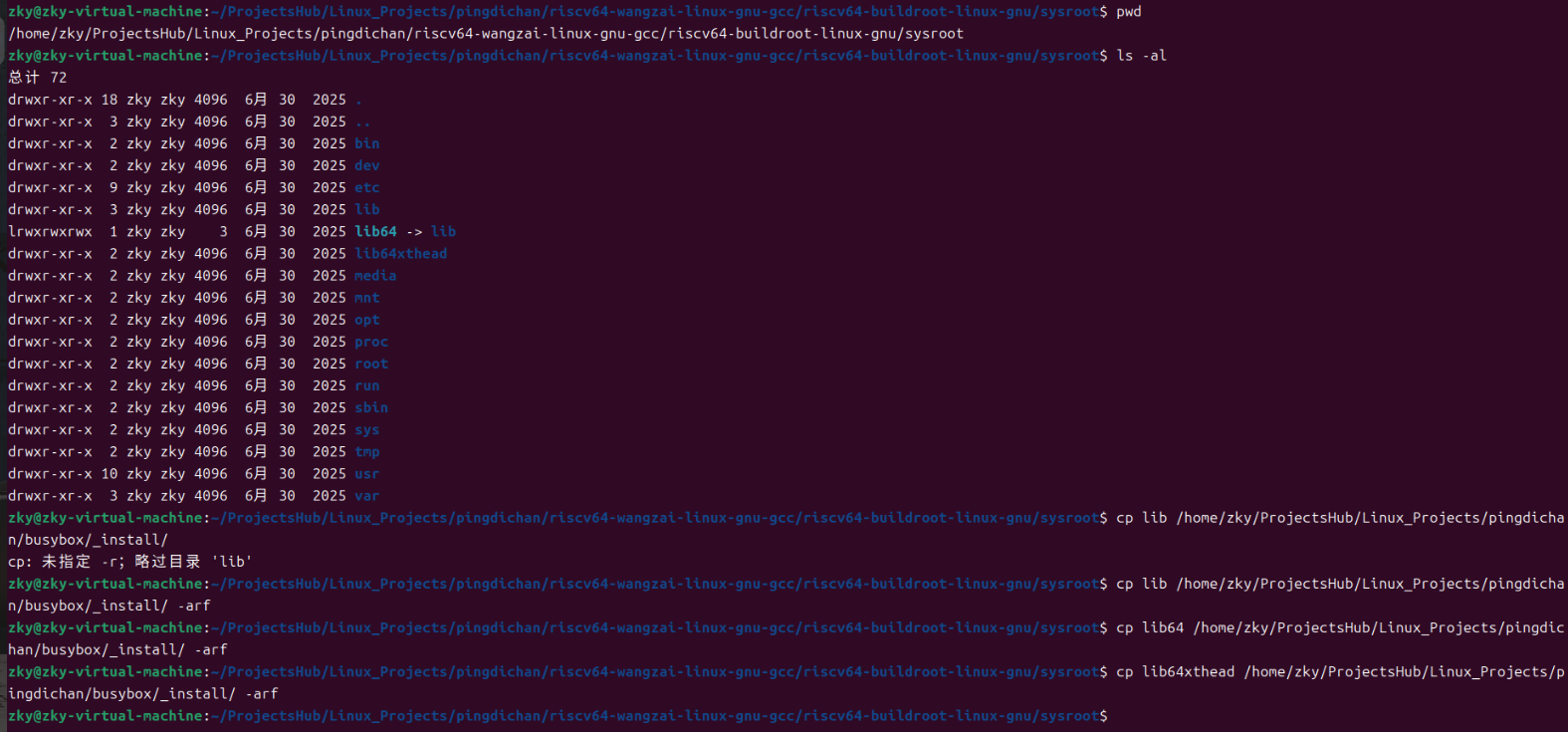
工具链的库在/home/zky/ProjectsHub/Linux_Projects/pingdichan/riscv64-wangzai-linux-gnu-gcc/riscv64-buildroot-linux-gnu/sysroot,将"lib/","/lib64","lib64xthead"拷贝到文件系统中即可

bash
zky@zky-virtual-machine:~/ProjectsHub/Linux_Projects/pingdichan/busybox$ tree ./_install
./_install
├── bin
│   ├── arch -> busybox
│   ├── ash -> busybox
│   ├── base32 -> busybox
│   ├── busybox
│   ├── cat -> busybox
│   ├── chattr -> busybox
│   ├── chgrp -> busybox
│   ├── chmod -> busybox
│   ├── chown -> busybox
│   ├── cp -> busybox
│   ├── cpio -> busybox
│   ├── dd -> busybox
│   ├── dnsdomainname -> busybox
│   ├── echo -> busybox
│   ├── ed -> busybox
│   ├── egrep -> busybox
│   ├── false -> busybox
│   ├── fatattr -> busybox
│   ├── fgrep -> busybox
│   ├── fsync -> busybox
│   ├── getopt -> busybox
│   ├── grep -> busybox
│   ├── gunzip -> busybox
│   ├── gzip -> busybox
│   ├── hostname -> busybox
│   ├── iostat -> busybox
│   ├── ipcalc -> busybox
│   ├── kill -> busybox
│   ├── link -> busybox
│   ├── linux32 -> busybox
│   ├── linux64 -> busybox
│   ├── ln -> busybox
│   ├── ls -> busybox
│   ├── lzop -> busybox
│   ├── mkdir -> busybox
│   ├── mktemp -> busybox
│   ├── more -> busybox
│   ├── mpstat -> busybox
│   ├── mv -> busybox
│   ├── nice -> busybox
│   ├── pipe_progress -> busybox
│   ├── printenv -> busybox
│   ├── ps -> busybox
│   ├── pwd -> busybox
│   ├── resume -> busybox
│   ├── rev -> busybox
│   ├── rm -> busybox
│   ├── rmdir -> busybox
│   ├── rpm -> busybox
│   ├── run-parts -> busybox
│   ├── scriptreplay -> busybox
│   ├── sed -> busybox
│   ├── setpriv -> busybox
│   ├── setserial -> busybox
│   ├── sh -> busybox
│   ├── sleep -> busybox
│   ├── sync -> busybox
│   ├── tar -> busybox
│   ├── touch -> busybox
│   ├── true -> busybox
│   ├── uname -> busybox
│   ├── uncompress -> busybox
│   ├── usleep -> busybox
│   ├── vi -> busybox
│   ├── watch -> busybox
│   └── zcat -> busybox
├── dev
├── etc
│   ├── fstab
│   ├── group
│   ├── hostname
│   ├── init.d
│   │   └── rcK
│   ├── inittab
│   ├── passwd
│   ├── profile
│   ├── rcS
│   └── shadow
├── home
├── lib
│   ├── ld-2.29.so
│   ├── ld-linux-riscv64xthead-lp64d.so.1 -> ../lib64xthead/lp64d/ld-2.29.so
│   ├── libanl-2.29.so
│   ├── libanl.so.1 -> libanl-2.29.so
│   ├── libatomic.a
│   ├── libatomic.la
│   ├── libatomic.so -> libatomic.so.1.2.0
│   ├── libatomic.so.1 -> libatomic.so.1.2.0
│   ├── libatomic.so.1.2.0
│   ├── libblkid.so.1 -> libblkid.so.1.1.0
│   ├── libblkid.so.1.1.0
│   ├── libBrokenLocale-2.29.so
│   ├── libBrokenLocale.so.1 -> libBrokenLocale-2.29.so
│   ├── libc-2.29.so
│   ├── libcrypt-2.29.so
│   ├── libcrypt.so.1 -> libcrypt-2.29.so
│   ├── libc.so.6 -> libc-2.29.so
│   ├── libdl-2.29.so
│   ├── libdl.so.2 -> libdl-2.29.so
│   ├── libgcc_s.so -> libgcc_s.so.1
│   ├── libgcc_s.so.1
│   ├── libgfortran.a
│   ├── libgfortran.la
│   ├── libgfortran.so -> libgfortran.so.5.0.0
│   ├── libgfortran.so.5 -> libgfortran.so.5.0.0
│   ├── libgfortran.so.5.0.0
│   ├── libgfortran.spec
│   ├── libgomp.a
│   ├── libgomp.la
│   ├── libgomp.so -> libgomp.so.1.0.0
│   ├── libgomp.so.1 -> libgomp.so.1.0.0
│   ├── libgomp.so.1.0.0
│   ├── libgomp.spec
│   ├── libm-2.29.so
│   ├── libmemusage.so
│   ├── libm.so.6 -> libm-2.29.so
│   ├── libnsl-2.29.so
│   ├── libnsl.so.1 -> libnsl-2.29.so
│   ├── libnss_compat-2.29.so
│   ├── libnss_compat.so.2 -> libnss_compat-2.29.so
│   ├── libnss_db-2.29.so
│   ├── libnss_db.so.2 -> libnss_db-2.29.so
│   ├── libnss_dns-2.29.so
│   ├── libnss_dns.so.2 -> libnss_dns-2.29.so
│   ├── libnss_files-2.29.so
│   ├── libnss_files.so.2 -> libnss_files-2.29.so
│   ├── libnss_hesiod-2.29.so
│   ├── libnss_hesiod.so.2 -> libnss_hesiod-2.29.so
│   ├── libpcprofile.so
│   ├── libpthread-2.29.so
│   ├── libpthread.so.0 -> libpthread-2.29.so
│   ├── libresolv-2.29.so
│   ├── libresolv.so.2 -> libresolv-2.29.so
│   ├── librt-2.29.so
│   ├── librt.so.1 -> librt-2.29.so
│   ├── libSegFault.so
│   ├── libstdc++.a
│   ├── libstdc++fs.a
│   ├── libstdc++fs.la
│   ├── libstdc++.la
│   ├── libstdc++.so -> libstdc++.so.6.0.25
│   ├── libstdc++.so.6 -> libstdc++.so.6.0.25
│   ├── libstdc++.so.6.0.25
│   ├── libstdc++.so.6.0.25-gdb.py
│   ├── libsupc++.a
│   ├── libsupc++.la
│   ├── libthread_db-1.0.so
│   ├── libthread_db.so.1 -> libthread_db-1.0.so
│   ├── libutil-2.29.so
│   ├── libutil.so.1 -> libutil-2.29.so
│   ├── libuuid.so.1 -> libuuid.so.1.3.0
│   ├── libuuid.so.1.3.0
│   └── udev
│       └── rules.d
│           └── 99-fuse.rules
├── lib64 -> lib
├── lib64xthead
│   └── lp64d -> ../lib
├── media
├── mnt
├── opt
├── proc
├── root
├── run
├── sbin
│   ├── fstrim -> ../bin/busybox
│   ├── ifdown -> ../bin/busybox
│   ├── ifup -> ../bin/busybox
│   ├── ipneigh -> ../bin/busybox
│   ├── logread -> ../bin/busybox
│   ├── mkdosfs -> ../bin/busybox
│   ├── mke2fs -> ../bin/busybox
│   ├── poweroff -> ../bin/busybox
│   ├── reboot -> ../bin/busybox
│   ├── run-init -> ../bin/busybox
│   ├── swapoff -> ../bin/busybox
│   ├── swapon -> ../bin/busybox
│   ├── sysctl -> ../bin/busybox
│   ├── syslogd -> ../bin/busybox
│   ├── tc -> ../bin/busybox
│   └── uevent -> ../bin/busybox
├── sys
├── tmp
├── usr
│   ├── bin
│   │   ├── [ -> ../../bin/busybox
│   │   ├── [[ -> ../../bin/busybox
│   │   ├── ar -> ../../bin/busybox
│   │   ├── ascii -> ../../bin/busybox
│   │   ├── awk -> ../../bin/busybox
│   │   ├── basename -> ../../bin/busybox
│   │   ├── bc -> ../../bin/busybox
│   │   ├── blkdiscard -> ../../bin/busybox
│   │   ├── bunzip2 -> ../../bin/busybox
│   │   ├── bzcat -> ../../bin/busybox
│   │   ├── bzip2 -> ../../bin/busybox
│   │   ├── cal -> ../../bin/busybox
│   │   ├── chrt -> ../../bin/busybox
│   │   ├── cksum -> ../../bin/busybox
│   │   ├── clear -> ../../bin/busybox
│   │   ├── cmp -> ../../bin/busybox
│   │   ├── comm -> ../../bin/busybox
│   │   ├── crc32 -> ../../bin/busybox
│   │   ├── crontab -> ../../bin/busybox
│   │   ├── cut -> ../../bin/busybox
│   │   ├── dc -> ../../bin/busybox
│   │   ├── diff -> ../../bin/busybox
│   │   ├── dirname -> ../../bin/busybox
│   │   ├── dos2unix -> ../../bin/busybox
│   │   ├── du -> ../../bin/busybox
│   │   ├── env -> ../../bin/busybox
│   │   ├── expand -> ../../bin/busybox
│   │   ├── expr -> ../../bin/busybox
│   │   ├── factor -> ../../bin/busybox
│   │   ├── fallocate -> ../../bin/busybox
│   │   ├── find -> ../../bin/busybox
│   │   ├── flock -> ../../bin/busybox
│   │   ├── fold -> ../../bin/busybox
│   │   ├── ftpget -> ../../bin/busybox
│   │   ├── ftpput -> ../../bin/busybox
│   │   ├── groups -> ../../bin/busybox
│   │   ├── hd -> ../../bin/busybox
│   │   ├── head -> ../../bin/busybox
│   │   ├── hexdump -> ../../bin/busybox
│   │   ├── hexedit -> ../../bin/busybox
│   │   ├── hostid -> ../../bin/busybox
│   │   ├── id -> ../../bin/busybox
│   │   ├── install -> ../../bin/busybox
│   │   ├── killall -> ../../bin/busybox
│   │   ├── less -> ../../bin/busybox
│   │   ├── logger -> ../../bin/busybox
│   │   ├── logname -> ../../bin/busybox
│   │   ├── lpq -> ../../bin/busybox
│   │   ├── lpr -> ../../bin/busybox
│   │   ├── lsof -> ../../bin/busybox
│   │   ├── lspci -> ../../bin/busybox
│   │   ├── lsscsi -> ../../bin/busybox
│   │   ├── lsusb -> ../../bin/busybox
│   │   ├── lzcat -> ../../bin/busybox
│   │   ├── lzma -> ../../bin/busybox
│   │   ├── md5sum -> ../../bin/busybox
│   │   ├── microcom -> ../../bin/busybox
│   │   ├── mkfifo -> ../../bin/busybox
│   │   ├── mkpasswd -> ../../bin/busybox
│   │   ├── nc -> ../../bin/busybox
│   │   ├── nl -> ../../bin/busybox
│   │   ├── nohup -> ../../bin/busybox
│   │   ├── nproc -> ../../bin/busybox
│   │   ├── nsenter -> ../../bin/busybox
│   │   ├── od -> ../../bin/busybox
│   │   ├── paste -> ../../bin/busybox
│   │   ├── patch -> ../../bin/busybox
│   │   ├── pgrep -> ../../bin/busybox
│   │   ├── pkill -> ../../bin/busybox
│   │   ├── pmap -> ../../bin/busybox
│   │   ├── printf -> ../../bin/busybox
│   │   ├── pscan -> ../../bin/busybox
│   │   ├── pstree -> ../../bin/busybox
│   │   ├── pwdx -> ../../bin/busybox
│   │   ├── readlink -> ../../bin/busybox
│   │   ├── realpath -> ../../bin/busybox
│   │   ├── renice -> ../../bin/busybox
│   │   ├── reset -> ../../bin/busybox
│   │   ├── resize -> ../../bin/busybox
│   │   ├── rpm2cpio -> ../../bin/busybox
│   │   ├── seq -> ../../bin/busybox
│   │   ├── setfattr -> ../../bin/busybox
│   │   ├── setsid -> ../../bin/busybox
│   │   ├── sha1sum -> ../../bin/busybox
│   │   ├── sha256sum -> ../../bin/busybox
│   │   ├── sha3sum -> ../../bin/busybox
│   │   ├── sha512sum -> ../../bin/busybox
│   │   ├── shred -> ../../bin/busybox
│   │   ├── shuf -> ../../bin/busybox
│   │   ├── smemcap -> ../../bin/busybox
│   │   ├── sort -> ../../bin/busybox
│   │   ├── split -> ../../bin/busybox
│   │   ├── ssl_client -> ../../bin/busybox
│   │   ├── strings -> ../../bin/busybox
│   │   ├── sum -> ../../bin/busybox
│   │   ├── svc -> ../../bin/busybox
│   │   ├── svok -> ../../bin/busybox
│   │   ├── tail -> ../../bin/busybox
│   │   ├── tee -> ../../bin/busybox
│   │   ├── telnet -> ../../bin/busybox
│   │   ├── test -> ../../bin/busybox
│   │   ├── tftp -> ../../bin/busybox
│   │   ├── timeout -> ../../bin/busybox
│   │   ├── tr -> ../../bin/busybox
│   │   ├── tree -> ../../bin/busybox
│   │   ├── truncate -> ../../bin/busybox
│   │   ├── ts -> ../../bin/busybox
│   │   ├── tsort -> ../../bin/busybox
│   │   ├── tty -> ../../bin/busybox
│   │   ├── ttysize -> ../../bin/busybox
│   │   ├── unexpand -> ../../bin/busybox
│   │   ├── uniq -> ../../bin/busybox
│   │   ├── unix2dos -> ../../bin/busybox
│   │   ├── unlink -> ../../bin/busybox
│   │   ├── unlzma -> ../../bin/busybox
│   │   ├── unshare -> ../../bin/busybox
│   │   ├── unxz -> ../../bin/busybox
│   │   ├── unzip -> ../../bin/busybox
│   │   ├── uudecode -> ../../bin/busybox
│   │   ├── uuencode -> ../../bin/busybox
│   │   ├── volname -> ../../bin/busybox
│   │   ├── wc -> ../../bin/busybox
│   │   ├── wget -> ../../bin/busybox
│   │   ├── which -> ../../bin/busybox
│   │   ├── whoami -> ../../bin/busybox
│   │   ├── whois -> ../../bin/busybox
│   │   ├── xargs -> ../../bin/busybox
│   │   ├── xxd -> ../../bin/busybox
│   │   ├── xz -> ../../bin/busybox
│   │   ├── xzcat -> ../../bin/busybox
│   │   └── yes -> ../../bin/busybox
│   └── sbin
│       ├── addgroup -> ../../bin/busybox
│       ├── chroot -> ../../bin/busybox
│       ├── delgroup -> ../../bin/busybox
│       ├── dnsd -> ../../bin/busybox
│       ├── fakeidentd -> ../../bin/busybox
│       ├── fsfreeze -> ../../bin/busybox
│       ├── ftpd -> ../../bin/busybox
│       ├── httpd -> ../../bin/busybox
│       ├── i2cdetect -> ../../bin/busybox
│       ├── i2cdump -> ../../bin/busybox
│       ├── i2cget -> ../../bin/busybox
│       ├── i2cset -> ../../bin/busybox
│       ├── i2ctransfer -> ../../bin/busybox
│       ├── killall5 -> ../../bin/busybox
│       ├── mim -> ../../bin/busybox
│       ├── nologin -> ../../bin/busybox
│       ├── partprobe -> ../../bin/busybox
│       ├── powertop -> ../../bin/busybox
│       ├── readprofile -> ../../bin/busybox
│       ├── seedrng -> ../../bin/busybox
│       ├── telnetd -> ../../bin/busybox
│       ├── tftpd -> ../../bin/busybox
│       ├── ubimkvol -> ../../bin/busybox
│       ├── ubirename -> ../../bin/busybox
│       ├── ubirmvol -> ../../bin/busybox
│       ├── ubirsvol -> ../../bin/busybox
│       └── ubiupdatevol -> ../../bin/busybox
└── var

25 directories, 322 files
2.3.11 拷贝,再和linux内核固件、设备树之类的烧录到sd卡中,进行启动
bash
cp _install/* /home/zky/ProjectsHub/Linux_Projects/pingdichan/bootcard/wangzai_d1s_rootfs/ -arf
bash
cd /home/zky/ProjectsHub/Linux_Projects/pingdichan/bootcard

ls /dev/sd*

mount | grep /dev/sdb

sudo umount /dev/sdb1

sudo ./mkbootcard /dev/sdb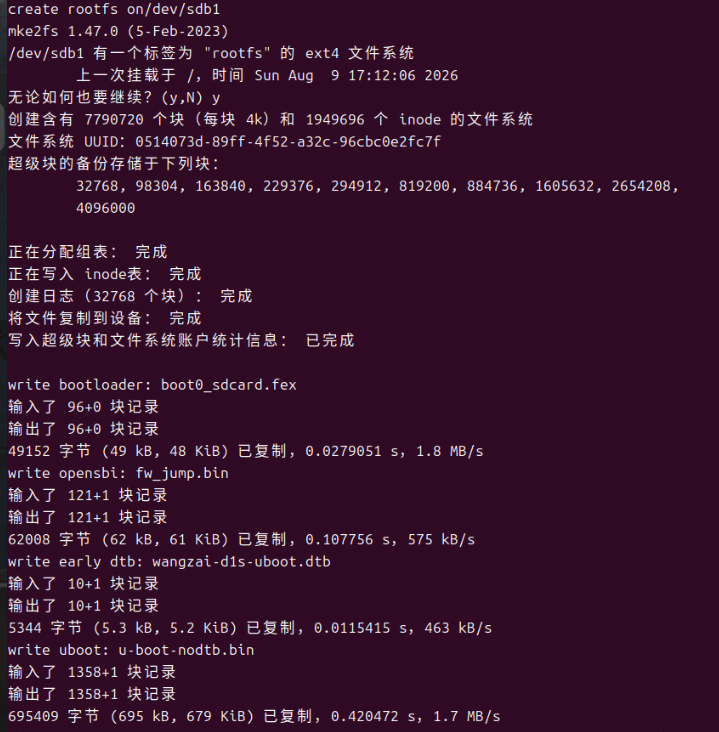
查看可以看见成功了
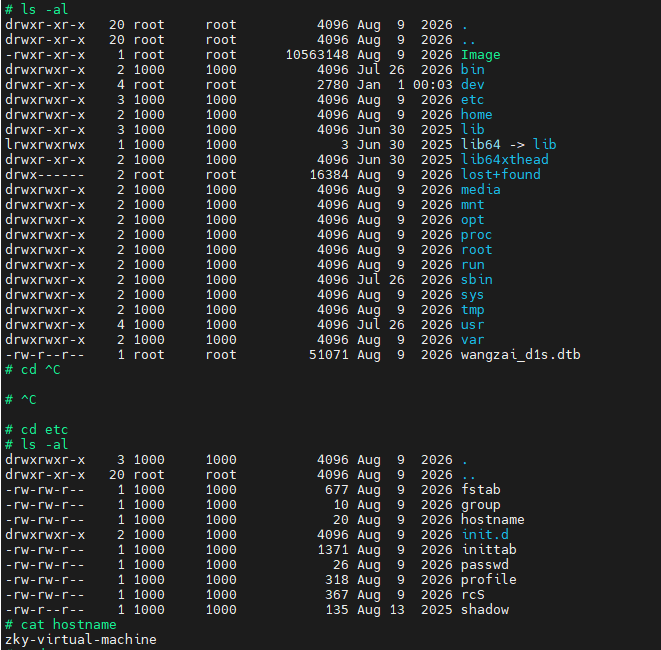
在板上可以改
bash
[\u@\h:\W]# cat /etc/profile
# Set PS1
if [ "$(id -u)" -eq 0 ]; then
    USER=$(whoami)
    HOST=$(hostname)
    export PS1="[$USER@$HOST:\W]# "
else
    USER=$(whoami)
    HOST=$(hostname)
    export PS1="[$USER@$HOST:\W]$ "
fi

# Set terminal env
export PATH=/bin:/sbin:/usr/bin:/usr/sbin
export PATH=/system/bin:$PATH
export LD_LIBRARY_PATH=/system/lib

# Set directoty and file default create permission
umask 022
[\u@\h:\W]# whoami
root
[\u@\h:\W]# . /etc/profile
[root@zky-virtual-machine:\W]#
BusyBox 自带的 ash shell 不支持 \u(用户名)和 \h(主机名)这两个转义符。
这属于 Shell 的特性差异,而不是写的 if 条件判断有问题。