环境准备
需要组件:
|-------------------|----------------|------------------------------------------------------|
| 组件 | 版本 | 说明 |
| JDK | 8 | 暂时不要选用大于等于JDK9的版本,因为启动虚拟机会发生未知异常 |
| MySQL | 8.x | 用于管理Hive的元数据 |
| Apache Hadoop | 3.3.0 | |
| Apache Hive | 3.1.2 | |
| Apache Hive src | 1.2.2 | 因为只有1.x版本的Hive源码提供了.bat启动脚本,有能力可以自己写脚本就不用下此源码包 |
| winutils | hadoop-3.3.0 | Hadoop的Windows系统下的启动依赖 |
部分组件对应的下载地址:
Apache Hadoop 3.3.0:https://mirror.bit.edu.cn/apache/hadoop/common/hadoop-3.3.0/hadoop-3.3.0.tar.gz
Apache Hive 3.1.2:https://mirrors.bfsu.edu.cn/apache/hive/hive-3.1.2/apache-hive-3.1.2-bin.tar.gz
Apache Hive 1.2.2 src:https://mirrors.bfsu.edu.cn/apache/hive/hive-1.2.2/apache-hive-1.2.2-src.tar.gz
winutils:https://github.com/kontext-tech/winutils
MySQL 8.*安装参考:https://blog.csdn.net/molaoye/article/details/163566748
解压组件到指定目录:

分别为HADOOP_HOME和HIVE_HOME目录。
接着把源码包apache-hive-1.2.2-src.tar.gz解压后的bin目录下的文件拷贝到apache-hive-3.1.2-bin的bin目录中。
然后把winutils中的hadoop-3.3.0\bin目录下的hadoop.dll和winutils.exe文件拷贝到Hadoop的解压目录的bin文件夹下。
再配置一下HADOOP_HOME环境变量。
接着用命令行测试一下,如果上述步骤没问题,控制台输出如下:
bash
C:\Users\Administrator>hadoop version
Hadoop 3.3.0
Source code repository https://gitbox.apache.org/repos/asf/hadoop.git -r aa96f1871bfd858f9bac59cf2a81ec470da649af
Compiled by brahma on 2020-07-06T18:44Z
Compiled with protoc 3.7.1
From source with checksum 5dc29b802d6ccd77b262ef9d04d19c4
This command was run using /D:/mogx/doc/dev-env/hive3/hadoop-3.3.0/share/hadoop/common/hadoop-common-3.3.0.jar
配置和启动Hadoop
在HADOOP_HOME的etc\hadoop子目录下,找到并且修改下面的几个配置文件:
「core-site.xml」 (这里的tmp目录一定要配置一个非虚拟目录,别用默认的tmp目录,否则后面会遇到权限分配失败的问题)
XML
<configuration>
    <property>
        <name>fs.defaultFS</name>
        <value>hdfs://localhost:9000</value>
    </property>
    <property>
        <name>hadoop.tmp.dir</name>
        <value>/e:/hadoop-3.3.0-data/tmp</value>
    </property>
</configuration>
「hdfs-site.xml」 (这里要预先创建nameNode和dataNode的数据存放目录,注意一下每个目录要以左斜杠/开头)
XML
<configuration>
    <property>
        <name>dfs.replication</name>
        <value>1</value>
    </property>
    <property>
        <name>dfs.http.address</name>
        <value>0.0.0.0:50070</value>
    </property>
    <property>
        <name>dfs.namenode.name.dir</name>
        <value>/e:/hadoop-3.3.0-data/nameNode</value>
    </property>
    <property>
        <name>dfs.datanode.data.dir</name>
        <value>/e:/hadoop-3.3.0-data/dataNode</value>
    </property>
    <property>
        <name>dfs.permissions.enabled</name>
        <value>false</value>
    </property>
</configuration>
「mapred-site.xml」
XML
<configuration>
    <property>
        <name>mapreduce.framework.name</name>
        <value>yarn</value>
    </property>
</configuration>
「yarn-site.xml」
XML
<configuration>
    <property>
        <name>yarn.nodemanager.aux-services</name>
        <value>mapreduce_shuffle</value>
    </property>
    <property>
        <name>yarn.nodemanager.aux-services.mapreduce.shuffle.class</name>
        <value>org.apache.hadoop.mapred.ShuffleHandler</value>
    </property>
</configuration>至此,最小化配置基本完成。接着需要格式化namenode并且启动Hadoop服务。切换至$HADOOP_HOME/bin目录下,使用CMD输入命令hdfs namenode -format(格式化namenode切记不要重复执行):
bash
D:\mogx\doc\dev-env\hive3\hadoop-3.3.0\bin>hdfs namenode -format
2026-08-08 11:41:03,903 INFO namenode.NameNode: STARTUP_MSG:
/************************************************************
STARTUP_MSG: Starting NameNode
STARTUP_MSG:   host = mogx/169.254.85.150
STARTUP_MSG:   args = [-format]
STARTUP_MSG:   version = 3.3.0
STARTUP_MSG:   classpath = ***.jar
STARTUP_MSG:   build = https://gitbox.apache.org/repos/asf/hadoop.git -r aa96f1871bfd858f9bac59cf2a81ec470da649af; compiled by 'brahma' on 2020-07-06T18:44Z
STARTUP_MSG:   java = 1.8.0_25
************************************************************/
2026-08-08 11:41:04,134 INFO namenode.NameNode: createNameNode [-format]
2026-08-08 11:41:05,750 INFO common.Util: Assuming 'file' scheme for path /e:/hadoop-3.3.0-data/nameNode in configuration.
2026-08-08 11:41:05,752 INFO common.Util: Assuming 'file' scheme for path /e:/hadoop-3.3.0-data/nameNode in configuration.
2026-08-08 11:41:05,769 INFO namenode.NameNode: Formatting using clusterid: CID-b579335c-3f69-44c3-b1a6-528518b8a0da
2026-08-08 11:41:05,870 INFO namenode.FSEditLog: Edit logging is async:true
2026-08-08 11:41:05,952 INFO namenode.FSNamesystem: KeyProvider: null
2026-08-08 11:41:05,957 INFO namenode.FSNamesystem: fsLock is fair: true
2026-08-08 11:41:05,960 INFO namenode.FSNamesystem: Detailed lock hold time metrics enabled: false
2026-08-08 11:41:05,991 INFO namenode.FSNamesystem: fsOwner                = Administrator (auth:SIMPLE)
2026-08-08 11:41:05,991 INFO namenode.FSNamesystem: supergroup             = supergroup
2026-08-08 11:41:05,994 INFO namenode.FSNamesystem: isPermissionEnabled    = false
2026-08-08 11:41:05,995 INFO namenode.FSNamesystem: isStoragePolicyEnabled = true
2026-08-08 11:41:05,997 INFO namenode.FSNamesystem: HA Enabled: false
2026-08-08 11:41:06,098 INFO common.Util: dfs.datanode.fileio.profiling.sampling.percentage set to 0. Disabling file IO profiling
2026-08-08 11:41:06,129 INFO blockmanagement.DatanodeManager: dfs.block.invalidate.limit: configured=1000, counted=60, effected=1000
2026-08-08 11:41:06,130 INFO blockmanagement.DatanodeManager: dfs.namenode.datanode.registration.ip-hostname-check=true
2026-08-08 11:41:06,141 INFO blockmanagement.BlockManager: dfs.namenode.startup.delay.block.deletion.sec is set to 000:00:00:00.000
2026-08-08 11:41:06,142 INFO blockmanagement.BlockManager: The block deletion will start around 2026 八月 08 11:41:06
2026-08-08 11:41:06,147 INFO util.GSet: Computing capacity for map BlocksMap
2026-08-08 11:41:06,148 INFO util.GSet: VM type       = 64-bit
2026-08-08 11:41:06,158 INFO util.GSet: 2.0% max memory 889 MB = 17.8 MB
2026-08-08 11:41:06,158 INFO util.GSet: capacity      = 2^21 = 2097152 entries
2026-08-08 11:41:06,248 INFO blockmanagement.BlockManager: Storage policy satisfier is disabled
2026-08-08 11:41:06,248 INFO blockmanagement.BlockManager: dfs.block.access.token.enable = false
2026-08-08 11:41:06,737 INFO blockmanagement.BlockManagerSafeMode: dfs.namenode.safemode.threshold-pct = 0.999
2026-08-08 11:41:06,737 INFO blockmanagement.BlockManagerSafeMode: dfs.namenode.safemode.min.datanodes = 0
2026-08-08 11:41:06,740 INFO blockmanagement.BlockManagerSafeMode: dfs.namenode.safemode.extension = 30000
2026-08-08 11:41:06,742 INFO blockmanagement.BlockManager: defaultReplication         = 1
2026-08-08 11:41:06,743 INFO blockmanagement.BlockManager: maxReplication             = 512
2026-08-08 11:41:06,744 INFO blockmanagement.BlockManager: minReplication             = 1
2026-08-08 11:41:06,746 INFO blockmanagement.BlockManager: maxReplicationStreams      = 2
2026-08-08 11:41:06,747 INFO blockmanagement.BlockManager: redundancyRecheckInterval  = 3000ms
2026-08-08 11:41:06,750 INFO blockmanagement.BlockManager: encryptDataTransfer        = false
2026-08-08 11:41:06,751 INFO blockmanagement.BlockManager: maxNumBlocksToLog          = 1000
2026-08-08 11:41:06,809 INFO namenode.FSDirectory: GLOBAL serial map: bits=29 maxEntries=536870911
2026-08-08 11:41:06,810 INFO namenode.FSDirectory: USER serial map: bits=24 maxEntries=16777215
2026-08-08 11:41:06,811 INFO namenode.FSDirectory: GROUP serial map: bits=24 maxEntries=16777215
2026-08-08 11:41:06,812 INFO namenode.FSDirectory: XATTR serial map: bits=24 maxEntries=16777215
2026-08-08 11:41:06,851 INFO util.GSet: Computing capacity for map INodeMap
2026-08-08 11:41:06,851 INFO util.GSet: VM type       = 64-bit
2026-08-08 11:41:06,854 INFO util.GSet: 1.0% max memory 889 MB = 8.9 MB
2026-08-08 11:41:06,856 INFO util.GSet: capacity      = 2^20 = 1048576 entries
2026-08-08 11:41:06,859 INFO namenode.FSDirectory: ACLs enabled? true
2026-08-08 11:41:06,859 INFO namenode.FSDirectory: POSIX ACL inheritance enabled? true
2026-08-08 11:41:06,861 INFO namenode.FSDirectory: XAttrs enabled? true
2026-08-08 11:41:06,863 INFO namenode.NameNode: Caching file names occurring more than 10 times
2026-08-08 11:41:06,885 INFO snapshot.SnapshotManager: Loaded config captureOpenFiles: false, skipCaptureAccessTimeOnlyChange: false, snapshotDiffAllowSnapRootDescendant: true, maxSnapshotLimit: 65536
2026-08-08 11:41:06,890 INFO snapshot.SnapshotManager: SkipList is disabled
2026-08-08 11:41:06,904 INFO util.GSet: Computing capacity for map cachedBlocks
2026-08-08 11:41:06,904 INFO util.GSet: VM type       = 64-bit
2026-08-08 11:41:06,907 INFO util.GSet: 0.25% max memory 889 MB = 2.2 MB
2026-08-08 11:41:06,908 INFO util.GSet: capacity      = 2^18 = 262144 entries
2026-08-08 11:41:06,935 INFO metrics.TopMetrics: NNTop conf: dfs.namenode.top.window.num.buckets = 10
2026-08-08 11:41:06,935 INFO metrics.TopMetrics: NNTop conf: dfs.namenode.top.num.users = 10
2026-08-08 11:41:06,938 INFO metrics.TopMetrics: NNTop conf: dfs.namenode.top.windows.minutes = 1,5,25
2026-08-08 11:41:06,953 INFO namenode.FSNamesystem: Retry cache on namenode is enabled
2026-08-08 11:41:06,955 INFO namenode.FSNamesystem: Retry cache will use 0.03 of total heap and retry cache entry expiry time is 600000 millis
2026-08-08 11:41:06,964 INFO util.GSet: Computing capacity for map NameNodeRetryCache
2026-08-08 11:41:06,964 INFO util.GSet: VM type       = 64-bit
2026-08-08 11:41:06,966 INFO util.GSet: 0.029999999329447746% max memory 889 MB = 273.1 KB
2026-08-08 11:41:06,969 INFO util.GSet: capacity      = 2^15 = 32768 entries
2026-08-08 11:41:16,117 INFO namenode.FSImage: Allocated new BlockPoolId: BP-2096699510-169.254.85.150-1786160476084
2026-08-08 11:41:16,218 INFO common.Storage: Storage directory E:\hadoop-3.3.0-data\nameNode has been successfully formatted.
2026-08-08 11:41:16,287 INFO namenode.FSImageFormatProtobuf: Saving image file E:\hadoop-3.3.0-data\nameNode\current\fsimage.ckpt_0000000000000000000 using no compression
2026-08-08 11:41:16,520 INFO namenode.FSImageFormatProtobuf: Image file E:\hadoop-3.3.0-data\nameNode\current\fsimage.ckpt_0000000000000000000 of size 408 bytes saved in 0 seconds .
2026-08-08 11:41:16,552 INFO namenode.NNStorageRetentionManager: Going to retain 1 images with txid >= 0
2026-08-08 11:41:16,565 INFO namenode.FSImage: FSImageSaver clean checkpoint: txid=0 when meet shutdown.
2026-08-08 11:41:16,566 INFO namenode.NameNode: SHUTDOWN_MSG:
/************************************************************
SHUTDOWN_MSG: Shutting down NameNode at mogx/169.254.85.150
************************************************************/格式化namenode完毕后,切换至$HADOOP_HOME/sbin目录下,执行start-all.cmd脚本,会拉起四个JVM实例:
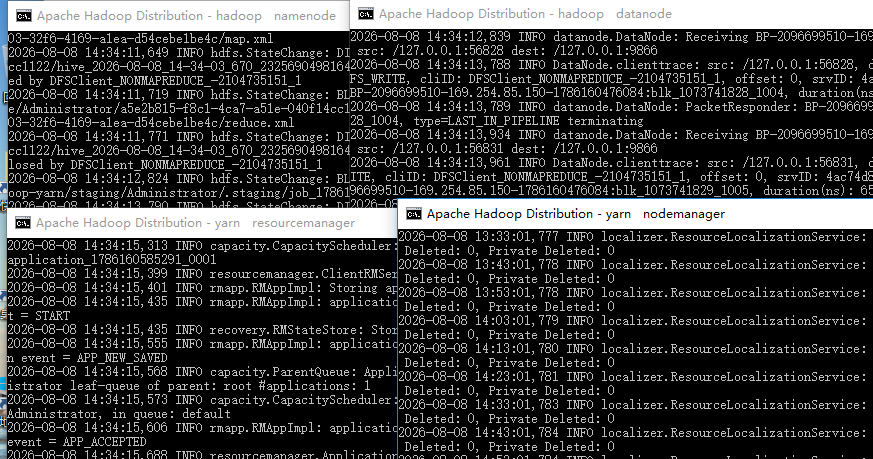
如果命令行提示start-all.cmd脚本已经过期,建议使用start-dfs.cmd和start-yarn.cmd替代。同理,如果执行stop-all.cmd也会有类似的提示,可以使用stop-dfs.cmd和stop-yarn.cmd替代。此时可以通过jps查看当前的JVM实例:
bash
D:\mogx\doc\dev-env\hive3\hadoop-3.3.0\sbin>jps
10528 NameNode
4228 NodeManager
6904 Jps
8200 DataNode
8476 ResourceManager可见已经启动了ResourceManager、NodeManager、NameNode和DataNode四个应用,至此Hadoop的单机版已经启动成功。通过stop-all.cmd命令退出这四个进程。
可以通过http://localhost:8088/查看调度任务的状态。
可以通过http://localhost:50070/去查看HDFS的状态和文件。
重启Hadoop的办法:先执行stop-all.cmd脚本,再执行start-all.cmd脚本。
配置Hive
Hive是构筑于HDFS上的,所以务必确保Hadoop已经启动。Hive在HDFS中默认的文件路径前缀是/user/hive/warehouse,因此可以先通过命令行在HDFS中创建此文件夹:
bash
D:\mogx\doc\dev-env\hive3\hadoop-3.3.0\sbin>hdfs dfs -mkdir /user/hive/warehouse
mkdir: `hdfs://localhost:9000/user/hive': No such file or directory

D:\mogx\doc\dev-env\hive3\hadoop-3.3.0\sbin>hdfs dfs -mkdir /user/hive
mkdir: `hdfs://localhost:9000/user': No such file or directory

D:\mogx\doc\dev-env\hive3\hadoop-3.3.0\sbin>hdfs dfs -mkdir /user

D:\mogx\doc\dev-env\hive3\hadoop-3.3.0\sbin>hdfs dfs -mkdir /user/hive

D:\mogx\doc\dev-env\hive3\hadoop-3.3.0\sbin>hdfs dfs -mkdir /user/hive/warehouse

D:\mogx\doc\dev-env\hive3\hadoop-3.3.0\sbin>hdfs dfs -ls /user/hive
Found 1 items
drwxr-xr-x   - Administrator supergroup          0 2026-08-08 12:01 /user/hive/warehouse

D:\mogx\doc\dev-env\hive3\hadoop-3.3.0\sbin>hdfs dfs -chmod -R 777 /user/hive/warehouse

D:\mogx\doc\dev-env\hive3\hadoop-3.3.0\sbin>hdfs dfs -ls /user/hive
Found 1 items
drwxrwxrwx   - Administrator supergroup          0 2026-08-08 12:01 /user/hive/warehouse

D:\mogx\doc\dev-env\hive3\hadoop-3.3.0\sbin>
不要像本例一样,直接建子目录。要先建根目录,层层往下建。
同时需要创建并为tmp目录赋予权限:
bash
hdfs dfs -mkdir /tmp
hdfs dfs -chmod -R 777 /tmp
在系统变量中添加HIVE_HOME。
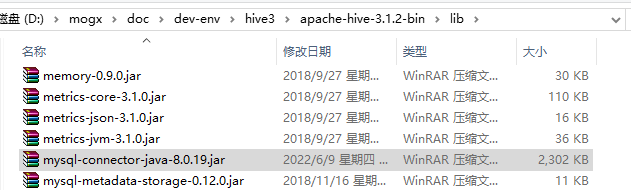
拷贝一个mysql-connector-java-8.0.x.jar到$HIVE_HOME/lib目录下:
创建Hive的配置文件,在$HIVE_HOME/conf目录下已经有对应的配置文件模板,需要重命名,具体如下:
hive-default.xml.template => hive-site.xml
hive-env.sh.template => hive-env.sh
hive-exec-log4j.properties.template => hive-exec-log4j.properties
hive-log4j.properties.template => hive-log4j.properties
修改hive-env.sh脚本,在尾部添加下面内容:
bash
export HADOOP_HOME=D:\mogx\doc\dev-env\hive3\hadoop-3.3.0
export HIVE_CONF_DIR=D:\mogx\doc\dev-env\hive3\apache-hive-3.1.2-bin\conf
export HIVE_AUX_JARS_PATH=D:\mogx\doc\dev-env\hive3\apache-hive-3.1.2-bin\lib修改hive-site.xml文件,主要修改下面的属性项:
| 属性名 | 属性值 | 说明 |
|---|---|---|
hive.metastore.warehouse.dir |
/user/hive/warehouse |
Hive的数据存储目录,这个是默认值 |
hive.exec.scratchdir |
/tmp/hive |
Hive的临时数据目录,这个是默认值 |
javax.jdo.option.ConnectionURL |
jdbc:mysql://localhost:3306/hive?characterEncoding=UTF-8&serverTimezone=UTC |
Hive元数据存放的数据库连接 |
javax.jdo.option.ConnectionDriverName |
com.mysql.cj.jdbc.Driver |
Hive元数据存放的数据库驱动 |
javax.jdo.option.ConnectionUserName |
root |
Hive元数据存放的数据库用户 |
javax.jdo.option.ConnectionPassword |
root |
Hive元数据存放的数据库密码 |
hive.exec.local.scratchdir |
E:/hive-3.1.2-data/scratchDir |
创建本地目录/scratchDir |
hive.downloaded.resources.dir |
E:/hive-3.1.2-data/resourcesDir |
创建本地目录/resourcesDir |
hive.querylog.location |
E:/hive-3.1.2-data/querylogDir |
创建本地目录/querylogDir |
hive.server2.logging.operation.log.location |
E:/hive-3.1.2-data/operationDir |
创建本地目录/operationDir |
datanucleus.autoCreateSchema |
true |
可选 |
datanucleus.autoCreateTables |
true |
可选 |
datanucleus.autoCreateColumns |
true |
可选 |
hive.metastore.schema.verification |
false |
可选 |
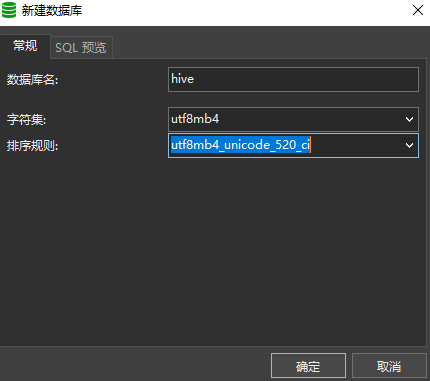
修改完毕之后,用Navicat新建一个数据库,编码和字符集可以选用范围比较大的utf8mb4(虽然官方建议是latin1,但是字符集往大范围选没有影响):
上面的准备工作做完之后,可以进行Hive的元数据库初始化,在$HIVE_HOME/bin目录下执行下面的命令:
hive --service schematool -dbType mysql -initSchema
执行之前,先核对:
- hive-site.xml文件的第3215行有个神奇的无法识别的符号,要去掉。
- hive-site.xml文件,javax.jdo.option.ConnectionURL值的连接串中的数据库名称。
- hive-site.xml文件,javax.jdo.option.ConnectionUserName值对应数据库用户名。
- hive-site.xml文件,javax.jdo.option.ConnectionPassword值对应数据库用户名的密码。
执行后:
bash
D:\mogx\doc\dev-env\hive3\apache-hive-3.1.2-bin\bin>hive --service schematool -dbType mysql -initSchema
SLF4J: Class path contains multiple SLF4J bindings.
SLF4J: Found binding in [jar:file:/D:/mogx/doc/dev-env/hive3/hadoop-3.3.0/share/hadoop/common/lib/slf4j-log4j12-1.7.25.jar!/org/slf4j/impl/StaticLoggerBinder.class]
SLF4J: Found binding in [jar:file:/D:/mogx/doc/dev-env/hive3/apache-hive-3.1.2-bin/lib/log4j-slf4j-impl-2.10.0.jar!/org/slf4j/impl/StaticLoggerBinder.class]
SLF4J: See http://www.slf4j.org/codes.html#multiple_bindings for an explanation.
SLF4J: Actual binding is of type [org.slf4j.impl.Log4jLoggerFactory]
2026-08-08 14:14:19,149 INFO conf.HiveConf: Found configuration file file:/D:/mogx/doc/dev-env/hive3/apache-hive-3.1.2-bin/conf/hive-site.xml
2026-08-08 14:14:20,099 INFO tools.HiveSchemaHelper: Metastore connection URL:   jdbc:mysql://localhost:3306/hive_test1?characterEncoding=UTF-8&serverTimezone=UTC
Metastore connection URL:        jdbc:mysql://localhost:3306/hive_test1?characterEncoding=UTF-8&serverTimezone=UTC
2026-08-08 14:14:20,103 INFO tools.HiveSchemaHelper: Metastore Connection Driver :       com.mysql.cj.jdbc.Driver
Metastore Connection Driver :    com.mysql.cj.jdbc.Driver
2026-08-08 14:14:20,107 INFO tools.HiveSchemaHelper: Metastore connection User:  root
Metastore connection User:       root
Starting metastore schema initialization to 3.1.0
Initialization script hive-schema-3.1.0.mysql.sql


Initialization script completed
schemaTool completed
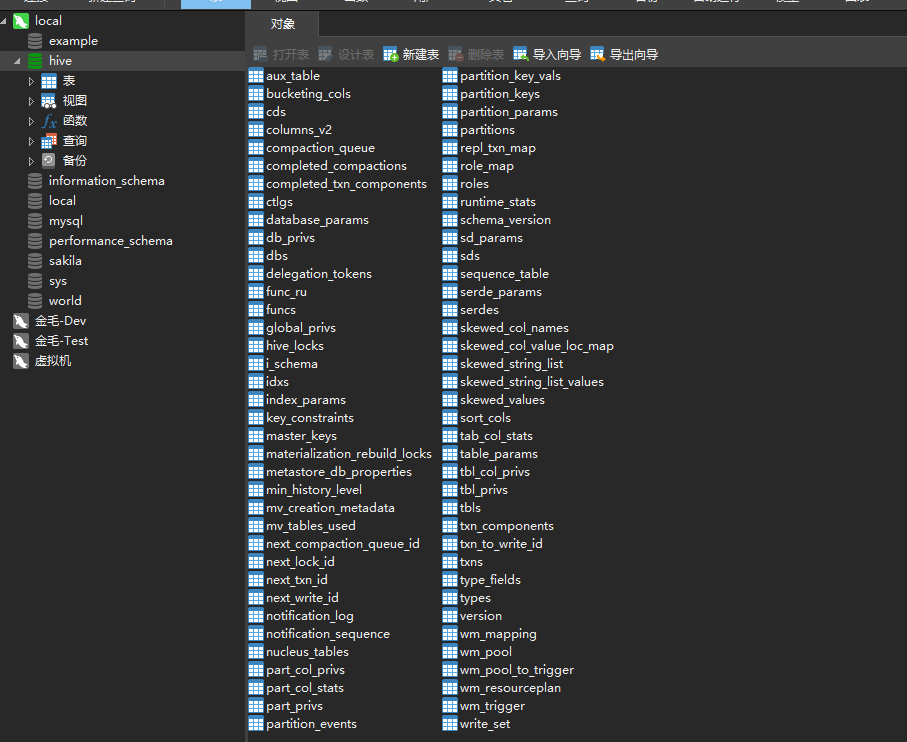
这时说明元数据库已经初始化完毕:
用hive.cmd操作hive
在$HIVE_HOME/bin目录下,通过hive.cmd可以连接Hive(关闭即可退出):
bash
D:\mogx\doc\dev-env\hive3\apache-hive-3.1.2-bin\bin>hive.cmd
SLF4J: Class path contains multiple SLF4J bindings.
SLF4J: Found binding in [jar:file:/D:/mogx/doc/dev-env/hive3/hadoop-3.3.0/share/hadoop/common/lib/slf4j-log4j12-1.7.25.jar!/org/slf4j/impl/StaticLoggerBinder.class]
SLF4J: Found binding in [jar:file:/D:/mogx/doc/dev-env/hive3/apache-hive-3.1.2-bin/lib/log4j-slf4j-impl-2.10.0.jar!/org/slf4j/impl/StaticLoggerBinder.class]
SLF4J: See http://www.slf4j.org/codes.html#multiple_bindings for an explanation.
SLF4J: Actual binding is of type [org.slf4j.impl.Log4jLoggerFactory]
2026-08-08 14:28:05,476 INFO conf.HiveConf: Found configuration file file:/D:/mogx/doc/dev-env/hive3/apache-hive-3.1.2-bin/conf/hive-site.xml
Hive Session ID = a5e2b815-f8c1-4ca7-a51e-040f14cc1122
2026-08-08 14:28:10,453 INFO SessionState: Hive Session ID = a5e2b815-f8c1-4ca7-a51e-040f14cc1122

Logging initialized using configuration in jar:file:/D:/mogx/doc/dev-env/hive3/apache-hive-3.1.2-bin/lib/hive-common-3.1.2.jar!/hive-log4j2.properties Async: true
2026-08-08 14:28:10,569 INFO SessionState:
Logging initialized using configuration in jar:file:/D:/mogx/doc/dev-env/hive3/apache-hive-3.1.2-bin/lib/hive-common-3.1.2.jar!/hive-log4j2.properties Async: true
2026-08-08 14:28:12,849 INFO session.SessionState: Created HDFS directory: /tmp/hive/Administrator
2026-08-08 14:28:12,863 INFO session.SessionState: Created HDFS directory: /tmp/hive/Administrator/a5e2b815-f8c1-4ca7-a51e-040f14cc1122
2026-08-08 14:28:12,873 INFO session.SessionState: Created local directory: E:/hive-3.1.2-data/scratchDir/a5e2b815-f8c1-4ca7-a51e-040f14cc1122
2026-08-08 14:28:12,883 INFO session.SessionState: Created HDFS directory: /tmp/hive/Administrator/a5e2b815-f8c1-4ca7-a51e-040f14cc1122/_tmp_space.db
2026-08-08 14:28:12,921 INFO conf.HiveConf: Using the default value passed in for log id: a5e2b815-f8c1-4ca7-a51e-040f14cc1122
2026-08-08 14:28:12,921 INFO session.SessionState: Updating thread name to a5e2b815-f8c1-4ca7-a51e-040f14cc1122 main
2026-08-08 14:28:15,717 INFO metastore.HiveMetaStore: 0: Opening raw store with implementation class:org.apache.hadoop.hive.metastore.ObjectStore
2026-08-08 14:28:15,795 WARN metastore.ObjectStore: datanucleus.autoStartMechanismMode is set to unsupported value null . Setting it to value: ignored
2026-08-08 14:28:15,813 INFO metastore.ObjectStore: ObjectStore, initialize called
2026-08-08 14:28:15,816 INFO conf.MetastoreConf: Found configuration file file:/D:/mogx/doc/dev-env/hive3/apache-hive-3.1.2-bin/conf/hive-site.xml
2026-08-08 14:28:15,819 INFO conf.MetastoreConf: Unable to find config file hivemetastore-site.xml
2026-08-08 14:28:15,819 INFO conf.MetastoreConf: Found configuration file null
2026-08-08 14:28:15,823 INFO conf.MetastoreConf: Unable to find config file metastore-site.xml
2026-08-08 14:28:15,823 INFO conf.MetastoreConf: Found configuration file null
2026-08-08 14:28:16,393 INFO DataNucleus.Persistence: Property datanucleus.cache.level2 unknown - will be ignored
2026-08-08 14:28:17,061 INFO hikari.HikariDataSource: HikariPool-1 - Starting...
2026-08-08 14:28:18,064 INFO hikari.HikariDataSource: HikariPool-1 - Start completed.
2026-08-08 14:28:18,245 INFO hikari.HikariDataSource: HikariPool-2 - Starting...
2026-08-08 14:28:18,295 INFO hikari.HikariDataSource: HikariPool-2 - Start completed.
2026-08-08 14:28:18,794 INFO metastore.ObjectStore: Setting MetaStore object pin classes with hive.metastore.cache.pinobjtypes="Table,StorageDescriptor,SerDeInfo,Partition,Database,Type,FieldSchema,Order"
2026-08-08 14:28:19,152 INFO metastore.MetaStoreDirectSql: Using direct SQL, underlying DB is MYSQL
2026-08-08 14:28:19,156 INFO metastore.ObjectStore: Initialized ObjectStore
2026-08-08 14:28:19,669 WARN DataNucleus.MetaData: Metadata has jdbc-type of null yet this is not valid. Ignored
2026-08-08 14:28:19,703 WARN DataNucleus.MetaData: Metadata has jdbc-type of null yet this is not valid. Ignored
2026-08-08 14:28:19,724 WARN DataNucleus.MetaData: Metadata has jdbc-type of null yet this is not valid. Ignored
2026-08-08 14:28:19,752 WARN DataNucleus.MetaData: Metadata has jdbc-type of null yet this is not valid. Ignored
2026-08-08 14:28:19,757 WARN DataNucleus.MetaData: Metadata has jdbc-type of null yet this is not valid. Ignored
2026-08-08 14:28:19,760 WARN DataNucleus.MetaData: Metadata has jdbc-type of null yet this is not valid. Ignored
2026-08-08 14:28:23,036 WARN DataNucleus.MetaData: Metadata has jdbc-type of null yet this is not valid. Ignored
2026-08-08 14:28:23,055 WARN DataNucleus.MetaData: Metadata has jdbc-type of null yet this is not valid. Ignored
2026-08-08 14:28:23,060 WARN DataNucleus.MetaData: Metadata has jdbc-type of null yet this is not valid. Ignored
2026-08-08 14:28:23,064 WARN DataNucleus.MetaData: Metadata has jdbc-type of null yet this is not valid. Ignored
2026-08-08 14:28:23,067 WARN DataNucleus.MetaData: Metadata has jdbc-type of null yet this is not valid. Ignored
2026-08-08 14:28:23,072 WARN DataNucleus.MetaData: Metadata has jdbc-type of null yet this is not valid. Ignored
2026-08-08 14:28:26,665 INFO metastore.HiveMetaStore: Setting location of default catalog, as it hasn't been done after upgrade
2026-08-08 14:28:26,737 WARN metastore.ObjectStore: Failed to get database hive.default, returning NoSuchObjectException
2026-08-08 14:28:26,952 INFO metastore.HiveMetaStore: Added admin role in metastore
2026-08-08 14:28:26,977 INFO metastore.HiveMetaStore: Added public role in metastore
2026-08-08 14:28:27,086 INFO metastore.HiveMetaStore: No user is added in admin role, since config is empty
2026-08-08 14:28:27,588 INFO metastore.RetryingMetaStoreClient: RetryingMetaStoreClient proxy=class org.apache.hadoop.hive.ql.metadata.SessionHiveMetaStoreClient ugi=Administrator (auth:SIMPLE) retries=1 delay=1 lifetime=0
2026-08-08 14:28:27,643 INFO metastore.HiveMetaStore: 0: get_all_functions
2026-08-08 14:28:27,648 INFO HiveMetaStore.audit: ugi=Administrator     ip=unknown-ip-addr      cmd=get_all_functions

Hive-on-MR is deprecated in Hive 2 and may not be available in the future versions. Consider using a different execution engine (i.e. spark, tez) or using Hive 1.X releases.
Hive Session ID = 7a6257a7-18d8-45ff-bcd3-9d2e4d7c67be
2026-08-08 14:28:27,705 INFO CliDriver: Hive-on-MR is deprecated in Hive 2 and may not be available in the future versions. Consider using a different execution engine (i.e. spark, tez) or using Hive 1.X releases.
2026-08-08 14:28:27,705 INFO SessionState: Hive Session ID = 7a6257a7-18d8-45ff-bcd3-9d2e4d7c67be
2026-08-08 14:28:27,754 INFO session.SessionState: Created HDFS directory: /tmp/hive/Administrator/7a6257a7-18d8-45ff-bcd3-9d2e4d7c67be
2026-08-08 14:28:27,763 INFO session.SessionState: Created local directory: E:/hive-3.1.2-data/scratchDir/7a6257a7-18d8-45ff-bcd3-9d2e4d7c67be
2026-08-08 14:28:27,787 INFO session.SessionState: Created HDFS directory: /tmp/hive/Administrator/7a6257a7-18d8-45ff-bcd3-9d2e4d7c67be/_tmp_space.db
2026-08-08 14:28:27,797 INFO metastore.HiveMetaStore: 1: get_databases: @hive#
2026-08-08 14:28:27,802 INFO HiveMetaStore.audit: ugi=Administrator     ip=unknown-ip-addr      cmd=get_databases: @hive#
2026-08-08 14:28:27,813 INFO metastore.HiveMetaStore: 1: Opening raw store with implementation class:org.apache.hadoop.hive.metastore.ObjectStore
2026-08-08 14:28:27,816 INFO metastore.ObjectStore: ObjectStore, initialize called
2026-08-08 14:28:27,858 INFO metastore.MetaStoreDirectSql: Using direct SQL, underlying DB is MYSQL
2026-08-08 14:28:27,867 INFO metastore.ObjectStore: Initialized ObjectStore
2026-08-08 14:28:27,901 INFO metastore.HiveMetaStore: 1: get_tables_by_type: db=@hive#default pat=.*,type=MATERIALIZED_VIEW
2026-08-08 14:28:27,901 INFO HiveMetaStore.audit: ugi=Administrator     ip=unknown-ip-addr      cmd=get_tables_by_type: db=@hive#default pat=.*,type=MATERIALIZED_VIEW
2026-08-08 14:28:27,932 INFO metastore.HiveMetaStore: 1: get_multi_table : db=default tbls=
2026-08-08 14:28:27,933 INFO HiveMetaStore.audit: ugi=Administrator     ip=unknown-ip-addr      cmd=get_multi_table : db=default tbls=
2026-08-08 14:28:27,941 INFO metadata.HiveMaterializedViewsRegistry: Materialized views registry has been initialized
hive>
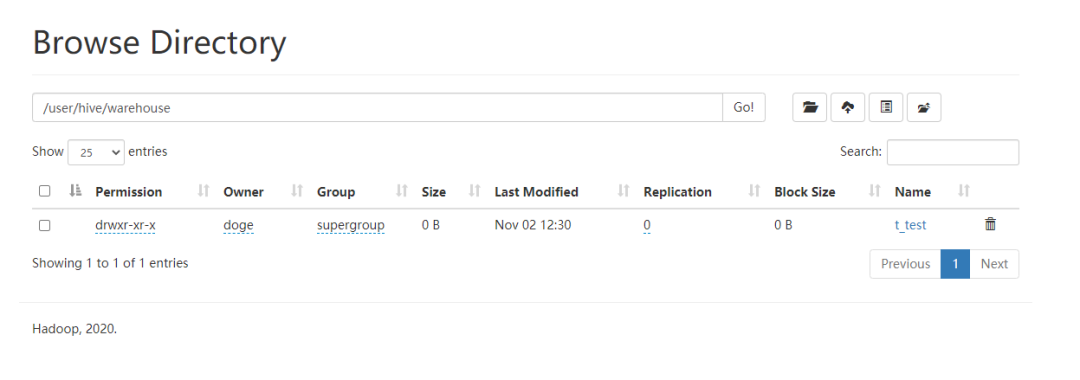
>尝试创建一个表t_test:
bash
hive>  create table t_test(id INT,name string);
hive> show tables;查看http://localhost:50070/确认t_test表已经创建成功。
尝试执行一个写入语句和查询语句:
bash
hive>  insert into t_test(id,name) values(1,'throwx');
hive>  select * from t_test;