1、理解重定向
在task_struct结构体中存放files_struct*指针,指向本进程的文件描述符表fd_array
文件描述符的分配规则是从下标0开始,找值最小并且没有被使用的位置
正常程序默认打开0、1、2,这三个位置全部被占用,默认起始下标为3,如果先执行close(2),那么起始下标就为2
cpp
#include <stdio.h>
#include <sys/types.h>
#include <sys/stat.h>
#include <fcntl.h>
#include <unistd.h>
#include <string.h>

int main()
{
    close(2);
    int fda = open("log.txt", O_WRONLY | O_CREAT | O_TRUNC, 0666);
    printf("fda: %d\n", fda);

    int fdb = open("log.txt", O_WRONLY | O_CREAT | O_TRUNC, 0666);
    printf("fdb: %d\n", fdb);

    int fdc = open("log.txt", O_WRONLY | O_CREAT | O_TRUNC, 0666);
    printf("fdc: %d\n", fdc);

    return 0;
}
1为显示器输出,如果把1号下标对应的文件关闭,那么将产生输出重定向:
cpp
#include <stdio.h>
#include <sys/types.h>
#include <sys/stat.h>
#include <fcntl.h>
#include <unistd.h>
#include <string.h>

int main()
{
    close(1);
    int fda = open("log.txt", O_WRONLY | O_CREAT | O_TRUNC, 0666);
    printf("fda: %d\n", fda);

    int fdb = open("log.txt", O_WRONLY | O_CREAT | O_TRUNC, 0666);
    printf("fdb: %d\n", fdb);

    int fdc = open("log.txt", O_WRONLY | O_CREAT | O_TRUNC, 0666);
    printf("fdc: %d\n", fdc);

    return 0;
}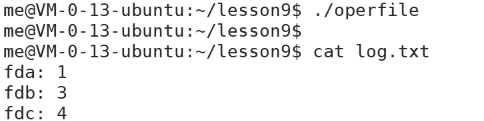
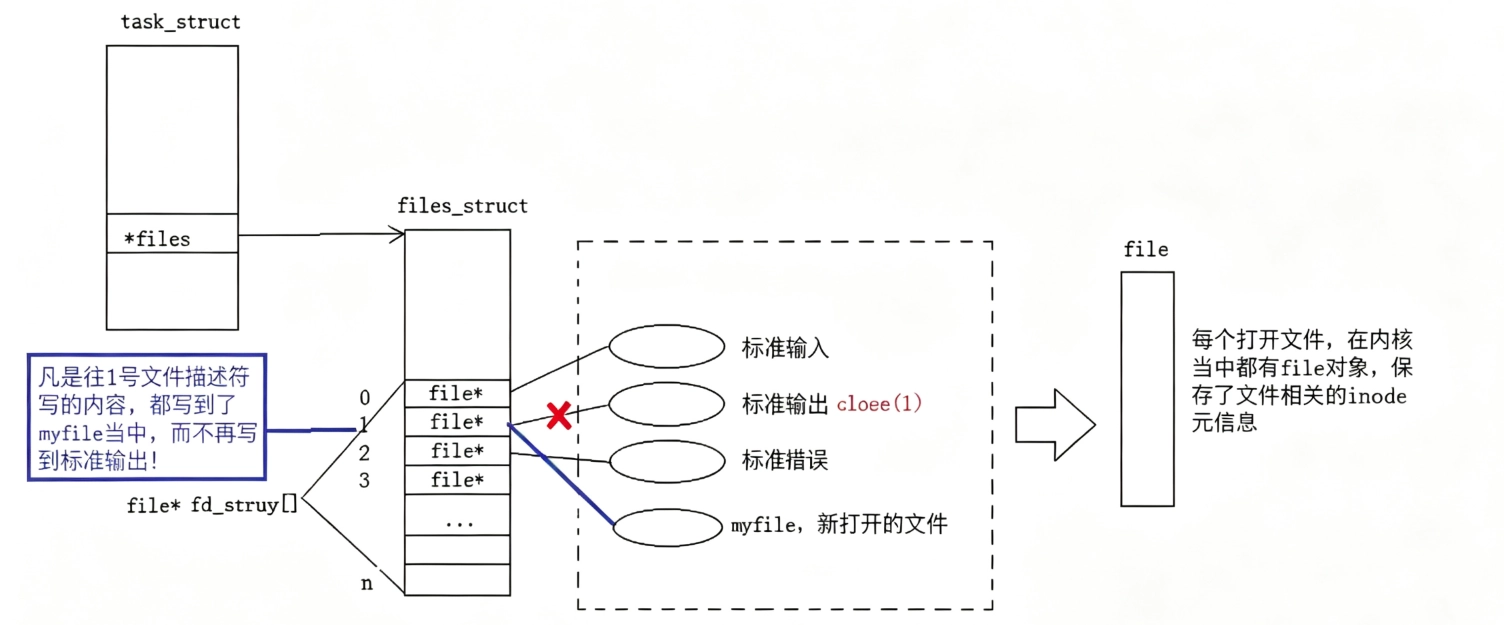
当运行operfile程序时无输出,内容全部写入了log.txt中,完成输出重定向,文件描述符1这个编号从绑定屏幕改成了绑定log.txt,fd1中存储的内容指向了log.txt的内容,并且,操作系统更改1的指向后语言层并不知道,stdout封装1后语言层只认数字1
所以,重定向的本质是更改数组特定下标内的内容
2、dup2
dup2为系统调用的重定向函数,函数定义:
cpp
int dup2(int oldfd, int newfd);将newfd变成oldfd的副本,如果newfd原本打开了资源,会先自动关闭newfd
dup2实现重定向的方式不是先关闭文件描述符再打开一个文件,而是将oldfd下标里存储的文件拷贝到newfd中
cpp
#include <stdio.h>
#include <sys/types.h>
#include <sys/stat.h>
#include <fcntl.h>
#include <unistd.h>
#include <string.h>

int main()
{
    // close(1); 注释掉,不手动关闭标准输出fd=1
    int fda = open("log.txt", O_WRONLY | O_CREAT | O_TRUNC, 0666);
    printf("fda: %d\n", fda);  // 输出 3
    dup2(fda, 1);
    // fd1现在指向log.txt,内容写入文件
    printf("aaaaaa");
    printf("aaaaaa");
    printf("aaaaaa");

    fprintf(stdout, "aaaaaa\n");
    return 0;
}
dup2让fd1复制fda指向的文件,实现标准输出重定向
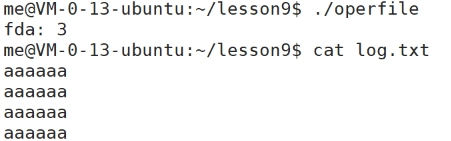
把O_TRUNC替换成O_APPEND可以实现追加重定向
3、输入重定向
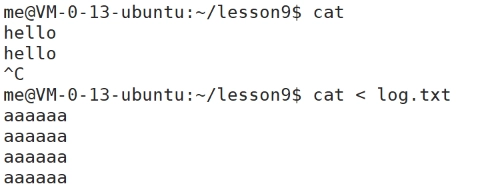
使用cat命令时,cat会从键盘读取数据,但输入重定向后会从log.txt中读取内容
cpp
#include <stdio.h>
#include <sys/types.h>
#include <sys/stat.h>
#include <fcntl.h>
#include <unistd.h>
#include <string.h>

int main()
{
    int fd = open("log.txt", O_RDONLY);
    printf("fd: %d\n", fd);
    dup2(fd, 0);

    // 从标准输入读取数据
    char buf[64];
    fgets(buf, sizeof(buf), stdin);
    printf("读取到文件内容:%s", buf);

    close(fd);
    return 0;
}
dup2(fd, 0); 把打开的文件fd覆盖掉0号文件描述符,之后所有读 stdin 的操作,不再读键盘,而是读log.txt,这就是程序内部实现输入重定向
4、理解一切皆文件
键盘、显示器、网卡、硬盘等硬件底层读写逻辑完全不相同,为什么上层可以统一用同一个接口?
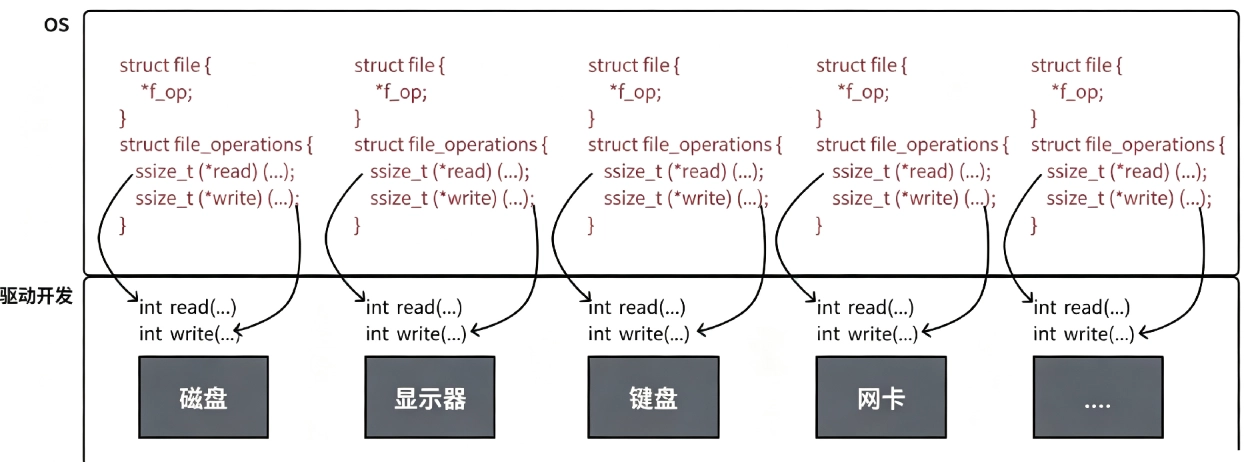
每次打开一个文件或设备时,内核都会创建一个独立的struct file对象,内部有函数指针数组,操作系统向上层应用提供统一的IO接口,通过内核struct file+ 驱动函数指针,把磁盘文件、键盘、显示器、网卡、管道、套接字全部抽象成文件,统一管理。
所以应用层调用open或write等函数时,会通过fd下标找到进程文件描述符表,拿到struct file* ,自动跳转到底层硬件驱动专属方法,上层应用完全不用区分硬件类型,接口是统一的