RAG系列文章:
- RAG概述
- RAG(一):Agentic RAG、AUTO-RAG、ChunkRAG、FastRAG、Graph RAG、HtmlRAG
- RAG(二)
- RAG(三):UltraRAG、Elysia、Late Chunking、CoRAG、ComoRAG
OpenRAG
官网,Langflow团队打造、全面开源(GitHub,4.4K Star,458 Fork)RAG平台,旨在通过智能体赋能,实现高效、智能的文档搜索和AI对话体验。
基于Starlette和Next.js构建,并由OpenSearch、Langflow和Docling等强大项目提供核心动力,为用户提供从文档上传、处理到智能查询的全流程无缝体验。官方文档。
功能亮点
- 开箱即用,一键启动:所有核心工具都已预先配置和连接,用户只需简单安装即可立即运行,无需复杂的环境配置
- 强大的智能体RAG工作流 (Agentic RAG workflows):利用智能体实现高级的流程编排,例如对检索结果进行重排序和多智能体协同工作,从而提供更精准更智能的回答
- 智能文档摄取:内置强大的文档解析能力,能够处理现实世界中各种格式混乱、复杂的文档数据,实现智能解析和切分
- 拖拽式工作流构建器:由Langflow提供强大的可视化界面,用户可通过拖拽组件的方式快速构建、测试和迭代自己的RAG工作流,极大降低开发门槛
- 模块化的企业级插件:平台设计灵活,允许用户根据需要扩展功能,满足不同规模的企业级应用需求
- 企业级规模的搜索能力:底层采用强大的OpenSearch,确保在任何数据规模下都能提供生产级别的稳定性和高性能搜索体验。
工作原理即步骤:
- 文档摄取(Ingestion):用户上传文档(如PDF、TXT、Markdown等)
- 数据处理(Processing):系统对文档进行解析、切块(Chunking)并生成向量嵌入(Embeddings)
- 数据索引(Indexing):将处理后的数据和向量存储在OpenSearch中,建立可供快速检索的索引
- 检索与生成(Retrieval & Generation)
用户通过聊天界面提出问题。系统将问题转换为向量,在OpenSearch中进行语义搜索,找到最相关的文档片段。将检索到的相关内容与用户原始问题一起作为上下文,提交给大型语言模型(LLM)。LLM基于提供的上下文生成最终的、准确的回答。
实战
官方提供多种部署方式:
- Docker
- 源码
- 基于
uv安装:uv run openrag
官方提供MCP
基于pip安装:pip install openrag-mcp
配置MCP Server:
json
{
	"mcpServers": {
		"openrag": {
			"command": "uvx",
			"args": ["openrag-mcp"],
			"env": {
				"OPENRAG_URL": "http://localhost:3000",
				"OPENRAG_API_KEY": "api_key"
			}
		}
	}
}
Python SDK,官方文档集成,安装:pip install openrag-sdk
示例:
py
import asyncio
from openrag_sdk import OpenRAGClient

async def main():
	async with OpenRAGClient() as client:
		response = await client.chat.create(message="What is RAG?")
		print(response.response)

if __name__ == "__main__":
	asyncio.run(main())
TS SDK,官方文档,安装:npm install openrag-sdk,集成
ts
import { OpenRAGClient } from "openrag-sdk";

const client = new OpenRAGClient();
const response = await client.chat.create({ message: "What is RAG?" });
console.log(response.response);
Ragflow-Plus
官网,开源(GitHub,1.4K Star,257 Fork)基于RAGFlow,针对中文场景进行深度优化。
五大核心升级
- 管理模式:额外搭建后台管理系统,支持管理员执行用户管理、团队管理、配置管理、文件管理、知识库管理等功能。不同于基础版的「无管理模式」,新增独立后台管理系统,对于企业用户而言,可将RAG工具纳入标准化IT管理体系,而非游离在外的「野系统」,支持:
- 多维度权限体系:用户分组、团队隔离、操作审计
- 全生命周期管理:从文件上传到知识库更新的可视化流程
- 系统级配置中心:模型参数、解析规则、存储策略集中调控
- 权限回收:前台系统对用户权限进行收缩,进一步简化界面
- 解析增强:使用MinerU替代DeepDoc算法,文件解析效果更好
- 支持10+格式文件:PDF/Word/PPT/Excel/图片等无缝解析
- 结构还原度提升:复杂表格、公式、图表的层级关系精准保留
- 图片智能处理:自动提取文档内嵌图片并关联上下文
- 图文输出:支持模型在回答时,输出引用文本块关联的相关图片。当用户询问「某产品的结构示意图」时,不仅能返回描述文字,还能直接展示对应的图纸,这在传统RAG中是难以实现的。实现文本-图片的深度绑定:
- 解析时自动标记图片与文本块的关联关系
- 回答时根据引用内容自动插入相关图片
- 支持图片放大预览、批量下载等交互操作
- 文档撰写模式:支持全新的文档模式交互体验。将知识库变成创作助手:
- 内置多场景模板:技术文档、会议纪要、研究报告等即选即用
- 光标定位插入:在编辑区指定位置,AI基于知识库内容精准补写
- 一键导出格式:支持Word/PDF等多格式输出,保留排版样式
- 轻量化部署:兼顾性能与成本,考虑到中小企业的算力限制,性能优化:
- 支持CPU/GPU双模式部署,最低16GB内存即可启动
- 提供Docker一键部署方案,3分钟完成环境配置
- 支持离线部署,满足数据敏感场景需求
原理
#mermaid-svg-NB6hXKRP9pIfM4fM{font-family:"trebuchet ms",verdana,arial,sans-serif;font-size:16px;fill:#333;}@keyframes edge-animation-frame{from{stroke-dashoffset:0;}}@keyframes dash{to{stroke-dashoffset:0;}}#mermaid-svg-NB6hXKRP9pIfM4fM .edge-animation-slow{stroke-dasharray:9,5!important;stroke-dashoffset:900;animation:dash 50s linear infinite;stroke-linecap:round;}#mermaid-svg-NB6hXKRP9pIfM4fM .edge-animation-fast{stroke-dasharray:9,5!important;stroke-dashoffset:900;animation:dash 20s linear infinite;stroke-linecap:round;}#mermaid-svg-NB6hXKRP9pIfM4fM .error-icon{fill:#552222;}#mermaid-svg-NB6hXKRP9pIfM4fM .error-text{fill:#552222;stroke:#552222;}#mermaid-svg-NB6hXKRP9pIfM4fM .edge-thickness-normal{stroke-width:1px;}#mermaid-svg-NB6hXKRP9pIfM4fM .edge-thickness-thick{stroke-width:3.5px;}#mermaid-svg-NB6hXKRP9pIfM4fM .edge-pattern-solid{stroke-dasharray:0;}#mermaid-svg-NB6hXKRP9pIfM4fM .edge-thickness-invisible{stroke-width:0;fill:none;}#mermaid-svg-NB6hXKRP9pIfM4fM .edge-pattern-dashed{stroke-dasharray:3;}#mermaid-svg-NB6hXKRP9pIfM4fM .edge-pattern-dotted{stroke-dasharray:2;}#mermaid-svg-NB6hXKRP9pIfM4fM .marker{fill:#333333;stroke:#333333;}#mermaid-svg-NB6hXKRP9pIfM4fM .marker.cross{stroke:#333333;}#mermaid-svg-NB6hXKRP9pIfM4fM svg{font-family:"trebuchet ms",verdana,arial,sans-serif;font-size:16px;}#mermaid-svg-NB6hXKRP9pIfM4fM p{margin:0;}#mermaid-svg-NB6hXKRP9pIfM4fM .label{font-family:"trebuchet ms",verdana,arial,sans-serif;color:#333;}#mermaid-svg-NB6hXKRP9pIfM4fM .cluster-label text{fill:#333;}#mermaid-svg-NB6hXKRP9pIfM4fM .cluster-label span{color:#333;}#mermaid-svg-NB6hXKRP9pIfM4fM .cluster-label span p{background-color:transparent;}#mermaid-svg-NB6hXKRP9pIfM4fM .label text,#mermaid-svg-NB6hXKRP9pIfM4fM span{fill:#333;color:#333;}#mermaid-svg-NB6hXKRP9pIfM4fM .node rect,#mermaid-svg-NB6hXKRP9pIfM4fM .node circle,#mermaid-svg-NB6hXKRP9pIfM4fM .node ellipse,#mermaid-svg-NB6hXKRP9pIfM4fM .node polygon,#mermaid-svg-NB6hXKRP9pIfM4fM .node path{fill:#ECECFF;stroke:#9370DB;stroke-width:1px;}#mermaid-svg-NB6hXKRP9pIfM4fM .rough-node .label text,#mermaid-svg-NB6hXKRP9pIfM4fM .node .label text,#mermaid-svg-NB6hXKRP9pIfM4fM .image-shape .label,#mermaid-svg-NB6hXKRP9pIfM4fM .icon-shape .label{text-anchor:middle;}#mermaid-svg-NB6hXKRP9pIfM4fM .node .katex path{fill:#000;stroke:#000;stroke-width:1px;}#mermaid-svg-NB6hXKRP9pIfM4fM .rough-node .label,#mermaid-svg-NB6hXKRP9pIfM4fM .node .label,#mermaid-svg-NB6hXKRP9pIfM4fM .image-shape .label,#mermaid-svg-NB6hXKRP9pIfM4fM .icon-shape .label{text-align:center;}#mermaid-svg-NB6hXKRP9pIfM4fM .node.clickable{cursor:pointer;}#mermaid-svg-NB6hXKRP9pIfM4fM .root .anchor path{fill:#333333!important;stroke-width:0;stroke:#333333;}#mermaid-svg-NB6hXKRP9pIfM4fM .arrowheadPath{fill:#333333;}#mermaid-svg-NB6hXKRP9pIfM4fM .edgePath .path{stroke:#333333;stroke-width:2.0px;}#mermaid-svg-NB6hXKRP9pIfM4fM .flowchart-link{stroke:#333333;fill:none;}#mermaid-svg-NB6hXKRP9pIfM4fM .edgeLabel{background-color:rgba(232,232,232, 0.8);text-align:center;}#mermaid-svg-NB6hXKRP9pIfM4fM .edgeLabel p{background-color:rgba(232,232,232, 0.8);}#mermaid-svg-NB6hXKRP9pIfM4fM .edgeLabel rect{opacity:0.5;background-color:rgba(232,232,232, 0.8);fill:rgba(232,232,232, 0.8);}#mermaid-svg-NB6hXKRP9pIfM4fM .labelBkg{background-color:rgba(232, 232, 232, 0.5);}#mermaid-svg-NB6hXKRP9pIfM4fM .cluster rect{fill:#ffffde;stroke:#aaaa33;stroke-width:1px;}#mermaid-svg-NB6hXKRP9pIfM4fM .cluster text{fill:#333;}#mermaid-svg-NB6hXKRP9pIfM4fM .cluster span{color:#333;}#mermaid-svg-NB6hXKRP9pIfM4fM div.mermaidTooltip{position:absolute;text-align:center;max-width:200px;padding:2px;font-family:"trebuchet ms",verdana,arial,sans-serif;font-size:12px;background:hsl(80, 100%, 96.2745098039%);border:1px solid #aaaa33;border-radius:2px;pointer-events:none;z-index:100;}#mermaid-svg-NB6hXKRP9pIfM4fM .flowchartTitleText{text-anchor:middle;font-size:18px;fill:#333;}#mermaid-svg-NB6hXKRP9pIfM4fM rect.text{fill:none;stroke-width:0;}#mermaid-svg-NB6hXKRP9pIfM4fM .icon-shape,#mermaid-svg-NB6hXKRP9pIfM4fM .image-shape{background-color:rgba(232,232,232, 0.8);text-align:center;}#mermaid-svg-NB6hXKRP9pIfM4fM .icon-shape p,#mermaid-svg-NB6hXKRP9pIfM4fM .image-shape p{background-color:rgba(232,232,232, 0.8);padding:2px;}#mermaid-svg-NB6hXKRP9pIfM4fM .icon-shape .label rect,#mermaid-svg-NB6hXKRP9pIfM4fM .image-shape .label rect{opacity:0.5;background-color:rgba(232,232,232, 0.8);fill:rgba(232,232,232, 0.8);}#mermaid-svg-NB6hXKRP9pIfM4fM .label-icon{display:inline-block;height:1em;overflow:visible;vertical-align:-0.125em;}#mermaid-svg-NB6hXKRP9pIfM4fM .node .label-icon path{fill:currentColor;stroke:revert;stroke-width:revert;}#mermaid-svg-NB6hXKRP9pIfM4fM :root{--mermaid-font-family:"trebuchet ms",verdana,arial,sans-serif;}#mermaid-svg-NB6hXKRP9pIfM4fM .blue>*{fill:#4285f4!important;stroke:#333!important;stroke-width:1px!important;color:#fff!important;}#mermaid-svg-NB6hXKRP9pIfM4fM .blue span{fill:#4285f4!important;stroke:#333!important;stroke-width:1px!important;color:#fff!important;}#mermaid-svg-NB6hXKRP9pIfM4fM .blue tspan{fill:#fff!important;}#mermaid-svg-NB6hXKRP9pIfM4fM .green>*{fill:#4caf50!important;stroke:#333!important;stroke-width:1px!important;color:#fff!important;}#mermaid-svg-NB6hXKRP9pIfM4fM .green span{fill:#4caf50!important;stroke:#333!important;stroke-width:1px!important;color:#fff!important;}#mermaid-svg-NB6hXKRP9pIfM4fM .green tspan{fill:#fff!important;}#mermaid-svg-NB6hXKRP9pIfM4fM .red>*{fill:#e53935!important;stroke:#333!important;stroke-width:1px!important;color:#fff!important;}#mermaid-svg-NB6hXKRP9pIfM4fM .red span{fill:#e53935!important;stroke:#333!important;stroke-width:1px!important;color:#fff!important;}#mermaid-svg-NB6hXKRP9pIfM4fM .red tspan{fill:#fff!important;}#mermaid-svg-NB6hXKRP9pIfM4fM .yellow>*{fill:#ffc107!important;stroke:#333!important;stroke-width:1px!important;color:#000!important;}#mermaid-svg-NB6hXKRP9pIfM4fM .yellow span{fill:#ffc107!important;stroke:#333!important;stroke-width:1px!important;color:#000!important;}#mermaid-svg-NB6hXKRP9pIfM4fM .yellow tspan{fill:#000!important;}#mermaid-svg-NB6hXKRP9pIfM4fM .container>*{fill:#fffbe6!important;stroke:#d9d9d9!important;stroke-width:1px!important;rx:5px!important;}#mermaid-svg-NB6hXKRP9pIfM4fM .container span{fill:#fffbe6!important;stroke:#d9d9d9!important;stroke-width:1px!important;rx:5px!important;} 后台管理系统
知识库管理
用户与权限管理
系统设置
核心控制层
知识库配置
-
创建/删除
-
基本信息设置
-
访问权限控制
系统参数 -
存储配置
-
缓存设置
-
部署参数
自定义配置 -
界面Logo
-
标题修改
-
水印设置
用户管理 -
创建/删除
-
信息修改
-
密码重置
团队管理 -
成员增删
-
权限分配
-
数据共享
角色配置 -
权限粒度控制
-
操作审计日志
文件管理 -
上传/删除
-
批量解析
-
格式转换
模型配置 -
Embedding模型
-
Chat模型
-
解析引擎设置
解析任务管理 -
进度监控
-
日志查看
-
重新解析
管理首页
仪表盘
实战
基于源码和Docker Compose本地部署:
bash
git clone https://github.com/zstar1003/ragflow-plus.git
cd ragflow-plus
docker compose -f docker/docker-compose.yml up -d
LinearRAG
论文,开源(GitHub,532 Star,63 Fork)。
| 方法 | 工作原理 | 优点 | 缺点 |
|---|---|---|---|
| ✅NaiveRAG | 把文档切块→向量化→按相似度检索→生成答案 | 简单直接、稳定可靠 | 容易丢失上下文,难以处理多跳推理 |
| ⚠️GraphRAG | 提取实体和关系→构建知识图谱→在图上检索路径→生成答案 | 支持复杂推理、召回能力强 | 图谱质量差、噪声多、构建成本高 |
| LinearRAG | 只提取实体+语义链接→构建三元层级图→两阶段检索 | 高效、准确、抗噪、线性扩展 | 新方法,需进一步验证 |
总结
Naive RAG:像是"关键词搜索",快但浅GraphRAG:像是"构建思维导图后推理",容易被噪声影响,负责、耗时LinearRAG:则另辟蹊径:不画抽取关系,只抓关键节点,靠"语义桥"连通信息孤岛
优势
- 无需关系抽取:避免错误三元组污染图谱
- 轻量高效:使用
spaCy等轻模型,不烧LLM Token - 线性可扩展:数据越多,扩展越平稳
- 多跳推理强:通过语义桥实现单次遍历多跳检索
- 抗噪能力强:不依赖脆弱的关系结构
LinearRAG构建一个名为Tri-Graph(三图)的层级图结构,包含三类节点:
- 实体节点(Entity):如爱因斯坦、AI
- 句子节点(Sentence):原文中的每一句话
- 段落节点(Passage):原始文本块
实体抽取方法:不依赖大模型,直接使用spaCy进行抽取。
边的连接规则:
- 实体出现在某句子中→连接到该句子
- 实体出现在某段落中→连接到该段落
形成两个关系矩阵:
Mention Matrix:句子←→实体Contain Matrix:段落←→实体
特点:
- 不依赖LLM做关系抽取,零Token消耗
- 使用轻量NER工具(spaCy),速度快、精度高
- 图谱更新只需局部重建,支持线性扩展
实验显示:相比传统GraphRAG,索引时间减少77%以上!
两阶段检索
先激活实体,再召回段落;检索过程分为两个阶段,层层递进:
第一阶段:局部语义桥接(Local Semantic Bridging)
目标:找出与问题相关的中间实体,打通多跳路径。
举例:哪些技术推动现代语音识别的发展?
单纯匹配【语音识别】可能找不到提到【深度神经网络】的段落,但通过语义桥可发现:语音识别↔端到端模型↔Transformer↔深度神经网络
这些中间实体虽然没出现在问题中,但语义相近,能帮助打通信息链。
方法:
- 计算查询与初始实体的语义相似度
- 在句子层传播相似性,激活潜在相关实体
- 形成激活实体集
第二阶段:全局重要性聚合(Global Importance Aggregation)
目标:从全局视角评估哪些段落最重要。
方法:使用个性化PageRank(Personalized PageRank)
- 将第一阶段激活的实体作为种子
- 在实体-段落子图上运行PR算法
- 得到每个段落的重要性得分
- 返回Top-K最相关段落
Cache-Augmented Generation
缓存增强生成,论文,主要使用Python和Shell开发、开源(GitHub,1.5K Star,223 Fork)技术。
与传统RAG系统不同,CAG通过预加载所有相关的资源,尤其是当文档或知识库规模有限时,将其融入LLMs的扩展上下文中,并计算运行时参数的缓存。可消除检索延迟,减少检索错误,并简化系统架构,同时保持上下文相关性(高质量回答),确保模型能够全面处理相关上下文。
论文给出的架构简图
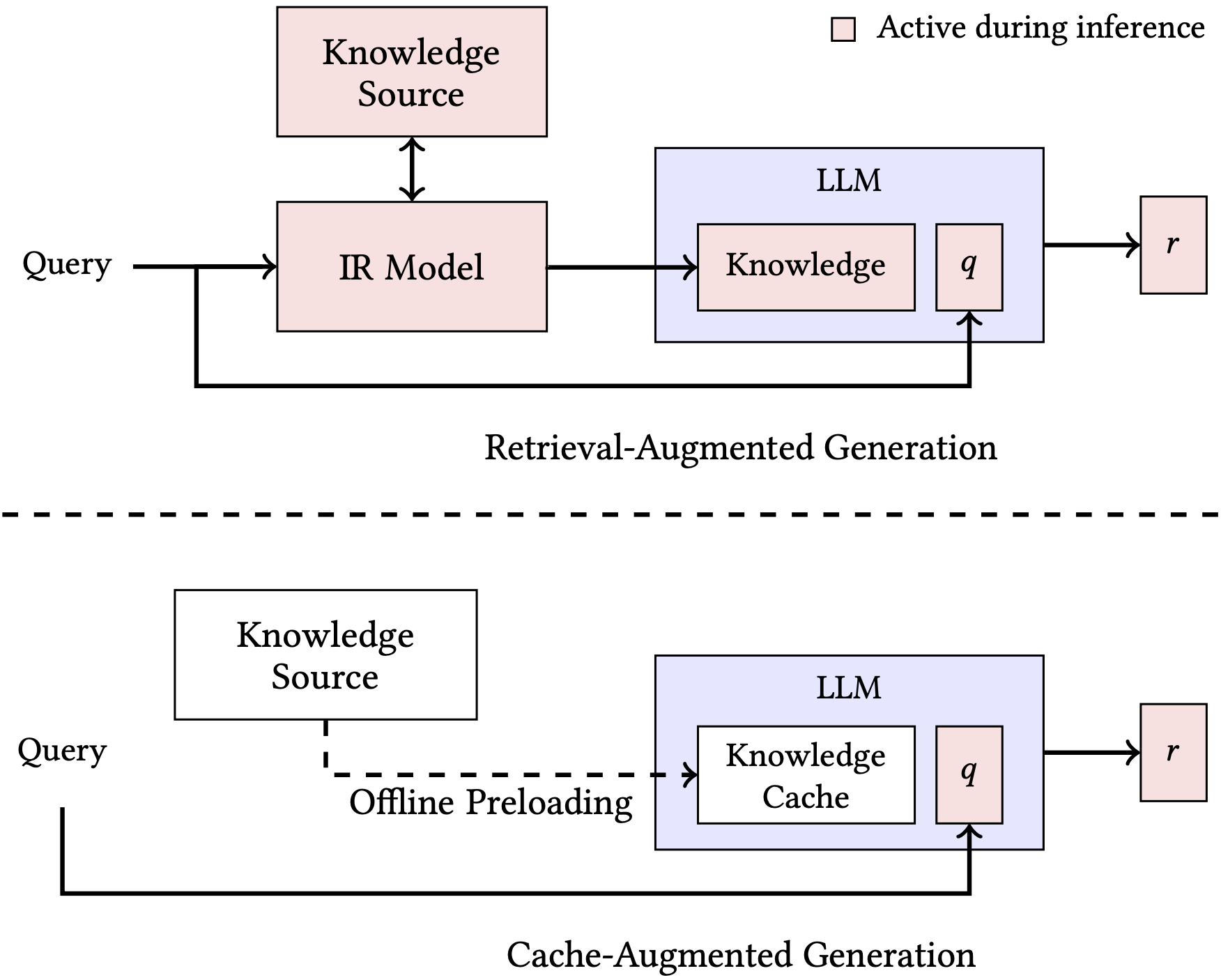
思路:利用长上下文LLM的扩展上下文能力,将所有相关资源预加载到LLM的扩展上下文中,并缓存运行时参数。在推理时,模型利用这些预加载的参数来回答查询,从而实现无检索知识集成。
架构上主要分成三个部分(阶段):
- 外部知识预加载:需将上下文文档集合交给LLM进行处理,编码成KV Cache。这些KV Cache会被用于在推理阶段进行生成。处理之后的计算结果被存储在磁盘或内存中,以供后续流程使用
- 推理:需将已经处理好的KV Cache从磁盘加载到内存(如果之前是存在磁盘的话)。之后,利用已有的KV Cache和新的请求进行结合,提交给LLM进行后续的继续生成(即从请求开始继续往后生成KVCache)。当此次请求处理完毕,KVCache的内容变更为新的KVCache
- 重置:在处理多个请求时,由于原先的KVCache已经变更,为获取原先的KVCache,需对内存中新的KVCache进行截断(论文中认为从磁盘重新加载的成本更高),重置成原来的KVCache,然后和新的请求一起进行进一步的处理。
Context-Augmented Generation
上下文增强生成,论文,项目主页,开源(GitHub,38 Star,7 Fork)
APE:Adaptive Parallel Encoding
方法论
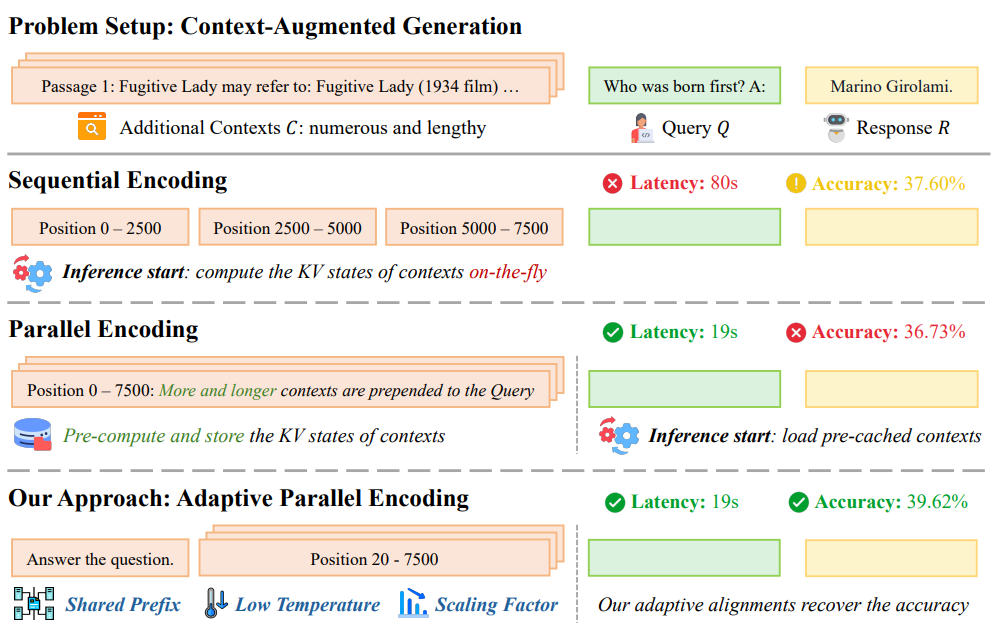
核心区别在于:
- 领域记忆(Domain Memory):核心,超越RAG的被动知识库,是一个主动的、有状态的记忆系统,不仅存储着事实知识,还包括:
- 领域规则:例如,医疗 AI 需要遵守的诊断逻辑,或金融 AI 必须遵循的合规条款
- 对话历史:记住用户在三天前讨论过的话题,而不仅仅是上一句话
- 用户偏好:知道用户的具体需求、风格偏好或个人背景
- 上下文对齐(Context Alignment):不只是简单地拼接信息。在生成答案前,会进行复杂的对齐工作,确保即将生成的回复,同时与外部知识(RAG做的)、领域记忆、对话历史保持逻辑一致
- 一致性检查(Consistency Check):在生成答案后,CAG会增加关键的验证层。会反向检查答案是否与领域记忆中的核心规则或长期目标相矛盾
关键增强技术
| 技术方向 | 功能说明 |
|---|---|
| 上下文聚类(Context Clustering) | 对知识库聚类,生成主题级上下文(CAG的早期变体) |
| 上下文摘要(Context Summarization) | 对相似文档进行压缩摘要,减少冗余与token占用 |
| 上下文选择(Context Selection) | 利用注意力或重排序模型筛选最相关上下文 |
| 上下文融合(Context Fusion) | 将多源上下文(文档、图谱、记忆)融合成统一输入 |
| 上下文记忆(Context Memory) | 动态保存生成历史和用户意图,实现长程依赖 |
对比RAG
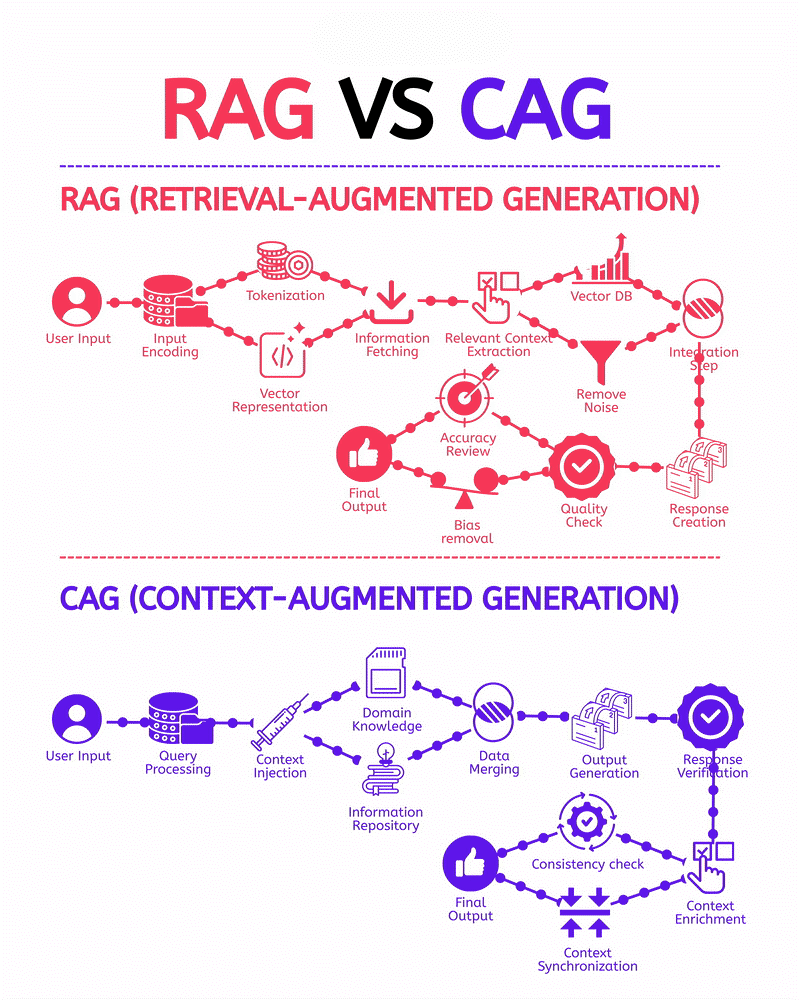
解读:上下文增强生成,注重深度理解上下文。
| 特性 | RAG | CAG |
|---|---|---|
| 核心焦点 | 事实检索(Fact Retrieval) | 情境管理(Context Management) |
| 工作模式 | 偏向无状态 (Stateless) (每次查询都像一次新的检索) | 强调有状态 (Stateful) (维护和调用持久的记忆) |
| 知识源 | 外部知识库(文档、网页等) | 外部知识库 + 领域记忆 (规则、历史、偏好) |
| 关键动作 | 检索 (Retrieve)、排序 (Rank)、融合 (Fuse) | 注入 (Inject)、对齐 (Align)、一致性检查 (Consistency) |
| 上下文组织 | 扁平式(无结构) | 结构化(聚类、图谱、主题记忆) |
| 目标角色 | 开卷考试的考生 (能快速查到正确答案) | 融会贯通的专家 (能结合记忆和知识给出一贯的见解) |
| 适用场景 | QA、知识问答、事实型任务 | 复杂问答、决策推理、多轮对话、专业领域生成 |
| 代表实现 | OpenAI RAG、LlamaIndex、LangChain RAG | GraphRAG、ClusterRAG、Dynamic-Memory RAG、Context-Tuning |
实战
基于源码和Python环境本地部署:
bash
git clone https://github.com/Infini-AI-Lab/APE.git
cd APE
conda create -yn ape python=3.10
conda activate ape
pip install -r requirements.txt
python setup.py install
# 运行示例
CUDA_VISIBLE_DEVICES=0 python demo_APE.py --model llama3-8b-instruct