背景:若依框架的 easyexcel,导出的文件,如list<model>, 假设有 5 列,其中 2 列的前后行如果数据一样,则直接合并单元格。
效果:
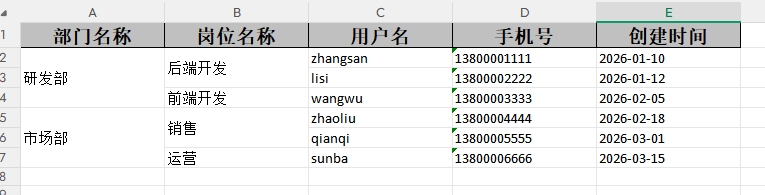
1.依赖引入
       <dependency>
            <groupId>com.alibaba</groupId>
            <artifactId>easyexcel-core</artifactId>
            <version>3.3.4</version>
        </dependency>
2.方法句柄
package com.ruoyi.common.core.utils;

import com.alibaba.excel.metadata.Head;
import com.alibaba.excel.metadata.data.WriteCellData;
import com.alibaba.excel.write.handler.CellWriteHandler;
import com.alibaba.excel.write.metadata.holder.WriteSheetHolder;
import com.alibaba.excel.write.metadata.holder.WriteTableHolder;
import org.apache.poi.ss.usermodel.Cell;
import org.apache.poi.ss.usermodel.CellType;
import org.apache.poi.ss.usermodel.CellStyle;
import org.apache.poi.ss.usermodel.VerticalAlignment;
import org.apache.poi.ss.usermodel.Sheet;
import org.apache.poi.ss.util.CellRangeAddress;

import java.util.ArrayList;
import java.util.HashMap;
import java.util.List;
import java.util.Map;

/**
 * EasyExcel相邻行纵向合并处理器
 * 适配easyexcel-core 3.3.4
 * 合并单元格【垂直居中】
 */
public class ExcelMergeHandler implements CellWriteHandler {

    // 需要合并的列下标
    private final int[] mergeColumnIndexes;
    // 列 -> 合并起始行
    private final Map<Integer, Integer> mergeStartRowMap = new HashMap<>();
    // 列 -> 上一行文本
    private final Map<Integer, String> lastValueMap = new HashMap<>();
    // 记录所有待合并区域,结束后统一创建合并+设置居中
    private final List<CellRangeAddress> mergeRegionList = new ArrayList<>();

    public ExcelMergeHandler(int[] mergeColumnIndexes) {
        this.mergeColumnIndexes = mergeColumnIndexes;
    }

    @Override
    public void afterCellDispose(WriteSheetHolder writeSheetHolder, WriteTableHolder writeTableHolder,
                                 List<WriteCellData<?>> cellDataList, Cell cell, Head head,
                                 Integer relativeRowIndex, Boolean isHead) {
        // 跳过表头
        if (Boolean.TRUE.equals(isHead)) {
            return;
        }

        int colIndex = cell.getColumnIndex();
        if (!isNeedMergeColumn(colIndex)) {
            return;
        }

        // 预先设置单元格垂直居中
        CellStyle style = cell.getCellStyle();
        style.setVerticalAlignment(VerticalAlignment.CENTER);
        cell.setCellStyle(style);

        int rowIndex = cell.getRowIndex();
        Sheet sheet = writeSheetHolder.getSheet();
        String currentVal = getCellText(cell);
        String lastVal = lastValueMap.get(colIndex);

        if (lastVal != null && lastVal.equals(currentVal)) {
            // 内容相同,继续等待
        } else {
            // 内容不一样,把上一段区间存入列表,延迟合并
            recordMergeRegion(colIndex, rowIndex - 1);
            mergeStartRowMap.put(colIndex, rowIndex);
        }
        lastValueMap.put(colIndex, currentVal);
    }

    /**
     * 记录一段合并区间
     */
    private void recordMergeRegion(int colIndex, int endRow) {
        Integer startRow = mergeStartRowMap.get(colIndex);
        if (startRow != null && endRow > startRow) {
            CellRangeAddress region = new CellRangeAddress(startRow, endRow, colIndex, colIndex);
            mergeRegionList.add(region);
        }
    }

    /**
     * 全部写入完成后执行:创建合并区域 + 统一设置垂直居中(关键!解决合并后文字不居中)
     */
    public void finishAllMerge(Sheet sheet) {
        int lastRowNum = sheet.getLastRowNum();
        // 处理每一列最后的连续数据
        for (int col : mergeColumnIndexes) {
            Integer startRow = mergeStartRowMap.get(col);
            if (startRow != null && lastRowNum > startRow) {
                mergeRegionList.add(new CellRangeAddress(startRow, lastRowNum, col, col));
            }
        }

        // 遍历所有合并区域,执行合并 + 强制区域内单元格垂直居中
        for (CellRangeAddress region : mergeRegionList) {
            sheet.addMergedRegion(region);
            // 刷新合并区域内所有单元格垂直居中
            applyVerticalCenterToRegion(sheet, region);
        }
    }

    /**
     * 给指定合并区域内所有单元格设置垂直居中
     */
    private void applyVerticalCenterToRegion(Sheet sheet, CellRangeAddress region) {
        int firstRow = region.getFirstRow();
        int lastRow = region.getLastRow();
        int col = region.getFirstColumn();

        for (int r = firstRow; r <= lastRow; r++) {
            Cell cell = sheet.getRow(r).getCell(col);
            if (cell != null) {
                CellStyle cellStyle = cell.getCellStyle();
                cellStyle.setVerticalAlignment(VerticalAlignment.CENTER);
                cell.setCellStyle(cellStyle);
            }
        }
    }

    /**
     * 判断是否是需要合并的列
     */
    private boolean isNeedMergeColumn(int columnIndex) {
        for (int idx : mergeColumnIndexes) {
            if (idx == columnIndex) {
                return true;
            }
        }
        return false;
    }

    /**
     * 获取单元格文本用于比对
     */
    private String getCellText(Cell cell) {
        if (cell == null) {
            return "";
        }
        CellType cellType = cell.getCellType();
        switch (cellType) {
            case STRING:
                return cell.getStringCellValue().trim();
            case NUMERIC:
                return String.valueOf(cell.getNumericCellValue());
            case BOOLEAN:
                return String.valueOf(cell.getBooleanCellValue());
            case FORMULA:
                return cell.getCellFormula();
            default:
                return "";
        }
    }
}
3.工具类封装
package com.ruoyi.common.core.utils;


import com.alibaba.excel.EasyExcel;
import com.alibaba.excel.ExcelWriter;
import com.alibaba.excel.write.metadata.WriteSheet;
import org.apache.poi.ss.usermodel.Sheet;
import org.apache.poi.ss.usermodel.Workbook;

import java.io.ByteArrayOutputStream;
import java.io.IOException;
import java.util.List;

public class EasyExcelMergeUtil {

    /**
     * 生成Excel字节数组(支持指定列相邻行合并)
     * @param sheetName sheet名称
     * @param data 导出数据集
     * @param clazz VO类
     * @param mergeColumns 需要合并的列下标数组
     * @return excel byte数组
     */
    public static <T> byte[] writeExcelToBytes(String sheetName,
                                               List<T> data,
                                               Class<T> clazz,
                                               int[] mergeColumns) throws IOException {
        try (ByteArrayOutputStream baos = new ByteArrayOutputStream()) {
            ExcelMergeHandler mergeHandler = new ExcelMergeHandler(mergeColumns);

            try (ExcelWriter writer = EasyExcel.write(baos, clazz)
                    .registerWriteHandler(mergeHandler)
                    .build()) {

                WriteSheet writeSheet = EasyExcel.writerSheet(sheetName).build();
                writer.write(data, writeSheet);

                // 兜底合并末尾连续单元格
                Workbook workbook = writer.writeContext().writeWorkbookHolder().getWorkbook();
                Sheet sheet = workbook.getSheet(sheetName);
                if (sheet == null && workbook.getNumberOfSheets() > 0) {
                    sheet = workbook.getSheetAt(0);
                }
                if (sheet != null) {
                    mergeHandler.finishAllMerge(sheet);
                }
            }
            return baos.toByteArray();
        }
    }
}
4.方法接口
    public byte[] exportUsersToExcel();

    // 模拟获取导出数据
    public List<UserExportVO> getMockExportData();
5.接口实现类
    /**
     * 生成Excel字节数组
     */
    @Override
    public byte[] exportUsersToExcel() {
        // 获取模拟数据
        List<UserExportVO> exportList = getMockExportData();
        // ============重点============
        // 需要合并 第0列(部门名称)、第1列(岗位名称)
        int[] mergeColumns = new int[]{0, 1};
        try {
            return EasyExcelMergeUtil.writeExcelToBytes("用户列表", exportList, UserExportVO.class, mergeColumns);
        } catch (IOException e) {
            throw new ServiceException("Excel文件生成失败:" + e.getMessage());
        }
    }

    /**
     * 内置模拟测试数据(无需查询数据库)
     * 相同部门、岗位连续排布,用于测试合并效果
     */
    @Override
    public List<UserExportVO> getMockExportData() {
        List<UserExportVO> list = new ArrayList<>();

        UserExportVO u1 = new UserExportVO();
        u1.setDeptName("研发部");
        u1.setPostName("后端开发");
        u1.setUserName("zhangsan");
        u1.setPhonenumber("13800001111");
        u1.setCreateTime("2026-01-10");
        list.add(u1);

        UserExportVO u2 = new UserExportVO();
        u2.setDeptName("研发部");
        u2.setPostName("后端开发");
        u2.setUserName("lisi");
        u2.setPhonenumber("13800002222");
        u2.setCreateTime("2026-01-12");
        list.add(u2);

        UserExportVO u3 = new UserExportVO();
        u3.setDeptName("研发部");
        u3.setPostName("前端开发");
        u3.setUserName("wangwu");
        u3.setPhonenumber("13800003333");
        u3.setCreateTime("2026-02-05");
        list.add(u3);

        UserExportVO u4 = new UserExportVO();
        u4.setDeptName("市场部");
        u4.setPostName("销售");
        u4.setUserName("zhaoliu");
        u4.setPhonenumber("13800004444");
        u4.setCreateTime("2026-02-18");
        list.add(u4);

        UserExportVO u5 = new UserExportVO();
        u5.setDeptName("市场部");
        u5.setPostName("销售");
        u5.setUserName("qianqi");
        u5.setPhonenumber("13800005555");
        u5.setCreateTime("2026-03-01");
        list.add(u5);

        UserExportVO u6 = new UserExportVO();
        u6.setDeptName("市场部");
        u6.setPostName("运营");
        u6.setUserName("sunba");
        u6.setPhonenumber("13800006666");
        u6.setCreateTime("2026-03-15");
        list.add(u6);
        return list;
    }
6.控制器
    /**
     * 导出用户Excel
     */
    @GetMapping("/export/excel")
    public void exportUserExcel(HttpServletResponse response) {
        try {
            // 获取Excel字节数组
            byte[] excelBytes = userService.exportUsersToExcel();

            // 设置响应头
            response.setContentType("application/vnd.openxmlformats-officedocument.spreadsheetml.sheet");
            response.setCharacterEncoding("UTF-8");
            String fileName = URLEncoder.encode("用户数据列表", "UTF-8").replaceAll("\\+", "%20");
            response.setHeader("Content-Disposition", "attachment;filename*=UTF-8''" + fileName + ".xlsx");

            // 写入响应流
            response.getOutputStream().write(excelBytes);
            response.getOutputStream().flush();
        } catch (Exception e) {
            // 异常处理
            try {
                response.setContentType("text/html;charset=utf-8");
                response.getWriter().write("导出失败:" + e.getMessage());
            } catch (IOException ex) {
                throw new ServiceException("导出失败!");
            }
        }
    }
7.调用链接