文章目录
-
- 一、前言
- [二、概念对齐:Agent 和普通 LLM 的核心区别](#二、概念对齐:Agent 和普通 LLM 的核心区别)
-
- [2.1 回顾:Alex 只会"动嘴"](#2.1 回顾:Alex 只会"动嘴")
- [2.2 工具调用:给模型装"手"](#2.2 工具调用:给模型装"手")
- [2.3 工具循环:不是一问一答](#2.3 工具循环:不是一问一答)
- [2.4 本期"组装公式"](#2.4 本期"组装公式")
- [三、动手做:给 Alex 装上"手"](#三、动手做:给 Alex 装上"手")
-
- [3.1 用 JSON schema 描述工具](#3.1 用 JSON schema 描述工具)
- [3.2 工具实现:真实执行](#3.2 工具实现:真实执行)
- [3.3 工具循环:本期核心](#3.3 工具循环:本期核心)
- [3.4 tool_choice 参数](#3.4 tool_choice 参数)
- [3.5 messages 角色演进](#3.5 messages 角色演进)
- 四、跑起来:工具调用的实际体验
-
- [4.1 自动演示:问时间](#4.1 自动演示:问时间)
- [4.2 问计算:不再心算出错](#4.2 问计算:不再心算出错)
- [4.3 纯聊天:模型自己判断不调工具](#4.3 纯聊天:模型自己判断不调工具)
- [4.4 安全性:为什么 calculate 用 AST 而不是 eval](#4.4 安全性:为什么 calculate 用 AST 而不是 eval)
- [4.5 五期演进](#4.5 五期演进)
- 五、执行脚本
- 六、总结
一、前言
第 04 期 Alex 已经有了记忆和人设,但它还是只能"动嘴"------你问"现在几点",它会老老实实承认"我没有实时信息获取能力";你问"17 乘 23 等于多少",它可能会"心算"出错,给你一个近似值。
这是第 01 期就埋下的伏笔:模型的知识停留在训练数据里,它无法访问外部世界------不能看时间、不能查数据库、不能调接口。LLM 是一个博学但"无手脚"的顾问,它什么都能聊,但什么都做不了。
这一期我们给 Alex 装上"手":用 JSON schema 描述工具,让模型自己决定何时调用、传什么参数,执行后把结果喂回去,最终生成准确回答。看完你就能:
- 用
tools参数 + JSON schema 给模型描述工具 - 实现"工具循环":模型决定调用 → 执行 → 结果喂回去 → 生成最终回答
- 理解
role: tool消息和tool_choice参数 - 用 AST 安全执行数学表达式(防止 eval 注入)
本文是 Agent 教学系列第 05 期的实战笔记,干货为主,各位看官将就着看。
二、概念对齐:Agent 和普通 LLM 的核心区别
2.1 回顾:Alex 只会"动嘴"
前 04 期我们做了三件事:
| 期 | 做了什么 | Agent 能力 |
|---|---|---|
| 01-02 | API 调用 + 循环 | 能说话,但无记忆 |
| 03 | messages 回灌 | 有短期记忆 |
| 04 | system prompt | 有身份(Alex 技术助理) |
但 Alex 还是一个"只会说的顾问"------问时间它说"我不知道",问算术它"心算"可能出错。这就是 Agent 和普通 LLM 的核心区别:Agent 能"动手",不只是"动嘴"。
2.2 工具调用:给模型装"手"
OpenAI SDK 的 chat completions 接口支持 tools 参数------你用 JSON schema 描述工具,模型据此决定何时调用、传什么参数。
python
TOOLS = [
    {
        "type": "function",
        "function": {
            "name": "get_current_time",
            "description": "获取当前日期和时间。当用户问'现在几点'时调用。",
            "parameters": {
                "type": "object",
                "properties": {
                    "timezone": {
                        "type": "string",
                        "description": "目标时区,如 Asia/Shanghai",
                    }
                },
                "required": [],
            },
        },
    },
]
模型看到的是 description 和 parameters 的 JSON schema。它据此判断"这个问题我需要调工具"还是"我自己就能答"。
2.3 工具循环:不是一问一答
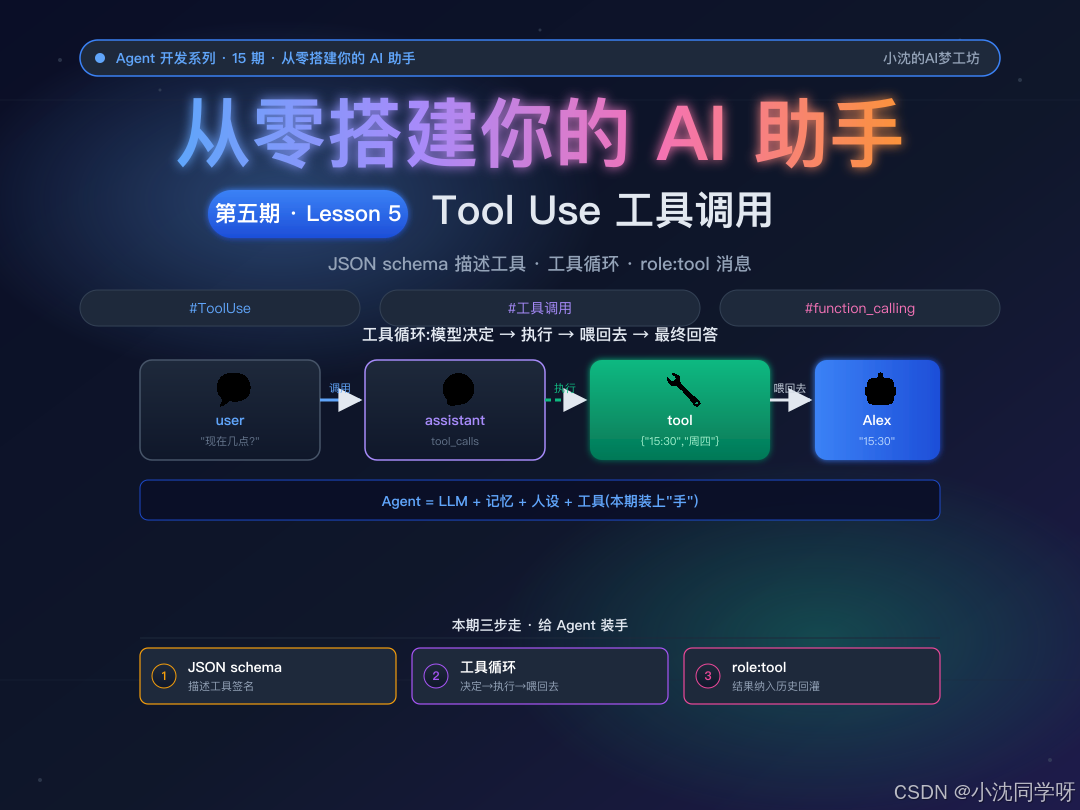
加了工具后,对话不再是"一问一答"的单次调用,而是一个循环:
用户: "现在几点了?"
  ↓ 第 1 次调用 API (tools=TOOLS, tool_choice=auto)
  → 模型返回: tool_calls=[get_current_time()]
  → 模型没有文本回答,只说"我要调工具"
  ↓ 执行工具: datetime.now()
  → 结果: {"datetime": "2026-08-14 15:30:00", "weekday": "周四"}
  ↓ 把结果喂回去: messages.append({"role": "tool", "content": result})
  ↓ 第 2 次调用 API (带着工具结果)
  → 模型返回文本: "现在是 2026年8月14日 15:30,周四。"
这就是 Agent 的本质:模型决定调什么工具,代码真正执行,结果喂回去让模型生成最终回答。
2.4 本期"组装公式"
有工具的 Agent = step04(system prompt + history) + 工具定义 + 工具循环累积式:step05 = step04 + Tool Use。不重构前期代码,只新增一层。
三、动手做:给 Alex 装上"手"
3.1 用 JSON schema 描述工具
本期装了 2 个工具:get_current_time(拿时间)和 calculate(四则运算)。
python
TOOLS = [
    {
        "type": "function",
        "function": {
            "name": "get_current_time",
            "description": "获取当前日期和时间。当用户问'现在几点''今天星期几'时调用。",
            "parameters": {
                "type": "object",
                "properties": {
                    "timezone": {
                        "type": "string",
                        "description": "目标时区,如 Asia/Shanghai。默认 Asia/Shanghai。",
                    }
                },
                "required": [],
            },
        },
    },
    {
        "type": "function",
        "function": {
            "name": "calculate",
            "description": "进行四则运算。当用户要求计算数学表达式时调用。",
            "parameters": {
                "type": "object",
                "properties": {
                    "expression": {
                        "type": "string",
                        "description": "数学表达式,如 '17 * 23'",
                    }
                },
                "required": ["expression"],
            },
        },
    },
]
关键是 description------模型靠它判断"该不该调这个工具"。写清楚,模型才能对上号。
3.2 工具实现:真实执行
execute_tool() 是工具的"手"------模型决定调什么,这里真正执行:
python
def execute_tool(name: str, arguments: dict) -> str:
    if name == "get_current_time":
        now = datetime.now()
        weekdays = ["周一", "周二", "周三", "周四", "周五", "周六", "周日"]
        return json.dumps({
            "datetime": now.strftime("%Y-%m-%d %H:%M:%S"),
            "weekday": weekdays[now.weekday()],
        }, ensure_ascii=False)

    if name == "calculate":
        expr = arguments.get("expression", "")
        tree = ast.parse(expr, mode="eval")
        result = _safe_eval(tree.body)
        return json.dumps({"result": result}, ensure_ascii=False)
真实场景里这里可能是 HTTP 请求(查天气、查数据库、发邮件)------结构完全一样。
3.3 工具循环:本期核心
把第 04 期的 chat() 升级为 chat_with_tools():
python
def chat_with_tools(messages: list[dict]) -> tuple[str, list[dict], int, int]:
    while True:
        response = client.chat.completions.create(
            model=MODEL,
            messages=messages,
            tools=TOOLS,              # ← 告诉模型有哪些工具
            tool_choice="auto",       # ← 模型自己决定要不要调
            max_tokens=1000,
        )
        msg = response.choices[0].message

        # 情况 A:模型决定调用工具
        if msg.tool_calls:
            messages.append({
                "role": "assistant",
                "content": msg.content or "",
                "tool_calls": [...]
            })
            for tool_call in msg.tool_calls:
                result = execute_tool(fn_name, fn_args)
                messages.append({
                    "role": "tool",
                    "tool_call_id": tool_call.id,
                    "content": result,
                })
            continue  # 继续循环,让模型生成最终回答

        # 情况 B:模型返回文本回答(没有调用工具)
        return msg.content, messages, total_prompt, total_completion
核心逻辑:模型返回 tool_calls 时,执行工具、把结果喂回去、继续循环;模型返回文本时,循环结束。
3.4 tool_choice 参数
python
tool_choice="auto"      # 模型自己决定要不要调工具(默认,最常用)
tool_choice="none"      # 禁止调工具(纯粹聊天时用,省 token)
tool_choice="required"  # 强制调工具(必须动手,不能只动嘴)
本期用 auto------模型判断:问时间就调工具,问"你好"就不调。
3.5 messages 角色演进
到第 05 期,messages 结构变成:
第 04 期: [system, user, assistant, user, assistant, ...]
第 05 期: [system, user, assistant+tool_calls, tool, assistant, user, ...]
多出来的 role: tool 消息携带工具执行结果,会被纳入历史回灌------模型后续调用也能看到"之前调过什么工具、结果是什么"。
四、跑起来:工具调用的实际体验
4.1 自动演示:问时间
程序启动会自动问"现在几点了?今天星期几?",打印工具循环全过程:
[工具调用] get_current_time({})
[工具结果] {"datetime": "2026-08-14 15:30:00", "weekday": "周四"}
[最终回答] 现在是 2026年8月14日 15:30,周四。
模型没有"猜"时间,而是调用了真正的工具------这就是 Agent 和普通 LLM 的核心区别。
4.2 问计算:不再心算出错
输入"帮我算一下 17 * 23":
[工具调用] calculate({"expression": "17 * 23"})
[工具结果] {"expression": "17 * 23", "result": 391}
[最终回答] 17 * 23 = 391
LLM 不擅长精确计算,有了工具就不再出错。
4.3 纯聊天:模型自己判断不调工具
输入"你好"或"Python 怎么读文件",模型不调工具直接回答------tool_choice=auto 让模型自己判断。
4.4 安全性:为什么 calculate 用 AST 而不是 eval
python
# 危险!模型如果传入恶意表达式,eval 会执行任意代码
result = eval(expression)  # __import__('os').system('rm -rf /')

# 安全:用 AST 解析,只允许四则运算节点
tree = ast.parse(expr, mode="eval")
result = _safe_eval(tree.body)  # 只处理 Num / BinOp / UnaryOp
工具执行是 Agent 安全的关键------模型传来的参数不可信,必须当作用户输入来校验。execute_tool() 是代码边界,任何参数都要做输入校验。
4.5 五期演进
| 期 | messages 结构 | Agent 能力 |
|---|---|---|
| 01 | [user] |
单次调用 |
| 02 | [user](每次独立) |
循环对话(无记忆) |
| 03 | [user, assistant, ...] |
有短期记忆 |
| 04 | [system, user, assistant, ...] |
有记忆 + 有身份 |
| 05 | [system, user, assistant+tool_calls, tool, assistant, ...] |
有记忆 + 有身份 + 有工具 |
前 05 期:模型从"只会说"到"能记住"到"有身份"再到"有工具"。Agent = LLM + 记忆 + 人设 + 工具,四个零件齐了。
五、执行脚本
以下是第 05 期的完整代码,累积式,可直接运行:
python
#!/usr/bin/env python3
"""step05_tool_use.py --- 第 05 期:Tool Use 工具调用

本期目标:
1. 给 Alex 装第一个工具 get_current_time,解决第 01 期"不知道几点"的伏笔
2. 实现"工具循环":模型决定调用工具 → 执行 → 把结果喂回去 → 生成最终回答
3. 理解 JSON schema 描述工具、tool 角色消息、tool_choice 参数

累积式:step05 = step04 + 工具定义 + 工具循环
(保留 step04 的 system prompt 人设 + history 记忆,只新增工具层)

运行:
    python code/step05_tool_use.py
"""
import os
import json
import ast
import operator
from datetime import datetime
from pathlib import Path
from dotenv import load_dotenv
from openai import OpenAI
from prompt_toolkit import prompt
from prompt_toolkit.history import InMemoryHistory

load_dotenv()

client = OpenAI(
    api_key=os.environ["DEEPSEEK_API_KEY"],
    base_url=os.environ.get("DEEPSEEK_BASE_URL", "https://api.deepseek.com"),
)
MODEL = os.environ.get("DEEPSEEK_MODEL", "deepseek-chat")
MAX_ROUNDS = 10

SOUL_PATH = Path(__file__).parent.parent / "templates" / "SOUL.md"

def load_system_prompt() -> str:
    if not SOUL_PATH.exists():
        raise FileNotFoundError(f"找不到人设文件: {SOUL_PATH}")
    return SOUL_PATH.read_text(encoding="utf-8")

# ============ 工具定义 ============
TOOLS = [
    {
        "type": "function",
        "function": {
            "name": "get_current_time",
            "description": "获取当前日期和时间。当用户问'现在几点''今天星期几'时调用。",
            "parameters": {
                "type": "object",
                "properties": {
                    "timezone": {"type": "string", "description": "目标时区"}
                },
                "required": [],
            },
        },
    },
    {
        "type": "function",
        "function": {
            "name": "calculate",
            "description": "进行四则运算。当用户要求计算数学表达式时调用。",
            "parameters": {
                "type": "object",
                "properties": {
                    "expression": {"type": "string", "description": "数学表达式"}
                },
                "required": ["expression"],
            },
        },
    },
]

# ============ 工具实现 ============
_ALLOWED_BINOPS = {
    ast.Add: operator.add, ast.Sub: operator.sub,
    ast.Mult: operator.mul, ast.Div: operator.truediv,
    ast.Mod: operator.mod, ast.Pow: operator.pow,
}
_ALLOWED_UNARYOPS = {ast.UAdd: operator.pos, ast.USub: operator.neg}

def _safe_eval(node):
    if isinstance(node, ast.Constant):
        if isinstance(node.value, (int, float)):
            return node.value
        raise ValueError(f"不支持的常量: {node.value!r}")
    if isinstance(node, ast.BinOp):
        op = _ALLOWED_BINOPS.get(type(node.op))
        if op is None:
            raise ValueError(f"不支持的运算符: {type(node.op).__name__}")
        return op(_safe_eval(node.left), _safe_eval(node.right))
    if isinstance(node, ast.UnaryOp):
        op = _ALLOWED_UNARYOPS.get(type(node.op))
        if op is None:
            raise ValueError(f"不支持的运算符: {type(node.op).__name__}")
        return op(_safe_eval(node.operand))
    raise ValueError(f"不支持的表达式类型: {type(node).__name__}")

def execute_tool(name: str, arguments: dict) -> str:
    if name == "get_current_time":
        now = datetime.now()
        weekdays = ["周一", "周二", "周三", "周四", "周五", "周六", "周日"]
        return json.dumps({
            "datetime": now.strftime("%Y-%m-%d %H:%M:%S"),
            "weekday": weekdays[now.weekday()],
        }, ensure_ascii=False)
    if name == "calculate":
        expr = arguments.get("expression", "")
        try:
            tree = ast.parse(expr, mode="eval")
            result = _safe_eval(tree.body)
            return json.dumps({"result": result}, ensure_ascii=False)
        except Exception as e:
            return json.dumps({"error": f"计算失败: {e}"}, ensure_ascii=False)
    return json.dumps({"error": f"未知工具: {name}"}, ensure_ascii=False)

# ============ 工具循环 ============
def chat_with_tools(messages):
    total_prompt = 0
    total_completion = 0
    while True:
        response = client.chat.completions.create(
            model=MODEL, messages=messages,
            tools=TOOLS, tool_choice="auto", max_tokens=1000,
        )
        msg = response.choices[0].message
        total_prompt += response.usage.prompt_tokens
        total_completion += response.usage.completion_tokens

        if msg.tool_calls:
            messages.append({
                "role": "assistant",
                "content": msg.content or "",
                "tool_calls": [
                    {"id": tc.id, "type": "function",
                     "function": {"name": tc.function.name,
                                  "arguments": tc.function.arguments}}
                    for tc in msg.tool_calls
                ],
            })
            for tool_call in msg.tool_calls:
                fn_name = tool_call.function.name
                fn_args = json.loads(tool_call.function.arguments)
                result = execute_tool(fn_name, fn_args)
                messages.append({
                    "role": "tool",
                    "tool_call_id": tool_call.id,
                    "content": result,
                })
            continue
        # 把最终回答也加入历史,history 能看到完整对话
        messages.append({"role": "assistant", "content": msg.content})
        return msg.content, messages, total_prompt, total_completion

# ... (main 函数与第 04 期类似,新增 tools 命令、history 查看历史、工具循环)
完整代码见仓库
code/step05_tool_use.py,单文件可直接运行。
六、总结
一句话回顾:Agent = LLM + 记忆 + 人设 + 工具。前 04 期搞定了前三个,本期用 JSON schema 描述工具、用工具循环让模型"动手"------不再靠"猜",而是调用真实工具获取准确信息。
三个关键概念记牢:
- JSON Schema 描述工具 → 告诉模型:有哪些工具、叫什么、做什么、需要什么参数
- 工具循环 → 模型决定调用 → 执行 → 结果喂回去 → 生成最终回答(可能多次调用)
- tool 角色消息 →
role: tool携带工具结果,被纳入历史回灌
一行代码记住本期:
python
response = client.chat.completions.create(
    model=MODEL, messages=messages,
    tools=TOOLS, tool_choice="auto",  # ← 告诉模型有哪些工具,让它自己决定
)
模型看到 tools 的 JSON schema,决定"调工具"还是"自己答"。调了就执行,结果喂回去再调一次------这就是 Agent 的"动手"能力。
安全性提醒 :工具执行是代码边界,模型传来的参数不可信!calculate 用 AST 而不是 eval,就是防止注入攻击。任何工具的输入参数都要做校验。
适用场景:这篇适合已经给 Agent 加了人设、想让 Agent 能调用外部工具的人。
下一期预告:第 06 期------Skills 按需加载。Alex 现在有 2 个工具,但如果需要 20 个工具呢?全部塞进 TOOLS 列表会占大量 token。下一期用 skills/ 目录 + SKILL.md frontmatter 实现按需加载------只加载当前任务需要的技能。
感谢各位看官的一路陪伴,大家都再接再厉!