实例:订单与明细(Order)|风格:主从嵌套列表
一、设计理念:主从嵌套的信息层级
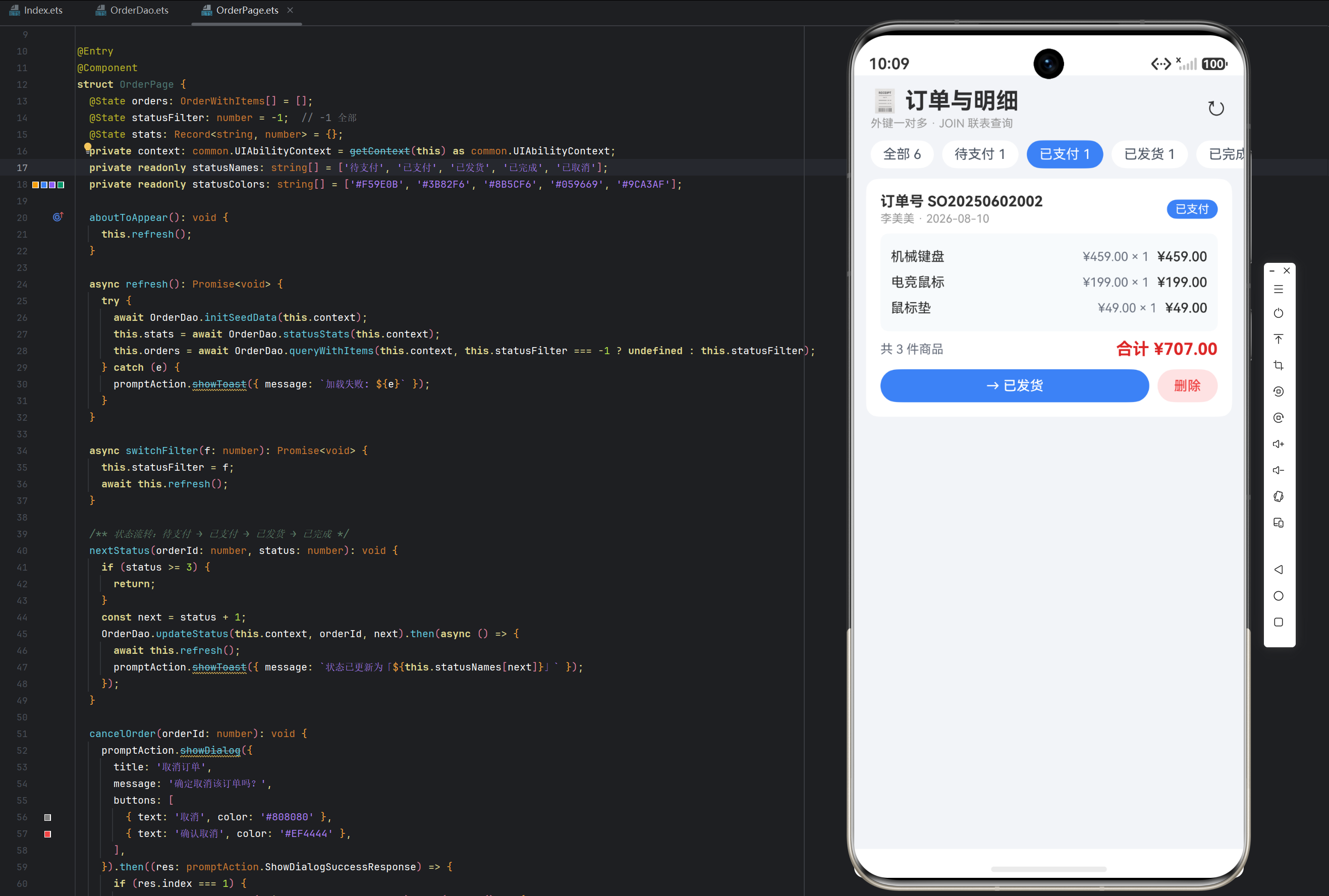
订单列表的信息密度很高------每个订单要同时展示「订单头(单号、状态、收货人)」「明细(每件商品)」「订单尾(总价、操作)」三层信息。如果平铺成普通列表会非常拥挤;「主从嵌套」(Master-Detail)是标准解法:外层列表项是「主」(订单卡片),内层嵌套「从」(明细子列表)------一个订单卡片内部再渲染它的商品明细列表,形成清晰的主从层次。
页面信息架构:
- 标题栏:订单标题 + 标语 + 刷新;
- 状态统计条:全部 + 待支付/已支付/已发货/已完成/已取消的订单数(GROUP BY 统计);
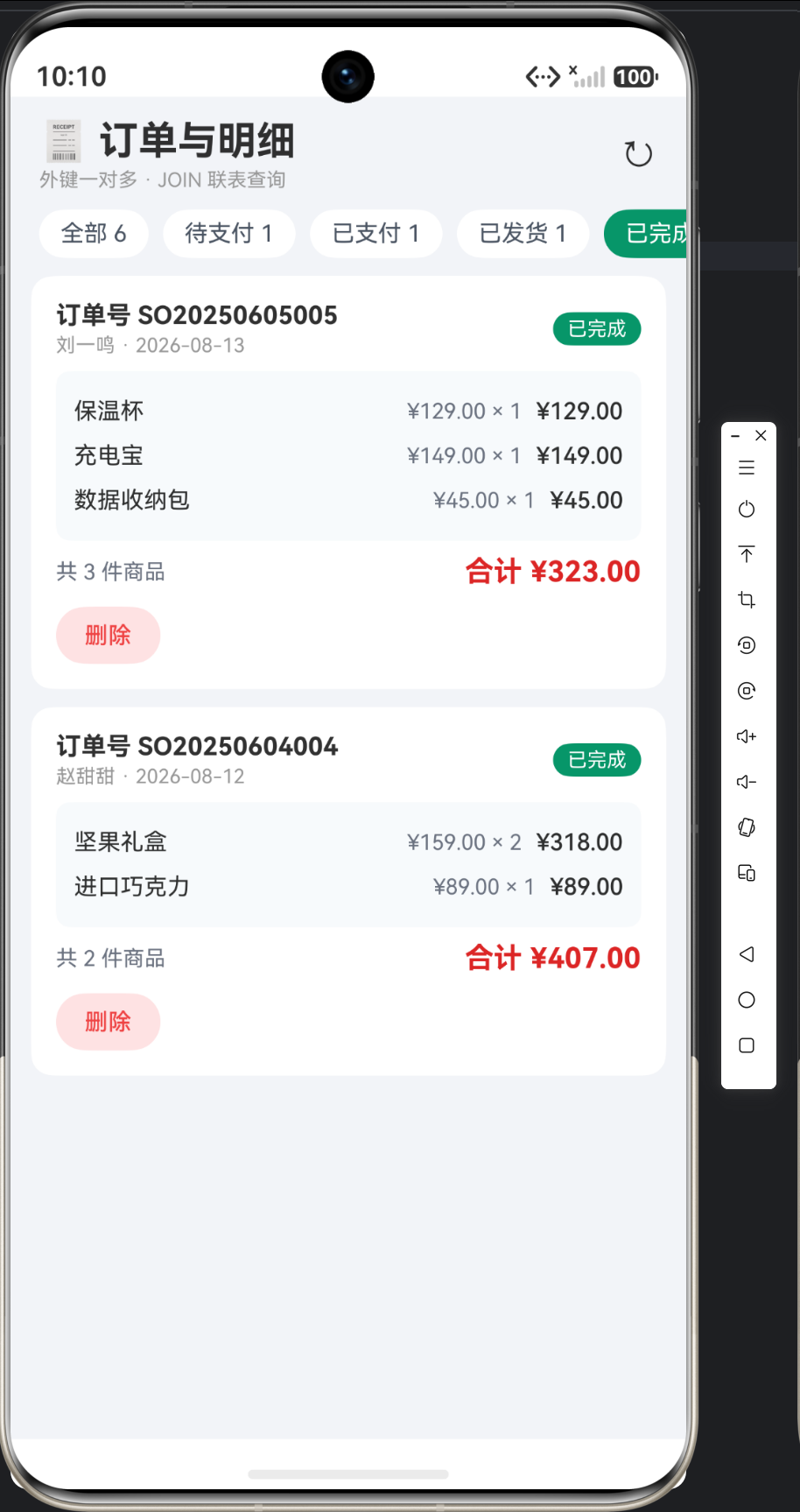
- 订单列表:主从嵌套卡片------订单头 → 明细区 → 订单尾 → 操作按钮;
- 状态流转:待支付 → 支付 → 发货 → 完成(逐级推进),或取消。
二、页面骨架:Column + 筛选条 + List
typescript
build() {
  Column() {
    // 标题栏
    Row() { ... }
    // 状态统计条(横向滚动)
    Scroll() { Row() { 全部 + 5 状态 } }
    // 订单列表(主从嵌套)
    List({ space: 10 }) {
      ForEach(this.orders, (o: OrderWithItems) => {
        ListItem() {
          Column() {
            // 订单头
            // 明细子列表
            // 订单尾
            // 操作按钮
          }.padding(14).backgroundColor(Color.White).borderRadius(12)
        }
      }, (o: OrderWithItems) => `${o.order.id}-${o.order.orderNo}`)
    }
    .width('94%').layoutWeight(1).margin({ top: 10 })
    .scrollBar(BarState.Off)
  }
  .width('100%').height('100%').backgroundColor('#F1F4F8')
}
主从嵌套的核心 :ForEach(this.orders) 外层遍历订单,每个 ListItem 内部再 ForEach(o.items) 遍历明细------List 套 List(更准确说是 ListItem 内嵌 Column + ForEach),这就是嵌套列表。明细区不滚动(随订单卡片整体滚动),用 Column + ForEach 平铺即可。
三、状态统计条:GROUP BY 的可视化
筛选条显示每种状态的订单数,数据来自 statusStats()(GROUP BY status):
typescript
Scroll() {
  Row({ space: 8 }) {
    Text(`全部 ${this.totalOrders()}`)
      .fontSize(13).padding({ left: 12, right: 12, top: 6, bottom: 6 })
      .borderRadius(16)
      .backgroundColor(this.statusFilter === -1 ? '#111827' : '#FFFFFF')
      .fontColor(this.statusFilter === -1 ? Color.White : '#4B5563')
      .onClick(() => this.switchFilter(-1))
    ForEach(this.statusNames, (name: string, idx: number) => {
      Text(`${name} ${this.stats[String(idx)] ?? 0}`)
        .fontSize(13).padding({ left: 12, right: 12, top: 6, bottom: 6 })
        .borderRadius(16)
        .backgroundColor(this.statusFilter === idx ? this.statusColors[idx] : '#FFFFFF')
        .fontColor(this.statusFilter === idx ? Color.White : '#4B5563')
        .onClick(() => this.switchFilter(idx))
    }, (name: string, idx: number) => `${idx}-${name}`)
  }.padding({ left: 16, right: 16, top: 10 })
}.scrollable(ScrollDirection.Horizontal).scrollBar(BarState.Off).width('100%')
this.stats[String(idx)] 的取值 :statusStats 返回 Record<string, number>,键是状态的字符串形式('0'~'4')------String(idx) 转换后取值,?? 0 兜底(没有该状态的订单时显示 0)。状态色板 statusColors 与 statusNames 平行数组按索引对应:
| 索引 | 状态 | 颜色 |
|---|---|---|
| 0 | 待支付 | 橙 #F59E0B |
| 1 | 已支付 | 蓝 #3B82F6 |
| 2 | 已发货 | 紫 #8B5CF6 |
| 3 | 已完成 | 绿 #059669 |
| 4 | 已取消 | 灰 #9CA3AF |
筛选逻辑(switchFilter)与 8-2 的分类切换同理------筛选变化时重新查询,-1 表示全部:
typescript
async switchFilter(f: number): Promise<void> {
  this.statusFilter = f;
  await this.refresh();
}
四、订单卡片:主从三段的完整呈现
每个订单卡片是「订单头 + 明细区 + 订单尾」三段式:
订单头:单号 + 状态标签
typescript
Row() {
  Column({ space: 2 }) {
    Text(`订单号 ${o.order.orderNo}`).fontSize(14).fontWeight(FontWeight.Bold)
    Text(`${o.order.customer} · ${this.fmtTime(o.order.createdTime)}`).fontSize(11).fontColor('#999999')
  }.alignItems(HorizontalAlign.Start).layoutWeight(1)
  Text(this.statusNames[o.order.status])
    .fontSize(11).padding({ left: 8, right: 8, top: 3, bottom: 3 })
    .borderRadius(10).backgroundColor(this.statusColors[o.order.status])
    .fontColor(Color.White)
}.width('100%')
订单号加粗(业务标识),收货人 + 时间灰色小字,右侧状态标签用状态色底白字------状态用颜色编码,待支付橙、已完成绿,一眼可辨。
明细区:浅色底内嵌列表
typescript
Column() {
  ForEach(o.items, (it: OrderItem) => {
    Row({ space: 8 }) {
      Text(it.productName).fontSize(13).layoutWeight(1)
      Text(`¥${it.price.toFixed(2)} × ${it.quantity}`).fontSize(12).fontColor('#6B7280')
      Text(`¥${it.subtotal.toFixed(2)}`).fontSize(13).fontWeight(FontWeight.Medium)
    }.width('100%').padding({ top: 5, bottom: 5 })
  }, (it: OrderItem) => `${it.id}-${it.productName}`)
}
.width('100%').padding(10).backgroundColor('#F8FAFC').borderRadius(8).margin({ top: 8 })
明细区用 #F8FAFC 浅灰底 + 圆角------视觉上与白色卡片主体区分,形成「主白从灰」的层次。每行:商品名(弹性) + 单价×数量(灰) + 小计(中粗)。
订单尾:总件数 + 总价
typescript
Row() {
  Text(`共 ${o.items.length} 件商品`).fontSize(12).fontColor('#6B7280')
  Blank()
  Text(`合计 ¥${o.order.totalAmount.toFixed(2)}`).fontSize(16).fontWeight(FontWeight.Bold).fontColor('#DC2626')
}.width('100%').margin({ top: 8 })总件数灰字,合计红色加粗------总价是订单的视觉落点。
五、操作按钮:状态流转 + 取消 + 删除
卡片底部是操作区,根据当前状态动态渲染按钮:
typescript
Row({ space: 8 }) {
  if (o.order.status === 0) {
    Button('取消订单').layoutWeight(1).height(32).backgroundColor('#EEF2F7').fontColor('#EF4444').fontSize(13)
      .onClick(() => this.cancelOrder(o.order.id))
  }
  if (o.order.status < 3) {
    Button(`→ ${this.statusNames[o.order.status + 1]}`).layoutWeight(1).height(32).backgroundColor('#3B82F6').fontSize(13)
      .onClick(() => this.nextStatus(o.order.id, o.order.status))
  }
  Button('删除').height(32).backgroundColor('#FEE2E2').fontColor('#EF4444').fontSize(13)
    .onClick(() => this.deleteOrder(o.order.id))
}
.width('100%').margin({ top: 10 })状态驱动的按钮渲染:
- 待支付(status=0):显示「取消订单」+「→ 已支付」------支付或取消二选一;
- 已支付/已发货(1/2):显示「→ 下一状态」推进流转;
- 已完成/已取消(3/4):只显示「删除」。
动态按钮文案 :→ ${statusNames[status + 1]}------按钮文字自动显示「下一步状态名」,无需硬编码。这是「状态机驱动的 UI」------按钮集合由状态决定,比固定按钮 + 禁用逻辑更清晰。
状态流转逻辑(nextStatus):
typescript
nextStatus(orderId: number, status: number): void {
  if (status >= 3) {
    return;  // 已完成/已取消不可再流转
  }
  const next = status + 1;
  OrderDao.updateStatus(this.context, orderId, next).then(async () => {
    await this.refresh();
    promptAction.showToast({ message: `状态已更新为「${this.statusNames[next]}」` });
  });
}
流转规则 :status < 3 才允许推进(+1),已完成/已取消终止。取消订单单独走 cancelOrder(弹确认框,status → 4)。状态机的边界约束(不可从已完成继续推进)由代码守卫,保证状态流转合法性。
六、删除订单:级联确认
删除订单涉及双表(明细 + 订单),弹确认框:
typescript
deleteOrder(id: number): void {
  promptAction.showDialog({
    title: '删除订单',
    message: '删除订单及全部明细,确定吗?',
    buttons: [
      { text: '取消', color: '#808080' },
      { text: '删除', color: '#EF4444' },
    ],
  }).then((res: promptAction.ShowDialogSuccessResponse) => {
    if (res.index === 1) {
      OrderDao.deleteOrder(this.context, id).then(async () => {
        await this.refresh();
        promptAction.showToast({ message: '🗑 已删除' });
      });
    }
  });
}
提示语明确说明「删除订单及全部明细」------让用户知道这是级联删除。
七、刷新与统计
typescript
async refresh(): Promise<void> {
  try {
    await OrderDao.initSeedData(this.context);
    this.stats = await OrderDao.statusStats(this.context);
    this.orders = await OrderDao.queryWithItems(this.context, this.statusFilter === -1 ? undefined : this.statusFilter);
  } catch (e) {
    promptAction.showToast({ message: `加载失败: ${e}` });
  }
}
queryWithItems 带状态过滤 ------筛选条选中某状态时,只加载该状态的订单(含明细)。undefined 表示不过滤(全部),与 DAO 的 status?: number 可选参数配合(9-3 文章详解)。
八、UI 风格要素一览
| 风格项 | 取值 | 说明 |
|---|---|---|
| 页面背景 | #F1F4F8 浅冷灰 |
衬托白卡 |
| 订单卡 | 白底圆角 12 | 主容器 |
| 明细区 | #F8FAFC 浅灰底圆角 8 |
主从层次 |
| 状态标签 | 状态色底白字 | 颜色编码状态 |
| 总价 | 红 #DC2626 16fp Bold |
视觉落点 |
| 主色 | #3B82F6 蓝 |
流转按钮 |
九、文章小结
本篇文章完成了实例 9 的 UI 层:主从嵌套列表(订单头 → 明细区 → 订单尾)+ 状态统计条 + 状态驱动的动态按钮。核心是「一主多从」的嵌套渲染(ListItem 内嵌 ForEach 明细)、状态颜色编码、以及状态机驱动的按钮集合------这三个模式构成了订单管理类页面的标准骨架。
下一篇(9-3)深入数据层,讲解事务下单、JOIN 联表查询与状态流转的实现------那是本实例的技术核心。
十、展开式明细:点击订单卡片的交互增强
严格意义上,上面的明细区是「常显」的------订单卡片内部永远平铺全部明细。当订单商品较多时卡片会显得冗长,更高级的交互是展开式明细:默认只显示订单头 + 合计,点击卡片头部才展开明细区。ArkUI 用状态变量 + transition 即可实现:
typescript
@State expandedId: number = -1;  // 当前展开的订单 id,-1 表示全部收起

// 卡片头部:点击切换展开/收起
Row() {
  Text(`订单号 ${o.order.orderNo}`).fontSize(14).fontWeight(FontWeight.Bold)
  Text(this.statusNames[o.order.status])
    .fontSize(11).backgroundColor(this.statusColors[o.order.status]).fontColor(Color.White)
    .borderRadius(10).padding({ left: 8, right: 8, top: 3, bottom: 3 })
}.width('100%').onClick(() => {
  this.expandedId = this.expandedId === o.order.id ? -1 : o.order.id;  // 再点收起
})

// 明细区:展开时才渲染,带出现/消失动画
if (this.expandedId === o.order.id) {
  Column() {
    ForEach(o.items, (it: OrderItem) => {
      Row({ space: 8 }) {
        Text(it.productName).fontSize(13).layoutWeight(1)
        Text(`¥${it.subtotal.toFixed(2)}`).fontSize(13).fontWeight(FontWeight.Medium)
      }.width('100%').padding({ top: 5, bottom: 5 })
    }, (it: OrderItem) => `${it.id}-${it.productName}`)
  }
  .width('100%').padding(10).backgroundColor('#F8FAFC').borderRadius(8).margin({ top: 8 })
  .transition(TransitionEffect.asymmetric(
    TransitionEffect.opacity(0).combine(TransitionEffect.translate({ y: -8 })),
    TransitionEffect.opacity(1)
  ))
}
关键 ArkTS 细节:
expandedId单值互斥 :同时只展开一个订单,再次点击同一订单收起(三元切换)------比布尔数组expandedFlags[]更省内存,且天然保证互斥;if条件渲染 + transition :明细区用if包裹,配合.transition()在组件插入/移除时播放动画------展开淡入下滑,收起淡出上滑,默认时长约 300ms;- animation 与 transition 的分工 :
.animation()驱动属性变化(如高度、透明度渐变),.transition()驱动组件的出现/消失------展开收起是「组件存在性」变化,用 transition 更合适。
十一、状态标签配色与合计金额的视觉规范
状态标签与合计金额是本页面的两个视觉重点,规范汇总:
| 元素 | 规则 | 取值 |
|---|---|---|
| 状态标签底色 | 状态色(橙/蓝/紫/绿/灰) | 见第二节色板 |
| 标签文字 | 11fp 白字,padding 8/3,圆角 10 | 小标签不喧宾夺主 |
| 合计金额 | 16fp Bold 红 #DC2626 |
页面最大字号之一 |
| 合计前缀 | 「合计 ¥」12fp 灰字 #6B7280 |
区分金额与文案 |
ArkTS 细节:
- 金额统一
toFixed(2)保留两位小数,避免浮点误差显示(如19.9000000001); - 状态色板用平行数组
statusColors: string[]与statusNames按索引对齐------新增状态只需改数组,渲染代码零改动; #DC2626红色语义统一:仅「合计」与「删除」使用,页面红色只表达「金额 / 危险操作」,避免颜色歧义。
FAQ
Q1:展开式明细会影响 List 的复用性能吗?
A:会,但可控。展开/收起触发 if 分支重建明细区,开销与明细条数成正比(本实例每单 ≤3 条,完全无感);若单条明细很多,可改为固定高度 + 高度动画方案。
Q2:状态标签为什么不用图标?
A:颜色 + 文字已足够区分五种状态,图标会增加色板维护成本。状态流转后标签颜色自动切换,用户靠「颜色记忆」即可定位状态,这正是颜色编码的价值。
Q3:transition 动画在 List 里失效怎么办?
A:ListItem 的子组件 transition 需要确保 if 分支位于 ListItem 内部(本页正是如此),并给 List 留出动画空间(space: 10);若仍失效,检查是否误用了 .animation() 去驱动条件渲染------条件渲染必须配 .transition()。