表的增删查改
CURD:Create(创建),Update(更新),Retreieve(读取),Delete(删除)
create
建一个表
sql
create table if not exists students(
    -> id int unsigned primary key auto_increment,
    -> sn int unsigned unique key,
    -> name varchar(20) not null,
    -> qq varchar(32) unique key
    -> );

mysql> desc students;
+-------+------------------+------+-----+---------+----------------+
| Field | Type             | Null | Key | Default | Extra          |
+-------+------------------+------+-----+---------+----------------+
| id    | int(10) unsigned | NO   | PRI | NULL    | auto_increment |
| sn    | int(10) unsigned | YES  | UNI | NULL    |                |
| name  | varchar(20)      | NO   |     | NULL    |                |
| qq    | varchar(32)      | YES  | UNI | NULL    |                |
+-------+------------------+------+-----+---------+----------------+
插入数据
sql
insert into students values ();    #全列插入
insert into students (sn,name,qq) values (123,'张三','123455');    #指定列插入
#into 可以省略
insert into students values (13,124,'许褚','12345552'),(14,125,'曹操','666666');    #多行插入
如果发生键冲突就更新,不存在就插入
sql
insert into students values(13,128,'xuyou','11111') on duplicate key update sn=128,name='xuyou',qq='11111';
#修改了id为13的sn,name,qq数据,更新的值不能和其他的值冲突
-- 0 row affected:表中有冲突数据,但冲突数据的值和 update 的值相等
-- 1 row affected:表中没有冲突数据,数据被插入
-- 2 row affected:表中有冲突数据,并且数据已经被更新
替换
没有冲突直接插入,有冲突删除后再插入
sql
replace into students (sn,name,qq) values (140,'许攸','424242424');
-- 1 row affected: 表中没有冲突数据,数据被插入
-- 2 row affected: 表中有冲突数据,删除后重新插入
查询Retreieve(读取)
基本语法
sql
SELECT
[DISTINCT] {* | {column [, column] ...}
[FROM table_name]
[WHERE ...]
[ORDER BY column [ASC | DESC], ...]
LIMIT ...
sql
select * from exam_result;   #*相当于统配符可以查询所有
+----+-----------+---------+------+---------+
| id | name      | chinese | math | english |
+----+-----------+---------+------+---------+
|  1 | 唐三藏    |      67 |   98 |      56 |
|  2 | 孙悟空    |      87 |   78 |      77 |
|  3 | 猪悟能    |      88 |   98 |      90 |
|  4 | 曹孟德    |      82 |   84 |      67 |
|  5 | 刘玄德    |      55 |   85 |      45 |
|  6 | 孙权      |      70 |   73 |      78 |
|  7 | 宋公明    |      75 |   65 |      30 |
+----+-----------+---------+------+---------+
按列信息查询
sql
select id, name from exam_result;
+----+-----------+
| id | name      |
+----+-----------+
|  1 | 唐三藏    |
|  2 | 孙悟空    |
|  3 | 猪悟能    |
|  4 | 曹孟德    |
|  5 | 刘玄德    |
|  6 | 孙权      |
|  7 | 宋公明    |
+----+-----------+
可以查询计算之后的结果,as可以重命名,as可以省略
sql
select name, math, math+chinese+english as tatal from exam_result;
+-----------+------+-------+
| name      | math | tatal |
+-----------+------+-------+
| 唐三藏    |   98 |   221 |
| 孙悟空    |   78 |   242 |
| 猪悟能    |   98 |   276 |
| 曹孟德    |   84 |   233 |
| 刘玄德    |   85 |   185 |
| 孙权      |   73 |   221 |
| 宋公明    |   65 |   170 |
+-----------+------+-------+
查询结果去重
sql
select distinct math from exam_result;where 条件
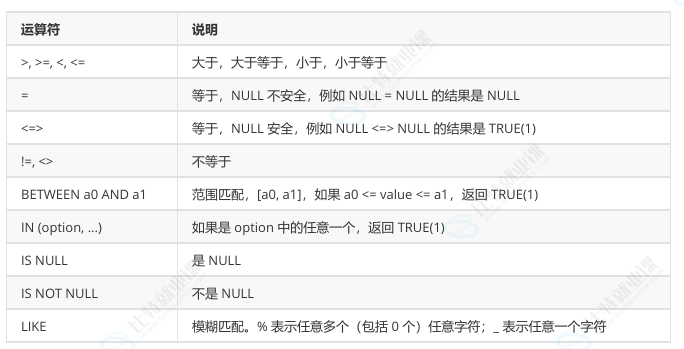
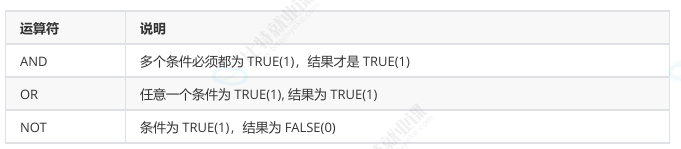
使用where筛选出english小于60的name和english
sql
select name, english from exam_result where english<60;
+-----------+---------+
| name      | english |
+-----------+---------+
| 唐三藏    |      56 |
| 刘玄德    |      45 |
| 宋公明    |      30 |
+-----------+---------+
语文成绩在 80, 90 分的同学及语文成绩
sql
select name, chinese from exam_result where chinese>=80 and chinese<=90;
select name, chinese from exam_result where chinese between 80 and 90;
+-----------+---------+
| name      | chinese |
+-----------+---------+
| 孙悟空    |      87 |
| 猪悟能    |      88 |
| 曹孟德    |      82 |
+-----------+---------+
数学成绩是 58 或者 59 或者 98 或者 99 分的同学及数学成绩
sql
select name, math from exam_result where math=58 or math=59 or math=98 or math=99;
select name, math from exam_result where math in(58,59,98,99);
姓孙的同学 及 孙某同学
sql
select name from exam_result where name like '孙%';   #姓孙的同学
select name from exam_result where name like '孙_';   #孙某同学
语文成绩好于英语成绩的同学
sql
select name, chinese, english from exam_result where chinese > english;总分在 200 分以下的同学
sql
select name, chinese+english+math from exam_result where chinese+english+math < 200;
#重命名不能写在where后面
语文成绩 > 80 并且不姓孙的同学
sql
select name, chinese from exam_result where chinese > 80 and name not like '孙%';孙某同学,否则要求总成绩 > 200 并且 语文成绩 < 数学成绩 并且 英语成绩 > 80
sql
select name, chinese, math, english, chinese+math+english 总分 from exam_result where name like '孙_' or (chinese+math+english>200 and chinese < math and english > 80);NULL 的查询
sql
select * from test where name is null;
select * from test where name is not null;
结果排序
语法
sql
-- ASC 为升序(从小到大)
-- DESC 为降序(从大到小)
-- 默认为 ASC
SELECT ... FROM table_name [WHERE ...]
	ORDER BY column [ASC|DESC], [...];
没有order by 子句的查询,返回的顺序是未定义的,永远不要依赖这个顺序
sql
select name, math from exam_result order by math asc;   #升序
select name, math from exam_result order by math desc;	#降序
NULL比任何值都要小,升序出现在最上面
查询同学各门成绩,依次按 数学降序,英语升序,语文升序的方式显示
sql
select name, math, english, chinese from exam_result order by math desc,chinese desc,english asc;order by 默认升序排序
sql
select name, math+chinese+english as total from exam_result order by total;
#order可以使用别名
查询姓孙的同学或者姓曹的同学数学成绩,结果按数学成绩由高到低显示
sql
select name, math from exam_result where name like '孙%' or name like '曹%' order by math desc;筛选分页结果
sql
select * from exam_result limit 5;   #筛选5行
select * from exam_result limit 2,5;  #筛选从3往下走5行,从0开始,5是步长
select * from exam_result limit 3 offset 0;  #0是起始位置,3是步长
limit的本质是显示