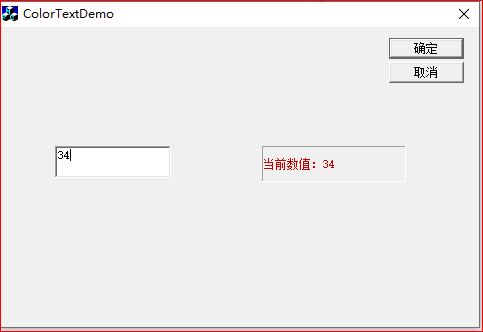
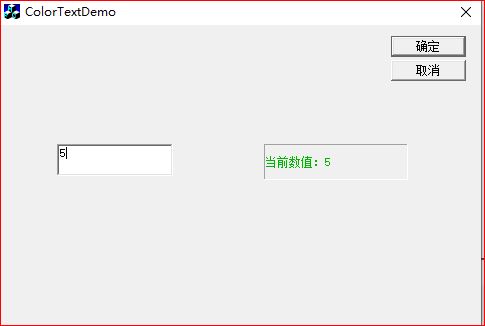
功能:编辑框输入数字;当数值<10,静态文本显示内容绿色字体;当数值≥10 红色字体。
打开资源视图 IDD_COLORTEXTDEMO_DIALOG
Edit Box:ID = IDC_EDIT_NUM
Static Text:ID = IDC_STATIC_SHOW
相关代码如下:
ColorTextDemoDlg.h
cpp
#if !defined(AFX_COLORTEXTDEMODLG_H__10123456_ABCD_EFGH_1234_001122334455__INCLUDED_)
#define AFX_COLORTEXTDEMODLG_H__10123456_ABCD_EFGH_1234_001122334455__INCLUDED_

#if _MSC_VER > 1000
#pragma once
#endif // _MSC_VER > 1000

class CColorTextDemoDlg : public CDialog
{
// Construction
public:
	CColorTextDemoDlg(CWnd* pParent = NULL);	// standard constructor

// Dialog Data
	//{{AFX_DATA(CColorTextDemoDlg)
	enum { IDD = IDD_COLORTEXTDEMO_DIALOG };
	CStatic	m_StaticShow;
	CEdit	m_EditNum;
	//}}AFX_DATA

	// ClassWizard generated virtual function overrides
	//{{AFX_VIRTUAL(CColorTextDemoDlg)
	protected:
	virtual void DoDataExchange(CDataExchange* pDX);	// DDX/DDV support
	//}}AFX_VIRTUAL

// Implementation
protected:
	HICON m_hIcon;
	COLORREF m_colorText;	//保存文本颜色

	// Generated message map functions
	//{{AFX_MSG(CColorTextDemoDlg)
	virtual BOOL OnInitDialog();
	afx_msg void OnSysCommand(UINT nID, LPARAM lParam);
	afx_msg void OnPaint();
	afx_msg HCURSOR OnQueryDragIcon();
	afx_msg void OnChangeEditNum();	//编辑框内容改变通知
	afx_msg HBRUSH OnCtlColor(CDC* pDC, CWnd* pWnd, UINT nCtlColor);
	//}}AFX_MSG
	DECLARE_MESSAGE_MAP()
};

//{{AFX_INSERT_LOCATION}}
// Microsoft Visual C++ will insert additional declarations immediately before the previous line.

#endif // !defined(AFX_COLORTEXTDEMODLG_H__10123456_ABCD_EFGH_1234_001122334455__INCLUDED_)
ColorTextDemoDlg.cpp
cpp
#include "stdafx.h"
#include "ColorTextDemo.h"
#include "ColorTextDemoDlg.h"

#ifdef _DEBUG
#define new DEBUG_NEW
#undef THIS_FILE
static char THIS_FILE[] = __FILE__;
#endif

/////////////////////////////////////////////////////////////////////////////
// CAboutDlg dialog used for App About

class CAboutDlg : public CDialog
{
public:
	CAboutDlg();

// Dialog Data
	//{{AFX_DATA(CAboutDlg)
	enum { IDD = IDD_ABOUTBOX };
	//}}AFX_DATA

	// ClassWizard generated virtual function overrides
	//{{AFX_VIRTUAL(CAboutDlg)
	protected:
	virtual void DoDataExchange(CDataExchange* pDX);    // DDX/DDV support
	//}}AFX_VIRTUAL

// Implementation
protected:
	//{{AFX_MSG(CAboutDlg)
	//}}AFX_MSG
	DECLARE_MESSAGE_MAP()
};

CAboutDlg::CAboutDlg() : CDialog(CAboutDlg::IDD)
{
	//{{AFX_DATA_INIT(CAboutDlg)
	//}}AFX_DATA_INIT
}

void CAboutDlg::DoDataExchange(CDataExchange* pDX)
{
	CDialog::DoDataExchange(pDX);
	//{{AFX_DATA_MAP(CAboutDlg)
	//}}AFX_DATA_MAP
}

BEGIN_MESSAGE_MAP(CAboutDlg, CDialog)
	//{{AFX_MSG_MAP(CAboutDlg)
		// No message handlers
	//}}AFX_MSG_MAP
END_MESSAGE_MAP()

/////////////////////////////////////////////////////////////////////////////
// CColorTextDemoDlg dialog

CColorTextDemoDlg::CColorTextDemoDlg(CWnd* pParent /*=NULL*/)
	: CDialog(CColorTextDemoDlg::IDD, pParent)
{
	//{{AFX_DATA_INIT(CColorTextDemoDlg)
	//}}AFX_DATA_INIT
	// NOTE: the ClassWizard will add member initialization here
	m_hIcon = AfxGetApp()->LoadIcon(IDR_MAINFRAME);
	m_colorText = RGB(0,0,0); //初始黑色
}

void CColorTextDemoDlg::DoDataExchange(CDataExchange* pDX)
{
	CDialog::DoDataExchange(pDX);
	//{{AFX_DATA_MAP(CColorTextDemoDlg)
	DDX_Control(pDX, IDC_STATIC_SHOW, m_StaticShow);
	DDX_Control(pDX, IDC_EDIT_NUM, m_EditNum);
	//}}AFX_DATA_MAP
}

BEGIN_MESSAGE_MAP(CColorTextDemoDlg, CDialog)
	//{{AFX_MSG_MAP(CColorTextDemoDlg)
	ON_WM_SYSCOMMAND()
	ON_WM_PAINT()
	ON_WM_QUERYDRAGICON()
	ON_EN_CHANGE(IDC_EDIT_NUM, OnChangeEditNum)
	ON_WM_CTLCOLOR()
	//}}AFX_MSG_MAP
END_MESSAGE_MAP()

BOOL CColorTextDemoDlg::OnInitDialog()
{
	CDialog::OnInitDialog();

	// Add "About..." menu item to system menu.

	// IDM_ABOUTBOX must be in the system command range.
	ASSERT((IDM_ABOUTBOX & 0xFFF0) == IDM_ABOUTBOX);
	ASSERT(IDM_ABOUTBOX < 0xF000);

	CMenu* pSysMenu = GetSystemMenu(FALSE);
	if (pSysMenu != NULL)
	{
		CString strAboutMenu;
		strAboutMenu.LoadString(IDS_ABOUTBOX);
		if (!strAboutMenu.IsEmpty())
		{
			pSysMenu->AppendMenu(MF_SEPARATOR);
			pSysMenu->AppendMenu(MF_STRING, IDM_ABOUTBOX, strAboutMenu);
		}
	}

	// Set the icon for this dialog.  The framework does this automatically
	//  when the application's main window is not a dialog
	SetIcon(m_hIcon, TRUE);			// Set big icon
	SetIcon(m_hIcon, FALSE);		// Set small icon

	//初始化静态文本内容
	m_StaticShow.SetWindowText(_T("等待输入数值"));

	return TRUE;  // return TRUE  unless you set the focus to a control
}

void CColorTextDemoDlg::OnSysCommand(UINT nID, LPARAM lParam)
{
	if ((nID & 0xFFF0) == IDM_ABOUTBOX)
	{
		CAboutDlg dlgAbout;
		dlgAbout.DoModal();
	}
	else
	{
		CDialog::OnSysCommand(nID, lParam);
	}
}

// If you add a minimize button to your dialog, you will need the code below
//  to draw the icon.  For MFC applications using the document/view model,
//  this is automatically done for you by the framework.

void CColorTextDemoDlg::OnPaint()
{
	if (IsIconic())
	{
		CPaintDC dc(this); // device context for painting

		SendMessage(WM_ICONERASEBKGND, (WPARAM) dc.GetSafeHdc(), 0);

		// Center icon in client rectangle
		int cxIcon = GetSystemMetrics(SM_CXICON);
		int cyIcon = GetSystemMetrics(SM_CYICON);
		CRect rect;
		GetClientRect(&rect);
		int x = (rect.Width() - cxIcon + 1) / 2;
		int y = (rect.Height() - cyIcon + 1) / 2;

		// Draw the icon
		dc.DrawIcon(x, y, m_hIcon);
	}
	else
	{
		CDialog::OnPaint();
	}
}

// The system calls this to obtain the cursor to display while the user drags
//  the minimized window.
HCURSOR CColorTextDemoDlg::OnQueryDragIcon()
{
	return (HCURSOR) m_hIcon;
}

//编辑框内容发生变化
void CColorTextDemoDlg::OnChangeEditNum()
{
	CString strEdit;
	m_EditNum.GetWindowText(strEdit);

	int nVal;
	//判断是否是有效数字
	if(_stscanf(strEdit, _T("%d"), &nVal) != 1)
	{
		m_StaticShow.SetWindowText(_T("输入无效数字"));
		m_colorText = RGB(0,0,0); //无效时黑色
		m_StaticShow.Invalidate();//刷新控件颜色
		return;
	}

	CString strShow;
	strShow.Format(_T("当前数值:%d"), nVal);
	m_StaticShow.SetWindowText(strShow);

	//核心逻辑:小于10绿色;>=10红色
	if(nVal < 10)
	{
		m_colorText = RGB(0, 180, 0);	//绿色
	}
	else
	{
		m_colorText = RGB(200, 0, 0);	//红色
	}
	m_StaticShow.Invalidate(); //触发OnCtlColor重绘文字颜色
}

//控件颜色回调,修改静态文本字体颜色
HBRUSH CColorTextDemoDlg::OnCtlColor(CDC* pDC, CWnd* pWnd, UINT nCtlColor)
{
	HBRUSH hbr = CDialog::OnCtlColor(pDC, pWnd, nCtlColor);

	if(pWnd->GetDlgCtrlID() == IDC_STATIC_SHOW)
	{
		pDC->SetTextColor(m_colorText);	//设置文字颜色
		pDC->SetBkMode(TRANSPARENT);		//背景透明
	}
	return hbr;
}
运行程序