第 3 讲 · Electron 主进程:这个进程就是 harness
系列 :我在Deepseek harness中增加了桌面版,将逐行代码解析我是怎么增加的,希望你也能创建属于自己的桌面版Agent 本讲目标 :逐行吃透
apps/desktop/src/main.ts(85 行全行)------Electron 主进程如何调用runProfile({ profile: 'desktop' })真正 boot harness、如何通过 IPC 桥接渲染进程、以及桌面端"无 TCP、纯 IPC"的架构差异。配套精讲argv.ts(37 行)与ipc.ts(31 行)。 逐行文件 :apps/desktop/src/main.ts(85 行,全行)+argv.ts+ipc.ts+preload.ts+renderer.ts(精讲)
代码仓库 :github.com/tslcarmack/...Desktop App 运行效果图
🎯 本讲地图
scss
Electron 主进程(main.ts)
   ├─► 检查构建产物(preload.cjs / dist/index.html)
   ├─► parseDesktopArgv(process.argv) → { patches, args }
   ├─► await app.whenReady()
   ├─► runProfile({ environment, profile: 'desktop', patchFiles, args })
   │        └─► ← 这就是第 4 讲的 boot 流程!返回 ctx
   ├─► ctx.get('desktopRuntime') → runtime
   ├─► new BrowserWindow(...) + IPC 三通道
   ├─► runtime.subscribeMux / subscribeHost → 推送渲染进程
   └─► window.loadFile(dist/index.html) → 窗口打开
📁 0. 前置认知:桌面端的架构定位
在逐行之前,先理解这个文件的关键设计(第 2 行注释点破):
"Electron main: this process IS the harness"
- web 端 :CLI 进程 boot harness + HTTP 服务器,浏览器通过 TCP(
http://127.0.0.1:3080)访问。 - desktop 端 :Electron 主进程自己就是 harness ,渲染进程通过 IPC(进程间通信) 访问------不监听任何 TCP 端口(第 5 行注释:"nothing listens on TCP")。
这是安全与部署上的重要差异:桌面应用不需要开放本地端口,也就少了一个攻击面。
📁 1. main.ts 全行逐行(85 行)
文件:apps/desktop/src/main.ts
ts
1  /**
  2   * Electron main: this process IS the harness (`runProfile({ profile: 'desktop' })`).
  3   * The renderer talks IPC through preload; nothing listens on TCP.
  4   * @module @deepseek-ai/dsh-desktop/main
  5   */
  6
  7  import { existsSync } from 'node:fs'
  8  import { fileURLToPath } from 'node:url'
  9  import { dirname, join } from 'node:path'
 10  import { app, BrowserWindow, ipcMain } from 'electron'
 11  import { loadLayeredEnv } from '@deepseek-ai/dsh-app-boot'
 12  import type { DesktopRuntimeImpl } from '@deepseek-ai/dsh-desktop-app'
 13  import { runProfile } from '../../cli/src/profile-boot.ts'
 14  import { parseDesktopArgv } from './argv.ts'
 15  import { DSH_IPC, FOREIGN_WEB_CONTENTS } from './ipc.ts'
 16
 17  const here = dirname(fileURLToPath(import.meta.url))
 18  const preloadPath = join(here, '..', 'lib', 'preload.cjs')
 19  const indexHtml = join(here, '..', 'dist', 'index.html')
 20
 21  function requireFile(path: string, hint: string): void {
 22    if (!existsSync(path)) throw new Error(`desktop: missing ${path}; ${hint}`)
 23  }
 24
 25  function sendJson(contents: Electron.WebContents, channel: string, json: string): void {
 26    if (contents.isDestroyed()) return
 27    try {
 28      contents.send(channel, json)
 29    } catch {
 30      // The window closed between isDestroyed and send.
 31    }
 32  }
 33
 34  async function main(): Promise {
 35    requireFile(preloadPath, 'run `pnpm --filter @deepseek-ai/dsh-desktop build`')
 36    requireFile(indexHtml, 'run `pnpm --filter @deepseek-ai/dsh-desktop build`')
 37    const { patches, args } = parseDesktopArgv(process.argv, fileURLToPath(import.meta.url))
 38    await app.whenReady()
 39    process.stderr.write('dsh: booting desktop profile\n')
 40    const { ctx } = await runProfile({
 41      environment: loadLayeredEnv('dsh'),
 42      profile: 'desktop',
 43      patchFiles: patches,
 44      args,
 45    })
 46    const runtime = ctx.get('desktopRuntime') as DesktopRuntimeImpl | undefined
 47    if (runtime === undefined) throw new Error('desktop: desktopRuntime is not mounted')
 48
 49    const window = new BrowserWindow({
 50      webPreferences: {
 51        preload: preloadPath,
 52        contextIsolation: true,
 53        nodeIntegration: false,
 54        sandbox: false,
 55      },
 56    })
 57
 58    const fromThisWindow = (sender: Electron.WebContents): boolean => sender === window.webContents
 59
 60    ipcMain.on(DSH_IPC.bootGraph, (event) => {
 61      if (!fromThisWindow(event.sender)) return
 62      event.returnValue = runtime.graph()
 63    })
 64    ipcMain.handle(DSH_IPC.invoke, async (event, request) => {
 65      if (!fromThisWindow(event.sender)) throw new Error(FOREIGN_WEB_CONTENTS)
 66      return runtime.fetchFromPreload(request)
 67    })
 68    ipcMain.handle(DSH_IPC.loadBundle, async (event, url: string) => {
 69      if (!fromThisWindow(event.sender)) throw new Error(FOREIGN_WEB_CONTENTS)
 70      return runtime.loadBundleSource(url)
 71    })
 72    runtime.subscribeMux((json) => { sendJson(window.webContents, DSH_IPC.mux, json) })
 73    runtime.subscribeHost((json) => { sendJson(window.webContents, DSH_IPC.host, json) })
 74
 75    window.on('closed', () => {
 76      void ctx.fiber.dispose().finally(() => { app.quit() })
 77    })
 78    await window.loadFile(indexHtml)
 79  }
 80
 81  void main().catch((error: unknown) => {
 82    const message = error instanceof Error ? error.stack ?? error.message : String(error)
 83    process.stderr.write(`dsh: desktop main failed\n${message}\n`)
 84    app.exit(1)
 85  })
逐段讲解
第 7-15 行 · 导入(重点看两处)
ts
import { app, BrowserWindow, ipcMain } from 'electron'
import { runProfile } from '../../cli/src/profile-boot.ts'runProfile直接跨目录 import :apps/desktop/src/main.tsimportapps/cli/src/profile-boot.ts!这是 tsx 源码启动才能做到的事(ESM + tsx 让跨应用源码互引成为可能)。- 关键含义 :desktop 主进程复用了 CLI 的 boot 逻辑 ------
runProfile正是第 1 讲里 web/headless 走的那条常规路径。所以"desktop 特殊"只特殊在如何拉起进程(第 2 讲),一旦进入 harness 世界,desktop 与 web 的 boot 流程完全一致。
第 17-19 行 · 构建产物路径
ts
const here = dirname(fileURLToPath(import.meta.url))
const preloadPath = join(here, '..', 'lib', 'preload.cjs')
const indexHtml = join(here, '..', 'dist', 'index.html')main.ts在apps/desktop/src/,上溯一层到apps/desktop/,再进lib/(preload 编译产物)与dist/(前端打包产物)。- preload 是
.cjs(CommonJS)------Electron preload 要求非 ESM,这与主进程的 ESM 形成对比(第 5 讲展开)。
第 21-23 行 · requireFile(fail-fast 检查)
ts
function requireFile(path: string, hint: string): void {
  if (!existsSync(path)) throw new Error(`desktop: missing ${path}; ${hint}`)
}- 启动前检查两个构建产物是否存在,缺失时直接给出修复命令 (
pnpm --filter @deepseek-ai/dsh-desktop build)------延续第 2 讲的"报错即操作指引"风格。
第 25-32 行 · sendJson(防销毁竞态)
ts
function sendJson(contents: Electron.WebContents, channel: string, json: string): void {
  if (contents.isDestroyed()) return
  try {
    contents.send(channel, json)
  } catch {
    // The window closed between isDestroyed and send.
  }
}- 双保险:先查
isDestroyed(),再 try/catch 包裹send------注释点破竞态:"window 在 isDestroyed 检查与 send 之间关闭了"。
第 34-38 行 · boot 前置
ts
async function main(): Promise {
  requireFile(preloadPath, ...)
  requireFile(indexHtml, ...)
  const { patches, args } = parseDesktopArgv(process.argv, fileURLToPath(import.meta.url))
  await app.whenReady()
process.stderr.write('dsh: booting desktop profile\n')- 第 37 行 :
parseDesktopArgv解析 Electron argv(见 2.1 精讲)------把第 2 讲透传的--patch和--后的参数还原出来。 - 第 38 行 :
await app.whenReady()------Electron 生命周期:等 Chromium 就绪(此时才能创建窗口)。 - 注意顺序:先 boot harness(第 40 行),后创建窗口(第 49 行)------窗口打开前 harness 必须已经跑起来。
第 40-47 行 · 真正 boot harness(核心)
ts
const { ctx } = await runProfile({
  environment: loadLayeredEnv('dsh'),
  profile: 'desktop',
  patchFiles: patches,
  args,
})
const runtime = ctx.get('desktopRuntime') as DesktopRuntimeImpl | undefined
if (runtime === undefined) throw new Error('desktop: desktopRuntime is not mounted')
runProfile({ profile: 'desktop' }):与 web/headless 同一条 boot 路径!desktop profile 的 bundles =[dsh-base, dsh-desktop-app](第 1 讲验证过)。- 第 46 行
ctx.get('desktopRuntime'):从已装载的插件树里取desktopRuntime服务------这是 desktop-app bundle 注入的服务(第 5 讲详解)。 - 第 47 行:取不到就报错"desktopRuntime is not mounted"------fail-fast 保证后续 IPC 一定有 runtime 可用。
第 49-56 行 · 创建窗口(安全配置)
ts
const window = new BrowserWindow({
  webPreferences: {
    preload: preloadPath,
    contextIsolation: true,
    nodeIntegration: false,
    sandbox: false,
  },
})| 配置 | 值 | 含义 |
|---|---|---|
preload |
preload.cjs | 预加载脚本(暴露 dshDesktop 桥,见 2.3) |
contextIsolation |
true |
安全关键:渲染进程与 preload 隔离上下文,防止 XSS 直接拿到 Node API |
nodeIntegration |
false |
安全关键:渲染进程没有 Node 能力 |
sandbox |
false |
例外项:preload 需要 require 模块,所以关掉沙箱(但 contextIsolation + nodeIntegration:false 已提供主要防护) |
第 58-71 行 · IPC 三通道
ts
const fromThisWindow = (sender: Electron.WebContents): boolean => sender === window.webContents- 所有 IPC 处理前先校验
sender是不是本窗口 的 webContents------防止任意窗口/页面调用主进程 API(FOREIGN_WEB_CONTENTS错误)。
ts
ipcMain.on(DSH_IPC.bootGraph, (event) => {
  if (!fromThisWindow(event.sender)) return
  event.returnValue = runtime.graph()
})bootGraph:同步 通道(on+returnValue)。渲染进程 preload 用sendSync获取启动图(__DSH_BOOT__,见 2.3)。runtime.graph():desktop-app 提供的启动图(插件树快照之类)。
ts
ipcMain.handle(DSH_IPC.invoke, async (event, request) => {
  if (!fromThisWindow(event.sender)) throw new Error(FOREIGN_WEB_CONTENTS)
  return runtime.fetchFromPreload(request)
})invoke:异步 通道(handle= invoke/handle 模式)。渲染进程发任意 JSON 请求,转发给runtime.fetchFromPreload(request)------这是桌面端替代 HTTP 的 RPC 通道。
ts
ipcMain.handle(DSH_IPC.loadBundle, async (event, url: string) => {
  if (!fromThisWindow(event.sender)) throw new Error(FOREIGN_WEB_CONTENTS)
  return runtime.loadBundleSource(url)
})loadBundle:渲染进程按需加载插件 bundle 源码(第 5 讲 renderer.ts 会用到)。
第 72-78 行 · 订阅推送 + 生命周期
ts
runtime.subscribeMux((json) => { sendJson(window.webContents, DSH_IPC.mux, json) })
runtime.subscribeHost((json) => { sendJson(window.webContents, DSH_IPC.host, json) })- 两个推送通道 :
mux(多路复用的消息流)与host(host 侧事件流)------主进程订阅 runtime 的推送,转发给渲染进程(与 web 端的session/event流对应,第 6 讲详述)。
ts
window.on('closed', () => {
  void ctx.fiber.dispose().finally(() => { app.quit() })
})
await window.loadFile(indexHtml)- 第 75-77 行 :窗口关闭 →
ctx.fiber.dispose()拆掉整个插件树(一切皆插件的可逆注册在此刻体现)→ 然后app.quit()。 - 第 78 行:加载前端页面,窗口正式出现。
第 81-85 行 · 兜底错误处理
ts
void main().catch((error: unknown) => {
  const message = error instanceof Error ? error.stack ?? error.message : String(error)
  process.stderr.write(`dsh: desktop main failed\n${message}\n`)
  app.exit(1)
})- 主进程任何异步错误 → 打印堆栈到 stderr →
app.exit(1)。
📁 2. 配套文件精讲
2.1 argv.ts(37 行)------Electron 进程内 argv 解析
ts
export function parseDesktopArgv(
  argv: readonly string[],
  scriptPath: string,
): { patches: string[]; args: string[] } {
  const from = argv.findIndex(part => part === scriptPath || isMainScript(part))
  const rest = from === -1 ? argv.slice(2) : argv.slice(from + 1)
  const patches: string[] = []
  const args: string[] = []
  for (let i = 0; i < rest.length; i++) {
    const token = rest[i]
    if (token === '--patch') {
      const next = rest[++i]
      if (next === undefined) throw new Error('dsh: --patch requires a path')
      patches.push(next)
      continue
    }
    if (token === '--') {
      args.push(...rest.slice(i + 1))
      break
    }
    if (token !== undefined) args.push(token)
  }
  return { patches, args }
}

function isMainScript(part: string): boolean {
  const name = basename(part)
  return name === 'main.ts' || name === 'main.js'
}精讲:
- 第 13 行
argv.findIndex(...):找到主脚本在 argv 中的位置(Electron 的 argv 形态与 Node 不同------第一个参数可能是--inspect之类,所以用"找到 main 脚本路径"来定位真正的参数起点)。 - 第 14 行 :找不到就用
argv.slice(2)兜底。 - 第 17-30 行 :线性扫描------
--patch消费后一个 token;--之后全部归为 app args;其他 token 归为 args。 isMainScript:兼容main.ts(源码)与main.js(构建)两种形态。
2.2 ipc.ts(31 行)------IPC 通道名契约
ts
export const DSH_IPC = {
  bootGraph: 'dsh:boot-graph',
  invoke: 'dsh:invoke',
  mux: 'dsh:mux',
  host: 'dsh:host',
  loadBundle: 'dsh:load-bundle',
} as const

export const FOREIGN_WEB_CONTENTS = 'desktop: foreign webContents'

export function attachJsonListener(register, unregister, channel, listener) {
  const handler = (_event, json) => { listener(json) }
  register(channel, handler)
  return () => { unregister(channel, handler) }
}- 5 个通道名 集中定义,主进程与 preload 共享(
as const保证字面量类型)。 attachJsonListener:通用 JSON 监听器包装,返回取消订阅函数------渲染进程侧复用。
2.3 preload.ts(21 行)------安全桥
ts
const graph = ipcRenderer.sendSync(DSH_IPC.bootGraph)
contextBridge.exposeInMainWorld('__DSH_BOOT__', graph)
contextBridge.exposeInMainWorld('dshDesktop', {
  invoke: (request: unknown) => ipcRenderer.invoke(DSH_IPC.invoke, request),
  onMux: (listener) => attachJsonListener(...),
  onHost: (listener) => attachJsonListener(...),
  loadBundle: (url) => ipcRenderer.invoke(DSH_IPC.loadBundle, url),
})contextBridge.exposeInMainWorld:把最小 API 安全地暴露给渲染进程------只暴露invoke/onMux/onHost/loadBundle四个方法 +__DSH_BOOT__启动图。- 渲染进程拿不到 ipcRenderer 本身,只能调用这 4 个白名单方法------这是 contextIsolation 的核心价值。
2.4 renderer.ts(27 行)------前端入口
ts
void new AppWebEntry(el, {
  loadBundle: async (url) => {
    const source = await desktop.loadBundle(url)
    const blob = new Blob([source], { type: 'text/javascript' })
    const blobUrl = URL.createObjectURL(blob)
    ...动态创建  加载...
  },
}).run()- 复用
@deepseek-ai/dsh-client-web的AppWebEntry------桌面端前端与 web 端共用同一套 client 框架(只是传输层从 HTTP 换成 IPC + Blob URL)。 loadBundle的 Blob URL 技巧:主进程返回 bundle 源码字符串 → 渲染进程包装成 Blob URL → 动态<script>加载------这就是"浏览器端插件按需加载"在桌面的实现。
🖼️ 第 3 讲架构图
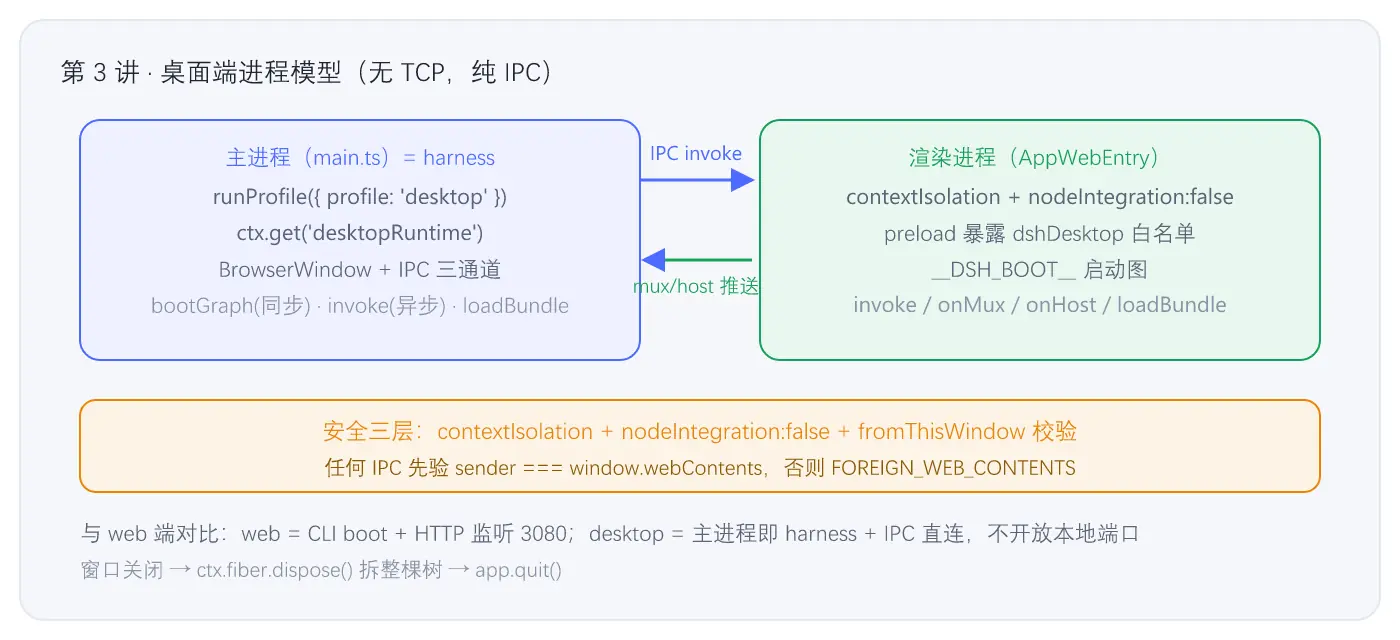
图 3-1 · 桌面端进程模型与 IPC 通道
⚙️ 机制小结
- 主进程 = harness :
runProfile({ profile: 'desktop' })与 web/headless 同一条 boot 路径,desktop 的"特殊"只体现在进程拉起方式。 - 无 TCP、纯 IPC:桌面端安全模型优于 web------不开放本地端口,渲染进程只能通过 preload 白名单方法通信。
- 三层安全防护 :
contextIsolation: true+nodeIntegration: false+ IPC 白名单 +fromThisWindow校验。 - 先 boot 后开窗 :插件树就绪(拿到
desktopRuntime)才创建 BrowserWindow。 - 前端复用 :
AppWebEntry让桌面与 web 共用 client 框架,仅传输层不同(IPC+Blob vs HTTP)。
🧪 动手验证
sh
# 1) 构建 desktop 前端产物(main.ts 会检查 preload.cjs 与 dist/index.html)
cd D:\code\deepseek-harness
pnpm --filter @deepseek-ai/dsh-desktop build

# 2) 在 Electron 里真正跑 desktop(若已装 Electron,会弹出窗口)
node apps/cli/lib/bin.js desktop

# 3) 观察 IPC 通道名(grep 共享契约)
grep -rn "dsh:boot-graph\|dsh:invoke" apps/desktop/src/
⚠️ 若
node apps/cli/lib/bin.js desktop报"electron is not installed",按第 2 讲指引安装后再试。
📚 深入指引
| 文件 | 作用 |
|---|---|
apps/desktop/src/main.ts |
本讲全行(85 行) |
apps/desktop/src/argv.ts / ipc.ts / preload.ts / renderer.ts |
配套精讲 |
packages/bundle/desktop-app/src/index.ts |
desktopRuntime 服务实现(第 5 讲) |
apps/cli/src/profile-boot.ts |
runProfile 实现(第 4 讲) |
下一讲预告 :runProfile 内部到底发生了什么------四层 patch 如何合并、boot() 如何创建 Context 并装载插件树、以及"config-only HMR"如何实现。→ 第 4 讲:组合与装载