本文以"环形跑道放箱子"为比喻,逐行拆解一段经典的嵌入式环形缓冲区(Ring Buffer)代码,讲清楚每一个设计决策背后的工程智慧。
一、整体比喻:环形跑道
想象一个环形跑道 ,跑道上有一圈格子,编号 0 到 size-1。
- 小明(写指针
head):负责往格子里放箱子(数据),放完往前跑 - 小红(读指针
tail):负责从格子里拿箱子,拿完往前跑 - 两人都是只朝一个方向跑,跑到尽头就绕回起点(环形)
text
        head(写) →
    ┌─────────────────┐
    │  0   1   2   3  │  ← 已放箱子的区域(used)
    │  ■   ■   □   □  │  ← 空格(free)
    │  7   6   5   4  │
    └─────────────────┘
        tail(读) →
二、结构体里的四个成员
c
typedef struct {
    uint8_t *buf;           // 跑道本身(数组内存)
    volatile uint32_t head; // 小明的位置(写指针)
    volatile uint32_t tail; // 小红的位置(读指针)
    uint32_t mask;          // 跑道长度-1,用于快速取模
} ringbuf_t;
2.1 buf ------ 跑道本身
外部提供的一块连续内存,生命周期必须比环形缓冲区长。代码不负责分配和释放,只负责往里面读写。
2.2 head ------ 写指针(小明)
- 永远指向下一个要写入的空位
- 写入后自增,不取模,裸奔增长
- 标记为
volatile,因为通常由**中断服务程序(ISR)**修改,防止编译器优化导致主循环读不到最新值
2.3 tail ------ 读指针(小红)
- 永远指向下一个要读取的数据
- 读取后自增,不取模,裸奔增长
- 标记为
volatile,因为通常由主循环修改,中断里也可能读取
2.4 mask ------ 快速取模的魔法数字
要求 size 必须是 2 的幂 (如 128、256、512),则 mask = size - 1。
任何数 & mask 只保留低 k 位(假设 size = 2^k),效果等同于 % size:
| 数值 | 二进制 | & 0b111(mask=7) |
等价于 % 8 |
|---|---|---|---|
| 3 | 011 | 3 | 3 |
| 7 | 111 | 7 | 7 |
| 8 | 1000 | 0 ✅ | 0 |
| 9 | 1001 | 1 ✅ | 1 |
| 15 | 1111 | 7 ✅ | 7 |
好处 :位运算 & 比取模 % 快得多,在单片机/中断里能省不少时钟周期。
三、逐个功能拆解
3.1 ringbuf_init ------ 清场,准备开工
c
void ringbuf_init(ringbuf_t *rb, uint8_t *buf, uint32_t size)
{
    rb->buf = buf;
    rb->head = 0;
    rb->tail = 0;
    rb->mask = size - 1;
}
比赛开始前,小明和小红都站在起点(0号格),跑道长度为 size。
3.2 ringbuf_used ------ 数一下放了多少箱子
c
uint32_t ringbuf_used(ringbuf_t *rb)
{
    return (rb->head - rb->tail) & rb->mask;
}
小明跑过的距离减去小红跑过的距离,就是两人之间的箱子数。
为什么无符号减法能自动处理回绕?
假设 size = 8(mask = 7),小明绕了一圈回到 1,小红在 6:
head = 1, tail = 6
head - tail = 1 - 6 = -5

但无符号下:0x00000001 - 0x00000006 = 0xFFFFFFFB
再 & 7:     0xFFFFFFFB & 0x00000007 = 3
实际箱子数是 3(格子 6→7→0→1,共 3 格)。无符号整数溢出正好帮我们完成了环形回绕的计算,非常巧妙。
3.3 ringbuf_free ------ 还能放几个箱子
c
uint32_t ringbuf_free(ringbuf_t *rb)
{
    return rb->mask - ringbuf_used(rb);
}跑道总格子数(mask,即 size-1)减去已放的箱子数。
注意 :最大可用空间是 size - 1,不是 size。因为故意留了一个空位来区分"满"和"空"(后面详细讲)。
3.4 ringbuf_is_empty ------ 是不是空的
c
uint8_t ringbuf_is_empty(ringbuf_t *rb)
{
    return (rb->head == rb->tail);
}
小明和小红站在同一个格子上 → 中间没有箱子 → 空的。
3.5 ringbuf_clear ------ 一键清空
c
void ringbuf_clear(ringbuf_t *rb)
{
    rb->head = 0;
    rb->tail = 0;
}直接把两人拉回起点。注意:不会擦除跑道上的旧数据,只是宣布"这些箱子作废了"。下次写会直接覆盖。
3.6 ringbuf_write ------ 小明放箱子(重点)
c
uint32_t ringbuf_write(ringbuf_t *rb, const uint8_t *data, uint32_t len)
{
    uint32_t free_len;

    /* 计算实际可写入长度,空间不足时截断 */
    free_len = ringbuf_free(rb);
    if (len > free_len)
    {
        len = free_len;
    }
    if (len == 0)
    {
        return 0;
    }

    {
        uint32_t head = rb->head;
        uint32_t pos = head & rb->mask;        /* 当前写入位置 */
        uint32_t first = (rb->mask + 1) - pos; /* 到数组末尾的连续空间 */

        if (first > len)
        {
            first = len;
        }

        /* 分两段拷贝:尾部连续空间 + 头部回绕空间 */
        memcpy(rb->buf + pos, data, first);
        memcpy(rb->buf, data + first, len - first);

        rb->head = head + len; /* 更新写指针 */
    }

    return len;
}第一步:free_len 截断(守门员)
c
free_len = ringbuf_free(rb);  // 最多只能写 size-1 个字节
if (len > free_len) {
    len = free_len;           // 超长的直接砍掉
}
空位保护在这里就已经生效了。 不管你要求写多少,最多只让写 size-1 个。
第二步:算 first(搬运工的分段策略)
c
uint32_t pos = head & rb->mask;        // 小明当前站在跑道的哪一格
uint32_t first = (rb->mask + 1) - pos; // 跑到终点前还能连续放几个
if (first > len) {
    first = len;                       // 实际没那么多货,按实际来
}
first 回答的问题是:"从当前位置开始,不绕圈的情况下,能连续写多少个?"
它只管物理数组的连续性,不管逻辑容量。容量限制由 free_len 把门。
第三步:两段拷贝
c
memcpy(rb->buf + pos, data, first);           // 第一段:尾部连续空间
memcpy(rb->buf, data + first, len - first);   // 第二段:绕回头部继续放
rb->head = head + len;                        // 小明往前走
注意 :rb->head = head + len,不取模 ,让 head 裸奔增长。
图解 (假设 size=8,head=6,要放 4 个字节,但 free_len=3 被截断为 3):
跑道:  [0] [1] [2] [3] [4] [5] [6] [7]
       空  空  空  空  空  空  ■   ■    ← 已有数据
                         ↑
                        head=6

要放 X Y Z(3字节,被截断后)

第一段:从 6 放到 7,放 X Y(2字节,到末尾)
        [6]=X, [7]=Y

第二段:绕回 0,放 Z(剩余1字节)
        [0]=Z

最终:  [Z] [空] [空] [空] [空] [空] [X] [Y]
head 更新为 6+3=9
3.7 ringbuf_read ------ 小红拿箱子
和 write 完全对称,只是方向相反:
c
uint32_t ringbuf_read(ringbuf_t *rb, uint8_t *data, uint32_t len)
{
    uint32_t used_len;

    used_len = ringbuf_used(rb);
    if (len > used_len)
    {
        len = used_len;
    }
    if (len == 0)
    {
        return 0;
    }

    {
        uint32_t tail = rb->tail;
        uint32_t pos = tail & rb->mask;
        uint32_t first = (rb->mask + 1) - pos;

        if (first > len)
        {
            first = len;
        }

        memcpy(data, rb->buf + pos, first);
        memcpy(data + first, rb->buf, len - first);

        rb->tail = tail + len;
    }

    return len;
}
四、关键设计:为什么最大容量是 size - 1?
如果跑道 8 格全放满,小明和小红会是什么状态?
满的状态:小明在 0,小红在 0(绕了一圈追上了)
空的状态:小明在 0,小红在 0(还没开始放)
完蛋了,两种状态一模一样,分不清是满还是空!
解决方案:故意留一个格子不放
约定:
head == tail→ 空head再往前一步就追上tail→ 满
代价:浪费 1 格,换来的是判断逻辑极其简单(只用判断 head == tail)。
这个空位是固定的吗?
不是!它是动态的,追着读写指针跑。
假设 size = 4(mask = 3):
第 1 步:写满 3 个字节
buf:  [A] [B] [C] [空]
       0   1   2   3
head=3, tail=0

空位在 buf[3]
第 2 步:读 1 个(A),写 1 个(D)
buf:  [空] [B] [C] [D]
       0   1   2   3
head=0, tail=1

空位跑到了 buf[0]!
第 3 步:再读 1 个(B),写 1 个(E)
buf:  [E] [空] [C] [D]
       0   1   2   3
head=1, tail=2

空位又跑到了 buf[1]!你可以把它想象成:一个会瞬移的幽灵座位,永远坐在队伍最前面那个还没入座的人旁边,用来区分"队伍排满了"和"队伍根本没人"。
五、为什么 head 和 tail 不取模,一直裸奔增长?
代码里只在需要数组索引的地方取模:
c
uint32_t pos = head & rb->mask; /* 只有这里需要 0~size-1 的物理位置 */而 head 和 tail 作为逻辑累计计数器,保持单调递增的"原始值"。
5.1 这样做的好处
- 语义清晰 :
head表示"累计写入了多少字节",tail表示"累计读取了多少字节" - 计算统一 :
used = (head - tail) & mask一条公式搞定,不需要处理跨圈不同步 - 统计友好 :在溢出前,可以直接看
head的值知道总共处理了多少数据 - 省指令:少了一次不必要的取模运算
5.2 溢出了怎么办?
溢出本身就是设计的一部分。
head 是 uint32_t,最大 4,294,967,295。无符号溢出在 C 里是明确定义的行为 ------它会像汽车里程表一样,从 0xFFFFFFFF 直接跳回 0。
核心公式:
c
used = (head - tail) & mask;这个公式成立的前提是:
head和tail是同类型、同位数的无符号整数- 两者的差距始终小于
size(由free_len截断保证)
验证 (size=8, mask=7):
| 场景 | head | tail | head - tail(无符号) | & 7 | used |
|---|---|---|---|---|---|
| 正常 | 5 | 2 | 3 | 3 | 3 ✅ |
| head 溢出回绕 | 1 | 6 | 0xFFFFFFFB |
3 | 3 ✅ |
| 两者都溢出 | 0x80000001 |
0x80000006 |
0xFFFFFFFB |
3 | 3 ✅ |
就像两个马拉松选手,你不需要知道他们各自跑了多少圈,只需要看他们当前在跑道上的相对距离。
5.3 什么时候会真出问题?
只有一种情况:
c
head = 0xFFFFFFFF;  // 快溢出了
tail = 0;           // 一直没读,但 head 已经跑完一整圈回来了
此时 head 和 tail 的差距接近 2^32,used 的计算会错乱。
但这种情况在环形缓冲区里不会发生,因为:
c
free_len = mask - used; // 最多只能写 size-1 个字节head 永远追不上 tail 超过 size-1 格。只要 size-1 远小于 2^32(这是必然的),head 和 tail 就永远"贴得很近",不可能失散到半个整数空间之外。
5.4 工业界也这么干吗?
是的,主流"官方"实现全部让计数器裸奔增长。
Linux kfifo:
c
struct __kfifo {
    unsigned int in;    /* 累计写入偏移,裸奔 */
    unsigned int out;   /* 累计读出偏移,裸奔 */
    unsigned int mask;
    ...
};

static inline unsigned int kfifo_len(struct __kfifo *fifo)
{
    return fifo->in - fifo->out;  /* 无符号减法,自动处理回绕 */
}
FreeBSD buf_ring 、DPDK rte_ring 也是同样的设计。
六、前导指针设计:为什么 head 永远指向空位,tail 永远指向数据?
观察非常精准:
| 指针 | 语义 | 指向位置的状态 |
|---|---|---|
head |
下一个要写入的位置 | 永远是空的(还没写) |
tail |
下一个要读取的位置 | 永远是有数据的(还没读) |
6.1 这是刻意为之的
两者之间的区域 [tail, head) 就是有效数据区。这个设计让代码极其对称:
c
// 写:先写 head 指向的位置,然后 head++
pos = head & mask;
buf[pos] = data;
head++;

// 读:先读 tail 指向的位置,然后 tail++
pos = tail & mask;
data = buf[pos];
tail++;
6.2 如果反过来设计会怎样?
假设 head 指向"最后一个已写入的数据",tail 指向"最后一个已读取的数据":
- 空的时候 :
head和tail初始值设多少?设为 -1?取模运算会崩 - 写入第一个字节后 :
head要变成 0,下次写之前要先head++再写,逻辑不对称 - 判断空/满 :
head == tail不再天然表示空,需要额外状态位
代码会变得丑陋且容易出错。
6.3 这种设计在其他地方有用吗?
无处不在。
| 场景 | "前导指针" | 作用 |
|---|---|---|
C++ vector::end() |
指向最后一个元素的下一个位置 | begin() == end() 表示空 |
| 文件读写指针 | 指向下一个要读写的字节 | offset == file_size 表示 EOF |
TCP 序列号 SND.NEXT |
下一个要发送的序列号 | 滑动窗口的核心 |
| 数据库 LSN | 下一个可写/可读日志位置 | WAL 日志回放 |
| CPU 程序计数器 PC | 下一条要执行的指令 | 取指后自动递增 |
"指向下一个空位" 这种设计,本质上是让边界条件(空/满/结束)的判断变得天然、简单、无歧义。它牺牲了"指针当前位置就是数据"的直觉,换来了"指针相遇即空"的优雅。
七、volatile 是干嘛的?
c
volatile uint32_t head;
volatile uint32_t tail;在嵌入式里,通常是中断服务程序(ISR)写数据 (改 head),主循环读数据 (改 tail)。
volatile 告诉编译器:这两个变量随时可能被外部(中断)修改,不要优化掉,每次都要从内存重新读取。
否则编译器可能觉得"这值我刚读过,没变",直接用寄存器里的旧值,导致主循环读不到中断最新写入的数据。
八、图示总结与动画演示
        写指针 head →
    ┌──────────────────────┐
    │  已用数据 (used)      │  ← 可读区域
    │  ■■■■■■■□□□□□□□□□    │
    │  空闲区域 (free)      │  ← 可写区域(永远留1格区分满/空)
    └──────────────────────┘
        读指针 tail →

判断空: head == tail
判断满: used == mask(即只剩1格未用)
写数据:先算能连续写多长,分两段 memcpy,更新 head(不取模)
读数据:先算能连续读多长,分两段 memcpy,更新 tail(不取模)
取模:  全部用 & mask 代替 % size
溢出:  利用无符号整数溢出自动回绕,head/tail 裸奔增长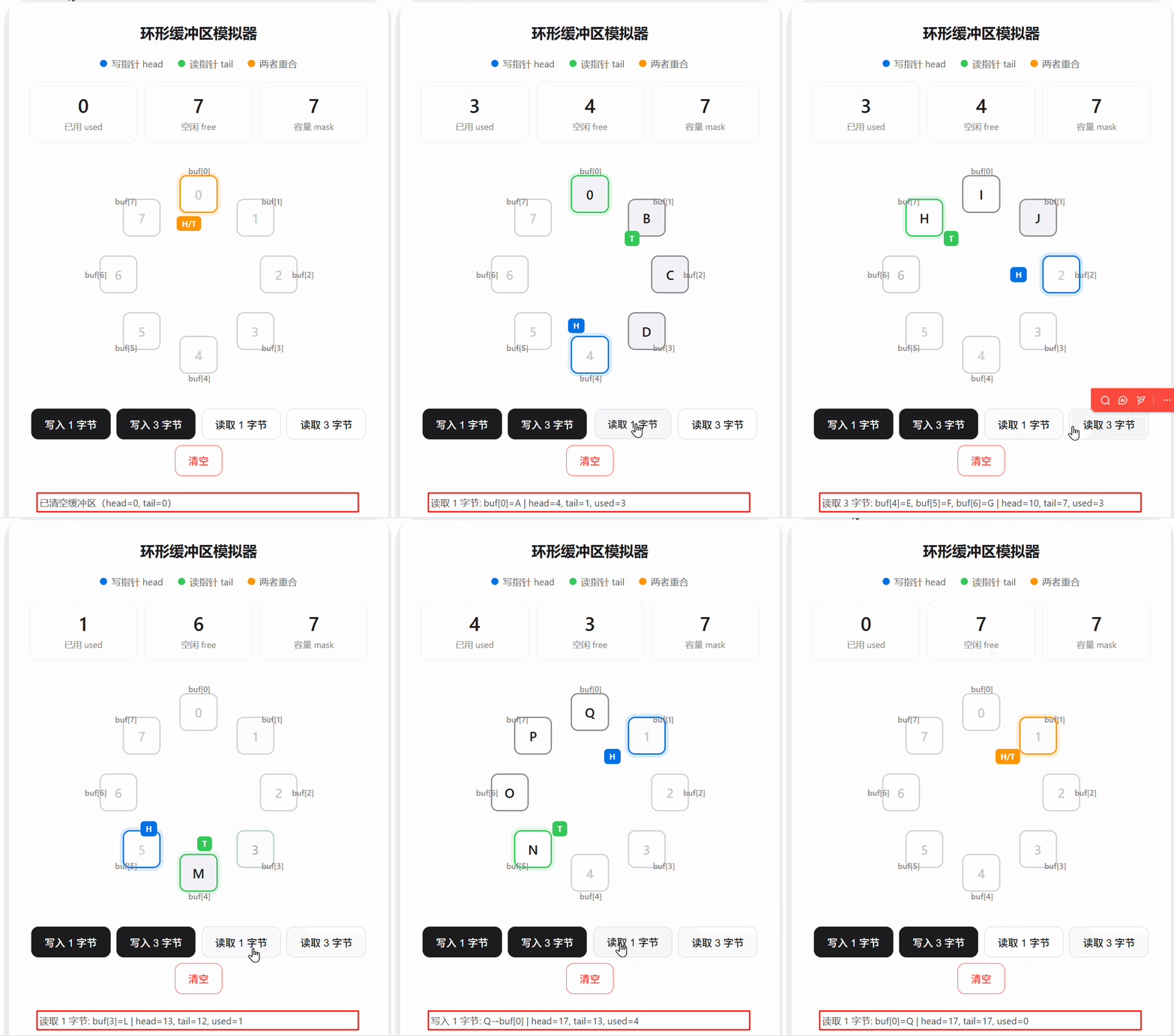
九、核心设计哲学
这段代码的每个细节都体现了嵌入式工程的核心权衡:
- 用位运算做取模 → 省时钟周期
- 用无符号减法算距离 → 自动处理回绕,一条指令搞定
- 用两段拷贝处理环形回绕 →
memcpy连续内存效率最高 - 用留一格区分满空 → 牺牲 1 字节容量,换来极简的判断逻辑
- 让 head/tail 裸奔增长 → 保持语义统一,利用溢出特性
volatile防止编译器优化 → 中断与主循环的安全桥梁
十、参考源码
10.1 Com_RingBuf.h
C
#ifndef __COM_RINGBUF_H
#define __COM_RINGBUF_H

#include "stdint.h"
#include "string.h"

// 定义环形缓冲区描述
typedef struct
{
    uint8_t *buf; // 环形缓冲区
    volatile uint32_t head;  // 写指针 使用volatile修饰 防止编译器优化
    volatile uint32_t tail;  // 读指针 使用volatile修饰 防止编译器优化
    uint32_t mask; // 缓冲区大小-1 规定缓冲区大小必须是2的幂次方 mask=size-1 方便取模
}RingBuf_t;

void Com_RingBuf_Init(RingBuf_t *rb, uint8_t *buf, uint32_t size);
uint32_t Com_RingBuf_IsEmpty(RingBuf_t *rb);
uint32_t Com_RingBuf_UsedByte(RingBuf_t *rb);
uint32_t Com_RingBuf_FreeByte(RingBuf_t *rb);

uint32_t Com_RingBuf_WriteData(RingBuf_t *rb, uint8_t *data, uint32_t len);
uint32_t Com_RingBuf_ReadData(RingBuf_t *rb, uint8_t *data, uint32_t len);


#endif // __COM_RINGBUF_H
10.2 Com_RingBuf.c
c
#include "Com_RingBuf.h"

// 环形缓冲区初始化
void Com_RingBuf_Init(RingBuf_t *rb, uint8_t *buf, uint32_t size)
{
    if (rb == NULL || buf == NULL)
        return;

    rb->buf = buf; // 绑定外部定义的缓冲区数组
    rb->head = 0;  // 读写指针归零
    rb->tail = 0;
    rb->mask = size - 1; // 绑定缓冲区总长度 size-1 size是2^n 便于位运算取模
}

// 判定环形缓冲区是否为空 1-空 0-非空
uint32_t Com_RingBuf_IsEmpty(RingBuf_t *rb)
{
    return (rb->head == rb->tail);
}

// 获取当前环形缓冲区已有的字节数
uint32_t Com_RingBuf_UsedByte(RingBuf_t *rb)
{
    return (rb->head - rb->tail) & rb->mask;
}

// 获取当前环形缓冲区剩余大小
uint32_t Com_RingBuf_FreeByte(RingBuf_t *rb)
{
    return (rb->mask - Com_RingBuf_UsedByte(rb));
}

// 向环形缓冲区写入数据
uint32_t Com_RingBuf_WriteData(RingBuf_t *rb, uint8_t *data, uint32_t len)
{
    if (len == 0)       return 0;

    uint32_t free_len = Com_RingBuf_FreeByte(rb);
    if (len > free_len)    len = free_len;  // 可写长度最多为剩余可写数据长度
    // 这里实际间接限定了写指针总处于读指针前方(位置限定)

    {
        uint32_t head = rb->head;
        uint32_t pos = head & rb->mask;             // 记录当前写指针位置
        uint32_t first_len = (rb->mask + 1) - pos; // 计算第一段最大写入长度
        if (first_len > len) first_len = len;     // 数据长度更短,则第一段写入长度就是实际数据长度
        uint32_t second_len = len - first_len; // 第二段数据长度

        memcpy(rb->buf + pos, data, first_len);        // 从当前位置写入第一段数据
        memcpy(rb->buf, data + first_len, second_len); // 转一圈回到原点位置,写入第二段

        rb->head = head + len; // 更新写指针位置
    }

    return len; // 返回写入长度
}

// 向环形缓冲区读取数据
uint32_t Com_RingBuf_ReadData(RingBuf_t *rb, uint8_t *data, uint32_t len)
{
    if(len == 0)    return 0;
    uint32_t used_len = Com_RingBuf_UsedByte(rb);
    if(used_len < len) len = used_len;  // 可读长度最大为实际已有数据长度
    // 实际这里间接限定了读指针永远不会到写指针前面(位置限定)

    {
        uint32_t tail = rb->tail;
        uint32_t pos = tail & rb->mask;             // 获取读指针位置
        uint32_t first_len = rb->mask + 1 - pos;   // 计算第一段最大可走长度
        if(len < first_len)    first_len = len;   // 获取第一段实际可读数据长度
        uint32_t second_len = len - first_len;

        memcpy(data, rb->buf + pos, first_len);        // 读取第一段数据长度
        memcpy(data + first_len, rb->buf, second_len); // 转一圈回到原点 读取剩余数据长度

        rb->tail = tail + len;  // 更新读指针位置
    }

    return len;  // 实际读取到的数据长度
}
10.3 main.c
C
#include <stdio.h>
#include "Com_RingBuf.h"

RingBuf_t rb;
#define RB_BUF_SIZE 512
uint8_t rb_buf[RB_BUF_SIZE];

void ringbuf_init_test(void)
{
    Com_RingBuf_Init(&rb, rb_buf, RB_BUF_SIZE);

    if (rb.buf == rb_buf)
    {
        printf("ringbuf buf init succ\r\n");
    }
    if (rb.head == 0 && rb.tail == 0)
    {
        printf("ringbuf head tail init 0 succ\r\n");
    }
    if (rb.mask == RB_BUF_SIZE - 1)
    {
        printf("ringbuf mask init size-1 succ\r\n");
    }
}

void ringbuf_write_test(void)
{
    Com_RingBuf_Init(&rb, rb_buf, RB_BUF_SIZE);
    uint8_t *data = "1234";
    Com_RingBuf_WriteData(&rb, data, 4);
    uint32_t free_len = Com_RingBuf_FreeByte(&rb);
    uint32_t used_len = Com_RingBuf_UsedByte(&rb);
    printf("ringbuf: free[%d],used[%d]\r\n", free_len, used_len);
}

void ringbuf_read_test(void)
{
    Com_RingBuf_Init(&rb, rb_buf, RB_BUF_SIZE);
    uint8_t *data = "1234";
    Com_RingBuf_WriteData(&rb, data, 4);
    uint32_t free_len = Com_RingBuf_FreeByte(&rb);
    uint32_t used_len = Com_RingBuf_UsedByte(&rb);
    printf("ringbuf: free[%d],used[%d]\r\n", free_len, used_len);

    uint8_t read[32];
    memset(read, 0, sizeof(read));
    Com_RingBuf_ReadData(&rb, read, 2);
    read[2] = '\0';
    printf("read data: %s\r\n", read);
    free_len = Com_RingBuf_FreeByte(&rb);
    used_len = Com_RingBuf_UsedByte(&rb);
    printf("ringbuf: free[%d],used[%d]\r\n", free_len, used_len);
}

int main()
{
    // 测试初始化
    // ringbuf_init_test();

    // 测试写入
    // ringbuf_write_test();

    // 测试读取
    // ringbuf_read_test();

    return 0;
}
10.4 ringbuf仿真器源码
html
<!DOCTYPE html>
<html lang="zh-CN">
<head>
<meta charset="UTF-8">
<meta name="viewport" content="width=device-width, initial-scale=1.0">
<title>环形缓冲区模拟器</title>
<style>
  * { margin: 0; padding: 0; box-sizing: border-box; }
  body {
    font-family: -apple-system, BlinkMacSystemFont, "Segoe UI", Roboto, "PingFang SC", "Microsoft YaHei", sans-serif;
    background: #f5f5f7;
    color: #1d1d1f;
    padding: 24px;
    min-height: 100vh;
    display: flex;
    justify-content: center;
    align-items: flex-start;
  }
  .container {
    background: #fff;
    border-radius: 16px;
    box-shadow: 0 4px 24px rgba(0,0,0,0.08);
    padding: 28px;
    max-width: 520px;
    width: 100%;
  }
  h1 { font-size: 20px; font-weight: 600; text-align: center; margin-bottom: 20px; }
  .legend {
    display: flex; gap: 20px; justify-content: center; margin-bottom: 16px;
    font-size: 13px; color: #666;
  }
  .legend span { display: flex; align-items: center; gap: 6px; }
  .dot { width: 10px; height: 10px; border-radius: 50%; display: inline-block; }
  .stats {
    display: grid; grid-template-columns: 1fr 1fr 1fr; gap: 10px; margin-bottom: 20px;
  }
  .stat {
    padding: 14px; border-radius: 12px; border: 1px solid #e5e5e7;
    text-align: center; background: #fafafa;
  }
  .stat-val { font-size: 26px; font-weight: 600; font-variant-numeric: tabular-nums; }
  .stat-lbl { font-size: 12px; color: #86868b; margin-top: 4px; }
  .ring-wrap {
    position: relative; width: 320px; height: 320px; margin: 0 auto 24px;
  }
  .cell {
    position: absolute; width: 52px; height: 52px; border-radius: 10px;
    display: flex; align-items: center; justify-content: center;
    font-size: 18px; font-weight: 600;
    transition: all 0.25s cubic-bezier(0.4,0,0.2,1);
    border: 2px solid #d2d2d7; background: #fff; color: #c7c7cc;
  }
  .cell.filled { background: #f2f2f7; color: #1d1d1f; border-color: #8e8e93; }
  .cell.head-here { border-color: #0071e3; box-shadow: 0 0 0 4px rgba(0,113,227,0.15); }
  .cell.tail-here { border-color: #34c759; box-shadow: 0 0 0 4px rgba(52,199,89,0.15); }
  .cell.both-here { border-color: #ff9500; box-shadow: 0 0 0 4px rgba(255,149,0,0.15); }
  .cell.flash-write { animation: flashWrite 0.4s ease; }
  .cell.flash-read { animation: flashRead 0.4s ease; }
  @keyframes flashWrite { 0% { background: #0071e3; color: #fff; border-color: #0071e3; } 100% { } }
  @keyframes flashRead { 0% { background: #34c759; color: #fff; border-color: #34c759; } 100% { } }
  .label {
    position: absolute; font-size: 11px; font-weight: 500; color: #86868b;
    pointer-events: none;
  }
  .arrow {
    position: absolute; font-size: 11px; font-weight: 700;
    padding: 3px 7px; border-radius: 5px; pointer-events: none;
    transition: all 0.3s cubic-bezier(0.4,0,0.2,1);
    z-index: 10;
  }
  .arrow.head { background: #0071e3; color: #fff; }
  .arrow.tail { background: #34c759; color: #fff; }
  .arrow.both { background: #ff9500; color: #fff; }
  .controls {
    display: flex; gap: 8px; justify-content: center; margin-bottom: 14px; flex-wrap: wrap;
  }
  .btn {
    padding: 10px 18px; border-radius: 10px; border: 1px solid #d2d2d7;
    background: #fff; color: #1d1d1f; font-size: 14px; font-weight: 500;
    cursor: pointer; transition: all 0.15s;
  }
  .btn:hover { background: #f5f5f7; }
  .btn:active { transform: scale(0.96); }
  .btn.primary { background: #1d1d1f; color: #fff; border-color: #1d1d1f; }
  .btn.primary:hover { opacity: 0.88; }
  .btn.danger { color: #ff3b30; border-color: #ff3b30; }
  .btn.danger:hover { background: rgba(255,59,48,0.06); }
  .log {
    font-size: 13px; color: #555; background: #f5f5f7;
    padding: 12px 14px; border-radius: 10px; min-height: 40px; line-height: 1.6;
    word-break: break-all;
  }
  .hint { font-size: 12px; color: #86868b; text-align: center; margin-top: 12px; }
</style>
<base target="_blank">
</head>
<body>
<div class="container">
  <h1>环形缓冲区模拟器</h1>

  <div class="legend">
    <span><span class="dot" style="background:#0071e3"></span>写指针 head</span>
    <span><span class="dot" style="background:#34c759"></span>读指针 tail</span>
    <span><span class="dot" style="background:#ff9500"></span>两者重合</span>
  </div>

  <div class="stats">
    <div class="stat">
      <div class="stat-val" id="rb-used">0</div>
      <div class="stat-lbl">已用 used</div>
    </div>
    <div class="stat">
      <div class="stat-val" id="rb-free">7</div>
      <div class="stat-lbl">空闲 free</div>
    </div>
    <div class="stat">
      <div class="stat-val" id="rb-mask">7</div>
      <div class="stat-lbl">容量 mask</div>
    </div>
  </div>

  <div class="ring-wrap" id="rb-ring"></div>

  <div class="controls">
    <button class="btn primary" onclick="rbWrite()">写入 1 字节</button>
    <button class="btn primary" onclick="rbWrite3()">写入 3 字节</button>
    <button class="btn" onclick="rbRead()">读取 1 字节</button>
    <button class="btn" onclick="rbRead3()">读取 3 字节</button>
    <button class="btn danger" onclick="rbClear()">清空</button>
  </div>

  <div class="log" id="rb-log">点击上方按钮开始模拟...</div>
  <div class="hint">提示:连续写入 8 次会被截断为 7 次,因为始终保留 1 个空位区分满/空</div>
</div>

<script>
  const SIZE = 8;
  const MASK = SIZE - 1;
  let head = 0, tail = 0;
  let buf = new Array(SIZE).fill(null);
  let nextChar = 0;
  const chars = 'ABCDEFGHIJKLMNOPQRSTUVWXYZ';

  function getPos(idx) {
    const cx = 160, cy = 160, r = 110;
    const angle = (idx / SIZE) * Math.PI * 2 - Math.PI / 2;
    return { x: cx + r * Math.cos(angle) - 26, y: cy + r * Math.sin(angle) - 26 };
  }
  function getLabelPos(idx) {
    const cx = 160, cy = 160, r = 142;
    const angle = (idx / SIZE) * Math.PI * 2 - Math.PI / 2;
    return { x: cx + r * Math.cos(angle) - 14, y: cy + r * Math.sin(angle) - 7 };
  }
  function getArrowPos(idx, offset) {
    const cx = 160, cy = 160, r = 70;
    const angle = (idx / SIZE) * Math.PI * 2 - Math.PI / 2;
    const ox = offset === 0 ? -14 : 14;
    return { x: cx + r * Math.cos(angle) + ox - 16, y: cy + r * Math.sin(angle) - 10 };
  }

  function init() {
    const ring = document.getElementById('rb-ring');
    ring.innerHTML = '';
    for (let i = 0; i < SIZE; i++) {
      const p = getPos(i);
      const cell = document.createElement('div');
      cell.className = 'cell';
      cell.id = 'cell-' + i;
      cell.style.left = p.x + 'px';
      cell.style.top = p.y + 'px';
      cell.textContent = i;
      ring.appendChild(cell);

      const lp = getLabelPos(i);
      const lbl = document.createElement('div');
      lbl.className = 'label';
      lbl.style.left = lp.x + 'px';
      lbl.style.top = lp.y + 'px';
      lbl.textContent = 'buf[' + i + ']';
      ring.appendChild(lbl);
    }
    render();
  }

  function used() { return (head - tail) & MASK; }
  function free() { return MASK - used(); }

  function render() {
    const u = used();
    document.getElementById('rb-used').textContent = u;
    document.getElementById('rb-free').textContent = free();

    for (let i = 0; i < SIZE; i++) {
      const cell = document.getElementById('cell-' + i);
      const h = head & MASK;
      const t = tail & MASK;
      const isHead = (h === i);
      const isTail = (t === i);
      const inRange = u > 0 && ((t < h && i >= t && i < h) || (t >= h && (i >= t || i < h)));

      cell.className = 'cell';
      if (inRange) {
        cell.classList.add('filled');
        cell.textContent = buf[i] || '';
      } else {
        cell.textContent = i;
      }
      if (isHead && isTail) cell.classList.add('both-here');
      else if (isHead) cell.classList.add('head-here');
      else if (isTail) cell.classList.add('tail-here');
    }

    const ring = document.getElementById('rb-ring');
    document.querySelectorAll('.arrow').forEach(e => e.remove());

    const h = head & MASK;
    const t = tail & MASK;
    if (h === t && u === 0) {
      const p = getArrowPos(h, 0);
      const arr = document.createElement('div');
      arr.className = 'arrow both';
      arr.style.left = p.x + 'px';
      arr.style.top = p.y + 'px';
      arr.textContent = 'H/T';
      ring.appendChild(arr);
    } else {
      const ph = getArrowPos(h, 0);
      const ah = document.createElement('div');
      ah.className = 'arrow head';
      ah.style.left = ph.x + 'px';
      ah.style.top = ph.y + 'px';
      ah.textContent = 'H';
      ring.appendChild(ah);

      const pt = getArrowPos(t, 1);
      const at = document.createElement('div');
      at.className = 'arrow tail';
      at.style.left = pt.x + 'px';
      at.style.top = pt.y + 'px';
      at.textContent = 'T';
      ring.appendChild(at);
    }
  }

  function log(msg) {
    document.getElementById('rb-log').textContent = msg;
  }

  function rbWrite() { rbWriteN(1); }
  function rbWrite3() { rbWriteN(3); }
  function rbRead() { rbReadN(1); }
  function rbRead3() { rbReadN(3); }

  function rbWriteN(n) {
    const f = free();
    if (f === 0) { log('缓冲区已满!无法写入(head=' + head + ', tail=' + tail + ')'); return; }
    const actual = Math.min(n, f);
    let written = [];
    for (let i = 0; i < actual; i++) {
      const pos = head & MASK;
      const ch = chars[nextChar % chars.length];
      nextChar++;
      buf[pos] = ch;
      head++;
      written.push(ch + '→buf[' + pos + ']');
      const cell = document.getElementById('cell-' + pos);
      cell.classList.remove('flash-write');
      void cell.offsetWidth;
      cell.classList.add('flash-write');
    }
    render();
    log('写入 ' + actual + ' 字节: ' + written.join(', ') + ' | head=' + head + ', tail=' + tail + ', used=' + used());
  }

  function rbReadN(n) {
    const u = used();
    if (u === 0) { log('缓冲区为空!无法读取(head=' + head + ', tail=' + tail + ')'); return; }
    const actual = Math.min(n, u);
    let read = [];
    for (let i = 0; i < actual; i++) {
      const pos = tail & MASK;
      const ch = buf[pos];
      buf[pos] = null;
      tail++;
      read.push('buf[' + pos + ']=' + ch);
      const cell = document.getElementById('cell-' + pos);
      cell.classList.remove('flash-read');
      void cell.offsetWidth;
      cell.classList.add('flash-read');
    }
    render();
    log('读取 ' + actual + ' 字节: ' + read.join(', ') + ' | head=' + head + ', tail=' + tail + ', used=' + used());
  }

  function rbClear() {
    head = 0; tail = 0; buf.fill(null); nextChar = 0;
    render();
    log('已清空缓冲区(head=0, tail=0)');
  }

  init();
</script>
</body>
</html>