Pygame 小游戏------黑白棋(Othello)
项目概述
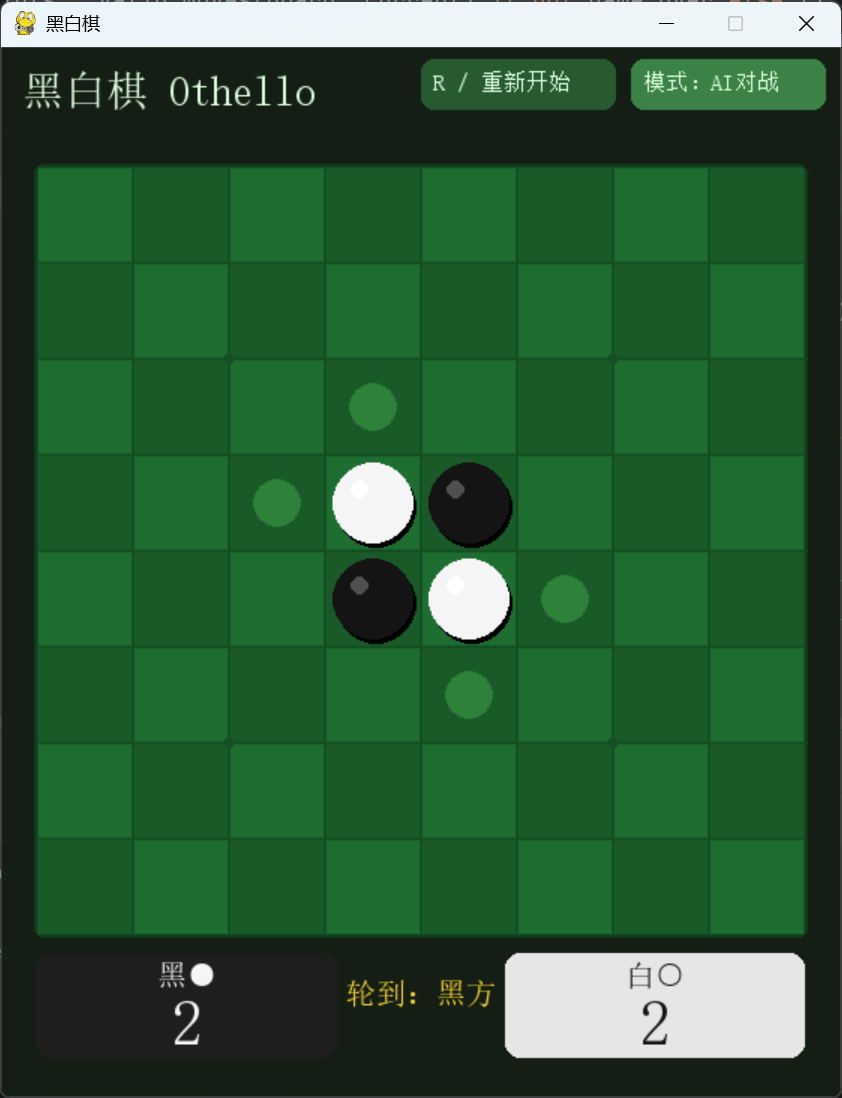
本文通过 Pygame 实现一款黑白棋(翻转棋)对弈游戏,支持双人对战和人机对战两种模式。
游戏在 8×8 标准棋盘上进行,采用经典翻转规则:玩家点击合法交叉点落子,夹住对方棋子即可将其翻转为己方颜色,最终棋子多者获胜。AI 基于 Minimax 搜索 + Alpha-Beta 剪枝(深度 4),结合位置权重与行动力评估,具备一定棋力。核心特性包括:
- 双模式切换:支持双人对战与人机对战,按 A 键一键切换,重置棋局即时生效。
- AI 对手:AI 执白(亦可配置),采用带 Alpha-Beta 剪枝的 Minimax 搜索,评估函数融合位置权重表与行动力,深度 4 保证响应迅速且具有一定智能。
- 合法走法提示:当前玩家可落子的位置以半透明绿色圆点标示,方便新手快速掌握可下位置。
- 翻转动画:落子后,被翻转的棋子会播放缩放动画,视觉反馈流畅,增强操作手感。
- 最后落子标记:每一步最后落子的位置以金色圆点高亮,便于回溯棋局进程。
- 计分与状态栏:实时显示黑子与白子数量,标明当前轮到谁,无子可跳时给出文字提示。
- 键盘操作:R 重置棋局、A 切换模式、ESC 退出;点击任意处亦可在结束后重开。
游戏实现
初始化与基础设置
游戏启动时初始化 Pygame,定义棋盘参数、窗口尺寸及布局常量。
python
W, H = 560, 700
CELL = 64
BOARD_X, BOARD_Y = 24, 80
SIZE = 8
FPS = 60
CELL = 64:每格边长 64px,8×8 棋盘总宽 512px,窗口宽度 560px 留出两侧边距。BOARD_X = 24, BOARD_Y = 80:棋盘左上角坐标,上方 80px 区域留给标题、按钮与状态栏。- 窗口高度 700px 为棋盘下方留出计分板与操作提示区域。
颜色定义
python
C_BG       = (20,  30,  20)   # 深绿色背景
C_BOARD    = (30, 110,  50)   # 棋盘格主色
C_BOARD_D  = (25,  90,  40)   # 棋盘格间隔色
C_LINE     = (20,  80,  35)   # 网格线
C_BLACK    = (20,  20,  20)   # 黑子
C_WHITE    = (245, 245, 245)  # 白子
C_HINT     = (100, 200, 100, 80) # 提示点半透明绿
C_LAST     = (255, 230,  60)  # 最后落子金色
C_TEXT     = (220, 255, 220)  # 字体
C_WIN      = (255, 215,  50)  # 胜利/强调色
整体采用自然绿调,模拟木质或草编棋盘质感。棋盘格深浅交替形成视觉区分,棋子黑白对比鲜明,金色标记凸显关键信息。
字体加载
python
CHINESE_FONT_PATH = r"C:/Windows/Fonts/simsun.ttc"
try:
    FONT_TL = pygame.font.Font(CHINESE_FONT_PATH, 28)
    ...
except:
    FONT_TL = pygame.font.SysFont("microsoftyahei", 28, bold=True)
优先使用宋体,若系统无则回退微软雅黑,保证中文字符正常显示。
棋盘与棋子数据结构
棋盘用二维列表 board[8][8] 表示,其中:
0:空位1:黑子(玩家通常执黑)2:白子(AI 执白)
初始布局为经典四子交叉:
python
def init_board():
    b = [[0]*8 for _ in range(8)]
    b[3][3]=b[4][4]=2  # 白
    b[3][4]=b[4][3]=1  # 黑
    return b
核心游戏逻辑
翻转判定(get_flips)
黑白棋的精髓在于"夹住并翻转"。对于给定位置 (r,c) 和当前玩家 player,检查八个方向:
python
def get_flips(board, r, c, player):
    if board[r][c] != 0: return []
    opp = 3 - player
    all_flips = []
    for dr, dc in DIRS:
        flips = []
        nr, nc = r+dr, c+dc
        while in_bounds(nr,nc) and board[nr][nc]==opp:
            flips.append((nr,nc))
            nr += dr; nc += dc
        if flips and in_bounds(nr,nc) and board[nr][nc]==player:
            all_flips.extend(flips)
return all_flips- 沿某方向遍历,遇到对手棋子则暂存,直到遇到己方棋子或棋盘边界。
- 若终止于己方棋子且中间有至少一个对手棋子,则这些对手棋子均可被翻转。
- 返回所有可翻转位置的列表,空列表表示该位置不合法。
合法走法生成
python
def valid_moves(board, player):
    return [(r,c) for r in range(8) for c in range(8)
            if get_flips(board,r,c,player)]
遍历所有空格,调用 get_flips 过滤出有翻转可能的位置。
落子与翻转
python
def apply_move(board, r, c, player):
    flips = get_flips(board, r, c, player)
    if not flips: return board, []
    nb = copy.deepcopy(board)
    nb[r][c] = player
    for fr, fc in flips:
        nb[fr][fc] = player
    return nb, flips
深拷贝棋盘,将新子与所有被翻转的棋子改为当前玩家颜色,并返回新棋盘和翻转列表(用于动画)。
胜负判定与计分
游戏结束条件:双方均无合法走法(通常发生在棋盘填满或任何一方无子可下)。计分函数统计黑白棋子数量:
python
def count(board):
    b = sum(board[r][c]==1 for r in range(8) for c in range(8))
    w = sum(board[r][c]==2 for r in range(8) for c in range(8))
    return b, w
最终棋子多者获胜,平局则显示"平局!"。
AI 评估系统
位置权重表
python
WEIGHTS = [
    [100,-20,10, 5, 5,10,-20,100],
    [-20,-50,-2,-2,-2,-2,-50,-20],
    [ 10, -2, 5, 1, 1, 5, -2, 10],
    [  5, -2, 1, 0, 0, 1, -2,  5],
    [  5, -2, 1, 0, 0, 1, -2,  5],
    [ 10, -2, 5, 1, 1, 5, -2, 10],
    [-20,-50,-2,-2,-2,-2,-50,-20],
    [100,-20,10, 5, 5,10,-20,100],
]- 角落(100):占据角点意味着永不被翻转,价值极高。
- 角边(-20 ~ -50) :靠近角但非角的格子(如
(0,1))易被对手占角,视为负价值。 - 中心(0 ~ 5):控制中心有助于获得更多行动力,给予小幅正分。
该表为经典黑白棋启发式,引导 AI 争角、避弱边。
评估函数
python
def evaluate(board, player):
    opp = 3-player
    score = 0
    # 位置权重
    for r in range(8):
        for c in range(8):
            if board[r][c]==player: score += WEIGHTS[r][c]
            elif board[r][c]==opp:  score -= WEIGHTS[r][c]
    # 行动力
    score += len(valid_moves(board, player))*5
    score -= len(valid_moves(board, opp))*5
return score- 位置分:己方棋子加权总和减去对方棋子加权总和。
- 行动力:当前玩家的合法走法数减对方走法数,乘以系数 5,鼓励 AI 获得更多选择空间,同时限制对手。
Minimax + Alpha-Beta 剪枝
python
def minimax(board, depth, alpha, beta, player, max_player):
    moves = valid_moves(board, player)
    if depth==0 or not moves:
        return evaluate(board, max_player), None
    best_move = None
    if player==max_player:
        best = -math.inf
        for r,c in moves:
            nb,_ = apply_move(board,r,c,player)
            val,_ = minimax(nb, depth-1, alpha, beta, 3-player, max_player)
            if val>best: best=val; best_move=(r,c)
            alpha=max(alpha,best)
            if beta<=alpha: break
        return best, best_move
    else:
        best = math.inf
        for r,c in moves:
            nb,_ = apply_move(board,r,c,player)
            val,_ = minimax(nb, depth-1, alpha, beta, 3-player, max_player)
            if val<best: best=val; best_move=(r,c)
            beta=min(beta,best)
            if beta<=alpha: break
return best, best_move- 深度固定为 4(可调整),在 8×8 棋盘上搜索节点数可控(平均分支约 10~15),配合剪枝响应迅速(<0.1 秒)。
max_player为 AI 自身,在 AI 回合最大化分数,对手回合最小化分数。- 叶节点调用
evaluate返回静态估值。
AI 走法接口:
python
def ai_move(board, ai_player, depth=4):
    _, move = minimax(board, depth, -math.inf, math.inf, ai_player, ai_player)
    return move
若返回 None(无合法走法),则跳过该回合。
绘制与动画
棋盘绘制
python
def draw_board(surf, board, hints, last_move, anim_flips, anim_t):
    # 棋盘外框
    br = pygame.Rect(BOARD_X-2, BOARD_Y-2, SIZE*CELL+4, SIZE*CELL+4)
    pygame.draw.rect(surf, (15,60,25), br, border_radius=6)
    # 棋盘格(深浅交替)
    for r in range(SIZE):
        for c in range(SIZE):
            rect = pygame.Rect(BOARD_X+c*CELL, BOARD_Y+r*CELL, CELL, CELL)
            col = C_BOARD if (r+c)%2==0 else C_BOARD_D
            pygame.draw.rect(surf, col, rect)
            pygame.draw.rect(surf, C_LINE, rect, 1)
棋盘格交替色增加层次,网格线清晰。
合法走法提示
python
hint_surf = pygame.Surface((CELL, CELL), pygame.SRCALPHA)
pygame.draw.circle(hint_surf, (100,230,100,70), (CELL//2, CELL//2), CELL//4)
for r,c in hints:
    surf.blit(hint_surf, (BOARD_X+c*CELL, BOARD_Y+r*CELL))
半透明绿色圆点浮在可落子格上,柔和且不干扰棋子。
棋子立体渲染
python
# 阴影
pygame.draw.circle(surf, (0,0,0,80), (cx+2,cy+3), piece_r)
# 主体
pygame.draw.circle(surf, color, (cx,cy), piece_r)
# 高光
hl_col = (80,80,80) if v==1 else (255,255,255)
pygame.draw.circle(surf, hl_col, (cx-piece_r//3, cy-piece_r//3), piece_r//4)
与五子棋类似,采用阴影+主体+高光三层,提升立体感。
翻转动画
翻转动画是黑白棋的视觉亮点。当 anim_flips 非空时,动画计时器 anim_t 从 0 递增至 1:
python
if is_flipping:
    t = anim_t  # 0~1
    scale_x = abs(math.cos(t * math.pi))
    eff_r = max(2, int(piece_r * scale_x))
    # 颜色渐变(前半段旧色,后半段新色)
    if t < 0.5:
        color = C_BLACK if v==1 else C_WHITE
    else:
        color = C_WHITE if v==1 else C_BLACK
    pygame.draw.ellipse(surf, color,
(cx-eff_r, cy-piece_r, eff_r*2, piece_r*2))- 横向压缩(
scale_x从 1 → 0 → 1)模拟翻转效果。 - 颜色在中间时刻切换,实现"翻面"视觉。
- 非翻转棋子正常绘制。
动画速度由 anim_t += 0.08 控制,约 12 帧完成,流畅自然。
最后落子标记
python
if last_move and (r,c)==last_move:
    pygame.draw.circle(surf, C_LAST, (cx,cy), 6)
金色圆点高亮最后一步,便于追踪。
交互与状态流转
主循环状态机
python
while True:
    # 事件处理
    for event in pygame.event.get():
        # 鼠标点击 → 尝试落子
        if valid and not game_over:
            r,c = 计算格点
            flips = get_flips(board, r, c, current)
            if flips:
                board, flips = apply_move(...)
                last_move = (r,c)
                anim_flips = flips
                anim_t = 0.0
                # 切换玩家,跳过无子可下的一方
                nxt = 3-current
                if valid_moves(board, nxt):
                    current = nxt
                elif valid_moves(board, current):
                    message = "对方无子可下,跳过"
                else:
                    game_over = True
                if vs_ai and current == ai_player and not game_over:
                    pending_ai = True

    # AI 延迟落子(待动画结束后执行)
    if pending_ai and anim_t >= 1.0 and not game_over:
        pending_ai = False
        move = ai_move(board, ai_player)
        if move:
            ...
        else:
# AI 无子可下,跳过或结束- 玩家落子:仅在非 AI 回合或双人模式下响应点击。
- AI 落子 :通过
pending_ai标志延迟到动画完成,避免阻塞绘制。 - 跳过逻辑:若当前玩家无合法走法,自动切换对方;若双方均无走法,游戏结束。
- 动画同步 :
anim_t < 1.0时禁止新的落子,保证动画完整播放。
按钮与键盘
R键或点击"重新开始"按钮 → 重置棋盘。A键或点击"模式"按钮 → 在双人/AI 间切换,重置棋局。ESC→ 退出游戏。
绘制层次与界面布局
绘制顺序(由底至上):
- 深色背景填充
- 标题与按钮(位于顶部)
- 棋盘外框与格线
- 合法走法提示(半透明圆点)
- 所有棋子(含阴影、主体、高光)
- 翻转动画棋子(覆盖在静态棋子之上)
- 最后落子标记(金色圆点)
- 计分板(左右两侧显示黑白子数)
- 当前回合文字提示
- 跳过提示信息
- 游戏结束遮罩弹窗(半透明,含胜者与比分)
计分板设计
python
y_ui = BOARD_Y + SIZE*CELL + 12
# 黑方区域(左)
pygame.draw.rect(screen, (30,30,30), (BOARD_X, y_ui, 200, 70), border_radius=10)
# 白方区域(右)
pygame.draw.rect(screen, (230,230,230), (BOARD_X+SIZE*CELL-200, y_ui, 200, 70), border_radius=10)
左右对称,背景色与棋子颜色对应,字体颜色自动反色,清晰显示双方子数。
游戏结束弹窗
python
if game_over:
    ov = pygame.Surface((W,H), pygame.SRCALPHA)
    ov.fill((0,0,0,130))
    screen.blit(ov, (0,0))
    # 半透明深色遮罩,中央显示胜者、比分、重开提示
    ...
弹窗展示胜负结果、最终比分,并提示点击或按 R 重开,与五子棋风格一致。
全部代码
完整代码如下(与提供的代码一致,为便于阅读整理注释):
python
"""
黑白棋(Othello/翻转棋)
模式:双人 或 vs AI(Minimax + Alpha-Beta剪枝,深度4)
操作:鼠标点击落子
"""

import pygame
import sys
import copy
import math

pygame.init()

W, H = 560, 700
CELL = 64
BOARD_X, BOARD_Y = 24, 80
SIZE = 8
FPS = 60

C_BG       = (20,  30,  20)
C_BOARD    = (30, 110,  50)
C_BOARD_D  = (25,  90,  40)
C_LINE     = (20,  80,  35)
C_BLACK    = (20,  20,  20)
C_WHITE    = (245, 245, 245)
C_HINT     = (100, 200, 100, 80)
C_LAST     = (255, 230,  60)
C_TEXT     = (220, 255, 220)
C_BTN      = (40,  90,  50)
C_BTN_HL   = (60, 130,  70)
C_WIN      = (255, 215,  50)

# 中文字体
CHINESE_FONT_PATH = r"C:/Windows/Fonts/simsun.ttc"
try:
    FONT_TL = pygame.font.Font(CHINESE_FONT_PATH, 28)
    FONT_MD = pygame.font.Font(CHINESE_FONT_PATH, 20)
    FONT_SM = pygame.font.Font(CHINESE_FONT_PATH, 15)
    FONT_SC = pygame.font.Font(CHINESE_FONT_PATH, 42)
except:
    FONT_TL = pygame.font.SysFont("microsoftyahei", 28, bold=True)
    FONT_MD = pygame.font.SysFont("microsoftyahei", 20, bold=True)
    FONT_SM = pygame.font.SysFont("microsoftyahei", 15)
    FONT_SC = pygame.font.SysFont("microsoftyahei", 42, bold=True)

DIRS = [(-1,-1),(-1,0),(-1,1),(0,-1),(0,1),(1,-1),(1,0),(1,1)]

# 位置权重表(角落最高)
WEIGHTS = [
    [100,-20,10, 5, 5,10,-20,100],
    [-20,-50,-2,-2,-2,-2,-50,-20],
    [ 10, -2, 5, 1, 1, 5, -2, 10],
    [  5, -2, 1, 0, 0, 1, -2,  5],
    [  5, -2, 1, 0, 0, 1, -2,  5],
    [ 10, -2, 5, 1, 1, 5, -2, 10],
    [-20,-50,-2,-2,-2,-2,-50,-20],
    [100,-20,10, 5, 5,10,-20,100],
]

# ── 游戏逻辑 ─────────────────────────────────────────────────────────
def init_board():
    b = [[0]*8 for _ in range(8)]
    b[3][3]=b[4][4]=2  # 白
    b[3][4]=b[4][3]=1  # 黑
    return b

def in_bounds(r,c):
    return 0<=r<8 and 0<=c<8

def get_flips(board, r, c, player):
    if board[r][c] != 0: return []
    opp = 3 - player
    all_flips = []
    for dr,dc in DIRS:
        flips = []
        nr, nc = r+dr, c+dc
        while in_bounds(nr,nc) and board[nr][nc]==opp:
            flips.append((nr,nc))
            nr+=dr; nc+=dc
        if flips and in_bounds(nr,nc) and board[nr][nc]==player:
            all_flips.extend(flips)
    return all_flips

def valid_moves(board, player):
    return [(r,c) for r in range(8) for c in range(8)
            if get_flips(board,r,c,player)]

def apply_move(board, r, c, player):
    flips = get_flips(board, r, c, player)
    if not flips: return board, []
    nb = copy.deepcopy(board)
    nb[r][c] = player
    for fr,fc in flips:
        nb[fr][fc] = player
    return nb, flips

def count(board):
    b = sum(board[r][c]==1 for r in range(8) for c in range(8))
    w = sum(board[r][c]==2 for r in range(8) for c in range(8))
    return b, w

def evaluate(board, player):
    opp = 3-player
    score = 0
    # 位置权重
    for r in range(8):
        for c in range(8):
            if board[r][c]==player: score += WEIGHTS[r][c]
            elif board[r][c]==opp:  score -= WEIGHTS[r][c]
    # 行动力
    score += len(valid_moves(board, player))*5
    score -= len(valid_moves(board, opp))*5
    return score

def minimax(board, depth, alpha, beta, player, max_player):
    moves = valid_moves(board, player)
    if depth==0 or not moves:
        return evaluate(board, max_player), None
    best_move = None
    if player==max_player:
        best = -math.inf
        for r,c in moves:
            nb,_ = apply_move(board,r,c,player)
            val,_ = minimax(nb, depth-1, alpha, beta, 3-player, max_player)
            if val>best: best=val; best_move=(r,c)
            alpha=max(alpha,best)
            if beta<=alpha: break
        return best, best_move
    else:
        best = math.inf
        for r,c in moves:
            nb,_ = apply_move(board,r,c,player)
            val,_ = minimax(nb, depth-1, alpha, beta, 3-player, max_player)
            if val<best: best=val; best_move=(r,c)
            beta=min(beta,best)
            if beta<=alpha: break
        return best, best_move

def ai_move(board, ai_player, depth=4):
    _, move = minimax(board, depth, -math.inf, math.inf, ai_player, ai_player)
    return move

# ── 绘制 ─────────────────────────────────────────────────────────────
def draw_board(surf, board, hints, last_move, anim_flips, anim_t):
    # 棋盘背景
    br = pygame.Rect(BOARD_X-2, BOARD_Y-2, SIZE*CELL+4, SIZE*CELL+4)
    pygame.draw.rect(surf, (15,60,25), br, border_radius=6)
    for r in range(SIZE):
        for c in range(SIZE):
            rect = pygame.Rect(BOARD_X+c*CELL, BOARD_Y+r*CELL, CELL, CELL)
            col = C_BOARD if (r+c)%2==0 else C_BOARD_D
            pygame.draw.rect(surf, col, rect)
            pygame.draw.rect(surf, C_LINE, rect, 1)

    # 提示点
    hint_surf = pygame.Surface((CELL, CELL), pygame.SRCALPHA)
    pygame.draw.circle(hint_surf, (100,230,100,70), (CELL//2, CELL//2), CELL//4)
    for r,c in hints:
        surf.blit(hint_surf, (BOARD_X+c*CELL, BOARD_Y+r*CELL))

    # 棋子
    for r in range(SIZE):
        for c in range(SIZE):
            v = board[r][c]
            if v==0: continue
            cx = BOARD_X + c*CELL + CELL//2
            cy = BOARD_Y + r*CELL + CELL//2
            piece_r = CELL//2 - 5

            is_flipping = (r,c) in anim_flips
            color = (C_BLACK if v==1 else C_WHITE)

            if is_flipping:
                t = anim_t  # 0~1
                scale_x = abs(math.cos(t * math.pi))
                eff_r = max(2, int(piece_r * scale_x))
                # 动画中颜色渐变
                if t < 0.5:
                    color = C_BLACK if v==1 else C_WHITE
                else:
                    color = C_WHITE if v==1 else C_BLACK

            # 阴影
            pygame.draw.circle(surf, (0,0,0,80), (cx+2,cy+3), piece_r)
            # 棋子
            if is_flipping:
                pygame.draw.ellipse(surf, color,
                    (cx-eff_r, cy-piece_r, eff_r*2, piece_r*2))
            else:
                pygame.draw.circle(surf, color, (cx,cy), piece_r)
                # 高光
                hl_col = (80,80,80) if v==1 else (255,255,255)
                pygame.draw.circle(surf, hl_col, (cx-piece_r//3, cy-piece_r//3), piece_r//4)

            # 最后落子标记
            if last_move and (r,c)==last_move:
                pygame.draw.circle(surf, C_LAST, (cx,cy), 6)

    # 角落圆点(传统棋盘标记)
    for pr,pc in [(2,2),(2,6),(6,2),(6,6)]:
        pygame.draw.circle(surf, C_LINE,
            (BOARD_X+pc*CELL, BOARD_Y+pr*CELL), 4)

def main():
    screen = pygame.display.set_mode((W, H))
    pygame.display.set_caption("黑白棋")
    clock = pygame.time.Clock()

    vs_ai = True
    ai_player = 2  # AI执白
    board = init_board()
    current = 1   # 1=黑先
    last_move = None
    game_over = False
    anim_flips = []
    anim_t = 1.0
    message = ""
    pending_ai = False

    def reset():
        nonlocal board, current, last_move, game_over, anim_flips, anim_t, message, pending_ai
        board = init_board(); current = 1; last_move = None
        game_over = False; anim_flips = []; anim_t = 1.0; message = ""; pending_ai = False

    while True:
        mx, my = pygame.mouse.get_pos()

        for event in pygame.event.get():
            if event.type == pygame.QUIT:
                pygame.quit(); sys.exit()
            if event.type == pygame.KEYDOWN:
                if event.key == pygame.K_ESCAPE:
                    pygame.quit(); sys.exit()
                if event.key == pygame.K_r:
                    reset()
                if event.key == pygame.K_a:
                    vs_ai = not vs_ai
                    reset()

            if event.type == pygame.MOUSEBUTTONDOWN and event.button==1:
                # 模式切换按钮
                ai_btn = pygame.Rect(W-140, 8, 130, 34)
                rst_btn = pygame.Rect(W-280, 8, 130, 34)
                if ai_btn.collidepoint(mx, my):
                    vs_ai = not vs_ai; reset(); continue
                if rst_btn.collidepoint(mx, my):
                    reset(); continue

                if game_over:
                    reset(); continue

                if not vs_ai or current != ai_player:
                    if anim_t >= 1.0:
                        gx = mx - BOARD_X; gy = my - BOARD_Y
                        if 0<=gx<SIZE*CELL and 0<=gy<SIZE*CELL:
                            r, c = gy//CELL, gx//CELL
                            flips = get_flips(board, r, c, current)
                            if flips:
                                board, flips = apply_move(board, r, c, current)
                                last_move = (r,c)
                                anim_flips = flips
                                anim_t = 0.0
                                nxt = 3-current
                                if valid_moves(board, nxt):
                                    current = nxt
                                elif valid_moves(board, current):
                                    message = f"{'黑' if nxt==1 else '白'}方无子可落,跳过"
                                else:
                                    game_over = True
                                if vs_ai and current == ai_player and not game_over:
                                    pending_ai = True

        # AI行动
        if pending_ai and anim_t >= 1.0 and not game_over:
            pending_ai = False
            move = ai_move(board, ai_player)
            if move:
                r,c = move
                board, flips = apply_move(board, r, c, ai_player)
                last_move = (r,c)
                anim_flips = flips
                anim_t = 0.0
                nxt = 3-ai_player
                if valid_moves(board, nxt):
                    current = nxt
                elif valid_moves(board, ai_player):
                    message = "你方无子可落,AI继续"
                    pending_ai = True
                else:
                    game_over = True

        # 翻转动画
        if anim_t < 1.0:
            anim_t = min(1.0, anim_t + 0.08)
        elif anim_flips:
            anim_flips = []

        # ── 绘制 ──────────────────────────────────────────────────────
        screen.fill(C_BG)

        # 标题
        tl = FONT_TL.render("黑白棋 Othello", True, C_TEXT)
        screen.blit(tl, tl.get_rect(x=14, y=14))

        # 模式/重置按钮
        rst_btn = pygame.Rect(W-280, 8, 130, 34)
        ai_btn  = pygame.Rect(W-140, 8, 130, 34)
        pygame.draw.rect(screen, C_BTN, rst_btn, border_radius=8)
        pygame.draw.rect(screen, C_BTN_HL, ai_btn, border_radius=8)
        screen.blit(FONT_SM.render("R / 重新开始", True, C_TEXT), rst_btn.move(8,8))
        mode_txt = f"模式:{'AI对战' if vs_ai else '双人'}"
        screen.blit(FONT_SM.render(mode_txt, True, C_TEXT), ai_btn.move(8,8))

        hints = valid_moves(board, current) if not game_over else []
        draw_board(screen, board, hints, last_move, anim_flips if anim_t<1 else [], anim_t)

        # 计分
        bc, wc = count(board)
        y_ui = BOARD_Y + SIZE*CELL + 12
        bk_r = pygame.Rect(BOARD_X, y_ui, 200, 70)
        wh_r = pygame.Rect(BOARD_X + SIZE * CELL - 200, y_ui, 200, 70)
        for rect, col, label, cnt in [(bk_r, (30,30,30), "黑●", bc), (wh_r, (230,230,230), "白○", wc)]:

            pygame.draw.rect(screen, col, rect, border_radius=10)
            pygame.draw.rect(screen, col, rect.inflate(-4,-4), border_radius=8)
            txt_c = C_WHITE if col[0]<100 else C_BLACK
            t1 = FONT_MD.render(label, True, txt_c)
            t2 = FONT_SC.render(str(cnt), True, txt_c)
            screen.blit(t1, t1.get_rect(centerx=rect.centerx, y=rect.y+4))
            screen.blit(t2, t2.get_rect(centerx=rect.centerx, y=rect.y+24))

        # 当前玩家
        if not game_over:
            who = "黑方" if current==1 else ("AI(白)" if vs_ai and current==ai_player else "白方")
            turn_t = FONT_MD.render(f"轮到:{who}", True, C_WIN if not (vs_ai and current==ai_player) else (150,200,255))
            screen.blit(turn_t, turn_t.get_rect(centerx=W//2, y=y_ui+16))

        if message:
            mt = FONT_SM.render(message, True, C_WIN)
            screen.blit(mt, mt.get_rect(centerx=W//2, y=y_ui+42))

        # 游戏结束
        if game_over:
            ov = pygame.Surface((W, H), pygame.SRCALPHA)
            ov.fill((0,0,0,130))
            screen.blit(ov, (0,0))
            box = pygame.Rect(W//2-160, H//2-80, 320, 180)
            pygame.draw.rect(screen, (20,30,20), box, border_radius=16)
            pygame.draw.rect(screen, C_WIN, box, 3, border_radius=16)
            if bc > wc:
                winner = "黑方胜!" if not (vs_ai and ai_player==1) else "你赢了!"
            elif wc > bc:
                winner = "白方胜!" if not (vs_ai and ai_player==2) else "AI获胜"
            else:
                winner = "平局!"
            C_GREY = (150,180,150)
            lines = [
                (FONT_TL, winner, C_WIN, -40),
                (FONT_MD, f"黑 {bc} : {wc} 白", C_TEXT, 10),
                (FONT_SM, "点击或按 R 重新开始", C_GREY, 55),
            ]
            for font, text, color, dy in lines:
                t = font.render(text, True, color)
                screen.blit(t, t.get_rect(centerx=W//2, centery=H//2+dy))

        pygame.display.flip()
        clock.tick(FPS)

if __name__ == "__main__":
    main()
总结
本文从零开始,详细拆解了基于 Pygame 的黑白棋游戏实现。相较于五子棋,黑白棋的核心挑战在于翻转逻辑 、搜索算法 与动画反馈:
- 翻转逻辑通过双向扫描八方向实现,简单高效。
- AI 评估结合位置权重与行动力,配合 Minimax+剪枝,在深度 4 下达到可玩性。
- 翻转动画利用缩放与颜色渐变,提升视觉体验。
- 界面设计延续了五子棋的清晰布局,包括模式切换、计分板、提示点等,保持统一风格。
通过本项目的学习,读者可以掌握 Pygame 中棋盘游戏开发的基本范式,以及如何将经典博弈算法(Minimax)应用于实际游戏。
附:文章说明
本文仅为个人学习与分享,若有不准确之处,欢迎指正与交流~