一直觉得自己写的不是技术,而是情怀,一个个的教程是自己这一路走来的痕迹。靠专业技能的成功是最具可复制性的,希望我的这条路能让你们少走弯路,希望我能帮你们抹去知识的蒙尘,希望我能帮你们理清知识的脉络,希望未来技术之巅上有你们也有我。
Swift Control RollingCountdownView(动画倒计时) 下载链接
文章目录
效果
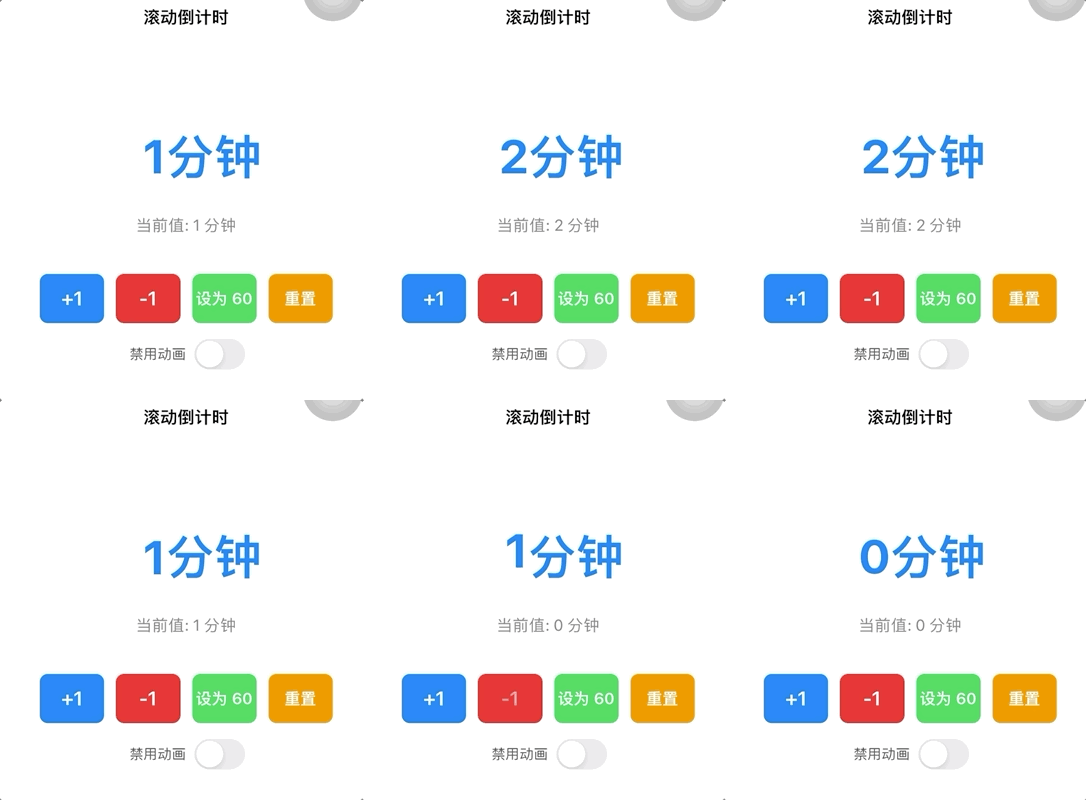
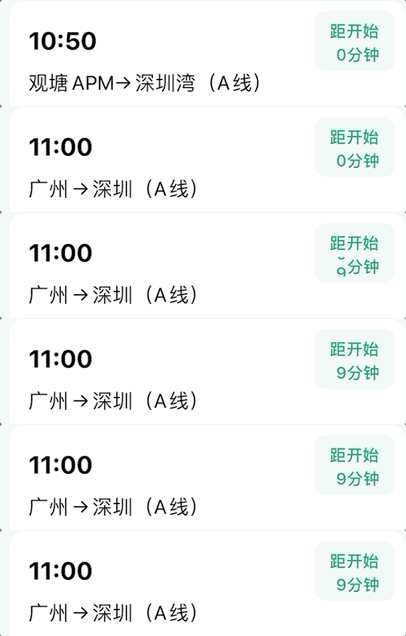
使用
bash
import UIKit
import SnapKit

class ViewController: UIViewController {

    // MARK: - UI Components

    private let countdownView: RollingCountdownView = {
        let view = RollingCountdownView()
        view.unit = "分钟"
        view.numberFont = .systemFont(ofSize: 48, weight: .bold)
        view.textColor = .systemBlue
        view.animationDuration = 0.6
        return view
    }()

    private let valueLabel: UILabel = {
        let label = UILabel()
        label.text = "当前值: 0"
        label.font = .systemFont(ofSize: 16)
        label.textColor = .gray
        label.textAlignment = .center
        return label
    }()

    private let incrementButton: UIButton = {
        let button = UIButton(type: .system)
        button.setTitle("+1", for: .normal)
        button.titleLabel?.font = .systemFont(ofSize: 20, weight: .semibold)
        button.backgroundColor = .systemBlue
        button.setTitleColor(.white, for: .normal)
        button.layer.cornerRadius = 8
        return button
    }()

    private let decrementButton: UIButton = {
        let button = UIButton(type: .system)
        button.setTitle("-1", for: .normal)
        button.titleLabel?.font = .systemFont(ofSize: 20, weight: .semibold)
        button.backgroundColor = .systemRed
        button.setTitleColor(.white, for: .normal)
        button.layer.cornerRadius = 8
        return button
    }()

    private let setButton: UIButton = {
        let button = UIButton(type: .system)
        button.setTitle("设为 60", for: .normal)
        button.titleLabel?.font = .systemFont(ofSize: 16, weight: .semibold)
        button.backgroundColor = .systemGreen
        button.setTitleColor(.white, for: .normal)
        button.layer.cornerRadius = 8
        return button
    }()

    private let resetButton: UIButton = {
        let button = UIButton(type: .system)
        button.setTitle("重置", for: .normal)
        button.titleLabel?.font = .systemFont(ofSize: 16, weight: .semibold)
        button.backgroundColor = .systemOrange
        button.setTitleColor(.white, for: .normal)
        button.layer.cornerRadius = 8
        return button
    }()

    private let noAnimationSwitch: UISwitch = {
        let switchControl = UISwitch()
        return switchControl
    }()

    private let noAnimationLabel: UILabel = {
        let label = UILabel()
        label.text = "禁用动画"
        label.font = .systemFont(ofSize: 14)
        label.textColor = .darkGray
        return label
    }()

    private let buttonStackView: UIStackView = {
        let stack = UIStackView()
        stack.axis = .horizontal
        stack.spacing = 12
        stack.distribution = .fillEqually
        return stack
    }()

    private let controlStackView: UIStackView = {
        let stack = UIStackView()
        stack.axis = .vertical
        stack.spacing = 16
        stack.alignment = .center
        return stack
    }()

    // MARK: - Lifecycle

    override func viewDidLoad() {
        super.viewDidLoad()
        setupUI()
        setupActions()

        // 初始值
        countdownView.setValue(0, animated: false)
    }

    // MARK: - Setup

    private func setupUI() {
        view.backgroundColor = .white
        title = "滚动倒计时"

        // 添加视图
        view.addSubview(countdownView)
        view.addSubview(valueLabel)
        view.addSubview(controlStackView)

        // 按钮容器
        [incrementButton, decrementButton, setButton, resetButton].forEach {
            buttonStackView.addArrangedSubview($0)
        }

        // 控制开关
        let switchStack = UIStackView(arrangedSubviews: [noAnimationLabel, noAnimationSwitch])
        switchStack.axis = .horizontal
        switchStack.spacing = 8
        switchStack.alignment = .center

        [buttonStackView, switchStack].forEach {
            controlStackView.addArrangedSubview($0)
        }

        // 布局
        countdownView.snp.makeConstraints { make in
            make.top.equalTo(view.safeAreaLayoutGuide).offset(80)
            make.centerX.equalToSuperview()
            make.height.equalTo(80)
            make.width.equalTo(200)
        }

        valueLabel.snp.makeConstraints { make in
            make.top.equalTo(countdownView.snp.bottom).offset(20)
            make.centerX.equalToSuperview()
        }

        controlStackView.snp.makeConstraints { make in
            make.top.equalTo(valueLabel.snp.bottom).offset(40)
            make.left.right.equalToSuperview().inset(40)
        }

        buttonStackView.snp.makeConstraints { make in
            make.width.equalToSuperview()
            make.height.equalTo(50)
        }
    }

    private func setupActions() {
        incrementButton.addTarget(self, action: #selector(incrementTapped), for: .touchUpInside)
        decrementButton.addTarget(self, action: #selector(decrementTapped), for: .touchUpInside)
        setButton.addTarget(self, action: #selector(setTapped), for: .touchUpInside)
        resetButton.addTarget(self, action: #selector(resetTapped), for: .touchUpInside)
    }

    // MARK: - Actions

    @objc private func incrementTapped() {
        let newValue = countdownView.value + 1
        let animated = !noAnimationSwitch.isOn
        countdownView.setValue(newValue, animated: animated)
        updateValueLabel()
    }

    @objc private func decrementTapped() {
        let newValue = max(0, countdownView.value - 1)
        let animated = !noAnimationSwitch.isOn
        countdownView.setValue(newValue, animated: animated)
        updateValueLabel()
    }

    @objc private func setTapped() {
        let newValue = 60
        let animated = !noAnimationSwitch.isOn
        countdownView.setValue(newValue, animated: animated)
        updateValueLabel()
    }

    @objc private func resetTapped() {
        let newValue = 0
        let animated = !noAnimationSwitch.isOn
        countdownView.setValue(newValue, animated: animated)
        updateValueLabel()
    }

    private func updateValueLabel() {
        valueLabel.text = "当前值: \(countdownView.value) \(countdownView.unit)"
    }
}
封装代码
bash
import UIKit
import SnapKit

final class RollingCountdownView: UIView {

    // MARK: - Public

    /// 当前数字
    private(set) var value: Int = 0

    /// 是否已经设置过数字
    private var hasValue = false

    /// 单位
    var unit: String = "分钟" {
        didSet {
            unitLabel.text = unit
        }
    }

    /// 数字字体
    var numberFont: UIFont = .systemFont(ofSize: 15, weight: .medium) {
        didSet {
            currentNumberLabel.font = numberFont
            unitLabel.font = numberFont
        }
    }

    /// 文字颜色
    var textColor: UIColor = .systemBlue {
        didSet {
            currentNumberLabel.textColor = textColor
            unitLabel.textColor = textColor
        }
    }

    /// 动画时间
    var animationDuration: TimeInterval = 0.8

    // MARK: - UI

    /// 数字滚动容器
    private lazy var numberContainerView: UIView = {
        let view = UIView()
        view.clipsToBounds = true
        return view
    }()

    /// 当前数字
    private lazy var currentNumberLabel: UILabel = {
        let label = UILabel()
        label.textAlignment = .right
        label.font = numberFont
        label.textColor = textColor
        return label
    }()

    /// 单位
    private lazy var unitLabel: UILabel = {
        let label = UILabel()
        label.text = unit
        label.textAlignment = .left
        label.font = numberFont
        label.textColor = textColor
        return label
    }()

    // MARK: - Init

    override init(frame: CGRect) {
        super.init(frame: frame)
        buildUI()
    }

    required init?(coder: NSCoder) {
        super.init(coder: coder)
        buildUI()
    }

    // MARK: - UI

    private func buildUI() {

        clipsToBounds = true

        addSubview(numberContainerView)
        addSubview(unitLabel)

        // 数字容器:占 50%
        numberContainerView.snp.makeConstraints { make in
            make.left.top.bottom.equalToSuperview()
            make.width.equalToSuperview().multipliedBy(0.4)
        }

        // 单位:占 50%
        unitLabel.snp.makeConstraints { make in
            make.left.equalTo(numberContainerView.snp.right)
            make.top.bottom.right.equalToSuperview()
            make.width.equalToSuperview().multipliedBy(0.6)
        }

        // 当前数字
        numberContainerView.addSubview(currentNumberLabel)

        currentNumberLabel.snp.makeConstraints { make in
            make.edges.equalToSuperview()
        }
    }

    // MARK: - Public

    /// 设置数字
    /// - Parameters:
    ///   - value: 新数字
    ///   - animated: 是否播放滚动动画
    func setValue(_ value: Int, animated: Bool = true) {

        // 第一次设置
        if !hasValue {

            hasValue = true
            self.value = value

            currentNumberLabel.text = "\(value)"

            return
        }

        // 数字没有变化
        guard self.value != value else {
            return
        }

        let oldValue = self.value
        self.value = value

        // 不需要动画
        guard animated else {
            currentNumberLabel.text = "\(value)"
            return
        }

        animateChange(
            from: oldValue,
            to: value
        )
    }

    // MARK: - Animation

    private func animateChange(
        from oldValue: Int,
        to newValue: Int
    ) {

        layoutIfNeeded()
        numberContainerView.layoutIfNeeded()

        let oldLabel = currentNumberLabel

        // 创建新的数字 Label
        let newLabel = UILabel()
        newLabel.text = "\(newValue)"
        newLabel.textAlignment = .right
        newLabel.font = numberFont
        newLabel.textColor = textColor

        numberContainerView.addSubview(newLabel)

        // 和当前 Label 完全一样的位置
        newLabel.frame = numberContainerView.bounds

        // 新数字从下面开始
        newLabel.transform = CGAffineTransform(
            translationX: 0,
            y: numberContainerView.bounds.height
        )

        // 开始动画
        UIView.animate(
            withDuration: animationDuration,
            delay: 0,
            options: [
                .curveEaseInOut,
                .beginFromCurrentState,
                .allowUserInteraction
            ]
        ) {

            // 旧数字向上
            oldLabel.transform = CGAffineTransform(
                translationX: 0,
                y: -self.numberContainerView.bounds.height
            )

            // 新数字向上进入
            newLabel.transform = .identity

        } completion: { _ in

            // 恢复当前 Label
            oldLabel.transform = .identity
            oldLabel.text = "\(newValue)"

            // 删除临时 Label
            newLabel.removeFromSuperview()
        }
    }
}