计算机素养培养
在数字化普及的时代,网页开发已经成为青少年计算机素养培养的重要方向。传统计算机等级考试、课堂练习工具大多存在部署复杂、设备适配受限、题库固化、只能统一标准化考核的痛点。市面上多数练习软件需要安装客户端,仅适配电脑设备,无法覆盖手机、平板、电视教学终端、实训自助机等多元硬件;固定成套试卷很难适配不同基础学习者,零基础初学者与有编程基础的学生共用同一套习题,会出现新手难以入门、进阶学生得不到有效提升的情况。同时传统测评只输出最终分数,缺少对能力点的拆解,教师和学习者很难定位具体知识短板,天赋型自学者缺少可以自主练习、自我校验的技术平台。因此,建设一套零安装、多终端兼容、题库可灵活配置、能力可量化的网页技能自主考试系统,对青少年编程普及、NCRE 等级备考、发掘青少年技术天赋有着现实且重要的实践价值。
自助测试
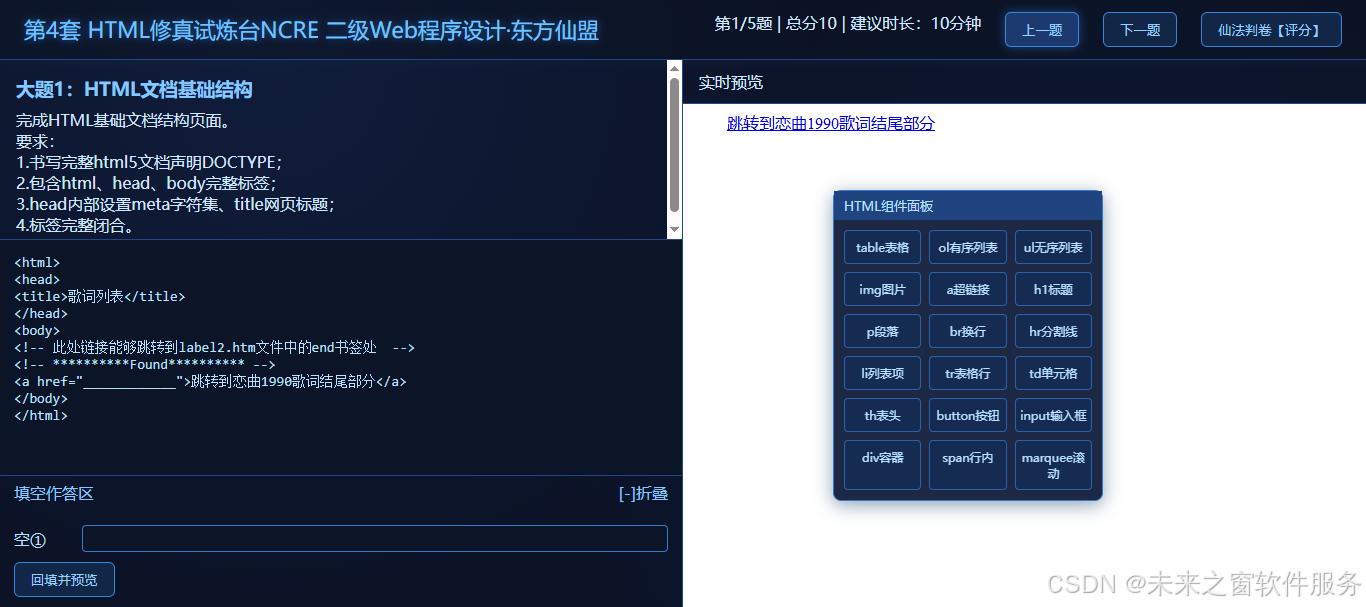
仙盟试炼 NCRE 青少年 Web 网页自助测试系统,面向青少年与计算机编程初学者打造网页开发技能自测平台,无需下载安装任何软件,仅依靠浏览器即可完成全部学习测评流程,完整适配电脑、手机、平板、智慧电视、实训自助考试终端等多类设备。学习者打开网页就能够开展 HTML、Web 程序设计的编码练习、填空刷题、模拟测评,不用配置复杂的本地开发环境,极大降低网页编程的入门门槛,让零基础青少年也可以便捷检验自身网页开发知识掌握程度。
自建测试好处
整套系统采用自主研发设计,具备高度灵活的题库编排能力,打破标准化试卷的束缚,适配不同学习者的成长路径,下一代建设可以重点落地五大题库配置能力:
- 按学生水平与学习阶段配置题库:实现分级题库体系,划分入门、基础、进阶、冲刺多个难度档位。刚接触 HTML 标签语法的新手使用基础填空题型,具备一定编码能力的学习者使用综合应用题,备考阶段启用全真模拟套题。系统可跟随学习者练习记录动态推荐对应难度习题,匹配个体学习进度,避免习题难度与自身能力脱节。
- 按兴趣爱好配置题库:支持围绕国风文化、动漫、游戏、科普等青少年感兴趣的主题定制专题题库,将枯燥的标签语法练习包装成趣味创作任务。例如制作国风诗词网页、游戏角色介绍页面等实操习题,以兴趣驱动练习,提升青少年学习的主观能动性,减少编程学习的枯燥感。
- 按个人发展方向配置题库:针对不同学习目标的学习者提供差异化题集。面向爱好静态页面创作的学习者侧重页面美化、布局实践类题目;面向参与 Web 竞赛的学生增加脚本交互、综合项目类题型;针对备考 NCRE 等级考试的学习者,重点强化考试高频考点训练,满足多元化的发展诉求。
- 对标官方考试大纲开发标准化题库:严格参照全国计算机等级考试二级 Web 程序设计考纲,复刻官方考试的题型结构、考核知识点、评分逻辑,搭建全真模拟题库。让备考学生熟悉真实考试的考察逻辑、出题风格,完成考前自测训练,提升等级考试备考效率。
- 实现联网‑断网双模式运行:离线模式下完整保留题库加载、代码编写、本地判分、预览调试全部核心能力,在教室、实训机房无网络环境依旧可以开展练习;联网模式支持成绩上报、学习档案云端同步、题库在线更新,兼顾教学场景与个人自学场景的网络条件差异。
自主研发架构最核心的价值,是实现学习进度可量化、学习标准可拆解,支撑差异化的人才识别培养。区别于传统考试只输出一个笼统分数,系统将网页开发能力拆解为标签使用、属性配置、CSS 样式、JavaScript 脚本等一个个独立可校验的能力考核点。在测评过程中,对每一个知识要点进行独立校验,记录学习者哪些知识点已经掌握、哪些模块存在薄弱,形成颗粒度更细的学习画像。依靠这套量化体系,可以差异化适配独立自学者,不局限于流水线式统一教学,客观识别青少年的编程天赋与特长方向,帮助有潜力的学习者走出一条个性化的技术独立赛道。
判分机制与成绩量化体系优化
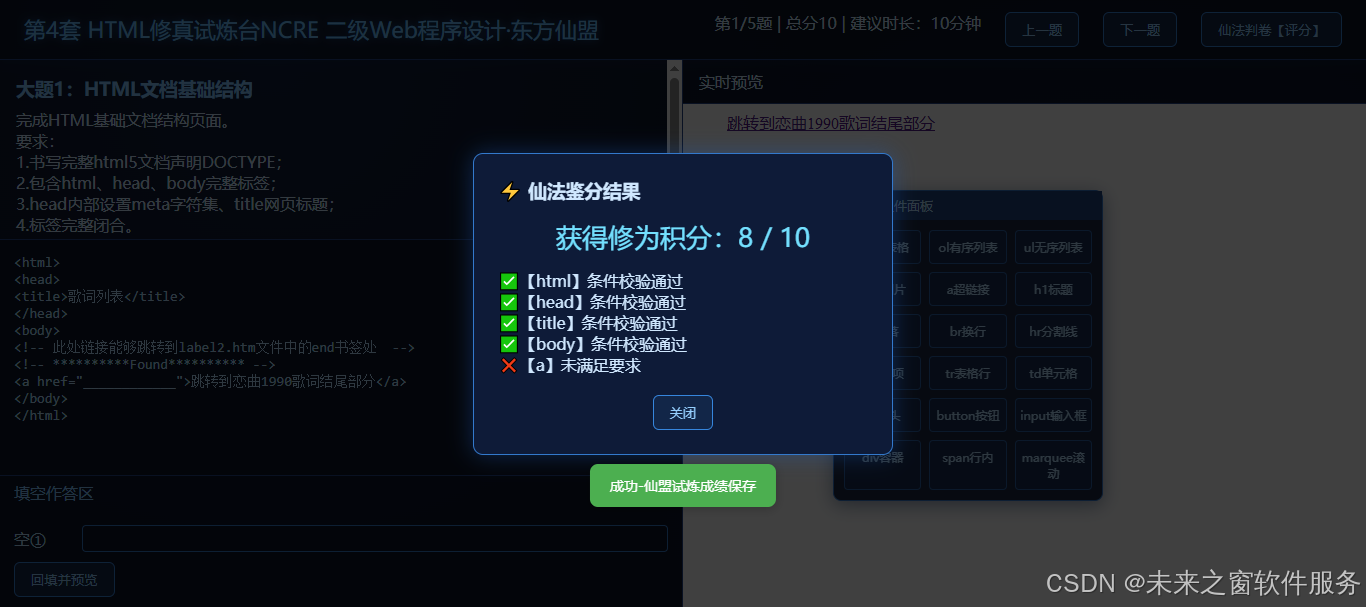
现有版本采用 DOM 树解析校验的 "仙法判卷" 机制,不直接比对原始文本字符串,将用户代码渲染至 iframe 预览容器,通过解析 DOM 节点完成考核点校验。每道试题预先定义考核规则集合,包含标签存在性校验、标签属性校验、文本内容匹配校验三类规则,遍历全部规则逐一校验用户输出结果,统计合格考核点占比换算得到题目得分。
面向下一代迭代,需要进一步优化这套量化体系: 第一,丰富校验规则类型。增加 CSS 样式校验、JavaScript 运行结果校验、代码结构规范校验,不只是校验 "功能是否实现",同时兼顾代码书写规范;支持部分得分机制,某道大题多个子条件,实现部分条件即可拿到对应部分分值,改变当前 "单条规则只有通过 / 不通过二元结果" 的模式,评分结果更加贴合真实考试采分逻辑。 第二,完善学习档案量化维度。除积分分数之外,统计练习正确率、薄弱知识点集合、做题耗时,生成可视化能力雷达图,直观展示标签、表单、表格、脚本等不同模块的掌握程度,为学习者、授课教师提供可参考的数据依据。 第三,区分离线本地判分与联网正式考试判分策略。断网模式侧重快速自测反馈,联网正式考试模式增加防重复提交、作答日志留存、异常代码拦截,适配课堂考核、正式模拟考试场景。 第四,细化反馈输出。除了输出 "通过 / 未通过",补充简易提示,告知学习者缺失的标签、遗漏的属性,实现练习即纠错,做到以测促学。
下一代产品还可适度融入 5% 占比的修仙文化作为产品包装理念,不侵入底层业务逻辑。产品交互层将代码练习类比修真试炼,测评得分命名为修为积分,刷题闯关设计为试炼闯关,作为青少年向产品的趣味外壳,提升产品亲和力。趣味化主题仅作为 UI 文案、弹窗提示、页面装饰,题库、判分逻辑、数据存储核心模块保持纯粹技术化架构,保障考试测评严谨公正。参考已有组件的交互设计思路,可借鉴其弹窗组件、文档预览组件的交互范式,用于试题展示、判分结果弹窗、题库文档查阅模块,复用成熟交互设计思路,减少重复开发工作量。

快速开发考试系统
昭和仙君跨平台开源考试架构可以快速开发这种面向青少年的浏览器端技能测评系统。该开源架构以仙盟试炼台作为实践落地样本,底座本身原生支持零客户端、多终端适配,提供题库配置模块、可扩展判分插件、本地离线运行、云端数据同步的基础能力。开发者基于这套开源架构,只需要聚焦业务层的题库内容编排、UI 主题定制、判分规则配置,无需从零搭建浏览器编辑器、iframe 预览、跨设备兼容底层逻辑,能够快速搭建面向编程、网页开发等学科的自主考试自测平台,助力青少年计算机素养教育落地,发掘更多青少年的技术天赋。
代码
<!DOCTYPE html>
<html lang="zh-CN">
<head>
<meta charset="UTF-8">
<title>东方仙盟|HTML修真试炼台</title>

<style>
*{margin:0;padding:0;box-sizing:border-box;font-family:"Microsoft Yahei",sans-serif}
body{
    background:#080c18;
    color:#d0e8ff;
    background-image:radial-gradient(circle at 20% 10%,#102040 0%,transparent 45%),radial-gradient(circle at 80% 70%,#0b1a36 0%,transparent 45%);
    min-height:100vh;
}
.header{
    height:60px;
    border-bottom:1px solid #244488;
    display:flex;
    align-items:center;
    justify-content:space-between;
    padding:0 24px;
    background:rgba(12,20,40,0.75);
    box-shadow:0 0 12px #14306688;
}
.title{
    font-size:22px;
    color:#73c2ff;
    text-shadow:0 0 8px #399cff88;
}
.bar-info{
    display:flex;
    gap:24px;
}
.btn{
    padding:8px 16px;
    border:1px solid #3686dd;
    background:#122648;
    color:#96d0ff;
    border-radius:6px;
    cursor:pointer;
    transition:0.2s;
}
.btn:hover{
    background:#1c3a70;
    box-shadow:0 0 10px #297cd880;
}
.wrap{
    display:flex;
    height:calc(100vh - 60px);
}
.left-box{
    width:50%;
    display:flex;
    flex-direction:column;
    border-right:1px solid #244488;
}
.question-desc{
    padding:16px;
    max-height:180px;
    overflow:auto;
    border-bottom:1px solid #244488;
    background:rgba(15,26,54,0.5);
}
.question-desc h3{
    color:#86c8ff;
    margin-bottom:8px;
}
.textarea-code{
    flex:1;
    width:100%;
    background:#0c1428;
    color:#b8e0ff;
    border:none;
    padding:14px;
    font-family:Consolas,monospace;
    font-size:14px;
    resize:none;
    outline:none;
}
.textarea-code:focus{
    box-shadow:inset 0 0 0 1px #347acc;
}
.right-box{
    width:50%;
    display:flex;
    flex-direction:column;
}
.preview-head{
    height:44px;
    line-height:44px;
    padding:0 16px;
    border-bottom:1px solid #244488;
    background:rgba(15,26,54,0.5);
}
#previewFrame{
    flex:1;
    border:none;
    background:#fff;
}
/* 弹窗样式 */
.modal{
    position:fixed;
    top:0;left:0;right:0;bottom:0;
    background:rgba(0,0,0,0.75);
    display:none;
    align-items:center;
    justify-content:center;
    z-index:999;
}
.modal-content{
    width:420px;
    background:#0e1b38;
    border:1px solid #3379cc;
    border-radius:10px;
    padding:24px;
    box-shadow:0 0 22px #2060bb66;
}
.score-text{
    font-size:26px;
    text-align:center;
    margin:16px 0;
    color:#73e0ff;
}
.opt-row{
    display:flex;
    gap:12px;
    margin-top:12px;
}
/* ========== NetBeans风格悬浮组件面板Palette ========== */
.palette-panel{
    position:fixed;
    width:220px;
    background:rgba(14,27,56,0.94);
    border:1px solid #3379cc;
    border-radius:8px;
    z-index:900;
    box-shadow:0 4px 18px #10306077;
	width:270px;
}
.palette-dragbar{
    padding:6px 10px;
    background:#204480;
    cursor:move;
    font-size:13px;
    color:#b8e0ff;
    user-select:none;
}
.palette-body{
    padding:10px;
    display:grid;
    grid-template-columns:1fr 1fr 1fr;
    gap:8px;
    max-height:360px;
    overflow-y:auto;
}
.palette-item{
    border:1px solid #2c62aa;
    background:#162b52;
    color:#b8e0ff;
    border-radius:4px;
    padding:8px 4px;
    text-align:center;
    font-size:12px;
    cursor:grab;
    user-select:none;
}
.palette-item:active{
    cursor:grabbing;
}
.palette-item:hover{
    background:#244480;
}

/*=====填空作答折叠面板【新增】=====*/
.fillbox-wrap{
    border-top:1px solid #244488;
    background:rgba(15,26,54,0.5);
}
.fillbox-header{
    display:flex;
    justify-content:space-between;
    align-items:center;
    padding:6px 14px;
    cursor:pointer;
    user-select:none;
    color:#86c8ff;
}
.fillbox-body{
    padding:10px 14px;
    max-height:220px;
    overflow-y:auto;
}
.fillbox-row{
    display:flex;
    gap:8px;
    align-items:center;
    margin:6px 0;
}
.fillbox-row label{
    color:#b8e0ff;
    min-width:60px;
}
.fillbox-row input{
    flex:1;
    background:#0c1428;
    border:1px solid #347acc;
    color:#b8e0ff;
    padding:4px 8px;
    border-radius:4px;
}
.fillbox-btn-group{
    display:flex;
    gap:10px;
    margin-top:10px;
}
.fillbox-hidden{
    display:none !important;
}
</style>


</head>
<body>
<div class="header">
    <div class="title"> 第4套 HTML修真试炼台NCRE 二级Web程序设计·东方仙盟</div>
    <div class="bar-info">
        <span id="qInfo">试题加载中</span>
        <button class="btn" id="prevBtn">上一题</button>
        <button class="btn" id="nextBtn">下一题</button>
        <button class="btn" id="checkBtn">仙法判卷【评分】</button>
    </div>
</div>
<div class="wrap">
    <div class="left-box">
        <div class="question-desc">
            <h3 id="qTitle"></h3>
            <div id="qContent"></div>
        </div>
        <textarea class="textarea-code" id="codeEditor" placeholder="在此书写HTML代码..."></textarea>
        <!--=====新增:填空作答折叠面板=====-->
        <div class="fillbox-wrap fillbox-hidden" id="fillBoxWrap">
            <div class="fillbox-header" id="fillBoxHeader">
                <span>填空作答区</span>
                <span>[-]折叠</span>
            </div>
            <div class="fillbox-body" id="fillBoxBody">
                <!--JS动态渲染输入框行-->
                <div class="fillbox-btn-group">
                    <button class="btn" id="fillGenBtn">回填并预览</button>
                </div>
            </div>
        </div>
    </div>
    <div class="right-box">
        <div class="preview-head">实时预览</div>
        <iframe id="previewFrame"></iframe>
    </div>
</div>
<!-- ========== 悬浮可拖动组件面板(模拟NetBeans Palette) ========== -->
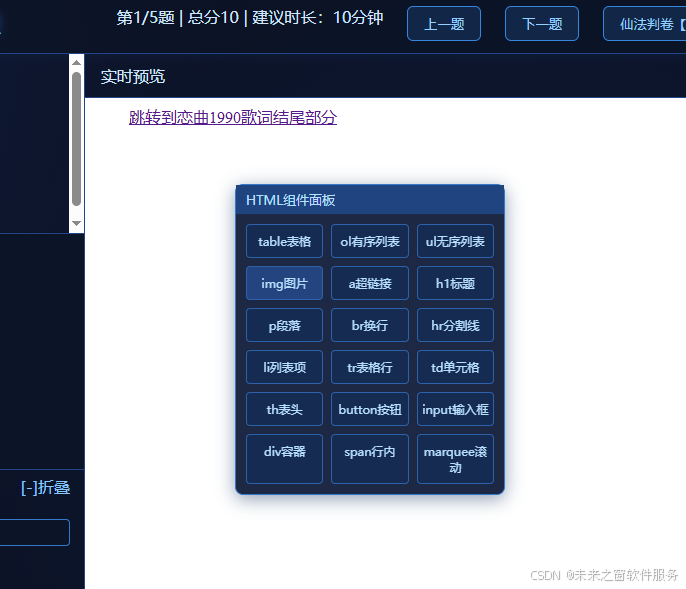
<div class="palette-panel" id="palettePanel" style="top:80px;right:12px;">
    <div class="palette-dragbar">HTML组件面板</div>
    <div class="palette-body" id="paletteBody">
        <!-- JS自动渲染组件方块 -->
    </div>
</div>
<!-- 评分弹窗 -->
<div class="modal" id="scoreModal">
    <div class="modal-content">
        <h3>⚡ 仙法鉴分结果</h3>
        <div class="score-text" id="scoreResult"></div>
        <div id="scoreMsg"></div>
        <div class="opt-row" style="justify-content:center;margin-top:20px;">
            <button class="btn" id="closeModal">关闭</button>
        </div>
    </div>
</div>
<script>
// ===================== 【组件面板配置】模拟NetBeans可拖拽组件,每一项:显示名称 + 插入的源码片段 =====================
const paletteItems = [
    {label:"table表格",snippet:"<table border=\"1\">\n  <tr>\n    <td></td>\n  </tr>\n</table>\n",ele:"table"},
	{label:"ol有序列表",snippet:"<ul>\n  <li>项目</li>\n</ul>\n",ele:"ol"},
    {label:"ul无序列表",snippet:"<ul>\n  <li>项目</li>\n</ul>\n",ele:"ul"},
	 {label:"img图片",snippet:"<img src=\"pic.jpg\" alt=\"图片\">\n",ele:"img"},
	  {label:"a超链接",snippet:"<a href=\"https://xxx\">链接文字</a>\n",ele:"a"},
    {label:"h1标题",snippet:"<h1>标题</h1>\n",ele:"h1"},
    {label:"p段落",snippet:"<p>文本内容</p>\n",ele:"p"},
    {label:"br换行",snippet:"<br>\n",ele:"br"},
    {label:"hr分割线",snippet:"<hr>\n",ele:"h1"},


    {label:"li列表项",snippet:"<li>列表内容</li>\n",ele:"li"},

    {label:"tr表格行",snippet:"<tr>\n  <td></td>\n</tr>\n",ele:"tr"},
    {label:"td单元格",snippet:"<td>内容</td>\n",ele:"td"},
    {label:"th表头",snippet:"<th>表头</th>\n",ele:"th"},
    {label:"button按钮",snippet:"<button onclick=\"alert('ok')\">按钮</button>\n",ele:"button"},
    {label:"input输入框",snippet:"<input type=\"text\">\n",ele:"input"},
    {label:"div容器",snippet:"<div></div>\n",ele:"div"},
    {label:"span行内",snippet:"<span></span>\n",ele:"span"},
	{label:"marquee滚动",snippet:"<span></span>\n",ele:"marquee"},
];
// ===================== 试题JSON配置区【预置3道题目,可无限扩展】 =====================

 const questionList = [
    {
        id: 1,
        title: "大题1:HTML文档基础结构",
        time: "10分钟",
        fullScore: 10,
        content: `完成HTML基础文档结构页面。
要求:
1.书写完整html5文档声明DOCTYPE;
2.包含html、head、body完整标签;
3.head内部设置meta字符集、title网页标题;
4.标签完整闭合。`,
     standardDom: {
        check: [

            { tag: "html" },
            { tag: "head" },
            { tag: "title" },
            { tag: "body" },
            { tag: "a", attr: { href: "./label2.htm#end" } }
        ]
    }, editorEditable: false,
    fillBoxes:[
        {
            boxNo:1,
            label:"空①",
            expect:"./label2.htm#end",
            ignoreSpace:true,
            prefix:`<a href="`,
            suffix:`">跳转到恋曲1990歌词结尾部分</a>`
        }
    ],
        defaultCode: `<html>
<head>
<title>歌词列表</title>
</head>
<body>
<!-- 此处链接能够跳转到label2.htm文件中的end书签处  -->
<!-- **********Found********** -->
<a href="____________">跳转到恋曲1990歌词结尾部分</a>
</body>
</html>

`
    },
    {
        id: 2,
        title: "大题2:文本标签练习",
        time: "12分钟",
        fullScore:12,
        content: `补全表单代码,实现用户名输入框、密码框、提交、重置按钮,同时正确引入外部CSS样式表。
要求:
1.link标签补全rel属性;
2.用户名输入框为普通文本框;
3.密码输入框为密码类型;
4.实现提交按钮与重置按钮`,
       standardDom: {
        check: [
            { tag: "html" },
            { tag: "head" },
            { tag: "title" },
            { tag: "link", attr: {href:"1.css",rel:"stylesheet",type:"text/css"} },
            { tag: "body" },
            { tag: "form" },
            { tag: "input", attr: {type:"text",name:"user"} },
            { tag: "input", attr: {type:"password",name:"paword"} },
            { tag: "input", attr: {type:"submit",value:"提交"} },
            { tag: "input", attr: {type:"reset",value:"重置"} }
        ]
    },
        defaultCode: `<html>
<head><title>表单示例</title>
<!-- 以下控件链接外部样式表 -->
<!-- ********FOUND********* -->
<link href="1.css" ____________="stylesheet" type="text/css">
</head>
<body>
<form>
<!-- ********FOUND********* -->
username:<input type="____________" name="user"><br>
<!-- ********FOUND********* -->
password:<input type="____________" name="paword"><br>
<!-- ********FOUND********* -->
<input type="____________" value="提交">
<!-- ********FOUND********* -->
<input type="____________" value="重置">
</form>
</body>
</html> `
    },
    {
        id:3,
        title:"大题3:列表标签应用",
        time:"12分钟",
        fullScore:12,
        content:`补全JavaScript代码:
1.页面加载触发morning函数,根据当前小时,9点前状态栏显示"早上好!",否则显示"下午好!";
2.点击关闭窗口按钮,弹出confirm确认框,确认后关闭浏览器窗口。`,
       standardDom: {
        check: [
            { tag: "title" },
            { tag: "script", attr: {"type":"text/javascript"} },
            { tag: "body", attr: {"onload":"morning()"} },
            { tag: "input", attr: {type:"button",value:"关闭窗口",onclick:"closeWin()"} }
        ]
    },
        defaultCode:`<html>
<head>
\<script type="text/javascript" >
function closeWin(){
//在此处添加代码
// **********Found**********
if(________________("确定要退出吗?")){
// **********Found**********
________________;
}
}
function morning(){
now = new Date();
// **********Found**********
hour = _______________;
if (hour < 9){window.status="早上好!"}
else {window.status="下午好!";}}
\<\/script>
</head>
<!-- **********Found********** -->
<body ________________="morning()">
<!-- **********Found********** -->
<input type="button" value="关闭窗口" onclick="______________"/>
</body>
</html>`
    },
    {
        id:4,
        title:"大题4:图片与超链接",
        time:"15分钟",
        fullScore:15,
        content:`完成图片和超链接页面。
要求:
1.img标签,设置src、alt替换文本、width宽度;
2.a超链接,href跳转地址,target="_blank"新窗口打开;
3.图片外面包裹a实现图片链接。`,
        standardDom:{
            check:[
                {tag:"img",attr:{alt:true}},
                {tag:"a",attr:{target:"_blank"}}
            ]
        },
        defaultCode:`<!DOCTYPE html>
<html>
<head>
\<script>
function foo()
{
var str = reverse('a,b,c,d,e,f,g');
alert(str);
if (str == 'g,f,e,d,c,b,a')
alert('成功');
else alert('失败');
}
function reverse(str)
{
// 在此处加入代码,完成字符串翻转功能
// **********Found**********
var spl = str._____________(',');
var newstr="";
// **********Found**********
for(i=____________;i>=0;i--)
{
// **********Found**********
newstr+=____________+',';
}
// **********Found**********
newstr=newstr._____________(0,newstr.length-1)
return newstr;
}
\<\/script>
</head>
<body>
<input type="button" value="str" onclick="foo()" />
</body>
</html>`
    },
    {
        id:5,
        title:"大题5:表格基础应用",
        time:"18分钟",
        fullScore:18,
        content:`制作HTML表格页面。
要求:
1.table设置border边框、cellpadding单元格填充、cellspacing单元格间距;
2.包含tr行、td单元格;
3.实现colspan跨列合并单元格。`,
        standardDom:{
            check:[
                {tag:"table"},
                {tag:"tr"},
                {tag:"td",attr:{colspan:true}}
            ]
        },
        defaultCode:`<!DOCTYPE html PUBLIC "-//W3C//DTD XHTML 1.0 Transitional//EN" "http://www.w3.org/TR/xhtml1/DTD/xhtml1-transitional.dtd">

<html xmlns="http://www.w3.org/1999/xhtml">

	<head>
		<meta http-equiv="content-type" content="text/html;charset=utf-8" />
			<title>未标题页面</title>
	</head>

        <!-- **********Found********** -->
	<body ______________="begintimer()">
	\<script language="JavaScript">
var limit="1:59"
var parselimit=limit.split(":");
// **********Found**********
parselimit=______________*60+______________*1;
function begintimer(){
if (parselimit==1)
//下面是限制时间到了后去的连接页面,自己修改。
window.location="1.htm"
else{
parselimit-=1
// **********Found**********
curmin=Math._______________;
cursec=parselimit-curmin*60;
if (curmin!=0)
curtime="你剩下"+curmin+"分"+cursec+"秒的时间。"
else
curtime="你剩下"+cursec+"秒的时间。"
//下一句需要设置定时器
// **********Found**********
________________;
//下一句告诉访问者剩余的时间,在文本框中显示。
document.lefttime.left.value=curtime;
//下一句告诉访问者剩余的时间,在状态栏中显示。
// **********Found**********
window.___________=curtime;
}
}
\<\/script>

		<p>
		<form name="lefttime">
		<input type="text" name="left">
		</form>
		</p>
	</body>

</html>`
    }
];
// ===================== 全局变量 =====================
let currentIndex = 0;
let previewTimer = null;
// 保存textarea最后一次光标位置
let lastCursorPos = {start:0,end:0};
const codeEditor = document.getElementById("codeEditor");
const previewFrame = document.getElementById("previewFrame");
const qTitle = document.getElementById("qTitle");
const qContent = document.getElementById("qContent");
const qInfo = document.getElementById("qInfo");
const scoreModal = document.getElementById("scoreModal");
const scoreResult = document.getElementById("scoreResult");
const scoreMsg = document.getElementById("scoreMsg");
const palettePanel = document.getElementById("palettePanel");
const paletteBody = document.getElementById("paletteBody");
const dragBar = document.querySelector(".palette-dragbar");

//====填空作答模块全局变量【新增】====
let fillBoxCollapse = false;
let fillBoxInputList = [];
const fillBoxWrap = document.getElementById("fillBoxWrap");
const fillBoxHeader = document.getElementById("fillBoxHeader");
const fillBoxBody = document.getElementById("fillBoxBody");
const fillGenBtn = document.getElementById("fillGenBtn");

// ========= textarea光标跟踪:记住最后光标位置 =========
codeEditor.addEventListener("keyup",saveCursor);
codeEditor.addEventListener("click",saveCursor);
function saveCursor(){
    lastCursorPos.start = codeEditor.selectionStart;
    lastCursorPos.end = codeEditor.selectionEnd;
}

/**
 * 在textarea光标位置插入文本片段
 * @param {string} insertText
 */
function insertAtTextarea(insertText){
    const start = lastCursorPos.start;
    const end = lastCursorPos.end;
    const oldVal = codeEditor.value;
    const newVal = oldVal.substring(0,start)+insertText+oldVal.substring(end);
    codeEditor.value = newVal;
    // 更新光标,放到插入内容末尾
    const newPos = start + insertText.length;
    codeEditor.selectionStart = newPos;
    codeEditor.selectionEnd = newPos;
    codeEditor.focus();
    refreshPreview();
}
// ========== 渲染Palette组件方块,绑定拖拽 ==========
function renderPalette(){
    paletteBody.innerHTML = "";
    paletteItems.forEach(item=>{
        const div = document.createElement("div");
        div.className = "palette-item";
        div.innerText = item.label;
        div.draggable = true;
        div.dataset.snippet = item.snippet;
		div.dataset.ele = item.ele;
        div.addEventListener("dragstart",function(e){
            e.dataTransfer.setData("text/snippet",this.dataset.snippet);
			e.dataTransfer.setData("text/ele",this.dataset.ele);
			e.dataTransfer.setData("text/title",this.innerText);
        })
        paletteBody.appendChild(div);
    })
}
// ========== textarea作为drop投放目标 ==========
codeEditor.addEventListener("dragover",function(e){
    e.preventDefault(); //必须允许drop
})
const 仙盟灵舟组件id="仙盟灵舟组件id";
codeEditor.addEventListener("drop",function(e){
    e.preventDefault();

    const snippet = e.dataTransfer.getData("text/snippet");
	const cyberele = e.dataTransfer.getData("text/ele");
	const title = e.dataTransfer.getData("text/title");

	if(cyberele){
		//alert(cyberele);
		let 仙盟插入="<cyberdiv style='background: #1c2844;display: block;height: 100%;width: 100%;text-align: left;color: #fff;padding-left: 10px;' id='仙盟灵舟组件form'>";
		if(cyberele == "table"){
			仙盟插入=仙盟插入+`行数:<input type="number" id="com_row" value="1" style="margin-top: 8px;">
			<br>列数:<input type="number"  id="com_col" value="1" style="margin-top: 8px;">
			<br>边框大小:<input type="number" id="com_border" value="" style="margin-top: 8px;">
			<br>宽度: <input type="text" id="com_width" value="" style="margin-top:8px;">
			<br>单元格间距:<input type="number" id="com_cellspacing" value="" style="margin-top:8px;">
			<br>单元格填充:<input type="number" id="com_cellpadding" value="" style="margin-top:8px;">`;
		}
		if(cyberele == "a"){
			仙盟插入=仙盟插入+`协议(P):
                   <select id="com_link_protocol" style="margin-top:8px;">
				<option value="http">http</option>
				<option value="https">https</option>
				<option value="ftp">ftp</option>
				<option value="mailto">mailto</option>
				<option value="file">file</option>
			</select>
			<br>
			URL:<input type="text" id="com_link_url" style="margin-top:8px;">

			<br>
			文本(T):<input type="text" id="com_link_text" style="margin-top:8px;">
			<br>
			目标(R):
			<select id="com_link_target" style="margin-top:8px;">
				<option value="_self" selected>相同的框架</option>
				<option value="_blank">新窗口(_blank)</option>
				<option value="_parent">父框架(_parent)</option>
				<option value="_top">顶层框架(_top)</option>
			</select>`;
		}
		if(cyberele == "img"){
			仙盟插入=仙盟插入+`位置(L):<input type="text" id="com_img_src" style="margin-top:8px;">

				<br>
				宽度(W):<input type="number" id="com_img_width" style="margin-top:8px;">
				<br>
				高度(H):<input type="number" id="com_img_height" style="margin-top:8px;">
				<br>
				替换文本(A):<input type="text" id="com_img_alt" style="margin-top:8px;">`;
		}
		if(cyberele == "ol"){
			仙盟插入=仙盟插入+`项数(N):<input type="number" id="com_ol_count" value="2" style="margin-top:8px;">
				<br>
				编号样式:<label><input type="radio" name="com_ol_type" value="1" checked> 缺省</label><br>
					<label><input type="radio" name="com_ol_type" value="1"> 1, 2, 3, ...</label><br>
					<label><input type="radio" name="com_ol_type" value="a"> a, b, c, ...</label><br>
					<label><input type="radio" name="com_ol_type" value="A"> A, B, C, ...</label><br>
					<label><input type="radio" name="com_ol_type" value="i"> i, ii, iii, ...</label><br>
					<label><input type="radio" name="com_ol_type" value="I"> I, II, III, ...</label>`;
		}
       if(cyberele == "ul"){
				仙盟插入=仙盟插入+`项数(N):<input type="number" id="com_ul_count" value="2" style="margin-top:8px;">
				<br>
				编号样式:
				<div style="margin-top:8px;">
					<label><input type="radio" name="com_ul_type" value="disc" checked> 缺省</label><br>
					<label><input type="radio" name="com_ul_type" value="disc"> 磁盘</label><br>
					<label><input type="radio" name="com_ul_type" value="circle"> 圆形</label><br>
					<label><input type="radio" name="com_ul_type" value="square"> 正方形</label>
				</div>`;
		}
		if(cyberele == "h1" || cyberele == "div" || cyberele == "tr"  || cyberele == "td"   || cyberele == "hr"  || cyberele == "button"  || cyberele == "span"  || cyberele == "marquee" || cyberele == "p" || cyberele == "li"){
			仙盟插入=仙盟插入+`内容:<input type="text" id="com_commontext" value="文本" style="margin-top:8px;">
				 `;
		}

        仙盟插入=仙盟插入+`<br><br><button class="palette-item"  onclick="仙盟html组件插入('${cyberele}')">确定</button> <button class="palette-item" onclick="cyberwin_closeAndDeldlg('仙盟灵舟组件id');" >取消</button> <cyberdiv>`;
		$cq.对话框().layer(仙盟插入,{type:"frame",title:"插入"+title+"",width:"400px",height:"300px",barbg:"#204480",id:仙盟灵舟组件id,mask:true});
	}
    if(snippet){
       // insertAtTextarea(snippet);
    }
})
function 仙盟html组件插入(cyberele){
	let 仙盟插入="<"+cyberele;
	if(cyberele == "table"){
		const com_row = $cq("#com_row").val();
		const com_col = $cq("#com_col").val();
		const com_border = $cq("#com_border").val();
		const com_width = $cq("#com_width").val();
		const com_cellspacing = $cq("#com_cellspacing").val();
		const com_cellpadding = $cq("#com_cellpadding").val();

        if(com_border){
			仙盟插入=仙盟插入+' border="'+com_border+'"';
		}
		if(com_width){
			仙盟插入=仙盟插入+' width="'+com_width+'"';
		}
		if(com_cellpadding){
			仙盟插入=仙盟插入+' cellpadding="'+com_cellpadding+'"';
		}
		if(com_cellspacing){
			仙盟插入=仙盟插入+' cellspacing="'+com_cellspacing+'"';
		}

		仙盟插入=仙盟插入+">";
		for(i=0;i< com_row;i++){
			仙盟插入=仙盟插入+'<tr>';
           for(j=0;j< com_col;j++){
                仙盟插入=仙盟插入+'<td></td>';
		   }
		   仙盟插入=仙盟插入+'</tr>';
		}
		 仙盟插入=仙盟插入+"</"+cyberele+">";

	}
    if(cyberele == "a"){
		const com_link_protocol = $cq("#com_link_protocol").val();
		const com_link_url = $cq("#com_link_url").val();
		const com_link_text = $cq("#com_link_text").val();
		const com_link_target = $cq("#com_link_target").val();
		仙盟插入=仙盟插入+' href="' +com_link_protocol+":"+com_link_url+'"' ;
		仙盟插入=仙盟插入+' target="' +com_link_target+'"' ;
		仙盟插入=仙盟插入+">";
		仙盟插入=仙盟插入+com_link_text;
		仙盟插入=仙盟插入+"</"+cyberele+">";
	}
	if(cyberele == "img"){
		const com_img_src = $cq("#com_img_src").val();
		const com_img_width = $cq("#com_img_width").val();
		const com_img_height = $cq("#com_img_height").val();
		const com_img_alt = $cq("#com_img_alt").val();
		仙盟插入=仙盟插入+' src="' +com_img_src+'"' ;
		仙盟插入=仙盟插入+' width="' +com_img_width+'"' ;
		仙盟插入=仙盟插入+' height="' +com_img_height+'"' ;
		仙盟插入=仙盟插入+' alt="' +com_img_alt+'"' ;
		仙盟插入=仙盟插入+">";

	}
	//com_ol_count
	if(cyberele == "ol"){
		const com_ol_count = $cq("#com_ol_count").val();
		var typeVal = $cq('input[name="com_ol_type"]:checked').val();
		仙盟插入=仙盟插入+' type="' +typeVal+'"' ;

		仙盟插入=仙盟插入+">";
		for(i=0;i< com_ol_count;i++){
          仙盟插入=仙盟插入+' <li></li>' ;
		}
		仙盟插入=仙盟插入+"</"+cyberele+">";
	}
	if(cyberele == "ul"){
		var ulType = $cq('input[name="com_ul_type"]:checked').val();
        var ulCount = $cq("#com_ul_count").val();

		仙盟插入=仙盟插入+' type="' +ulType+'"' ;

		仙盟插入=仙盟插入+">";
		for(i=0;i< ulCount;i++){
          仙盟插入=仙盟插入+' <li></li>' ;
		}
		仙盟插入=仙盟插入+"</"+cyberele+">";
	}
	if(cyberele == "h1" || cyberele == "div" || cyberele == "tr"  || cyberele == "td"   || cyberele == "hr"  || cyberele == "button"  || cyberele == "span"  || cyberele == "marquee" || cyberele == "p"  || cyberele == "li"){
		 var com_commontext = $cq("#com_commontext").val();
		仙盟插入=仙盟插入+">";
        仙盟插入=仙盟插入+com_commontext;

		仙盟插入=仙盟插入+"</"+cyberele+">";
	}
	if(cyberele == "br"){
        仙盟插入=仙盟插入+" />";
	}

	 insertAtTextarea(仙盟插入);
	cyberwin_closeAndDeldlg(仙盟灵舟组件id);
}
// ========== 整个悬浮面板可以拖动移动底座(标题条拖拽) ==========
let dragPanel = false;
let panelOffsetX,panelOffsetY;
dragBar.addEventListener("mousedown",function(e){
    dragPanel = true;
    const rect = palettePanel.getBoundingClientRect();
    panelOffsetX = e.clientX - rect.left;
    panelOffsetY = e.clientY - rect.top;
    e.preventDefault();
})
document.addEventListener("mousemove",function(e){
    if(!dragPanel) return;
    let x = e.clientX - panelOffsetX;
    let y = e.clientY - panelOffsetY;
    //边界约束,不跑出屏幕
    if(x<0)x=0;
    if(y<0)y=0;
    palettePanel.style.left = x+"px";
    palettePanel.style.top = y+"px";
    palettePanel.style.right = "auto";
})
document.addEventListener("mouseup",function(){
    dragPanel = false;
})

//====填空模块函数【新增】====
fillBoxHeader.onclick = function(){
    fillBoxCollapse = !fillBoxCollapse;
    if(fillBoxCollapse){
        fillBoxBody.style.display="none";
        fillBoxHeader.querySelector("span:last-child").innerText="[+]展开";
    }else{
        fillBoxBody.style.display="block";
        fillBoxHeader.querySelector("span:last-child").innerText="[-]折叠";
    }
}

function renderFillBox(fillBoxes){
    fillBoxInputList = [];
    const btnGroup = fillBoxBody.querySelector(".fillbox-btn-group");
    fillBoxBody.innerHTML = "";
    fillBoxBody.appendChild(btnGroup);

    fillBoxes.forEach((item,idx)=>{
        const rowDiv = document.createElement("div");
        rowDiv.className = "fillbox-row";
        rowDiv.innerHTML = `<label>${item.label}</label><input type="text" data-index="${idx}">`;
        fillBoxBody.insertBefore(rowDiv, btnGroup);
        fillBoxInputList.push({
            dom: rowDiv.querySelector("input"),
            config: item
        })
    })
    fillBoxWrap.classList.remove("fillbox-hidden");
    fillBoxBody.style.display="block";
    fillBoxCollapse=false;
    fillBoxHeader.querySelector("span:last-child").innerText="[-]折叠";
}

function hideFillBoxPanel(){
    fillBoxWrap.classList.add("fillbox-hidden");
    fillBoxInputList = [];
}

function buildSourceFromFillbox(template){
    let src = template;
    fillBoxInputList.forEach(item=>{
        const userVal = item.dom.value;
        const cfg = item.config;
        const findStr = cfg.prefix + "____________" + cfg.suffix;
        src = src.replace(findStr, cfg.prefix + userVal + cfg.suffix);
    })
    return src;
}

fillGenBtn.onclick = function(){
    const q = questionList[currentIndex];
    const built = buildSourceFromFillbox(q.defaultCode);
    codeEditor.value = built;
    refreshPreview();
}

// ===================== 加载试题 =====================
function loadQuestion(idx){
    const q = questionList[idx];
    qTitle.innerText = q.title;
    qContent.innerText = q.content;
    codeEditor.value = q.defaultCode;
    qInfo.innerText = `第${idx+1}/${questionList.length}题 | 总分${q.fullScore} | 建议时长:${q.time}`;
    //重置光标
    lastCursorPos.start = 0;
    lastCursorPos.end = 0;
    refreshPreview();

    //editorEditable字段,不定义默认true
    const canEdit = q.editorEditable ?? true;
    codeEditor.readOnly = !canEdit;

    if(q.fillBoxes && Array.isArray(q.fillBoxes) && q.fillBoxes.length>0){
        renderFillBox(q.fillBoxes);
    }else{
        hideFillBoxPanel();
    }
}

// ===================== 防抖实时预览 =====================
function refreshPreview(){
    clearTimeout(previewTimer);
    previewTimer = setTimeout(()=>{
        const html = codeEditor.value;
        const doc = previewFrame.contentDocument || previewFrame.contentWindow.document;
        doc.open();
        doc.write(html);
        doc.close();
    },350);
}
codeEditor.addEventListener("input",refreshPreview);

// ===================== 简易判分核心(DOM校验,练习使用) =====================
function judgeScore(){
    const q = questionList[currentIndex];
    let userSource;
    if(q.fillBoxes && Array.isArray(q.fillBoxes) && q.fillBoxes.length>0){
        userSource = buildSourceFromFillbox(q.defaultCode);
    }else{
        userSource = codeEditor.value;
    }

    const doc = previewFrame.contentDocument;
    doc.open();
    doc.write(userSource);
    doc.close();

    const rules = q.standardDom.check;
    let passCount = 0;
    let messageList = [];
	let messageListpush = [];
    for(let rule of rules){
        let find = false;
        const allNodes = doc.querySelectorAll(rule.tag);
        for(let node of allNodes){
            let matchText = true;
            let matchAttr = true;
            // 文本校验
            if(rule.text && !node.innerText.includes(rule.text)){
                matchText = false;
            }
            // 属性校验
            if(rule.attr){
                for(let key in rule.attr){
                    const val = rule.attr[key];
                    if(!node.hasAttribute(key) || node.getAttribute(key)!==val){
                        matchAttr = false;
                    }
                }
            }
            if(matchText && matchAttr){
                find = true;break;
            }
        }
        if(find){
            passCount++;
            messageList.push(`✅【${rule.tag}】条件校验通过`);
			messageListpush.push(`【${rule.tag}】条件校验通过`);
        }else{
            messageList.push(`❌【${rule.tag}】未满足要求`);
			messageListpush.push(`【${rule.tag}】未满足要求`);
        }
    }
    // 计算得分
    const totalRule = rules.length;
    const rate = passCount/totalRule;
    const getScore = Math.round(q.fullScore * rate);
    // 弹窗渲染
    scoreResult.innerText = `获得修为积分:${getScore} / ${q.fullScore}`;
    scoreMsg.innerHTML = messageList.join("<br>");
    scoreModal.style.display = "flex";
	const desc= `获得修为积分:${getScore} / ${q.fullScore}`+messageListpush.join(";");;

	仙盟提交成绩单("NcreWEBSelfTest",getScore,"Ncre WEB  第4套 HTML修真试炼台东方仙盟",2,hca_fairyalliance_appid,hca_fairyalliance_appsn,desc);
}
function 仙盟提交成绩单(eco_type,scoring,level_name,level,level_id,level_sn,desc){
	var 表单数据={eco_type:eco_type,scoring:scoring,level_name:level_name,level:level,level_id:level_id,level_sn:level_sn,desc:desc};
	var 服务数据={common_form:表单数据};
     var HCA中转="HCAFMSExaminationSystemScoreReportStorage";

}
// ===================== 按钮事件 =====================
document.getElementById("prevBtn").onclick = ()=>{
    if(currentIndex>0){
        currentIndex--;
        loadQuestion(currentIndex);
    }
}
document.getElementById("nextBtn").onclick = ()=>{
    if(currentIndex<questionList.length-1){
        currentIndex++;
        loadQuestion(currentIndex);
    }
}
document.getElementById("checkBtn").onclick = judgeScore;
document.getElementById("closeModal").onclick = ()=>{
    scoreModal.style.display = "none";
}
// 初始化
renderPalette();
loadQuestion(currentIndex);
</script>
</body>
</html>
人人皆为创造者,共创方能共成长
每个人都是使用者,也是创造者;是数字世界的消费者,更是价值的生产者与分享者。在智能时代的浪潮里,单打独斗的发展模式早已落幕,唯有开放连接、创意共创、利益共享,才能让个体价值汇聚成生态合力,让技术与创意双向奔赴,实现平台与伙伴的快速成长、共赢致远。
原创永久分成,共赴星辰大海
原创创意共创、永久收益分成,是东方仙盟始终坚守的核心理念。我们坚信,每一份原创智慧都值得被尊重与回馈,以永久分成锚定共创初心,让创意者长期享有价值红利,携手万千伙伴向着科技星辰大海笃定前行,拥抱硅基 生命与数字智能交融的未来,共筑跨越时代的数字文明共同体。
东方仙盟:拥抱知识开源,共筑数字新生态
在全球化与数字化浪潮中,东方仙盟始终秉持开放协作、知识共享的理念,积极拥抱开源技术与开放标准。我们相信,唯有打破技术壁垒、汇聚全球智慧,才能真正推动行业的可持续发展。
开源赋能中小商户:通过将前端异常检测、跨系统数据互联等核心能力开源化,东方仙盟为全球中小商户提供了低成本、高可靠的技术解决方案,让更多商家能够平等享受数字转型的红利。
共建行业标准:我们积极参与国际技术社区,与全球开发者、合作伙伴共同制定开放协议 与技术规范,推动跨境零售、文旅、餐饮等多业态的系统互联互通,构建更加公平、高效的数字生态。
知识普惠,共促发展:通过开源社区 、技术文档与培训体系,东方仙盟致力于将前沿技术转化为可落地的行业实践,赋能全球合作伙伴,共同培育创新人才,推动数字经济 的普惠式增长
阿雪技术观
在科技发展浪潮中,我们不妨积极投身技术共享。不满足于做受益者,更要主动担当贡献者 。无论是分享代码、撰写技术博客,还是参与开源项目 维护改进,每一个微小举动都可能蕴含推动技术进步的巨大能量。东方仙盟是汇聚力量的天地,我们携手在此探索硅基 生命,为科技进步添砖加瓦。
Hey folks, in this wild tech - driven world, why not dive headfirst into the whole tech - sharing scene? Don't just be the one reaping all the benefits; step up and be a contributor too. Whether you're tossing out your code snippets , hammering out some tech blogs, or getting your hands dirty with maintaining and sprucing up open - source projects, every little thing you do might just end up being a massive force that pushes tech forward. And guess what? The Eastern FairyAlliance is this awesome place where we all come together. We're gonna team up and explore the whole silicon - based life thing, and in the process, we'll be fueling the growth of technology