番茄钟的界面只有一个大数字,但真正需要控制的是计时器生命周期。开始后每秒递减,暂停时必须停住,切换时长要重置,页面离开后也不能让旧定时器继续在后台修改状态。
typescript
private roundById(id: number): FocusRecord | undefined {
  return this.records.find((round: FocusRecord) =>
    round.id === id
  )
}

private requireRound(id: number): FocusRecord {
  const target: FocusRecord | undefined = this.roundById(id)
  if (!target) {
    throw new Error('Round not found: ' + id)
  }
  return target
}
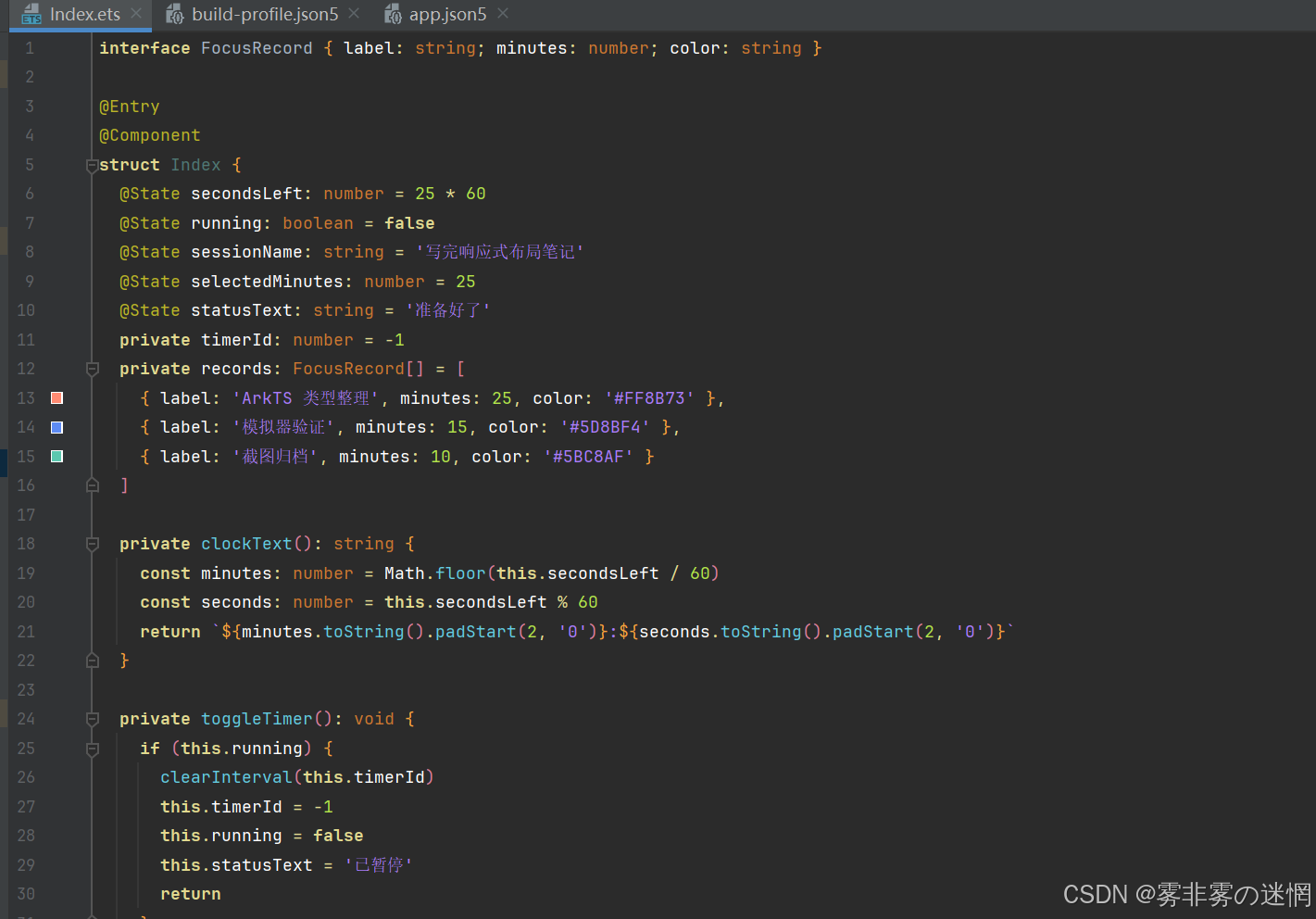
核心状态分成"剩余秒数"和"是否运行"。显示文本由秒数计算,避免同时维护 25:00 这样的字符串状态。
typescript
@State secondsLeft: number = 25 * 60
@State running: boolean = false
@State selectedMinutes: number = 25
@State statusText: string = '准备好了'
private timerId: number = -1

private clockText(): string {
  const minutes: number = Math.floor(this.secondsLeft / 60)
  const seconds: number = this.secondsLeft % 60
  return `${minutes.toString().padStart(2, '0')}:${seconds.toString().padStart(2, '0')}`
}
开始与暂停共用 toggleTimer()。暂停分支先清理定时器,再恢复标识;开始分支创建一个每秒执行的任务。倒计时到0时同样清理 timerId,并把状态改成"本轮完成"。
typescript
private toggleTimer(): void {
  if (this.running) {
    clearInterval(this.timerId)
    this.timerId = -1
    this.running = false
    this.statusText = '已暂停'
    return
  }

  this.running = true
  this.statusText = '专注中'
  this.timerId = setInterval(() => {
    if (this.secondsLeft > 0) {
      this.secondsLeft -= 1
    } else {
      clearInterval(this.timerId)
      this.timerId = -1
      this.running = false
      this.statusText = '本轮完成'
    }
  }, 1000)
}
切换15、25或45分钟时,旧计时器必须先清理。如果只改 secondsLeft,原来的 interval 仍在运行,新时长会立刻继续递减,按钮上却可能显示"准备好了"。
chooseDuration() 把运行标记、定时器ID、选中时长和提示一起复位。
typescript
private chooseDuration(minutes: number): void {
  if (this.timerId >= 0) {
    clearInterval(this.timerId)
  }
  this.running = false
  this.timerId = -1
  this.selectedMinutes = minutes
  this.secondsLeft = minutes * 60
  this.statusText = '准备好了'
}

aboutToDisappear(): void {
  if (this.timerId >= 0) {
    clearInterval(this.timerId) // 页面退出时停止后台回调
  }
}
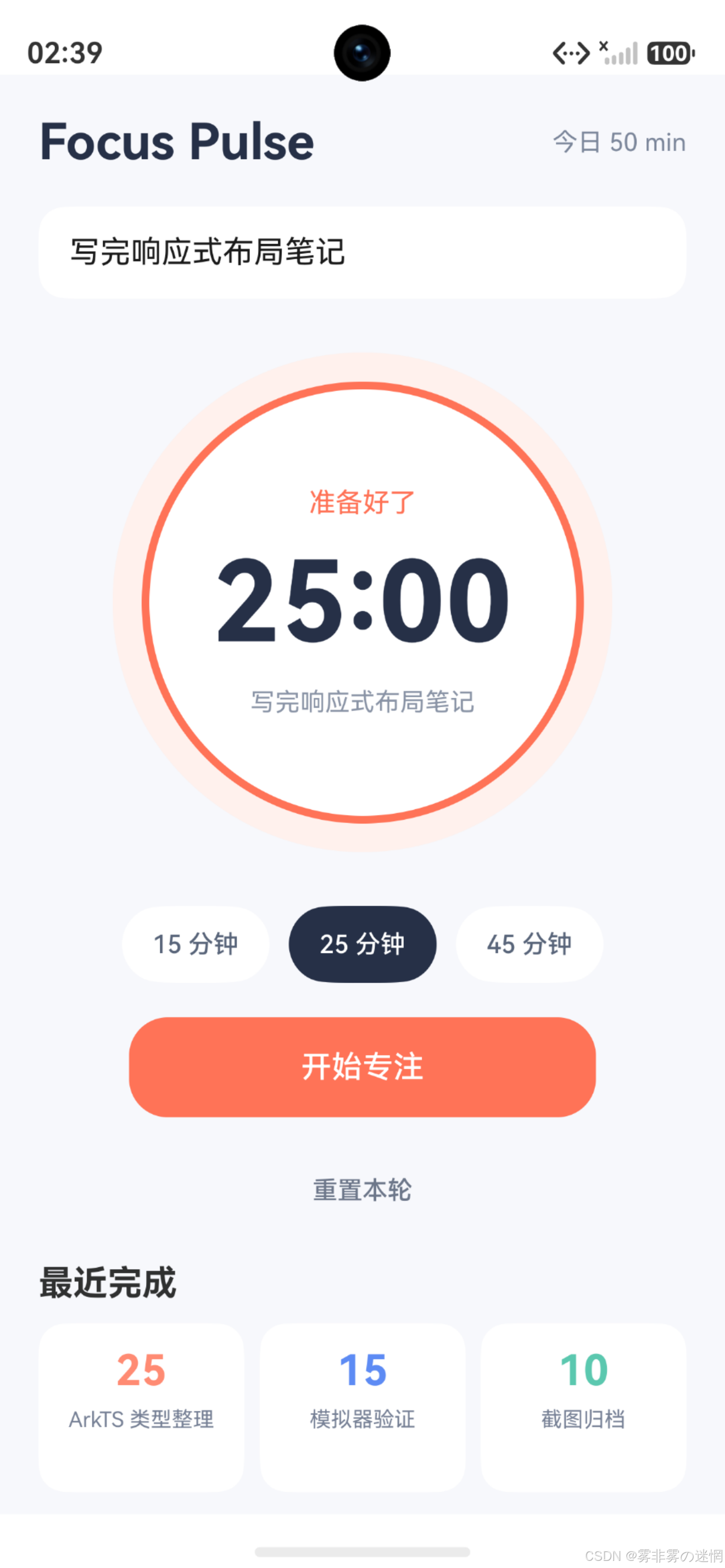
运行初始状态下,任务名称可编辑,圆形计时区域展示剩余时间,时长按钮与当前选择保持一致。
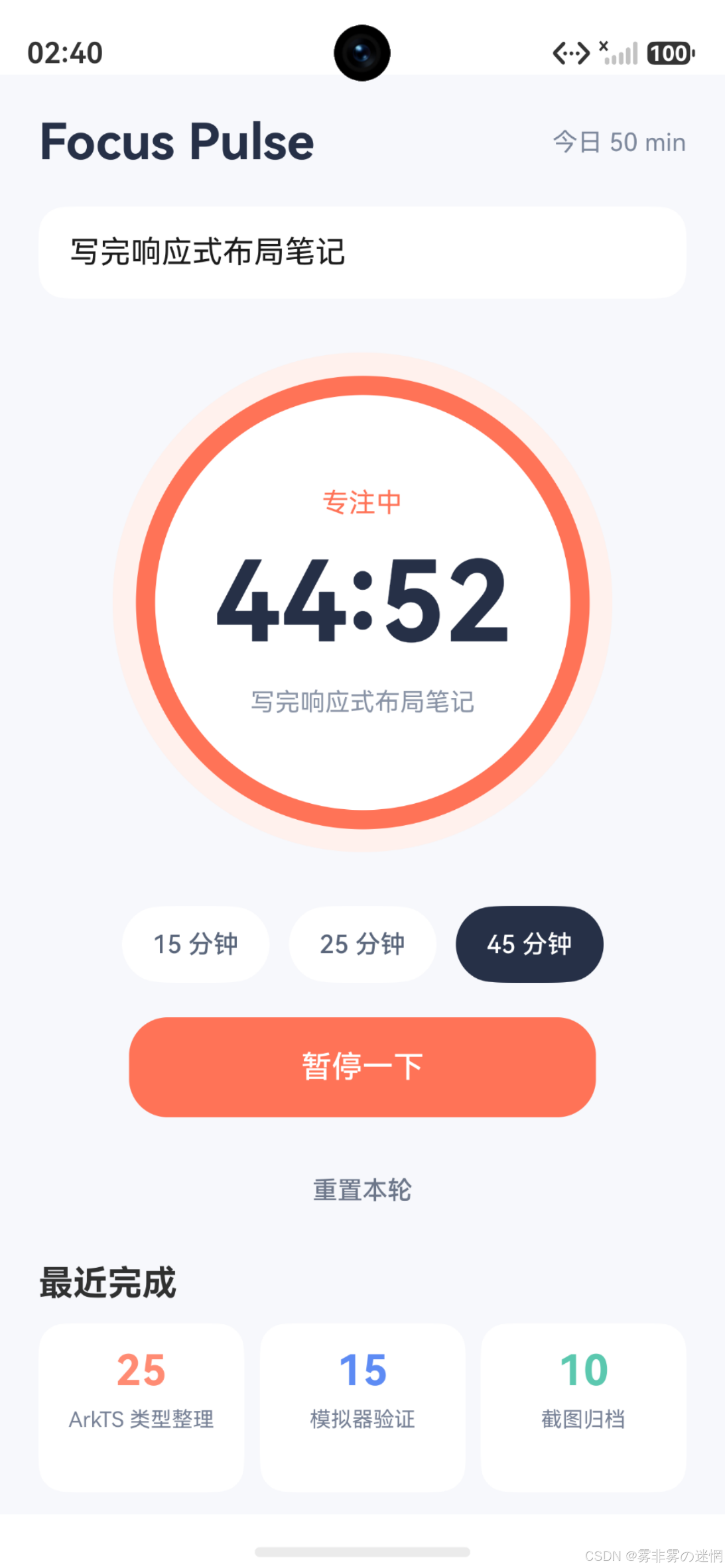
点击开始后,secondsLeft 每秒变化,状态文字进入"专注中",圆环宽度也根据 running 从4切换到10。暂停时定时器被释放,剩余时间留在当前值,继续点击可以从该值重新开始。
当前计时方式适合前台演示,但不能当作系统级精准计时。应用进入后台以后,interval 的调度可能延迟;
typescript
private replaceRound(
  id: number,
  updater: (source: FocusRecord) => FocusRecord
): void {
  this.records = this.records.map((round: FocusRecord) =>
    round.id === id ? updater(round) : round
  )
}

private updateRoundMessage(id: number): void {
  const target: FocusRecord | undefined = this.roundById(id)
  this.message = target ? '状态已更新' : '目标记录不存在'
}
声音提醒、后台任务和通知也尚未接入,当前边界是前台专注状态管理。
计时显示与计时来源要分开
clockText() 只做格式化,不改变秒数。分钟通过整除得到,秒数通过取余得到,再补齐两位。这样状态始终是可计算的秒数,而不是不断拆分和拼接字符串。
typescript
private clockText(): string {
  const minutes: number = Math.floor(this.secondsLeft / 60)
  const seconds: number = this.secondsLeft % 60
  return `${minutes.toString().padStart(2, '0')}:${
    seconds.toString().padStart(2, '0')
  }`
}
圆环宽度也读取 running。开始后描边从4变成10,暂停后恢复,视觉变化和按钮文案来自同一布尔值。
typescript
Circle()
  .width(226)
  .height(226)
  .fill('#FFFFFF')
  .stroke('#FF7357')
  .strokeWidth(this.running ? 10 : 4)

Button(this.running ? '暂停一下' : '开始专注')
  .onClick(() => {
    this.toggleTimer()
  })
当前倒计时会受到调度延迟影响
setInterval(..., 1000) 表达的是尽量每秒回调,不保证绝对准时。页面繁忙、应用切后台或系统调度变化都可能让回调延迟;单纯每次减1会让计时比真实时间慢。
typescript
private removeRound(id: number): void {
  const before: number = this.records.length
  this.records = this.records.filter((round: FocusRecord) =>
    round.id !== id
  )
  this.message = this.records.length < before
    ? '记录已删除'
    : '没有找到要删除的记录'
}

private hasRound(id: number): boolean {
  return this.records.some((round: FocusRecord) => round.id === id)
}
暂停时还要保存剩余秒数,而不是继续保留旧的目标结束时间;恢复时根据剩余值生成新的目标。页面销毁则只清理定时器
最近完成目前仍是静态数据
页面底部的 records 是固定数组,倒计时归零时只把 statusText 改成"本轮完成",并没有插入新的 FocusRecord。这意味着完成状态能显示,但最近完成列表不会增加。
typescript
private records: FocusRecord[] = [
  { label: 'ArkTS 类型整理', minutes: 25, color: '#FF8B73' },
  { label: '模拟器验证', minutes: 15, color: '#5D8BF4' },
  { label: '截图归档', minutes: 10, color: '#5BC8AF' }
]要让记录真正参与状态更新,records 需要变成 @State,归零分支构造包含任务名称和选中时长的新记录,再插入数组。中途暂停或重置不能写入完成记录,重复触发归零也要防止创建两条。
时长切换与输入任务的边界
切换15、25、45分钟会清理当前计时,这是一项有破坏性的操作。当前点击后立即重置,没有确认提示。专注已经进行较长时间时,可以先询问是否放弃,或把已进行时间保存为未完成记录。
typescript
private roundKey(round: FocusRecord): string {
  return String(round.id)
}

private allRoundKeys(): string[] {
  return this.records.map((round: FocusRecord) =>
    this.roundKey(round)
  )
}

private hasDuplicateRoundKey(): boolean {
  const keys: string[] = this.allRoundKeys()
  return new Set(keys).size !== keys.length
}
暂停后等待数秒再恢复,剩余时间应保持不变。页面销毁测试则确认退出后状态不再更新。将这些边界写成可重复用例,比只观察一分钟内数字变化更能验证计时生命周期。
用目标时间修正计时漂移
计时器回调只负责触发刷新,剩余秒数由目标时间重新计算:
typescript
private refreshRemaining(): void {
  if (this.endAt <= 0) {
    return
  }
  const delta: number = this.endAt - Date.now()
  this.remaining = Math.max(0, Math.ceil(delta / 1000))
  if (this.remaining === 0) {
    this.finishRound()
  }
}

private finishRound(): void {
  this.clearTicker()
  this.running = false
  this.message = '本轮专注已完成'
}
即使某次回调晚到几百毫秒,下一次刷新也会依据绝对结束时间校正。