本文承接上一篇文章:从JWT看SpringSecurity
本文要实现的是:
- 针对需要登录才能访问的接口,在未登录时返回401
- 针对需要特定角色或特定权限的接口,在当前用户没有该角色与权限的时候,返回403
401
java
@RestController
@RequestMapping("/disk")
@RequiredArgsConstructor
public class DiskItemController {

    private final DiskItemServiceImpl diskItemService;
    private final SysUserService userService;

    // 获取当前登录用户
    private Long getUserId() {
        return userService.getUserId();
    }

    /**
     * 分页按条件查询
     */
    @GetMapping("/page")
    public Result<PageResult<DiskItem>> page(DiskItemQuery query) {
        query.setOwnerId(getUserId());
        return Result.success(diskItemService.pageQuery(query));
    }

}前端发起请求/disk/page,是需要用户登录的,如果未登录则返回 401.
小插曲
这里有个小插曲忙活了一阵,我未登录状态发起请求/disk/page,然后控制台输入如下:

说是响应没有设置跨域,被浏览器拦截了,响应面板没有任何信息

这里有两个疑问:
- 既然是未登录,为什么返回的是403而不是401?
- 为什么没有响应体?
原因是这样的:我这个请求携带了一个过期的token,可我的JwtFilter没有捕获,于是异常一路向上抛,直到被Spring Security过滤器链中的ExceptionTranslationFilter截获,它的作用是捕获过滤器链中抛出的异常,并转换为 HTTP 响应。
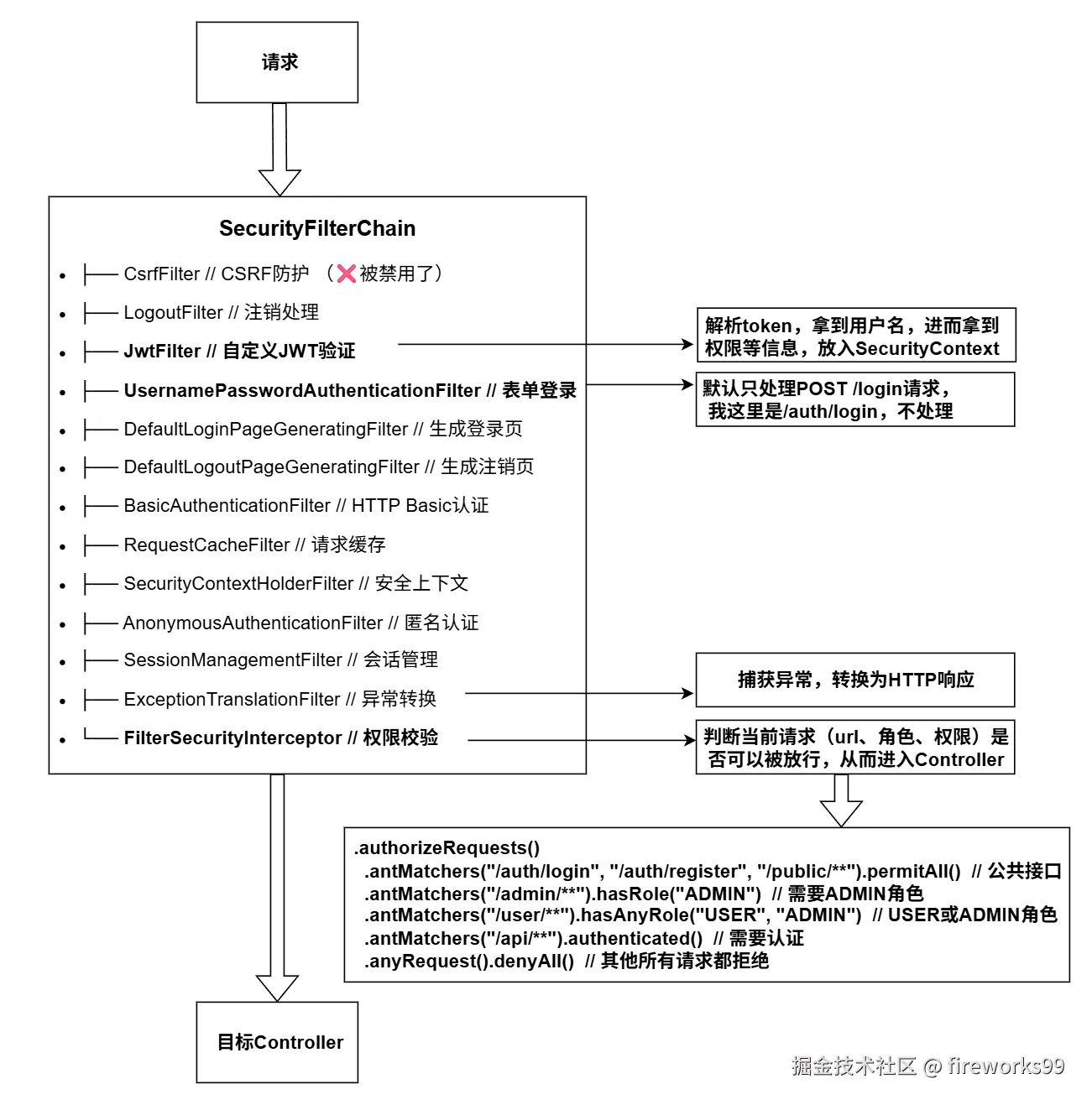
ExceptionTranslationFilter部分代码如下:
java
package org.springframework.security.web.access;

import ...

public class ExceptionTranslationFilter extends GenericFilterBean implements MessageSourceAware {
    private AccessDeniedHandler accessDeniedHandler;
    private AuthenticationEntryPoint authenticationEntryPoint;
    private AuthenticationTrustResolver authenticationTrustResolver;
    private ThrowableAnalyzer throwableAnalyzer;
    private RequestCache requestCache;
    protected MessageSourceAccessor messages;

    public ExceptionTranslationFilter(AuthenticationEntryPoint authenticationEntryPoint) {
        this(authenticationEntryPoint, new HttpSessionRequestCache());
    }

    public ExceptionTranslationFilter(AuthenticationEntryPoint authenticationEntryPoint, RequestCache requestCache) {
        this.accessDeniedHandler = new AccessDeniedHandlerImpl();
        this.authenticationTrustResolver = new AuthenticationTrustResolverImpl();
        this.throwableAnalyzer = new DefaultThrowableAnalyzer();
        this.requestCache = new HttpSessionRequestCache();
        this.messages = SpringSecurityMessageSource.getAccessor();
        Assert.notNull(authenticationEntryPoint, "authenticationEntryPoint cannot be null");
        Assert.notNull(requestCache, "requestCache cannot be null");
        this.authenticationEntryPoint = authenticationEntryPoint;
        this.requestCache = requestCache;
    }

    public void doFilter(ServletRequest request, ServletResponse response, FilterChain chain) throws IOException, ServletException {
        this.doFilter((HttpServletRequest)request, (HttpServletResponse)response, chain);
    }

    private void doFilter(HttpServletRequest request, HttpServletResponse response, FilterChain chain) throws IOException, ServletException {
        try {
            chain.doFilter(request, response);
        } catch (IOException ex) {
            throw ex;
        } catch (Exception var8) {
            Throwable[] causeChain = this.throwableAnalyzer.determineCauseChain(var8);
            RuntimeException securityException = (AuthenticationException)this.throwableAnalyzer.getFirstThrowableOfType(AuthenticationException.class, causeChain);
            if (securityException == null) {
                securityException = (AccessDeniedException)this.throwableAnalyzer.getFirstThrowableOfType(AccessDeniedException.class, causeChain);
            }

            if (securityException == null) {
                this.rethrow(var8);
            }

            if (response.isCommitted()) {
                throw new ServletException("Unable to handle the Spring Security Exception because the response is already committed.", var8);
            }

            this.handleSpringSecurityException(request, response, chain, securityException);
        }

    }

    private void handleSpringSecurityException(HttpServletRequest request, HttpServletResponse response, FilterChain chain, RuntimeException exception) throws IOException, ServletException {
        if (exception instanceof AuthenticationException) {
            this.handleAuthenticationException(request, response, chain, (AuthenticationException)exception);
        } else if (exception instanceof AccessDeniedException) {
            this.handleAccessDeniedException(request, response, chain, (AccessDeniedException)exception);
        }

    }

    private void handleAccessDeniedException(HttpServletRequest request, HttpServletResponse response, FilterChain chain, AccessDeniedException exception) throws ServletException, IOException {
        Authentication authentication = SecurityContextHolder.getContext().getAuthentication();
        boolean isAnonymous = this.authenticationTrustResolver.isAnonymous(authentication);
        if (!isAnonymous && !this.authenticationTrustResolver.isRememberMe(authentication)) {
            if (this.logger.isTraceEnabled()) {
                this.logger.trace(LogMessage.format("Sending %s to access denied handler since access is denied", authentication), exception);
            }

            this.accessDeniedHandler.handle(request, response, exception);
        } else {
            if (this.logger.isTraceEnabled()) {
                this.logger.trace(LogMessage.format("Sending %s to authentication entry point since access is denied", authentication), exception);
            }

            this.sendStartAuthentication(request, response, chain, new InsufficientAuthenticationException(this.messages.getMessage("ExceptionTranslationFilter.insufficientAuthentication", "Full authentication is required to access this resource")));
        }

    }

    protected void sendStartAuthentication(HttpServletRequest request, HttpServletResponse response, FilterChain chain, AuthenticationException reason) throws ServletException, IOException {
        SecurityContext context = SecurityContextHolder.createEmptyContext();
        SecurityContextHolder.setContext(context);
        this.requestCache.saveRequest(request, response);
        this.authenticationEntryPoint.commence(request, response, reason);
    }

    //...
}
调试中发现流程是这样的:
java
                     doFilter
                        ⬇
                handleSpringSecurityException
                        ⬇
                handleAccessDeniedException
                        ⬇
                sendStartAuthentication
                        ⬇
protected void sendStartAuthentication(HttpServletRequest request, HttpServletResponse response, FilterChain chain, AuthenticationException reason) throws ServletException, IOException {
    SecurityContext context = SecurityContextHolder.createEmptyContext();
    SecurityContextHolder.setContext(context);
    this.requestCache.saveRequest(request, response);
    this.authenticationEntryPoint.commence(request, response, reason);
}关键在于最后这句this.authenticationEntryPoint.commence(request, response, reason);决定了返回的是401还是403还是其他响应。
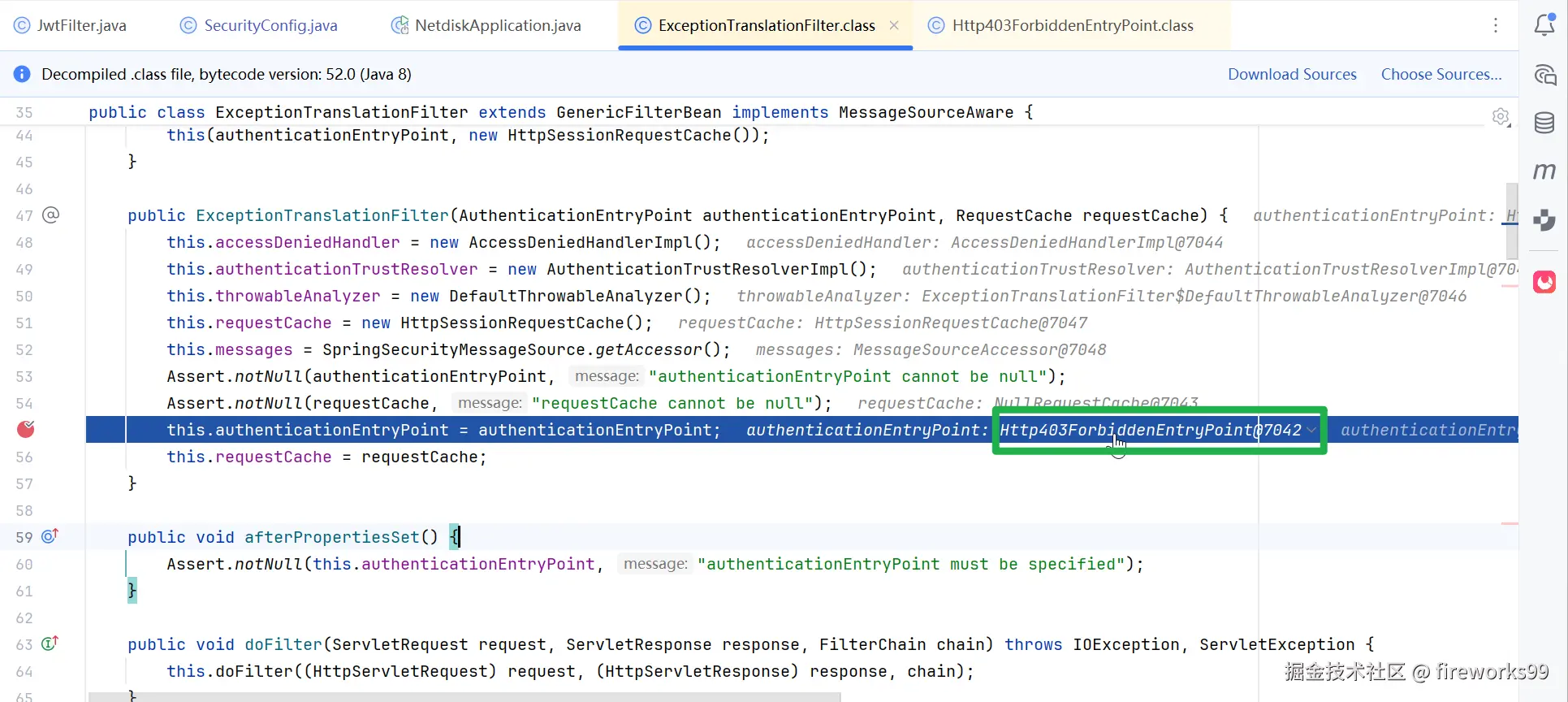
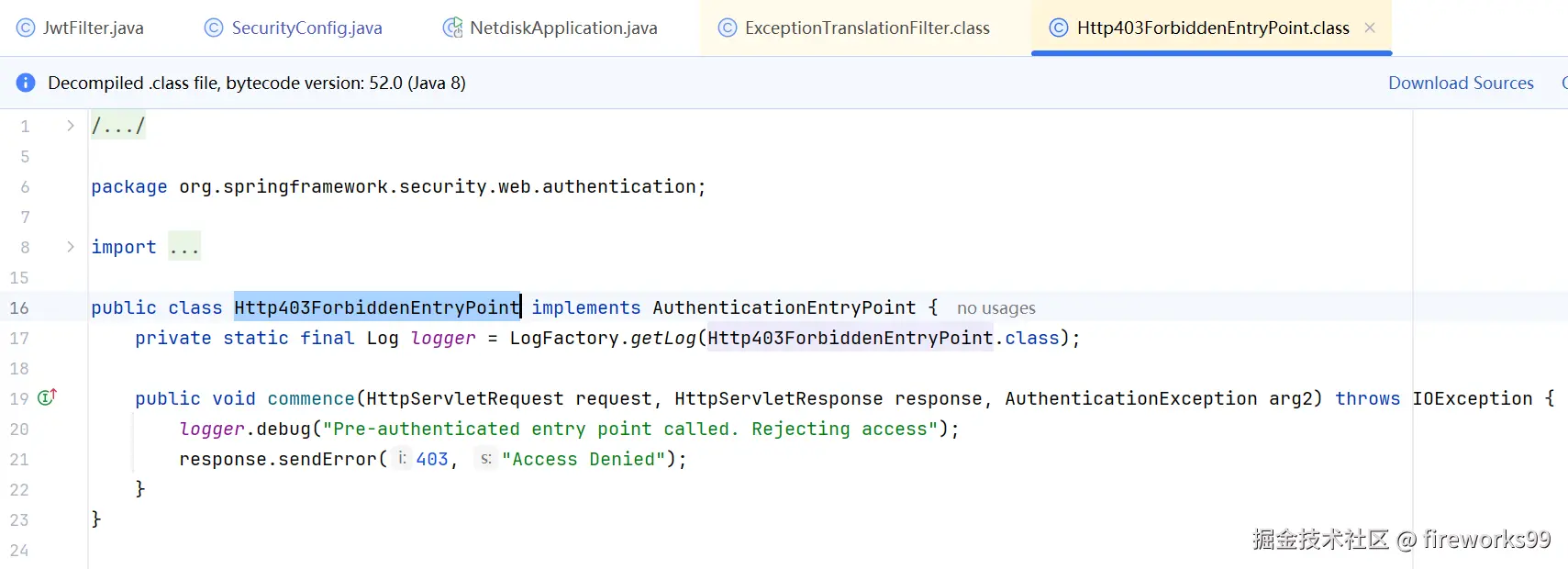
调试发现,Spring默认 注入的authenticationEntryPoint是Http403ForbiddenEntryPoint,而这个类就是返回的403,这就解释通了为什么返回的是403而不是401。
另外,由于我的 Spring Security 配置中,没有设置 AuthenticationEntryPoint 或 AccessDeniedHandler,导致响应头 返回了403但响应体 为空(因为异常处理器没有写入内容),浏览器发现前后端不同源且响应体里没有设置cors(No 'Access-Control-Allow-Origin' header),所以block并打印了信息:
Access to XMLHttpRequest at 'http://localhost:8080/disk/page?keyword=&deleted=false&pageNum=1&pageSize=10' from origin 'http://localhost:5173' has been blocked by CORS policy: No 'Access-Control-Allow-Origin' header is present on the requested resource.
为什么响应体里没有cors,下面会解释。
所以前端发现token过期时,要及时清理Storage里的token信息,后端要配置AuthenticationEntryPoint,才能避免这种现象。
插曲2
前面说了,我前端没有及时清理过期的token导致JwtFilter抛出异常,传到ExceptionTranslationFilter里,被默认的Http403ForbiddenEntryPoint设置为403响应。
可当我清除过期token(即请求未携带token)时,仍然返回403,唯一区别在于响应体不是空的了,这是为什么呢?
经调试发现,不携带token时,未抛出异常,但流程仍然经过ExceptionTranslationFilter,被默认的Http403ForbiddenEntryPoint设置为403响应。
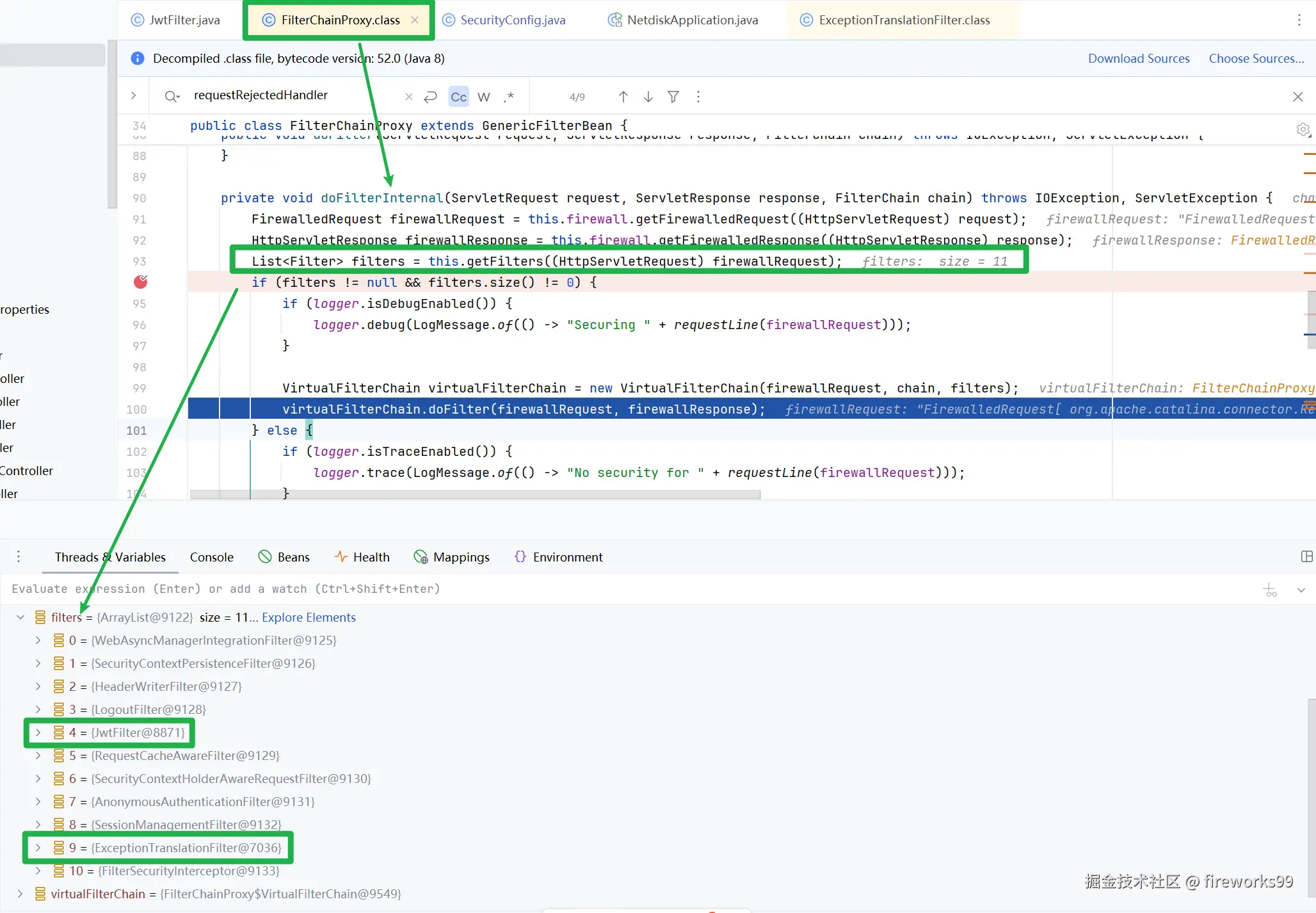
即,无论JwtFilter是否抛出异常,请求处理流程都经过了
ExceptionTranslationFilter,且由于未设置authenticationEntryPoint,Spring采用默认的Http403ForbiddenEntryPoint,返回403响应。区别在于:
- 如果请求携带了无效的token,后端抛出异常,且异常处理器没有写入内容,响应体为空;
- 如果请求没有携带token,流程没有异常,正常返回403响应体。
空的响应体被浏览器拦截,抛出cros异常 + 请求403异常;
正常的响应体未被拦截,只有请求403异常;
回到正题
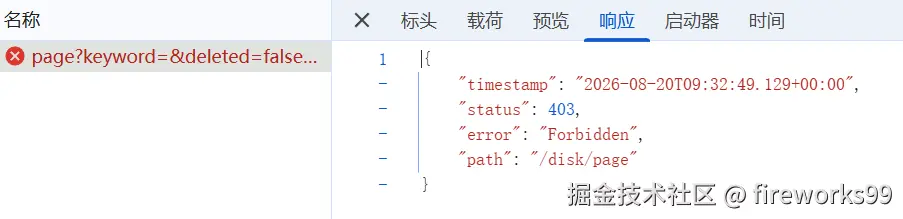
未登录时发起请求/disk/page,没有携带token,返回403 Forbidden,如下图所示。
由前述可知,需要配置自定义的authenticationEntryPoint来让未登录状态返回401
java
@Bean
public SecurityFilterChain filterChain(HttpSecurity http) throws Exception {

    http
        .csrf().disable() // 关闭CSRF保护:JWT认证通常用于REST API,且JWT存在浏览器LocalStorage中,CSRF防护与无状态API不兼容

        .sessionManagement().sessionCreationPolicy(SessionCreationPolicy.STATELESS) // 设置无状态会话

        .and()
        .exceptionHandling() // 异常处理
        // 未登录 / JWT 无效 -> 401
        .authenticationEntryPoint((request, response, authException) - > {
            response.setStatus(HttpServletResponse.SC_UNAUTHORIZED);
            response.setContentType("application/json;charset=utf-8");
            response.getWriter().write("{\"code\":401,\"msg\":\"未登录或登录已过期\"}");
        })

        .and() //返回 HttpSecurity
        .authorizeRequests() // 开始配置URL授权(新版可能用 authorizeHttpRequests)
        .antMatchers(HttpMethod.OPTIONS, "/**").permitAll() // 预检请求放行
        .antMatchers("/auth/**").permitAll() // 登录接口所有人都可访问
        .anyRequest().authenticated() // 其他所有请求都需要认证

        .and() //返回 HttpSecurity
        .addFilterBefore(jwtFilter, UsernamePasswordAuthenticationFilter.class); // 将自定义的 JwtFilter 插入到过滤器链中
        // 为什么放在它之前:因为我们希望先验证JWT,如果JWT有效就直接认证成功,这种情况下免了一次密码登录
        // [匿名过滤器] → [JwtFilter] → [UsernamePasswordAuthenticationFilter] → [其他过滤器] → [目标Controller]

    return http.build();
}如上面代码所示,我自定义了authenticationEntryPoint,未登录请求过来之后变成401了,但还是没有响应体,还是blocked by CORS policy.
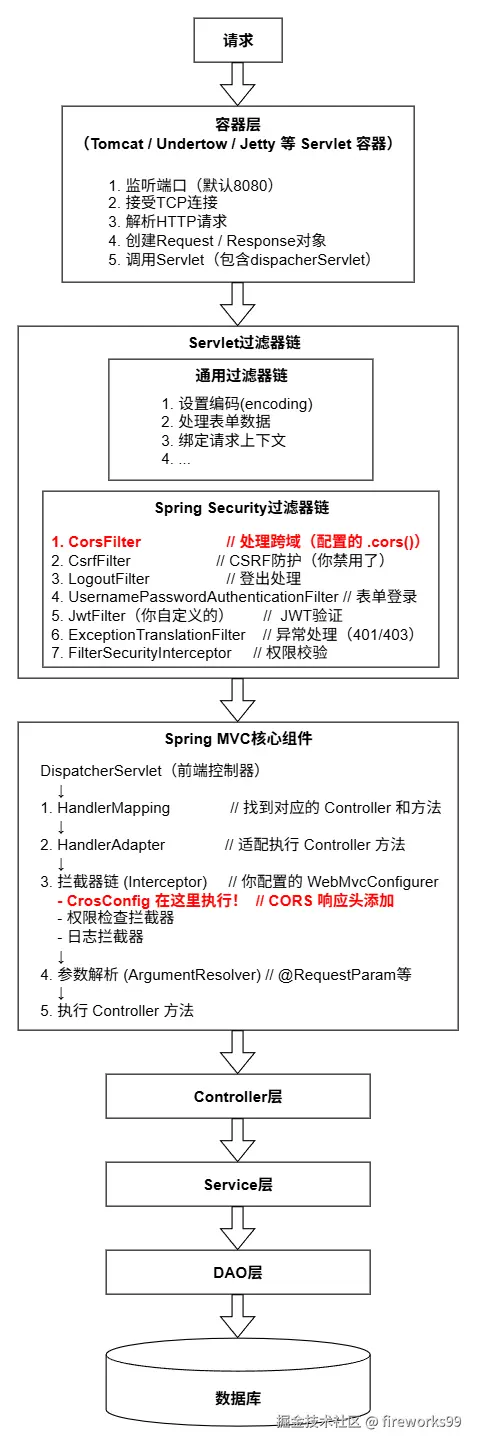
下图解释了为什么响应体里没有cors,因为需要在Spring Security里配置cors,且一旦这里配置了cors,后面Spring MVC里的CorsFilter就可以取消了。
插曲3
这里我又想起一个新的问题:为什么不设置authenticationEntryPoint的时候返回的403响应没有CORS异常,但是设置了authenticationEntryPoint的时候返回的401有CORS异常,按理说都应该有,偏偏前者没有?
yml
logging:
  level:
    org.springframework.web.cors: TRACE
org.springframework.security: TRACE添加相关的日志后再发起/disk/page请求,发现如下日志:
sql
Skip: response already contains "Access-Control-Allow-Origin"
logger_name:
org.springframework.web.cors.DefaultCorsProcessor
这说明Spring MVC 的 DefaultCorsProcessor 参与了处理,就是我项目中的CrosConfig implements WebMvcConfigurer发挥了作用。但是它处理的不是/disk/page,而是由Http403ForbiddenEntryPoint里的response.sendError(403)创建的/error,容器转发/error到dispatcherServlet,由SpringMVC里的CORS给添加了Access-Control-Allow-Origin,所以这个403没有CORS异常。
而设置了authenticationEntryPoint后,response.getWriter().write()就结束了,没有经过SpringMVC,自然也就产生了CORS异常。
再次回到正题
由前述可知,需要配置Spring Security的CORS,且取消SpringMVC中的CORS即可。
java
@Configuration
@RequiredArgsConstructor
@EnableMethodSecurity
public class SecurityConfig {

    private final JwtFilter jwtFilter;

    // 暴露 AuthenticationManager 作为 Bean(登录用到了)
    // Spring Security的核心认证接口,处理认证请求(如登录验证)
    @Bean
    public AuthenticationManager authenticationManager(AuthenticationConfiguration authenticationConfiguration) throws Exception {
        return authenticationConfiguration.getAuthenticationManager();//拿到默认的 认证管理器
    }

    @Bean
    public CorsConfigurationSource corsConfigurationSource() {
        CorsConfiguration corsConfiguration = new CorsConfiguration();

        corsConfiguration.setAllowedOriginPatterns(Arrays.asList("*"));
        corsConfiguration.setAllowedMethods(Arrays.asList(
                "GET", "POST", "PUT", "DELETE", "OPTIONS"
        ));
        corsConfiguration.setAllowedHeaders(Arrays.asList("*"));
        //暴露响应头,前端才能在headers中拿到文件名
        corsConfiguration.setExposedHeaders(Arrays.asList("Content-Disposition"));
        corsConfiguration.setAllowCredentials(true);

        UrlBasedCorsConfigurationSource url = new UrlBasedCorsConfigurationSource();
        url.registerCorsConfiguration("/**", corsConfiguration);
        return url;
    }

    /**
     * Bean注解:将当前方法的返回值注册为一个 Bean(一个由 Spring 管理的对象)
     * JWT认证方式,必须自定义SecurityFilterChain来跳过默认的 (Session认证)
     */
    @Bean
    public SecurityFilterChain filterChain(HttpSecurity http) throws Exception {

        http
                .csrf().disable()// 关闭CSRF保护:JWT认证通常用于REST API,且JWT存在浏览器LocalStorage中,CSRF防护与无状态API不兼容

                .cors()
                .and()

                .sessionManagement().sessionCreationPolicy(SessionCreationPolicy.STATELESS)// 设置无状态会话

                .and()
                .exceptionHandling()// 异常处理
                // 未登录 / JWT 无效 -> 401
                .authenticationEntryPoint((request, response, authException) -> {
                    response.setStatus(HttpServletResponse.SC_UNAUTHORIZED);
                    response.setContentType("application/json;charset=utf-8");
                    response.getWriter().write( "{\"code\":401,\"msg\":\"未登录或登录已过期\"}");
                })

                .and()//返回 HttpSecurity
                .authorizeRequests()// 开始配置URL授权(新版可能用 authorizeHttpRequests)
                .antMatchers(HttpMethod.OPTIONS, "/**").permitAll()// 预检请求放行
                .antMatchers("/auth/**").permitAll()// 登录接口所有人都可访问
                .anyRequest().authenticated()// 其他所有请求都需要认证

                .and()//返回 HttpSecurity
                .addFilterBefore(jwtFilter, UsernamePasswordAuthenticationFilter.class);// 将自定义的 JwtFilter 插入到过滤器链中
                // 为什么放在它之前:因为我们希望先验证JWT,如果JWT有效就直接认证成功,这种情况下免了一次密码登录
                // [匿名过滤器] → [JwtFilter] → [UsernamePasswordAuthenticationFilter] → [其他过滤器] → [目标Controller]

        return http.build();
    }

    /**
     * 提供密码加密和验证功能
     */
    @Bean
    public PasswordEncoder passwordEncoder() {
        return new BCryptPasswordEncoder();
    }

}这样一来,未登录时发起请求/disk/page,会返回401且无CORS异常。
403 Forbidden
java
@RestController
@RequestMapping("/user")
@RequiredArgsConstructor
public class SysUserController {

    private final SysUserService userService;

    /**
     * 分页查询用户
     */
    @GetMapping("/page")
    @PreAuthorize("hasRole('ADMIN')")
    public Result<PageResult<SysUser>> page(@RequestParam int pageNum, @RequestParam int pageSize) {
        return Result.success(userService.page(pageNum, pageSize));
    }
}普通用户登录后,发起/user/page请求,由于用户没有ADMIN角色,应该返回403.
但实际返回了500:系统异常,请稍后再试,这是因为此时已经过了Spring Security过滤器链,到达Controller,这时权限不足的异常无法被ExceptionTranslationFilter捕获(因为他只能捕获Spring Security过滤器链中的异常),于是被我设置的全局异常处理器GlobalExceptionHandler捕获并打印出来了。
java
@RestControllerAdvice
public class GlobalExceptionHandler {

    /**
     * 业务异常
     */
    @ExceptionHandler(BusinessException.class)
    public Result<Void> handleBusinessException(BusinessException e) {
        return Result.error(e.getCode(), e.getMessage());
    }

    /**
     * 兜底异常(系统异常)
     */
    @ExceptionHandler(Exception.class)
    public Result<Void> handleException(Exception e) {
        e.printStackTrace();;
        return Result.error(500, "系统异常,请稍后再试");
    }

}
插曲4
前面讲到我设置authenticationEntryPoint的过程,其实这里也能设置accessDeniedHandler,如下:
java
@Bean
public SecurityFilterChain filterChain(HttpSecurity http) throws Exception {

    http
        .csrf().disable() // 关闭CSRF保护:JWT认证通常用于REST API,且JWT存在浏览器LocalStorage中,CSRF防护与无状态API不兼容

        .cors()
        .and()

        .sessionManagement().sessionCreationPolicy(SessionCreationPolicy.STATELESS) // 设置无状态会话

        .and()
        .exceptionHandling() // 异常处理
        // 未登录 / JWT 无效 -> 401
        .authenticationEntryPoint((request, response, authException) - > {
            response.setStatus(HttpServletResponse.SC_UNAUTHORIZED);
            response.setContentType("application/json;charset=utf-8");
            response.getWriter().write("{\"code\":401,\"msg\":\"未登录或登录已过期\"}");
        })
        // 已登录,但是没有权限 → 403
        .accessDeniedHandler((request, response, accessDeniedException) - > {
            response.setStatus(HttpServletResponse.SC_FORBIDDEN);
            response.setContentType("application/json;charset=utf-8");
            response.getWriter().write("{\"code\":403,\"msg\":\"当前操作没有权限\"}");
        })

        .and() //返回 HttpSecurity
        .authorizeRequests() // 开始配置URL授权(新版可能用 authorizeHttpRequests)
        .antMatchers(HttpMethod.OPTIONS, "/**").permitAll() // 预检请求放行
        .antMatchers("/auth/**").permitAll() // 登录接口所有人都可访问
        .anyRequest().authenticated() // 其他所有请求都需要认证

        .and() //返回 HttpSecurity
        .addFilterBefore(jwtFilter, UsernamePasswordAuthenticationFilter.class);

    return http.build();
}但是,这显然不能让@PreAuthorize("hasRole('ADMIN')")对应方法抛出403异常,因为这里还是在Security Filter Chain里,而@PreAuthorize("hasRole('ADMIN')")已然到达了Controller.
如果是这样的配置:
java
.authorizeRequests()
    .antMatchers("/auth/login", "/auth/register", "/public/**").permitAll()  // 公共接口
    .antMatchers("/admin/**").hasRole("ADMIN")  // 需要ADMIN角色
    .antMatchers("/user/**").hasAnyRole("USER", "ADMIN")  // USER或ADMIN角色
    .antMatchers("/api/**").authenticated()  // 需要认证
.anyRequest().denyAll() // 其他所有请求都拒绝那么普通用户访问/admin/xxx接口会被我这里设置的accessDeniedHandler处理。
回到正题
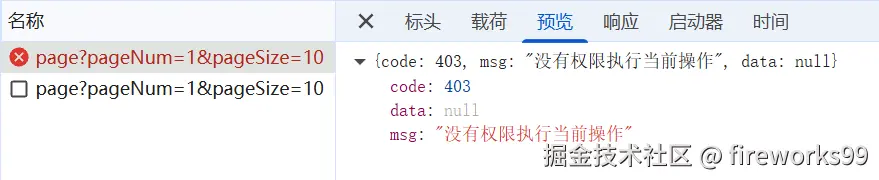
让@PreAuthorize("hasRole('ADMIN')")对应方法抛出403异常,可以让GlobalExceptionHandler来做:
java
package com.example.netdisk.exception;

import com.example.netdisk.common.Result;
import org.springframework.http.HttpStatus;
import org.springframework.security.access.AccessDeniedException;
import org.springframework.web.bind.annotation.ExceptionHandler;
import org.springframework.web.bind.annotation.ResponseStatus;
import org.springframework.web.bind.annotation.RestControllerAdvice;

/**
 * @RestControllerAdvice = @ControllerAdvice + @ResponseBody
 *
 * @ControllerAdvice:负责所有Controller的①异常②ModelAttribute绑定③参数预处理
 */
@RestControllerAdvice
public class GlobalExceptionHandler {

    @ExceptionHandler(AccessDeniedException.class)
    @ResponseStatus(HttpStatus.FORBIDDEN)
    public Result<?> handleAccessDeniedException(AccessDeniedException e) {
        return Result.error(403, "没有权限执行当前操作");
    }

    /**
     * 业务异常
     */
    @ExceptionHandler(BusinessException.class)
    public Result<Void> handleBusinessException(BusinessException e) {
        return Result.error(e.getCode(), e.getMessage());
    }

    /**
     * 兜底异常(系统异常)
     */
    @ExceptionHandler(Exception.class)
    public Result<Void> handleException(Exception e) {
        e.printStackTrace();;
        return Result.error(500, "系统异常,请稍后再试");
    }

}