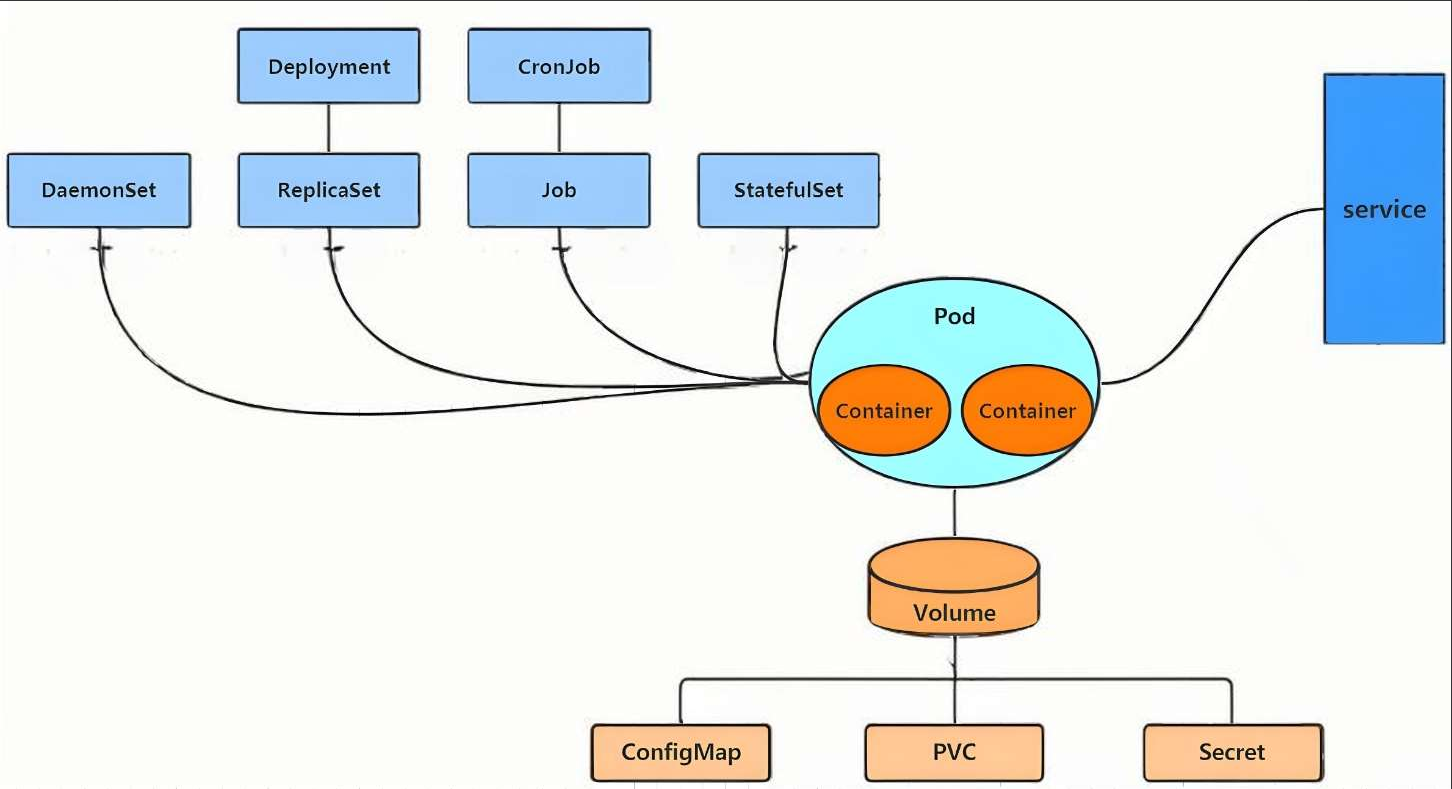
一、k8s的资源介绍
在 Kubernetes(k8s)中,资源(Resource) 是 Kubernetes API 中的一种端点(Endpoint),它代表了集群中的某种对象(Object) 。你可以把资源理解为在 Kubernetes 集群里定义和管理的"事物",它们共同描述了集群的期望状态(Desired State),比如"我要运行 3 个 Nginx 容器"、"我要开放一个 80 端口的服务"。
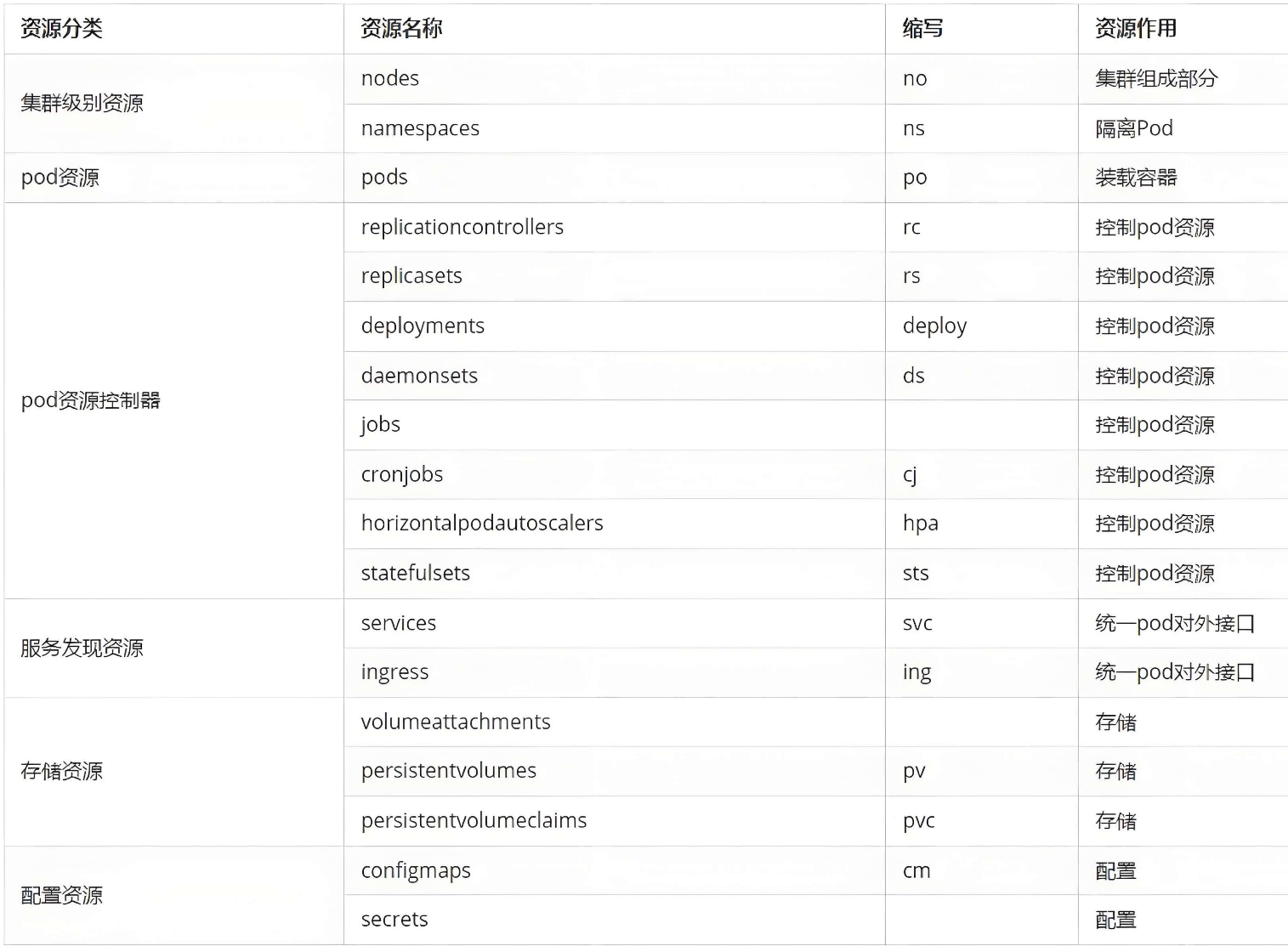
常用资源类型
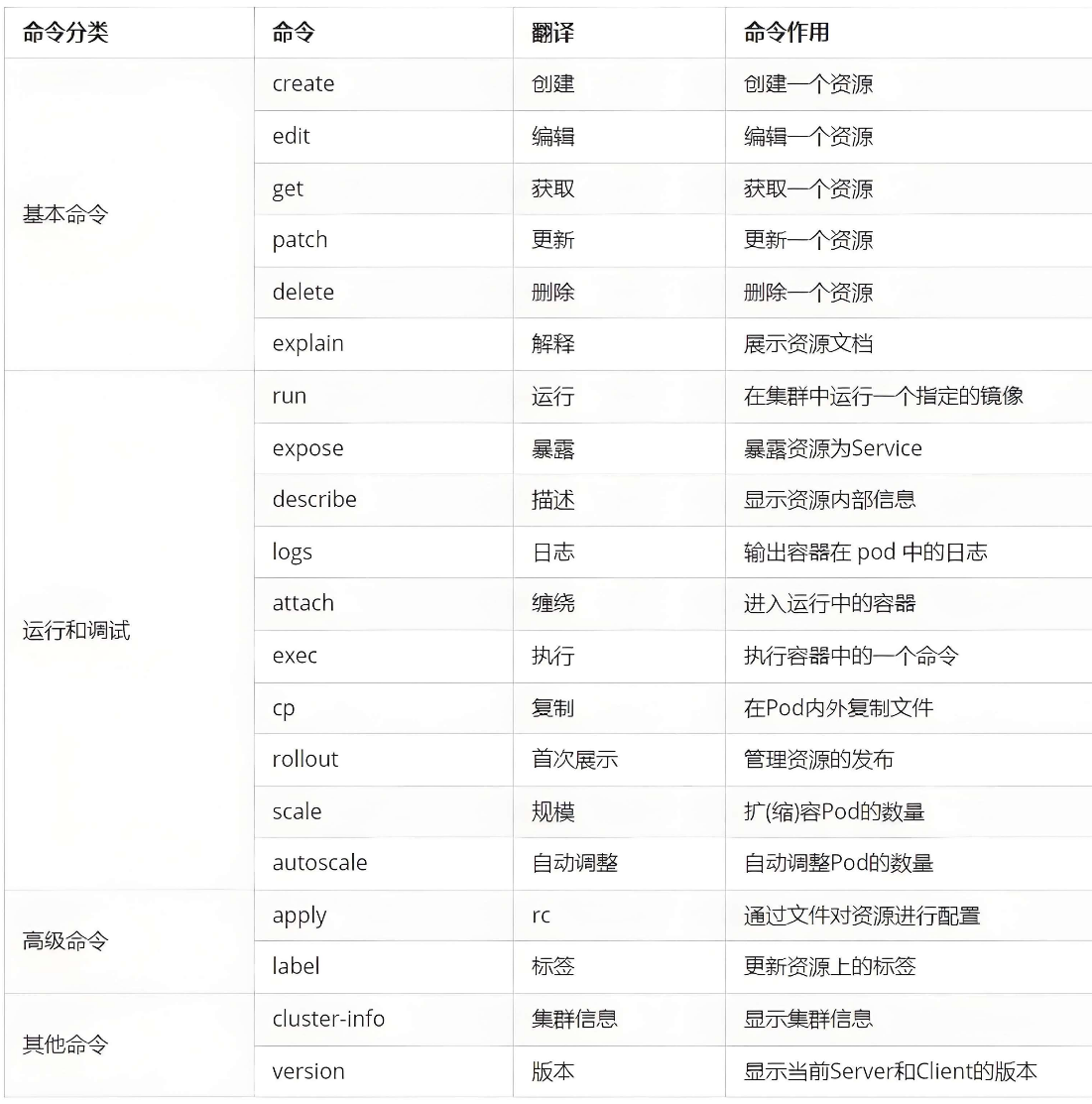
常用命令操作
工作负载资源(Workload)
这类资源决定了运行什么应用 以及如何运行。
-
Pod :这是 k8s 中最小、最基础的调度单元。一个 Pod 包含一个或多个容器(如 Docker 容器),共享网络和存储。它本身通常不直接创建,而是由更高级的控制器管理。
-
控制器:用于以各种方式,策略来管理Pod。包含ReplicaSet(控制容器数量),Deployment(管理不同replica版本),DaemonSet(确保集群主机都运行一个pod),job/cronjob(一次任务/定时任务),StatefulSet(管理有状态服务,提供域名)。
二、pod自主式和控制器管理
1.上传镜像到harbor仓库的library项目中
bash
[root@k8s-master ~]# ls
busybox-latest.tar.gz        myapp.tar.gz          busyboxplus.tar
[root@k8s-master ~]# docker load -i  myapp.tar.gz
[root@k8s-master ~]# docker load -i  busybox-latest.tar.gz
[root@k8s-master ~]# docker images
IMAGE                                                   ID             DISK USAGE   CONTENT SIZE   EXTRA
busybox:latest                                          40680ace50cf       8.82MB          4.5MB
timinglee/myapp:v1                                      238a348a45b2       31.8MB         15.9MB
timinglee/myapp:v2                                      22b40cab681a       31.8MB         15.9MB
[root@k8s-master ~]# docker tag timinglee/myapp:v1 reg.xiaoaxin.org/library/myapp:v1
[root@k8s-master ~]# docker tag timinglee/myapp:v2 reg.xiaoaxin.org/library/myapp:v2
[root@k8s-master ~]# docker tag busybox:latest  reg.xiaoaxin.org/library/busybox:latest
[root@k8s-master ~]# docker tag busyboxplus:latest  reg.xiaoaxin.org/library/busyboxplus:latest
[root@k8s-master ~]# docker push reg.xiaoaxin.org/library/busybox:latest
[root@k8s-master ~]# docker push reg.xiaoaxin.org/library/busyboxplus:latest
[root@k8s-master ~]# docker push reg.xiaoaxin.org/library/myapp:v1
[root@k8s-master ~]# docker push reg.xiaoaxin.org/library/myapp:v2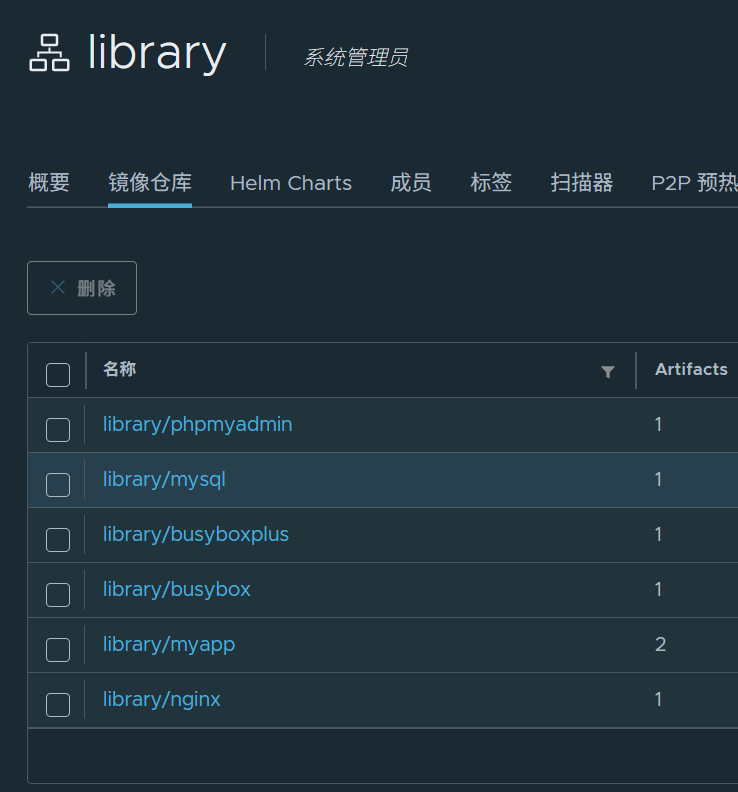
2.创建自主式pod(生产环境不推荐)
bash
[root@k8s-master service]# kubectl run test --image myapp:v1
pod/test created
[root@k8s-master service]# kubectl get pods -o wide
NAME   READY   STATUS    RESTARTS   AGE   IP            NODE        NOMINATED NODE   READINESS GATES
test   1/1     Running   0          10s   10.244.1.27   k8s-node2   <none>           <none>
[root@k8s-master service]# curl 10.244.1.27
Hello MyApp | Version: v1 | <a href="hostname.html">Pod Name</a>


#回收pod
[root@k8s-master service]# kubectl delete pods test
pod "test" deleted from default namespace
[root@k8s-master service]# kubectl get pods -o wide
No resources found in default namespace.
3.控制器管理pod(推荐使用)
这里以版本更替为例
准备环境
bash
#启动控制器
[root@k8s-master service]# kubectl create deployment testdep  --replicas 2 --image myapp:v1
deployment.apps/testdep created
[root@k8s-master service]# kubectl get deployments.apps
NAME      READY   UP-TO-DATE   AVAILABLE   AGE
testdep   2/2     2            2           16s
[root@k8s-master service]# kubectl get pods -o wide
NAME                       READY   STATUS    RESTARTS   AGE   IP            NODE        NOMINATED NODE   READINESS GATES
testdep-79757c8489-xnkk5   1/1     Running   0          22s   10.244.2.27   k8s-node1   <none>           <none>
testdep-79757c8489-zxpdq   1/1     Running   0          22s   10.244.1.28   k8s-node2   <none>           <none>

#当前的版本列表
[root@k8s-master service]# kubectl rollout history deployment testdep
deployment.apps/testdep
REVISION  CHANGE-CAUSE
1         <none>

#以service的nodeport模式暴露控制器端口
[root@k8s-master service]# kubectl expose deployment testdep --port 80 --target-port 80 --type NodePort
service/testdep exposed

[root@k8s-master service]# kubectl get svc
NAME         TYPE        CLUSTER-IP      EXTERNAL-IP   PORT(S)        AGE
kubernetes   ClusterIP   10.96.0.1       <none>        443/TCP        5d5h
testdep      NodePort    10.110.48.251   <none>        80:31667/TCP   38s

#访问测试
[root@k8s-master service]# curl 172.25.254.100:31667
Hello MyApp | Version: v1 | <a href="hostname.html">Pod Name</a>
#service负载均衡默认随机数策略
[root@k8s-master service]# curl 172.25.254.100:31667/hostname.html
testdep-79757c8489-zxpdq
[root@k8s-master service]# curl 172.25.254.100:31667/hostname.html
testdep-79757c8489-xnkk5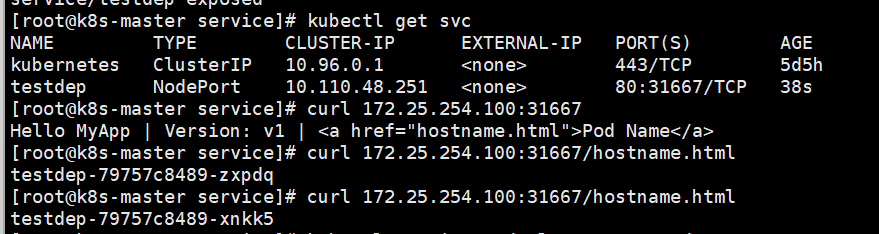
版本更新
bash
[root@k8s-master service]# kubectl set image deployments testdep myapp=myapp:v2
deployment.apps/testdep image updated
[root@k8s-master service]# curl 172.25.254.100:31667
Hello MyApp | Version: v2 | <a href="hostname.html">Pod Name</a>

#为此次更新设定标签
[root@k8s-master service]# kubectl annotate deployment testdep kubernetes.io/change-cause="myappv2" --overwrite
deployment.apps/testdep annotated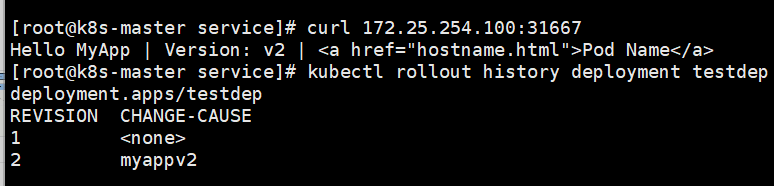
版本回滚
bash
[root@k8s-master service]# kubectl rollout undo deployment testdep --to-revision 1
deployment.apps/testdep rolled back
[root@k8s-master service]# kubectl rollout history deployment testdep
deployment.apps/testdep
REVISION  CHANGE-CAUSE
2         myappv2
3         <none>

[root@k8s-master service]# curl 172.25.254.100:31667
Hello MyApp | Version: v1 | <a href="hostname.html">Pod Name</a>


#回收deployment
[root@k8s-master service]# kubectl delete deployments.apps testdep
deployment.apps "testdep" deleted from default namespace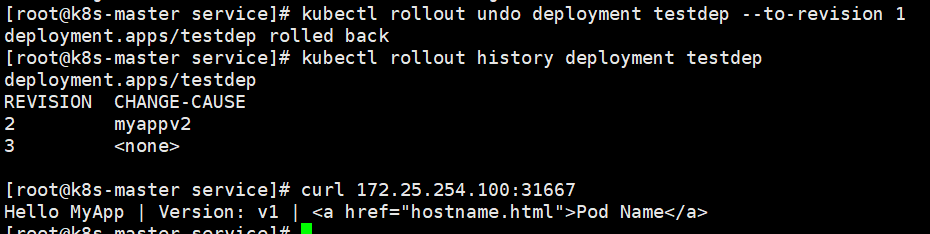
三、利用yaml文件声明资源
实验过程
--dry-run=client :表示在客户端(你的命令行) 进行验证。kubectl 会检查命令格式是否正确、必要参数是否齐全,如果通过,就直接输出结果,绝不会向 API Server 发送创建资源的请求。
-o 是 --output 的缩写,用于指定输出结果的格式。
bash
#生成pod的yml文件
[root@k8s-master service]# kubectl run testpod --image myapp:v1 --dry-run=client -o yaml > testpod.yml
[root@k8s-master service]# vim testpod.yml
apiVersion: v1
kind: Pod
metadata:
  labels:
    run: testpod
  name: testpod
spec:
  containers:
  - image: myapp:v1
    name: testpod
    resources: {}
  dnsPolicy: ClusterFirst
  restartPolicy: Always
status: {}

[root@k8s-master service]# kubectl apply -f testpod.yml
pod/testpod created
[root@k8s-master service]# kubectl get pods
NAME      READY   STATUS    RESTARTS   AGE
testpod   1/1     Running   0          4s


[root@k8s-master service]# kubectl delete -f testpod.yml
pod "testpod" deleted from default namespace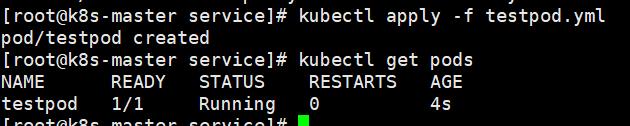
关于yml里的信息
bash
#查看资源类型,对应api版本,缩写
[root@k8s-master service]# kubectl api-resources

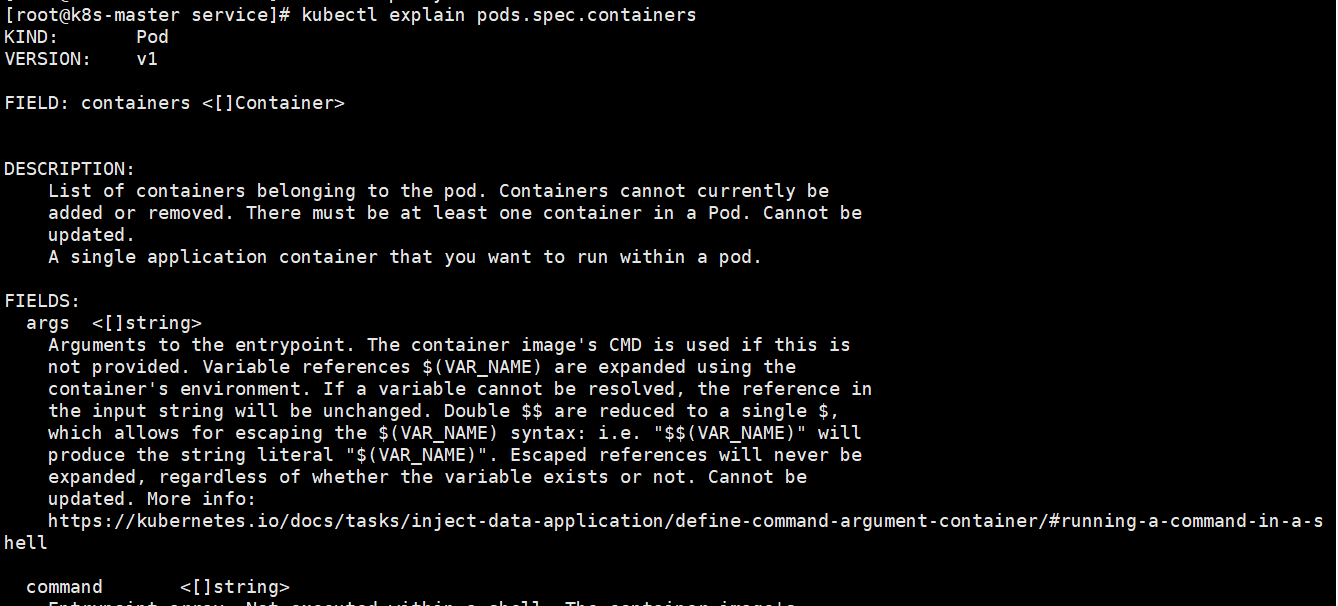
#查看yml里内容怎么写
[root@k8s-master service]# kubectl explain
#例子:kubectl explain pods.spec.containers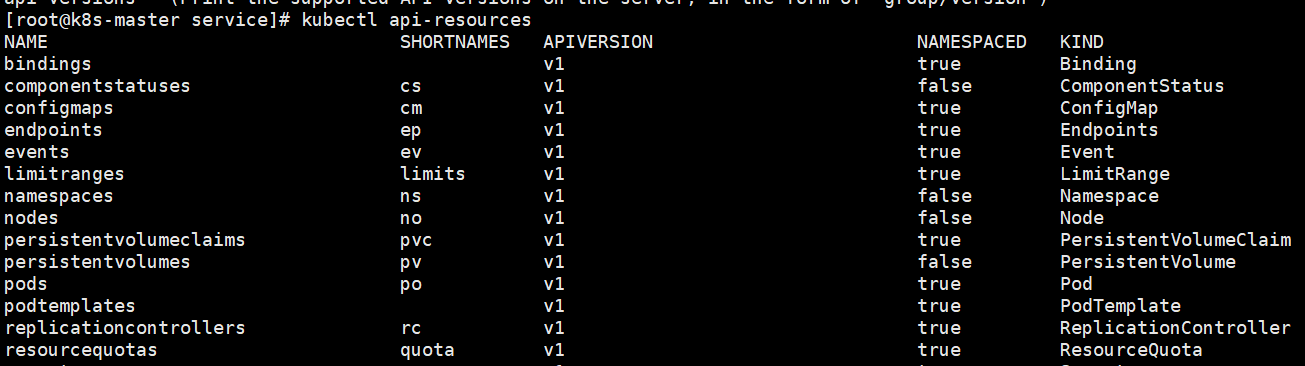
1.在pod中运行多容器
bash
[root@k8s-master service]# vim testpod.yml
apiVersion: v1
kind: Pod
metadata:
  labels:
    run: testpod
  name: testpod
spec:
  containers:
  - image: myapp:v1
    name: testpod
  - image: busyboxplus:latest
    name: busybox
    command:
    - /bin/sh
    - -c
    - sleep 1000

[root@k8s-master service]# kubectl apply -f testpod.yml

#测试
[root@k8s-master service]# kubectl get pods -o wide
NAME      READY   STATUS    RESTARTS   AGE   IP            NODE        NOMINATED NODE   READINESS GATES
testpod   2/2     Running   0          13s   10.244.1.33   k8s-node2   <none>           <none>
[root@k8s-master service]# kubectl exec -it pods/testpod -c busybox -- /bin/sh
/bin/sh: shopt: not found
[ root@testpod:/ ]$ curl 127.0.0.1
Hello MyApp | Version: v1 | <a href="hostname.html">Pod Name</a>


#回收
[root@k8s-master service]# kubectl delete -f testpod.yml --force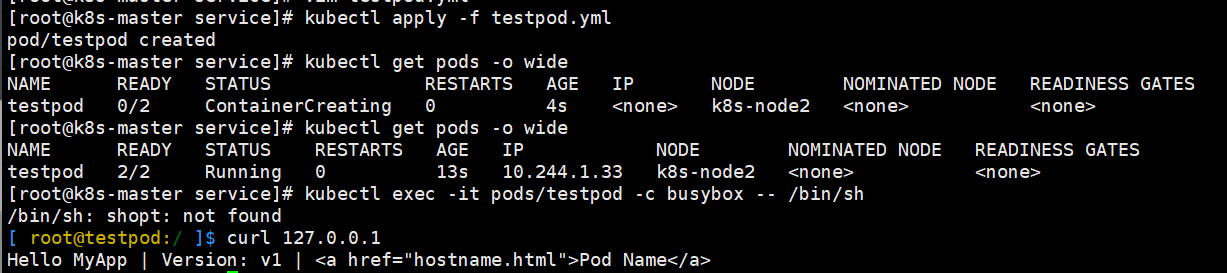
2.在pod运行主机中暴漏端口
bash
[root@k8s-master service]# vim testpod.yml
apiVersion: v1
kind: Pod
metadata:
  labels:
    run: testpod
  name: testpod
spec:
  containers:
  - image: myapp:v1
    name: myapp1
    ports:
    - name: http
      containerPort: 80			#pod内部容器端口
      hostPort: 80				#pod所在节点端口
      protocol: TCP				#端口所用协议

[root@k8s-master service]# kubectl apply -f testpod.yml
pod/testpod created
[root@k8s-master service]# kubectl get pods -o wide
NAME      READY   STATUS    RESTARTS   AGE   IP            NODE        NOMINATED NODE   READINESS GATES
testpod   1/1     Running   0          17s   10.244.1.34   k8s-node2   <none>           <none>

[root@k8s-master service]# curl k8s-node2
Hello MyApp | Version: v1 | <a href="hostname.html">Pod Name</a>

[root@k8s-master service]# kubectl delete -f testpod.yml --force
3.在pod中指定变量
mysql与phpmyadmin为例
bash
[root@k8s-master service]# vim testpod.yml
apiVersion: v1
kind: Pod
metadata:
  labels:
    run: mysql
  name: mysql
spec:
  containers:
  - image: mysql:8.0
    name: mysql8
    env:
    - name: MYSQL_ROOT_PASSWORD
      value: lee

  - image: phpmyadmin:latest
    name: mysqladmin
    env:
    - name: PMA_ARBITRARY
      value: "1"
    ports:
    - name: phpadminport
      containerPort: 80
      hostPort: 80
      protocol: TCP
[root@k8s-master service]# kubectl apply -f testpod.yml
pod/testpod created
[root@k8s-master service]# kubectl get pods -o wide
NAME      READY   STATUS    RESTARTS   AGE   IP            NODE        NOMINATED NODE   READINESS GATES
testpod   2/2     Running   0          35s   10.244.1.35   k8s-node2   <none>           <none>

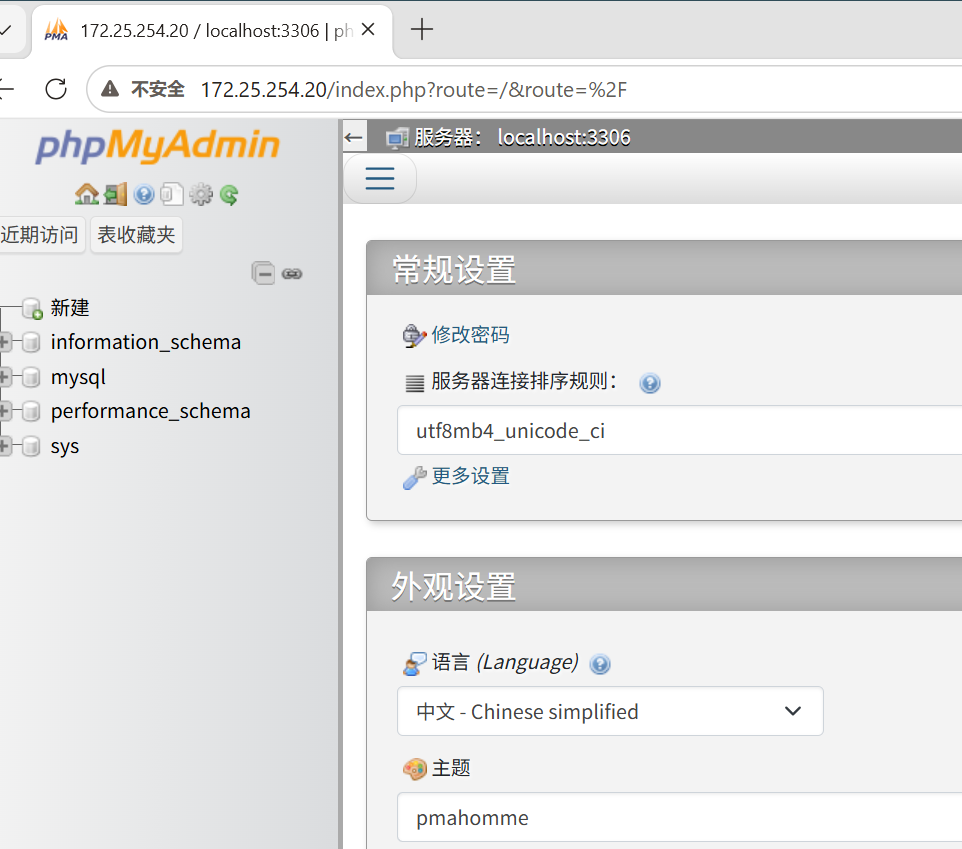
#测试看图


#回收
[root@k8s-master service]# kubectl delete -f testpod.yml --force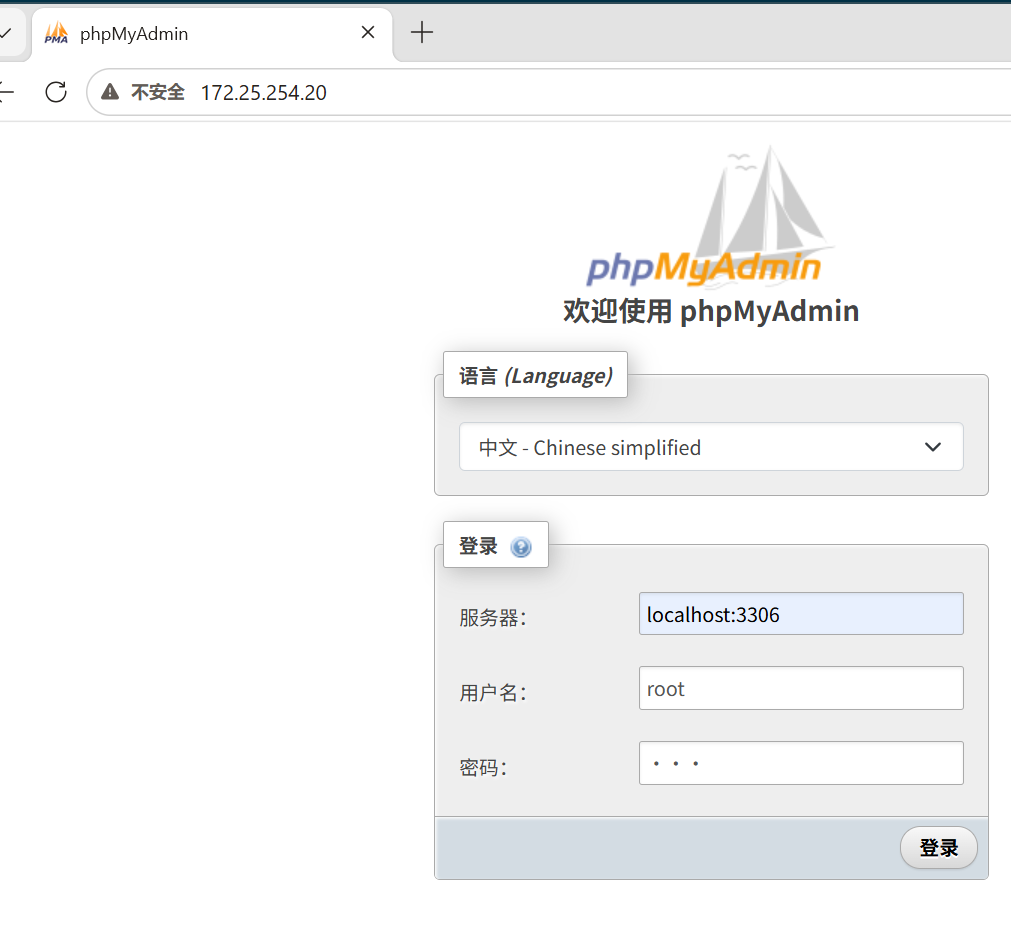
4.选择运行节点
bash
[root@k8s-master service]# vim testpod.yml
apiVersion: v1
kind: Pod
metadata:
  labels:
    run: testpod
  name: testpod
spec:
  nodeSelector:
    kubernetes.io/hostname: k8s-node1
  containers:
  - image: myapp:v1
    name: myapp

[root@k8s-master service]# kubectl apply -f testpod.yml
pod/testpod created
[root@k8s-master service]# kubectl get pods -o wide
NAME      READY   STATUS    RESTARTS   AGE   IP            NODE        NOMINATED NODE   READINESS GATES
testpod   1/1     Running   0          26s   10.244.2.30   k8s-node1   <none>           <none>


[root@k8s-master service]# kubectl delete -f testpod.yml --force
5.共享宿主机网络
bash
[root@k8s-master service]# vim testpod.yml
apiVersion: v1
kind: Pod
metadata:
  labels:
    run: testpod
  name: testpod
spec:
  hostNetwork: true
  containers:
  - image: myapp:v1
    name: myapp

[root@k8s-master service]# kubectl apply -f testpod.yml
pod/testpod created
[root@k8s-master service]# kubectl exec -it pods/testpod -- /bin/sh
/ # ipconfig
/bin/sh: ipconfig: not found
/ # ifconfig
cni0      Link encap:Ethernet  HWaddr 5A:69:4E:3A:FF:43
          inet addr:10.244.1.1  Bcast:10.244.1.255  Mask:255.255.255.0
          inet6 addr: fe80::5869:4eff:fe3a:ff43/64 Scope:Link
          UP BROADCAST MULTICAST  MTU:1500  Metric:1
          RX packets:650 errors:0 dropped:0 overruns:0 frame:0
          TX packets:531 errors:0 dropped:0 overruns:0 carrier:0
          collisions:0 txqueuelen:1000
          RX bytes:628915 (614.1 KiB)  TX bytes:88427 (86.3 KiB)

docker0   Link encap:Ethernet  HWaddr 06:97:DE:D0:FE:FF
          inet addr:172.17.0.1  Bcast:172.17.255.255  Mask:255.255.0.0
          UP BROADCAST MULTICAST  MTU:1500  Metric:1
          RX packets:0 errors:0 dropped:0 overruns:0 frame:0
          TX packets:0 errors:0 dropped:9 overruns:0 carrier:0
          collisions:0 txqueuelen:0
          RX bytes:0 (0.0 B)  TX bytes:0 (0.0 B)

eth0      Link encap:Ethernet  HWaddr 00:0C:29:00:5D:97
          inet addr:172.25.254.20  Bcast:172.25.254.255  Mask:255.255.255.0
          inet6 addr: fe80::2262:a20e:4ae1:6395/64 Scope:Link
          UP BROADCAST RUNNING MULTICAST  MTU:1500  Metric:1
          RX packets:141134 errors:0 dropped:0 overruns:0 frame:0
          TX packets:85305 errors:0 dropped:74 overruns:0 carrier:0
          collisions:0 txqueuelen:1000
          RX bytes:105198965 (100.3 MiB)  TX bytes:10765578 (10.2 MiB)


[root@k8s-master service]# kubectl delete -f testpod.yml --force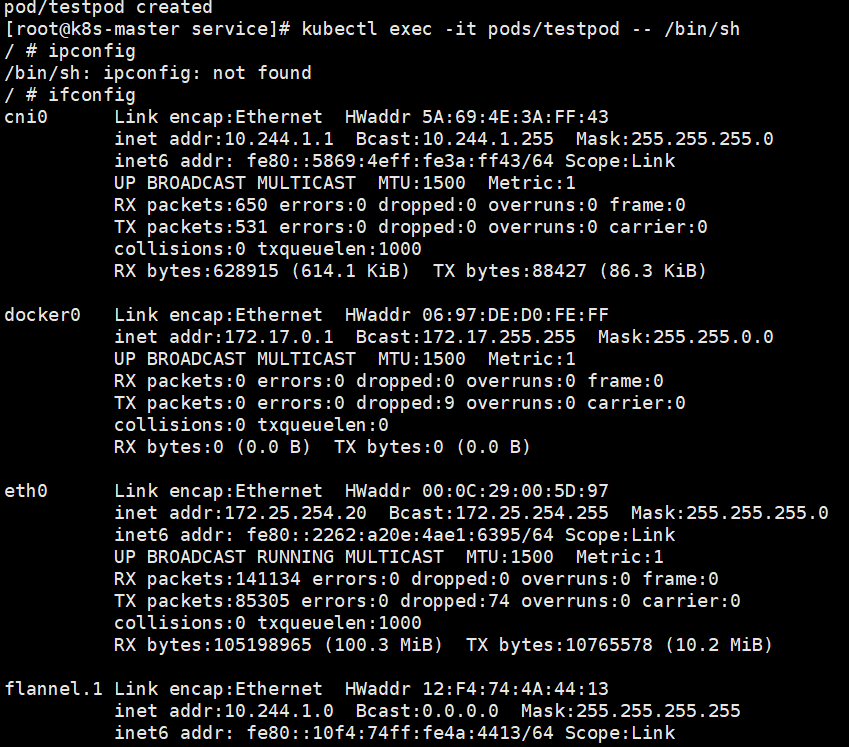
6.资源优先级
BestEffort没有做任何资源限制,资源使用优先级最低,默认选项
bash
[root@k8s-master service]# vim testpod.yml
apiVersion: v1
kind: Pod
metadata:
  labels:
    run: testpod
  name: testpod
spec:
  containers:
  - image: myapp:v1
    name: myapp

[root@k8s-master service]# kubectl apply -f testpod.yml
pod/testpod created
[root@k8s-master service]# kubectl describe pods  testpod  | grep "QoS Class:"
QoS Class:                   BestEffort

[root@k8s-master service]#  kubectl delete -f testpod.yml --force
Burstable 设定了资源限制,但是期望值和限制值不同,资源使用优先级次之
bash
[root@k8s-master service]# vim testpod.yml
apiVersion: v1
kind: Pod
metadata:
  labels:
    run: testpod
  name: testpod
spec:
  containers:
  - image: myapp:v1
    name: myapp
    resources:
      limits:
        cpu: 700m
        memory: 200M
      requests:
        cpu: 500m
        memory: 100M

[root@k8s-master service]# kubectl apply -f testpod.yml
pod/testpod created
[root@k8s-master service]# kubectl describe pods  testpod  | grep "QoS Class:"
QoS Class:                   Burstable

[root@k8s-master service]#  kubectl delete -f testpod.yml --force
Guaranteed期望值和最大使用限制相同,优先级最高
bash
[root@k8s-master service]# vim testpod.yml
apiVersion: v1
kind: Pod
metadata:
  labels:
    run: testpod
  name: testpod
spec:
  containers:
  - image: myapp:v1
    name: myapp
    resources:
      limits:
        cpu: 500m
        memory: 100M
      requests:
        cpu: 500m
        memory: 100M

[root@k8s-master service]# kubectl apply -f testpod.yml
pod/testpod created
[root@k8s-master service]# kubectl describe pods  testpod  | grep "QoS Class:"
QoS Class:                   Guaranteed


[root@k8s-master service]#  kubectl delete -f testpod.yml --force
7.容器重启规则
Always 无论什么原因都会从新运行pod
bash
[root@k8s-master service]# vim testpod.yml
apiVersion: v1
kind: Pod
metadata:
  labels:
    run: testpod
  name: testpod
spec:
  restartPolicy: Always
  containers:
  - image: busybox:latest
    name: busybox
    command:
    - /bin/sh
    - -c
    - sleep 10


[root@k8s-master service]# kubectl apply -f testpod.yml
pod/testpod created

[root@k8s-master service]# kubectl get pods -w
NAME      READY   STATUS    RESTARTS   AGE
testpod   1/1     Running   0          7s
testpod   0/1     Completed   0          13s
testpod   1/1     Running     1 (2s ago)   14s

[root@k8s-master service]#  kubectl delete -f testpod.yml --force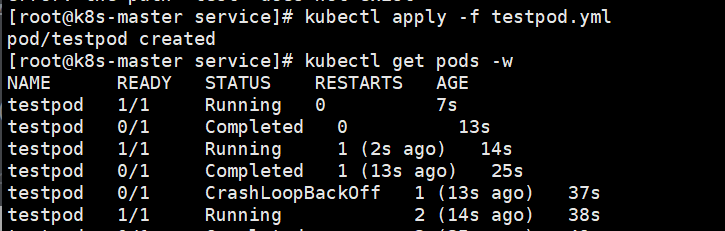
OnFailure 非正常管关闭会从其pod
bash
[root@k8s-master service]# vim testpod.yml
apiVersion: v1
kind: Pod
metadata:
  labels:
    run: testpod
  name: testpod
spec:
  restartPolicy: OnFailure
  containers:
  - image: busybox:latest
    name: busybox
    command:
    - /bin/sh
    - -c
    - sleep 10

[root@k8s-master service]# kubectl apply -f testpod.yml
pod/testpod created

[root@k8s-master service]# kubectl apply -f testpod.yml
pod/testpod created
[root@k8s-master service]# kubectl get pods -w
NAME      READY   STATUS    RESTARTS   AGE
testpod   1/1     Running   0          2s
testpod   0/1     Completed   0          12s
testpod   0/1     Completed   0          13s


[root@k8s-master service] kubectl delete -f testpod.yml --force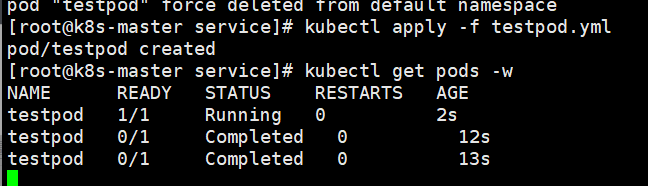
Never pod关闭后不重启
bash
[root@k8s-master service]# vim testpod.yml
apiVersion: v1
kind: Pod
metadata:
  labels:
    run: testpod
  name: testpod
spec:
  restartPolicy: Never
  containers:
  - image: busybox:latest
    name: busybox
    command:
    - /bin/sh
    - -c
    - sleep 10

[root@k8s-master service]# kubectl apply -f testpod.yml
pod/testpod created
[root@k8s-master service]# kubectl get pods -w
NAME      READY   STATUS    RESTARTS   AGE
testpod   1/1     Running   0          3s
testpod   0/1     Completed   0          13s
testpod   0/1     Completed   0          14s


[root@k8s-master service]#  kubectl delete -f testpod.yml --force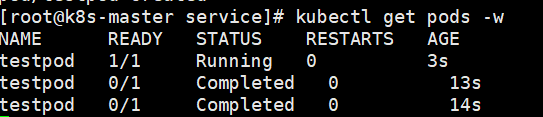
四、pod的生命周期
1.init容器
init 容器 (Init Container)是 Kubernetes 中一种特殊的容器 ,它在 Pod 的主容器(App Container)启动之前 运行,并且主要用于执行一些初始化任务(比如等待依赖服务就绪、下载配置文件、初始化数据库结构等)。
可以把它理解为一个 Pod 启动前的 "准备工作阶段"。
bash
[root@k8s-master service]# vim testpod.yml
apiVersion: v1
kind: Pod
metadata:
  labels:
    run: testpod
  name: testpod
spec:
  initContainers:
  - image: busybox:latest
    name: busybox
    command:
    - /bin/sh
    - -c
    - "until test -e /testfile;do echo wating for myservice; sleep 2; done"
  containers:
  - image: myapp:v1
    name: myapp
  restartPolicy: Always

[root@k8s-master service]# kubectl apply -f testpod.yml
pod/testpod created
[root@k8s-master service]# kubectl get pods
NAME      READY   STATUS     RESTARTS   AGE
testpod   0/1     Init:0/1   0          5s


[root@k8s-master service]# kubectl logs pods/testpod -c busybox
wating for myservice
wating for myservice
wating for myservice
wating for myservice
wating for myservice
wating for myservice
wating for myservice
wating for myservice
wating for myservice
wating for myservice
wating for myservice
[root@k8s-master service]# kubectl exec -it pods/testpod -c busybox -- /bin/sh
/ # mkdir /testfile
/ # exit
[root@k8s-master ~]# kubectl get pods
NAME      READY   STATUS    RESTARTS   AGE
testpod   1/1     Running   0          102s

[root@k8s-master service]# kubectl delete -f testpod.yml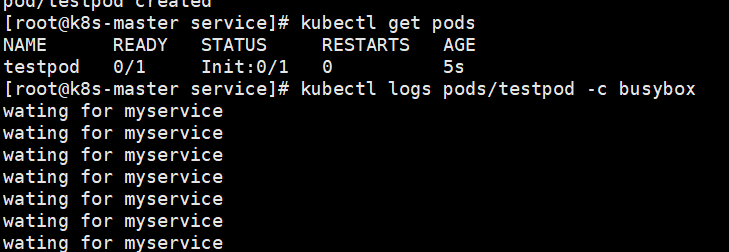


2.存活探针livness
场景复现
bash
[root@k8s-master service]# vim testpod.yml
apiVersion: v1
kind: Pod
metadata:
  labels:
    run: testpod
  name: testpod
spec:
  containers:
  - image: myapp:v1
    name: myapp
    command: ["/bin/sh", "-c"]
    args:
    - |
      nginx -g "daemon off;"
      sleep 10000
  restartPolicy: Always
[root@k8s-master service]# kubectl apply -f testpod.yml
pod/testpod created
[root@k8s-master service]# kubectl get pods -o wide
NAME      READY   STATUS    RESTARTS   AGE   IP            NODE        NOMINATED NODE   READINESS GATES
testpod   1/1     Running   0          19s   10.244.1.48   k8s-node2   <none>           <none>

[root@k8s-master service]# curl 10.244.1.48
Hello MyApp | Version: v1 | <a href="hostname.html">Pod Name</a>


[root@k8s-master service]# kubectl exec  -it  pods/testpod -c myapp  -- /bin/sh
/ #  nginx -s stop
2026/08/25 09:35:44 [notice] 15#15: signal process started
/ # exit

[root@k8s-master service]# curl 10.244.1.48
curl: (7) Failed to connect to 10.244.1.48 port 80: 拒绝连接
[root@k8s-master service]# kubectl get pods -o wide
NAME      READY   STATUS    RESTARTS   AGE    IP            NODE        NOMINATED NODE   READINESS GATES
testpod   1/1     Running   0          100s   10.244.1.48   k8s-node2   <none>           <none>


[root@k8s-master service]# kubectl delete -f testpod.yml --force
这里可以看到,容器服务停止后,pod依然是running状态,但是不提供服务
加上live探针后
bash
[root@k8s-master service]# vim testpod.yml
apiVersion: v1
kind: Pod
metadata:
  labels:
    run: testpod
  name: testpod
spec:
  containers:
  - image: myapp:v1
    name: myapp
    command: ["/bin/sh", "-c"]
    args:
    - |
      nginx -g "daemon off;"
      sleep 10000
    livenessProbe:
      tcpSocket:
        port: 80
      initialDelaySeconds: 3
      periodSeconds: 1
      timeoutSeconds: 1
  restartPolicy: Always

[root@k8s-master service]# kubectl apply -f testpod.yml
pod/testpod created

[root@k8s-master service]# kubectl exec  -it  pods/testpod -c myapp  -- /bin/sh
/ # nginx -s stop
2026/08/25 09:41:30 [notice] 15#15: signal process started
/ # exit

curl: (7) Failed to connect to 10.244.1.49 port 80: 拒绝连接
[root@k8s-master service]# curl 10.244.1.49
curl: (7) Failed to connect to 10.244.1.49 port 80: 拒绝连接
[root@k8s-master service]# curl 10.244.1.49
curl: (7) Failed to connect to 10.244.1.49 port 80: 拒绝连接
[root@k8s-master service]# curl 10.244.1.49
Hello MyApp | Version: v1 | <a href="hostname.html">Pod Name</a>


[root@k8s-master service]# kubectl delete -f testpod.yml --force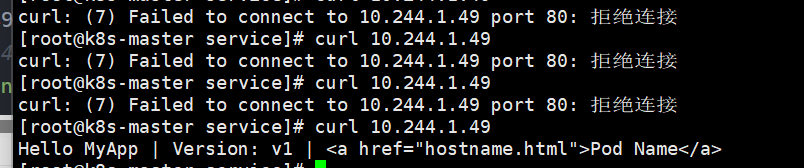
3.readness 就绪探针
场景复现
bash
[root@k8s-master service]# vim testpod.yml
apiVersion: v1
kind: Pod
metadata:
  labels:
    run: testpod
  name: testpod
spec:
  containers:
  - image: myapp:v1
    name: myapp
  restartPolicy: Always
---
apiVersion: v1
kind: Service
metadata:
  labels:
    run: webserver
  name: webserver
spec:
  ports:
  - port: 80
    protocol: TCP
    targetPort: 80
  selector:
    run: webserver

[root@k8s-master service]# kubectl apply -f testpod.yml
pod/testpod created
service/webserver created

[root@k8s-master service]# kubectl exec pods/testpod -- rm -rf /usr/share/nginx/html/index.html

[root@k8s-master service]# kubectl describe  svc webserver
Endpoints:                10.244.1.51:80    #还在


[root@k8s-master service]# curl 10.99.152.83
<html>
<head><title>403 Forbidden</title></head>
<body bgcolor="white">
<center><h1>403 Forbidden</h1></center>
<hr><center>nginx/1.12.2</center>
</body>
</html>
这里可以看到,容器服务的文件丢失后,service不会去除pod的ip,依然会调度到错误容器上
加上readness探针后
bash
[root@k8s-master service]# vim testpod.yml
apiVersion: v1
kind: Pod
metadata:
  labels:
    run: testpod
  name: testpod
spec:
  containers:
  - image: myapp:v1
    name: myapp
    readinessProbe:
      httpGet:
        path: /index.html
        port: 80
      initialDelaySeconds: 3
      periodSeconds: 2
      timeoutSeconds: 1
  restartPolicy: Always
---
apiVersion: v1
kind: Service
metadata:
  labels:
    run: webserver
  name: webserver
spec:
  ports:
  - port: 80
    protocol: TCP
    targetPort: 80
  selector:
    run: testpod

[root@k8s-master service]# kubectl apply -f testpod.yml
pod/testpod created
service/webserver created
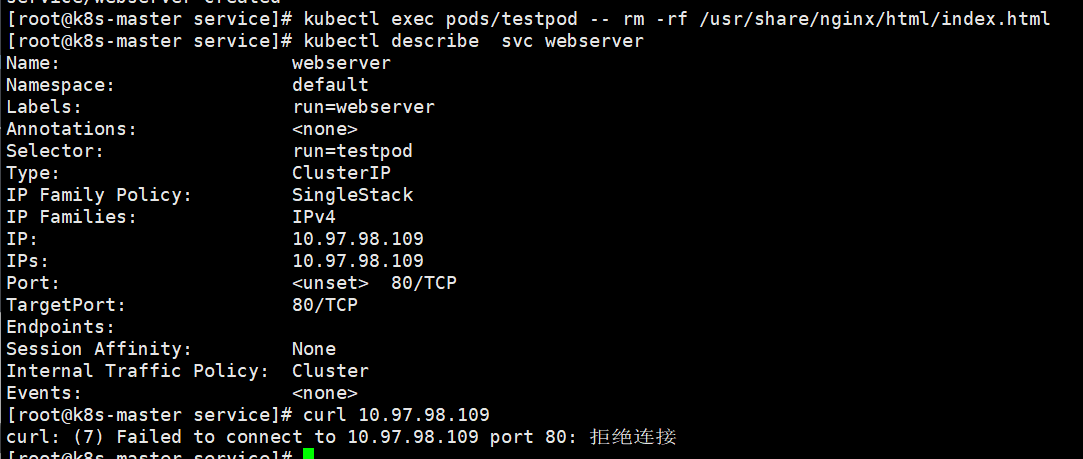
[root@k8s-master service]# kubectl exec pods/testpod -- rm -rf /usr/share/nginx/html/index.html
[root@k8s-master service]# kubectl describe  svc webserver
Endpoints:

[root@k8s-master service]# curl 10.97.98.109
curl: (7) Failed to connect to 10.97.98.109 port 80: 拒绝连接