若该文为原创文章,转载请注明原文出处。
一、背景与需求
在嵌入式Linux设备中,常使用BOA作为轻量级Web服务器。近期需要实现一个视频回放功能:在Web页面上显示指定目录(/mnt/sd/video/)下的所有MP4文件列表,点击即可播放。
设备环境:
-
Web服务器:BOA
-
文档根目录:
/customer/web -
视频存储目录:
/mnt/sd/video/ -
设备IP:
192.168.50.132
二、方案选择与设计
2.1 方案对比
| 方案 | 优点 | 缺点 | 适用性 |
|---|---|---|---|
| 直接目录列表 (Indexes On) | 无需编码,简单 | 样式简陋,无法控制 | 不满足需求 |
| AJAX读取目录HTML | 纯前端 | BOA对AJAX响应为空 | 实测失败 |
| CGI生成JSON列表 | 稳定可控,可扩展 | 需要编写CGI脚本 | ✅ 最终采用 |
2.2 最终方案架构
-
软链接 :将
/customer/web/video指向实际视频目录,使视频文件可通过HTTP直接访问。 -
CGI脚本:扫描视频目录,生成JSON格式的文件列表。
-
前端页面:通过AJAX获取JSON,渲染文件列表,点击播放。
三、详细操作步骤
3.1 创建软链接
cd /customer/web
ln -s /mnt/sd/video video-
作用:访问
http://设备IP/video/1.mp4即可获取实际文件。 -
验证:浏览器打开
http://192.168.50.132/video/1.mp4看能否播放。
3.2 编写CGI脚本
创建文件 /customer/web/video_list.cgi,内容如下:
#!/bin/sh
echo "Content-type: application/json"
echo
cd /mnt/sd/video 2>/dev/null || { echo "[]"; exit 0; }
first=1
echo "["
for f in *.mp4; do
    [ -f "$f" ] || continue
    [ $first -eq 1 ] && first=0 || echo ","
    printf '{"name":"%s","url":"/video/%s"}' "$f" "$f"
done
echo "]"
赋予执行权限:
chmod +x /customer/web/video_list.cgi注意:如果脚本是在Windows下编辑的,需要转换换行符为Unix格式:
sed -i 's/\r$//' /customer/web/video_list.cgi验证 :浏览器访问 http://192.168.50.132/video_list.cgi,应返回JSON数据,例如:
[{"name":"1.mp4","url":"/video/1.mp4"}]3.3 创建前端页面
将以下代码保存为 /customer/web/playbackvideo.html。
<!DOCTYPE html>
<html lang="en">
<head>
    <meta charset="UTF-8">
    <title>Video Playback</title>
    <link type="text/css" href="css/style.css" rel="stylesheet">
    <script type="text/javascript" src="js/script.js"></script>
    <style>
        /* ---------- 全局重置 ---------- */
        * {
            box-sizing: border-box;
            margin: 0;
            padding: 0;
        }
        body {
            font-family: 'Segoe UI', Roboto, 'Helvetica Neue', sans-serif;
            background: #f4f6f9;
            color: #333;
        }

        /* ---------- 标题栏 ---------- */
        .header-bar {
            padding: 15px 25px;
            background: linear-gradient(135deg, #2c3e50, #1a252f);
            display: flex;
            justify-content: space-between;
            align-items: center;
            border-radius: 8px 8px 0 0;
            margin: 10px 20px 0 20px;
        }
        .header-bar h2 {
            color: #ecf0f1;
            font-weight: 400;
            font-size: 22px;
            letter-spacing: 1px;
            margin: 0;
        }
        .header-bar h2 i {
            margin-right: 10px;
        }
        .refresh-btn {
            padding: 6px 18px;
            background: #5bc0de;
            color: #fff;
            border: none;
            border-radius: 20px;
            cursor: pointer;
            font-size: 14px;
            transition: background 0.2s;
        }
        .refresh-btn:hover {
            background: #31b0d5;
        }

        /* ---------- 主体左右布局 ---------- */
        .video-container {
            display: flex;
            gap: 25px;
            padding: 20px;
            background: #fff;
            margin: 0 20px 20px 20px;
            border-radius: 0 0 8px 8px;
            box-shadow: 0 2px 8px rgba(0,0,0,0.08);
            min-height: 500px;
        }
        .player-wrapper {
            flex: 2;
            min-width: 0;
        }
        .list-wrapper {
            flex: 1;
            min-width: 200px;
            max-width: 350px;
        }

        /* ---------- 播放器 ---------- */
        #playerContainer {
            background: #000;
            border-radius: 8px;
            overflow: hidden;
            box-shadow: 0 4px 12px rgba(0,0,0,0.2);
        }
        video {
            display: block;
            width: 100%;
            max-height: 500px;
            background: #000;
        }

        /* ---------- 列表 ---------- */
        .list-header {
            display: flex;
            justify-content: space-between;
            align-items: baseline;
            margin-bottom: 12px;
        }
        .list-header span:first-child {
            font-weight: 600;
            color: #2c3e50;
            font-size: 16px;
        }
        .list-header .file-count {
            font-size: 13px;
            color: #95a5a6;
        }
        #videoList {
            border: 1px solid #e8ecf0;
            border-radius: 8px;
            background: #fff;
            max-height: 460px;
            overflow-y: auto;
            box-shadow: inset 0 1px 3px rgba(0,0,0,0.03);
        }
        /* 滚动条美化 */
        #videoList::-webkit-scrollbar {
            width: 6px;
        }
        #videoList::-webkit-scrollbar-track {
            background: #f1f1f1;
            border-radius: 4px;
        }
        #videoList::-webkit-scrollbar-thumb {
            background: #c1c7cd;
            border-radius: 4px;
        }
        #videoList::-webkit-scrollbar-thumb:hover {
            background: #a0a8b0;
        }

        .video-item {
            display: flex;
            align-items: center;
            padding: 10px 14px;
            border-bottom: 1px solid #f0f2f5;
            cursor: pointer;
            transition: background 0.15s, transform 0.1s;
        }
        .video-item:last-child {
            border-bottom: none;
        }
        .video-item:hover {
            background: #f0f7ff;
        }
        .video-item:active {
            transform: scale(0.98);
        }
        .video-item .file-icon {
            margin-right: 12px;
            font-size: 20px;
            color: #3498db;
            flex-shrink: 0;
        }
        .video-item .file-name {
            flex: 1;
            font-size: 14px;
            color: #2c3e50;
            white-space: nowrap;
            overflow: hidden;
            text-overflow: ellipsis;
        }
        .video-item .play-badge {
            background: #ecf0f1;
            color: #7f8c8d;
            border-radius: 12px;
            padding: 2px 10px;
            font-size: 11px;
            transition: background 0.2s;
        }
        .video-item:hover .play-badge {
            background: #3498db;
            color: #fff;
        }

        /* 空状态 & 错误 */
        .no-video, .error, .loading {
            padding: 30px 15px;
            text-align: center;
            color: #95a5a6;
            font-size: 15px;
        }
        .error {
            color: #e74c3c;
        }
        .loading {
            color: #3498db;
        }

        /* ---------- 手动输入 ---------- */
        .manual-input {
            margin-top: 15px;
            display: flex;
            gap: 8px;
            align-items: center;
            background: #f8f9fa;
            padding: 8px 12px;
            border-radius: 6px;
            border: 1px solid #e8ecf0;
        }
        .manual-input input {
            flex: 1;
            padding: 6px 10px;
            border: 1px solid #dce1e6;
            border-radius: 4px;
            font-size: 13px;
            outline: none;
            transition: border 0.2s;
        }
        .manual-input input:focus {
            border-color: #3498db;
        }
        .manual-input button {
            padding: 6px 18px;
            background: #3498db;
            color: #fff;
            border: none;
            border-radius: 4px;
            cursor: pointer;
            font-size: 13px;
            transition: background 0.2s;
        }
        .manual-input button:hover {
            background: #2980b9;
        }

        /* ---------- 响应式 ---------- */
        @media (max-width: 768px) {
            .video-container {
                flex-direction: column;
                padding: 15px;
                margin: 0 10px 10px 10px;
            }
            .list-wrapper {
                max-width: 100%;
            }
            .header-bar {
                flex-direction: column;
                align-items: flex-start;
                gap: 8px;
                padding: 12px 18px;
                margin: 10px 10px 0 10px;
            }
            .header-bar h2 {
                font-size: 18px;
            }
            .video-item .file-name {
                white-space: normal;
                word-break: break-all;
            }
        }
    </style>
    <script>
        function loadVideoList() {
            var container = document.getElementById('videoList');
            var statusMsg = document.getElementById('statusMsg');
            container.innerHTML = '<div class="loading">⏳ Loading video list...</div>';
            statusMsg.textContent = 'Fetching from CGI...';

            var xhr = new XMLHttpRequest();
            xhr.open('GET', '/video_list.cgi', true);
            xhr.onreadystatechange = function() {
                if (xhr.readyState == 4) {
                    if (xhr.status == 200) {
                        try {
                            var data = JSON.parse(xhr.responseText);
                            // 兼容单个对象或数组
                            var files = Array.isArray(data) ? data : [data];
                            if (!files || files.length === 0) {
                                container.innerHTML = '<div class="no-video">📂 No MP4 files found.</div>';
                                showManualInput(container);
                                return;
                            }
                            container.innerHTML = '';
                            for (var i = 0; i < files.length; i++) {
                                var item = document.createElement('div');
                                item.className = 'video-item';
                                item.innerHTML = '<span class="file-icon">🎬</span>' +
                                                  '<span class="file-name">' + files[i].name + '</span>' +
                                                  '<span class="play-badge">▶ Play</span>';
                                item.onclick = (function(f) {
                                    return function() {
                                        playVideo(f.url);
                                    };
                                })(files[i]);
                                container.appendChild(item);
                            }
                            document.getElementById('fileCount').textContent = files.length + ' files';
                        } catch (e) {
                            container.innerHTML = '<div class="error">❌ Failed to parse JSON: ' + e.message + '</div>';
                            showManualInput(container);
                        }
                    } else {
                        container.innerHTML = '<div class="error">❌ Failed to load (HTTP ' + xhr.status + ').<br>Check CGI script.</div>';
                        showManualInput(container);
                    }
                }
            };
            xhr.send();
        }

        function playVideo(url) {
            var video = document.getElementById('videoPlayer');
            video.src = url;
            video.load();
            video.play().catch(function(e) {
                alert('Playback error: ' + e.message);
            });
        }

        function showManualInput(container) {
            var div = document.createElement('div');
            div.className = 'manual-input';
            div.innerHTML = '<input type="text" id="manualFile" placeholder="filename.mp4"> ' +
                            '<button onclick="playManual()">▶ Play</button>';
            container.appendChild(div);
        }

        function playManual() {
            var name = document.getElementById('manualFile').value.trim();
            if (name) {
                playVideo('/video/' + name);
            }
        }

        window.onload = function() {
            loadVideoList();
        };
    </script>
</head>
<body>
    <!-- 标题栏 -->
    <div class="header-bar">
        <h2><span style="font-weight:300;">🎞️</span> Video Playback</h2>
        <button class="refresh-btn" onclick="loadVideoList()">↻ Refresh</button>
    </div>

    <!-- 左右主体 -->
    <div class="video-container">
        <!-- 左:播放器 -->
        <div class="player-wrapper">
            <div id="playerContainer">
                <video id="videoPlayer" controls style="width:100%; max-height:500px;"></video>
            </div>
        </div>
        <!-- 右:列表 -->
        <div class="list-wrapper">
            <div class="list-header">
                <span>📋 Video List</span>
                <span class="file-count" id="fileCount">0 files</span>
            </div>
            <div id="videoList"></div>
            <div id="statusMsg" style="display:none;"></div>
        </div>
    </div>
</body>
</html>
四、常见问题与解决
4.1 CGI脚本返回502 Bad Gateway
原因 :脚本中存在Windows换行符(CRLF)或echo语法错误。
解决 :使用 sed -i 's/\r$//' /customer/web/video_list.cgi 转换换行符,并确保脚本内容正确。
4.2 视频文件无法播放(404)
原因 :HTML中的视频路径与软链接映射不一致。
解决 :确保视频URL使用 /video/ 前缀,且软链接 video -> /mnt/sd/video 已正确创建。
4.3 列表显示"No MP4 files found"
原因 :目录下没有 .mp4 文件,或CGI脚本无权限访问。
解决 :确认目录存在并有文件,检查CGI脚本执行权限 chmod +x /customer/web/video_list.cgi。
4.4 前端页面样式丢失
原因 :未正确引用 css/style.css 或文件路径错误。
解决:确认CSS文件存在,或直接将样式内嵌到HTML中(已内嵌)。
五、扩展与优化建议
-
支持更多格式 :修改CGI脚本中的
*.mp4为*.mp4 *.avi *.mov。 -
显示文件大小和修改时间 :在CGI中使用
stat命令获取详细信息并附加到JSON。 -
分页或搜索:在HTML前端实现,适用于文件数量较多的情况。
-
安全性:可增加登录验证或限制访问IP。
六、总结
本文详细介绍了在BOA服务器下实现视频回放功能的完整流程,采用"软链接+CGI"方案,成功解决了嵌入式设备中轻量级Web服务的视频列表需求。该方案稳定、可扩展,适用于各种文件管理场景。如有问题,欢迎交流讨论。
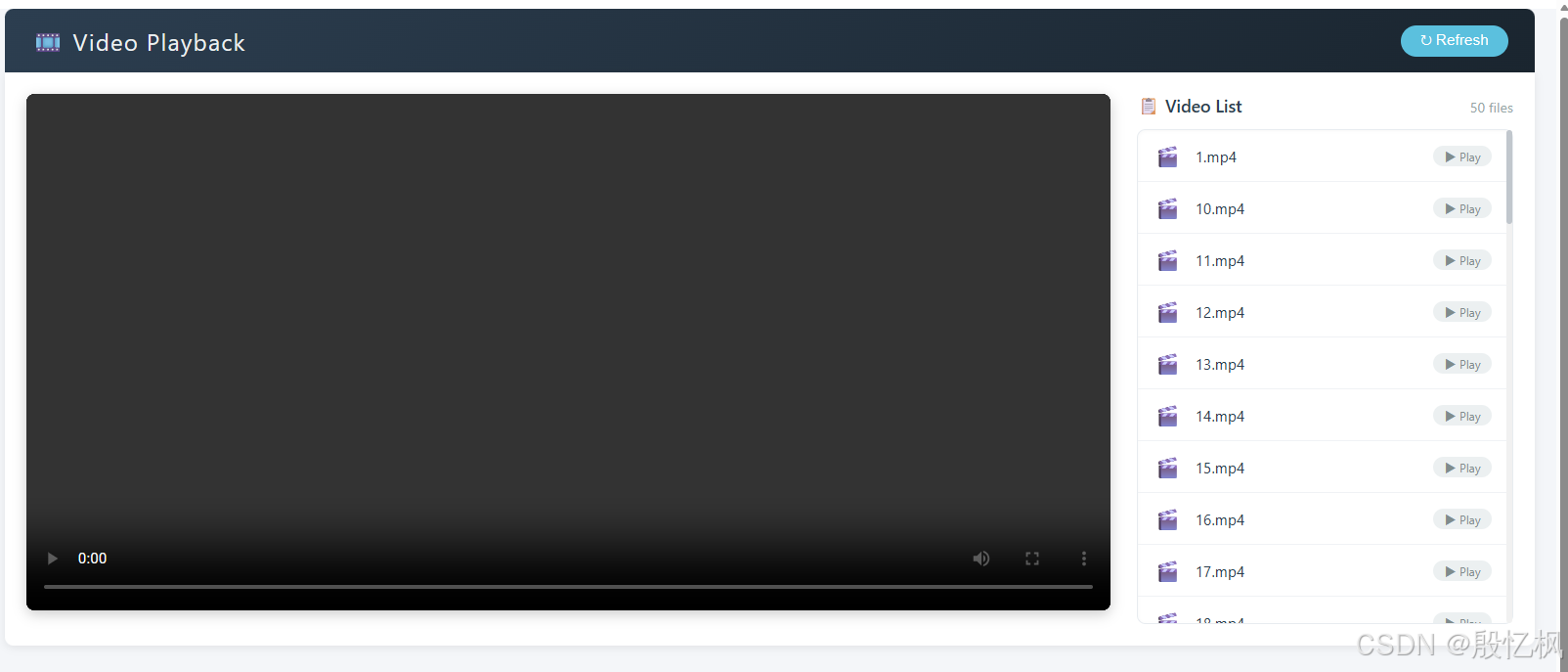
测试结果正常
如有侵权,或需要完整代码,请及时联系博主。