一、资源管理
1.介绍
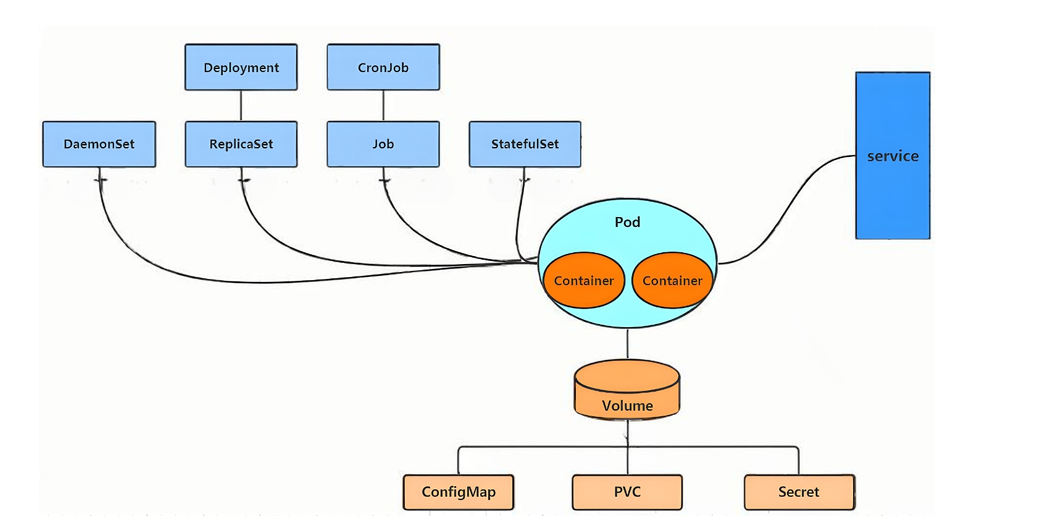
1.在kubernetes中,所有的内容都抽象为资源,用户需要通过操作资源来管理kubernetes。
2.kubernetes的最小管理单元是Pod,容器放在 Pod 中, kubernetes一般也不会直接管理Pod,而是通过 Pod控制器来管理Pod的。
3.Pod中服务的访问是由kubernetes提供的 Service 资源来实现。
4.Pod中程序的数据需要持久化是由kubernetes提供的各种存储系统来实现的。
2.方式
|---------|---------|------------------|------------------------------------------------------|
| 类型 | 优点 | 缺点 | 示例 |
| 命令式对象管理 | 简单 | 只能操作活动对象,无法审计、跟踪 | kubectl run nginx-pod --image=nginx:latest --port=80 |
| 命令式对象配置 | 可以审计、跟踪 | 项目大时,配置文件多,操作麻烦 | kubectl create/patch -f nginx-pod.yaml |
| 声明式对象配置 | 支持目录操作 | 意外情况下难以调试 | kubectl apply -f nginx-pod.yaml |
2.1命令式对象管理
cs
语法
kubectl [command] [type] [name] [flags]

comand:指定要对资源执行的操作,例如create、get、delete
type:指定资源类型,比如deployment、pod、service
name:指定资源的名称,名称大小写敏感
flags:指定额外的可选参数
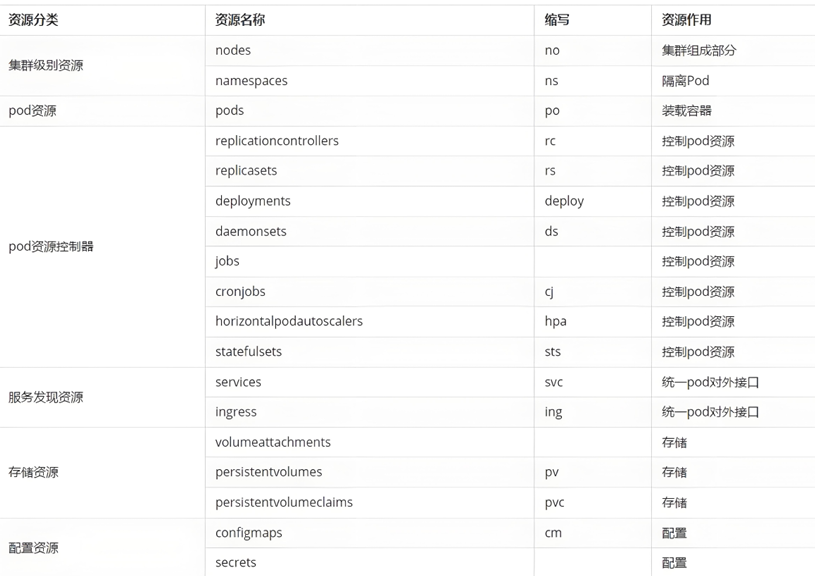
常见命令操作
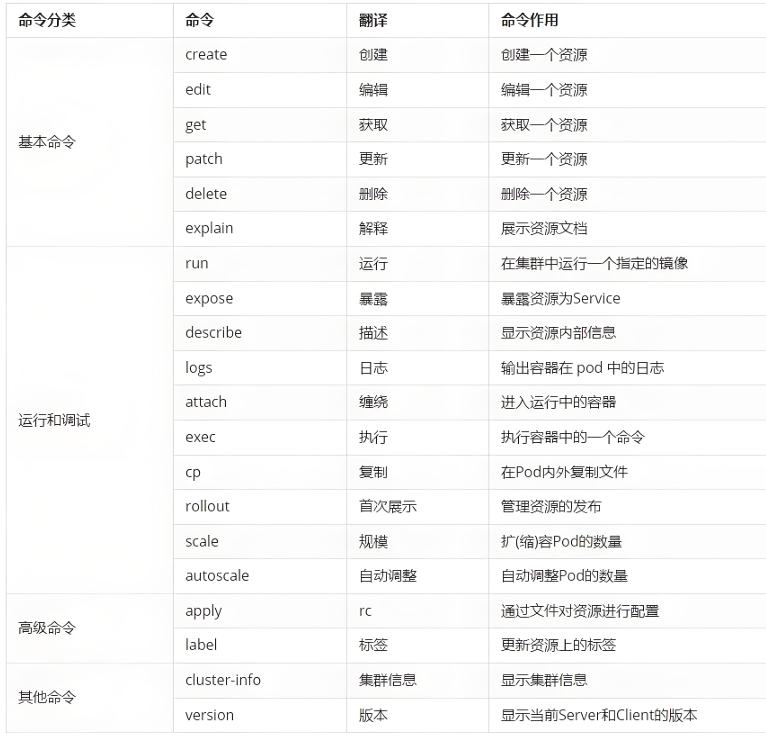
常见资源类型
2.1.1命名空间管理
cs
#查看命名空间
[root@k8s-master ~]# kubectl get namespaces

#创建命名空间
[root@k8s-master ~]# kubectl get namespaces

#删除命名空间
[root@k8s-master ~]# kubectl delete namespaces  timinglee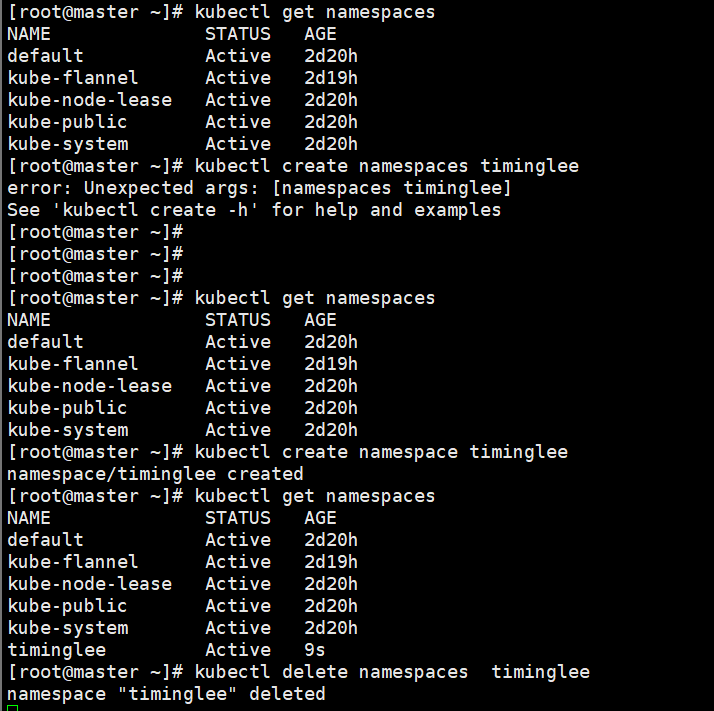
2.1.2pod管理
cs
#查看pod的运行情况和在哪里运行
[root@k8s-master ~]# kubectl get pods  -o wide

#创建pod
[root@k8s-master ~]# kubectl run  lee --image nginx:latest

[root@k8s-master ~]# kubectl get pods  -o wide

#当pod创建出现问题
[root@k8s-master ~]# kubectl run  error --image lee:v1
[root@k8s-master ~]# kubectl get pods -o wide

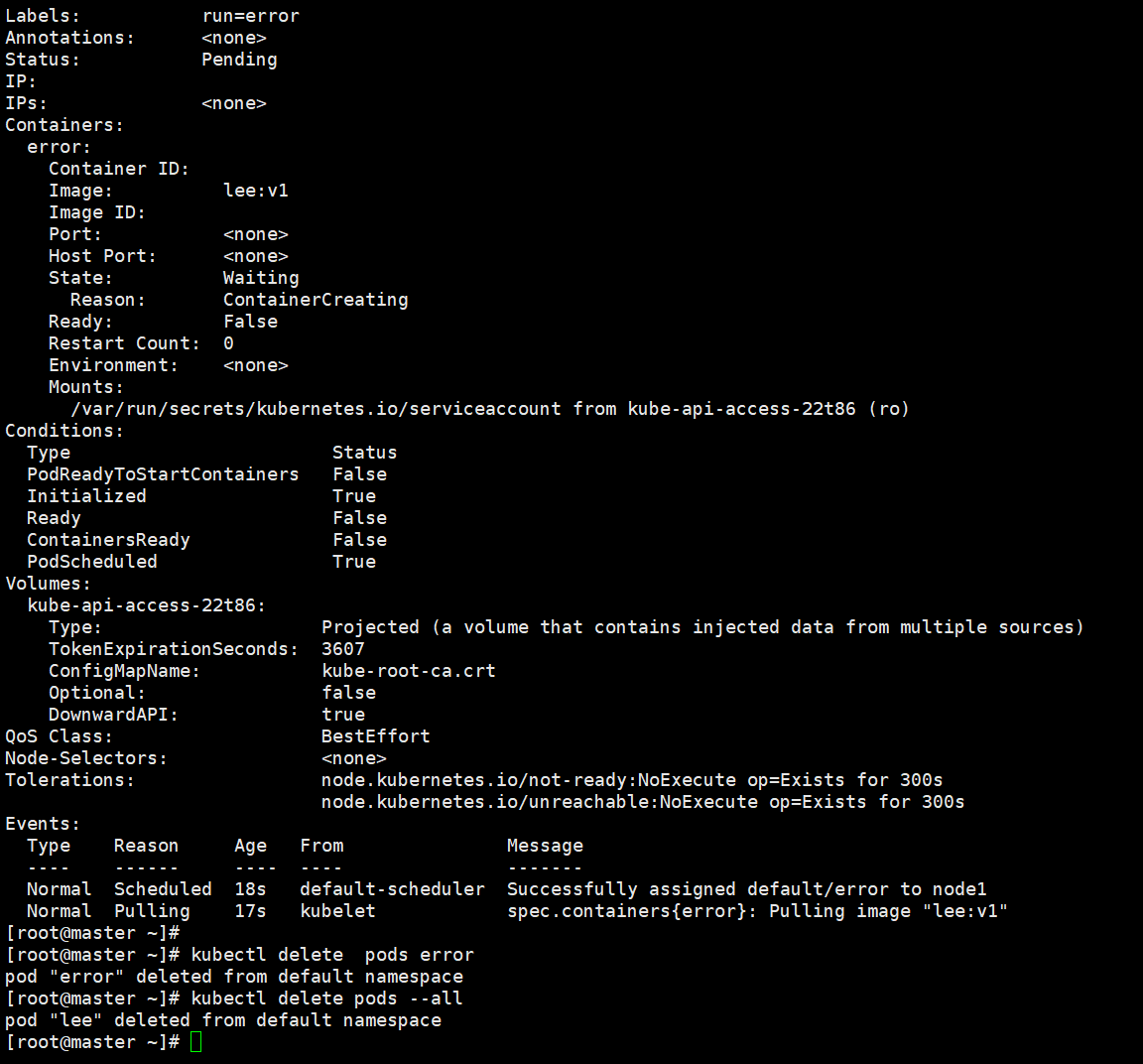
#查看pod运行的详细信息
[root@k8s-master ~]# kubectl describe  pods  error

#删除
[root@k8s-master ~]# kubectl delete  pods error
[root@k8s-master ~]# kubectl delete pods --all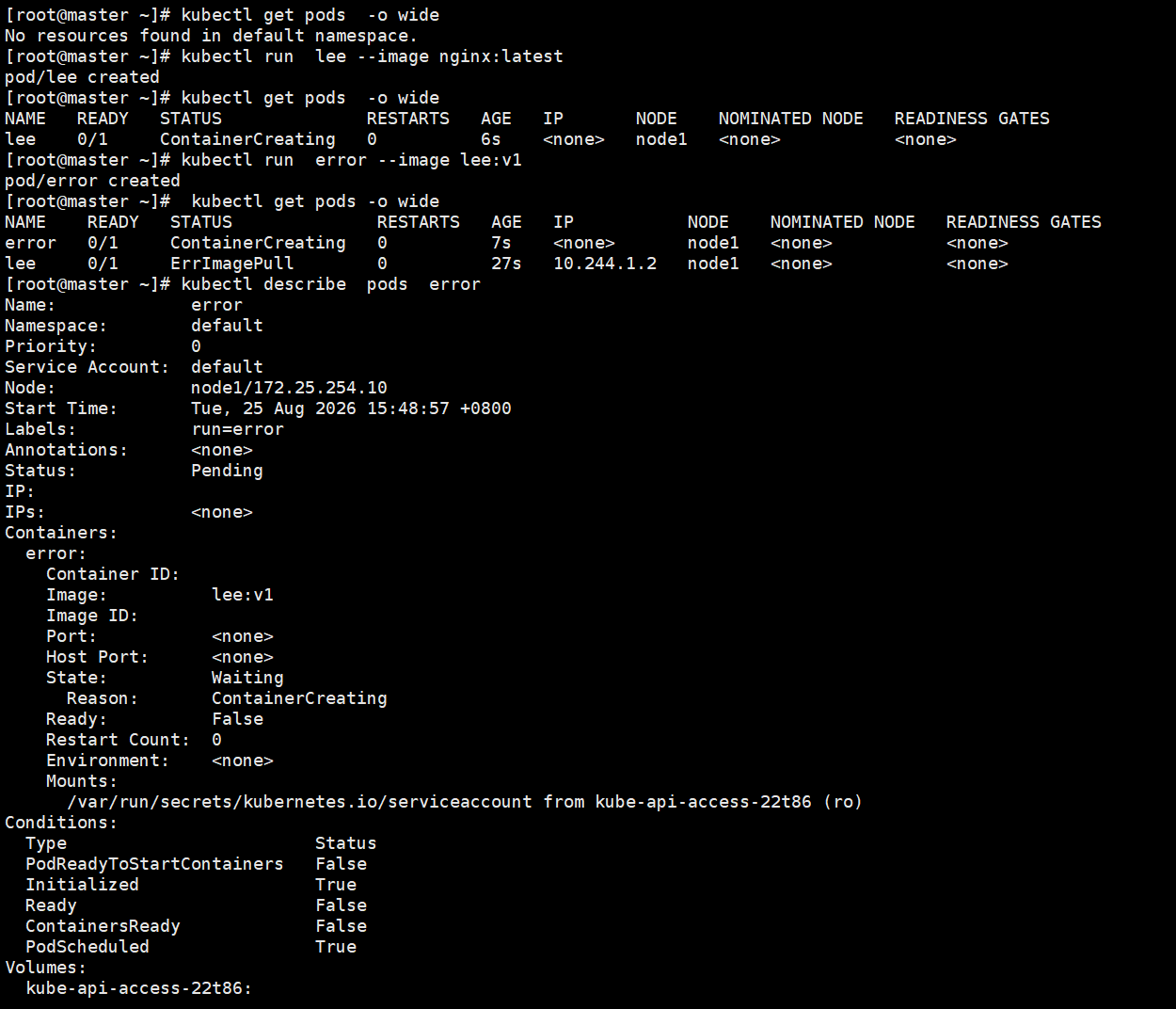
3.kubectl 命令实操
3.1准备
cs
上传实验镜像到仓库library中
[root@k8s-master ~]# docker load  -i myapp.tar.gz
[root@k8s-master ~]# docker tag timinglee/myapp:v1 reg.timinglee.org/library/myapp:v1
[root@k8s-master ~]# docker push  reg.timinglee.org/library/myapp:v1
[root@k8s-master ~]# docker tag timinglee/myapp:v2 reg.timinglee.org/library/myapp:v2
[root@k8s-master ~]# docker push  reg.timinglee.org/library/myapp:v2


生成实验所需yml文件
[root@k8s-master ~]# vim replica.yml
apiVersion: apps/v1
kind: ReplicaSet
metadata:
  labels:
    app: replica	#设定控制器标签
  name: replica
spec:
  replicas: 2		#启动pod数量
  selector:
    matchLabels:
      app: replica	#控制器标签选择器
  template:
    metadata:
      labels:
        app: replica	#开启pod的属性模板
    spec:
      containers:
      - image: myapp:v1
        name: myapp
3.2kubectl命令使用方法
create
cs
[root@k8s-master ~]# kubectl create deployment webcluster --replicas 2 --image myapp:v1

[root@k8s-master ~]# kubectl get deployments.apps

[root@k8s-master ~]# kubectl get pods

[root@k8s-master ~]# kubectl delete deployments.apps webcluster

[root@k8s-master ~]# kubectl get pods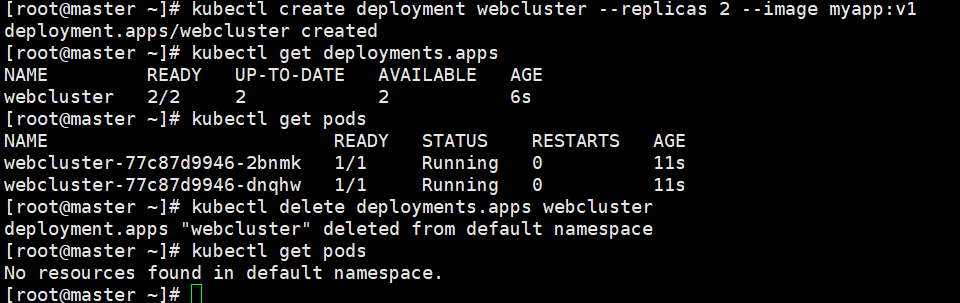
edit
cs
[root@k8s-master ~]# kubectl create deployment webcluster --image myapp:v1

[root@k8s-master ~]# kubectl get pods

[root@k8s-master ~]# kubectl edit deployments.apps webcluster
修改
replicas: 2

[root@k8s-master ~]# kubectl get pods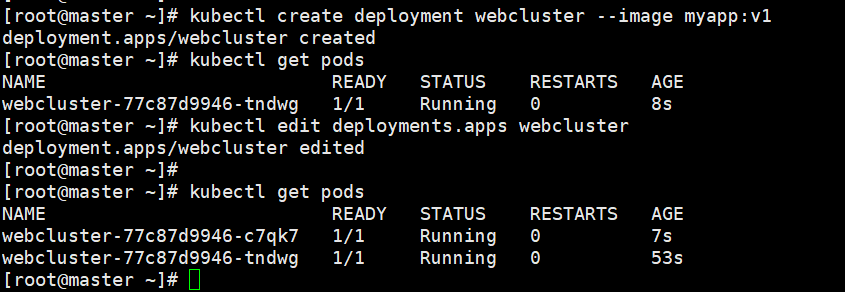
patch
cs
[root@k8s-master ~]# kubectl patch deployments.apps webcluster -p '{"spec":{"replicas":1}}'

[root@k8s-master ~]# kubectl get pods
expose
cs
[root@k8s-master ~]# kubectl expose deployment webcluster --port  80 --target-port 80

[root@k8s-master ~]# kubectl get service

[root@k8s-master ~]# kubectl describe  svc webcluster

[root@k8s-master ~]# curl 10.111.54.109/hostname.html
webcluster-77c87d9946-c7qk7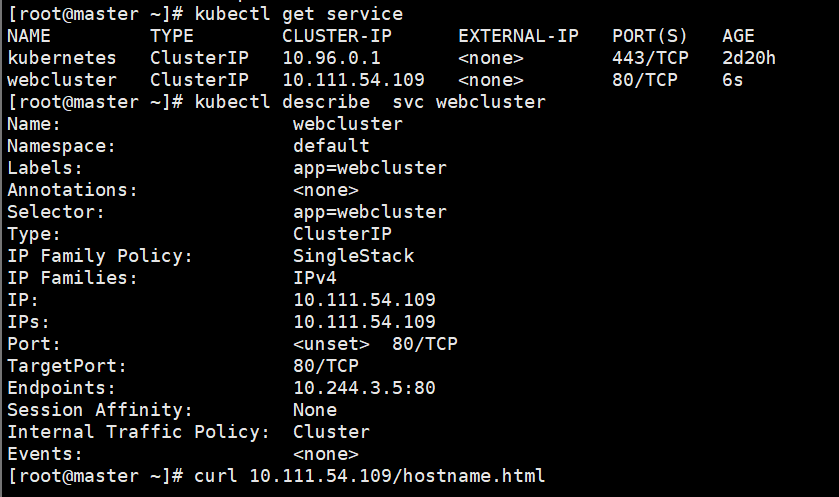

logs
cs
[root@master ~]# kubectl logs pods/webcluster-77c87d9946-c7qk7
attach
cs
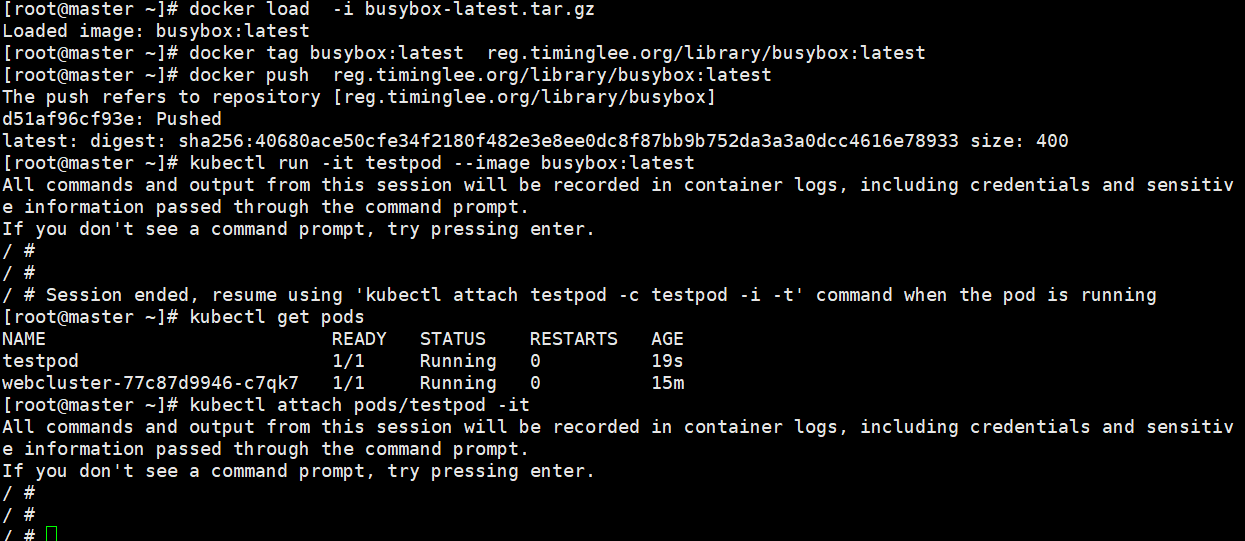
[root@k8s-master ~]# docker load  -i busybox-latest.tar.gz

[root@k8s-master ~]# docker tag busybox:latest  reg.timinglee.org/library/busybox:latest

[root@master ~]# docker push  reg.timinglee.org/library/busybox:latest

[root@k8s-master ~]# kubectl run -it testpod --image busybox:latest
All commands and output from this session will be recorded in container logs, including credentials and sensitive information passed through the command prompt.
If you don't see a command prompt, try pressing enter.
/ #
/ #
/ #  <ctrl+pq>

[root@k8s-master ~]# kubectl get pods

[root@k8s-master ~]# kubectl attach pods/testpod -it
All commands and output from this session will be recorded in container logs, including credentials and sensitive information passed through the command prompt.
If you don't see a command prompt, try pressing enter.
/ #
/ #
/ #
exec
cs
[root@k8s-master ~]# kubectl run  testpod --image  nginx:latest

[root@k8s-master ~]# kubectl get pods

root@k8s-master ~]# kubectl exec -it pods/testpod -c testpod -- /bin/bash
root@testpod:/#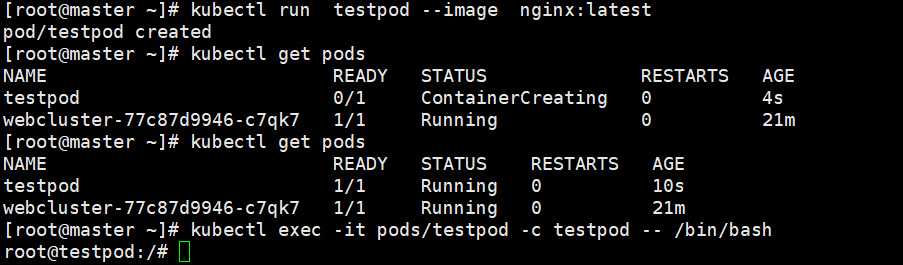
cp
cs
[root@k8s-master ~]# kubectl cp  testpod:/usr/share/nginx/html/index.html  /mnt/test

[root@k8s-master ~]# kubectl cp  testpod:/usr/share/nginx/html  /mnt/

[root@k8s-master ~]# ls /mnt/

[root@k8s-master ~]# echo timinglee > /mnt/index.html

[root@k8s-master ~]# kubectl cp /mnt/index.html testpod:/usr/share/nginx/html/index.html

[root@k8s-master ~]# kubectl get pods  -o wide

[root@k8s-master ~]# curl  10.244.1.9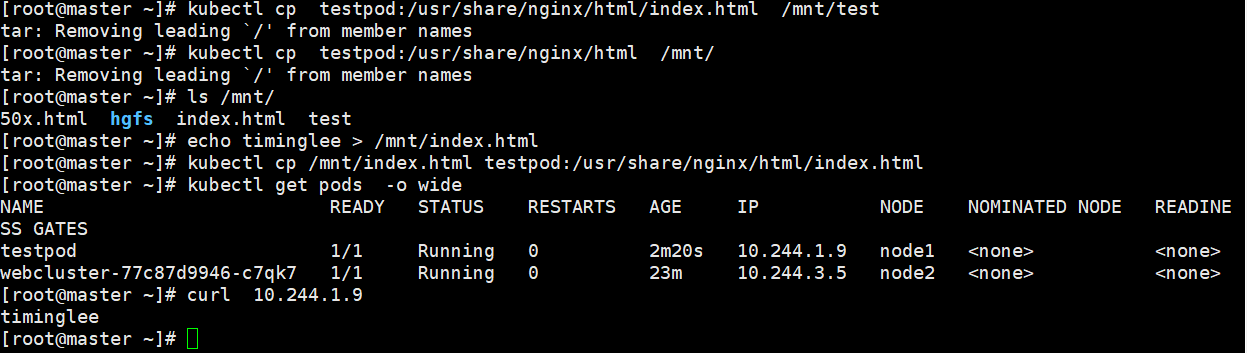
rollout
cs
[root@k8s-master pod]# kubectl create deployment webcluster --image myapp:v1 --replicas 2 --dry-run=client -o yaml > webcluster.yml
[root@k8s-master pod]# vim webcluster.yml
apiVersion: apps/v1
kind: Deployment
metadata:
  labels:
    app: webcluster
  name: webcluster
spec:
  replicas: 2
  selector:
    matchLabels:
      app: webcluster
  template:
    metadata:
      labels:
        app: webcluster
    spec:
      containers:
      - image: myapp:v1
        name: myapp

[root@k8s-master pod]# mkdirubectl apply -f webcluster.yml

[root@k8s-master pod]# kubectl get deployments.apps

[root@k8s-master pod]# kubectl get pods

[root@k8s-master pod]# kubectl rollout status  deployment webcluster

[root@k8s-master pod]# kubectl rollout  restart   deployment webcluster

[root@k8s-master pod]# kubectl get pods

[root@k8s-master pod]# kubectl rollout  restart   deployment webcluster

[root@k8s-master pod]# kubectl get pods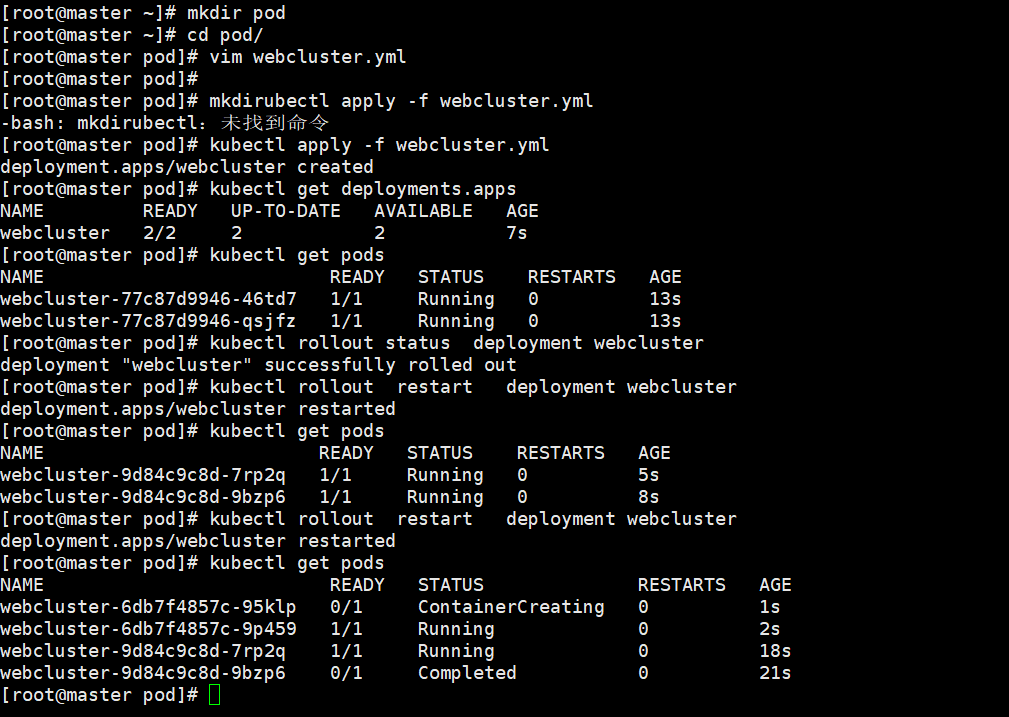
scale
cs
[root@k8s-master pod]# kubectl scale deployment webcluster --replicas 4

[root@k8s-master pod]# kubectl get pods

[root@k8s-master pod]# kubectl scale deployment webcluster --replicas 1

[root@k8s-master pod]# kubectl get pods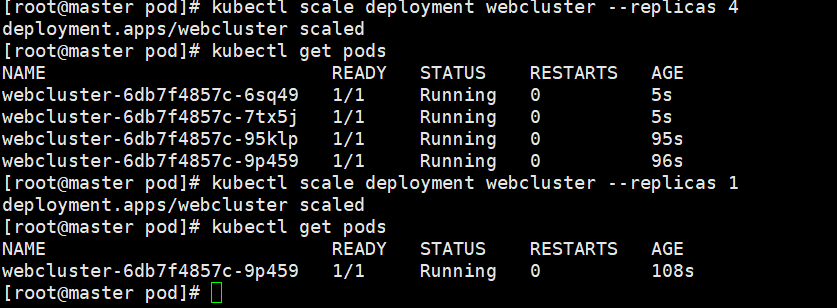
label
cs
[root@k8s-master pod]# kubectl get pods  --show-labels

[root@k8s-master pod]# kubectl get deployments.apps webcluster --show-labels

[root@k8s-master pod]# kubectl label pods webcluster-9787d97f6-zl6q2 app-

[root@k8s-master pod]# kubectl label pods webcluster-9787d97f6-zl6q2 app=webcluster

二、Pod
1.介绍
Pod 是 Kubernetes 最小调度单元,一个 Pod 可以包含一个或多个容器,共享网络、存储,同一 Pod 容器共用 IP,本地localhost互通。Pod 本身是临时的,不直接用于生产,一般通过控制器管理 Pod。
特点
1.生命周期短暂,Pod 销毁后重建 IP 会变,不建议直接裸用 Pod
2.Pod 内所有容器共享 Network Namespace,同一个 IP
3.支持 init 容器(初始化执行完退出)、业务容器、sidecar 边车容器
4.Pod 不是控制器,不会自愈,节点挂掉 Pod 不会自动重建
2.自主式pod
手动创建的 Pod 在更新应用版本或修改配置时需要手动干预,容易出现错误,并且难以保证一致 性。
优点:灵活性高、学习和调试方便、适用于特殊场景
缺点:管理复杂、缺乏高级功能、可维护性差
3.利用控制器管理pod
高可用性和可靠性自动故障恢复、健康检查和自愈
可扩展性:轻松扩缩容、水平自动扩缩容
版本管理和更新:滚动更新、回滚
声明式配置:简洁的配置方式、期望状态管理
服务发现和负载均衡:自动注册和发现、流量分发
多环境一致性:一致的部署方式
3.1建立控制器
cs
在做以下实验时harbor仓库中的library项目中必须有myapp:v1和myapp:v2两个镜像

[root@k8s-master ~]# kubectl create deployment webcluster --image myapp:v1 --replicas 2 --dry-run=client -o yaml > webcluster.yml

root@k8s-master ~]# vim webcluster.yml
apiVersion: apps/v1
kind: Deployment
metadata:
  labels:
    app: webcluster
  name: webcluster
spec:
  replicas: 2
  selector:
    matchLabels:
      app: webcluster
  template:
    metadata:
      labels:
        app: webcluster
    spec:
      containers:
      - image: myapp:v1
        name: myapp

[root@k8s-master ~]# kubectl apply -f webcluster.yml
deployment.apps/webcluster created
[root@k8s-master ~]# kubectl get pods
NAME                          READY   STATUS    RESTARTS   AGE
webcluster-77c87d9946-2xl44   1/1     Running   0          3s
webcluster-77c87d9946-cd9zv   1/1     Running   0          3s
[root@k8s-master ~]# kubectl rollout history deployment webcluster
deployment.apps/webcluster
REVISION  CHANGE-CAUSE
1         <none>


[root@k8s-master ~]# kubectl expose deployment webcluster --port 80 --target-port 80 --type NodePort

[root@k8s-master ~]# kubectl get svc
NAME         TYPE        CLUSTER-IP   EXTERNAL-IP   PORT(S)        AGE
kubernetes   ClusterIP   10.96.0.1    <none>        443/TCP        24h
webcluster   NodePort    10.99.3.32   <none>        80:30713/TCP   2m54s


[Administrator.DESKTOP-VJ307M3] ➤ curl http://172.25.254.100:30713/hostname.html
webcluster-77c87d9946-2xl44
3.2更新业务版本
cs
[root@k8s-master ~]# kubectl set image deployments webcluster myapp=myapp:v2
deployment.apps/webcluster image updated
[root@k8s-master ~]# kubectl annotate deployment webcluster kubernetes.io/change-cause="myappv2" --overwrite			#为此次更新设定标签

[root@k8s-master ~]# kubectl get pods
NAME                          READY   STATUS    RESTARTS   AGE
webcluster-6c8b4bb9d7-hpxf7   1/1     Running   0          7s
webcluster-6c8b4bb9d7-kz46j   1/1     Running   0          8s
[root@k8s-master ~]# kubectl rollout history
daemonset    deployment   statefulset
[root@k8s-master ~]# kubectl rollout history deployment webcluster
deployment.apps/webcluster
REVISION  CHANGE-CAUSE
1         <none>
2         <none>

[2026-08-21 11:30.21]  ~
[Administrator.DESKTOP-VJ307M3] ➤ curl http://172.25.254.100:30713
Hello MyApp | Version: v2 | <a href="hostname.html">Pod Name</a>
3.3版本回退
cs
[root@k8s-master ~]# kubectl rollout history deployment webcluster
deployment.apps/webcluster
REVISION  CHANGE-CAUSE
2         <none>
3         <none>

[root@k8s-master ~]# kubectl rollout undo deployment webcluster --to-revision 3
deployment.apps/webcluster rolled back

[Administrator.DESKTOP-VJ307M3] ➤ curl http://172.25.254.100:30713
Hello MyApp | Version: v1 | <a href="hostname.html">Pod Name</a>
4.利用yaml文件部署应用
优点:
声明式配置:清晰表达期望状态、可重复性和版本控制、团队协作
灵活性和可扩展性:丰富的配置选项、可组合和扩展
可与工具集成:与 CI/CD 流程集成、命令行工具支持
资源清单参数:
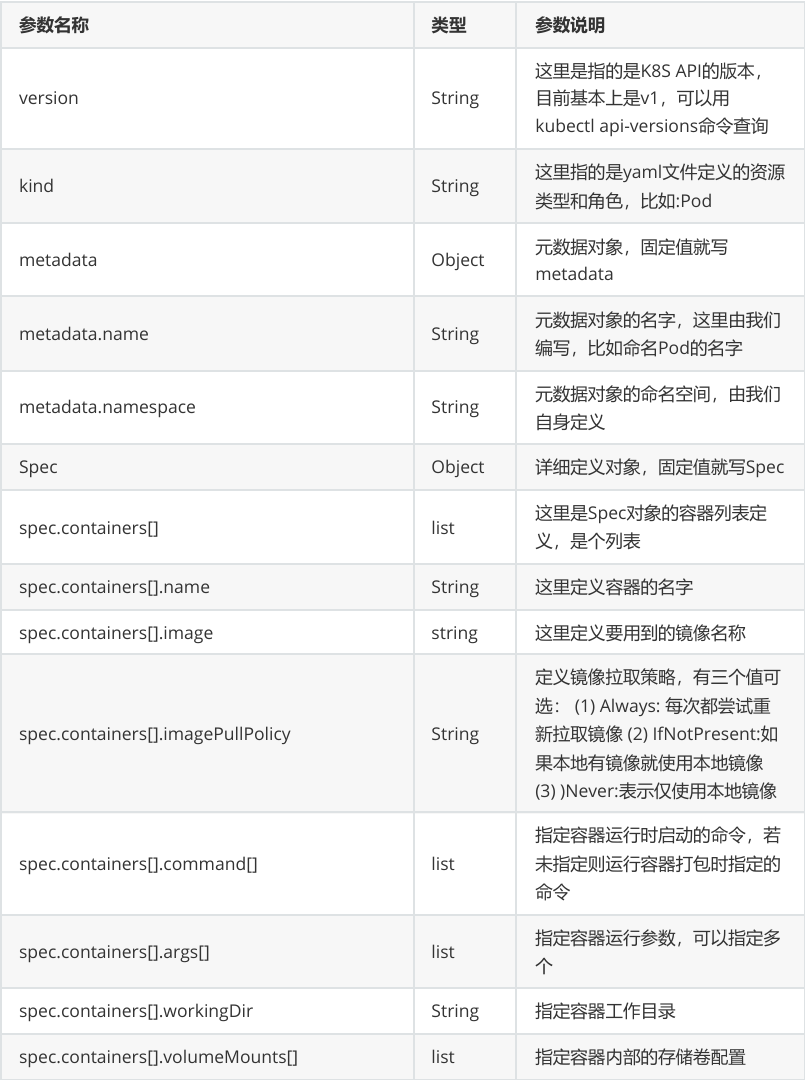
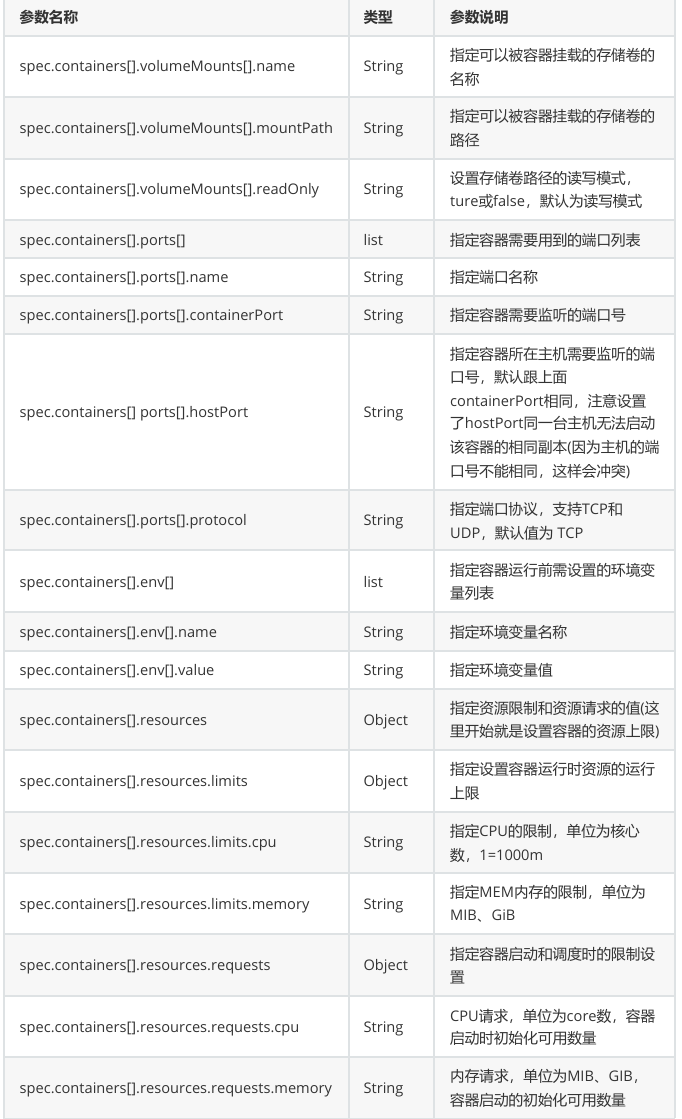
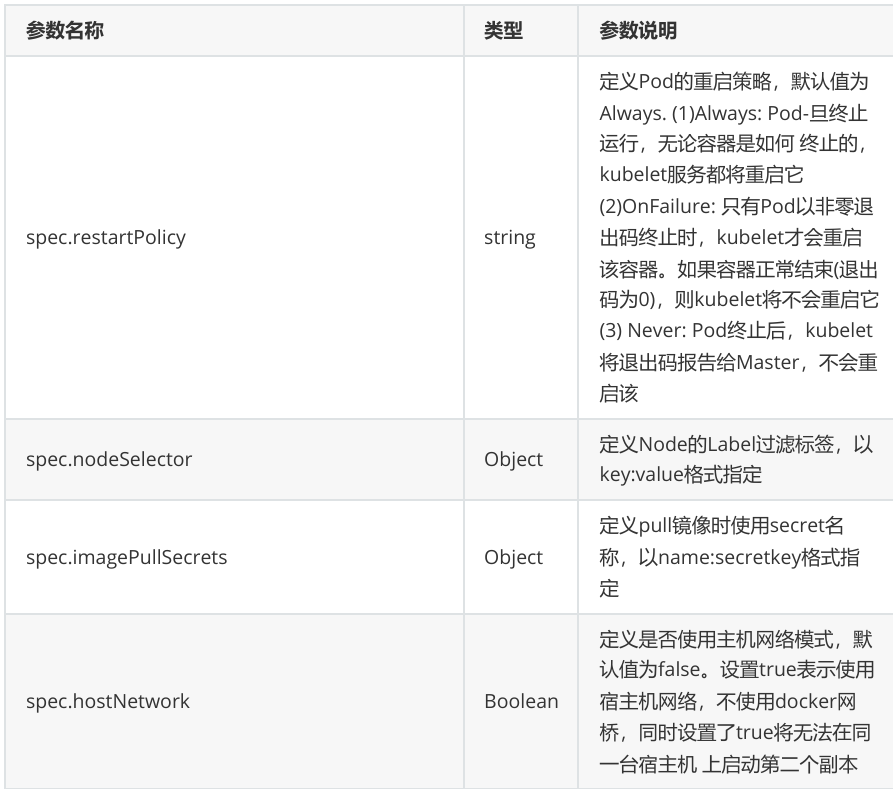
4.1在pod中运行多容器
cs
[root@k8s-master ~]# kubectl run  testpod --image  myapp:v1  --dry-run=client -o yaml > testpod.yaml

[root@k8s-master ~]# vim testpod.yaml
apiVersion: v1
kind: Pod
metadata:
  labels:
    run: testpod
  name: testpod
spec:
  containers:
  - image: myapp:v1
    name: myapp1
  - image: busyboxplus:latest
    name: busybox
    command:
    - /bin/sh
    - -c
    - sleep 10000


[root@k8s-master ~]# kubectl apply -f testpod.yaml
[root@k8s-master ~]# kubectl get pods
NAME      READY   STATUS    RESTARTS   AGE
testpod   2/2     Running   0          2m41s

[root@k8s-master ~]# kubectl exec -it pods/testpod -c busybox -- /bin/sh
[root@k8s-master ~]# kubectl exec -it pods/testpod -c busybox -- /bin/sh
/ # curl  127.0.0.1
Hello MyApp | Version: v1 | <a href="hostname.html">Pod Name</a>
4.2在pod运行主机中暴漏端口
cs
[root@k8s-master pod]# vim testpod.yaml
apiVersion: v1
kind: Pod
metadata:
  labels:
    run: testpod
  name: testpod
spec:
  containers:
  - image: myapp:v1
    name: myapp1
    ports:
    - name: http
      containerPort: 80			#pod内部容器端口
      hostPort: 80				#pod所在节点端口
      protocol: TCP				#端口所用协议

[root@k8s-master pod]# kubectl apply -f testpod.yaml
root@k8s-master pod]# kubectl get pods   -o wide
NAME      READY   STATUS    RESTARTS   AGE     IP            NODE        NOMINATED NODE   READINESS GATES
testpod   1/1     Running   0          3m33s   10.244.5.43   k8s-node2   <none>           <none>
[root@k8s-master pod]# curl  k8s-node2
Hello MyApp | Version: v1 | <a href="hostname.html">Pod Name</a>
4.3在pod中指定变量
cs
[root@k8s-master pod]# vim mysql.yml
apiVersion: v1
kind: Pod
metadata:
  labels:
    run: mysql
  name: mysql
spec:
  containers:
  - image: mysql:8.0
    name: mysql8
    env:
    - name: MYSQL_ROOT_PASSWORD
      value: lee

  - image: phpmyadmin:latest
    name: mysqladmin
    env:
    - name: PMA_ARBITRARY
      value: "1"
    ports:
    - name: phpadminport
      containerPort: 80
      hostPort: 80
      protocol: TCP

[root@k8s-master pod]# kubectl apply -f mysql.yml
[root@k8s-master pod]# kubectl get pods  -o wide
NAME    READY   STATUS    RESTARTS   AGE   IP            NODE        NOMINATED NODE   READINESS GATES
mysql   2/2     Running   0          36s   10.244.1.44   k8s-node1   <none>           <none>


#在浏览器中访问 node下面看到的主机ip
4.4选择运行节点
cs
root@k8s-master ~]# kubectl get nodes --show-labels
NAME         STATUS   ROLES           AGE   VERSION   LABELS
k8s-master   Ready    control-plane   29h   v1.35.7   beta.kubernetes.io/arch=amd64,beta.kubernetes.io/os=linux,kubernetes.io/arch=amd64,kubernetes.io/hostname=k8s-master,kubernetes.io/os=linux,node-role.kubernetes.io/control-plane=,node.kubernetes.io/exclude-from-external-load-balancers=
k8s-node1    Ready    <none>          29h   v1.35.7   beta.kubernetes.io/arch=amd64,beta.kubernetes.io/os=linux,kubernetes.io/arch=amd64,kubernetes.io/hostname=k8s-node1,kubernetes.io/os=linux
k8s-node2    Ready    <none>          24h   v1.35.7   beta.kubernetes.io/arch=amd64,beta.kubernetes.io/os=linux,kubernetes.io/arch=amd64,kubernetes.io/hostname=k8s-node2,kubernetes.io/os=linux

[root@k8s-master pod]# vim mysql.yml
apiVersion: v1
kind: Pod
metadata:
  labels:
    run: mysql
  name: mysql
spec:
  nodeSelector:
    kubernetes.io/hostname: k8s-node2
  containers:
  - image: mysql:8.0
    name: mysql8
    env:
    - name: MYSQL_ROOT_PASSWORD
      value: lee

  - image: phpmyadmin:latest
    name: mysqladmin
    env:
    - name: PMA_ARBITRARY
      value: "1"
    ports:
    - name: phpadminport
      containerPort: 80
      hostPort: 80
      protocol: TCP

[root@k8s-master pod]# kubectl apply -f mysql.yml
pod/mysql created
[root@k8s-master pod]# kubectl get pods  -o wide
NAME    READY   STATUS              RESTARTS   AGE   IP       NODE        NOMINATED NODE   READINESS GATES
mysql   0/2     ContainerCreating   0          11s   <none>   k8s-node2   <none>           <none>
4.5共享宿主机网络
cs
[root@k8s-master pod]# vim testpod.yaml
apiVersion: v1
kind: Pod
metadata:
  labels:
    run: testpod
  name: testpod
spec:
  hostNetwork: true
  containers:
  - image: busybox:latest
    name: busybox
    command:
    - /bin/sh
    - -c
    - sleep 10000

[root@k8s-master pod]# kubectl apply -f testpod.yaml
[root@k8s-master pod]# kubectl exec -it pods/testpod -c busybox -- /bin/sh
/ # ifconfig
cni0      Link encap:Ethernet  HWaddr 16:CB:58:6A:2A:5D
          inet addr:10.244.5.1  Bcast:10.244.5.255  Mask:255.255.255.0
          inet6 addr: fe80::d8df:1aff:fecb:258d/64 Scope:Link
          UP BROADCAST RUNNING MULTICAST  MTU:1450  Metric:1
          RX packets:581 errors:0 dropped:0 overruns:0 frame:0
          TX packets:223 errors:0 dropped:1 overruns:0 carrier:0
          collisions:0 txqueuelen:1000
          RX bytes:40865 (39.9 KiB)  TX bytes:17252 (16.8 KiB)

docker0   Link encap:Ethernet  HWaddr 0E:46:B9:8F:F4:B1
          inet addr:172.17.0.1  Bcast:172.17.255.255  Mask:255.255.0.0
          UP BROADCAST MULTICAST  MTU:1500  Metric:1
          RX packets:0 errors:0 dropped:0 overruns:0 frame:0
          TX packets:0 errors:0 dropped:3 overruns:0 carrier:0
          collisions:0 txqueuelen:0
          RX bytes:0 (0.0 B)  TX bytes:0 (0.0 B)

eth0      Link encap:Ethernet  HWaddr 00:0C:29:E9:E3:90
          inet addr:172.25.254.20  Bcast:172.25.254.255  Mask:255.255.255.0
          inet6 addr: fe80::dfb0:1fb2:dde4:e5e7/64 Scope:Link
          UP BROADCAST RUNNING MULTICAST  MTU:1500  Metric:1
          RX packets:753787 errors:0 dropped:0 overruns:0 frame:0
          TX packets:44359 errors:0 dropped:1 overruns:0 carrier:0
          collisions:0 txqueuelen:1000
          RX bytes:1100617086 (1.0 GiB)  TX bytes:5635916 (5.3 MiB)

flannel.1 Link encap:Ethernet  HWaddr DE:5A:26:1C:E5:A0
          inet addr:10.244.5.0  Bcast:0.0.0.0  Mask:255.255.255.255
          inet6 addr: fe80::dc5a:26ff:fe1c:e5a0/64 Scope:Link
          UP BROADCAST RUNNING MULTICAST  MTU:1450  Metric:1
          RX packets:144 errors:0 dropped:0 overruns:0 frame:0
          TX packets:110 errors:0 dropped:22 overruns:0 carrier:0
          collisions:0 txqueuelen:0
          RX bytes:8836 (8.6 KiB)  TX bytes:11091 (10.8 KiB)

lo        Link encap:Local Loopback
          inet addr:127.0.0.1  Mask:255.0.0.0
          inet6 addr: ::1/128 Scope:Host
          UP LOOPBACK RUNNING  MTU:65536  Metric:1
          RX packets:4503 errors:0 dropped:0 overruns:0 frame:0
          TX packets:4503 errors:0 dropped:0 overruns:0 carrier:0
          collisions:0 txqueuelen:1000
          RX bytes:342298 (334.2 KiB)  TX bytes:342298 (334.2 KiB)

veth4d79cff0 Link encap:Ethernet  HWaddr 16:C9:7B:BB:BB:36
          inet6 addr: fe80::14c9:7bff:febb:bb36/64 Scope:Link
          UP BROADCAST RUNNING MULTICAST  MTU:1450  Metric:1
          RX packets:16 errors:0 dropped:0 overruns:0 frame:0
          TX packets:82 errors:0 dropped:0 overruns:0 carrier:0
          collisions:0 txqueuelen:0
          RX bytes:1172 (1.1 KiB)  TX bytes:6448 (6.2 KiB)

/ #
4.6资源优先级
cs
BestEffort没有做任何资源限制,资源使用优先级最低
[root@k8s-master pod]# vim testpod.yaml
apiVersion: v1
kind: Pod
metadata:
  labels:
    run: testpod
  name: testpod
spec:
  hostNetwork: true
  containers:
  - image: busybox:latest
    name: busybox
    command:
    - /bin/sh
    - -c
    - sleep 10000
apiVersion: v1
kind: Pod
metadata:
  labels:
    run: testpod
  name: testpod
spec:
  hostNetwork: true
  containers:
  - image: busybox:latest
    name: busybox
    command:
    - /bin/sh
    - -c
    - sleep 10000


[root@k8s-master pod]# kubectl describe pods  testpod  | grep "QoS Class:"
QoS Class:                   BestEffort


Burstable 设定了资源限制,但是期望值和限制值不同,资源使用优先级次之
[root@k8s-master pod]# vim testpod.yaml
apiVersion: v1
kind: Pod
metadata:
  labels:
    run: testpod
  name: testpod
spec:
  hostNetwork: true
  containers:
  - image: busybox:latest
    name: busybox
    command:
    - /bin/sh
    - -c
    - sleep 10000
apiVersion: v1
kind: Pod
metadata:
  labels:
    run: testpod
  name: testpod
spec:
  hostNetwork: true
  containers:
  - image: busybox:latest
    name: busybox
    command:
    - /bin/sh
    - -c
    - sleep 10000
	resources:
      limits:
        cpu: 700m
        memory: 200M
      requests:
        cpu: 500m
        memory: 100M

[root@k8s-master pod]# kubectl apply -f testpod.yaml
pod/testpod unchanged

[root@k8s-master pod]# kubectl describe pods  testpod  | grep "QoS Class:"
QoS Class:                   Burstable


Guaranteed期望值和最大使用限制相同,优先级最高
[root@k8s-master pod]# vim testpod.yaml
apiVersion: v1
kind: Pod
metadata:
  labels:
    run: testpod
  name: testpod
spec:
  hostNetwork: true
  containers:
  - image: busybox:latest
    name: busybox
    command:
    - /bin/sh
    - -c
    - sleep 10000
apiVersion: v1
kind: Pod
metadata:
  labels:
    run: testpod
  name: testpod
spec:
  hostNetwork: true
  containers:
  - image: busybox:latest
    name: busybox
    command:
    - /bin/sh
    - -c
    - sleep 10000
	resources:
      limits:
        cpu: 500m
        memory: 100M
      requests:
        cpu: 500m
        memory: 100M

[root@k8s-master pod]# kubectl apply -f testpod.yaml
pod/testpod created
[root@k8s-master pod]# kubectl describe pods  testpod  | grep "QoS Class:"
QoS Class:                   Guaranteed
4.7容器重启规则
cs
Always 无论什么原因都会从新运行pod
apiVersion: v1
kind: Pod
metadata:
  labels:
    run: testpod
  name: testpod
spec:
  hostNetwork: true
  restartPolicy: Always
  containers:
  - image: busybox:latest
    name: busybox
    command:
    - /bin/sh
    - -c
    - sleep 60


[root@k8s-master pod]# kubectl get pods -o wide  -w
[root@k8s-node2 ~]# docker rm -f 3051d9de4c36

OnFailure 非正常管关闭会从其pod
apiVersion: v1
kind: Pod
metadata:
  labels:
    run: testpod
  name: testpod
spec:
  hostNetwork: true
  restartPolicy: OnFailure
  containers:
  - image: busybox:latest
    name: busybox
    command:
    - /bin/sh
    - -c
    - sleep 30

[root@k8s-master pod]# kubectl get pods -o wide  -w
[root@k8s-node2 ~]# docker rm -f 3051d9de4c36


#等30秒后让容器中的命令运行完成后再次观察

Never pod关闭后不重启
apiVersion: v1
kind: Pod
metadata:
  labels:
    run: testpod
  name: testpod
spec:
  hostNetwork: true
  restartPolicy: OnFailure
  containers:
  - image: busybox:latest
    name: busybox
    command:
    - /bin/sh
    - -c
    - sleep 30

[root@k8s-master pod]# kubectl get pods -o wide  -w
[root@k8s-node2 ~]# docker rm -f 3051d9de4c36
三、Pod的生命周期
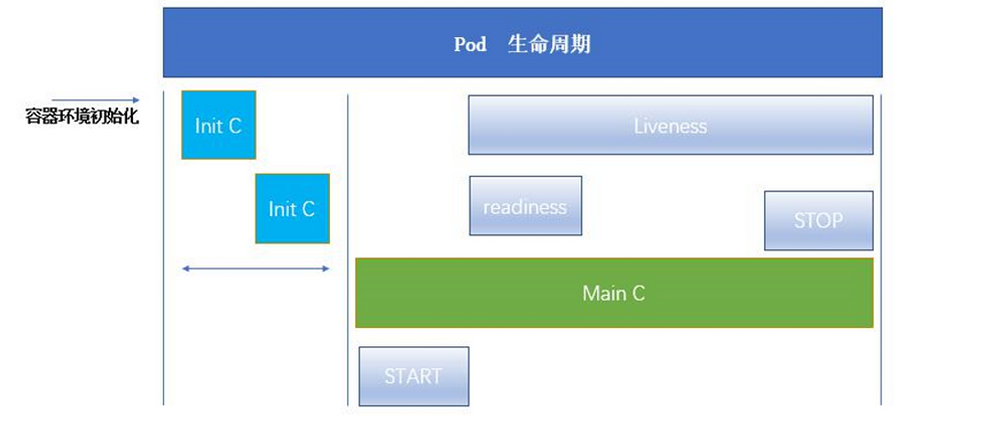
1.init容器
Init 容器是 Pod 中特殊的前置容器 ,必须全部执行完成并成功退出之后,业务容器才会启动。 一个 Pod 可以有多个 init 容器,按 yaml 书写顺序串行执行;init 容器执行失败,会不断重启 Pod 直到 init 执行成功。
功能:
Init 容器可以包含一些安装过程中应用容器中不存在的实用工具或个性化代码。
Init 容器可以安全地运行这些工具,避免这些工具导致应用镜像的安全性降低。
应用镜像的创建者和部署者可以各自独立工作,而没有必要联合构建一个单独的应用镜像。
Init 容器能以不同于Pod内应用容器的文件系统视图运行。因此,Init容器可具有访问 Secrets 的权 限,而应用容器不能够访问。
由于 Init 容器必须在应用容器启动之前运行完成,因此 Init 容器提供了一种机制来阻塞或延迟应用 容器的启动,直到满足了一组先决条件。一旦前置条件满足,Pod内的所有的应用容器会并行启 动。
cs
[root@k8s-master pod]# kubectl run  webserver --image myapp:v1 --dry-run=client -o yaml > init-example.yml
[root@k8s-master pod]# vim init-example.yml
apiVersion: v1
kind: Pod
metadata:
  labels:
    run: webserver
  name: webserver
spec:
  initContainers:
  - name: busybox
    image: busybox:latest
    command:
    - /bin/sh
    - -c
    - "until test -e /testfile;do echo wating for myservice; sleep 2;done"
  containers:
  - image: myapp:v1
    name: webserver
  restartPolicy: Always


[root@k8s-master pod]# watch -n 1 kubectl get pods  -o wide

[root@k8s-master pod]# kubectl apply -f init-example.yml
pod/webserver created

[root@k8s-master pod]# kubectl exec -it pods/webserver -c busybox -- /bin/sh
/ #
/ # touch /testfile
2.探针
kubelet 对容器做健康检查,共 3 种:
livenessProbe 存活探针:检查容器是否存活,失败杀死并重启容器。
readinessProbe 就绪探针 :检查业务能否接收流量,失败摘除 Service 流量,不重启容器。
startupProbe 启动探针:给启动慢的应用,成功后另外两个探针才生效。
2.1Livness存活探针
cs
没有存活探针时
[root@k8s-master pod]# kubectl run  testpod --image  myapp:v1  --dry-run=client -o yaml > livness-example.yaml
[root@k8s-master pod]# vim livness-example.yaml
apiVersion: v1
kind: Pod
metadata:
  labels:
    run: webserver
  name: webserver
spec:
  containers:
  - image: myapp:v1
    name: webserver
    command: ["/bin/sh", "-c"]
    args:
    - |
      nginx -g "daemon off;"
      sleep 10000
  restartPolicy: Always

[root@k8s-master pod]# kubectl apply -f livness-example.yaml

#监控程序
[root@k8s-master pod]# watch -n 1 kubectl get pods  -o wide

#测试操作:
[root@k8s-master pod]# kubectl exec  -it  pods/webserver -c webserver  -- /bin/sh
# nginx -s stop

#查看pod的状态仍然是runing,但是访问此pod时访问失败
[root@k8s-node2 ~]# curl 10.244.5.47
curl: (7) Failed to connect to 10.244.5.47 port 80: 拒绝连接

有存活探针时
[root@k8s-master pod]# kubectl delete -f livness-example.yaml  --force
kind: Pod
metadata:
  labels:
    run: webserver
  name: webserver
spec:
  containers:
  - image: myapp:v1
    name: testpod
    command: ["/bin/sh", "-c"]
    args:
    - |
      nginx -g "daemon off;"
      sleep 10000
    livenessProbe:
      tcpSocket:
        port: 80
      initialDelaySeconds: 3
      periodSeconds: 1
      timeoutSeconds: 1
  restartPolicy: Always


[root@k8s-master pod]# kubectl get pods  -o wide  -w

[root@k8s-master pod]#  kubectl exec -it pods/webserver -c webserver -- /bin/sh
/ #  nginx -s stop
2026/08/23 03:59:45 [notice] 15#15: signal process started

/ # exit
[root@k8s-master pod]# curl 10.244.5.66
curl: (7) Failed to connect to 10.244.5.66 port 80: 拒绝连接
[root@k8s-master pod]# curl 10.244.5.66
curl: (7) Failed to connect to 10.244.5.66 port 80: 拒绝连接
[root@k8s-master pod]# curl 10.244.5.66
curl: (7) Failed to connect to 10.244.5.66 port 80: 拒绝连接
[root@k8s-master pod]# curl 10.244.5.66
curl: (7) Failed to connect to 10.244.5.66 port 80: 拒绝连接
[root@k8s-master pod]# curl 10.244.5.66
Hello MyApp | Version: v1 | <a href="hostname.html">Pod Name</a>
2.2readness 就绪探针
cs
没有就绪探针情况
[root@k8s-master pod]# vim readness-example.yml
apiVersion: v1
kind: Pod
metadata:
  labels:
    run: webserver
  name: webserver
spec:
  containers:
  - image: myapp:v1
    name: webserver
  restartPolicy: Always

---
apiVersion: v1
kind: Service
metadata:
  labels:
    run: webserver
  name: webserver
spec:
  ports:
  - port: 80
    protocol: TCP
    targetPort: 80
  selector:
    run: webserver

[root@k8s-master pod]# kubectl apply -f readness-example.yml
pod/webserver unchanged
service/webserver created
[root@k8s-master pod]# kubectl describe  svc webserver
Name:                     webserver
Namespace:                default
Labels:                   run=webserver
Annotations:              <none>
Selector:                 run=webserver
Type:                     ClusterIP
IP Family Policy:         SingleStack
IP Families:              IPv4
IP:                       10.102.162.217
IPs:                      10.102.162.217
Port:                     <unset>  80/TCP
TargetPort:               80/TCP
Endpoints:                10.244.5.67:80
Session Affinity:         None
Internal Traffic Policy:  Cluster
Events:                   <none>

#删除默认发布文件
[root@k8s-master ~]# kubectl exec -it pods/webserver -c webserver -- /bin/sh
/ # cd /usr/share/nginx/
/usr/share/nginx # ls
html
/usr/share/nginx # cd html/
/usr/share/nginx/html # ls
50x.html    index.html
/usr/share/nginx/html # rm -fr index.html
/usr/share/nginx/html # ls
50x.html
/usr/share/nginx/html #

#验证是否在访问service时endpoints中被下架
[root@k8s-master pod]# kubectl describe  svc webserver
Name:                     webserver
Namespace:                default
Labels:                   run=webserver
Annotations:              <none>
Selector:                 run=webserver
Type:                     ClusterIP
IP Family Policy:         SingleStack
IP Families:              IPv4
IP:                       10.102.162.217
IPs:                      10.102.162.217
Port:                     <unset>  80/TCP
TargetPort:               80/TCP
Endpoints:                10.244.5.67:80			#还在
Session Affinity:         None
Internal Traffic Policy:  Cluster
Events:                   <none>


#业务问题
[root@k8s-master pod]# curl  10.102.162.217
<html>
<head><title>403 Forbidden</title></head>
<body bgcolor="white">
<center><h1>403 Forbidden</h1></center>
<hr><center>nginx/1.12.2</center>
</body>
</html>

有就绪探针情况
[root@k8s-master pod]# vim readness-example.yml
apiVersion: v1
kind: Pod
metadata:
  labels:
    run: webserver
  name: webserver
spec:
  containers:
  - image: myapp:v1
    name: webserver
    readinessProbe:
      httpGet:
        path: /index.html
        port: 80
      initialDelaySeconds: 3
      periodSeconds: 2
      timeoutSeconds: 1
  restartPolicy: Always
---
apiVersion: v1
kind: Service
metadata:
  labels:
    run: webserver
  name: webserver
spec:
  ports:
  - port: 80
    protocol: TCP
    targetPort: 80
  selector:
    run: webserver


[root@k8s-master pod]# kubectl get pods  -o wide
NAME        READY   STATUS    RESTARTS   AGE   IP            NODE        NOMINATED NODE   READINESS GATES
webserver   1/1     Running   0          7s    10.244.5.69   k8s-node2   <none>           <none>
[root@k8s-master pod]# kubectl describe  svc webserver
Name:                     webserver
Namespace:                default
Labels:                   run=webserver
Annotations:              <none>
Selector:                 run=webserver
Type:                     ClusterIP
IP Family Policy:         SingleStack
IP Families:              IPv4
IP:                       10.110.248.237
IPs:                      10.110.248.237
Port:                     <unset>  80/TCP
TargetPort:               80/TCP
Endpoints:                10.244.5.69:80
Session Affinity:         None
Internal Traffic Policy:  Cluster
Events:                   <none>


#复现问题
/usr/share/nginx/html # command terminated with exit code 137
[root@k8s-master ~]#
/ # rm -fr /usr/share/nginx/html/index.html
/ # echo timinglee > /usr/share/nginx/html/index.html
/ #