Seal Report Designer内Views节点支持添加Card View视图控件,该控件属于数据展示类视图,支持将模型数据以卡片形式展示。Card View相关的属性与前两篇文章介绍的View对象属性类似,本文主要学习Card View特有的属性用途及使用示例。
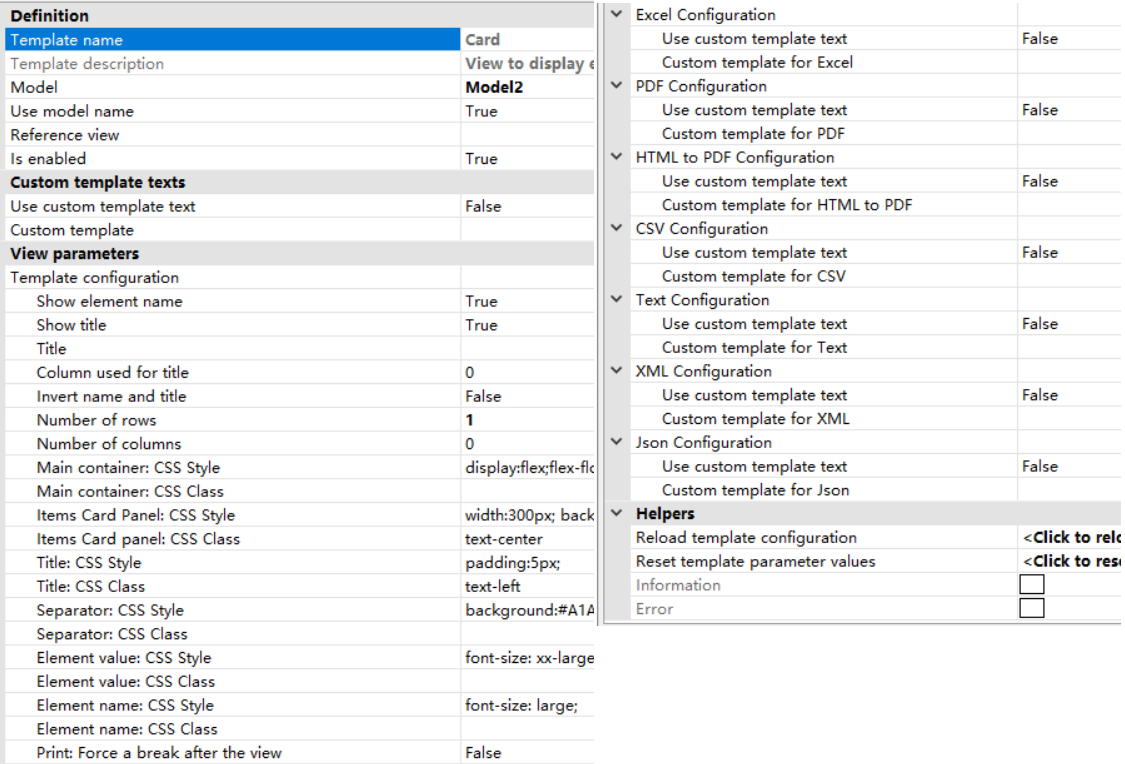
Model属性:设置Card View控件使用的数据模型,从Models节点内选择;
Use model name属性:值为True,则视图名称来源于模型名称;
Is enabled属性:设置是否启用当前Card View控件;
Show element name属性:设置是否在卡片中显示列名;
Show title属性:设置是否在卡片中显示标题;
Title属性:设置标题内容;
Column used for title属性:将指定列的值作为卡片标题;
Invert name and title属性:值为True,则互换列名与标题的内容;
Number of rows属性:设置从数据源中取多少行数据,值为0则取所有行;
Number of columns属性:设置从数据源中取多少列数据,值为0则取所有列;
Main container:CSS Style属性:设置整个Card View最外层容器的自定义CSS样式;
Main container:CSS Class属性:设置整个Card View最外层容器的自定义CSS类;
Items Card Paner:CSS Style属性:设置Card View内每个卡片的自定义CSS样式;
Items Card paner:CSS Class属性:设置Card View内每个卡片的自定义CSS类;
Title:CSS Style属性:设置卡片标题的自定义CSS样式;
Title:CSS Class属性:设置卡片标题的自定义CSS类;
Separator:CSS Style属性:设置卡片内分隔符的自定义CSS样式;
Separator:CSS Class属性:设置卡片内分隔符的自定义CSS类;
Element value:CSS Style属性:设置卡片内显示值的自定义CSS样式;
Element value:CSS Class属性:设置卡片内显示值的自定义CSS类;
Element name:CSS Style属性:设置卡片内列名的自定义CSS样式;
Element name:CSS Class属性:设置卡片内列名的自定义CSS类;
Print:Force a break after the view属性:值为True,则打印时在当前视图控件内容输出后强制换页。
Seal Report Designer软件自带的示例中包括Card View控件的使用示例,以15-Cards.srex文件为例(位于Samples文件夹内),该文件的Views节点中多次使用Card View控件。
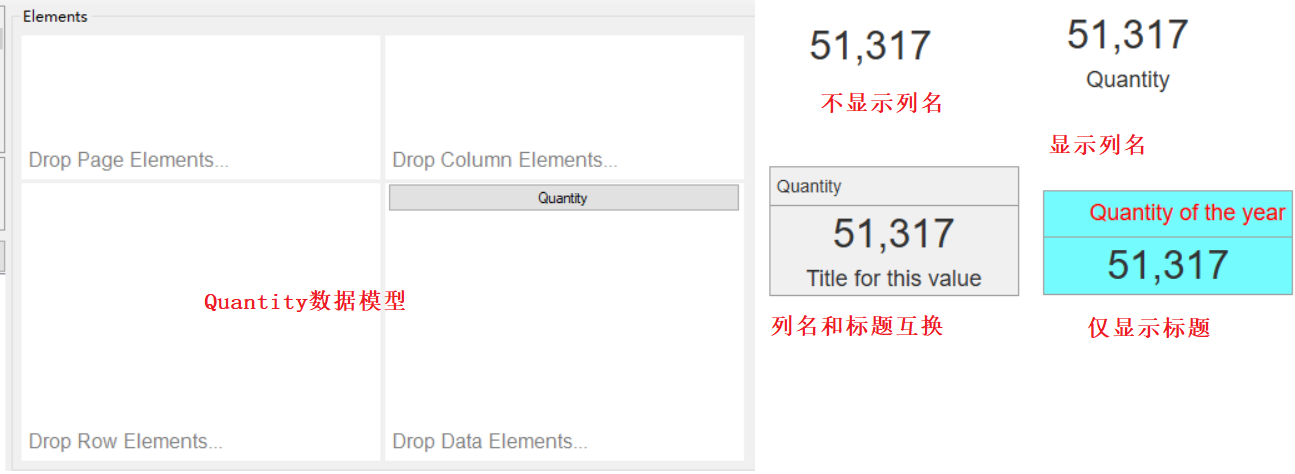
下图中的Quantity数据模型仅包含Quantity数据列,在View对象中添加四个Card View控件,通过配置不同的属性值及样式在卡片中显示单一数据值。
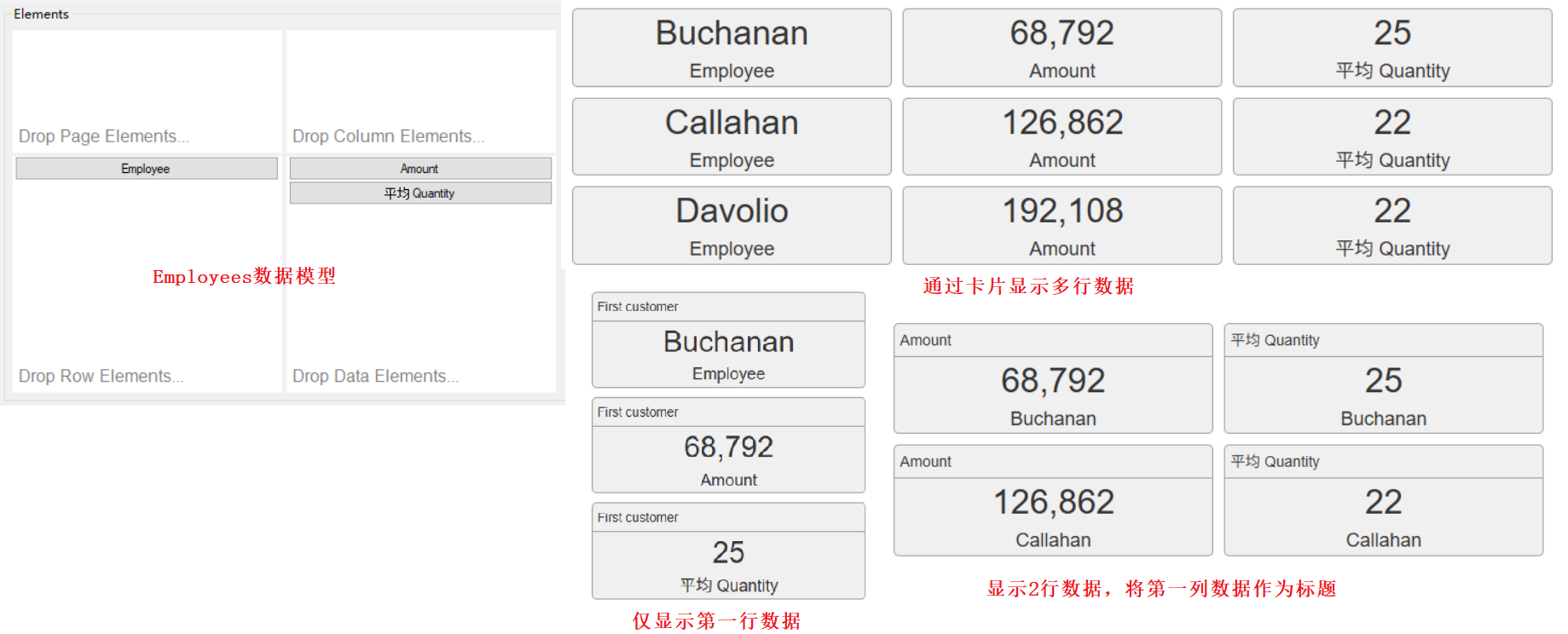
另一个Employees数据源分组统计人员信息,总共包含3行数据,在View对象中添加3个Card View控件,通过配置不同的属性值及样式在卡片中显示多行或单行数据,如下图所示。
参考文献:
1https://github.com/ariacom/Seal-Report
4https://sealreport.org/forum/
5https://github.com/ariacom/Seal-Report/releases
6https://www.cnblogs.com/Leo_wl/p/7716582.html
7https://sealreport.org/Help/html/26c7ae63-9b83-dc1d-b5d0-00a18021be41.htm