Rust+Slint 实现的"DNA双螺旋"加载动画源码分享
一、效果展示
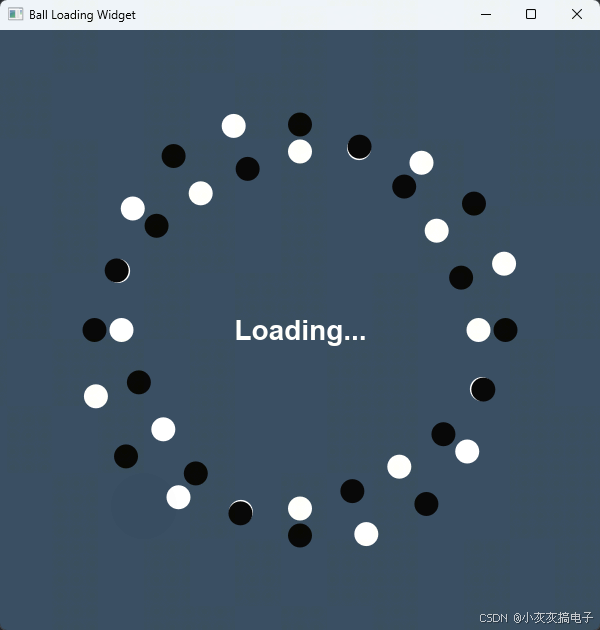
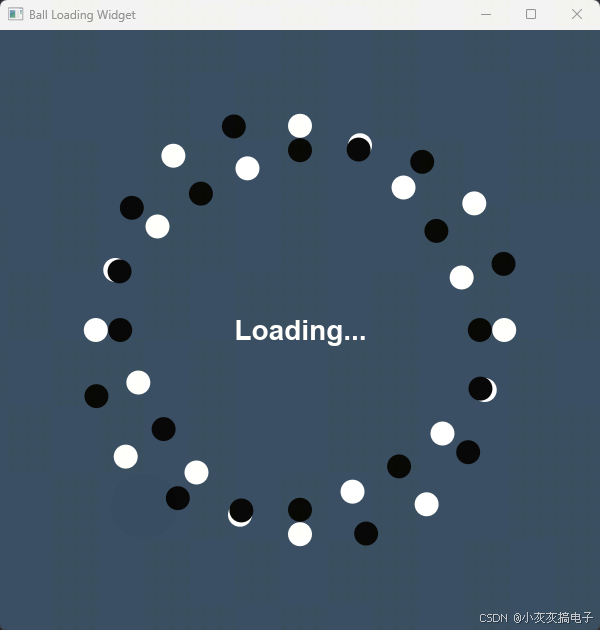
二、源码分享
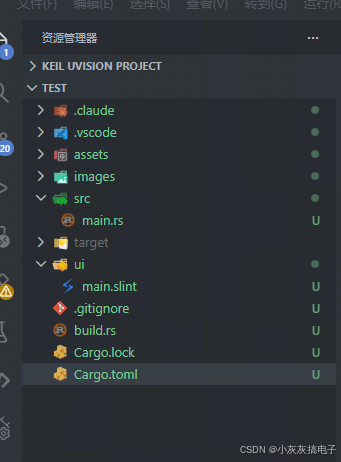
1、工程结构
2、main.rs
rust
slint::include_modules!();

fn main() -> Result<(), slint::PlatformError> {
    let main_window = MainWindow::new()?;
    main_window.run()
}3、build.rs
rust
fn main() {
    // 编译 Slint UI
    slint_build::compile("ui/main.slint").unwrap();
}
4、main.slint
rust
export component MainWindow inherits Window {
    preferred-width: 600px;
    preferred-height: 600px;
    title: "Ball Loading Widget";
    background: #34495E;

    // ---------- 可调参数 ----------
    in property <int>   position-count: 20;     // 角度位置数 (每个位置有黑白两颗球)
    in property <float> base-ratio:     0.32;   // 基础半径比例
    in property <float> amplitude:      0.04;   // 径向摆动幅度 (减小, 两圈更靠近)
    in property <float> ball-ratio:     0.02;   // 球半径比例
    in property <int>   wave-count:     8;      // 360度内交替次数 (DNA螺旋数)
    in property <float> wave-speed:     1;    // 波浪传播速度 (螺旋交替动画)

    // ---------- 派生量 ----------
    property <length> min-side: min(root.width, root.height);
    property <length> ball-r:   root.min-side * root.ball-ratio;
    property <length> cx:       root.width  / 2;
    property <length> cy:       root.height / 2;

    // 根据角度位置计算白球半径 (正弦波, 带波浪动画)
    pure function white-radius(pos: int, time-s: float) -> length {
        let angle-rad: float = pos * 360.0 / root.position-count * 3.14159 / 180.0 * root.wave-count;
        let wave-phase: float = time-s * root.wave-speed * 2.0 * 3.14159;
        let offset: float = root.amplitude * sin((angle-rad + wave-phase) * 1rad);
        root.min-side * (root.base-ratio + offset)
    }

    // 根据角度位置计算黑球半径 (与白球相反)
    pure function black-radius(pos: int, time-s: float) -> length {
        let angle-rad: float = pos * 360.0 / root.position-count * 3.14159 / 180.0 * root.wave-count;
        let wave-phase: float = time-s * root.wave-speed * 2.0 * 3.14159;
        let offset: float = root.amplitude * sin((angle-rad + wave-phase) * 1rad);
        root.min-side * (root.base-ratio - offset)
    }

    // ---------- 白球 ----------
    for i in [0, 1, 2, 3, 4, 5, 6, 7, 8, 9, 10, 11, 12, 13, 14, 15, 16, 17, 18, 19] : Rectangle {
        width:  root.ball-r * 2;
        height: root.ball-r * 2;
        border-radius: root.ball-r;
        background: white;

        // 角度固定, 无旋转
        x: root.cx + cos((i * 360.0 / root.position-count) * 1deg)
                 * root.white-radius(i, animation-tick() / 1s) - root.ball-r;
        y: root.cy + sin((i * 360.0 / root.position-count) * 1deg)
                 * root.white-radius(i, animation-tick() / 1s) - root.ball-r;
    }

    // ---------- 黑球 ----------
    for i in [0, 1, 2, 3, 4, 5, 6, 7, 8, 9, 10, 11, 12, 13, 14, 15, 16, 17, 18, 19] : Rectangle {
        width:  root.ball-r * 2;
        height: root.ball-r * 2;
        border-radius: root.ball-r;
        background: black;

        // 同样的角度,但半径与白球相反
        x: root.cx + cos((i * 360.0 / root.position-count) * 1deg)
                 * root.black-radius(i, animation-tick() / 1s) - root.ball-r;
        y: root.cy + sin((i * 360.0 / root.position-count) * 1deg)
                 * root.black-radius(i, animation-tick() / 1s) - root.ball-r;
    }

    // ---------- 中心文字 ----------
    Text {
        text: "Loading...";
        color: white;
        font-size: 28px;
        font-weight: 700;
        horizontal-alignment: center;
        vertical-alignment: center;
    }
}
5、Cargo.toml
rust
[package]
name = "sokoban"
version = "0.1.0"
edition = "2024"

[dependencies]
slint = "1.16.1"

[build-dependencies]
slint-build = "1.16.1"
三、实现原理
本节将详细解析 Rust + Slint 实现的"DNA双螺旋"加载动画的核心原理。通过结合数学函数与声明式UI,我们实现了一个视觉上富有节奏感的动态效果。
1、 整体架构与数据流
该动画的实现遵循典型的 Slint 应用架构:
[build.rs] → 编译 .slint → [main.slint] (UI 定义 + 动画逻辑) ←→ [main.rs] (启动入口)build.rs:在编译时调用slint_build::compile,将main.slint文件编译为 Rust 代码。main.rs:仅负责创建窗口并运行事件循环,所有动画逻辑均在.slint文件中以声明式方式定义。main.slint:核心文件,包含了UI结构、动画参数、计算函数和渲染循环。
2、 核心动画原理:正弦波与径向摆动
动画的核心在于每个小球(白球与黑球)的半径随时间呈正弦变化,且白球与黑球的半径变化相位相反,形成"双螺旋"视觉效果。
2.1、 位置与角度固定
- 共有
position-count(默认20)个角度位置,均匀分布在360度圆周上。 - 每个位置上有两颗球:一颗白球,一颗黑球。
- 它们的角度是固定的,不会旋转。动画仅通过改变**径向距离(半径)**来实现。
2.2 、半径计算函数
在 main.slint 中定义了两个纯函数:
white-radius(pos: int, time-s: float) -> lengthblack-radius(pos: int, time-s: float) -> length
计算公式(以白球为例):
半径 = min-side * (base-ratio + amplitude * sin(angle-rad + wave-phase))其中:
angle-rad = pos * 360° / position-count * wave-count * π / 180°wave-count控制360度内正弦波的周期数,即"螺旋的圈数"。
wave-phase = time-s * wave-speed * 2πtime-s来自animation-tick() / 1s,是系统提供的动画时间(秒)。wave-speed控制波浪传播的速度。
黑球的半径计算公式与白球相同,只是将 + amplitude 改为 - amplitude,从而实现相位相反的运动。
2.3、 动画驱动
- Slint 的
animation-tick()函数在每一帧渲染时都会更新,返回自应用启动以来的毫秒数。 - 我们将
animation-tick() / 1s作为time-s传入半径计算函数,使得半径随时间连续变化。 - 由于正弦函数的周期性,小球会沿着径向进行往复摆动,形成波浪传播的视觉效果。
3、 关键参数解析
| 参数 | 类型 | 默认值 | 作用 |
|---|---|---|---|
position-count |
int |
20 | 圆周上角度位置的数量,即白球和黑球各有多少个。 |
base-ratio |
float |
0.32 | 基础半径比例(相对于窗口短边),决定小球整体的分布半径。 |
amplitude |
float |
0.04 | 径向摆动幅度,值越大,白球与黑球的径向距离差越大。 |
ball-ratio |
float |
0.02 | 小球半径比例(相对于窗口短边)。 |
wave-count |
int |
8 | 360度内正弦波的周期数,即"DNA螺旋"的圈数。 |
wave-speed |
float |
1 | 波浪传播速度,值越大动画变化越快。 |
调整这些参数可以轻松改变动画的密度、幅度、速度和螺旋圈数。
4、代码结构说明
4.1、 属性与派生量
in property:定义可从外部(如Rust代码)调整的输入参数。property:定义内部派生属性,如min-side(窗口短边)、ball-r(小球实际半径)、cx/cy(中心坐标)。
4.2、 使用 for 循环生成重复元素
Slint 支持在UI中直接使用 for 循环生成重复的图形元素。本例中:
rust
for i in [0, 1, 2, ..., 19] : Rectangle { ... }为每个位置创建白球和黑球。循环列表目前是硬编码的(0~19),未来可改为 for i in 0..root.position-count 以支持动态 position-count。
4.3 、坐标计算
每个小球的位置由极坐标公式转换得到:
x = cx + cos(角度) * 半径 - ball-r
y = cy + sin(角度) * 半径 - ball-r
减去 ball-r 是为了让小球中心对准计算出的坐标点。
5、总结
本动画的实现精髓在于:
- 声明式动画 :所有运动逻辑均在
.slint文件中通过纯函数和属性绑定表达,无需手动更新每一帧的状态。 - 参数化设计:六个关键参数控制动画的各个方面,易于调整和实验。
- 数学驱动:通过正弦波函数将时间、角度映射为径向距离,产生流畅的周期性运动。
这种模式非常适合实现这类规律性强、视觉复杂的UI动画,且性能优异,因为Slint会在底层高效地只更新需要变化的属性。
