1、下载安装
- 完整源码地址:https://github.com/yufb12/dataexcel_winform
- nuget地址推荐:NuGet Gallery | DataExcel 2.11.1.53
 https://www.nuget.org/packages/DataExcel/
2、功能预览
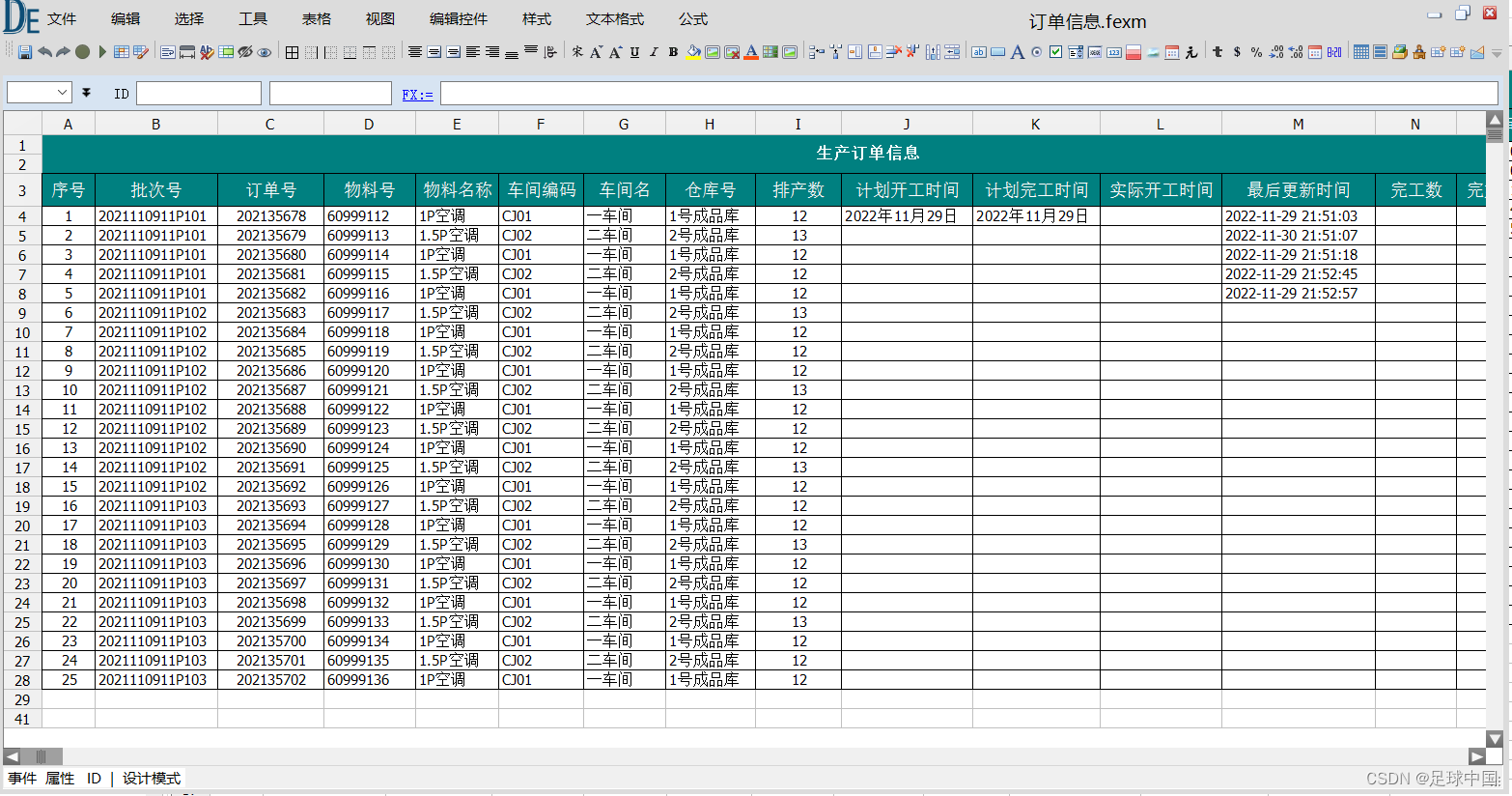
- 最新界面(源码官网可以下载)
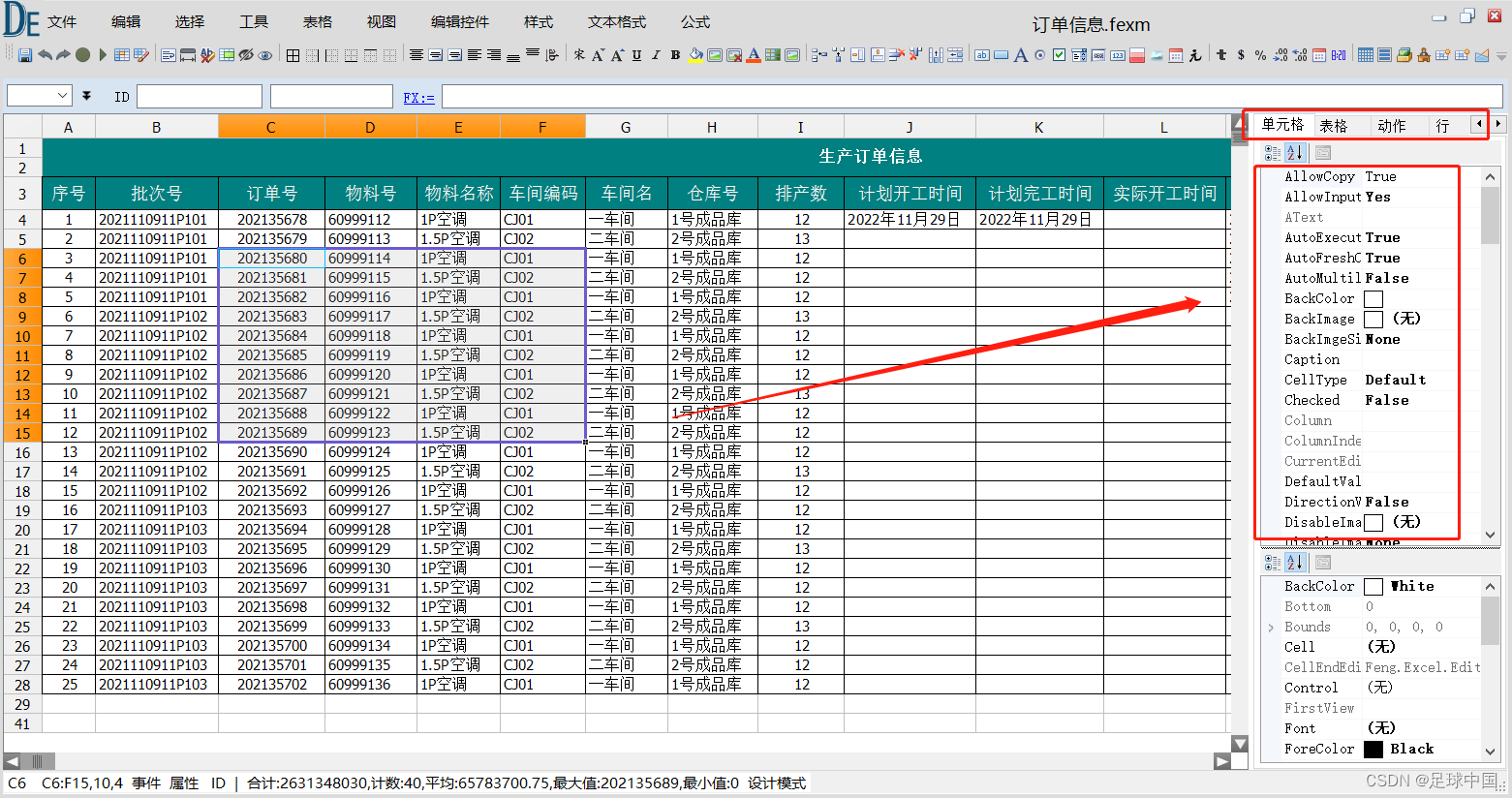
- 可以通过属性设置不能属性
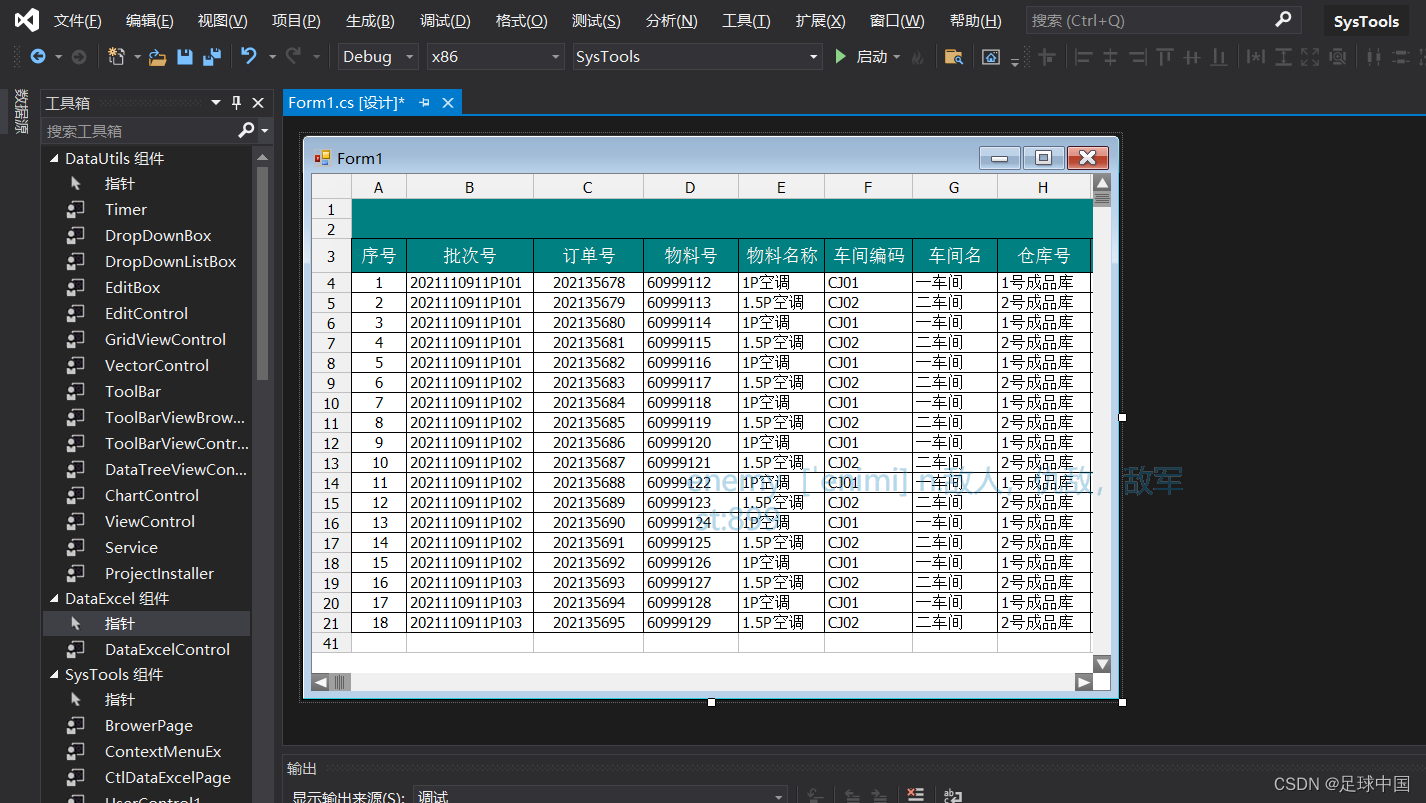
- VS下使用示例
- 浏览器查看效果
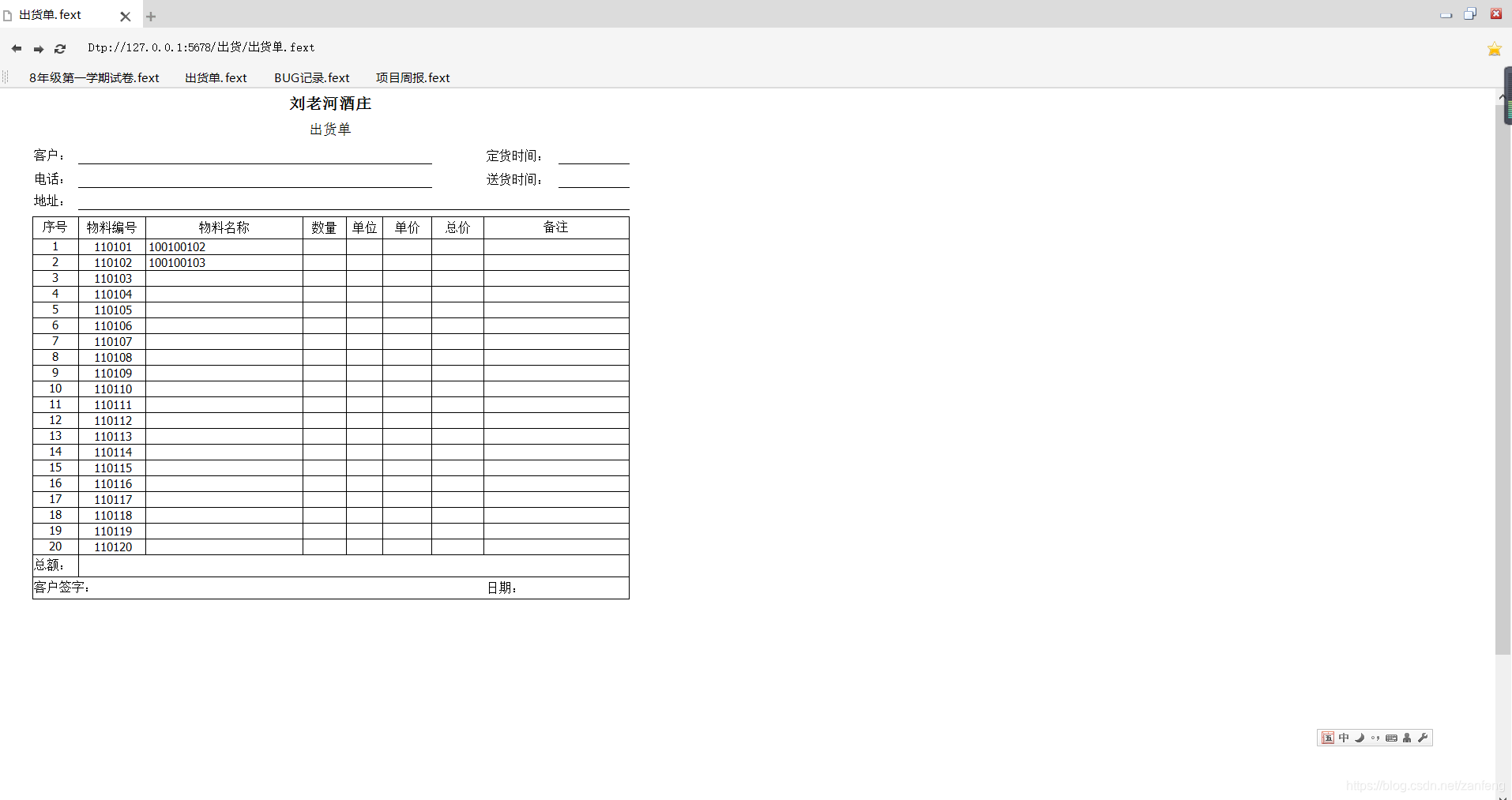

- 打印预览效果
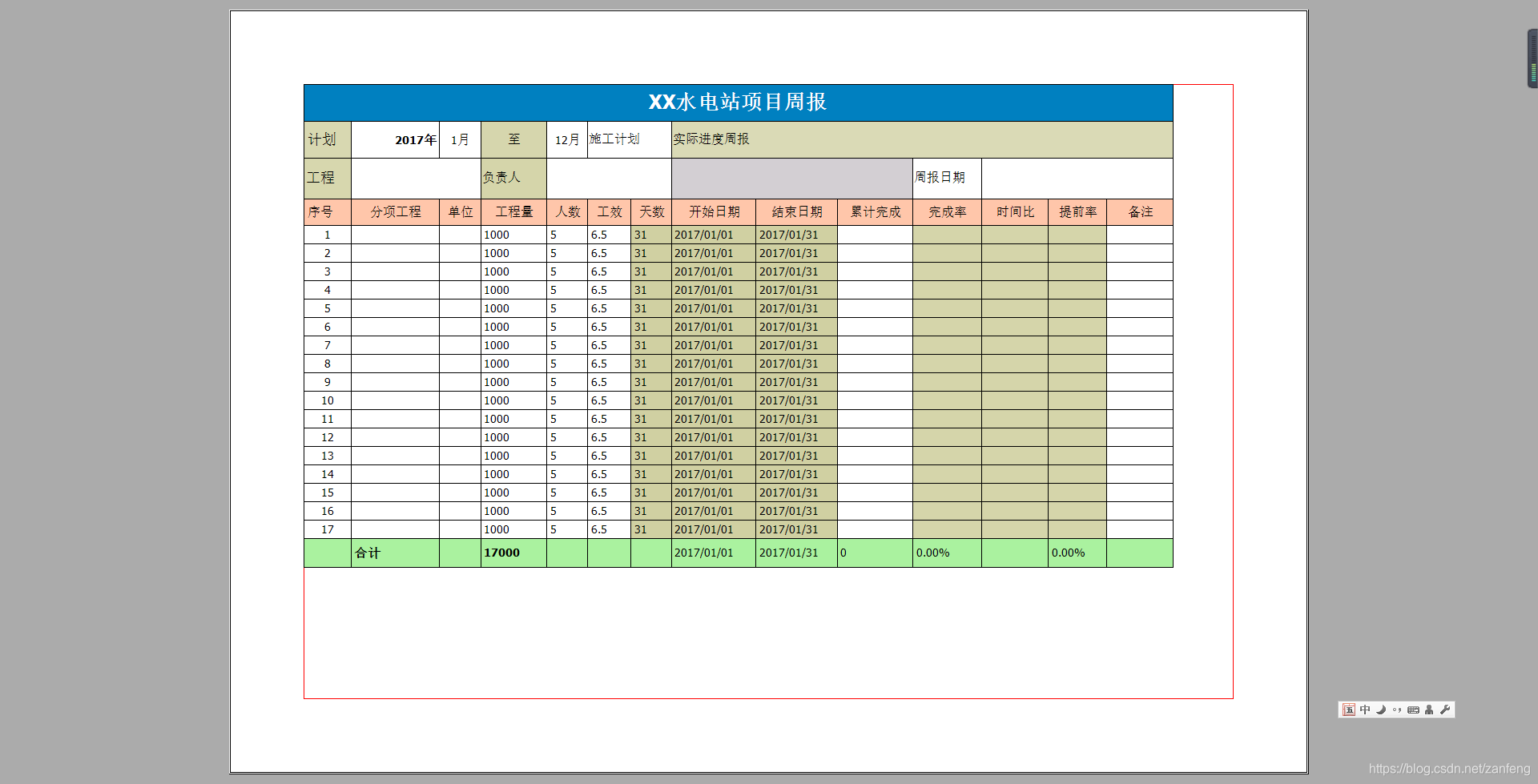
3、使用简介
DataExcel是由.net 开发的一套表格计算组件
包括 基本的表格视图,编辑控件,图表,公式计算,事件处理,文件格式化,排版,打印,图表。
DataExcel依赖于.net 框架。分别有2.0 4.0版本。
3.1 二 文件构成、
文件包括两个DLL文件。DataExcel.v1.1.dll DataUtils.v1.1.dll (V1.1为版本,根据不同版本文件名不同) DataExcel 为界面组件所在
另外 DataExcel.exe 为使用DataExcel组件开发的轻量级测试程序(源码下载见上面链接)
4、控件使用
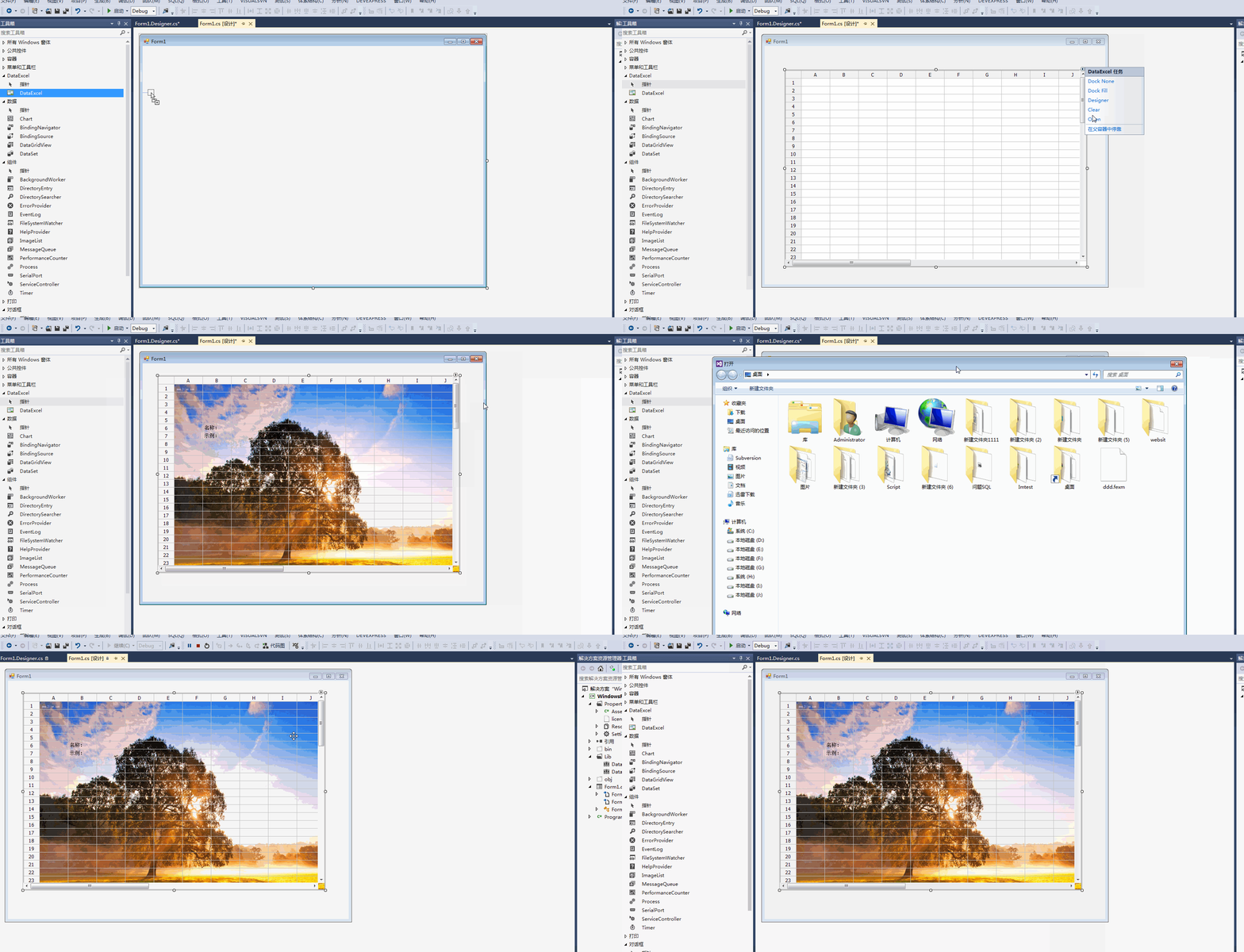
使用VS新建Winform项目 右键项目引用节点添加引用 需要添加(DataExcel.v1.1.dll,DataUtils.v1.1.dll)的引用
新建WINFORM窗口在工具箱右键并点击"选择项"选择中 DataExcel.v1.1.dll,
工具栏会出现
拖动 DataExcel 至窗口 显示如下
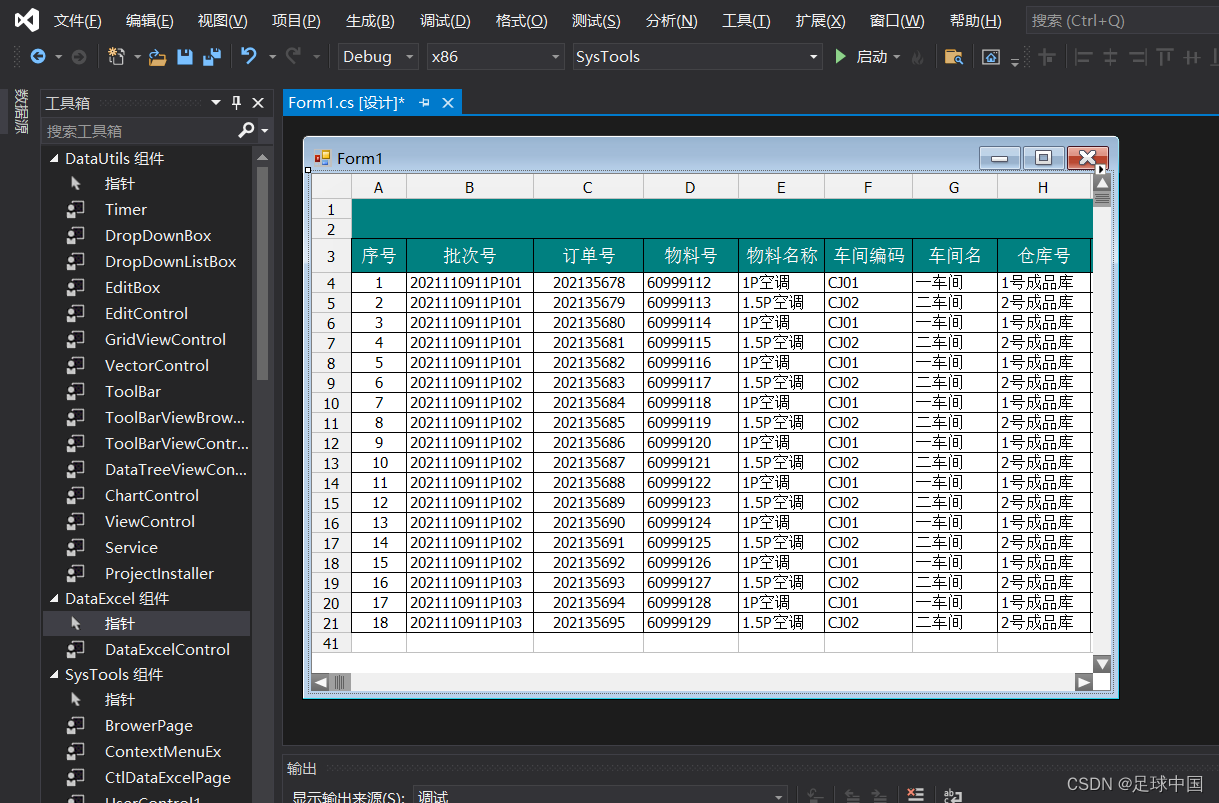 5、示例代码
cs
///清除所有行,列,合并单元格,扩展单元格,
            dataexcel1.Clear();
            ///初始化默认行,列
            dataexcel1.Init();
            //获取列
            IColumn column = dataexcel1.GetColumn(1);
            //设置列宽
            column.Width = 100;
            //获取第五行,第一列的单元格
            ICell cell = dataexcel1.GetCell("A5");
            cell.Text = "文本框:";
            cell.BackColor = Color.AliceBlue;
            cell.ForeColor = Color.Red;
            //设置编辑控件为LABEL 及为不可编辑
            cell.OwnEditControl = new Feng.Excel.Edits.CellLabel();

            //获取列
            column = dataexcel1.GetColumn(2);
            //设置列宽
            column.Width = 100;
            //获取第5行,第一列的单元格
            cell = dataexcel1.GetCell("B5");
            cell.Value = "我是编辑框";
            cell.BackColor = Color.AliceBlue;
            cell.ForeColor = Color.Red;
            //设置编辑控件为文本框
            cell.OwnEditControl = new Feng.Excel.Edits.CellTextBoxEdit();
            //设置进入编辑的方式
            cell.EditMode = Feng.Enums.EditMode.Focused | Feng.Enums.EditMode.KeyDown | Feng.Enums.EditMode.Click;


            cell = dataexcel1.GetCell("A6");
            cell.Text = "单选框:";
            cell.BackColor = Color.AliceBlue;
            cell.ForeColor = Color.Red;
            //设置编辑控件为LABEL 及为不可编辑
            cell.OwnEditControl = new Feng.Excel.Edits.CellLabel();

            //获取第6行,第一列的单元格
            Feng.Excel.Edits.CellRadioCheckBox radioedit = new Feng.Excel.Edits.CellRadioCheckBox();
            radioedit.Group = "单选组1";
            cell = dataexcel1.GetCell("B6");
            cell.Caption = "单选框1";
            cell.BackColor = Color.AliceBlue;
            cell.ForeColor = Color.RosyBrown;
            //设置编辑控件为单选框
            cell.OwnEditControl = radioedit;


            cell = dataexcel1.GetCell("C6");
            cell.Caption = "单选框2";
            cell.BackColor = Color.AliceBlue;
            cell.ForeColor = Color.RosyBrown;
            //设置编辑控件为单选框
            cell.OwnEditControl = radioedit;

            cell = dataexcel1.GetCell("D6");
            cell.Caption = "单选框3";
            cell.BackColor = Color.AliceBlue;
            cell.ForeColor = Color.RosyBrown;
            //设置编辑控件为单选框
            cell.OwnEditControl = radioedit;


            cell = dataexcel1.GetCell("A7");
            cell.Text = "复选框:";
            cell.BackColor = Color.AliceBlue;
            cell.ForeColor = Color.Red;
            //设置编辑控件为LABEL 及为不可编辑
            cell.OwnEditControl = new Feng.Excel.Edits.CellLabel();

            //获取第7行,第一列的单元格
            Feng.Excel.Edits.CellCheckBox checkedit = new Feng.Excel.Edits.CellCheckBox();
            cell = dataexcel1.GetCell("B7");
            cell.Value = true;
            cell.BackColor = Color.AliceBlue;
            cell.ForeColor = Color.RosyBrown;
            cell.Caption = "是/否";
            //设置编辑控件为复选框
            cell.OwnEditControl = checkedit;


            cell = dataexcel1.GetCell("A8");
            cell.Text = "选择日期:";
            cell.BackColor = Color.AliceBlue;
            cell.ForeColor = Color.Red;
            //设置编辑控件为LABEL 及为不可编辑
            cell.OwnEditControl = new Feng.Excel.Edits.CellLabel();

            //获取第8行,第一列的单元格
            Feng.Excel.Edits.CellDateTime datetimeedit = new Feng.Excel.Edits.CellDateTime();
            cell.FormatType = Feng.Utils.FormatType.DateTime;
            cell.FormatString = "yyyy-MM-dd";
            cell = dataexcel1.GetCell("B8");
            cell.Value = DateTime.Now;
            cell.BackColor = Color.AliceBlue;
            cell.ForeColor = Color.RosyBrown;
            //设置编辑控件为复选框
            cell.OwnEditControl = datetimeedit;
            //设置进入编辑的方式
            cell.EditMode = Feng.Enums.EditMode.Focused | Feng.Enums.EditMode.KeyDown | Feng.Enums.EditMode.Click;


            cell = dataexcel1.GetCell("A9");
            cell.Text = "数字选择:";
            cell.BackColor = Color.AliceBlue;
            cell.ForeColor = Color.Red;
            //设置编辑控件为LABEL 及为不可编辑
            cell.OwnEditControl = new Feng.Excel.Edits.CellLabel();

            //获取第9行,第一列的单元格
            Feng.Excel.Edits.CellNumber numberedit = new Feng.Excel.Edits.CellNumber();
            cell = dataexcel1.GetCell("B9");
            cell.FormatType = Feng.Utils.FormatType.Numberic;
            cell.FormatString = "$##0.00";
            cell.Value = 365.25;
            cell.BackColor = Color.AliceBlue;
            cell.ForeColor = Color.RosyBrown;
            //设置编辑控件为复选框
            cell.OwnEditControl = numberedit;
            //设置进入编辑的方式
            cell.EditMode = Feng.Enums.EditMode.Focused | Feng.Enums.EditMode.KeyDown | Feng.Enums.EditMode.Click;


            cell = dataexcel1.GetCell("A10");
            cell.Text = "数字文本框:";
            cell.BackColor = Color.AliceBlue;
            cell.ForeColor = Color.Red;
            //设置编辑控件为LABEL 及为不可编辑
            cell.OwnEditControl = new Feng.Excel.Edits.CellLabel();

            //获取第10行,第一列的单元格
            Feng.Excel.Edits.CellNumberBoxEdit numtextedit = new Feng.Excel.Edits.CellNumberBoxEdit();
            cell = dataexcel1.GetCell("B10");
            cell.FormatType = Feng.Utils.FormatType.Numberic;
            cell.FormatString = "$##0.00";
            cell.Value = 365.25;
            cell.BackColor = Color.AliceBlue;
            cell.ForeColor = Color.RosyBrown;
            //设置编辑控件为复选框
            cell.OwnEditControl = numtextedit;
            //设置进入编辑的方式
            cell.EditMode = Feng.Enums.EditMode.Focused | Feng.Enums.EditMode.KeyDown | Feng.Enums.EditMode.Click;


            cell = dataexcel1.GetCell("A11");
            cell.Text = "下拉文本框:";
            cell.BackColor = Color.AliceBlue;
            cell.ForeColor = Color.Red;
            //设置编辑控件为LABEL 及为不可编辑
            cell.OwnEditControl = new Feng.Excel.Edits.CellLabel();

            //获取第11行,第一列的单元格
            Feng.Excel.Edits.CellComboBox comboedit = new Feng.Excel.Edits.CellComboBox();
            cell = dataexcel1.GetCell("B11");
            cell.Value = "选项1";
            cell.BackColor = Color.AliceBlue;
            cell.ForeColor = Color.RosyBrown;
            //设置编辑控件为复选框
            cell.OwnEditControl = comboedit;
            comboedit.Items.AddRange(new string[] { "选项1", "选项2", "选项3", "选项4", "选项5", "选项6", "选项7" });
            //设置进入编辑的方式
            cell.EditMode = Feng.Enums.EditMode.Focused | Feng.Enums.EditMode.KeyDown | Feng.Enums.EditMode.Click;

        public void SetFunction()
        {
            ///清除所有行,列,合并单元格,扩展单元格,等
            dataexcel1.Clear();
            ///初始化默认行,列
            dataexcel1.Init();
            ICell cell = null;
            for (int i = 1; i < 6; i++)
            {
                for (int j = 1; j < 5; j++)
                {
                    cell = dataexcel1[i, j];
                    cell.Value = i + j;
                }
            }
            dataexcel1[6, 1].Expression = "\"合计:\"&sum(a1:a5)";//& 表示把两个字符串连接到一起
            dataexcel1[6, 2].Expression = "\"平均:\"&avg(b1:b5)";
            dataexcel1[6, 3].Expression = "\"数量:\"&count(c1:c5)";
            dataexcel1.Save(dataexcel1.Version + "_" + DateTime.Now.ToString("yyMMddHHmmss") + (fileindex++).ToString().PadLeft(4, '0') + ".dat");
        }


  ///清除所有行,列,合并单元格,扩展单元格,等
            dataexcel1.Clear();
            ///初始化默认行,列
            dataexcel1.Init();

            //获取行 通过GetRow函数获取行会自动创建行
            IRow row = dataexcel1.GetRow(1);
            row.Height = 30;
            row = dataexcel1.GetRow(2);
            //设置行只读
            row.InhertReadOnly = false;
            row.ReadOnly = true;
            row.BackColor = Color.AliceBlue;
            row.Height = 30;
            row = dataexcel1.GetRow(3);
            row.Height = 30;

            IColumn column = dataexcel1.GetColumn(1);
            column.Width = 120;
            column = dataexcel1.GetColumn(2);
            //设置列只读
            column.InhertReadOnly = false;
            column.ReadOnly = true;
            column.Width = 120;
            column.BackColor = Color.AntiqueWhite;
            column = dataexcel1.GetColumn(3);
            column.Width = 120;
            column = dataexcel1.GetColumn(4);
            column.Width = 120;

            ICell cell = dataexcel1[1, 1];
            cell.Name = "name1";
            cell.Value = "只读单元格";
            //设置单元格只读
            cell.ReadOnly = true;
            cell.InhertReadOnly = false;

            cell = dataexcel1[2, 1];
            cell.Name = "name2";
            cell.Value = "只读单元格";
            //设置单元格只读
            cell.ReadOnly = true;
            cell.InhertReadOnly = false;


            cell = dataexcel1[3, 2];
            cell.Value = "只读列";


            cell = dataexcel1[2, 4];
            cell.Value = "只读行";

            ///清除所有行,列,合并单元格,扩展单元格,等
            dataexcel1.Clear();
            ///初始化默认行,列
            dataexcel1.Init();

            //隐藏列头
            this.dataexcel1.ShowColumnHeader = false;
            //隐藏行头
            this.dataexcel1.ShowRowHeader = false;
            //隐藏 选中时的边框
            this.dataexcel1.ShowSelectRect = false;
            //隐藏 网络线
            this.dataexcel1.ShowGridRowLine = false;
            this.dataexcel1.ShowGridColumnLine = false;
            //显示标尺
            this.dataexcel1.ShowHorizontalRuler = true;
            this.dataexcel1.ShowVerticalRuler = true;
            //隐藏滚动条
            this.dataexcel1.VScroller.Visible = false;
            this.dataexcel1.HScroller.Visible = false;

            //获取行 通过集合获取行时不会自动创建行
            IRow row = dataexcel1.Rows[5];
            if (row == null)
            {
                row = dataexcel1.ClassFactory.CreateDefaultRow(dataexcel1, 5);
                dataexcel1.Rows.Add(row);
            }
            row.BackColor = Color.RosyBrown;

            //获取行 通过GetRow函数获取行会自动创建行
            row = dataexcel1.GetRow(6);
            row.BackColor = Color.RoyalBlue;


            //获取行 通过GetRow函数获取行会自动创建行
            row = dataexcel1.GetRow(1);
            row.Height = 30;
            row.BackColor = Color.RoyalBlue;


            //获取行 通过GetRow函数获取行会自动创建行
            row = dataexcel1.GetRow(2);
            row.Height = 30;
            row.BackColor = Color.RoyalBlue;

            //获取列 通过集合获取列时不会自动创建列
            IColumn column = dataexcel1.Columns[9];
            if (column == null)
            {
                column = dataexcel1.ClassFactory.CreateDefaultColumn(dataexcel1, 9);
                dataexcel1.Columns.Add(column);
            }
            column.BackColor = Color.SandyBrown;
            column.Width = 120;

            //获取行 通过GetRow函数获取行会自动创建行
            column = dataexcel1.GetColumn(1);
            column.Width = 190;

            ICell cell = dataexcel1["A1"];
            cell.Text = "我是单元格1";
            cell.BackColor = Color.Aquamarine;
            //获取第二行第1列
            cell = dataexcel1[2, 1];
            cell.Text = "单元格名称:" + cell.Name;
            cell.BackColor = Color.Azure;
            //能过字符串合并
            IMergeCell MergeCell = dataexcel1.MergeCell("B1:F1");
            MergeCell.BackColor = Color.AliceBlue;
            MergeCell.Text = "B1:F1";

            MergeCell = dataexcel1.MergeCell("B2:F2");
            MergeCell.BackColor = Color.AliceBlue;
            MergeCell.Text = "B2:F2";

            //获取合并的单元格
            //合并后的单元格以最左上角的单元格为基础
            cell = dataexcel1["B2"];
            cell.Text = "我是合并单元格" + cell.Name;
            cell.BackColor = Color.Beige;
            cell.Font = new Font("宋体", 13);
            cell.ForeColor = Color.Red;
            //设置内容居中
            cell.HorizontalAlignment = StringAlignment.Center;
            cell.VerticalAlignment = StringAlignment.Center;

            dataexcel1.Save(dataexcel1.Version + "_" + DateTime.Now.ToString("yyMMddHHmmss") + (fileindex++).ToString().PadLeft(4, '0') + ".dat");

     /// <summary>
        /// 获取行,列,单元格,合并后的合并单元格,并设置颜色
        /// </summary>
        public void CellInfo()
        {


            ///清除所有行,列,合并单元格,扩展单元格,等
            dataexcel1.Clear();
            ///初始化默认行,列
            dataexcel1.Init();

            //获取行 通过集合获取行时不会自动创建行
            IRow row = dataexcel1.Rows[5];
            if (row == null)
            {
                row = dataexcel1.ClassFactory.CreateDefaultRow(dataexcel1, 5);
                dataexcel1.Rows.Add(row);
            }
            row.BackColor = Color.RosyBrown;

            //获取行 通过GetRow函数获取行会自动创建行
            row = dataexcel1.GetRow(6);
            row.BackColor = Color.RoyalBlue;


            //获取行 通过GetRow函数获取行会自动创建行
            row = dataexcel1.GetRow(1);
            row.Height = 30;
            row.BackColor = Color.RoyalBlue;


            //获取行 通过GetRow函数获取行会自动创建行
            row = dataexcel1.GetRow(2);
            row.Height = 30;
            row.BackColor = Color.RoyalBlue;

            //获取列 通过集合获取列时不会自动创建列
            IColumn column = dataexcel1.Columns[9];
            if (column == null)
            {
                column = dataexcel1.ClassFactory.CreateDefaultColumn(dataexcel1, 9);
                dataexcel1.Columns.Add(column);
            }
            column.BackColor = Color.SandyBrown;
            column.Width = 120;

            //获取行 通过GetRow函数获取行会自动创建行
            column = dataexcel1.GetColumn(1);
            column.Width = 190;

            ICell cell = dataexcel1["A1"];
            cell.Text = "我是单元格1";
            cell.BackColor = Color.Aquamarine;
            //获取第二行第1列
            cell = dataexcel1[2, 1];
            cell.Text = "单元格名称:" + cell.Name;
            cell.BackColor = Color.Azure;
            //通过字符串合并
            IMergeCell MergeCell = dataexcel1.MergeCell("B1:F1");
            MergeCell.BackColor = Color.AliceBlue;
            MergeCell.Text = "B1:F1";

            MergeCell = dataexcel1.MergeCell("B2:F2");
            MergeCell.BackColor = Color.AliceBlue;
            MergeCell.Text = "B2:F2";

            //获取合并的单元格
            //合并后的单元格以最左上角的单元格为基础
            cell = dataexcel1["B2"];
            cell.Text = "我是合并单元格" + cell.Name;
            cell.BackColor = Color.Beige;
            cell.Font = new Font("宋体", 13);
            cell.ForeColor = Color.Red;
            //设置内容居中
            cell.HorizontalAlignment = StringAlignment.Center;
            cell.VerticalAlignment = StringAlignment.Center;

            dataexcel1.Save(dataexcel1.Version + "_" + DateTime.Now.ToString("yyMMddHHmmss") + (fileindex++).ToString().PadLeft(4, '0') + ".dat");
        }
6、支持公式
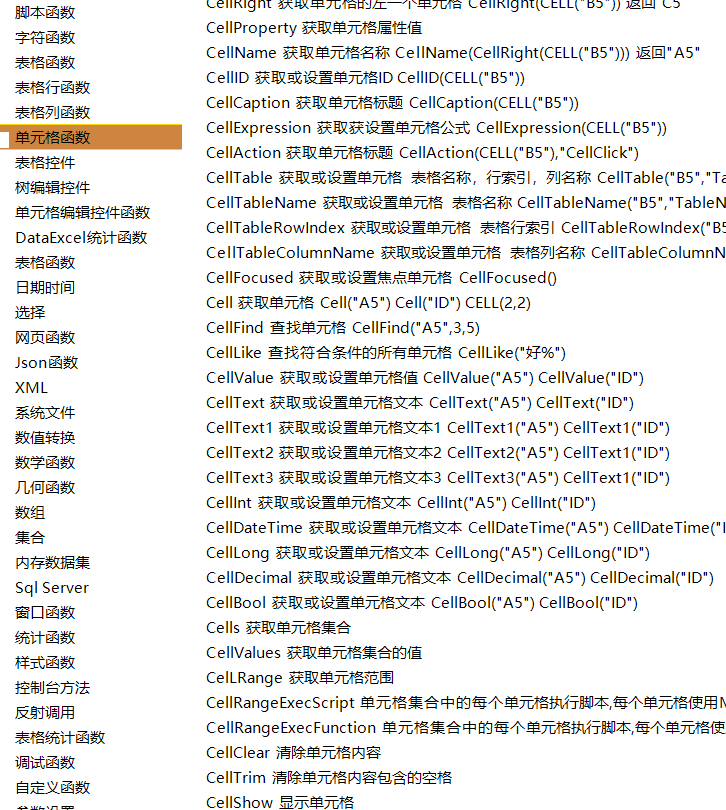
含有内置大量公式
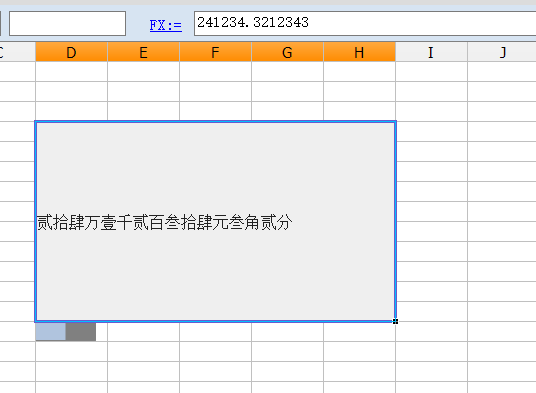
7、支持自定义单元格编辑控件
8、支持自定义公式
如下面自定义读取sqlite的公式
然后加入到公式函数列表就可以 netParser.AddFunction(new SqliteDB.SqlServerMethodContainer());
cs
    public class SqLiteMethodContainer : CBMethodContainer
    {
        public string FullName { get; set; }
        public const string Function_Category = "SqLite";
        public const string Function_Description = "SqLite";
        public override string Name
        {
            get { return Function_Category; }

        }
        public override string Description
        {
            get { return Function_Description; }
        }

        public SqLiteMethodContainer()
        {

            BaseMethod model = null;

            model = new BaseMethod();
            model.Name = "SqLiteGetParameter";
            model.Description = @"SqlGetParameter()";
            model.Eg = @"SqlGetParameter(id,no)";
            model.Function = this.SqLiteGetParameter;
            MethodList.Add(model);


            model = new BaseMethod();
            model.Name = "SqLiteInsert";
            model.Description = @"SqLiteInsert()";
            model.Eg = @"SqLiteInsert(""tablename"",list)";
            model.Function = this.SqLiteInsert;
            MethodList.Add(model);


            model = new BaseMethod();
            model.Name = "SqLiteExec";
            model.Description = @"SqLiteExec()";
            model.Eg = @"SqLiteExec(""tablename"")";
            model.Function = this.SqLiteExec;
            MethodList.Add(model);


            model = new BaseMethod();
            model.Name = "SqLiteDelete";
            model.Description = @"SqLiteDelete()";
            model.Eg = @"SqLiteDelete(""tablename"",list)";
            model.Function = this.SqLiteDelete;
            MethodList.Add(model);

            model = new BaseMethod();
            model.Name = "SqLiteUpdate";
            model.Description = @"SqLiteUpdate()";
            model.Eg = @"SqLiteUpdate(""tablename"",list)";
            model.Function = this.SqLiteUpdate;
            MethodList.Add(model);

            model = new BaseMethod();
            model.Name = "SqLiteQuery";
            model.Description = @"SqLiteQuery()";
            model.Eg = @"SqLiteQuery(""tablename"",list)";
            model.Function = this.SqLiteQuery;
            MethodList.Add(model);

            model = new BaseMethod();
            model.Name = "SqLiteTranInsertCommand";
            model.Description = @"SqLiteTranInsertCommand()";
            model.Eg = @"SqLiteTranInsertCommand(""tablename"",list)";
            model.Function = this.SqLiteTranInsertCommand;
            MethodList.Add(model);


            model = new BaseMethod();
            model.Name = "SqLiteTranDeleteCommand";
            model.Description = @"SqLiteTranDeleteCommand()";
            model.Eg = @"SqLiteTranDeleteCommand(""tablename"",list)";
            model.Function = this.SqLiteTranDeleteCommand;
            MethodList.Add(model);

            model = new BaseMethod();
            model.Name = "SqLiteTranUpdateCommand";
            model.Description = @"SqLiteTranUpdateCommand()";
            model.Eg = @"SqLiteTranUpdateCommand(""tablename"",list)";
            model.Function = this.SqLiteTranUpdateCommand;
            MethodList.Add(model);

            model = new BaseMethod();
            model.Name = "SqLiteTranExecCommand";
            model.Description = @"SqLiteTranExecCommand()";
            model.Eg = @"SqLiteTranExecCommand(""tablename"",list)";
            model.Function = this.SqLiteTranExecCommand;
            MethodList.Add(model);


            model = new BaseMethod();
            model.Name = "SqLiteTran";
            model.Description = @"SqLiteTran()";
            model.Eg = @"SqLiteTran(list)";
            model.Function = this.SqLiteTran;
            MethodList.Add(model);
        }
        public ListEx<SQLiteParameter> ToList(ListEx<object> list2)
        {
            ListEx<SQLiteParameter> list = new ListEx<SQLiteParameter>();
            if (list2 == null)
                return list;
            foreach (object item in list2)
            {
                if (item is SQLiteParameter)
                {
                    list.Add(item as SQLiteParameter);
                }
            }
            return list;
        }
        public DbType GetSqlDbType(string parameterTypeTxt)
        {
            DbType parameterType = DbType.String;
            switch (parameterTypeTxt)
            {
                case "varchar":
                    parameterType = DbType.String;
                    break;
                case "dbtype.string":
                    parameterType = DbType.String;
                    break;
                case "int":
                    parameterType = DbType.Int32;
                    break;
                case "decimal":
                    parameterType = DbType.Decimal;
                    break;
                case "datetime":
                    parameterType = DbType.DateTime;
                    break;
                case "dbtype.datetime":
                    parameterType = DbType.DateTime;
                    break;
                default:
                    break;
            }
            return parameterType;
        }
        public virtual object SqLiteGetParameter(params object[] args)
        {
            string parameterName = base.GetTextValue(1, args);
            SQLiteParameter parameter = null;
            if (args.Length == 5)
            {
                string parameterTypeTxt = base.GetTextValue(2, args);
                int parameterSize = base.GetIntValue(3, args);
                object value = base.GetArgIndex(4, args);
                DbType parameterType = GetSqlDbType(parameterTypeTxt.ToLower());
                parameter = new SQLiteParameter(parameterName, parameterType, parameterSize);
                parameter.Value = value;
            }
            else if (args.Length == 4)
            {
                string parameterTypeTxt = base.GetTextValue(2, args);
                object value = base.GetArgIndex(3, args);
                DbType parameterType = parameterType = GetSqlDbType(parameterTypeTxt.ToLower());
                parameter = new SQLiteParameter(parameterName, parameterType);
                parameter.Value = value;
            }
            else if (args.Length == 3)
            {
                object value = base.GetArgIndex(2, args);
                parameter = new SQLiteParameter(parameterName, value);
                parameter.Value = value;
            }
            return parameter;
        }
        public virtual object SqLiteInsert(params object[] args)
        {
            string table = base.GetTextValue(1, args);
            ListEx<object> list2 = base.GetArgIndex(2, args) as ListEx<object>;
            ListEx<SQLiteParameter> list = ToList(list2);
            string connection = base.GetTextValue(3, args);
            int rows = DbHelperSQLite.Insert(table, list, connection);
            return rows;
        }

        public virtual object SqLiteDelete(params object[] args)
        {
            string table = base.GetTextValue(1, args);
            ListEx<object> list2 = base.GetArgIndex(2, args) as ListEx<object>;
            ListEx<SQLiteParameter> list = ToList(list2);
            string connection = base.GetTextValue(3, args);
            int rows = DbHelperSQLite.Delete(table, list, connection);
            return rows;
        }
        public virtual object SqLiteUpdate(params object[] args)
        {
            string table = base.GetTextValue(1, args);
            ListEx<object> list2 = base.GetArgIndex(2, args) as ListEx<object>;
            ListEx<SQLiteParameter> list = ToList(list2);
            ListEx<object> list3 = base.GetArgIndex(3, args) as ListEx<object>;
            ListEx<SQLiteParameter> values = ToList(list3);
            string connection = base.GetTextValue(4, args);
            int rows = DbHelperSQLite.Update(table, list, values, connection);
            return rows;
        }
        public virtual object SqLiteExec(params object[] args)
        {
            string sql = base.GetTextValue(1, args);
            ListEx<object> list2 = base.GetArgIndex(2, args) as ListEx<object>;
            ListEx<SQLiteParameter> list = ToList(list2);
            string connection = base.GetTextValue(3, args);
            int rows = DbHelperSQLite.ExecuteSql(sql, list, connection);
            return rows;
        }
        public virtual object SqLiteQuery(params object[] args)
        {
            string sql = base.GetTextValue(1, args);
            ListEx<object> list2 = base.GetArgIndex(2, args) as ListEx<object>;
            ListEx<SQLiteParameter> list = ToList(list2);
            string connection = base.GetTextValue(3, args);
            DataTable table = DbHelperSQLite.Query2(sql, list, connection);
            return table;
        }
        public virtual object SqLiteTranInsertCommand(params object[] args)
        {
            string table = base.GetTextValue(1, args);
            ListEx<object> list2 = base.GetArgIndex(2, args) as ListEx<object>;
            ListEx<SQLiteParameter> list = ToList(list2);
            CommandInfoSQLite command = DbHelperSQLite.GetInsertCommandInfo(table, list);
            return command;
        }
        public virtual object SqLiteTranDeleteCommand(params object[] args)
        {
            string table = base.GetTextValue(1, args);
            ListEx<object> list2 = base.GetArgIndex(2, args) as ListEx<object>;
            ListEx<SQLiteParameter> list = ToList(list2);
            CommandInfoSQLite command = DbHelperSQLite.GetDeleteCommandInfo(table, list);
            return command;
        }
        public virtual object SqLiteTranUpdateCommand(params object[] args)
        {
            string table = base.GetTextValue(1, args);
            ListEx<object> list2 = base.GetArgIndex(2, args) as ListEx<object>;
            ListEx<SQLiteParameter> list = ToList(list2);

            ListEx<object> list3 = base.GetArgIndex(3, args) as ListEx<object>;
            ListEx<SQLiteParameter> values = ToList(list3);
            CommandInfoSQLite command = DbHelperSQLite.GetUpdateCommandInfo(table, list, values);
            return command;
        }
        public virtual object SqLiteTranExecCommand(params object[] args)
        {
            string table = base.GetTextValue(1, args);
            ListEx<object> list2 = base.GetArgIndex(2, args) as ListEx<object>;
            ListEx<SQLiteParameter> list = ToList(list2);
            CommandInfoSQLite command = DbHelperSQLite.GetExecuteCommandInfo(table, list);
            return command;
        }
        public virtual object SqLiteTran(params object[] args)
        {
            ListEx<object> list2 = base.GetArgIndex(1, args) as ListEx<object>;
            string connection = base.GetTextValue(2, args);
            ListEx<CommandInfoSQLite> list = new ListEx<CommandInfoSQLite>();


            if (list2 != null)
            {
                foreach (object item in list2)
                {
                    if (item is CommandInfoSQLite)
                    {
                        list.Add(item as CommandInfoSQLite);
                    }
                }
            }
            else
            {
                object item = base.GetArgIndex(1, args);
                if (item is CommandInfoSQLite)
                {
                    list.Add(item as CommandInfoSQLite);
                }
            }
            DbHelperSQLite.ExecuteSqlTran(list, connection);
            return true;
        }

    }