需求背景
经常有学员会对开机启动进行相关的性能优化,查看Perfetto的对应开机trace时,发现在SystemServer启动期间,会启动很多的Service,这些Service启动总计的耗时也有将近3s。
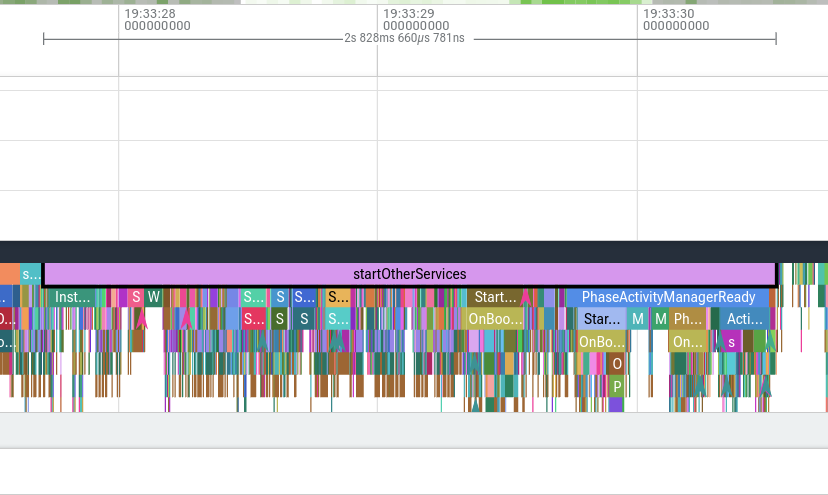
所以很多同学在做开机性能优化时候就会考虑对这个部分进行裁剪或者优化,这块的启动的Service确实数目巨大
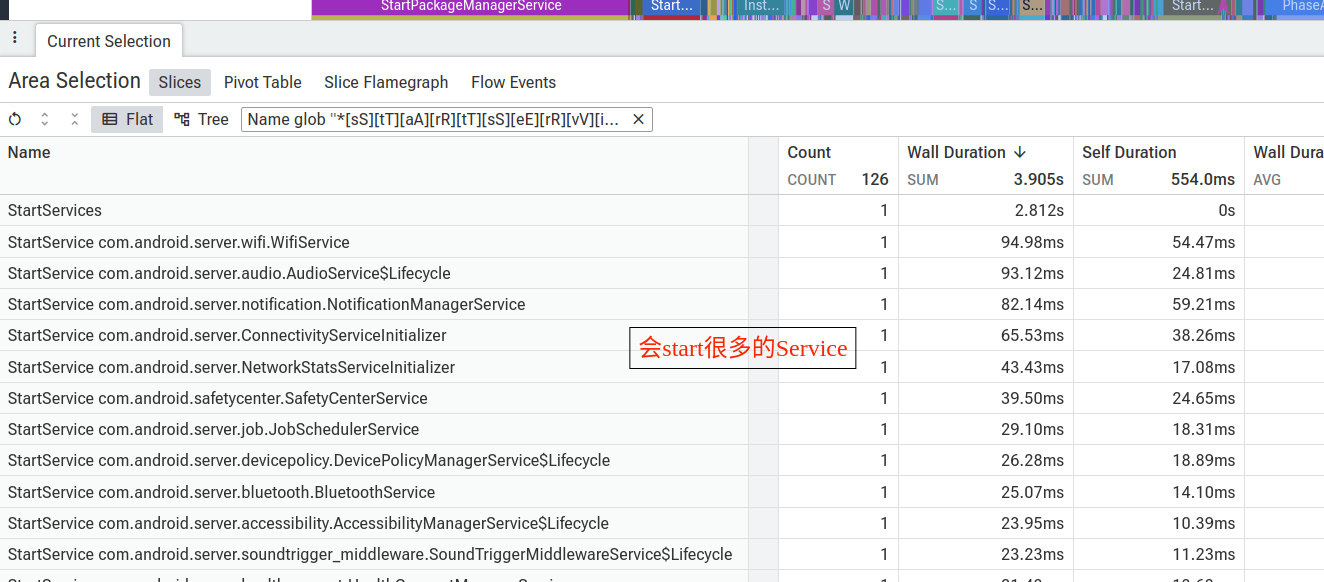
但其实有一些Service对于一些特定设备是可以不需要的,比如Print这种服务,VR,HDMI等,这种对于某些特定设备是不需要的,要根据自己手机特性看看是否保留,比如很多设备硬件没有了nfc,指纹。
裁剪相关的SystemService
那么如何关闭一些SystemService呢?
这里可以看一下相关的启动Service的代码
frameworks/base/services/java/com/android/server/SystemServer.java
cpp
/**
     * Starts a miscellaneous grab bag of stuff that has yet to be refactored and organized.
     */
    private void startOtherServices(@NonNull TimingsTraceAndSlog t) {
        t.traceBegin("startOtherServices");
//省略
            t.traceBegin("StartKeyAttestationApplicationIdProviderService");
            ServiceManager.addService("sec_key_att_app_id_provider",
                    new KeyAttestationApplicationIdProviderService(context));
            t.traceEnd();

            t.traceBegin("StartKeyChainSystemService");
            mSystemServiceManager.startService(KeyChainSystemService.class);
            t.traceEnd();

            t.traceBegin("StartBinaryTransparencyService");
            mSystemServiceManager.startService(BinaryTransparencyService.class);
            t.traceEnd();
            //省略
如果是直接启动的
这种直接系统直接启动的说明是系统核心服务,很重要的,一般不建议移除
cpp
   // TODO(aml-jobscheduler): Think about how to do it properly.
        t.traceBegin("StartJobScheduler");
        mSystemServiceManager.startService(JobSchedulerService.class);
        t.traceEnd();
还有
cpp
ServiceManager.addService("sec_key_att_app_id_provider",
                    new KeyAttestationApplicationIdProviderService(context));
当然如果大家评估确实可以不需要,也可以直接屏蔽这个启动代码,也可以自己加一些额外的config进行判断控制,但是一定要充分评估测试验证
如果有hasSystemFeature判断的
cpp
            if (mPackageManager.hasSystemFeature(PackageManager.FEATURE_PRINTING)) {
                t.traceBegin("StartPrintManager");
                mSystemServiceManager.startService(PrintManagerService.class);
                t.traceEnd();
            }
相关配置如下有2种方法:
方法1
定义unavailable-features
这种方法比较建议,因为可以不需要理会原来Feature在哪里进行声明的,不需要去寻找它,直接新建unavailable-features的xml就可以
config/unavailable-features.xml
bash
<?xml version="1.0" encoding="utf-8"?>
<!-- Device-specific feature removals -->
<permissions>
    <unavailable-feature name="android.software.print" />
</permissions>
还需要把这个xml拷贝到设备的etc目录下
bash
diff --git a/device.mk b/device.mk
index 4827007..7ce4cfb 100644
--- a/device.mk
+++ b/device.mk
@@ -38,6 +38,10 @@ PRODUCT_COPY_FILES += \
 # Shipping API level
 PRODUCT_SHIPPING_API_LEVEL := 28

+# Features
+PRODUCT_COPY_FILES += \
+    $(LOCAL_PATH)/config/unavailable-features.xml:$(TARGET_COPY_OUT_VENDOR)/etc/permissions/unavailable-features.xml
+
方法2
找到原来的Feature的声明的xml,然后在里面直接移除,或者overlay原来的xml
-
把 framework 的 frameworks/native/data/etc/handheld_core_hardware.xml 复制到 device tree,例如 device/xiaomi/grus/config/handheld_core_hardware.xml。
-
删掉:
bash
<feature name="android.software.print" /> - 用 PRODUCT_COPY_FILES 覆盖到同一个目标路径 /vendor/etc/permissions/handheld_core_hardware.xml。
bash
 PRODUCT_COPY_FILES += \
      device/xiaomi/grus/config/handheld_core_hardware.xml:$(TARGET_COPY_OUT_VENDOR)/etc/permissions/handheld_core_hardware.xml
如果有config_enableXXX判断的
cpp
 if (context.getResources().getBoolean(R.bool.config_enableVirtualDeviceManager)) {
            t.traceBegin("StartVirtualDeviceManager");
            mSystemServiceManager.startService(VirtualDeviceManagerService.class);
            t.traceEnd();
        }
如果想要去除,就需要趋势device相关的路径overlay这个config.xml
bash
diff --git a/overlay/frameworks/base/core/res/res/values/config.xml b/overlay/frameworks/base/core/res/res/values/config.xml
index e406a8a..edec643 100644
--- a/overlay/frameworks/base/core/res/res/values/config.xml
+++ b/overlay/frameworks/base/core/res/res/values/config.xml
@@ -276,6 +276,9 @@
          auto-brightness adjustment setting. -->
     <fraction name="config_autoBrightnessAdjustmentMaxGamma">100%</fraction>

+    <!-- Disable the virtual device manager. -->
+    <bool name="config_enableVirtualDeviceManager">false</bool>
+
     <!-- Whether the always on display mode is available. -->
     <bool name="config_dozeAlwaysOnDisplayAvailable">true</bool>
验证方法
上面修改完成后,进行整编然后刷机进行验证。
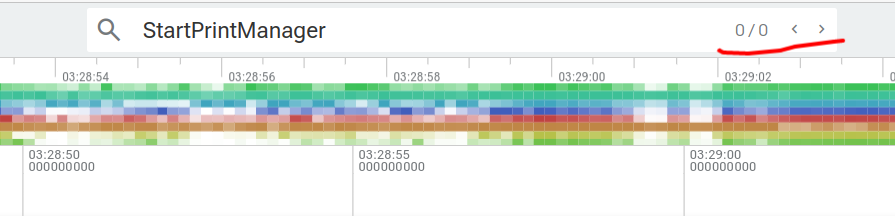
可以直接Perfetto查看开机trace搜索相关服务的Trace,发现无法找到
也可以使用adb命令查看
bash
adb shell pm list features | grep printfeature:android.hardware.fingerprint
原文地址: