作者:来自 Elastic Kathleen DeRusso, Matt Nowzari, Apostolos Matsagkas, Peter Pišljar
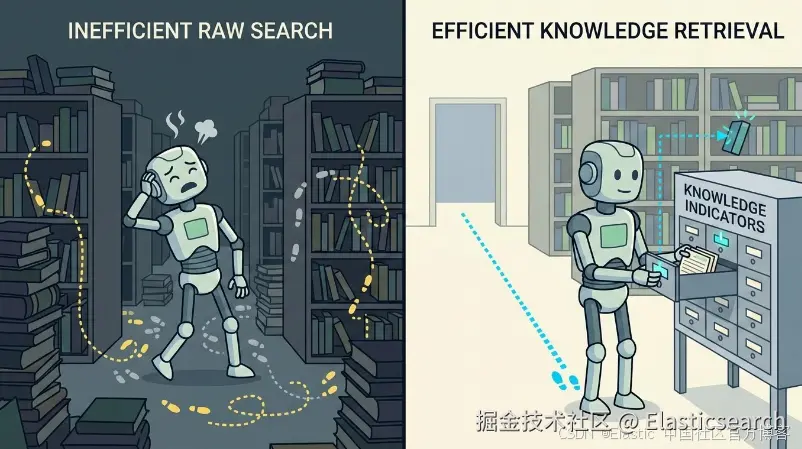
一篇技术实践指南,介绍如何将事实预先计算到 Elasticsearch AI Index 中,让 agents 通过一次 ES|QL 查询直接获得答案,而无需阅读完整文档,从而减少 token 消耗并降 低延迟 。
Elasticsearch 与业界领先的 Gen AI 工具和提供商进行了原生集成。观看我们的网络研讨会,了解如何超越 RAG 基础,或者使用 Elastic vector database 构建可用于生产环境的应用。
要为你的使用场景构建最佳搜索解决方案,现在可以开始免费 cloud 试用,或者立即在你的本地计算机上试用 Elastic。
为了回答一个问题而将完整文档加载到 agent 的上下文中成本很高,而且每次检索失败都会进一步增加成本。在这篇实践指南中,我们采用的是预先计算事实的方法。Kibana workflow 将每个文档提炼成事实级别的 Knowledge Indicator(KI),存储在 Elasticsearch AI Index 中,并通过一次 Elasticsearch Query Language(ES|QL)查询进行检索。针对同一个问题,与阅读原始文档相比,从 KI 中获取答案的 agent 使用更少的 token 和更低的延迟,就能得到相同的、有依据的答案,而且无需将任何完整文档加载到上下文中。这些事实只需预先计算一次,然后就可以存储起来,供未来遇到类似查询的 agents 使用。这是我们关于使用 AI indices 构建上下文系列文章的第 2 部分;第 1 部分介绍了如何将 agents 路由到正确的 index。
上下文管理依赖于良好的检索。与其让 agents 为每个问题重新发现相同的内容,不断重复类似的步骤并消耗 token,Elastic 的 agentic AI 功能可以让我们预先计算这些细节,并将它们以结构化、可搜索的形式存储起来,同时让 agents 直接加载这些上下文。我们将这种预先计算的上下文单元称为 Knowledge Indicator。
默认的 agentic retrieval augmented generation(RAG)模式恰恰相反。它在查询时检索完整文档,并将这些文档直接放入模型的上下文中,因此每个问题都要为这种检索付出 token 和延迟成本。将答案预先计算为 KI,可以把这部分成本移出关键路径,只需执行一次即可。
它是如何工作的:AI Index、Kibana Workflows 和 query-ki skill
通过 AI indices 构建上下文主要包含三个部分:AI Index(一个用于存储 KI 的特殊 Elasticsearch index)、用于创建 KI 的 Kibana Workflows,以及帮助 agents 使用 ES|QL 直接查询 KI 的 query-ki skill:
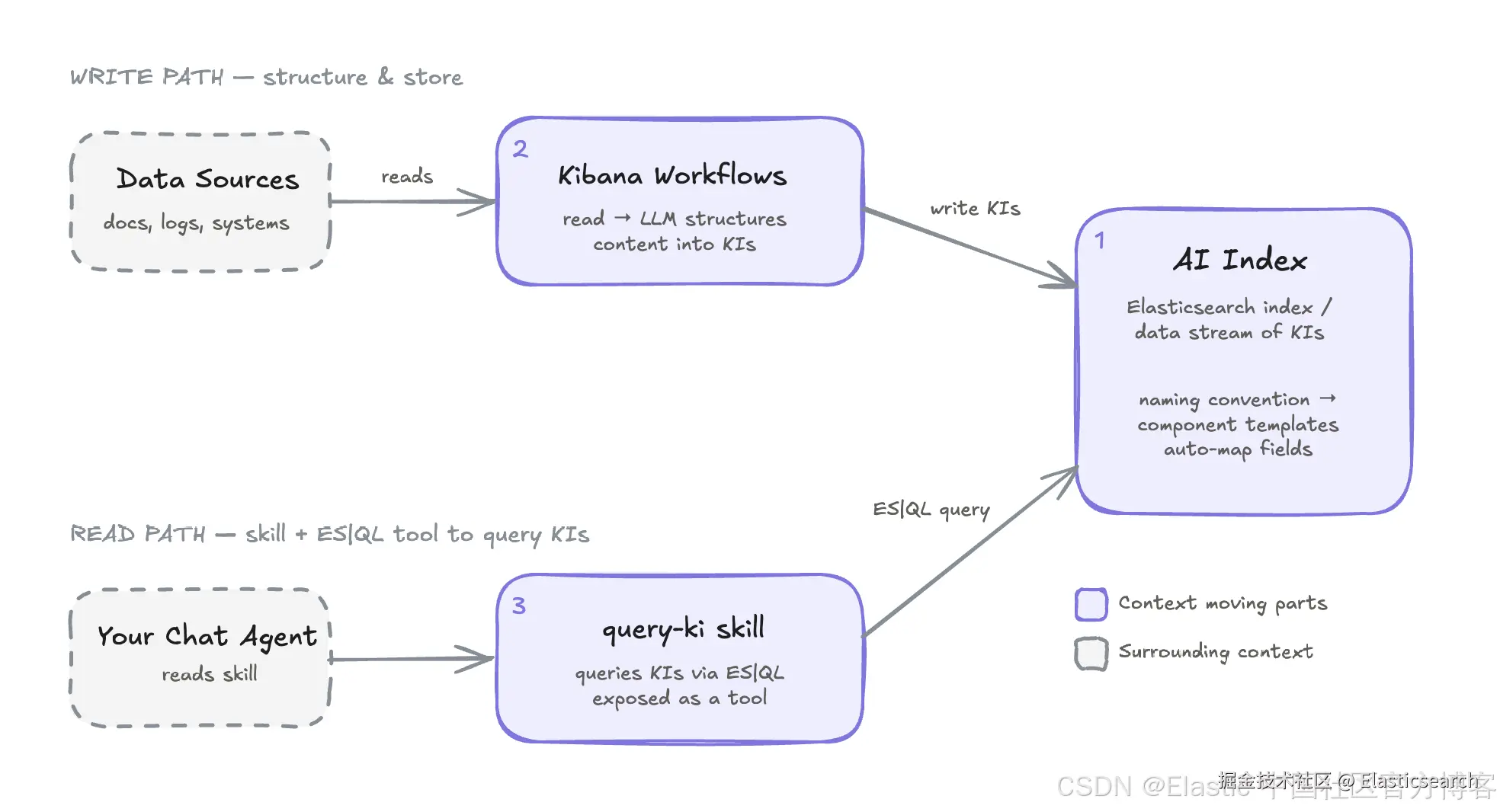
这篇博客文章与第 1 部分类似,因为我们使用的是相同的核心构建模块。但在这篇文章中,我们展示的是一个非常不同的使用场景。我们不是预先计算 index 元数据,而是从已建立索引的文档中提炼出特定的 事实 ,这些事实可以直接用于回答 agents 的问题,而无需后续搜索。如果你希望在阅读这些示例的过程中端到端地自行创建相同的 KI,我们还提供了一个 notebook。
前提条件:Elasticsearch Serverless 和 LLM API key
本教程假设你已经具备:
-
一个 Elasticsearch Serverless project。如果你还没有,可以注册试用。
-
一个用于访问 Elasticsearch project 的 API key。
-
一个兼容 OpenAI 的大型语言模型(LLM)API key,用于通过 Deep Agents scripts 访问 AI indices。
将 BrowseComp-Plus 示例语料库加载到 Elasticsearch
首先,我们需要一些数据源。数据源可以是已经存在于 Elasticsearch indices 中的数据,也可以是通过 connectors 或 ES|QL data sources 访问的外部数据。
在这篇博客中,我们将创建一个名为 browsecomp-plus 的 index,用于存放示例数据,其 mappings 如下:
bash
`
1. {
2. "browsecomp-plus": {
3. "mappings": {
4. "_meta": {
5. "description": "BrowseComp-Plus corpus: ~100k human-verified web documents (news articles, Wikipedia entries, institutional pages) used as a reasoning-intensive browsing/QA retrieval benchmark. BM25-only index."
6. },
7. "properties": {
8. "docid": {
9. "type": "keyword",
10. "meta": {
11. "description": "Stable corpus document id."
12. }
13. },
14. "text": {
15. "type": "text",
16. "meta": {
17. "description": "Full document text: title, date, and body content."
18. }
19. },
20. "title": {
21. "type": "text",
22. "meta": {
23. "description": "Document title (from the document's front matter)."
24. }
25. },
26. "url": {
27. "type": "keyword",
28. "meta": {
29. "description": "Source URL the document was crawled from."
30. }
31. }
32. }
33. }
34. }
35. }
`Lobster AI并通过 _bulk API 填充一小部分 BrowseComp-Plus 数据。你可以使用配套的 notebook,将这些示例数据加载到你的 project 中。
创建用于存储 KI 的 AI Index
与第 1 部分类似,第一步是创建一个 AI Index:
go
`PUT ai-index-idx-my-corpus`Lobster AI该 index 已预先配置好与第 1 部分中列出的相同必需 mappings。这里我们直接使用 semantic_text 开箱即用地执行混合搜索。
Agents 如何使用 ES|QL 检索 KI
KI 是 AI Index 中的一个文档。KI 之所以有用,在于_检索_,也就是查询 AI Index 以找到正确的内容。这个查询被封装在一个小型、可移植且与 harness 无关的 skill 中,可以在任何 agent harness 中运行。
下面是一个 query-ki skill 示例:
vbnet
`2. ---
3. name: query-ki
4. description: >-
5. Retrieve Knowledge Indicators (precomputed context) from the Elasticsearch AI
6. Index before answering. Use it to find which index to search (routing profiles)
7. or to look up precomputed facts without reading source documents. Trigger on any question that depends on specific facts, names, dates, or on choosing a data source.
8. allowed-tools: esql_query
9. ---
11. # Retrieving Knowledge Indicators
13. Knowledge Indicators (KIs) live in Elasticsearch indices named
14. ai-index-*
15. .
16. Retrieve them by calling the
17. esql_query
18. tool with the query below. Substitute
19. the user's question for
20. <query>
21. , and
22. corpus_entry
23. as the
24. <ki_type>
25. for facts.
27. ```esql
28. FROM ai-index-idx-* METADATA _id, _index, _score
29. | WHERE type == "<ki_type>"
30. | FORK
31. (WHERE MATCH(content, "<query>") OR MATCH(description, "<query>")
32. | SORT _score DESC | LIMIT 20)
33. (WHERE MATCH(content.semantic, "<query>") OR MATCH(description.semantic, "<query>")
34. | SORT _score DESC | LIMIT 20)
35. | FUSE
36. | SORT _score DESC
37. | KEEP title, content, description, tags
38. | LIMIT 5
39. ```
41. Ground your answer in what the query returns, and cite the KI titles you used. If
42. nothing relevant comes back, say so rather than guessing.`Lobster AI将其保存为 skills/query-ki/SKILL.md。
下面是这个 skill 所执行的操作:
-
我们将
corpus_entry定义为 KI 使用场景。 -
我们在 AI indices 上执行混合 ES|QL 搜索,按照适当的
type进行过滤,并使用 reciprocal rank fusion(RRF)作为融合结果的默认方法。 -
在判断哪些事实与用户查询相关时,KI 结果将直接为 agent 的答案提供依据。
当我们说 AI indices 和 KI 与 harness 无关 时,是因为这个 skill 本质上只是指令加查询。它可以在 Elastic Agent Builder、Kibana workflow agent、 Claude Code 或任何其他 harness 中运行。我们将使用 Deep Agents 来演示如何在 Kibana 生态系统之外查询它。由于 AI Index 的核心就是一个 Elasticsearch index,因此你也可以直接探索其中的数据。
为 agentic RAG 将事实预先计算为 KI
在这个示例中,我们提取实际事实,让 agents 无需消耗完整文档就能检索答案。我们为选定的每个文档生成一个基于事实的 KI,不过你实际生成的 KI 数量和结构完全可以自定义。
我们将使用 BrowseComp-Plus 语料库的一个样本,将其建立索引到 browsecomp-plus index 中,其中包含 docid、url、title 和 text 字段。
基线:使用 RRF 检索完整文档
首先,这是一个简单的 RRF 查询:
bash
`
1. POST /_query?format=txt
2. {
3. "query": """
4. FROM browsecomp-plus METADATA _score, _id, _index
5. | FORK
6. (WHERE match(title, "What was the actress who played Torvi from Vikings also known for?") | SORT _score DESC | LIMIT 100)
7. (WHERE match(text, "What was the actress who played Torvi from Vikings also known for?") | SORT _score DESC | LIMIT 100)
8. | FUSE // uses RRF by default
9. | SORT _score DESC
10. | KEEP _id, title, text
11. | LIMIT 10
12. """
13. }
`Lobster AI这会将数百个单词的原始正文内容直接放入模型的上下文中。它可能有效,但成本很高,而且每次检索失败都会进一步增加成本。
构建 Kibana workflow
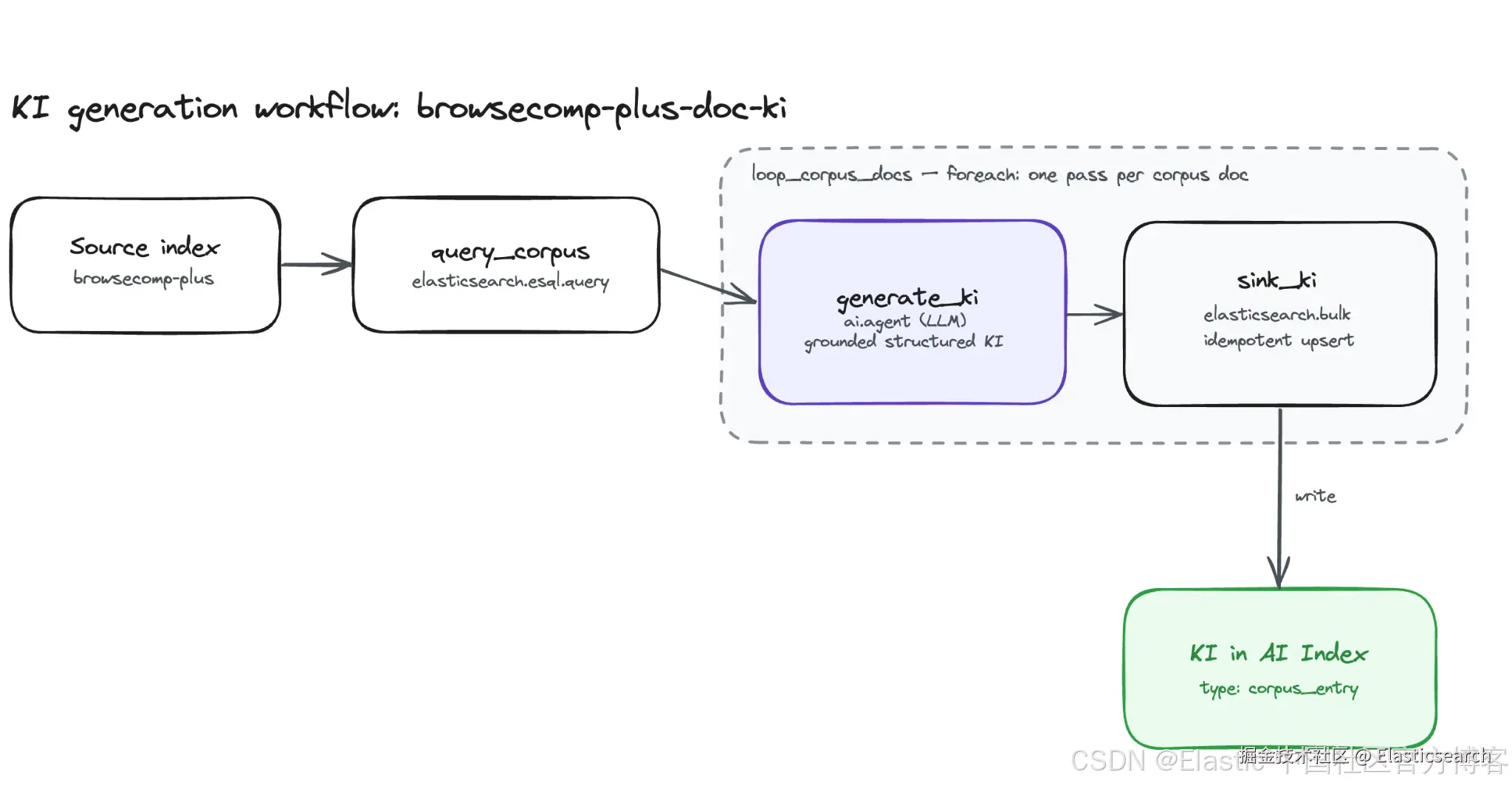
下面的 workflow 使用一次 ES|QL 查询读取一批文档,并将每个文档生成一个事实级别的 KI,写入 AI Index。每次迭代执行两个步骤:generate_ki 将原始文档提炼为结构化 KI,而 sink_ki 则以 docid 作为键将其写入 AI Index,从而确保重复运行具有幂等性。
将下面的 YAML 复制并粘贴到 Elastic Workflows 编辑器中:
yaml
`
1. version: '1'
2. name: browsecomp-plus-doc-ki
3. description: Query the BrowseComp-Plus corpus with ES|QL, generate a KI per doc with an AI agent, and bulk-write each into the AI Index as a corpus_entry.
4. enabled: true
5. tags:
6. - precomputed-context
7. - browsecomp-plus
8. triggers:
9. - type: manual
10. steps:
11. - name: query_corpus
12. type: elasticsearch.esql.query
13. with:
14. # WHERE drops empty bodies and restricts to the curated KI_DOCIDS -- the
15. # specific documents this example's question depends on -- so the workflow
16. # generates only a handful of KIs instead of one per corpus document.
17. # SUBSTRING keeps the prompt bounded (a full body would blow the context window).
18. # Column order drives the foreach.item[N] indices:
19. # item[0]=docid item[1]=title item[2]=url item[3]=text
20. query: >
21. FROM browsecomp-plus
22. | WHERE text IS NOT NULL AND docid IN ("11589", "50639", "64501", "41758", "57766", "84983", "82008")
23. | KEEP docid, title, url, text
24. | EVAL text = SUBSTRING(text, 1, 12000)
26. - name: loop_corpus_docs
27. type: foreach
28. foreach: '{{ steps.query_corpus.output.values }}'
29. steps:
30. # Turn the raw doc into a retrieval-optimized Knowledge Indicator.
31. - name: generate_ki
32. type: ai.agent
33. timeout: 300s
34. with:
35. message: >
36. You are a knowledge engineer building a Knowledge Indicator (KI)
37. for an enterprise document-retrieval corpus. A KI is a compact,
38. high-signal record that a hybrid (BM25 + semantic) search engine
39. and an AI agent use to FIND and JUDGE the source document without
40. reading it in full.
42. Read the document below and extract a faithful, richly structured KI.
43. Follow these rules strictly:
44. - Be 100% grounded: never state anything not supported by the text.
45. - Prefer concrete, named specifics (people, organizations, products,
46. dates, places, figures) over vague phrasing.
47. - Write for retrieval, not prose flourish. No marketing language.
48. - If a field cannot be determined from the text, return an empty
49. string or empty array rather than guessing.
51. Document ID: {{ foreach.item[0] }}
52. Original Title: {{ foreach.item[1] }}
53. Source URL: {{ foreach.item[2] }}
54. Document Body:
55. {{ foreach.item[3] }}
56. schema:
57. type: object
58. properties:
59. title:
60. type: string
61. description: A concise, specific, human-readable title (<= 12 words).
62. summary:
63. type: string
64. description: A dense 3-5 sentence factual summary capturing the document's main claims, named entities, and conclusions. PRIMARY semantic search surface.
65. answers_questions:
66. type: array
67. items:
68. type: string
69. description: 2-5 natural-language questions this document can authoritatively answer.
70. key_entities:
71. type: array
72. items:
73. type: string
74. description: 3-10 salient named entities (people, organizations, products, places, dates) explicitly mentioned in the text.
75. topics:
76. type: array
77. items:
78. type: string
79. description: 3-8 short topic/category labels.
80. tagline:
81. type: string
82. description: A single ultra-short phrase (<= 6 words) as a quick-reference label.
83. required:
84. - title
85. - summary
86. - answers_questions
87. - key_entities
88. - topics
90. # Direct bulk write to the AI Index. The explicit
91. index
92. action row sets
93. # _id = docid so re-runs upsert in place (idempotent).
94. index:
95. in
96. with
98. # supplies the default target index for the bulk request.
99. - name: sink_ki
100. type: elasticsearch.bulk
101. with:
102. index: ai-index-idx-my-corpus
103. operations:
104. - index:
105. _id: '{{ foreach.item[0] }}'
106. - '@timestamp': '{{ execution.startedAt | date: "%Y-%m-%dT%H:%M:%S.%LZ" }}'
107. type: corpus_entry
108. title: '{{ foreach.item[1] | default: steps.generate_ki.output.structured_output.title }}'
109. tags:
110. - browsecomp-plus
111. references:
112. uri: '{{ foreach.item[2] }}'
113. attributes:
114. docid: '{{ foreach.item[0] }}'
115. url: '{{ foreach.item[2] }}'
116. source_index: browsecomp-plus
117. tagline: '{{ steps.generate_ki.output.structured_output.tagline }}'
118. topics: '{{ steps.generate_ki.output.structured_output.topics | json }}'
119. answers_questions: '{{ steps.generate_ki.output.structured_output.answers_questions | json }}'
120. key_entities: '{{ steps.generate_ki.output.structured_output.key_entities | json }}'
121. content: >
122. === SOURCE / PROVENANCE ===
123. Backing Elasticsearch index: browsecomp-plus
124. Document ID (docid): {{ foreach.item[0] }}
125. Source URL: {{ foreach.item[2] }}
126. Retrieve the full original document with ES|QL:
127. FROM browsecomp-plus | WHERE docid == "{{ foreach.item[0] }}"
128. === KNOWLEDGE INDICATOR ===
129. {{ steps.generate_ki.output.structured_output.summary }}
130. Questions this document answers: {{ steps.generate_ki.output.structured_output.answers_questions | join: " | " }}
131. Key entities: {{ steps.generate_ki.output.structured_output.key_entities | join: ", " }}
132. description: >
133. {{ steps.generate_ki.output.structured_output.tagline }}.
134. Topics: {{ steps.generate_ki.output.structured_output.topics | join: ", " }}.
135. Entities: {{ steps.generate_ki.output.structured_output.key_entities | join: ", " }}.
`Lobster AI收起代码块下面是这个 workflow 所执行的操作:
-
query_corpus针对browsecomp-plusindex 运行 ES|QL 查询,并应用一些规则,例如丢弃正文为空的文档,并将每个正文截断到 12,000 个字符,以确保 agent prompt 保持在上下文窗口范围内。- 注意:在这个示例中,我们会挑选一些具体的 KI ID,因为如果为 index 中的每个文档都生成 KI,会花费很长时间,而我们希望跟着示例操作的人能够在较短时间内完成这个练习。
-
loop_corpus_docs遍历所有返回的文档,并针对每个文档依次运行以下两个步骤:-
generate_ki读取文档,并调用 LLM 生成一个严格基于文档内容、有结构的 KI。 -
sink_ki将每个 KI 批量写入 AI Index(ai-index-idx-my-corpus),并将其作为corpus_entry类型的 KI。它强制将_id设置为与文档的docid相同,从而确保重复运行 workflow 时具有幂等性。
-
总而言之,这个 workflow 会将每个原始语料库文档转换为紧凑、可搜索的元数据记录,让 agents 无需将完整源文档加载到 上下文窗口 中,就能找到这些记录并判断其内容。
这个 workflow 仅用于示例,同样适用第 1 部分中提到的 foreach 注意事项。如果需要进行大规模处理,请使用 workflow.executeAsync 或原生并行支持。cheat sheet 对优化 Workflows 很有帮助。在生产环境中,通过使用 ai.prompt 或选择不同的模型来创建 KI,也可能进一步降低成本并提高效率。
检查 AI Index 中的 KI
Workflow 运行后,你可以查询 AI Index,查看写入其中的内容:
ini
`

1.  FROM ai-index-idx-*
2.  | WHERE type == "corpus_entry"
3.  | KEEP title, description, attributes, tags
4.  | LIMIT 25

`Lobster AI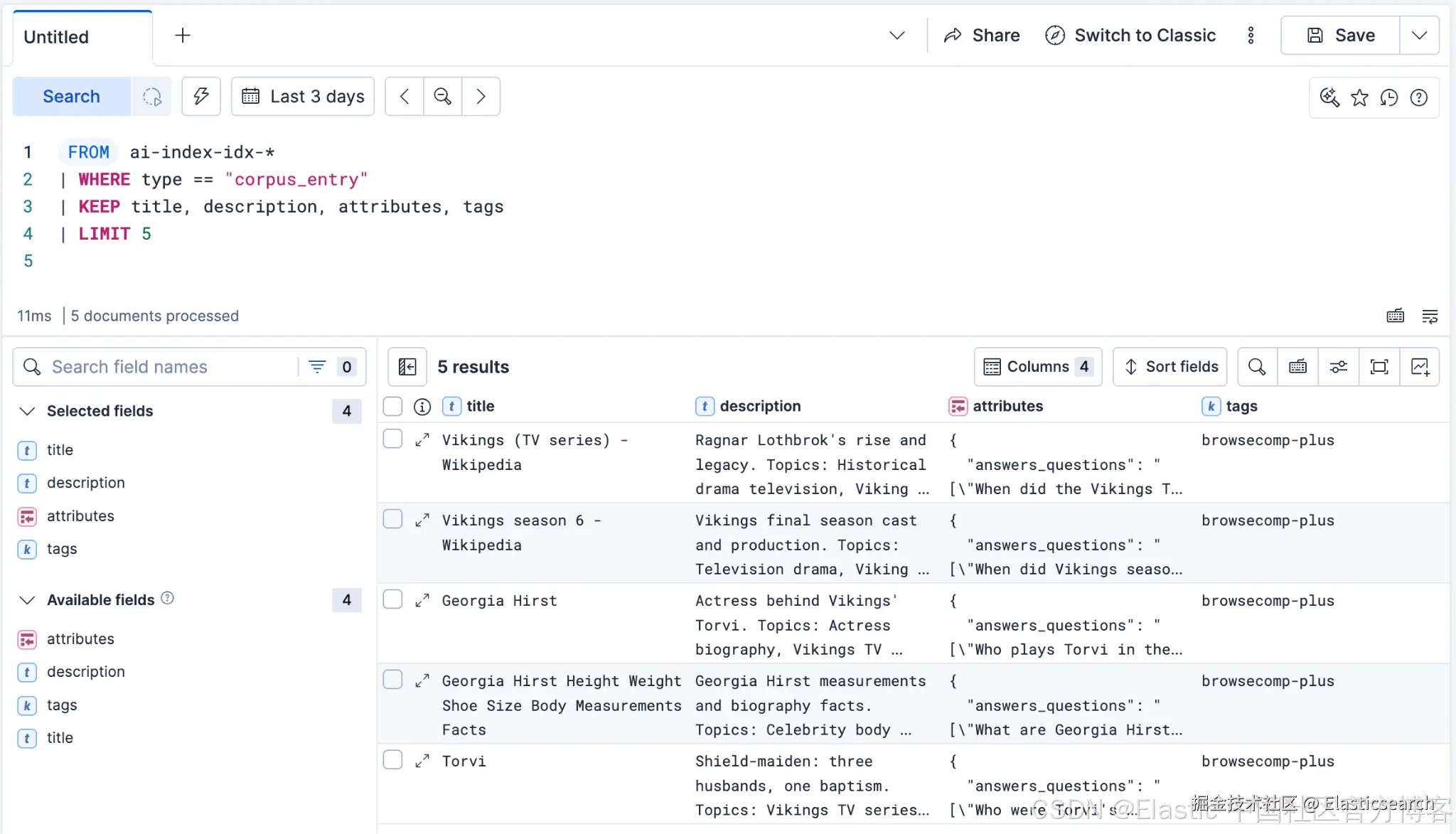
下面是其中一个 KI 文档的示例:
python
`
1. {
2. "_index": "ai-index-idx-my-corpus",
3. "_id": "57766",
4. "_version": 1,
5. "_seq_no": 0,
6. "_primary_term": 1,
7. "found": true,
8. "_source": {
9. "@timestamp": "2026-08-05T20:35:39.034Z",
10. "type": "corpus_entry",
11. "title": "Vikings (TV series) - Wikipedia",
12. "tags": [
13. "browsecomp-plus"
14. ],
15. "references": {
16. "uri": "https://en.wikipedia.org/wiki/Vikings_%28TV_series%29"
17. },
18. "attributes": {
19. "docid": "57766",
20. "url": "https://en.wikipedia.org/wiki/Vikings_%28TV_series%29",
21. "source_index": "browsecomp-plus",
22. "tagline": "Ragnar Lothbrok's rise and legacy",
23. "topics": """["Historical drama television","Viking Age","Norse mythology and sagas","Canadian-Irish co-production","Television cast and production","Medieval Scandinavia"]""",
24. "answers_questions": """["When did the Vikings TV series premiere and on which network?","Who created and wrote the Vikings TV series?","Where was the Vikings TV series filmed?","Who are the main cast members of Vikings?","What historical and literary sources inspired the Vikings TV series?"]""",
25. "key_entities": """["Michael Hirst","Travis Fimmel","Katheryn Winnick","History Channel","Amazon Prime Video","Ashford Studios","County Wicklow, Ireland","Vikings: Valhalla","Ragnar Lodbrok","Wardruna"]"""
26. },
27. "content": """=== SOURCE / PROVENANCE === Backing Elasticsearch index: browsecomp-plus Document ID (docid): 57766 Source URL: https://en.wikipedia.org/wiki/Vikings_%28TV_series%29 Retrieve the full original document with ES|QL: FROM browsecomp-plus | WHERE docid == "57766" === KNOWLEDGE INDICATOR === Vikings is a historical drama television series created and written by Michael Hirst, co-produced between Canada and Ireland, that premiered on the History Channel on March 3, 2013, and concluded on March 3, 2021, after 6 seasons and 89 episodes. The series is inspired by the sagas of legendary Norse hero Ragnar Lodbrok --- drawing on 13th-century texts Ragnars saga Loðbrókar and Ragnarssona þáttr, as well as Saxo Grammaticus' Gesta Danorum --- and follows Ragnar's rise from farmer to Scandinavian king, then the exploits of his sons across England, Scandinavia, Kievan Rus', the Mediterranean, and North America. Principal cast includes Travis Fimmel as Ragnar Lothbrok, Katheryn Winnick as Lagertha, Gustaf Skarsgård as Floki, and Alexander Ludwig as Bjorn Ironside, among many others. The series was filmed entirely in Ireland at Ashford Studios and County Wicklow, with additional location shoots in Iceland, Morocco, Norway, and Canada; the first season budget was US$40 million. A sequel series, Vikings: Valhalla, premiered on Netflix on February 25, 2022. Questions this document answers: When did the Vikings TV series premiere and on which network? | Who created and wrote the Vikings TV series? | Where was the Vikings TV series filmed? | Who are the main cast members of Vikings? | What historical and literary sources inspired the Vikings TV series? Key entities: Michael Hirst, Travis Fimmel, Katheryn Winnick, History Channel, Amazon Prime Video, Ashford Studios, County Wicklow, Ireland, Vikings: Valhalla, Ragnar Lodbrok, Wardruna
28. """,
29. "description": """Ragnar Lothbrok's rise and legacy. Topics: Historical drama television, Viking Age, Norse mythology and sagas, Canadian-Irish co-production, Television cast and production, Medieval Scandinavia. Entities: Michael Hirst, Travis Fimmel, Katheryn Winnick, History Channel, Amazon Prime Video, Ashford Studios, County Wicklow, Ireland, Vikings: Valhalla, Ragnar Lodbrok, Wardruna.
30. """
31. }
32. }
`Lobster AI从 LangChain Deep Agents 查询 KI
我们将使用 LangChain Deep Agents 和一个兼容 OpenAI 的 key,来展示 AI indices 和 KI 可以与任何 agent harness 配合使用,无论是在 Kibana 的 Agent Builder 生态系统内部还是外部。
首先,让我们创建 facts_baseline_agent.py,在应用 KI 之前测量我们的基线:
python
`
1. # Example question: What was the actress who played Torvi from Vikings also known for?
2. import os
3. import sys
4. import time
5. from elasticsearch import Elasticsearch
7. from langchain_core.messages import AIMessage
8. from langchain_core.tools import tool
9. from langchain_openai import ChatOpenAI
10. from deepagents import create_deep_agent
12. if len(sys.argv) < 2:
13. sys.exit(f'Usage: python {sys.argv[0]} "your question"')
15. es = Elasticsearch(os.environ["ES_URL"], api_key=os.environ["ES_API_KEY"])
18. @tool
19. def esql_query(query: str) -> list[dict] | str:
20. """Execute an ES|QL query against Elasticsearch and return the matching rows.
22. Args:
23. query: A complete ES|QL query string, e.g. 'FROM browsecomp-plus | LIMIT 5'.
24. Full-text search syntax: WHERE MATCH(field, "value") --- not field MATCH "value".
25. """
26. try:
27. resp = es.esql.query(query=query, format="json")
28. cols = [c["name"] for c in resp["columns"]]
29. return [dict(zip(cols, row)) for row in resp["values"]]
30. except Exception as e:
31. return f"ES|QL error: {e}"
34. @tool
35. def get_mapping(index: str) -> dict:
36. """Return the field mapping for an Elasticsearch index or pattern."""
37. return es.indices.get_mapping(index=index).body
40. baseline_agent = create_deep_agent(
41. model=ChatOpenAI( # any OpenAI-compatible endpoint; configure via LLM_* env vars
42. base_url=os.environ.get("LLM_BASE_URL", "https://openrouter.ai/api/v1"),
43. model=os.environ.get("LLM_MODEL", "anthropic/claude-sonnet-4.5"),
44. api_key=os.environ["LLM_API_KEY"],
45. ),
46. tools=[esql_query, get_mapping], # no query-ki skill
47. system_prompt=(
48. "You are a research assistant answering questions about a document corpus "
49. "stored in the Elasticsearch index
50. browsecomp-plus
51. (fields: docid, url, "
52. "title, text). You have NOT memorized the corpus. Answer by querying the raw "
53. "index directly with ES|QL via the esql_query tool. "
54. "Full-text search syntax: WHERE MATCH(field, \"value\") --- never use field MATCH \"value\". "
55. "Use get_mapping if you are unsure of field names. Ground your answer strictly "
56. "in the rows returned, and cite the docid or url you used."
57. ),
58. )
60. start = time.perf_counter()
61. result = baseline_agent.invoke(
62. {
63. "messages": [
64. {
65. "role": "user",
66. "content": sys.argv[1],
67. }
68. ]
69. }
70. )
71. latency = time.perf_counter() - start
73. print("\n--- Tool calls ---")
74. for m in result["messages"]:
75. if isinstance(m, AIMessage) and m.tool_calls:
76. for tc in m.tool_calls:
77. print(f" [{tc['name']}] {str(tc['args'])[:120]}")
78. total = sum(
79. len(m.tool_calls)
80. for m in result["messages"]
81. if isinstance(m, AIMessage) and m.tool_calls
82. )
83. print(f"Total: {total}\n")
85. print("--- Usage ---")
86. input_tokens = sum(
87. (m.usage_metadata or {}).get("input_tokens", 0)
88. for m in result["messages"]
89. if isinstance(m, AIMessage) and m.usage_metadata
90. )
91. output_tokens = sum(
92. (m.usage_metadata or {}).get("output_tokens", 0)
93. for m in result["messages"]
94. if isinstance(m, AIMessage) and m.usage_metadata
95. )
96. print(f"Tokens: {input_tokens + output_tokens} (input {input_tokens}, output {output_tokens})")
97. print(f"Latency: {latency:.2f}s\n")
99. print("--- Answer ---")
100. print(result["messages"][-1].content)
`Lobster AI收起代码块当我运行这个基线查询 《Vikings》中饰演 Torvi 的女演员还因什么而闻名?/What was the actress who played Torvi from Vikings also known for? 时,它输出了以下内容:
rust
`
1. % python facts_baseline_agent.py "What was the actress who played Torvi from Vikings also known for?"
3. --- Tool calls ---
4. [esql_query] {'query': 'FROM browsecomp-plus | WHERE MATCH(text, "Torvi Vikings actress") | LIMIT 10'}
5. [esql_query] {'query': 'FROM browsecomp-plus | WHERE MATCH(text, "Georgia Hirst") | LIMIT 10'}
6. [read_file] {'file_path': '/large_tool_results/toolu_bdrk_01SVEwHdtc9uE1zdfgCwchb5', 'offset': 0, 'limit': 50}
7. [esql_query] {'query': 'FROM browsecomp-plus | WHERE MATCH(text, "Torvi Vikings TV") | LIMIT 10'}
8. [esql_query] {'query': 'FROM browsecomp-plus | WHERE MATCH(text, "Vikings series cast actress") | LIMIT 10'}
9. [esql_query] {'query': 'FROM browsecomp-plus | WHERE MATCH(text, "Michael Hirst Vikings") | LIMIT 10'}
10. [esql_query] {'query': 'FROM browsecomp-plus | WHERE MATCH(text, "Torvi") | LIMIT 20'}
11. [read_file] {'file_path': '/large_tool_results/toolu_bdrk_01PS3ryzML5BstqMXnV4c65N', 'offset': 0, 'limit': 100}
12. Total: 8
14. --- Usage ---
15. Tokens: 386187 (input 384940, output 1247)
16. Latency: 44.86s
18. --- Answer ---
19. Perfect! I found the information. Based on the document from docid 11589 (Georgia Hirst's Wikipedia page), I now have the answer to the question.
21. **Georgia Hirst**, the actress who played Torvi in the History Channel series Vikings (2014-2020), is also known for:
23. 1. **Her role as Becky in the zombie horror movie "Ravers" (2018)** - This film had its world premiere at the 2018 London FrightFest Film Festival.
25. 2. **Being the daughter of Michael Hirst**, the creator and writer of Vikings. This is a notable connection that's frequently mentioned about her.
27. 3. **Her role in the short film "Dungeness" (2018)**, directed by Stephen Gates, where she was the sole actor.
29. 4. **Her role as Grace in the interactive rom-com "Five Dates" (2020)**.
31. 5. **Her advocacy work** - In 2017, she made an appearance on Sky News urging young women to get smear tests after being diagnosed with precancerous cells at age 22.
33. 6. **Her philanthropy** - She joined The Celebs in 2021 to record a cover of The Beatles' "Let It Be" in support of the Mind charity.
35. So while she's primarily known for her role as Torvi in Vikings (where she appeared in 63 episodes across seasons 2-6), she's also recognized for her work in horror films like "Ravers," her health advocacy, and being part of the Hirst family that created the show.
`Lobster AI(注意:Deep Agents 会自动添加 read_file 工具来处理分页的工具结果,因此它会出现在输出中。)
接下来,让我们创建一个知道如何使用 query-ki skill 的 agent,即 facts_ki_agent.py:
python
`
1. # Example question: What was the actress who played Torvi from Vikings also known for?
2. import os
3. import sys
4. import time
5. from elasticsearch import Elasticsearch
6. from langchain_core.messages import AIMessage
7. from langchain_core.tools import tool
8. from langchain_openai import ChatOpenAI
9. from deepagents import create_deep_agent
10. from deepagents.backends.filesystem import FilesystemBackend
12. if len(sys.argv) < 2:
13. sys.exit(f'Usage: python {sys.argv[0]} "your question"')
15. es = Elasticsearch(os.environ["ES_URL"], api_key=os.environ["ES_API_KEY"])
18. @tool
19. def esql_query(query: str) -> list[dict] | str:
20. """Execute an ES|QL query against Elasticsearch and return the matching rows.
22. Args:
23. query: A complete ES|QL query string, e.g. 'FROM ai-index-idx-* | LIMIT 5'.
24. """
25. try:
26. resp = es.esql.query(query=query, format="json")
27. cols = [c["name"] for c in resp["columns"]]
28. return [dict(zip(cols, row)) for row in resp["values"]]
29. except Exception as e:
30. return f"ES|QL error: {e}"
33. # FilesystemBackend loads skills from disk, relative to root_dir.
34. backend = FilesystemBackend(root_dir=".", virtual_mode=False)
36. agent = create_deep_agent(
37. model=ChatOpenAI( # any OpenAI-compatible endpoint; configure via LLM_* env vars
38. base_url=os.environ.get("LLM_BASE_URL", "https://openrouter.ai/api/v1"),
39. model=os.environ.get("LLM_MODEL", "anthropic/claude-sonnet-4.5"),
40. api_key=os.environ["LLM_API_KEY"],
41. ),
42. tools=[esql_query],
43. skills=["skills"],
44. backend=backend,
45. system_prompt=(
46. "You are a research assistant answering questions about a document corpus. "
47. "You have NOT memorized the corpus. When a question depends on specific facts, "
48. "names, dates, or events, use the query-ki skill to retrieve Knowledge "
49. "Indicators before answering. Ground your answer strictly in what it returns, "
50. "and cite the KI titles you used."
51. ),
52. )
54. start = time.perf_counter()
55. result = agent.invoke(
56. {
57. "messages": [
58. {
59. "role": "user",
60. "content": sys.argv[1],
61. }
62. ]
63. }
64. )
65. latency = time.perf_counter() - start
67. print("\n--- Tool calls ---")
68. for m in result["messages"]:
69. if isinstance(m, AIMessage) and m.tool_calls:
70. for tc in m.tool_calls:
71. print(f" [{tc['name']}] {str(tc['args'])[:120]}")
72. total = sum(
73. len(m.tool_calls)
74. for m in result["messages"]
75. if isinstance(m, AIMessage) and m.tool_calls
76. )
77. print(f"Total: {total}\n")
79. print("--- Usage ---")
80. input_tokens = sum(
81. (m.usage_metadata or {}).get("input_tokens", 0)
82. for m in result["messages"]
83. if isinstance(m, AIMessage) and m.usage_metadata
84. )
85. output_tokens = sum(
86. (m.usage_metadata or {}).get("output_tokens", 0)
87. for m in result["messages"]
88. if isinstance(m, AIMessage) and m.usage_metadata
89. )
90. print(f"Tokens: {input_tokens + output_tokens} (input {input_tokens}, output {output_tokens})")
91. print(f"Latency: {latency:.2f}s\n")
93. print("--- Answer ---")
94. print(result["messages"][-1].content)
`Lobster AI收起代码块这个 agent 会查询 KI indices 来生成答案,而不是将每个文档都加载到上下文中。
当我使用相同的查询运行这个 agent 时,得到的输出如下:
rust
`
1. % python facts_ki_agent.py "What was the actress who played Torvi from Vikings also known for?"
3. --- Tool calls ---
4. [read_file] {'file_path': './query-ki/SKILL.md', 'limit': 1000}
5. [esql_query] {'query': 'FROM ai-index-idx-* METADATA _id, _index, _score\n| WHERE type == "corpus_entry"\n| FORK\n (WHERE MATCH(co
6. Total: 2
8. --- Usage ---
9. Tokens: 27625 (input 27037, output 588)
10. Latency: 15.22s
12. --- Answer ---
13. Based on the retrieved information, **Georgia Hirst** played Torvi in Vikings. She is also known for:
15. 1. **Ravers (2018)** - A zombie horror film where she played the character Becky. This was her debut film and premiered at the London FrightFest Film Festival.
17. 2. **Being the daughter of Michael Hirst** - The creator and writer of Vikings itself, making her connection to the show a notable family affair. Her older half-sister Maude Hirst also appeared in Vikings as Helga.
19. 3. **Cervical cancer awareness advocacy** - She has publicly advocated for cervical cancer screening after being diagnosed with precancerous cells at age 22 and successfully recovering through treatment.
21. 4. **Charity work** - In 2021, she participated in a celebrity cover of The Beatles' "Let It Be" in support of the Mind charity (a mental health organization), alongside Anne Hegerty, Ivan Kaye, Eunice Olumide, and Shona McGarty.
23. **Sources cited:** "Georgia Hirst" and "Georgia Hirst - Wikipedia" Knowledge Indicators from the AI Index.
`Lobster AI预先计算事实可以减少多少 agent 的 token 使用量?
两个 agents 得出了相似的结论,但它们采取了截然不同的路径:
对于相同的问题和相同的有依据的答案,从 KI 中获取答案时,token 数量减少了 93%, 工具调用 次数也从 8 次减少到 2 次。
| 指标 | 基线(无 AI Index) | 使用 AI Index |
|---|---|---|
| 工具调用总数 | 8 | 2 |
read_file 调用次数 |
2 | 1 |
esql_query 调用次数 |
6,全部针对 browsecomp-plus index |
1,来自 ai-index-idx-* |
| 消耗的 token | 386,187 | 27,625 |
| 延迟 | 44.86 秒 | 15.22 秒 |
| 答案 | 有依据、正确 | 有依据、正确 |
具体的工具调用次数、延迟和答案会因运行情况以及使用的 agents 不同而有所变化。
两个 agents 都生成了可靠且有依据的答案。区别在于成本。从 AI Index 查询 KI 将 token 使用量降低了 93%,并将延迟降低了大约三分之二。下面是两条路径的并排对比:
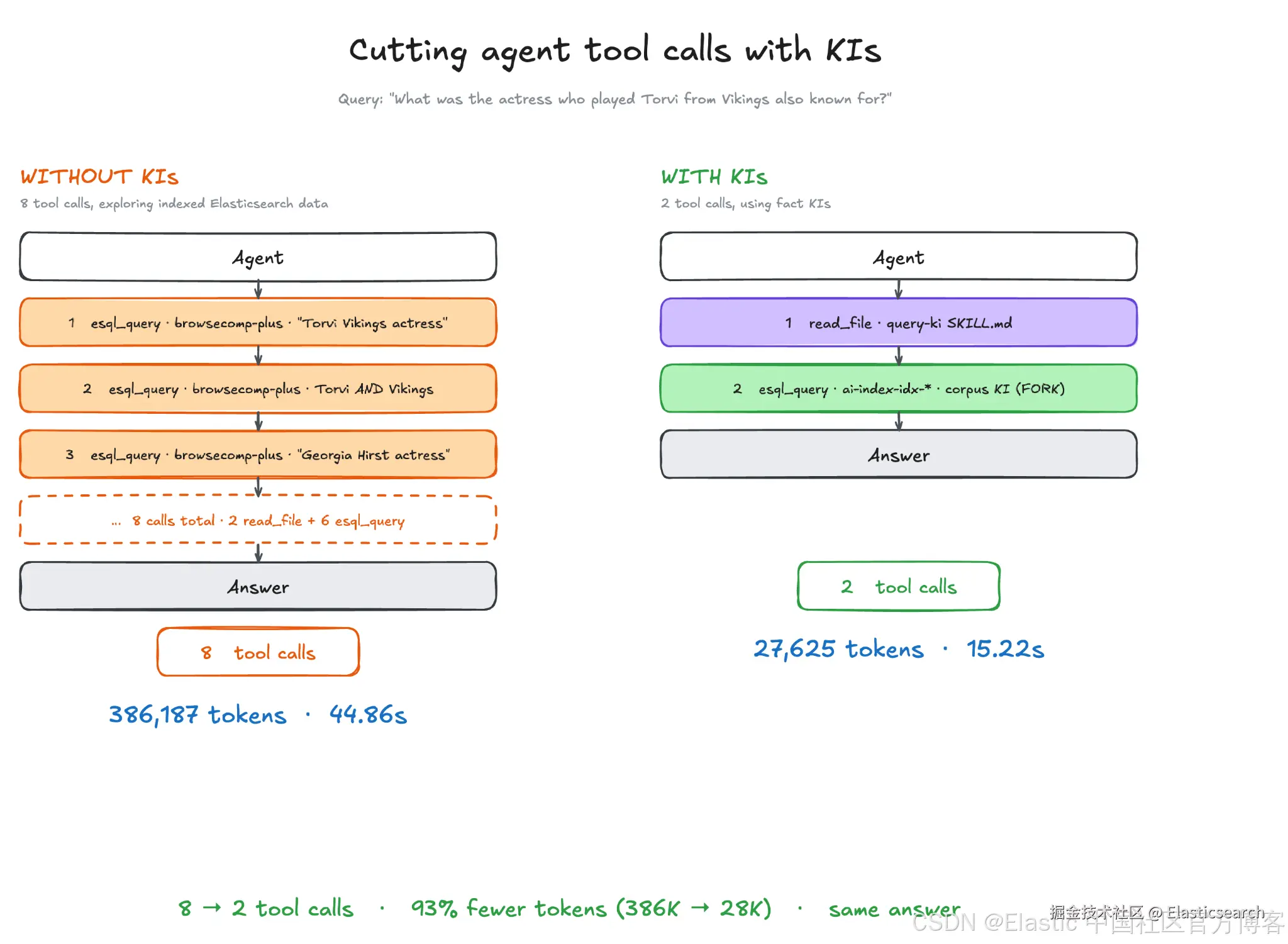
这次过程比较深入,但它展示了 AI indices 和 Workflows 结合使用能够实现什么:相同的答案,只需消耗一小部分 token。
在 Elasticsearch Serverless 中构建预先计算的上下文
本实践指南展示了如何基于文档化的事实生成更复杂的 KI,并使用 Elasticsearch 原生功能查询这些 KI,以满足知识检索使用场景。
在 agentic search 系统中,上下文管理至关重要。而从本质上来说,上下文管理是一个检索问题。AI indices 可以帮助你在 Elastic Stack 中管理上下文。现在就可以在 Serverless 中进行尝试,并通过我们的 Discuss forums 或 Community Slack 中的 #stack-kibana channel 告诉我们你的想法。
我们也很希望听听你有哪些希望通过 AI indices 解决的使用场景。
原文:Agentic RAG without reading the documents | Elasticsearch Labs