先看看现有方案。
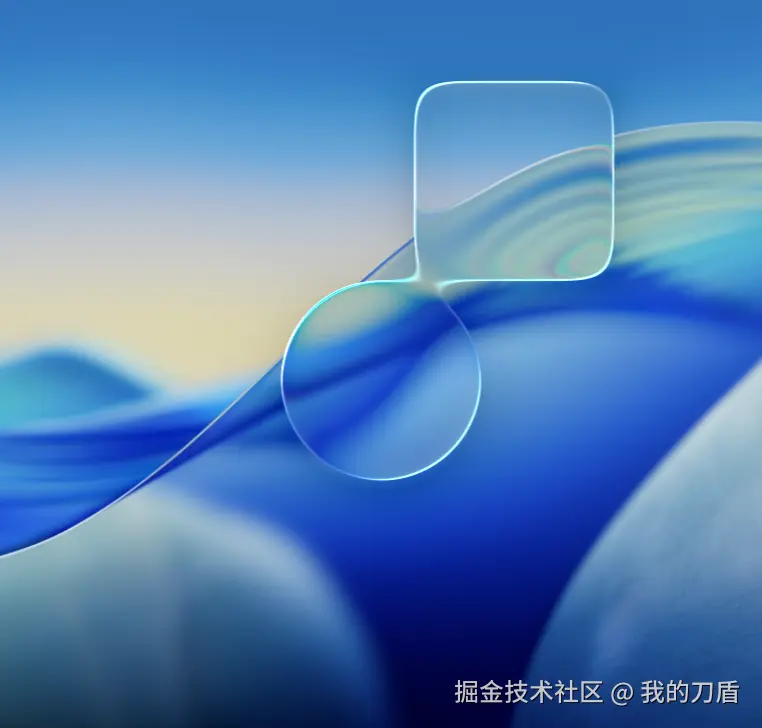
大佬实现的:github.com/iyinchao/li... 效果非常牛逼,但是目前只能渲染图片对于html却无能为力。
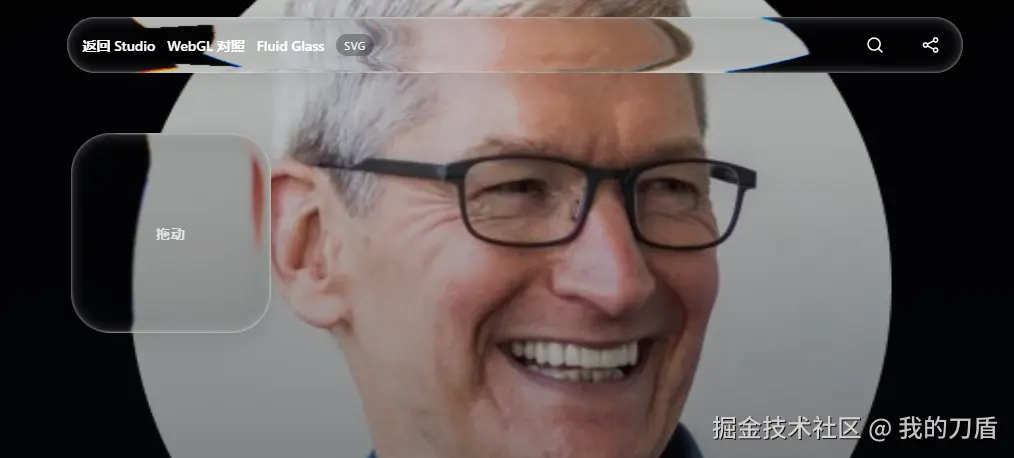
svg版本:vue-bits.dev/components/... 简单,但是存在致命问题,平滑度不够并会出现毛边且会出现颜色异常。

目前最好方案:three.js + webGL
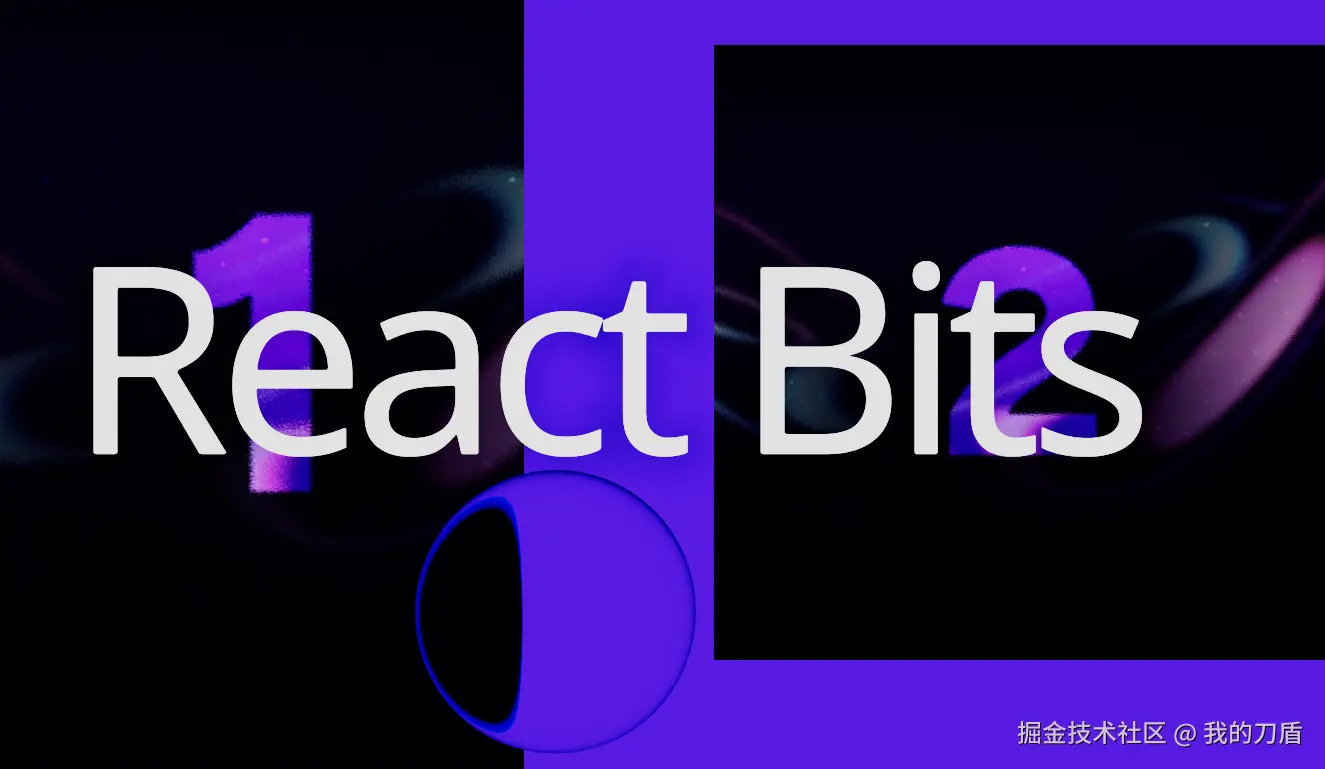
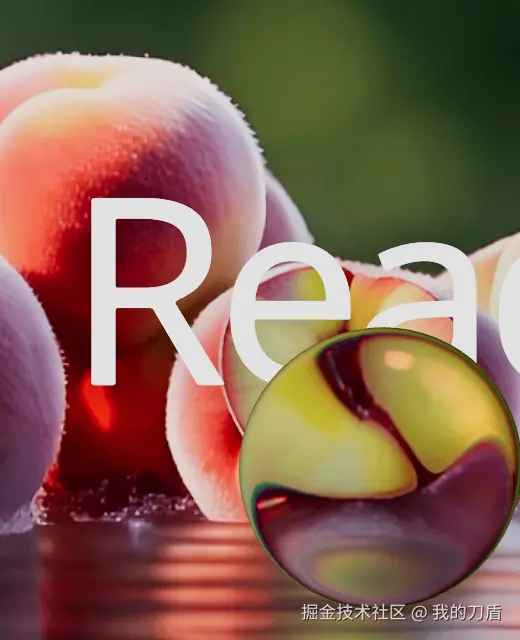

1. 渲染原理概览
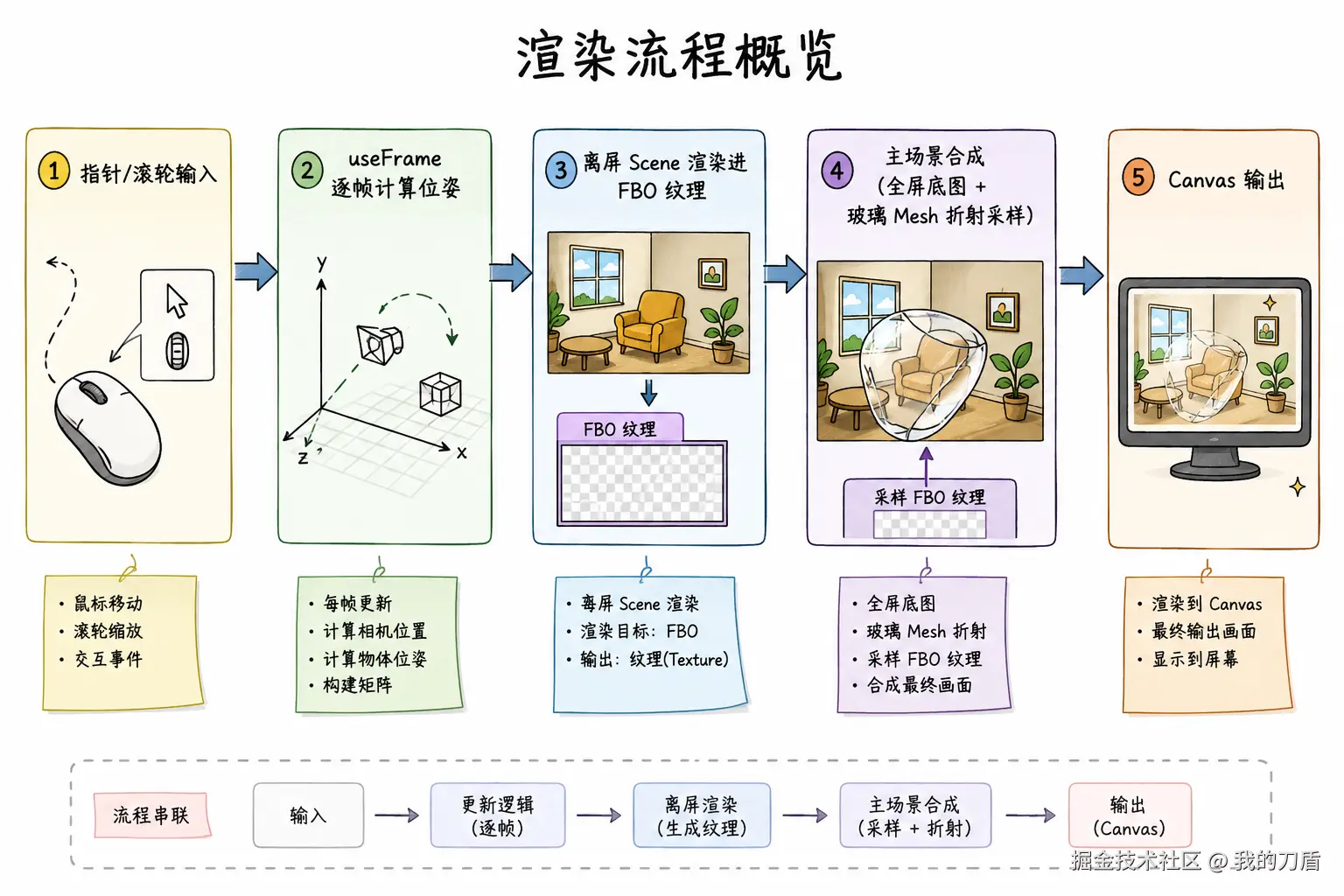
Fluid Glass 的核心是利用 FBO 离屏渲染 与 体积透射材质 (MeshTransmissionMaterial) 实现真 3D 光学折射与色散。
数据流向:
核心机制:
- Scene 隔离 :背景文字与画廊通过
createPortal挂载到独立离屏Scene,不直接出现在主画布上。 - 离屏烘焙 :每帧渲染循环中,先将离屏
Scene绘制到帧缓冲对象(FBO),生成背景纹理。 - 单 Pass 折射采样:3D 玻璃网格直接使用该 FBO 纹理作为透射采样源,基于网格表面法线与光学参数(IOR、厚度、色散)计算折射偏移。
2. 关键实现解析 (FluidGlass.tsx)
2.1 模型预加载与参数配置
typescript
import { memo, Suspense, useEffect, useMemo, useRef, useState, type ReactNode } from 'react';
import * as THREE from 'three';
import { Canvas, createPortal, useFrame, useThree } from '@react-three/fiber';
import {
  Image,
  MeshTransmissionMaterial,
  Preload,
  Scroll,
  ScrollControls,
  Text,
  useFBO,
  useGLTF,
  useScroll,
} from '@react-three/drei';
import { easing } from 'maath';

export type FluidMode = 'lens' | 'cube' | 'bar';

export type FluidGlassProps = {
  mode?: FluidMode;
  scale?: number;
  ior?: number;
  thickness?: number;
  chromaticAberration?: number;
  anisotropy?: number;
};

const LENS_GLB = '/assets/3d/lens.glb';
const CUBE_GLB = '/assets/3d/cube.glb';
const BAR_GLB = '/assets/3d/bar.glb';

// 预加载模型,避免切换形态时由于异步加载引发画面闪烁
useGLTF.preload(LENS_GLB);
useGLTF.preload(CUBE_GLB);
useGLTF.preload(BAR_GLB);
2.2 核心包装器 ModeWrapper:事件与状态处理
ModeWrapper 负责状态管理、模型加载、事件监听与渲染管线调度。
typescript
type ModeWrapperProps = {
  children?: ReactNode;
  glb: string;
  geometryKey: string;
  followPointer?: boolean;
  lockToBottom?: boolean;
  modeProps: Record<string, unknown>;
};

const ModeWrapper = memo(function ModeWrapper({
  children,
  glb,
  geometryKey,
  lockToBottom = false,
  followPointer = true,
  modeProps = {},
}: ModeWrapperProps) {
  const meshRef = useRef<THREE.Mesh>(null);
  const gltf = useGLTF(glb);
  const nodes = gltf.nodes as Record<string, THREE.Mesh>;
  const buffer = useFBO(); // 分配离屏 FBO 渲染目标
  const { viewport, gl } = useThree();
  const scene = useMemo(() => new THREE.Scene(), []); // 创建独立的离屏场景
  const geoWidthRef = useRef(1);
  const pointerNDC = useRef(new THREE.Vector2());

  // 1. 获取模型包围盒尺寸,用于未指定 scale 时的自适应计算
  useEffect(() => {
    const geo = nodes[geometryKey]?.geometry;
    if (!geo) return;
    geo.computeBoundingBox();
    const box = geo.boundingBox;
    geoWidthRef.current = box ? box.max.x - box.min.x || 1 : 1;
  }, [nodes, geometryKey]);

  // 2. 指针事件监听与 NDC (归一化设备坐标) 转换
  useEffect(() => {
    const canvas = gl.domElement;
    const onMove = (event: PointerEvent) => {
      const rect = canvas.getBoundingClientRect();
      if (rect.width === 0 || rect.height === 0) return;
      pointerNDC.current.set(
        ((event.clientX - rect.left) / rect.width) * 2 - 1,
        -((event.clientY - rect.top) / rect.height) * 2 + 1,
      );
    };
    window.addEventListener('pointermove', onMove);
    return () => window.removeEventListener('pointermove', onMove);
  }, [gl]);
由于外层使用了 Drei 的 ScrollControls,滚动容器会劫持一部分默认事件,因此这里通过原生 pointermove 与 canvas.getBoundingClientRect() 自行计算归一化坐标。
2.3 逐帧调度:useFrame 渲染循环
useFrame 回调由 requestAnimationFrame 驱动,在每一帧主画面渲染前执行:
typescript
  useFrame((state, delta) => {
    const mesh = meshRef.current;
    if (!mesh) return;
    const { gl, camera } = state;

    // 计算透镜所在深度 (Z=15) 的视口尺寸
    const view = viewport.getCurrentViewport(camera, [0, 0, 15]);
    const destX = followPointer ? (pointerNDC.current.x * view.width) / 2 : 0;
    const destY = lockToBottom
      ? -view.height / 2 + 0.2
      : followPointer
        ? (pointerNDC.current.y * view.height) / 2
        : 0;

    // 惯性平滑插值
    easing.damp3(mesh.position, [destX, destY, 15], 0.15, delta);

    // 自适应缩放
    if (modeProps.scale == null) {
      const maxWorld = view.width * 0.9;
      mesh.scale.setScalar(Math.min(0.15, maxWorld / geoWidthRef.current));
    }

    // 将离屏 Scene 渲染进 FBO
    gl.setRenderTarget(buffer);
    gl.render(scene, camera);
    gl.setRenderTarget(null);
    gl.setClearColor(0x5227ff, 1);
  });
2.4 视口与坐标计算原理
1. 深度定在 Z = 15
- 相机位置在
Z = 20(camera={{ position: [0, 0, 20], fov: 15 }})。 - 场景背景内容分布在
Z = 0 ~ 12。 - 透镜放置在
Z = 15,位于相机与背景内容之间,使光线穿过玻璃后折射背景。
2. view 的作用
在透视投影(Perspective Projection)下,视锥体会随深度变化:
viewport.getCurrentViewport(camera, [0, 0, 15])用于计算在Z = 15切平面上,屏幕对应的世界坐标宽高(view.width,view.height)。
3. 坐标计算除以 2 的原因
Three.js 场景原点 (0, 0, 0) 位于视口正中央:
pointerNDC.x范围为[-1, 1]。- 视口正中为
0,最右边界为+view.width / 2,最左边界为-view.width / 2。 - 坐标换算公式: destX=pointerNDC.x×2view.width destY=pointerNDC.y×2view.height
2.5 场景隔离与 FBO 离屏渲染时序
1. const buffer = useFBO()
- 初始化时仅在显存中开辟一块渲染缓冲(此时纹理内无有效像素数据)。
- 数据写入发生在
useFrame中调用gl.render(scene, camera)时。
2. createPortal(children, scene)
- 将 React 子节点(文字与图片)挂载到独立的
scene(new THREE.Scene())。 - 这些元素脱离默认场景树,不会直接渲染到屏幕上,专门用于 FBO 离屏绘制。
2.6 双材质设计:底图平面与透射材质
tsx
  return (
    <>
      {createPortal(children, scene)}

      {/* 1. 底层:全屏背景平面 */}
      <mesh scale={[viewport.width, viewport.height, 1]}>
        <planeGeometry />
        <meshBasicMaterial map={buffer.texture} transparent />
      </mesh>

      {/* 2. 顶层:3D 玻璃网格 */}
      <mesh
        ref={meshRef}
        scale={(scale as number | undefined) ?? 0.15}
        rotation-x={Math.PI / 2}
        geometry={nodes[geometryKey]?.geometry}
      >
        <MeshTransmissionMaterial
          buffer={buffer.texture}
          ior={(ior as number | undefined) ?? 1.15}
          thickness={(thickness as number | undefined) ?? 5}
          anisotropy={(anisotropy as number | undefined) ?? 0.01}
          chromaticAberration={(chromaticAberration as number | undefined) ?? 0.1}
          {...extraMat}
        />
      </mesh>
    </>
);| 材质与参数 | 数据源 | 作用与机制 |
|---|---|---|
meshBasicMaterial map={buffer.texture} |
buffer.texture |
无光照贴图:将 FBO 内容 1:1 贴满视口,作为未被透镜遮挡时的正常背景底图。 |
MeshTransmissionMaterial buffer={buffer.texture} |
buffer.texture |
透射折射采样源 :片元着色器根据网格法线、ior(折射率)、thickness(厚度)和 chromaticAberration(色散)对纹理进行偏移动态采样。 |
3. 场景组件与模式切换
3.1 透镜形态模式(Lens / Cube / Bar)
typescript
function Lens({ children, modeProps }: { children?: ReactNode; modeProps: Record<string, unknown> }) {
  return (
    <ModeWrapper glb={LENS_GLB} geometryKey="Cylinder" followPointer modeProps={modeProps}>
      {children}
    </ModeWrapper>
  );
}

function Cube({ children, modeProps }: { children?: ReactNode; modeProps: Record<string, unknown> }) {
  return (
    <ModeWrapper glb={CUBE_GLB} geometryKey="Cube" followPointer modeProps={modeProps}>
      {children}
    </ModeWrapper>
  );
}

function Bar({ children, modeProps = {} }: { children?: ReactNode; modeProps?: Record<string, unknown> }) {
  return (
    <ModeWrapper
      glb={BAR_GLB}
      geometryKey="Cube"
      lockToBottom
      followPointer={false}
      modeProps={{
        transmission: 1,
        roughness: 0,
        thickness: 10,
        ior: 1.15,
        color: '#ffffff',
        attenuationColor: '#ffffff',
        attenuationDistance: 0.25,
        ...modeProps,
      }}
    >
      {children}
    </ModeWrapper>
  );
}Lens:圆柱透镜网格,跟随指针。Cube:立方体网格,呈现多面折射,跟随指针。Bar:长条网格,固定在视口底部,作为底部毛玻璃导航栏。
3.2 滚动画廊组件 Images
typescript
type ZoomMaterial = THREE.MeshBasicMaterial & { zoom: number };

function Images() {
  const group = useRef<THREE.Group>(null);
  const data = useScroll();
  const { height } = useThree((state) => state.viewport);

  useFrame(() => {
    const children = group.current?.children;
    if (!children || children.length < 5) return;
    const zoom = (index: number, value: number) => {
      ((children[index] as THREE.Mesh).material as ZoomMaterial).zoom = value;
    };
    zoom(0, 1 + data.range(0, 1 / 3) / 3);
    zoom(1, 1 + data.range(0, 1 / 3) / 3);
    zoom(2, 1 + data.range(1.15 / 3, 1 / 3) / 2);
    zoom(3, 1 + data.range(1.15 / 3, 1 / 3) / 2);
    zoom(4, 1 + data.range(1.15 / 3, 1 / 3) / 2);
  });

  return (
    <group ref={group}>
      <Image position={[-2, 0, 0]} scale={[3, height / 1.1]} url="/assets/demo/cs1.webp" />
      <Image position={[2, 0, 3]} scale={3} url="/assets/demo/cs2.webp" />
      <Image position={[-2.05, -height, 6]} scale={[1, 3]} url="/assets/demo/cs3.webp" />
      <Image position={[-0.6, -height, 9]} scale={[1, 2]} url="/assets/demo/cs1.webp" />
      <Image position={[0.75, -height, 10.5]} scale={1.5} url="/assets/demo/cs2.webp" />
    </group>
  );
}
3.3 响应式排版组件 Typography 与 NavItems
typescript
function Typography() {
  const DEVICE = {
    mobile: { fontSize: 0.2 },
    tablet: { fontSize: 0.4 },
    desktop: { fontSize: 0.6 },
  };
  const getDevice = (): keyof typeof DEVICE => {
    const width = window.innerWidth;
    return width <= 639 ? 'mobile' : width <= 1023 ? 'tablet' : 'desktop';
  };
  const [device, setDevice] = useState(getDevice);

  useEffect(() => {
    const onResize = () => setDevice(getDevice());
    window.addEventListener('resize', onResize);
    return () => window.removeEventListener('resize', onResize);
  }, []);

  return (
    <Text
      position={[0, 0, 12]}
      fontSize={DEVICE[device].fontSize}
      letterSpacing={-0.05}
      outlineWidth={0}
      outlineBlur="20%"
      outlineColor="#000"
      outlineOpacity={0.5}
      color="white"
      anchorX="center"
      anchorY="middle"
    >
      React Bits
    </Text>
  );
}

function NavItems({ items }: { items: { label: string; link: string }[] }) {
  const group = useRef<THREE.Group>(null);
  const { viewport, camera } = useThree();
  const DEVICE = {
    mobile: { max: 639, spacing: 0.2, fontSize: 0.035 },
    tablet: { max: 1023, spacing: 0.24, fontSize: 0.035 },
    desktop: { max: Infinity, spacing: 0.3, fontSize: 0.035 },
  };
  const getDevice = (): keyof typeof DEVICE => {
    const width = window.innerWidth;
    return width <= DEVICE.mobile.max ? 'mobile' : width <= DEVICE.tablet.max ? 'tablet' : 'desktop';
  };
  const [device, setDevice] = useState(getDevice);

  useEffect(() => {
    const onResize = () => setDevice(getDevice());
    window.addEventListener('resize', onResize);
    return () => window.removeEventListener('resize', onResize);
  }, []);

  const { spacing, fontSize } = DEVICE[device];

  useFrame(() => {
    const nav = group.current;
    if (!nav) return;
    const view = viewport.getCurrentViewport(camera, [0, 0, 15]);
    nav.position.set(0, -view.height / 2 + 0.2, 15.1);
    nav.children.forEach((child, index) => {
      child.position.x = (index - (items.length - 1) / 2) * spacing;
    });
  });

  return (
    <group ref={group} renderOrder={10}>
      {items.map(({ label }) => (
        <Text
          key={label}
          fontSize={fontSize}
          color="white"
          anchorX="center"
          anchorY="middle"
          outlineWidth={0}
          outlineBlur="20%"
          outlineColor="#000"
          outlineOpacity={0.5}
          renderOrder={10}
        >
          {label}
        </Text>
      ))}
    </group>
  );
}
3.4 根组件容器 FluidGlass
typescript
export function FluidGlass({
  mode = 'lens',
  scale = 0.2,
  ior = 1.15,
  thickness = 2,
  chromaticAberration = 0.05,
  anisotropy = 0.01,
}: FluidGlassProps) {
  const Wrapper = mode === 'bar' ? Bar : mode === 'cube' ? Cube : Lens;
  const modeProps = {
    scale,
    ior,
    thickness,
    chromaticAberration,
    anisotropy,
    transmission: 1,
    roughness: 0,
  };

  return (
    <Canvas camera={{ position: [0, 0, 20], fov: 15 }} gl={{ alpha: true }}>
      <Suspense fallback={null}>
        <ScrollControls damping={0.2} pages={3} distance={0.4}>
          {mode === 'bar' && (
            <NavItems
              items={[
                { label: 'Home', link: '' },
                { label: 'About', link: '' },
                { label: 'Contact', link: '' },
              ]}
            />
          )}
          <Wrapper modeProps={modeProps}>
            <Scroll>
              <Typography />
              <Images />
            </Scroll>
            <Scroll html />
            <Preload />
          </Wrapper>
        </ScrollControls>
      </Suspense>
    </Canvas>
  );
}
4. 架构与渲染流程图
4.1 核心渲染与数据流向 (core-pipeline)

4.2 每帧执行流程 (frame-pipeline)
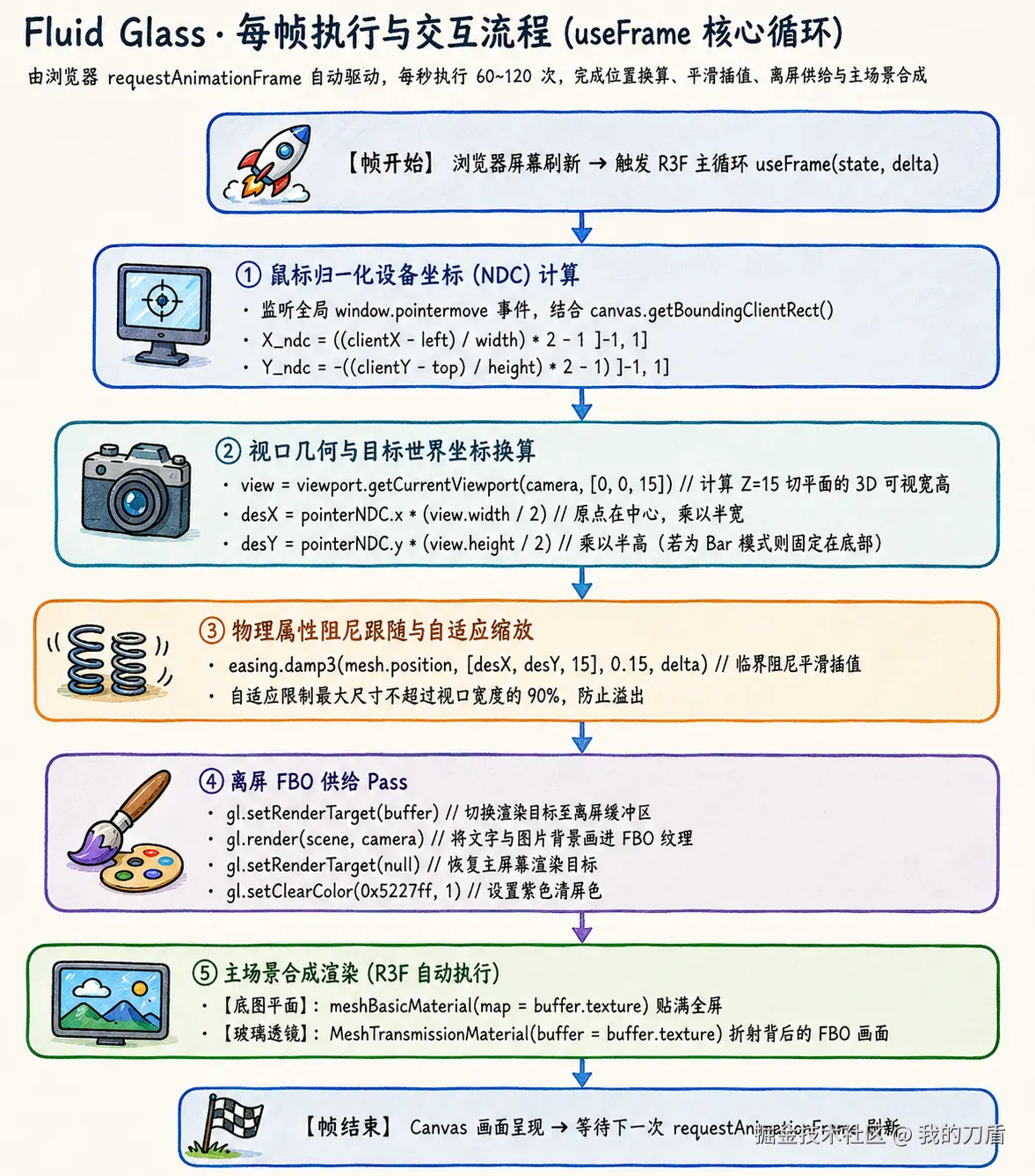
5. 玻璃渲染方案对比
| 维度 | Fluid Glass (/fluid-glass.html) |
Studio 四 Pass GLSL (/) |
SVG Filter (/glass-svg.html) |
|---|---|---|---|
| 渲染技术 | Three.js + R3F + FBO 离屏渲染 | WebGL 原生四 Pass (Offscreen FBO) | 原生 DOM + SVG 滤镜 |
| 形状表现 | 3D 网格模型 (.glb 几何体) |
2D 符号距离场 (SDF) | HTML DOM 盒模型 |
| 折射机制 | 物理法线折射 (MeshTransmissionMaterial) |
GLSL 片元多重采样 | feDisplacementMap 像素位移 |
| 色散支持 | 分通道 RGB 物理色散 | Shader 手动偏移采样色散 | 伪色相偏移 |
| 适用场景 | 3D 模型交互、物理透镜视觉特效 | 参数化玻璃材质编辑器、高斯模糊背景 | 轻量级纯网页 HTML UI 装饰 |
6. 完整源代码 (FluidGlass.tsx)
tsx
/* eslint-disable react/no-unknown-property */
import { memo, Suspense, useEffect, useMemo, useRef, useState, type ReactNode } from 'react';
import * as THREE from 'three';
import { Canvas, createPortal, useFrame, useThree } from '@react-three/fiber';
import {
  Image,
  MeshTransmissionMaterial,
  Preload,
  Scroll,
  ScrollControls,
  Text,
  useFBO,
  useGLTF,
  useScroll,
} from '@react-three/drei';
import { easing } from 'maath';

export type FluidMode = 'lens' | 'cube' | 'bar';

export type FluidGlassProps = {
  mode?: FluidMode;
  scale?: number;
  ior?: number;
  thickness?: number;
  chromaticAberration?: number;
  anisotropy?: number;
};

type ZoomMaterial = THREE.MeshBasicMaterial & { zoom: number };

type ModeWrapperProps = {
  children?: ReactNode;
  glb: string;
  geometryKey: string;
  followPointer?: boolean;
  lockToBottom?: boolean;
  modeProps: Record<string, unknown>;
};

const LENS_GLB = '/assets/3d/lens.glb';
const CUBE_GLB = '/assets/3d/cube.glb';
const BAR_GLB = '/assets/3d/bar.glb';

useGLTF.preload(LENS_GLB);
useGLTF.preload(CUBE_GLB);
useGLTF.preload(BAR_GLB);

const ModeWrapper = memo(function ModeWrapper({
  children,
  glb,
  geometryKey,
  lockToBottom = false,
  followPointer = true,
  modeProps = {},
}: ModeWrapperProps) {
  const meshRef = useRef<THREE.Mesh>(null);
  const gltf = useGLTF(glb);
  const nodes = gltf.nodes as Record<string, THREE.Mesh>;
  const buffer = useFBO();
  const { viewport, gl } = useThree();
  const scene = useMemo(() => new THREE.Scene(), []);
  const geoWidthRef = useRef(1);
  const pointerNDC = useRef(new THREE.Vector2());

  useEffect(() => {
    const geo = nodes[geometryKey]?.geometry;
    if (!geo) return;
    geo.computeBoundingBox();
    const box = geo.boundingBox;
    geoWidthRef.current = box ? box.max.x - box.min.x || 1 : 1;
  }, [nodes, geometryKey]);

  useEffect(() => {
    const canvas = gl.domElement;
    const onMove = (event: PointerEvent) => {
      const rect = canvas.getBoundingClientRect();
      if (rect.width === 0 || rect.height === 0) return;
      pointerNDC.current.set(
        ((event.clientX - rect.left) / rect.width) * 2 - 1,
        -((event.clientY - rect.top) / rect.height) * 2 + 1,
      );
    };
    window.addEventListener('pointermove', onMove);
    return () => window.removeEventListener('pointermove', onMove);
  }, [gl]);

  useFrame((state, delta) => {
    const mesh = meshRef.current;
    if (!mesh) return;
    const { gl, camera } = state;
    const view = viewport.getCurrentViewport(camera, [0, 0, 15]);
    const destX = followPointer ? (pointerNDC.current.x * view.width) / 2 : 0;
    const destY = lockToBottom
      ? -view.height / 2 + 0.2
      : followPointer
        ? (pointerNDC.current.y * view.height) / 2
        : 0;
    easing.damp3(mesh.position, [destX, destY, 15], 0.15, delta);

    if (modeProps.scale == null) {
      const maxWorld = view.width * 0.9;
      mesh.scale.setScalar(Math.min(0.15, maxWorld / geoWidthRef.current));
    }

    gl.setRenderTarget(buffer);
    gl.render(scene, camera);
    gl.setRenderTarget(null);
    gl.setClearColor(0x5227ff, 1);
  });

  const {
    scale,
    ior,
    thickness,
    anisotropy,
    chromaticAberration,
    ...extraMat
  } = modeProps as FluidGlassProps & Record<string, unknown>;

  return (
    <>
      {createPortal(children, scene)}
      <mesh scale={[viewport.width, viewport.height, 1]}>
        <planeGeometry />
        <meshBasicMaterial map={buffer.texture} transparent />
      </mesh>
      <mesh
        ref={meshRef}
        scale={(scale as number | undefined) ?? 0.15}
        rotation-x={Math.PI / 2}
        geometry={nodes[geometryKey]?.geometry}
      >
        <MeshTransmissionMaterial
          buffer={buffer.texture}
          ior={(ior as number | undefined) ?? 1.15}
          thickness={(thickness as number | undefined) ?? 5}
          anisotropy={(anisotropy as number | undefined) ?? 0.01}
          chromaticAberration={(chromaticAberration as number | undefined) ?? 0.1}
          {...extraMat}
        />
      </mesh>
    </>
  );
});

function Lens({ children, modeProps }: { children?: ReactNode; modeProps: Record<string, unknown> }) {
  return (
    <ModeWrapper glb={LENS_GLB} geometryKey="Cylinder" followPointer modeProps={modeProps}>
      {children}
    </ModeWrapper>
  );
}

function Cube({ children, modeProps }: { children?: ReactNode; modeProps: Record<string, unknown> }) {
  return (
    <ModeWrapper glb={CUBE_GLB} geometryKey="Cube" followPointer modeProps={modeProps}>
      {children}
    </ModeWrapper>
  );
}

function Bar({ children, modeProps = {} }: { children?: ReactNode; modeProps?: Record<string, unknown> }) {
  return (
    <ModeWrapper
      glb={BAR_GLB}
      geometryKey="Cube"
      lockToBottom
      followPointer={false}
      modeProps={{
        transmission: 1,
        roughness: 0,
        thickness: 10,
        ior: 1.15,
        color: '#ffffff',
        attenuationColor: '#ffffff',
        attenuationDistance: 0.25,
        ...modeProps,
      }}
    >
      {children}
    </ModeWrapper>
  );
}

function Images() {
  const group = useRef<THREE.Group>(null);
  const data = useScroll();
  const { height } = useThree((state) => state.viewport);

  useFrame(() => {
    const children = group.current?.children;
    if (!children || children.length < 5) return;
    const zoom = (index: number, value: number) => {
      ((children[index] as THREE.Mesh).material as ZoomMaterial).zoom = value;
    };
    zoom(0, 1 + data.range(0, 1 / 3) / 3);
    zoom(1, 1 + data.range(0, 1 / 3) / 3);
    zoom(2, 1 + data.range(1.15 / 3, 1 / 3) / 2);
    zoom(3, 1 + data.range(1.15 / 3, 1 / 3) / 2);
    zoom(4, 1 + data.range(1.15 / 3, 1 / 3) / 2);
  });

  return (
    <group ref={group}>
      <Image position={[-2, 0, 0]} scale={[3, height / 1.1]} url="/assets/demo/cs1.webp" />
      <Image position={[2, 0, 3]} scale={3} url="/assets/demo/cs2.webp" />
      <Image position={[-2.05, -height, 6]} scale={[1, 3]} url="/assets/demo/cs3.webp" />
      <Image position={[-0.6, -height, 9]} scale={[1, 2]} url="/assets/demo/cs1.webp" />
      <Image position={[0.75, -height, 10.5]} scale={1.5} url="/assets/demo/cs2.webp" />
    </group>
  );
}

function Typography() {
  const DEVICE = {
    mobile: { fontSize: 0.2 },
    tablet: { fontSize: 0.4 },
    desktop: { fontSize: 0.6 },
  };
  const getDevice = (): keyof typeof DEVICE => {
    const width = window.innerWidth;
    return width <= 639 ? 'mobile' : width <= 1023 ? 'tablet' : 'desktop';
  };
  const [device, setDevice] = useState(getDevice);

  useEffect(() => {
    const onResize = () => setDevice(getDevice());
    window.addEventListener('resize', onResize);
    return () => window.removeEventListener('resize', onResize);
  }, []);

  return (
    <Text
      position={[0, 0, 12]}
      fontSize={DEVICE[device].fontSize}
      letterSpacing={-0.05}
      outlineWidth={0}
      outlineBlur="20%"
      outlineColor="#000"
      outlineOpacity={0.5}
      color="white"
      anchorX="center"
      anchorY="middle"
    >
      React Bits
    </Text>
  );
}

function NavItems({ items }: { items: { label: string; link: string }[] }) {
  const group = useRef<THREE.Group>(null);
  const { viewport, camera } = useThree();
  const DEVICE = {
    mobile: { max: 639, spacing: 0.2, fontSize: 0.035 },
    tablet: { max: 1023, spacing: 0.24, fontSize: 0.035 },
    desktop: { max: Infinity, spacing: 0.3, fontSize: 0.035 },
  };
  const getDevice = (): keyof typeof DEVICE => {
    const width = window.innerWidth;
    return width <= DEVICE.mobile.max ? 'mobile' : width <= DEVICE.tablet.max ? 'tablet' : 'desktop';
  };
  const [device, setDevice] = useState(getDevice);

  useEffect(() => {
    const onResize = () => setDevice(getDevice());
    window.addEventListener('resize', onResize);
    return () => window.removeEventListener('resize', onResize);
  }, []);

  const { spacing, fontSize } = DEVICE[device];

  useFrame(() => {
    const nav = group.current;
    if (!nav) return;
    const view = viewport.getCurrentViewport(camera, [0, 0, 15]);
    nav.position.set(0, -view.height / 2 + 0.2, 15.1);
    nav.children.forEach((child, index) => {
      child.position.x = (index - (items.length - 1) / 2) * spacing;
    });
  });

  return (
    <group ref={group} renderOrder={10}>
      {items.map(({ label }) => (
        <Text
          key={label}
          fontSize={fontSize}
          color="white"
          anchorX="center"
          anchorY="middle"
          outlineWidth={0}
          outlineBlur="20%"
          outlineColor="#000"
          outlineOpacity={0.5}
          renderOrder={10}
        >
          {label}
        </Text>
      ))}
    </group>
  );
}

export function FluidGlass({
  mode = 'lens',
  scale = 0.2,
  ior = 1.15,
  thickness = 2,
  chromaticAberration = 0.05,
  anisotropy = 0.01,
}: FluidGlassProps) {
  const Wrapper = mode === 'bar' ? Bar : mode === 'cube' ? Cube : Lens;
  const modeProps = {
    scale,
    ior,
    thickness,
    chromaticAberration,
    anisotropy,
    transmission: 1,
    roughness: 0,
  };

  return (
    <Canvas camera={{ position: [0, 0, 20], fov: 15 }} gl={{ alpha: true }}>
      <Suspense fallback={null}>
        <ScrollControls damping={0.2} pages={3} distance={0.4}>
          {mode === 'bar' && (
            <NavItems
              items={[
                { label: 'Home', link: '' },
                { label: 'About', link: '' },
                { label: 'Contact', link: '' },
              ]}
            />
          )}
          <Wrapper modeProps={modeProps}>
            <Scroll>
              <Typography />
              <Images />
            </Scroll>
            <Scroll html />
            <Preload />
          </Wrapper>
        </ScrollControls>
      </Suspense>
    </Canvas>
  );
}
7. 相关文档与参考资源
7.1 本项目不同玻璃实现模块与页面
| 模块页面 | 源码目录 | 技术方案与特征 |
|---|---|---|
流体 3D 玻璃透镜 (/fluid-glass.html) |
src/fluid-glass/ |
Three.js + R3F + FBO 离屏渲染 + GLB 3D 模型透射折射 |
材质实验室主工作台 (/) |
src/ (App.tsx, shaders/) |
WebGL2/WebGPU + 四 Pass 高斯模糊与 SDF 物理光学着色 |
毛玻璃悬浮交互按键 (/glass-buttons.html) |
src/glass-buttons/ |
DOM 捕获 + Shader Overlay 玻璃浮层 |
SVG 滤镜轻量玻璃 (/glass-svg.html) |
src/glass-svg/ |
纯 DOM + SVG feDisplacementMap 位移滤镜 |
7.2 核心参考库与规范
- React Three Fiber (R3F) 官方文档:React 声明式 Three.js 渲染器。
- @react-three/drei - MeshTransmissionMaterial:基于物理折射率 (IOR)、色散与厚度的体透射材质组件。
- Three.js 官方文档 - WebGLRenderTarget (FBO):离屏帧缓冲对象 API 规范。
- pmndrs/maath:用于 3D 物理运动与相机平滑插值的数学库 (
easing.damp3)。