1、配置qspi/octospi
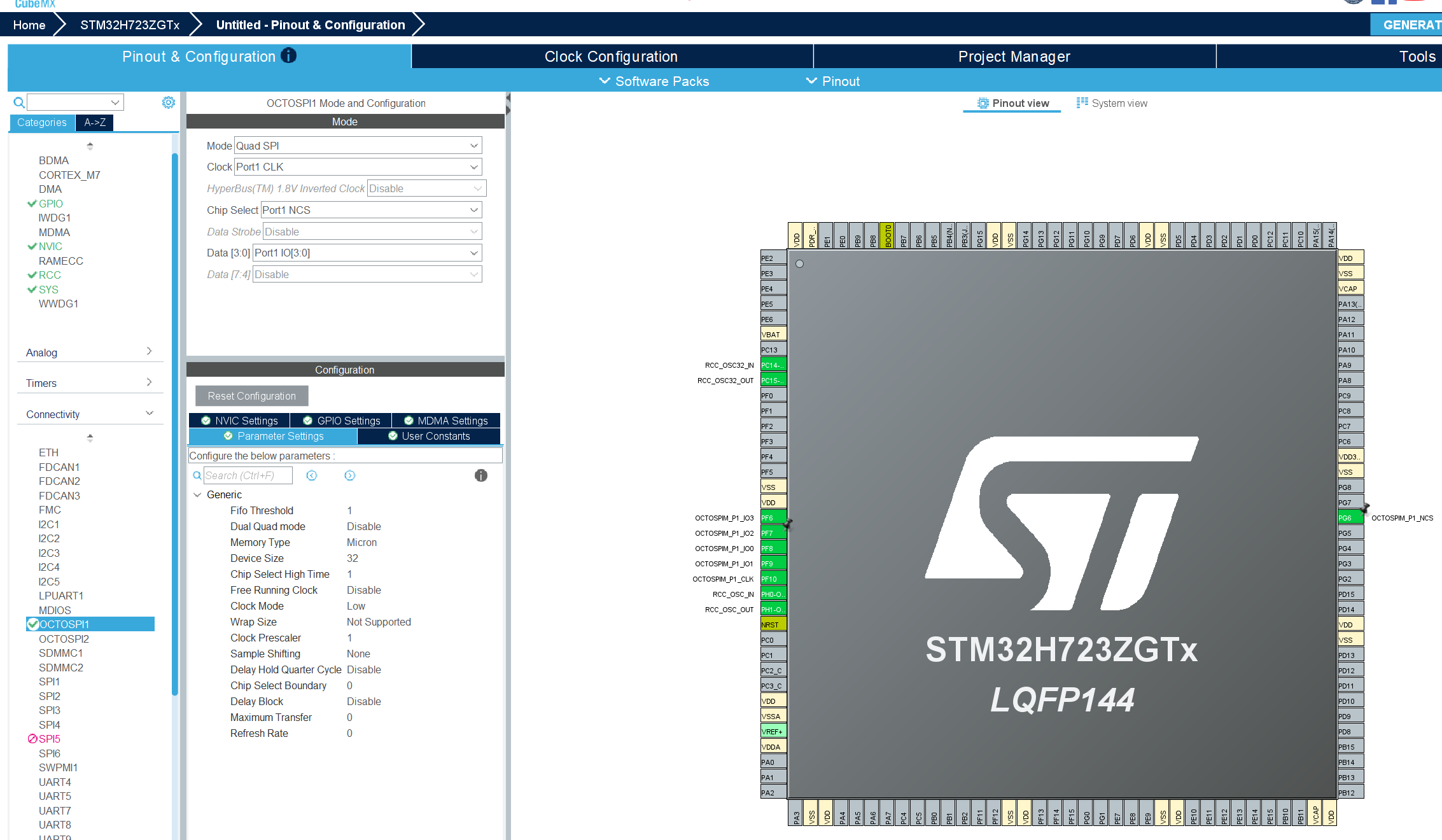
这里选中对应硬件引脚即可为后面配置做参考,并不会使用这里生成的函数。不开启外设中断,仅使用xxspi外设。系统时钟配置使用默认的时钟配置即可。
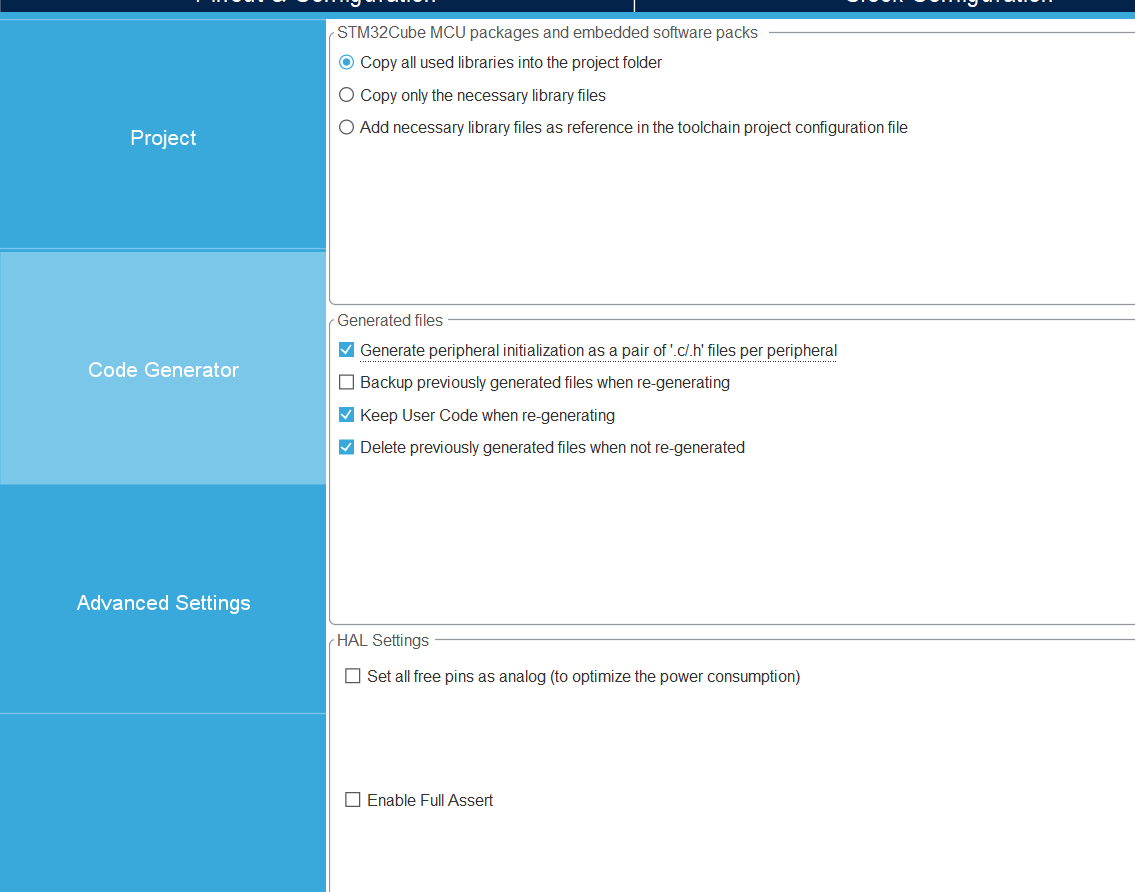
这里选择mdk工程 ,因为cubeide工程里:Copy all used librariess into project folder 是无法选择的。
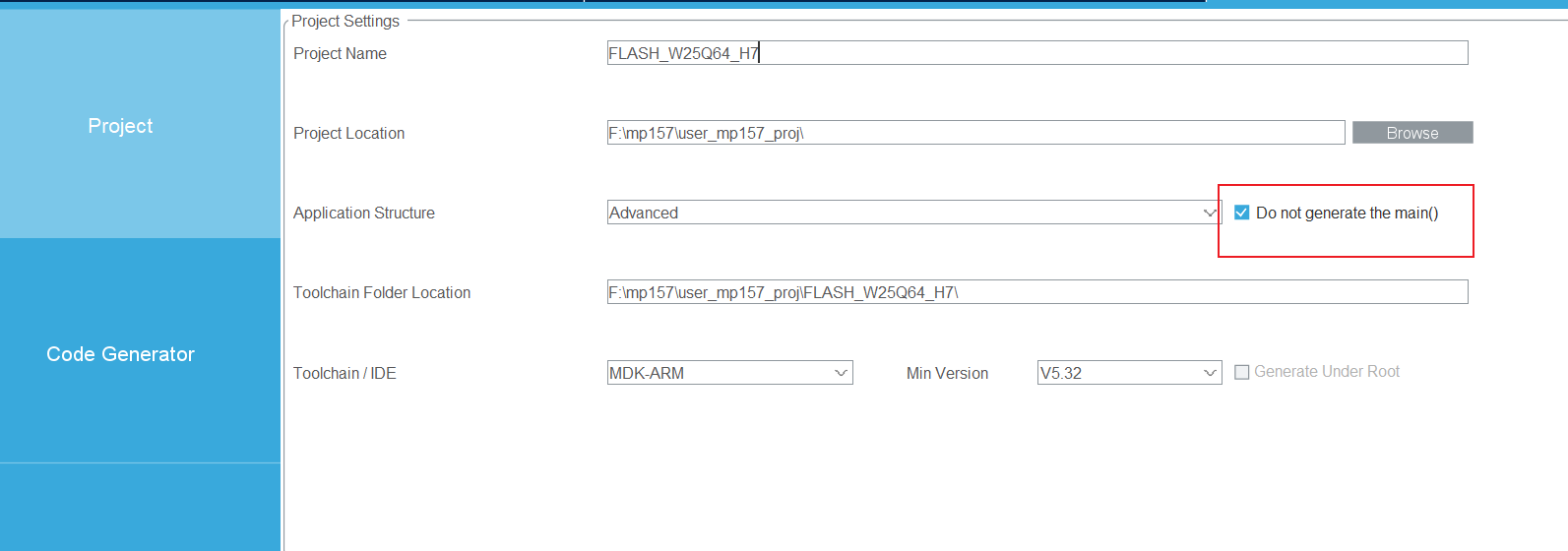
并选中不生成main函数。
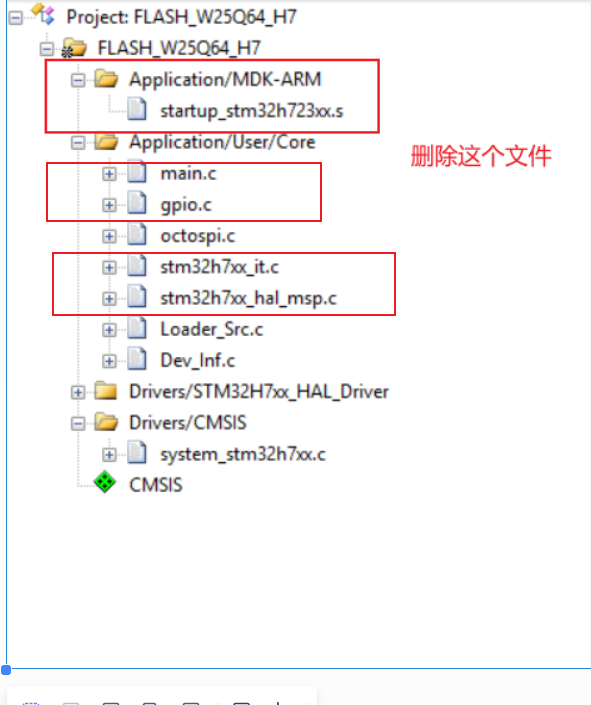
删除多余文件:
配置链接文件
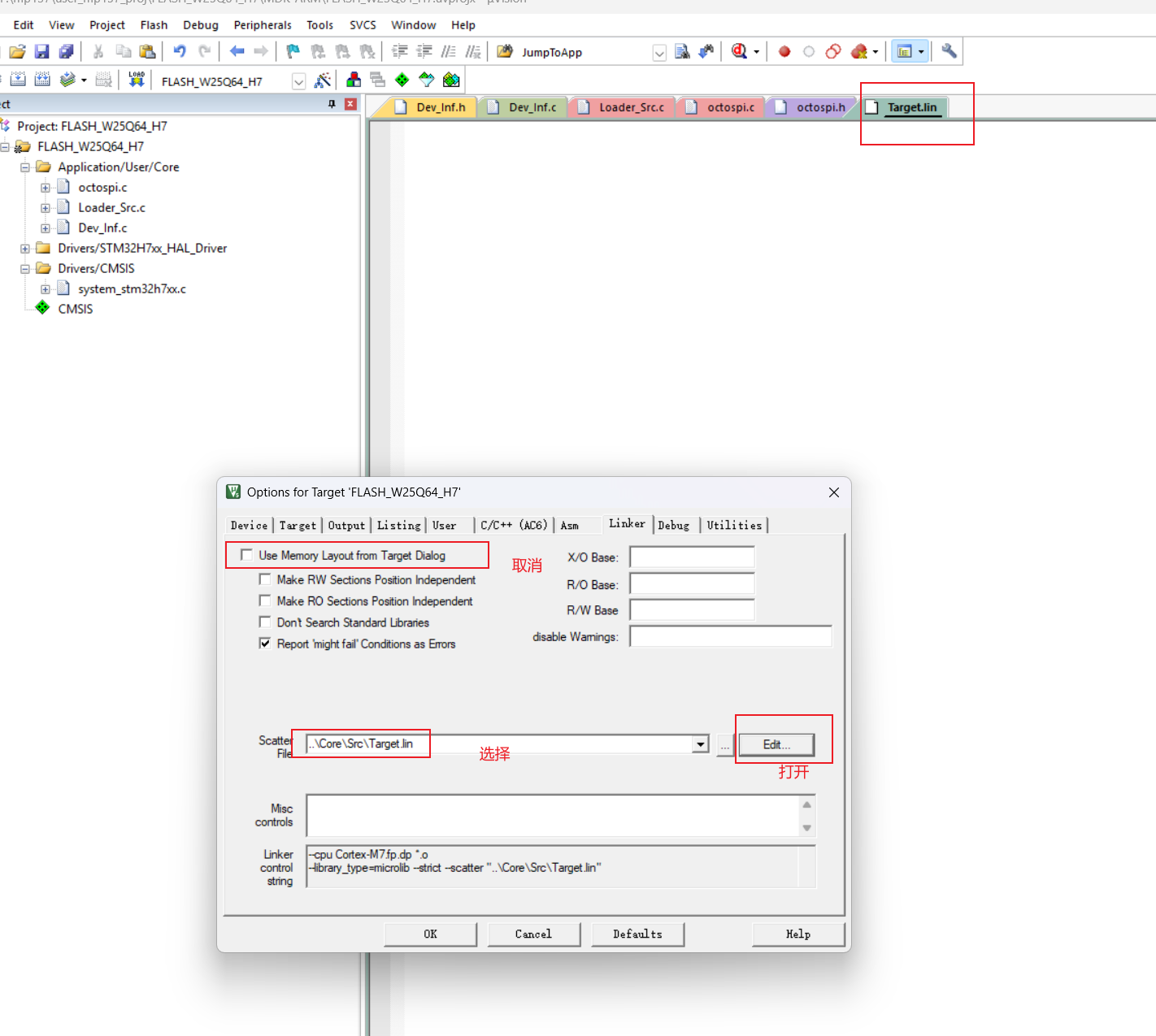
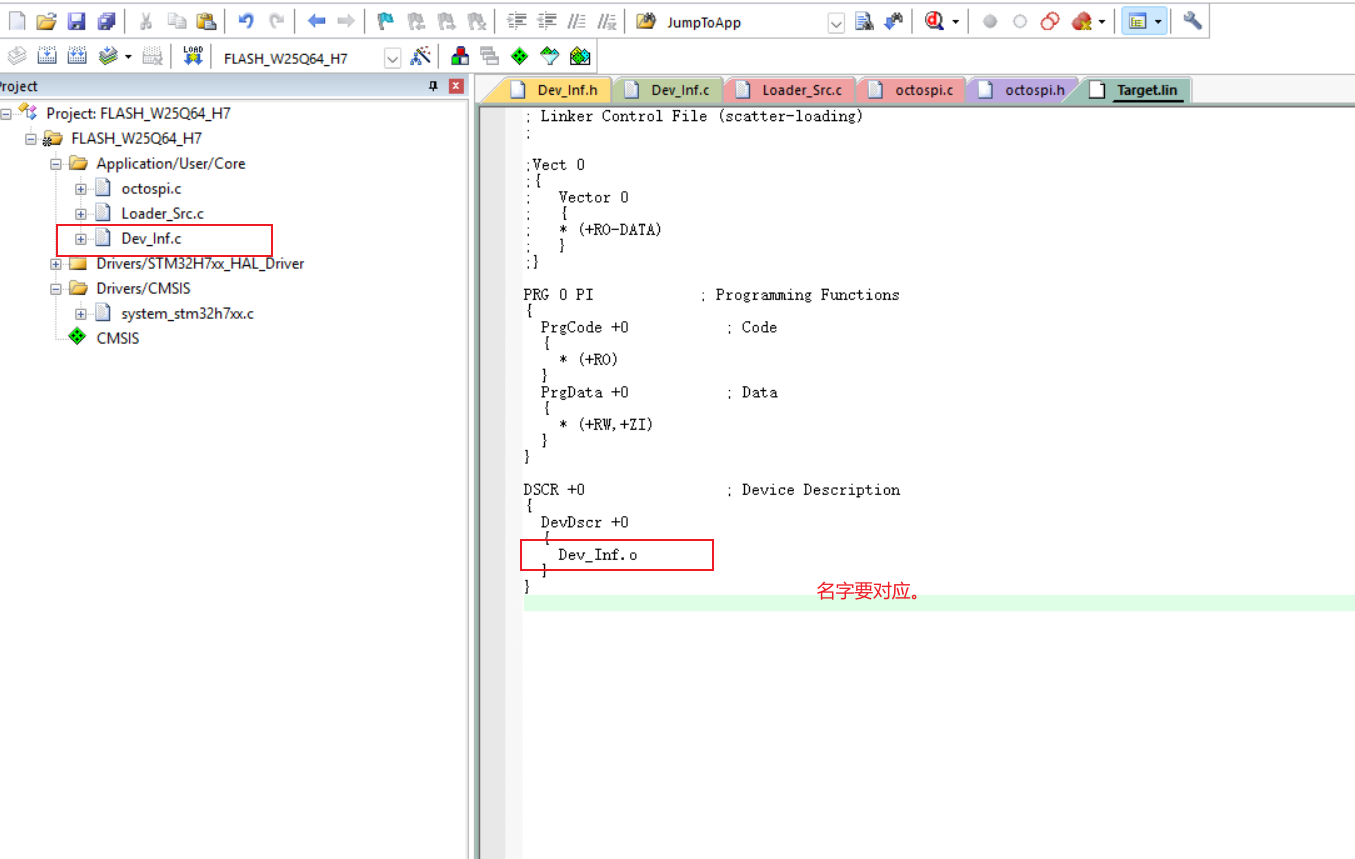
配置.lin文件内容,这里对应mdk上的需要与cube进行区分
配置生成FLM文件/stldr文件
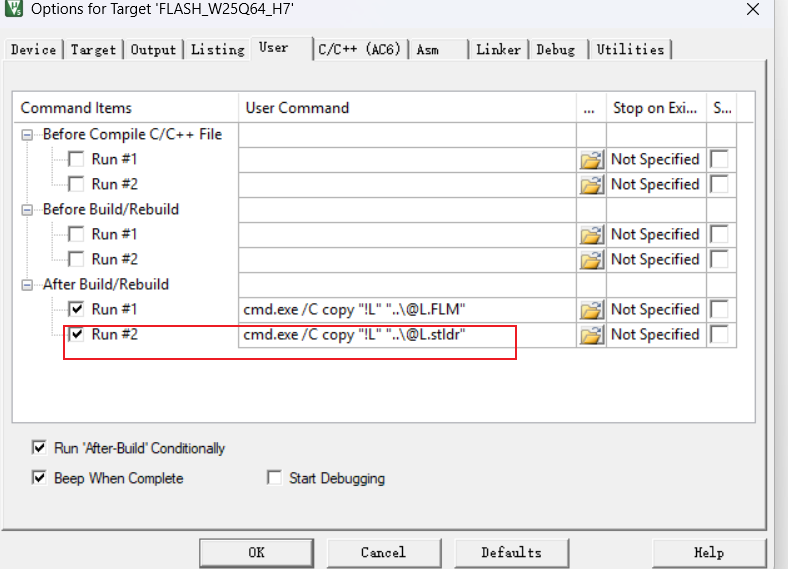
指令:
c
cmd.exe /C copy "!L" "..\@L.FLM"
cmd.exe /C copy "!L" "..\@L.stldr"
配置此处,去除编译报错。
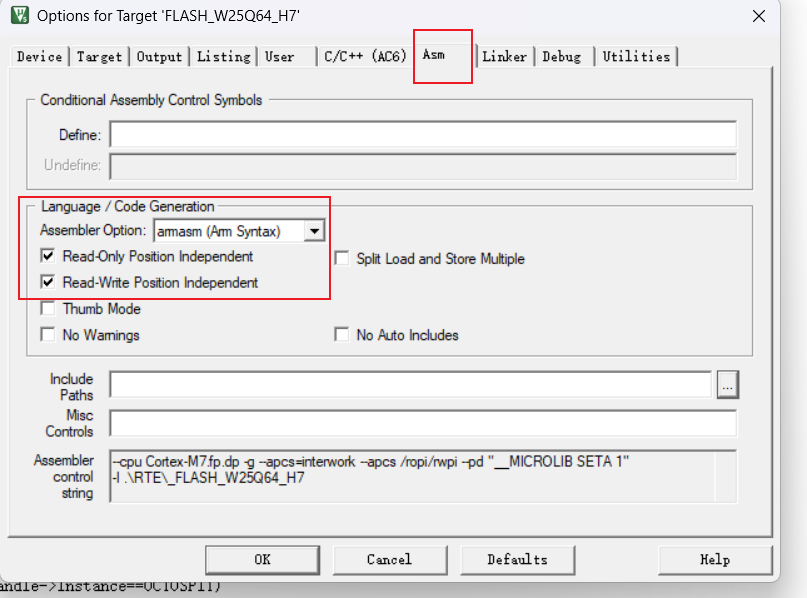
编译得到.FLM文件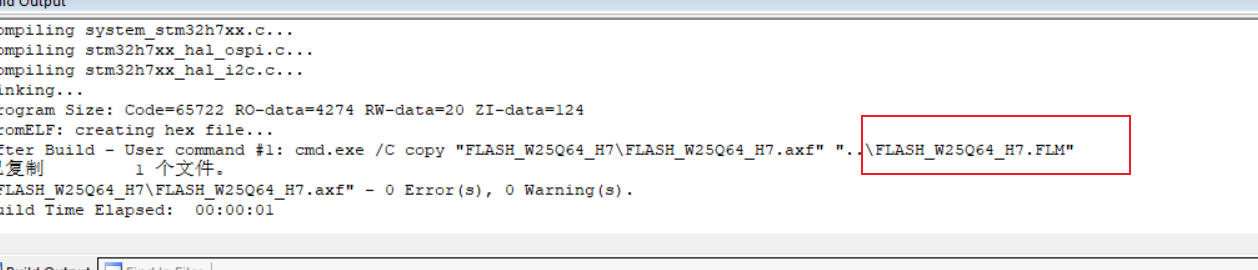
移动.FLM文件,让mdk软件识别
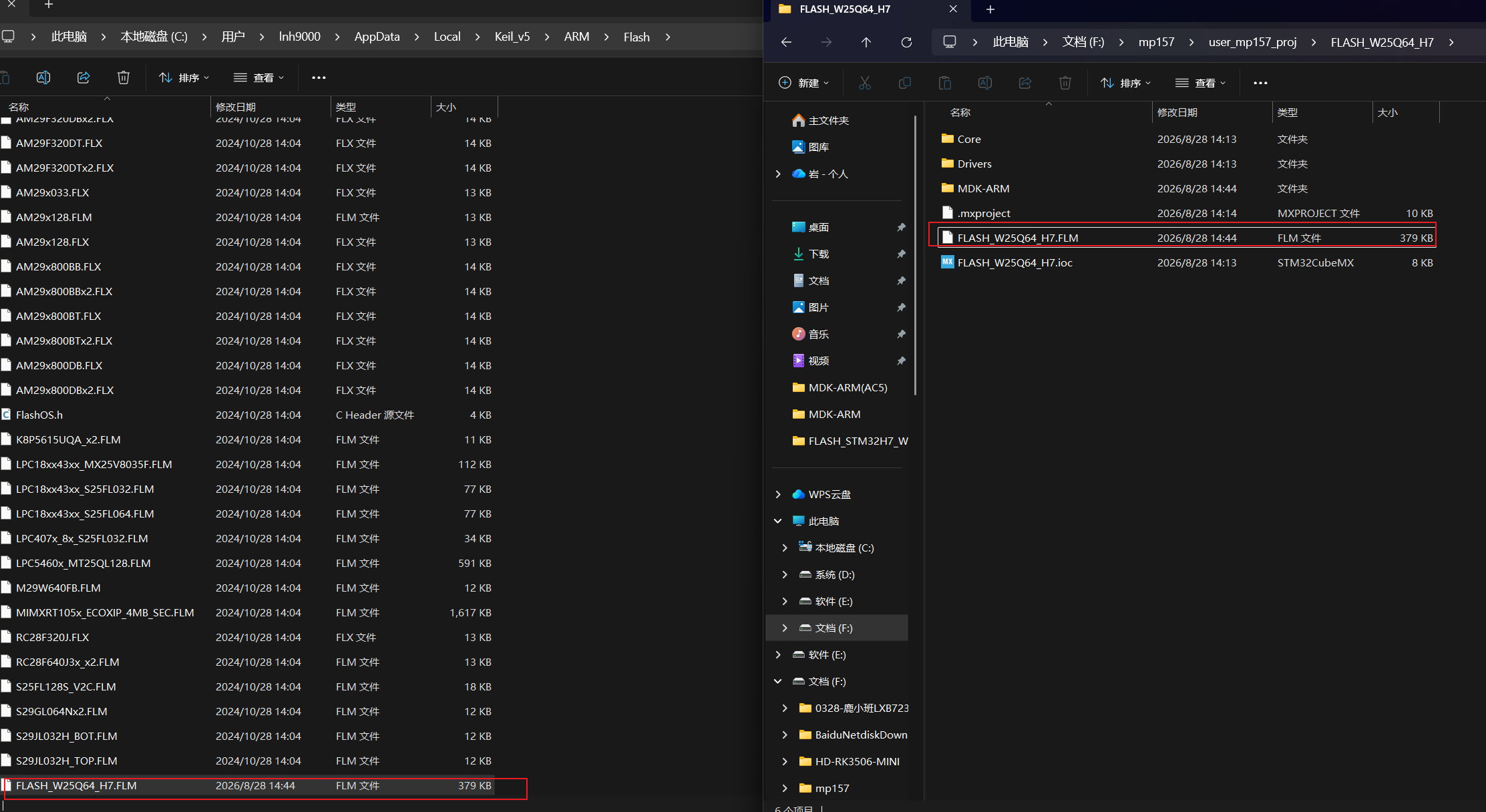
查看软件能否识别到FLM文件。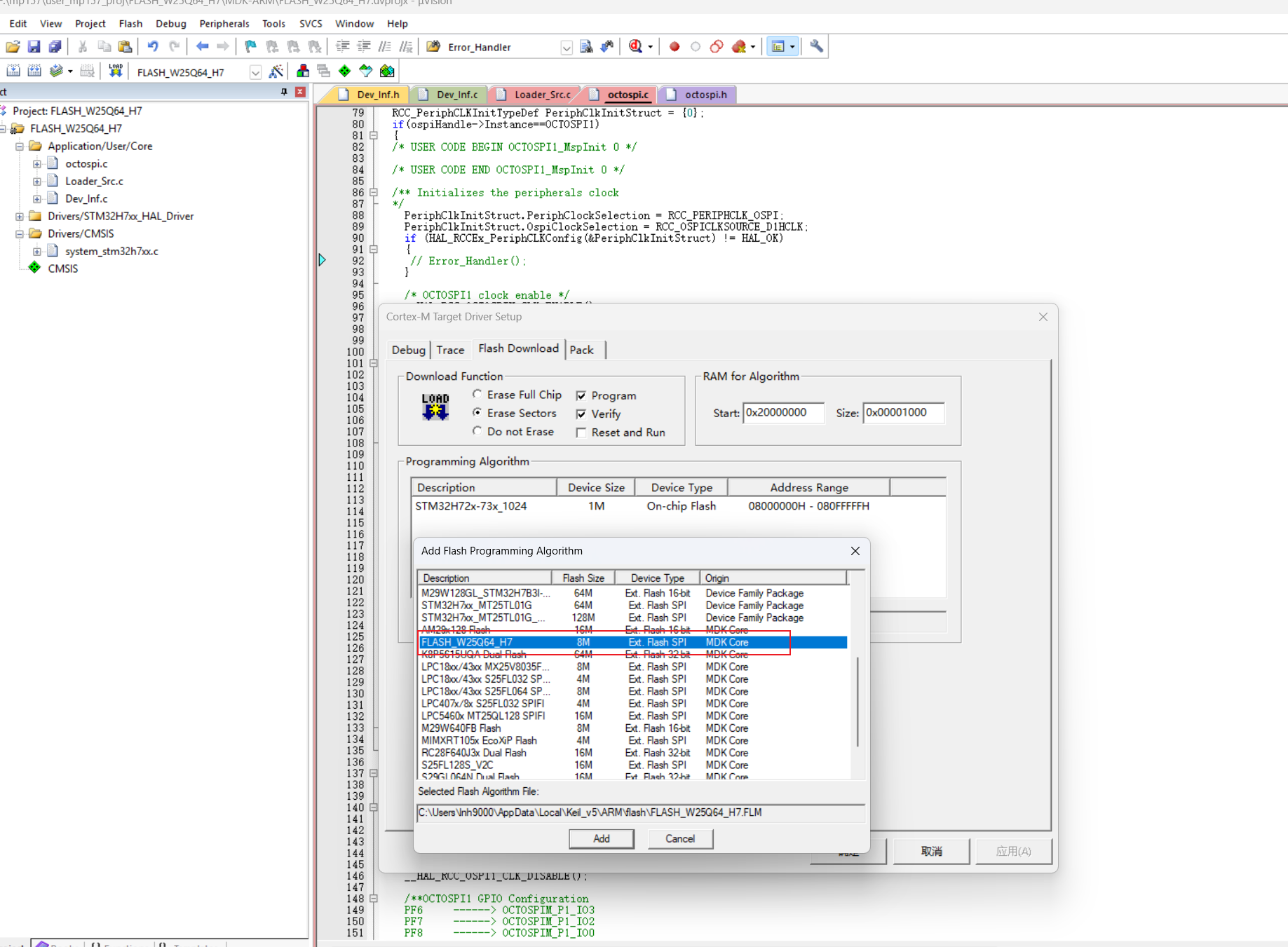
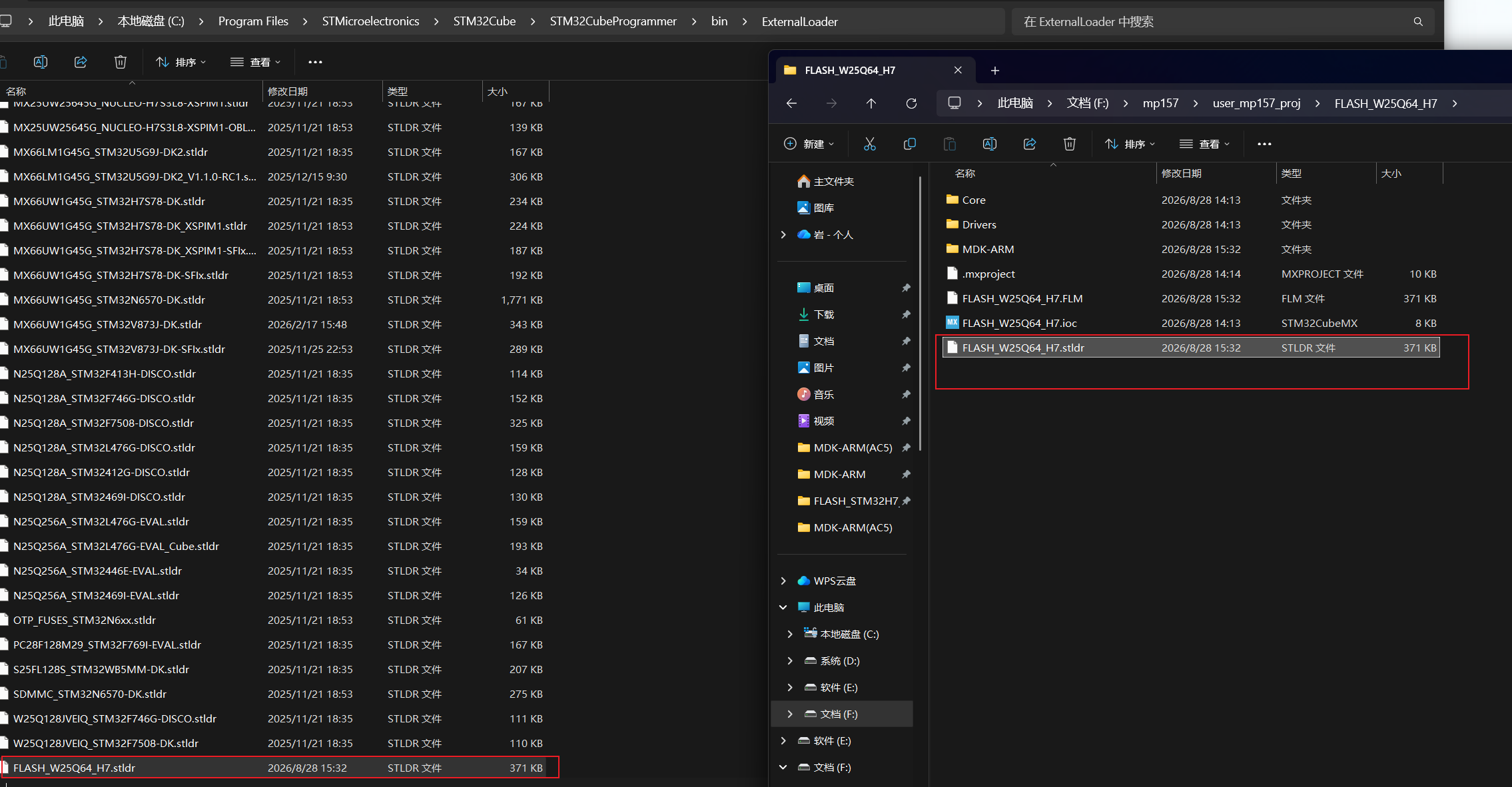
生成stldr文件。
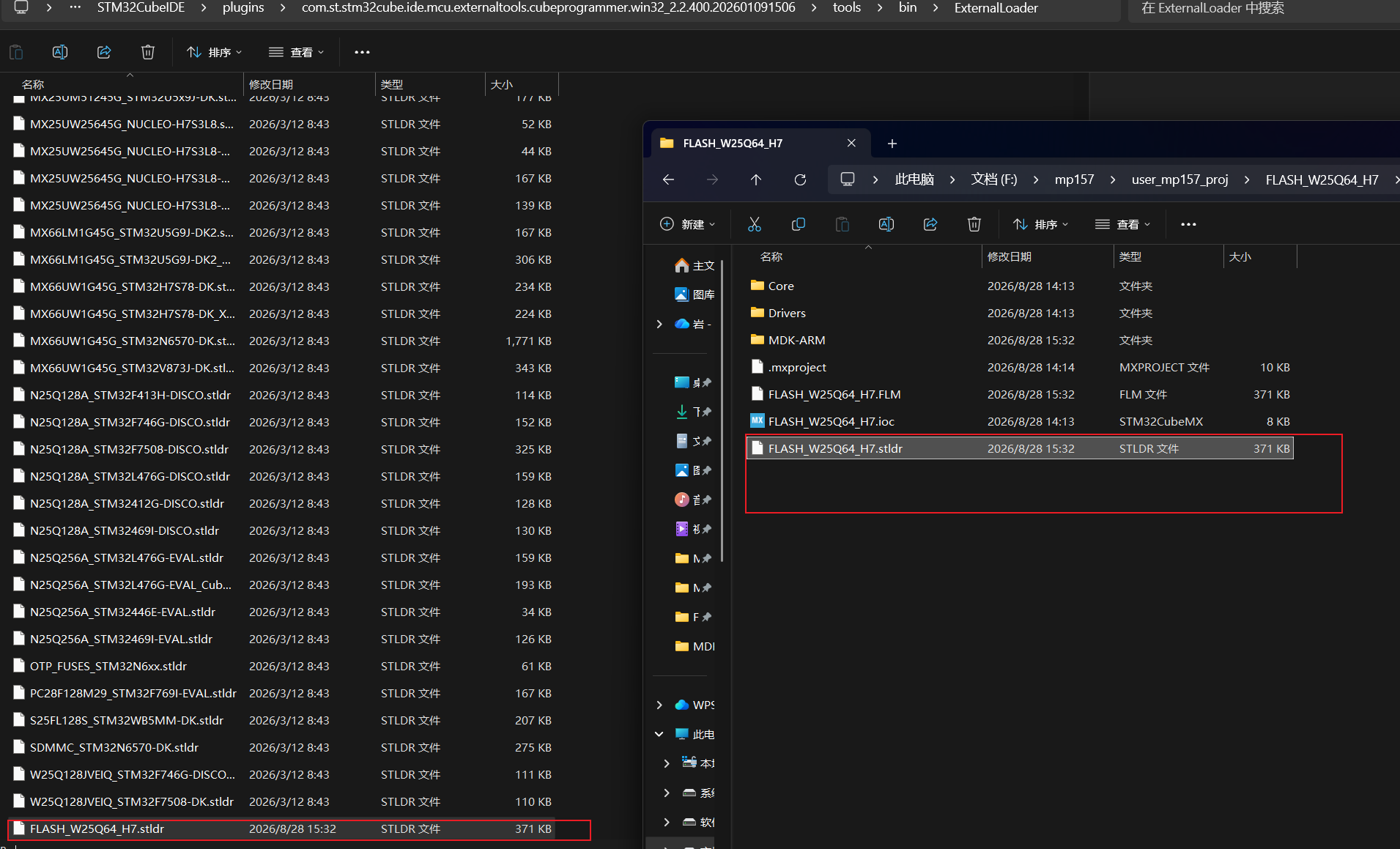
移动到该位置即让cubeprogrammer 上能识别到
通过选择对应的烧录算法,使用上面对应的下载功能即可下载文件得到外部存储其中:
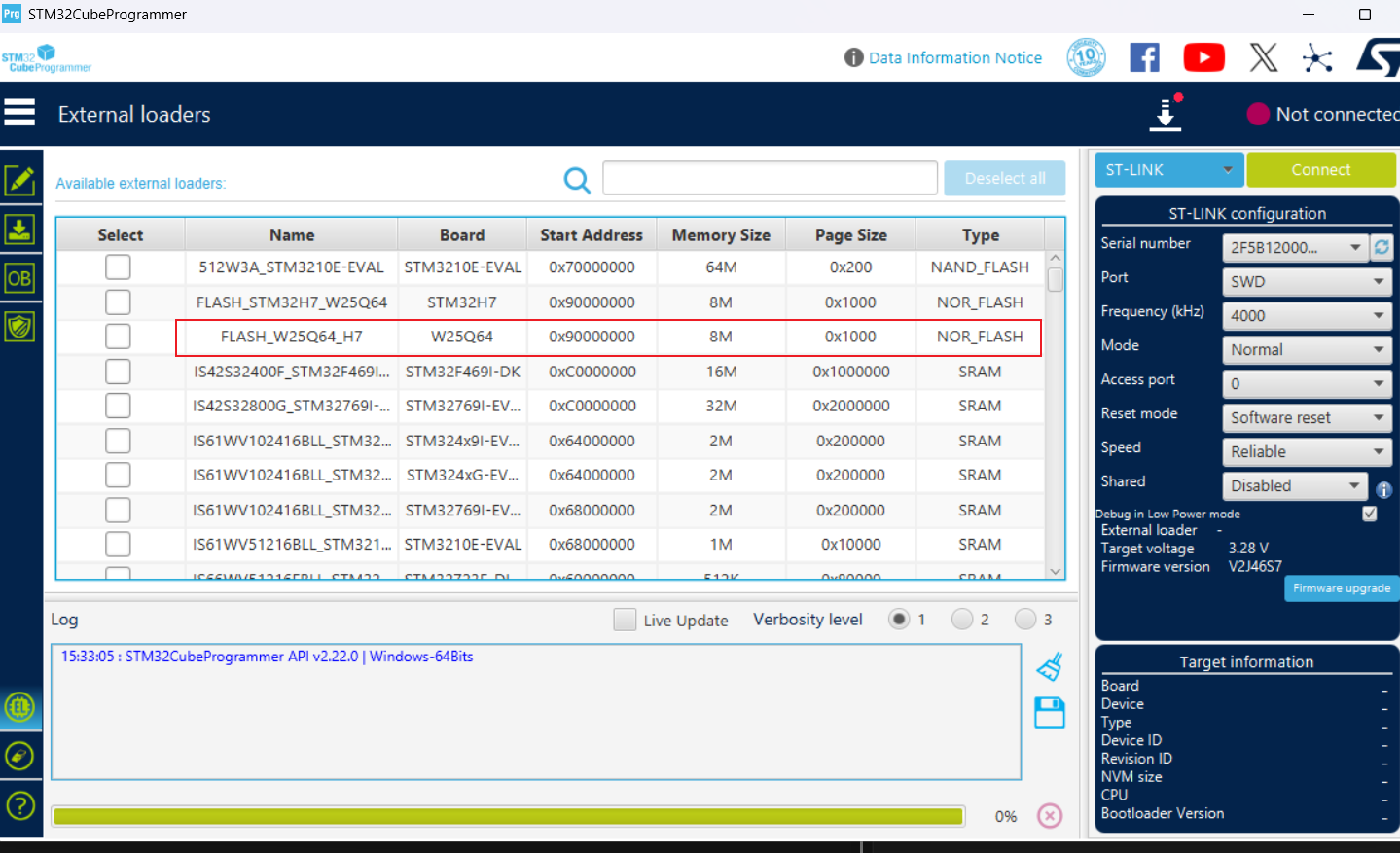
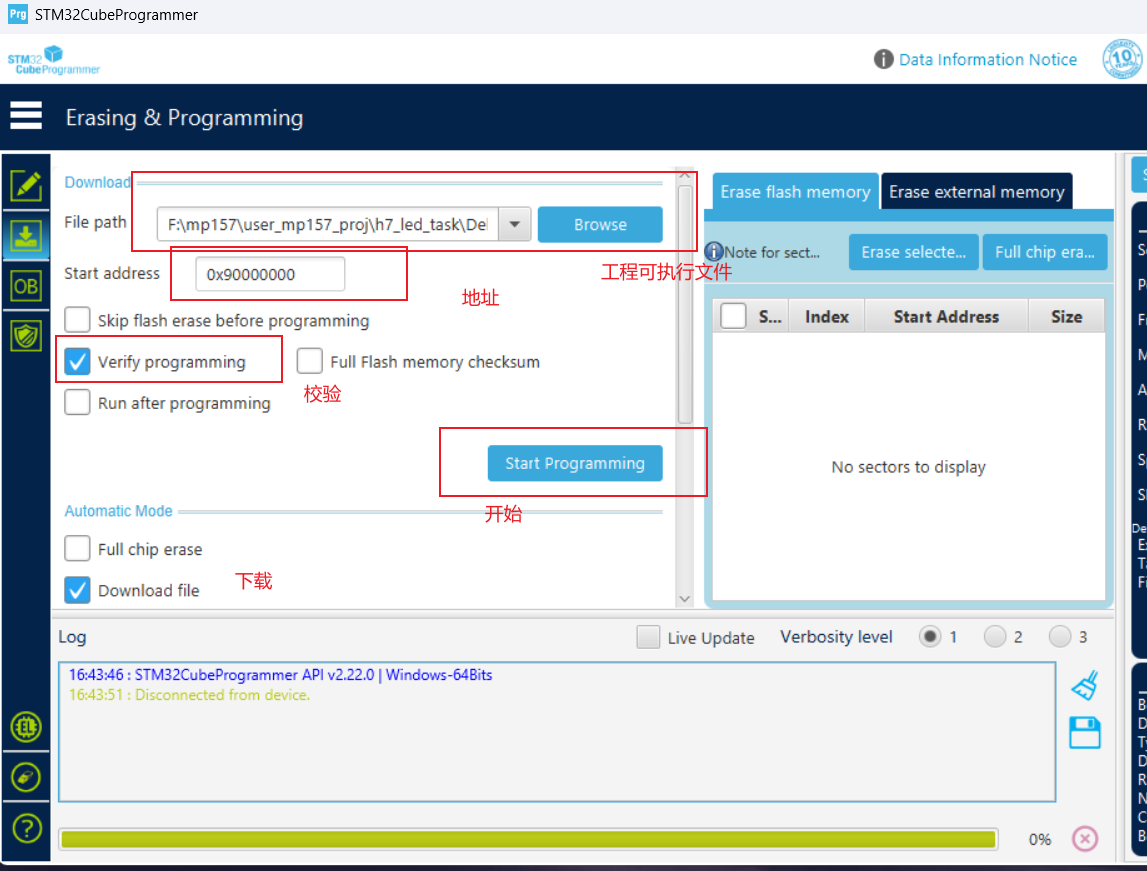
复制算法文件到cubeide的目录下,供后续文件能在软件上找到它。
如何选择对应的烧录算法文件。
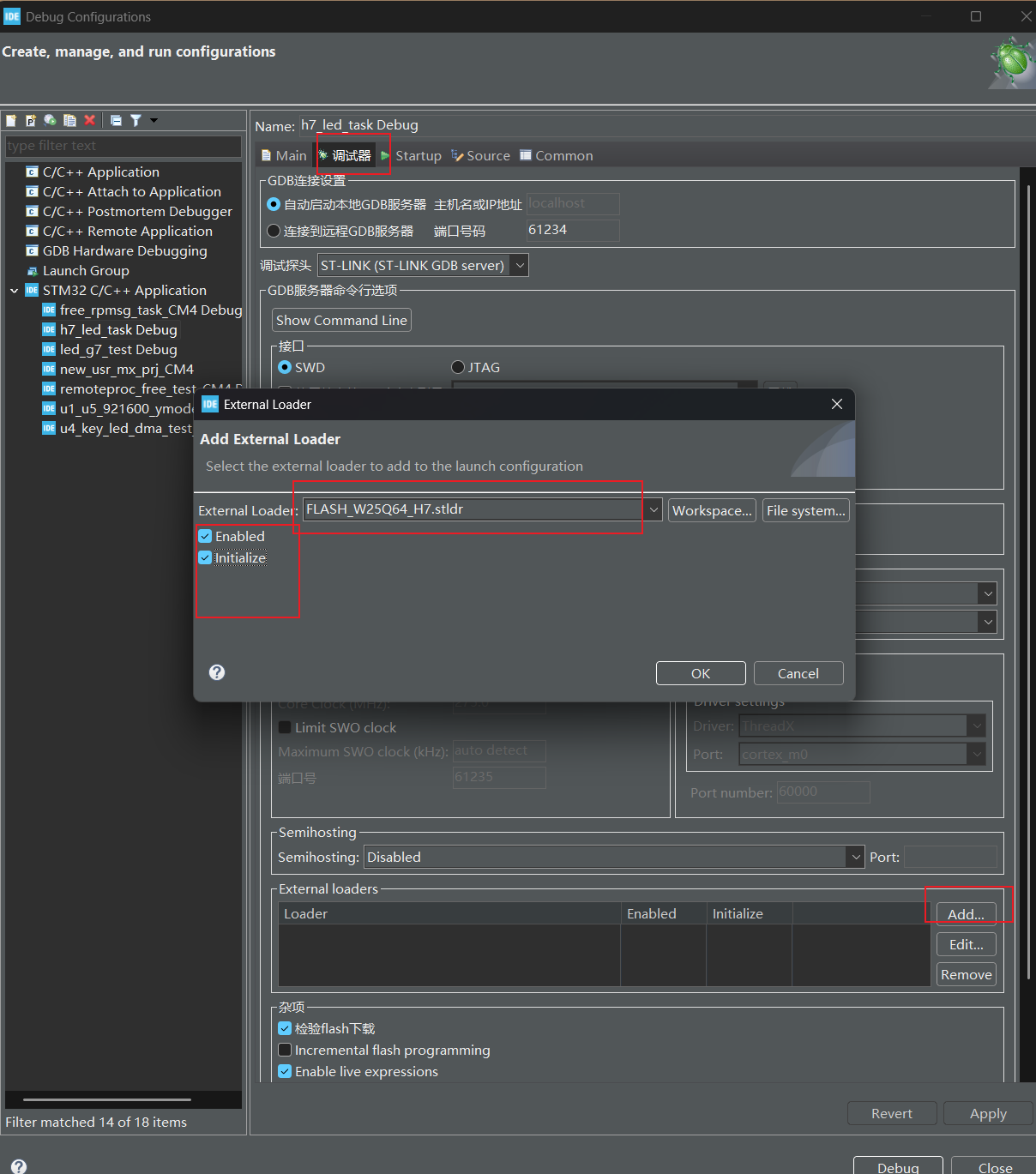
确保init。
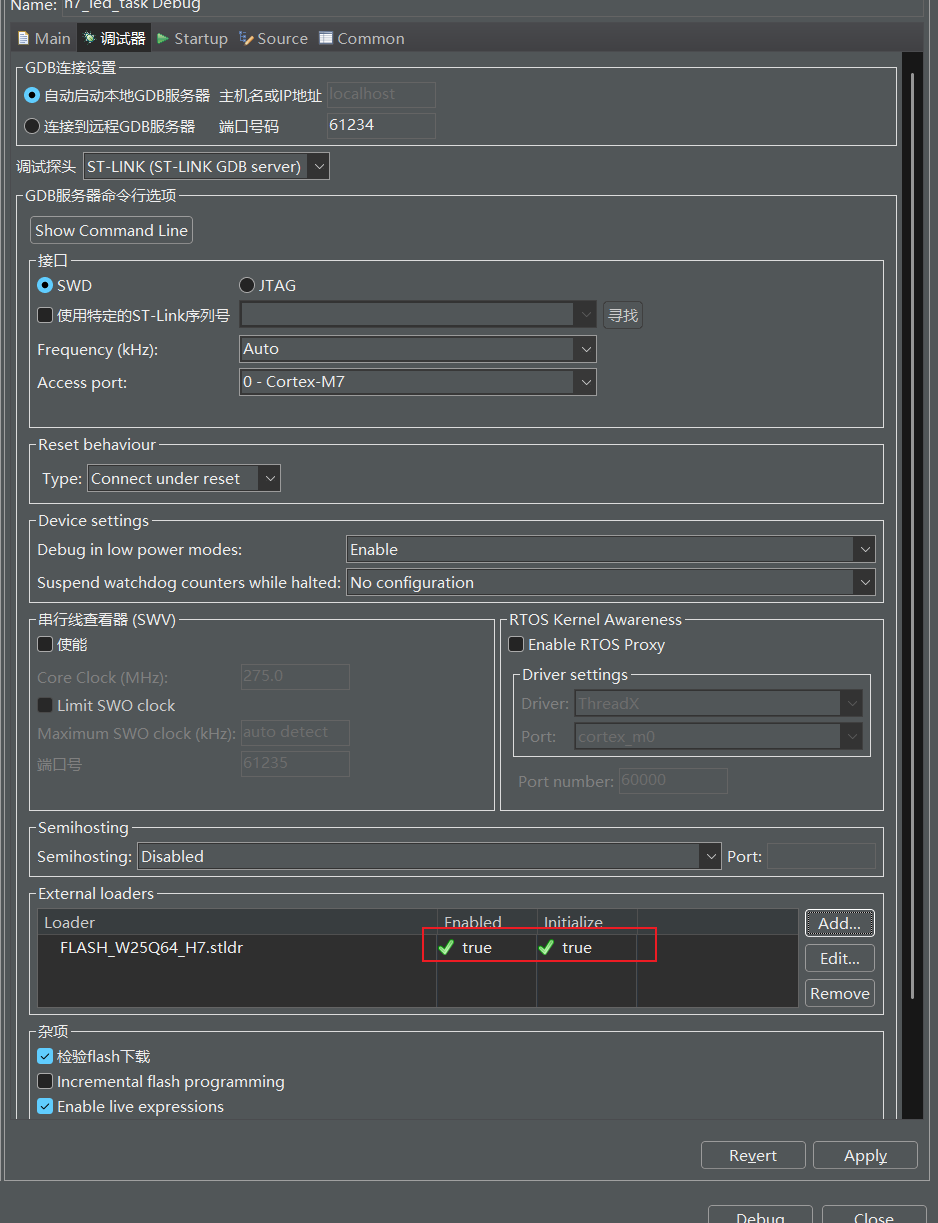
编辑工程的ld文件,用来指定内容存储到外部flash中,则下载时会将指定的内容通过该烧录算法烧录到外部flash中去。
2、编辑Dev_Inf.c 与.h 以及Loader_Src.c文件
参考该文件里其他的flash工程
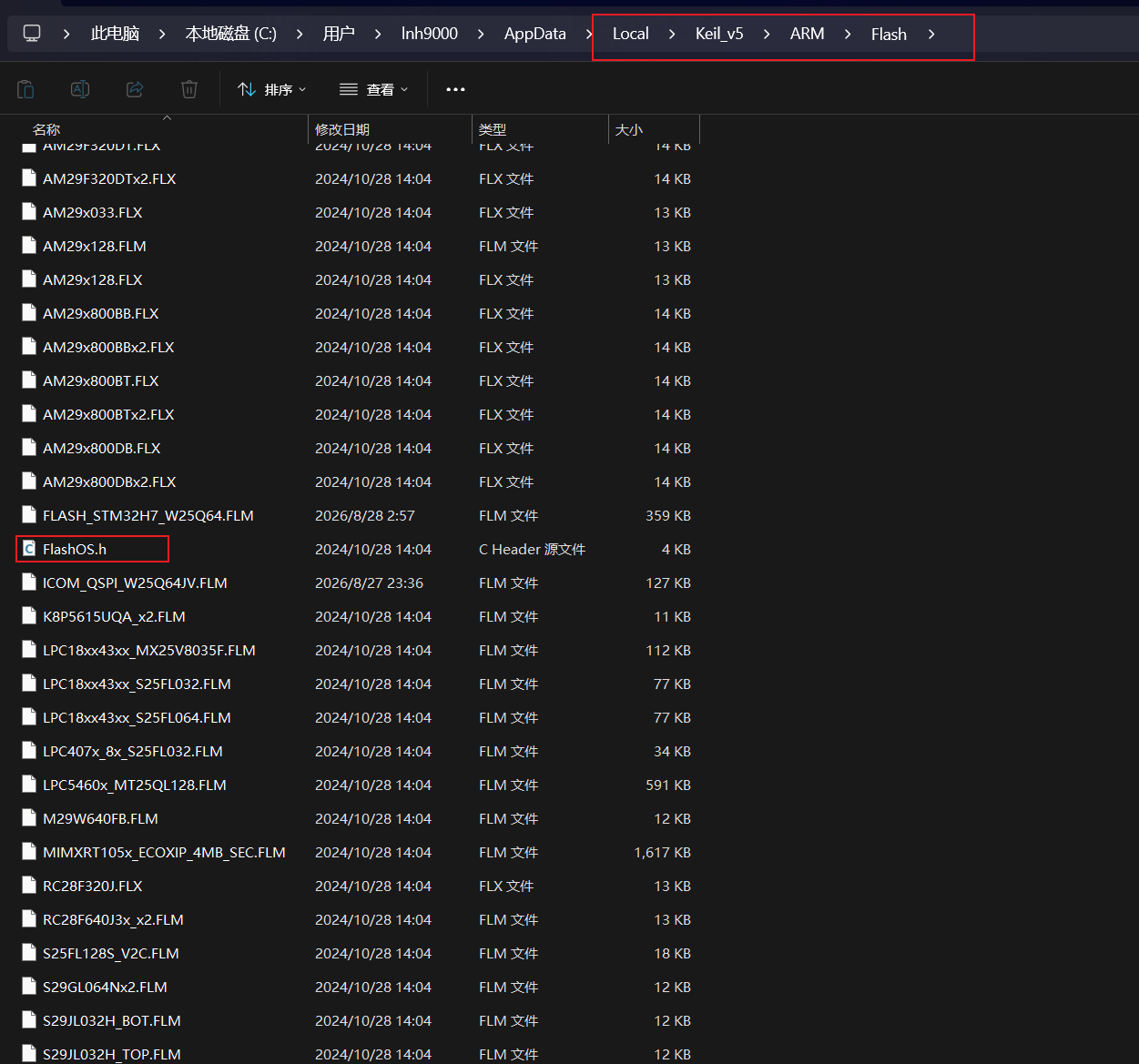
实现:Dev_Inf.c/.h文件,让软件能够读取到烧录算法的信息。
这里需要格外注意:配置不好,直接软件上是识别不到的。
Dev_Inf.h文件
这里对应 cube上
c
#ifndef __DEV_INF
#define __DEV_INF
#define 	MCU_FLASH 	1
#define 	NAND_FLASH  2
#define 	NOR_FLASH   3
#define 	SRAM        4
#define 	PSRAM       5
#define 	PC_CARD     6
#define 	SPI_FLASH   7
#define 	I2C_FLASH   8
#define 	SDRAM       9
#define 	I2C_EEPROM  10


#define SECTOR_NUM1 10				// Max Number of Sector types

struct DeviceSectors
{
  unsigned long		SectorNum;     // Number of Sectors
  unsigned long		SectorSize;    // Sector Size in Bytes
};

struct StorageInfo
{
   char       		 DeviceName[100];			// Device Name and Description
   unsigned short DeviceType;					// Device Type: ONCHIP, EXT8BIT, EXT16BIT, ...
   unsigned long  DeviceStartAddress;		// Default Device Start Address
   unsigned long  DeviceSize;					// Total Size of Device
   unsigned long  PageSize;					// Programming Page Size
   unsigned char  EraseValue;					// Content of Erased Memory
   struct 	  DeviceSectors	 sectors[SECTOR_NUM1];
};


#endif
Dev_Inf.c文件
c
#inlcude "Dev_Inf.c"

struct StorageInfo const StorageInfo =  {

    "FLASH_W25Q64_H7", /* 算法名,添加算法到STM32CubeProg安装目录会显示此名字 一般和你工程名字一样即可*/
    NOR_FLASH,                      /* 设备类型 */
    0X90000000,                     /* Flash起始地址 */
    8 * 1024 * 1024,                /* Flash大小,8MB */
    4096,                           /* 编程页大小 */
    0xFF,                           /* 擦除后的数值 */
    2048 , 4 * 1024,                /* 块个数和块大小 */
    0x00000000, 0x00000000,
};
对应的Target.lin文件,与mdk也是有区别的,
c
FLASH_LOADER 0x24000000 PI   ; FlashLoader Functions
{
  PrgCode +0           ; Code
  {
    * (+RO)
  }
  PrgData +0           ; Data
  {
    * (+RW,+ZI)
  }
}

DEVICE_INFO +0               ; Device Info
{
  DevInfo +0           ; Info structure
  {
    Dev_Inf.o    :这里需要对应工程里的Dev_Inf文件,如何不同改为一致的不然会识别不到
  }
}
对应:Loader_Src.c文件
需要完善这些函数,即使不做任何内容,当前如此配置软件上也能识别到该烧录算法,只是不能用而已,具体实现依据当前外部flash的驱动代码,来补充这些函数。
c
 int Init(void)	 {

 return 0;
	 }
 int Write(uint32_t adr, uint32_t sz, uint8_t* buf)	 {

 return 0;
	 }
 int SectorErase (uint32_t adr ,uint32_t adr_end)	 {

 return 0;
	 }
 int Read(uint32_t Address, uint32_t Size, uint8_t* Buffer)	 {

 return 0;
	 }
 int MassErase(void)
	 {

 return 0;
	 }
这里对应MDK上
Dev_Inf.c
c
#include "Dev_Inf.h"
struct FlashDevice const FlashDevice  =
{
    FLASH_DRV_VERS,                   /* 驱动版本,勿修改,这个是MDK定的 */
    "FLASH_W25Q64_H7",       			/* 算法名,添加算法到MDK安装目录会显示此名字 */
    EXTSPI,                           /* 设备类型 */
    0X90000000,                       /* Flash起始地址 0X90000000 定义内存的起始地址 */
    8 * 1024 * 1024,                  /* Flash大小,8MB  W25Q64的内存大小就是8MB */
    4 * 1024,                         /* 编程页大小 */
    0,                                /* 保留,必须为0 */
    0xFF,                             /* 擦除后的数值 */
    1000,                             /* 页编程等待时间 */
    6000,                             /* 扇区擦除等待时间 */
    64 * 1024, 0x000000,              /* 扇区大小,扇区地址 */
    SECTOR_END
};
Dev_Inf.h文件
c
#ifndef __DEV_INF
#define __DEV_INF

#define VERS       1           // Interface Version 1.01

#define UNKNOWN    0           // Unknown
#define ONCHIP     1           // On-chip Flash Memory
#define EXT8BIT    2           // External Flash Device on 8-bit  Bus
#define EXT16BIT   3           // External Flash Device on 16-bit Bus
#define EXT32BIT   4           // External Flash Device on 32-bit Bus
#define EXTSPI     5           // External Flash Device on SPI

#define SECTOR_NUM 512         // Max Number of Sector Items
#define PAGE_MAX   65536       // Max Page Size for Programming

struct FlashSectors  {
  unsigned long   szSector;    // Sector Size in Bytes
  unsigned long AddrSector;    // Address of Sector
};

#define SECTOR_END 0xFFFFFFFF, 0xFFFFFFFF

struct FlashDevice  {
   unsigned short     Vers;    // Version Number and Architecture
   char       DevName[128];    // Device Name and Description
   unsigned short  DevType;    // Device Type: ONCHIP, EXT8BIT, EXT16BIT, ...
   unsigned long    DevAdr;    // Default Device Start Address
   unsigned long     szDev;    // Total Size of Device
   unsigned long    szPage;    // Programming Page Size
   unsigned long       Res;    // Reserved for future Extension
   unsigned char  valEmpty;    // Content of Erased Memory

   unsigned long    toProg;    // Time Out of Program Page Function
   unsigned long   toErase;    // Time Out of Erase Sector Function

   struct FlashSectors sectors[SECTOR_NUM];
};

#define FLASH_DRV_VERS (0x0100+VERS)   // Driver Version, do not modify!

// Flash Programming Functions (Called by FlashOS)
extern          int  Init        (unsigned long adr,   // Initialize Flash
                                  unsigned long clk,
                                  unsigned long fnc);
extern          int  UnInit      (unsigned long fnc);  // De-initialize Flash
extern          int  BlankCheck  (unsigned long adr,   // Blank Check
                                  unsigned long sz,
                                  unsigned char pat);
extern          int  EraseChip   (void);               // Erase complete Device
extern          int  EraseSector (unsigned long adr);  // Erase Sector Function
extern          int  ProgramPage (unsigned long adr,   // Program Page Function
                                  unsigned long sz,
                                  unsigned char *buf);
extern unsigned long Verify      (unsigned long adr,   // Verify Function
                                  unsigned long sz,
                                  unsigned char *buf);


#endif
Target.lin内容
c
; Linker Control File (scatter-loading)
;

;Vect 0
;{
;	Vector 0
;	{
;	* (+RO-DATA)
;	}
;}

PRG 0 PI            ; Programming Functions
{
  PrgCode +0           ; Code
  {
    * (+RO)
  }
  PrgData +0           ; Data
  {
    * (+RW,+ZI)
  }
}

DSCR +0                ; Device Description
{
  DevDscr +0
  {
   Dev_Inf.o      :这里改为和工程里Dev_Inf文件里,一致的名字才能识别到
  }
}
Loader_Src.c文件则是实现这些函数,依旧时根据外部存储器类型来实现操作这些函数
c
int  Init        (unsigned long adr,   // Initialize Flash
                                  unsigned long clk,
                                  unsigned long fnc);
int  UnInit      (unsigned long fnc);  // De-initialize Flash
int  BlankCheck  (unsigned long adr,   // Blank Check
                                  unsigned long sz,
                                  unsigned char pat);
int  EraseChip   (void);               // Erase complete Device
int  EraseSector (unsigned long adr);  // Erase Sector Function
int  ProgramPage (unsigned long adr,   // Program Page Function
                                  unsigned long sz,
                                  unsigned char *buf);
unsigned long Verify      (unsigned long adr,   // Verify Function
                                  unsigned long sz,
                                  unsigned char *buf);
关于使用:
mdk上
填入:对应的外部存储器的地址与大小
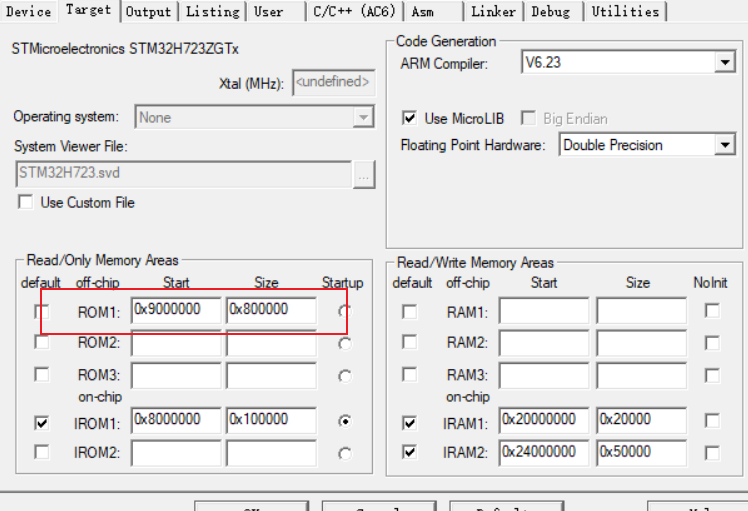
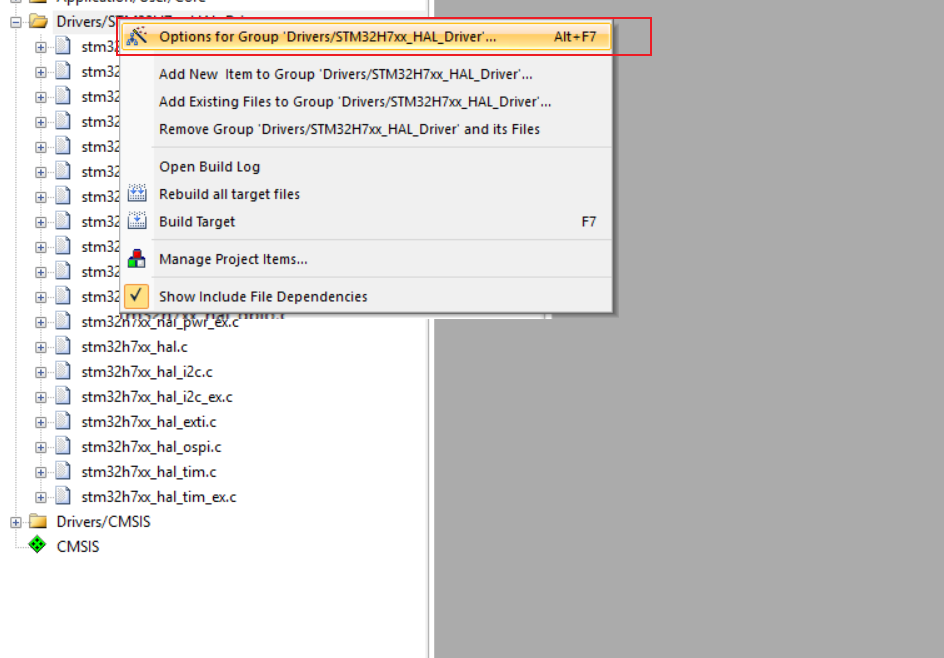
指定哪些文件在外部上存储。
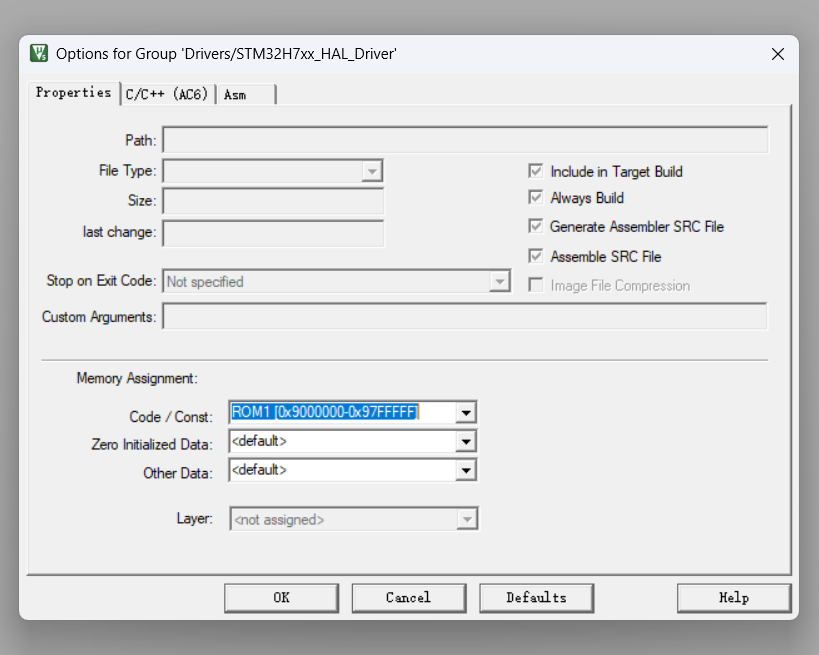
查看
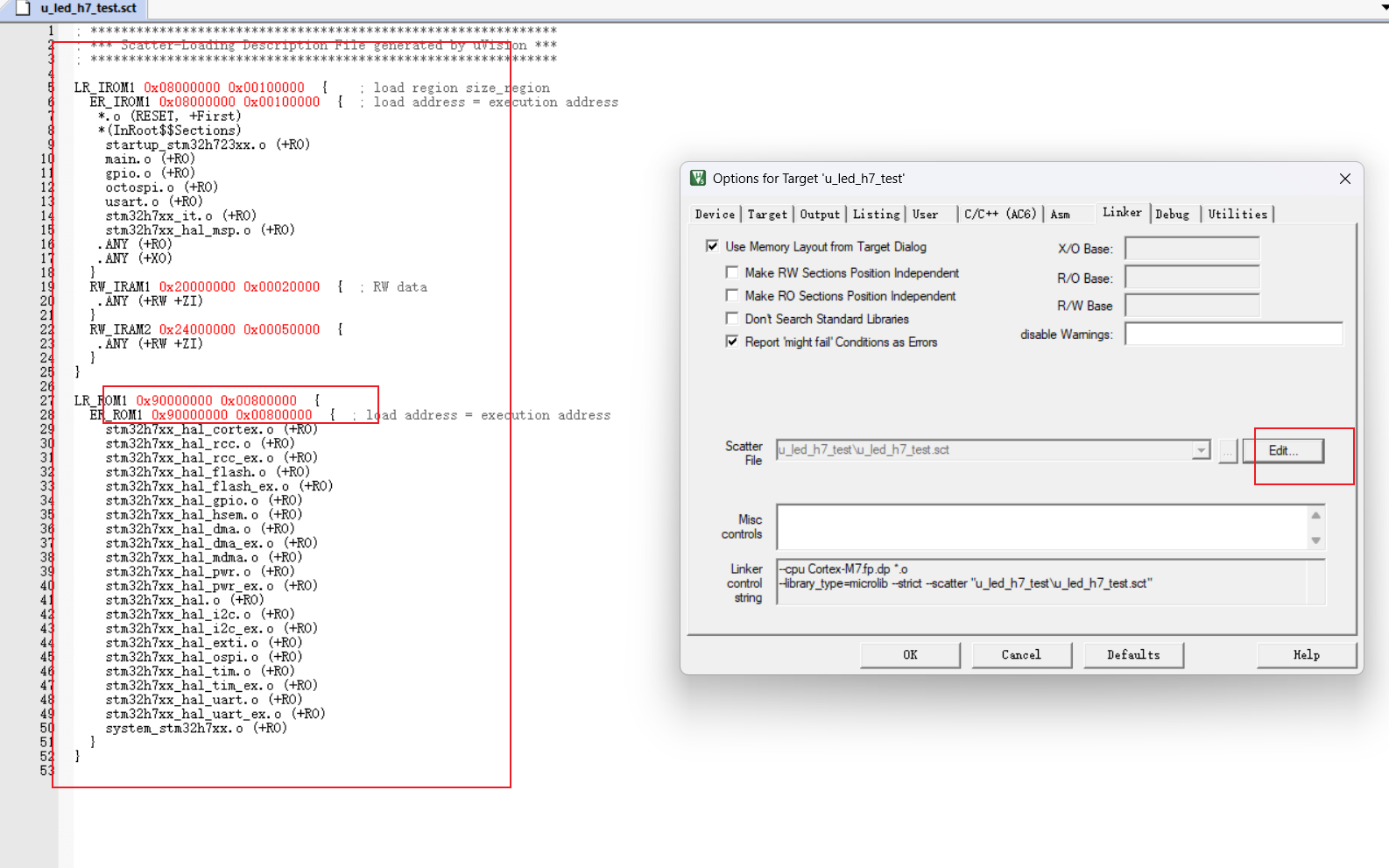
总结:
烧录算法文件,本质就是一个外部flash调用程序,指定好了地址,
只是这个在烧录时,加载到了ram里执行了,外部flash的擦除与填写内容。
类比操作:
程序启动,初始化外部flash,进行地址映射, 在映射的地址写入:函数,较长数组等,然后退出,结束操作。(算法文件)
(程序文件)用户程序启动,根据ld文件/sct文件,判断启动从哪里开始,然后执行程序。