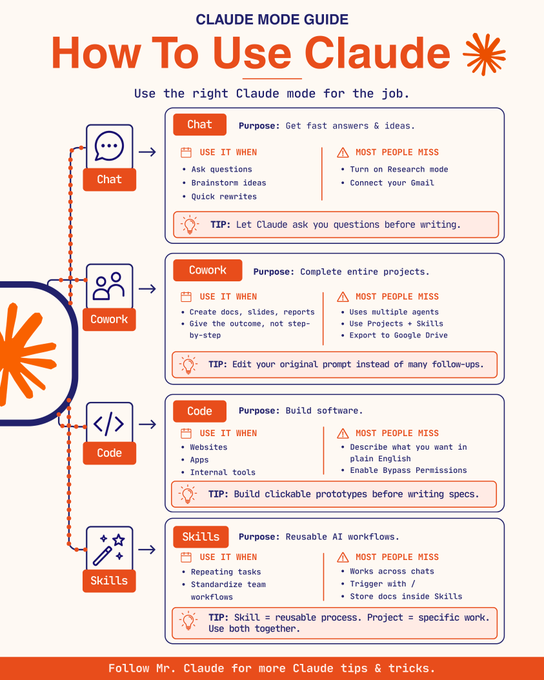
Learn which mode you are in before you touch the prompt. Most people use Claude the same way for everything, and that is why the output feels inconsistent.
Chat is for fast answers and ideas: questions, brainstorming, quick rewrites. Most people never turn on Research mode or connect Gmail, so it stays a search box instead of an assistant with real context.
Cowork is for finishing entire projects: docs, slides, reports. Give it the outcome you want, not a step-by-step, and let it run multiple agents on the work at once. Projects and Skills stack here, and it can export straight to Google Drive.
Code is for building software: websites, apps, internal tools. Describe what you want in plain English instead of writing a spec first, and turn on Bypass Permissions so it can actually move without stopping to ask.
Skills are for the work you do more than once. A skill is a reusable process that works across every chat, triggered with a slash command, with its instructions stored inside it. A project is the specific work in front of you right now. Use both together instead of picking one.
Bookmark this before your next Claude session.
在点击提示之前,先了解你当前所处的模式。大多数人使用 Claude 的方式都一样,所以输出结果才会显得不一致。
- 聊天模式用于快速获取答案和想法:提问、头脑风暴、快速修改。大多数人从不开启研究模式或连接 Gmail,所以它始终只是一个搜索框,而不是一个能提供真正上下文的助手。
- 协作模式用于完成整个项目:文档、幻灯片、报告。直接告诉它你想要的结果,而不是一步一步的步骤,让它同时运行多个代理来处理你的工作。项目和技能可以叠加在这里,并且可以直接导出到 Google 云端硬盘。
- 代码模式用于构建软件:网站、应用程序、内部工具。用简单的英语描述你的需求,而不是先编写规范,并启用"绕过权限"功能,这样它就可以直接运行,无需询问。
- 技能模式用于你多次执行的工作。技能是一个可重用的流程,可以在所有聊天中使用,通过斜杠命令触发,其指令存储在命令内部。项目是你当前正在处理的具体工作。两者结合使用,不要只选择一种。下次使用克劳德之前,请将此信息添加到书签。