1. 引言
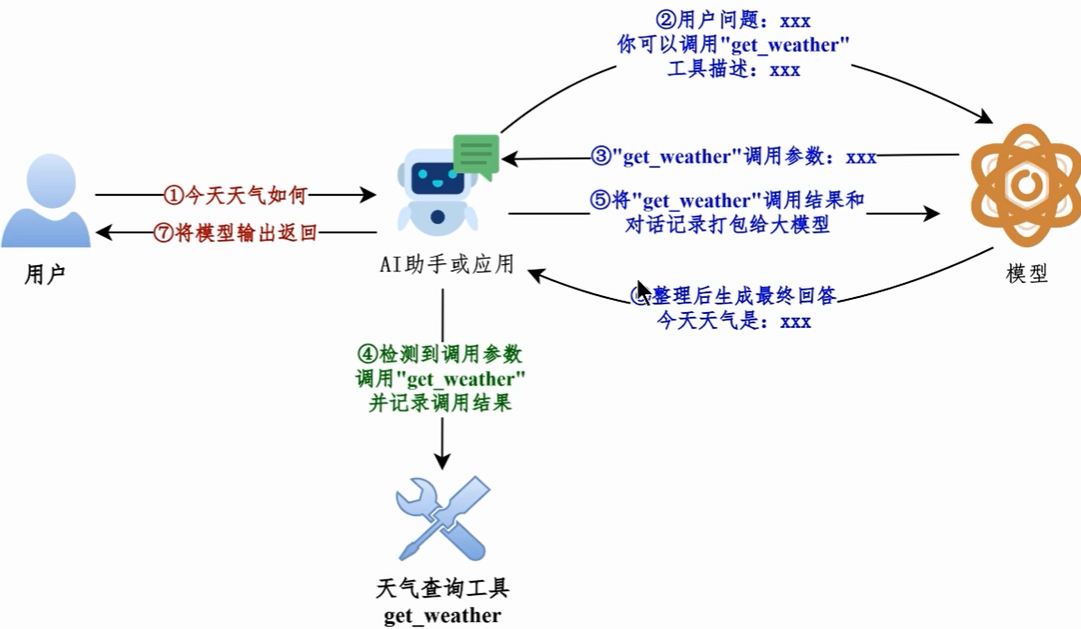
在构建大语言模型(LLM)应用时,模型本身无法执行实时查询、调用外部 API 或操作数据库。工具调用(Tool Calling / Function Calling)正是为了解决这一痛点而生的机制:它让模型在对话过程中识别出需要外部能力才能回答的问题,并结构化地输出一个"调用请求",由我们的应用代码去真正执行对应的函数,再把结果回传给模型,从而生成最终答案。
本文将基于 LangChain 0.3 系列,从零开始讲解工具调用的核心概念、定义方式、绑定与执行流程,并通过可运行的代码示例带你快速上手。
2. 什么是工具调用
工具调用是 LLM 的一种能力:模型在生成回复时,可以输出一个结构化的"工具调用指令",而不是直接给出最终文本。这个指令通常包含:
- 工具名称(tool name)
- 传给该工具的参数(arguments,JSON 格式)
应用侧拿到这个指令后,负责真正执行对应的函数,并把执行结果作为新的消息返回给模型,模型再基于结果继续推理,最终给出面向用户的回答。
需要特别注意的是:模型本身并不执行工具,它只负责"决定调用哪个工具、传什么参数"。真正的执行逻辑始终由我们的代码完成。
3. 环境准备
在开始之前,请确保你的环境中已安装 LangChain 及对应模型的依赖包:
bash
pip install langchain langchain-openai如果你使用 OpenAI 兼容接口(如国内大模型服务),通常还需要配置 API Key 和 Base URL:
python
import os

os.environ["OPENAI_API_KEY"] = "your-api-key"
os.environ["OPENAI_BASE_URL"] = "https://your-endpoint/v1"
4. 定义一个工具
在 LangChain 中,最推荐的方式是使用 @tool 装饰器,把一个普通的 Python 函数声明为可供模型调用的工具。
python
from langchain_core.tools import tool

@tool
def get_weather(city: str) -> str:
    """查询指定城市的当前天气。

    参数:
        city: 城市名称,例如 "北京"、"上海"。

    返回:
        该城市的天气描述字符串。
    """
    # 这里仅作演示,实际可替换为真实天气 API 调用
    return f"{city} 今天晴,气温 26℃,微风。"
要点说明:
- 函数的**文档字符串(docstring)**会被 LangChain 自动提取,作为模型判断"何时调用该工具"的依据,务必写清楚用途和参数含义。
- 函数的类型注解 (如
city: str)会被转换为工具的参数 schema,模型据此生成合法的参数 JSON。 - 函数返回值会被作为工具执行结果回传给模型。
docstring 的写法与作用
docstring(文档字符串)是写在函数定义第一行的三引号字符串,它不仅是给开发者看的注释,更是 LangChain 生成工具描述的核心依据。模型正是通过 docstring 来理解"这个工具是做什么的、什么时候该调用它"。
一个规范的 docstring 通常包含三部分:
- 功能描述:一句话说明工具的作用,例如"查询指定城市的当前天气"。
- 参数说明:逐个列出参数的含义、类型和取值范围,帮助模型生成合法的参数 JSON。
- 返回值说明:说明函数返回什么内容,让模型知道拿到结果后该如何使用。
python
@tool
def get_weather(city: str) -> str:
    """查询指定城市的当前天气。

    参数:
        city: 城市名称,例如 "北京"、"上海"。

    返回:
        该城市的天气描述字符串。
    """
    return f"{city} 今天晴,气温 26℃,微风。"
docstring 的书写质量直接影响模型调用工具的准确率:
- 描述越具体,模型判断越准 。如果只写"查询天气",模型可能不清楚该传什么参数;写清楚"城市名称,例如北京、上海"后,模型就能正确生成
{"city": "北京"}这样的参数。 - 参数说明要与类型注解一致。docstring 里说明的参数名必须和函数签名中的参数名完全一致,否则 LangChain 生成的 schema 会与 docstring 描述不一致,可能导致模型传错参数。
- 避免歧义和冗余。docstring 应简洁明确,不要写与工具功能无关的内容,以免干扰模型的判断。
5. 绑定工具到模型
定义好工具后,需要把它"绑定"到聊天模型上,模型才会在推理时知道有这个工具可用。
python
from langchain_openai import ChatOpenAI

llm = ChatOpenAI(model="gpt-4o-mini", temperature=0)

# 将工具绑定到模型
llm_with_tools = llm.bind_tools([get_weather])
bind_tools 接收一个工具列表,可以一次绑定多个工具。绑定后,模型在需要时就会输出工具调用指令。
6. 执行工具调用
下面是一个完整的调用流程示例:用户提问 → 模型决定调用工具 → 我们执行工具 → 把结果回传给模型 → 模型给出最终回答。
python
from langchain_core.messages import HumanMessage, ToolMessage

# 第一步:用户提问
messages = [HumanMessage(content="北京今天天气怎么样?")]

# 第二步:模型决定调用工具
response = llm_with_tools.invoke(messages)
print("模型输出:", response)

# 第三步:检查是否有工具调用请求
if response.tool_calls:
    tool_call = response.tool_calls[0]
    print(f"需要调用工具: {tool_call['name']}")
    print(f"参数: {tool_call['args']}")

    # 第四步:真正执行工具函数
    tool_result = get_weather.invoke(tool_call["args"])

    # 第五步:把工具执行结果作为 ToolMessage 追加到消息列表
    messages.append(response)
    messages.append(ToolMessage(content=tool_result, tool_call_id=tool_call["id"]))

    # 第六步:让模型基于工具结果生成最终回答
    final_response = llm_with_tools.invoke(messages)
    print("最终回答:", final_response.content)
执行流程可以概括为下图:
#mermaid-svg-SUefrZvJzh9Vd8hv{font-family:"trebuchet ms",verdana,arial,sans-serif;font-size:16px;fill:#333;}@keyframes edge-animation-frame{from{stroke-dashoffset:0;}}@keyframes dash{to{stroke-dashoffset:0;}}#mermaid-svg-SUefrZvJzh9Vd8hv .edge-animation-slow{stroke-dasharray:9,5!important;stroke-dashoffset:900;animation:dash 50s linear infinite;stroke-linecap:round;}#mermaid-svg-SUefrZvJzh9Vd8hv .edge-animation-fast{stroke-dasharray:9,5!important;stroke-dashoffset:900;animation:dash 20s linear infinite;stroke-linecap:round;}#mermaid-svg-SUefrZvJzh9Vd8hv .error-icon{fill:#552222;}#mermaid-svg-SUefrZvJzh9Vd8hv .error-text{fill:#552222;stroke:#552222;}#mermaid-svg-SUefrZvJzh9Vd8hv .edge-thickness-normal{stroke-width:1px;}#mermaid-svg-SUefrZvJzh9Vd8hv .edge-thickness-thick{stroke-width:3.5px;}#mermaid-svg-SUefrZvJzh9Vd8hv .edge-pattern-solid{stroke-dasharray:0;}#mermaid-svg-SUefrZvJzh9Vd8hv .edge-thickness-invisible{stroke-width:0;fill:none;}#mermaid-svg-SUefrZvJzh9Vd8hv .edge-pattern-dashed{stroke-dasharray:3;}#mermaid-svg-SUefrZvJzh9Vd8hv .edge-pattern-dotted{stroke-dasharray:2;}#mermaid-svg-SUefrZvJzh9Vd8hv .marker{fill:#333333;stroke:#333333;}#mermaid-svg-SUefrZvJzh9Vd8hv .marker.cross{stroke:#333333;}#mermaid-svg-SUefrZvJzh9Vd8hv svg{font-family:"trebuchet ms",verdana,arial,sans-serif;font-size:16px;}#mermaid-svg-SUefrZvJzh9Vd8hv p{margin:0;}#mermaid-svg-SUefrZvJzh9Vd8hv .label{font-family:"trebuchet ms",verdana,arial,sans-serif;color:#333;}#mermaid-svg-SUefrZvJzh9Vd8hv .cluster-label text{fill:#333;}#mermaid-svg-SUefrZvJzh9Vd8hv .cluster-label span{color:#333;}#mermaid-svg-SUefrZvJzh9Vd8hv .cluster-label span p{background-color:transparent;}#mermaid-svg-SUefrZvJzh9Vd8hv .label text,#mermaid-svg-SUefrZvJzh9Vd8hv span{fill:#333;color:#333;}#mermaid-svg-SUefrZvJzh9Vd8hv .node rect,#mermaid-svg-SUefrZvJzh9Vd8hv .node circle,#mermaid-svg-SUefrZvJzh9Vd8hv .node ellipse,#mermaid-svg-SUefrZvJzh9Vd8hv .node polygon,#mermaid-svg-SUefrZvJzh9Vd8hv .node path{fill:#ECECFF;stroke:#9370DB;stroke-width:1px;}#mermaid-svg-SUefrZvJzh9Vd8hv .rough-node .label text,#mermaid-svg-SUefrZvJzh9Vd8hv .node .label text,#mermaid-svg-SUefrZvJzh9Vd8hv .image-shape .label,#mermaid-svg-SUefrZvJzh9Vd8hv .icon-shape .label{text-anchor:middle;}#mermaid-svg-SUefrZvJzh9Vd8hv .node .katex path{fill:#000;stroke:#000;stroke-width:1px;}#mermaid-svg-SUefrZvJzh9Vd8hv .rough-node .label,#mermaid-svg-SUefrZvJzh9Vd8hv .node .label,#mermaid-svg-SUefrZvJzh9Vd8hv .image-shape .label,#mermaid-svg-SUefrZvJzh9Vd8hv .icon-shape .label{text-align:center;}#mermaid-svg-SUefrZvJzh9Vd8hv .node.clickable{cursor:pointer;}#mermaid-svg-SUefrZvJzh9Vd8hv .root .anchor path{fill:#333333!important;stroke-width:0;stroke:#333333;}#mermaid-svg-SUefrZvJzh9Vd8hv .arrowheadPath{fill:#333333;}#mermaid-svg-SUefrZvJzh9Vd8hv .edgePath .path{stroke:#333333;stroke-width:2.0px;}#mermaid-svg-SUefrZvJzh9Vd8hv .flowchart-link{stroke:#333333;fill:none;}#mermaid-svg-SUefrZvJzh9Vd8hv .edgeLabel{background-color:rgba(232,232,232, 0.8);text-align:center;}#mermaid-svg-SUefrZvJzh9Vd8hv .edgeLabel p{background-color:rgba(232,232,232, 0.8);}#mermaid-svg-SUefrZvJzh9Vd8hv .edgeLabel rect{opacity:0.5;background-color:rgba(232,232,232, 0.8);fill:rgba(232,232,232, 0.8);}#mermaid-svg-SUefrZvJzh9Vd8hv .labelBkg{background-color:rgba(232, 232, 232, 0.5);}#mermaid-svg-SUefrZvJzh9Vd8hv .cluster rect{fill:#ffffde;stroke:#aaaa33;stroke-width:1px;}#mermaid-svg-SUefrZvJzh9Vd8hv .cluster text{fill:#333;}#mermaid-svg-SUefrZvJzh9Vd8hv .cluster span{color:#333;}#mermaid-svg-SUefrZvJzh9Vd8hv div.mermaidTooltip{position:absolute;text-align:center;max-width:200px;padding:2px;font-family:"trebuchet ms",verdana,arial,sans-serif;font-size:12px;background:hsl(80, 100%, 96.2745098039%);border:1px solid #aaaa33;border-radius:2px;pointer-events:none;z-index:100;}#mermaid-svg-SUefrZvJzh9Vd8hv .flowchartTitleText{text-anchor:middle;font-size:18px;fill:#333;}#mermaid-svg-SUefrZvJzh9Vd8hv rect.text{fill:none;stroke-width:0;}#mermaid-svg-SUefrZvJzh9Vd8hv .icon-shape,#mermaid-svg-SUefrZvJzh9Vd8hv .image-shape{background-color:rgba(232,232,232, 0.8);text-align:center;}#mermaid-svg-SUefrZvJzh9Vd8hv .icon-shape p,#mermaid-svg-SUefrZvJzh9Vd8hv .image-shape p{background-color:rgba(232,232,232, 0.8);padding:2px;}#mermaid-svg-SUefrZvJzh9Vd8hv .icon-shape .label rect,#mermaid-svg-SUefrZvJzh9Vd8hv .image-shape .label rect{opacity:0.5;background-color:rgba(232,232,232, 0.8);fill:rgba(232,232,232, 0.8);}#mermaid-svg-SUefrZvJzh9Vd8hv .label-icon{display:inline-block;height:1em;overflow:visible;vertical-align:-0.125em;}#mermaid-svg-SUefrZvJzh9Vd8hv .node .label-icon path{fill:currentColor;stroke:revert;stroke-width:revert;}#mermaid-svg-SUefrZvJzh9Vd8hv :root{--mermaid-font-family:"trebuchet ms",verdana,arial,sans-serif;} 否
是
用户提问
模型推理
是否需要调用工具?
直接返回回答
模型输出工具调用指令
应用代码执行工具函数
将结果回传给模型
调用流程:
7. 多工具与参数校验
实际项目中往往需要同时提供多个工具。LangChain 支持一次绑定多个工具,模型会根据问题自动选择合适的那个。
python
@tool
def get_time(city: str) -> str:
    """查询指定城市的当前时间。

    参数:
        city: 城市名称。

    返回:
        该城市的当前时间字符串。
    """
    return f"{city} 当前时间为 14:30"

llm_with_tools = llm.bind_tools([get_weather, get_time])
此外,LangChain 会自动根据函数的类型注解和 docstring 生成 JSON Schema,并在调用时对模型生成的参数做校验。如果参数不合法,会抛出异常,便于我们及时发现并处理。
下面是一个更完整的示例:定义两个工具(查询天气、查询时间),绑定到模型,并演示模型如何根据问题自动选择工具、以及参数校验失败时的处理。
python
from langchain_core.tools import tool
from langchain_core.messages import HumanMessage, ToolMessage

@tool
def get_weather(city: str) -> str:
    """查询指定城市的当前天气。

    参数:
        city: 城市名称,例如 "北京"、"上海"。

    返回:
        该城市的天气描述字符串。
    """
    return f"{city} 今天晴,气温 26℃,微风。"

@tool
def get_time(city: str) -> str:
    """查询指定城市的当前时间。

    参数:
        city: 城市名称。

    返回:
        该城市的当前时间字符串。
    """
    return f"{city} 当前时间为 14:30"

# 一次绑定多个工具
llm_with_tools = llm.bind_tools([get_weather, get_time])

# 模型会根据问题自动选择合适的工具
messages = [HumanMessage(content="北京现在几点了?")]
response = llm_with_tools.invoke(messages)

if response.tool_calls:
    tool_call = response.tool_calls[0]
    print(f"模型选择了工具: {tool_call['name']}")
    print(f"参数: {tool_call['args']}")

    # 根据工具名动态执行对应的函数
    tool_map = {"get_weather": get_weather, "get_time": get_time}
    selected_tool = tool_map[tool_call["name"]]
    tool_result = selected_tool.invoke(tool_call["args"])

    messages.append(response)
    messages.append(ToolMessage(content=tool_result, tool_call_id=tool_call["id"]))
    final_response = llm_with_tools.invoke(messages)
    print("最终回答:", final_response.content)
关于参数校验,LangChain 会根据函数的类型注解自动生成 JSON Schema。例如 get_weather(city: str) 会生成一个要求 city 为字符串的 schema。如果模型生成的参数不符合要求(例如缺少必填字段、类型错误),调用时会抛出异常:
python
# 模拟参数校验失败:缺少必填参数 city
try:
    get_weather.invoke({})
except Exception as e:
    print("参数校验失败:", e)
通过这种方式,我们可以在开发阶段尽早发现模型生成的参数问题,从而及时修正 docstring 或类型注解,提升工具调用的稳定性。
8. 总结
本文介绍了 LangChain 工具调用的完整流程:
- 使用
@tool装饰器定义工具,docstring 和类型注解是模型理解工具的关键。 - 通过
bind_tools把工具绑定到模型。 - 模型输出
tool_calls后,由应用代码真正执行工具,并通过ToolMessage回传结果。 - 支持一次绑定多个工具,模型会自动选择。
工具调用是构建 Agent、RAG 查询增强、自动化工作流等高级应用的基础能力。掌握它之后,你就可以让大模型"动手做事",而不仅仅是"动嘴说话"了。