BlueZ 的用户态守护进程
bluetoothd是整个蓝牙协议栈的核心控制中心,负责:
管理蓝牙适配器
处理设备连接与断开
实现蓝牙 Profile(A2DP、HFP、GATT 等)
提供 DBus 接口供上层应用调用
所有这些复杂功能的起点,就是
src/main.c中的main()函数。
目录
[一、main 函数整体架构](#一、main 函数整体架构)
[七、DBus 总线连接](#七、DBus 总线连接)
本文逐段拆解 main.c 源码,深度剖析:
-
BlueZ 启动的完整流程
-
参数解析与环境初始化
-
日志系统搭建
-
配置文件加载与解析
-
DBus 总线注册
-
内核 MGMT 接口初始化
-
各服务模块注册
-
主循环启动与事件处理
-
优雅退出流程
一、 main 函数整体架构
1.1 函数完整流程
cpp
// src/main.c - main 函数
int main(int argc, char *argv[])
{
    // 1. 初始化默认配置
    init_defaults();

    // 2. 解析命令行参数
    context = g_option_context_new(NULL);
    g_option_context_add_main_entries(context, options, NULL);
    g_option_context_parse(context, &argc, &argv, &err);

    // 3. 设置安全权限
    umask(0077);

    // 4. 初始化崩溃回溯
    btd_backtrace_init();

    // 5. 初始化主循环
    mainloop_init();

    // 6. 初始化日志系统
    __btd_log_init(option_debug, option_detach);

    // 7. 加载配置文件
    main_conf = load_config(main_conf_file_path);
    parse_config(main_conf);

    // 8. 连接 DBus
    connect_dbus();

    // 9. 初始化适配器管理
    adapter_init();

    // 10. 初始化设备/Agent/Profile 模块
    btd_device_init();
    btd_agent_init();
    btd_profile_init();

    // 11. 启动 SDP 服务器(BR/EDR 模式)
    start_sdp_server(sdp_mtu, sdp_flags);

    // 12. 注册设备 ID
    register_device_id(...);

    // 13. 注册 MPS
    register_mps(...);

    // 14. 加载插件
    plugin_init(option_plugin, option_noplugin);

    // 15. 初始化 rfkill 支持
    rfkill_init();

    // 16. 进入主循环
    mainloop_run_with_signal(signal_callback, NULL);

    // 17. 清理退出
    plugin_cleanup();
    btd_profile_cleanup();
    btd_agent_cleanup();
    btd_device_cleanup();
    adapter_cleanup();
    rfkill_exit();
    stop_sdp_server();
    disconnect_dbus();
    __btd_log_cleanup();

    return 0;
}
1.2 启动流程图
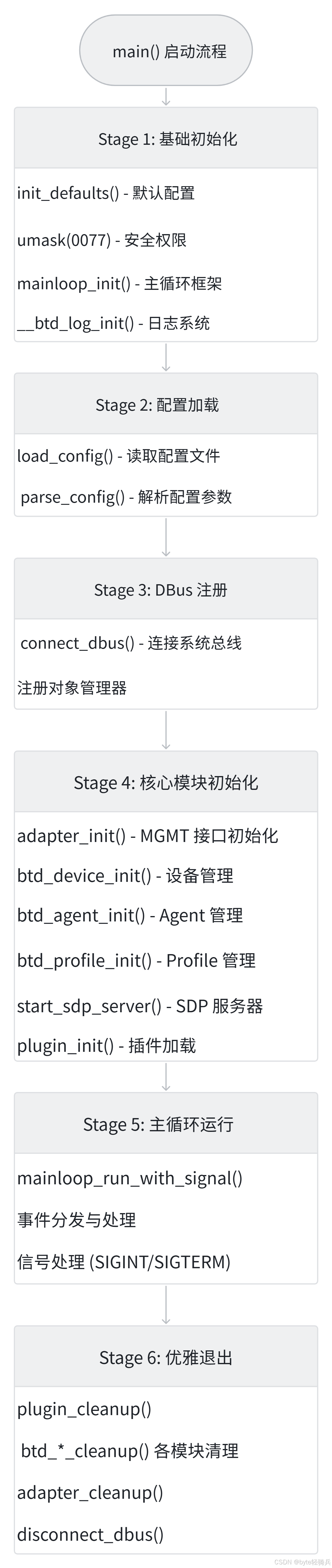
二、默认配置初始化:init_defaults()
2.1 函数源码
cpp
// src/main.c - 默认配置初始化
static void init_defaults(void)
{
    uint8_t major, minor;

    /* Default HCId settings */
    memset(&btd_opts, 0, sizeof(btd_opts));

    // 基础配置
    btd_opts.name = g_strdup_printf("BlueZ %s", VERSION);
    btd_opts.class = 0x000000;
    btd_opts.pairto = DEFAULT_PAIRABLE_TIMEOUT;      // 0 (disabled)
    btd_opts.discovto = DEFAULT_DISCOVERABLE_TIMEOUT; // 180s
    btd_opts.tmpto = DEFAULT_TEMPORARY_TIMEOUT;       // 30s
    btd_opts.reverse_discovery = TRUE;
    btd_opts.name_resolv = TRUE;
    btd_opts.debug_keys = FALSE;
    btd_opts.refresh_discovery = TRUE;
    btd_opts.name_request_retry_delay = DEFAULT_NAME_REQUEST_RETRY_DELAY; // 300s

    // BR/EDR 默认值
    btd_opts.defaults.num_entries = 0;
    btd_opts.defaults.br.page_scan_type = 0xFFFF;
    btd_opts.defaults.br.scan_type = 0xFFFF;
    btd_opts.defaults.le.enable_advmon_interleave_scan = 0xFF;

    // 版本信息 (Device ID)
    if (sscanf(VERSION, "%hhu.%hhu", &major, &minor) != 2)
        return;

    btd_opts.did_source = 0x0002;      /* USB */
    btd_opts.did_vendor = 0x1d6b;      /* Linux Foundation */
    btd_opts.did_product = 0x0246;     /* BlueZ */
    btd_opts.did_version = (major << 8 | minor);

    // GATT 默认配置
    btd_opts.gatt_cache = BT_GATT_CACHE_ALWAYS;
    btd_opts.gatt_mtu = BT_ATT_MAX_LE_MTU;
    btd_opts.gatt_channels = 3;

    // AVDTP 默认配置
    btd_opts.avdtp.session_mode = BT_IO_MODE_BASIC;
    btd_opts.avdtp.stream_mode = BT_IO_MODE_BASIC;

    // 广播监控默认值
    btd_opts.advmon.rssi_sampling_period = 0xFF;
}
2.2 核心配置结构体
cpp
// src/btd.h - 全局配置结构
struct btd_opts {
    // 基本信息
    char *name;
    uint32_t class;

    // 超时设置
    uint16_t pairto;        // 可配对超时
    uint16_t discovto;      // 可发现超时
    uint16_t tmpto;         // 临时设备超时

    // 功能开关
    bool reverse_discovery; // 反向服务发现
    bool name_resolv;       // 名称解析
    bool debug_keys;        // 调试密钥
    bool refresh_discovery; // 刷新发现
    uint16_t name_request_retry_delay;

    // 模式设置
    bt_mode_t mode;         // BT_MODE_DUAL/BT_MODE_BREDR/BT_MODE_LE
    uint8_t max_controllers;

    // Device ID
    uint8_t did_source;
    uint16_t did_vendor;
    uint16_t did_product;
    uint16_t did_version;

    // GATT 配置
    bt_gatt_cache_t gatt_cache;
    uint16_t gatt_mtu;
    uint8_t gatt_channels;

    // 其他配置...
    struct btd_defaults defaults;
    // ...
};
三、命令行参数解析
3.1 支持的命令行选项
cpp
// src/main.c - 命令行选项定义
static GOptionEntry options[] = {
    { "debug", 'd', 0, G_OPTION_ARG_CALLBACK, parse_debug, NULL,
      "Specify debug options", "<category>" },
    { "detach", 'n', 0, G_OPTION_ARG_NONE, &option_detach, NULL,
      "Detach from terminal", NULL },
    { "version", 'v', 0, G_OPTION_ARG_NONE, &option_version, NULL,
      "Show version", NULL },
    { "config", 'c', 0, G_OPTION_ARG_STRING, &option_configfile, NULL,
      "Specify config file", "<file>" },
    { "compat", 'b', 0, G_OPTION_ARG_NONE, &option_compat, NULL,
      "Enable BlueZ 4.x compatible SDP server", NULL },
    { "plugin", 'p', 0, G_OPTION_ARG_STRING, &option_plugin, NULL,
      "Load specified plugin", "<plugin>" },
    { "noplugin", 'P', 0, G_OPTION_ARG_STRING, &option_noplugin, NULL,
      "Do not load specified plugin", "<plugin>" },
    { "experimental", 'e', 0, G_OPTION_ARG_CALLBACK, parse_experimental,
      NULL, "Enable experimental interfaces", "<interface>" },
    { "nopair", 's', 0, G_OPTION_ARG_NONE, &option_nopair, NULL,
      "Disable pairing", NULL },
    { "hdp", 'h', 0, G_OPTION_ARG_NONE, NULL, NULL,
      "Enable HDP support (obsolete)", NULL },
    { NULL }
};
3.2 解析流程
cpp
// src/main.c - 参数解析
context = g_option_context_new(NULL);
g_option_context_add_main_entries(context, options, NULL);

if (g_option_context_parse(context, &argc, &argv, &err) == FALSE) {
    if (err != NULL) {
        g_printerr("%s\n", err->message);
        g_error_free(err);
    } else
        g_printerr("An unknown error occurred\n");
    exit(1);
}

g_option_context_free(context);

// 处理版本号
if (option_version == TRUE) {
    printf("%s\n", VERSION);
    exit(0);
}
3.3 使用示例
cpp
# 启动调试模式
bluetoothd -d

# 后台运行
bluetoothd -n

# 指定配置文件
bluetoothd -c /etc/bluetooth/custom.conf

# 启用实验性接口
bluetoothd -e

# 查看版本
bluetoothd -v
四、主循环框架初始化
4.1 mainloop_init() 实现
cpp
// src/shared/mainloop.c - 主循环初始化
void mainloop_init(void)
{
    unsigned int i;

    // 创建 epoll 实例
    epoll_fd = epoll_create1(EPOLL_CLOEXEC);

    // 初始化主循环列表
    for (i = 0; i < MAX_MAINLOOP_ENTRIES; i++)
        mainloop_list[i] = NULL;

    epoll_terminate = 0;

    // 初始化 sd_notify 支持
    mainloop_notify_init();
}
4.2 主循环数据结构
cpp
// src/shared/mainloop.c - 主循环数据
struct mainloop_data {
    int fd;                      // 文件描述符
    uint32_t events;             // epoll 事件
    mainloop_event_func callback; // 事件回调
    mainloop_destroy_func destroy; // 销毁回调
    void *user_data;             // 用户数据
};

#define MAX_MAINLOOP_ENTRIES 128
static struct mainloop_data *mainloop_list[MAX_MAINLOOP_ENTRIES];
4.3 主循环运行
cpp
// src/shared/mainloop.c - 主循环运行(带信号支持)
void mainloop_run_with_signal(mainloop_signal_func signal_handler,
                            void *user_data)
{
    int signal_fd;
    // 创建信号 fd,将信号转换为 epoll 事件
    signal_fd = signalfd(NULL, &signals, SFD_NONBLOCK | SFD_CLOEXEC);
    // 注册到 epoll
    mainloop_register_fd(signal_fd, signal_handler, signal_destroy, user_data);

    // 进入主循环
    while (!epoll_terminate) {
        // 等待事件
        epoll_wait(epoll_fd, events, MAX_EVENTS, timeout);
        // 处理事件
        for (i = 0; i < nfds; i++) {
            mainloop_list[i]->callback(fd, events, user_data);
        }
    }
}
五、日志系统初始化
5.1 日志初始化
cpp
// src/log.c - 日志初始化
void __btd_log_init(const char *debug, int detach)
{
    // 初始化 syslog 或文件日志
    openlog("bluetoothd", LOG_NDELAY | LOG_PID, LOG_DAEMON);

    // 设置调试级别
    if (debug)
        btd_debug_set(debug);

    // 输出启动信息
    info("Bluetooth daemon %s", VERSION);
}
5.2 GLib 日志重定向
cpp
// src/main.c - GLib 日志处理
g_log_set_handler("GLib", G_LOG_LEVEL_MASK | G_LOG_FLAG_FATAL |
                        G_LOG_FLAG_RECURSION,
                        log_handler, NULL);

// 日志处理回调
static void log_handler(const gchar *log_domain, GLogLevelFlags log_level,
                const gchar *message, gpointer user_data)
{
    int priority;

    if (log_level & (G_LOG_LEVEL_ERROR |
                G_LOG_LEVEL_CRITICAL | G_LOG_LEVEL_WARNING))
        priority = 0x03;  // LOG_ERR
    else
        priority = 0x06;  // LOG_INFO

    btd_log(0xffff, priority, "GLib: %s", message);
    btd_backtrace(0xffff);
}
5.3 日志使用示例
cpp
// src/main.c 中的日志使用
info("Bluetooth daemon %s", VERSION);    // 信息日志
error("Failed to read management version"); // 错误日志
DBG("sending read version command");       // 调试日志
warn("Unknown key %s for group %s", ...);  // 警告日志
六、配置文件加载与解析
6.1 配置文件格式
配置文件路径:/etc/bluetooth/main.conf
cpp
# /etc/bluetooth/main.conf 示例

[General]
Name = Bluetooth
Class = 0x001F00
DiscoverableTimeout = 180
AlwaysPairable = True
PairableTimeout = 0
DeviceID = bluetooth:1D6B:0246:0560
ReverseServiceDiscovery = true
NameResolving = true
DebugKeys = false
ControllerMode = dual
MaxControllers = 2
Privacy = device
JustWorksRepairing = confirm
TemporaryTimeout = 30
Experimental = false

[BR]
PageScanType = 0
PageScanInterval = 10
PageScanWindow = 10
InquiryScanType = 0
InquiryScanInterval = 10240
InquiryScanWindow = 2048
LinkSupervisionTimeout = 20
PageTimeout = 5000
MinSniffInterval = 256
MaxSniffInterval = 512

[LE]
MinAdvertisementInterval = 100
MaxAdvertisementInterval = 100
ScanIntervalAutoConnect = 4096
ScanWindowAutoConnect = 1099
ScanIntervalSuspend = 0
ScanWindowSuspend = 0
ScanIntervalDiscovery = 5120
ScanWindowDiscovery = 1024
MinConnectionInterval = 8
MaxConnectionInterval = 40
ConnectionLatency = 0
ConnectionSupervisionTimeout = 400
Autoconnecttimeout = 10
6.2 配置文件加载
cpp
// src/main.c - 配置文件加载
static GKeyFile *load_config(const char *file)
{
    GError *err = NULL;
    GKeyFile *keyfile;

    keyfile = g_key_file_new();
    g_key_file_set_list_separator(keyfile, ',');

    if (!g_key_file_load_from_file(keyfile, file, 0, &err)) {
        if (!g_error_matches(err, G_FILE_ERROR, G_FILE_ERROR_NOENT))
            error("Parsing %s failed: %s", file, err->message);
        g_error_free(err);
        g_key_file_free(keyfile);
        return NULL;
    }

    return keyfile;
}
6.3 配置参数解析
cpp
// src/main.c - 模式配置解析
static void parse_mode_config(GKeyFile *config, const char *group,
                const struct config_param *params, size_t params_len)
{
    uint16_t i;

    if (!config)
        return;

    for (i = 0; i < params_len; ++i) {
        GError *err = NULL;
        char *str;

        // 从配置文件读取字符串
        str = g_key_file_get_string(config, group, params[i].val_name, &err);
        if (err) {
            DBG("%s", err->message);
            g_clear_error(&err);
        } else {
            char *endptr = NULL;
            int val;

            // 转换为整数
            val = strtol(str, &endptr, 0);
            if (!endptr || *endptr != '\0')
                continue;

            info("%s=%s(%d)", params[i].val_name, str, val);

            // 范围限制
            val = MAX(val, params[i].min);
            val = MIN(val, params[i].max);

            // 转换为字节序并写入
            val = htobl(val);
            memcpy(params[i].val, &val, params[i].size);
            ++btd_opts.defaults.num_entries;
        }
    }
}

// src/main.c - BR 配置解析
static void parse_br_config(GKeyFile *config)
{
    static const struct config_param params[] = {
        { "PageScanType",
          &btd_opts.defaults.br.page_scan_type,
          sizeof(btd_opts.defaults.br.page_scan_type), 0, 1 },
        { "PageScanInterval",
          &btd_opts.defaults.br.page_scan_interval,
          sizeof(btd_opts.defaults.br.page_scan_interval),
          0x0012, 0x1000 },
        // ... 其他参数
    };

    parse_mode_config(config, "BR", params, G_N_ELEMENTS(params));
}
6.4 配置项验证
cpp
// src/main.c - 配置项验证
static void check_config(GKeyFile *config)
{
    char **keys;
    int i;
    const struct group_table *group;

    if (!config)
        return;

    // 检查分组是否有效
    keys = g_key_file_get_groups(config, NULL);
    for (i = 0; keys != NULL && keys[i] != NULL; i++) {
        bool match = false;
        for (group = valid_groups; group && group->name ; group++) {
            if (g_str_equal(keys[i], group->name)) {
                match = true;
                break;
            }
        }
        if (!match)
            warn("Unknown group %s in %s", keys[i], main_conf_file_path);
    }
    g_strfreev(keys);

    // 检查组内选项是否有效
    for (group = valid_groups; group && group->name; group++)
        check_options(config, group->name, group->options);
}
七、DBus 总线连接
7.1 DBus 连接流程
cpp
// src/main.c - DBus 连接
static int connect_dbus(void)
{
    DBusConnection *conn;
    DBusError err;

    dbus_error_init(&err);

    // 连接到系统总线并注册服务名
    conn = g_dbus_setup_bus(DBUS_BUS_SYSTEM, BLUEZ_NAME, &err);
    if (!conn) {
        if (dbus_error_is_set(&err)) {
            g_printerr("D-Bus setup failed: %s\n", err.message);
            dbus_error_free(&err);
            return -EIO;
        }
        return -EALREADY;
    }

    // 保存连接
    set_dbus_connection(conn);

    // 设置断开回调
    g_dbus_set_disconnect_function(conn, disconnected_dbus, NULL, NULL);

    // 附加对象管理器(用于自动导出对象路径)
    g_dbus_attach_object_manager(conn);

    return 0;
}
7.2 DBus 服务名注册
cpp
// src/main.c - 服务名
#define BLUEZ_NAME "org.bluez"

// 注册到系统 DBus
conn = g_dbus_setup_bus(DBUS_BUS_SYSTEM, BLUEZ_NAME, &err);权限要求:
cpp
<!-- /etc/dbus-1/system.d/bluetooth.conf -->
<policy context="system">
    <allow own="org.bluez"/>
    <allow send_destination="org.bluez"/>
    <allow send_interface="org.bluez.*"/>
</policy>
7.3 对象管理器
cpp
// 附加对象管理器
g_dbus_attach_object_manager(conn);

// 效果:
// 1. 所有注册到 DBus 的对象自动出现在 /org/bluez 路径下
// 2. 其他应用可通过 org.freedesktop.DBus.ObjectManager 接口
//    枚举所有蓝牙对象
// 3. 对象添加/移除时自动发送 InterfacesAdded/Removed 信号
八、适配器管理初始化
8.1 adapter_init() 实现
cpp
// src/adapter.c - 适配器初始化
int adapter_init(void)
{
    dbus_conn = btd_get_dbus_connection();

    // 创建 MGMT 主接口
    mgmt_primary = mgmt_new_default();
    if (!mgmt_primary) {
        error("Failed to access management interface");
        return -EIO;
    }

    // 设置调试(可选)
    if (getenv("MGMT_DEBUG"))
        mgmt_set_debug(mgmt_primary, mgmt_debug, "mgmt: ", NULL);

    DBG("sending read version command");

    // 发送版本读取命令
    if (mgmt_send(mgmt_primary, MGMT_OP_READ_VERSION,
                MGMT_INDEX_NONE, 0, NULL,
                read_version_complete, NULL, NULL) > 0)
        return 0;

    error("Failed to read management version information");
    return -EIO;
}
8.2 MGMT 接口通信流程
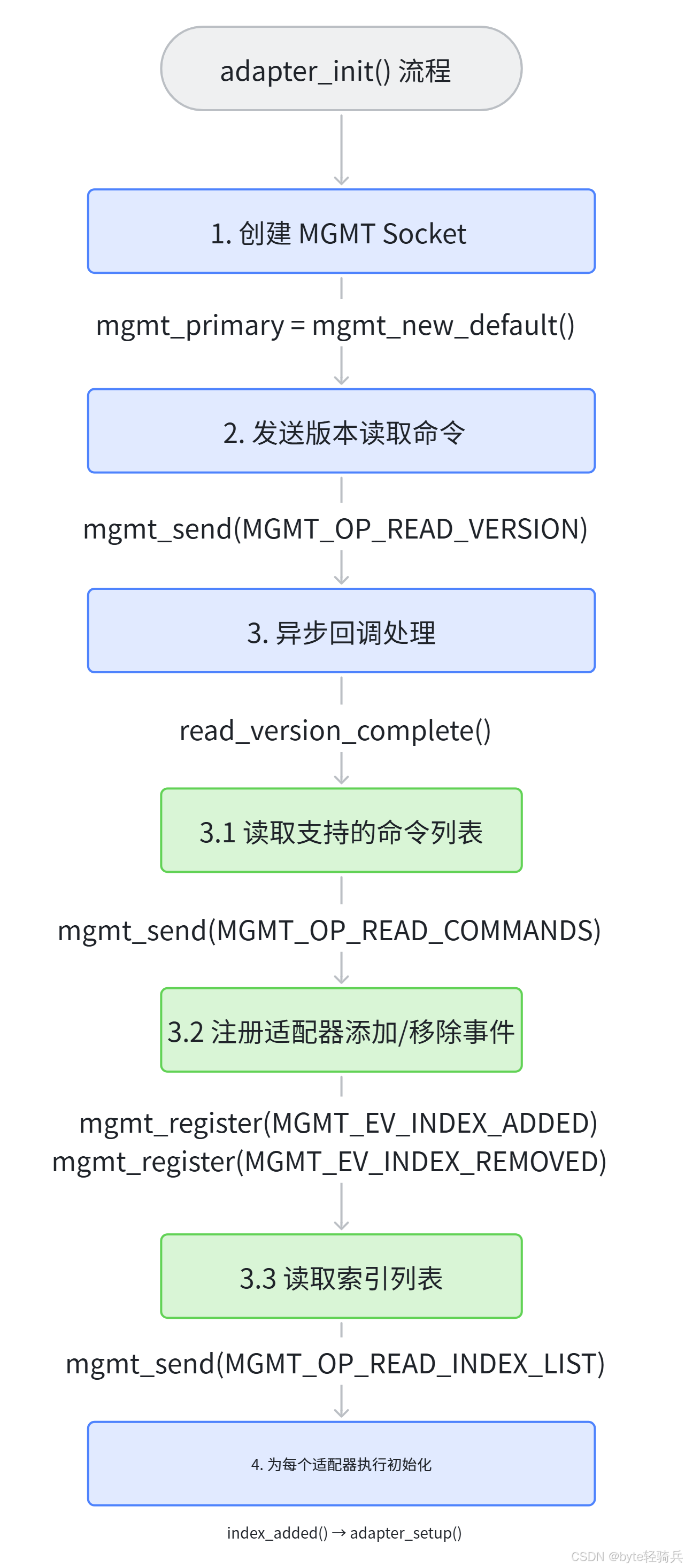
8.3 版本读取完成回调
cpp
// src/adapter.c - 版本读取完成
static void read_version_complete(uint8_t status, uint16_t length,
                    const void *param, void *user_data)
{
    const struct mgmt_rp_read_version *rp = param;

    if (status != MGMT_STATUS_SUCCESS) {
        error("Failed to read version: %s (0x%02x)",
                        mgmt_errstr(status), status);
        return;
    }

    mgmt_version = rp->version;
    mgmt_revision = btohs(rp->revision);

    info("Bluetooth management interface %u.%u initialized",
                    mgmt_version, mgmt_revision);

    if (mgmt_version < 1) {
        error("Version 1.0 or later of management interface required");
        abort();
    }

    // 继续初始化
    mgmt_send(mgmt_primary, MGMT_OP_READ_COMMANDS,
                MGMT_INDEX_NONE, 0, NULL,
                read_commands_complete, NULL, NULL);
}
九、服务模块初始化
9.1 设备管理初始化
cpp
// src/device.c - 设备初始化
void btd_device_init(void)
{
    dbus_conn = btd_get_dbus_connection();

    // 注册服务状态变更回调
    service_state_cb_id = btd_service_add_state_cb(
                    service_state_changed, NULL);
}
9.2 Agent 管理初始化
cpp
// src/agent.c - Agent 初始化
void btd_agent_init(void)
{
    // 创建 Agent 列表
    agent_list = g_hash_table_new_full(g_str_hash, g_str_equal,
                        NULL, agent_destroy);

    // 创建默认 Agent 队列
    default_agents = queue_new();

    // 注册 Agent Manager DBus 接口
    g_dbus_register_interface(btd_get_dbus_connection(),
                "/org/bluez", "org.bluez.AgentManager1",
                methods, NULL, NULL, NULL, NULL);
}
9.3 Profile 管理初始化
cpp
// src/profile.c - Profile 初始化
void btd_profile_init(void)
{
    // 注册 Profile Manager DBus 接口
    g_dbus_register_interface(btd_get_dbus_connection(),
                "/org/bluez", "org.bluez.ProfileManager1",
                methods, NULL, NULL, NULL, NULL);
}
9.4 SDP 服务器启动
cpp
// src/main.c - SDP 服务器启动
if (btd_opts.mode != BT_MODE_LE) {
    if (option_compat == TRUE)
        sdp_flags |= SDP_SERVER_COMPAT;

    // 启动 SDP 服务器
    start_sdp_server(sdp_mtu, sdp_flags);

    // 注册 Device ID
    if (btd_opts.did_source > 0)
        register_device_id(btd_opts.did_source,
                    btd_opts.did_vendor,
                    btd_opts.did_product,
                    btd_opts.did_version);
}
9.5 插件系统初始化
cpp
// src/main.c - 插件加载
plugin_init(option_plugin, option_noplugin);
BlueZ 内置插件:
-
a2dp- 高级音频分发 Profile -
avrcp- 音频视频远程控制 Profile -
hfp- 免提 Profile -
hidp- 人机接口设备 Profile -
bcm- BCM 芯片驱动 -
hfpb- HFP 客户端 Profile -
sbc- SBC 编解码
十、信号处理与主循环
10.1 信号处理回调
cpp
// src/main.c - 信号处理
static void signal_callback(int signum, void *user_data)
{
    static bool terminated = false;

    switch (signum) {
    case SIGINT:
    case SIGTERM:
        if (!terminated) {
            info("Terminating");

            // 延迟 10 秒后退出
            timeout_add_seconds(SHUTDOWN_GRACE_SECONDS,
                        quit_eventloop, NULL, NULL);

            // 通知 systemd
            mainloop_sd_notify("STATUS=Powering down");

            // 关闭所有适配器
            adapter_shutdown();
        }
        terminated = true;
        break;

    case SIGUSR2:
        // 动态切换调试模式
        __btd_toggle_debug();
        break;
    }
}
10.2 主循环启动
cpp
// src/main.c - 进入主循环
mainloop_sd_notify("STATUS=Running");
mainloop_sd_notify("READY=1");

// 启动主循环(阻塞运行)
mainloop_run_with_signal(signal_callback, NULL);
10.3 事件处理机制
cpp
┌─────────────────────────────────────────────────────────────────
│                     主循环事件处理
├─────────────────────────────────────────────────────────────────
│
│  epoll_wait(epoll_fd, events, MAX_EVENTS, timeout)
│                          ↓
│  检查所有注册的 fd 事件
│                          ↓
│  for each event:
│      if (event.data & EPOLLIN) {
│          // 数据可读:调用 read 回调
│          callback(fd, EPOLLIN, user_data);
│      }
│      if (event.data & EPOLLOUT) {
│          // 数据可写:调用 write 回调
│          callback(fd, EPOLLOUT, user_data);
│      }
│
│  检查信号事件
│      if (signal_received) {
│          signal_handler(signum, user_data);
│      }
│
│  检查定时器超时
│      for each timer:
│          if (timer_expired) {
│              timeout_callback(user_data);
│          }
│
└─────────────────────────────────────────────────────────────────
十一、优雅退出流程
11.1 退出触发
cpp
// src/main.c - 退出触发
// 1. 信号触发
signal_callback(SIGTERM);
//    ↓
// 2. 延迟 10 秒后
timeout_add_seconds(SHUTDOWN_GRACE_SECONDS, quit_eventloop, ...);
//    ↓
// 3. 退出主循环
mainloop_quit();
11.2 清理流程
cpp
// src/main.c - 清理流程
// 1. 插件清理
plugin_cleanup();

// 2. Profile 清理
btd_profile_cleanup();

// 3. Agent 清理
btd_agent_cleanup();

// 4. 设备清理
btd_device_cleanup();

// 5. 适配器清理
adapter_cleanup();

// 6. rfkill 退出
rfkill_exit();

// 7. SDP 服务器停止
if (btd_opts.mode != BT_MODE_LE)
    stop_sdp_server();

// 8. 实验性接口清理
if (btd_opts.experimental)
    queue_destroy(btd_opts.experimental, free);

// 9. 配置文件释放
if (main_conf)
    g_key_file_free(main_conf);

// 10. DBus 断开
disconnect_dbus();

// 11. 日志清理
__btd_log_cleanup();
十二、启动失败常见原因
12.1 配置文件问题
|-----------------------------|----------|--------------------|
| 问题 | 原因 | 解决方案 |
| Unable to parse main.conf | 配置文件格式错误 | 检查语法、使用 = 而非 : |
| Unknown group X | 配置了无效分组 | 参考有效分组列表 |
| Unknown key Y for group Z | 配置了无效选项 | 检查选项拼写 |
12.2 DBus 连接问题
|--------------------------|----------|----------------|
| 问题 | 原因 | 解决方案 |
| Unable to get on D-Bus | DBus 未运行 | 启动 dbus-daemon |
| Permission denied | 权限不足 | 检查 dbus 配置文件 |
| Name already taken | 已有实例运行 | 停止现有实例 |
12.3 适配器初始化问题
|------------------------------------------|-------------|------------|
| 问题 | 原因 | 解决方案 |
| Failed to access management interface | 内核 MGMT 不支持 | 更新内核到 3.x+ |
| No adapters found | 蓝牙硬件未就绪 | 检查硬件、驱动 |
| Adapter handling initialization failed | 适配器初始化失败 | 查看详细日志 |
12.4 调试技巧
cpp
# 1. 查看启动参数
bluetoothd --help

# 2. 启用调试日志
bluetoothd -d

# 3. 运行前台查看错误
bluetoothd -n

# 4. 检查 DBus 配置
cat /etc/dbus-1/system.d/bluetooth.conf

# 5. 检查内核支持
zcat /proc/config.gz | grep CONFIG_BT

# 6. 检查蓝牙设备
lsusb | grep Bluetooth
hciconfig -a
btmgmt info

# 7. 查看日志
journalctl -u bluetooth -f
十三、核心函数索引
13.1 main.c 核心函数
|---------------------|--------|------------|
| 函数 | 行号 | 功能 |
| main() | 1154 | 主入口函数 |
| init_defaults() | 945 | 初始化默认配置 |
| load_config() | 178 | 加载配置文件 |
| check_config() | 292 | 验证配置有效性 |
| connect_dbus() | 1077 | 连接 DBus 总线 |
| signal_callback() | 1011 | 信号处理回调 |
| log_handler() | 985 | GLib 日志处理 |
13.2 关联模块函数
|------------------------------|-------------------|---------------|
| 函数 | 文件 | 功能 |
| mainloop_init() | shared/mainloop.c | 主循环初始化 |
| mainloop_run_with_signal() | shared/mainloop.c | 启动主循环 |
| mainloop_quit() | shared/mainloop.c | 退出主循环 |
| adapter_init() | src/adapter.c | 适配器初始化 |
| adapter_cleanup() | src/adapter.c | 适配器清理 |
| btd_device_init() | src/device.c | 设备管理初始化 |
| btd_agent_init() | src/agent.c | Agent 管理初始化 |
| btd_profile_init() | src/profile.c | Profile 管理初始化 |
| start_sdp_server() | src/sdpd-server.c | 启动 SDP 服务器 |
十四、总结
BlueZ main.c 作为蓝牙协议栈的用户态入口,实现了一个清晰的启动流程:
14.1 启动阶段划分
|-------------|----------------------|-----------------------------------|
| 阶段 | 核心任务 | 关键函数 |
| 基础初始化 | 默认配置、日志、主循环 | init_defaults(), mainloop_init() |
| 配置加载 | 读取并解析配置文件 | load_config(), parse_config() |
| DBus 注册 | 连接系统总线、注册服务 | connect_dbus() |
| 模块初始化 | 适配器、设备、Agent、Profile | adapter_init(), btd_*_init() |
| 服务启动 | SDP 服务器、插件 | start_sdp_server(), plugin_init() |
| 主循环运行 | 事件处理、信号响应 | mainloop_run_with_signal() |
| 优雅退出 | 各模块清理、资源释放 | `*_cleanup() |
14.2 设计亮点
-
模块化初始化:各功能模块独立初始化,职责清晰
-
异步事件驱动:基于 epoll 的事件处理机制,高效响应
-
信号安全处理:支持优雅退出、调试切换等信号
-
配置灵活性:支持命令行参数和配置文件两种配置方式
-
DBus 标准接口:通过 DBus 对外提供标准化 API
14.3 理解价值
深入理解 main.c 的启动流程,有助于:
-
掌握 BlueZ 蓝牙协议栈的整体架构
-
快速定位启动阶段的问题
-
正确配置蓝牙守护进程
-
开发自定义蓝牙应用