mysql教材
实验环境:ip 192.168.108.128
摘要:本文是一份系统性的 MySQL 数据库学习教程,内容涵盖数据库基础理论、MySQL 安装与基本使用、以及 SQL 语言三大核心模块。首先从数据的分类、数据管理发展历史、数据库管理系统(DBMS)及关系型数据库理论(E-R 模型、范式)入手,帮助读者建立扎实的理论基础;随后详细介绍 MySQL 的安装、多实例配置、主要组成与常用客户端工具(mysql、mysqladmin、mycli 等);最后深入讲解 SQL 语言,包括数据库与表的 DDL 操作、数据的增删改查(DML)以及查询(DQL)语句的完整语法与实战范例,适合数据库初学者系统学习与进阶实践。
1数据库原理
1.1数据的分类
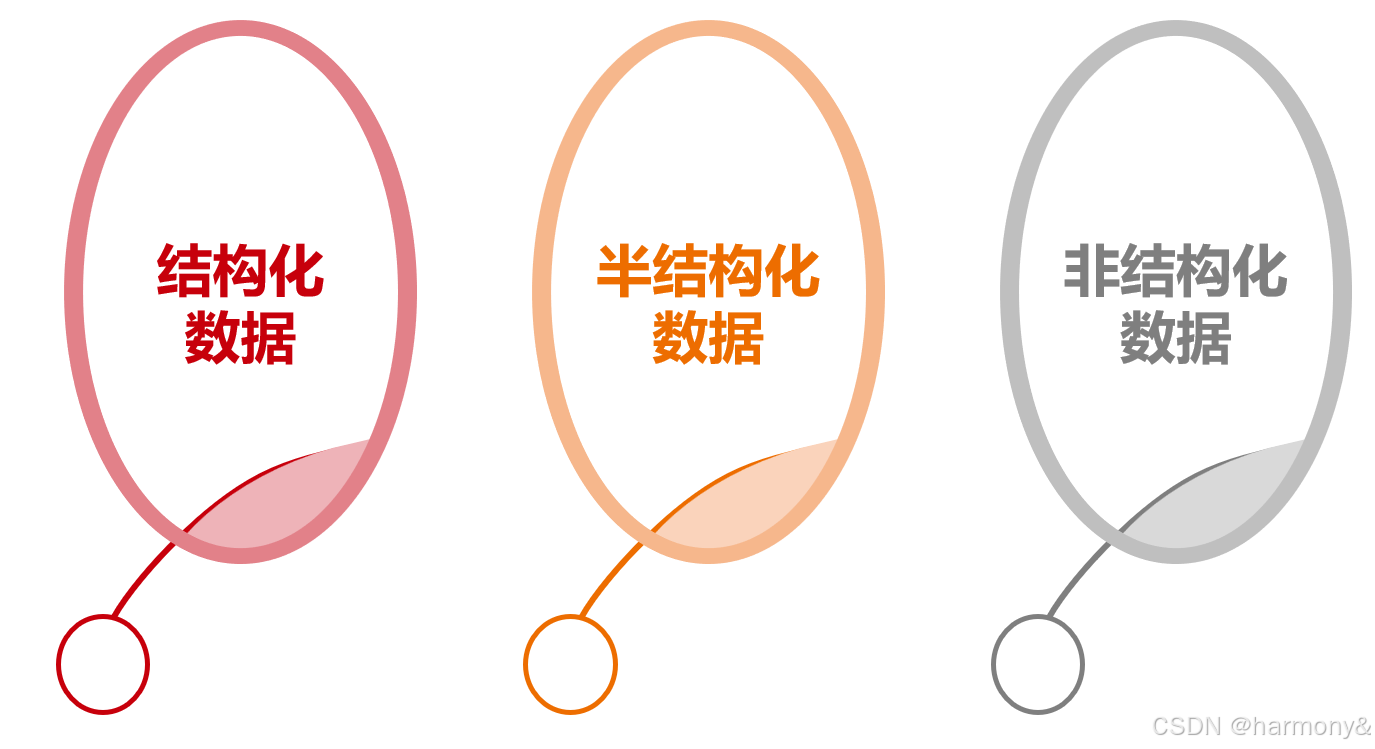
在数据的获取和使用的过程中,我们可以根据数据的结构类型,将数据分成三类,分别是:结构化数据,半结构化数据,非结构化数据。
结构化数据
结构化数据一般是指可以用二维表来逻辑表达实现的数据。是有固定的格式和有限长度的数据,可以用关系型数据库表示和存储。
其特点是:数据以行为单位,一行数据表示一个实体信息,每一行数据的属性是相同的,存储在数据库中;能够用统一的数据类型和结构加以表示;也能够用二维表结构来逻辑表达实现,包含属性和元组。
对于结构化数据来讲通常是先有结构再有数据。
范例:二维表
| no | name | age |
|---|---|---|
| 1 | 唐三 | 123 |
| 2 | 叶凡 | 456 |
半结构化数据
半结构化数据就是介于完全结构化数据和完全无结构的数据之间的数据。
半结构化数据是结构化数据的一种形式,它并不符合关系型数据库或其它数据表的形式关联起来的数据模型结构,但包含相关的标记,用来分隔语义元素及对记录和字段进行分层,数据的结构和内容混在一起,没有明显的区分,因此,这种数据也被称为自描述结构的数据。
例如:HTML文档,JSON,XML和一些NoSQL数据库等就属于半结构化数据。
对于半结构化数据来说则是先有数据再有结构。
范例:json
json
[
    {
        "id":1,
        "name": "唐三",
        "age":123
    },
    {
        "id":2,
        "name": "叶凡",
        "age":456
    }
]
非结构化数据
顾名思义,就是没有固定结构的数据,这种数据没有固定格式和有限长度,无法用数据库二维逻辑表来表现其结构,对于这类数据,我们一般进行整体存储。
典型的非结构化数据包括:二进制文件,音视频文件,位置信息等
1.2数据管理发展历史
如何有效管理大量数据,方法和手段都在随着计算机技术的发展而进步。
数据管理的发展经历了人工管理、文件系统和数据库系统三个发展阶段。
1.2.1数据管理的三个阶段
人工管理阶段
时间:20世纪50年代中期以前
特点:当时的计算机主要用于科学计算。外部存储设备只有磁带,打孔纸带等,也没有专业的数据管理软件,所以在当时数据管理主要由人工完成。数据处理方式上基本是批处理。
文件系统管理阶段
时间:20世纪50年代后期至60年代中期
特点:随着时间的发展,计算机不仅用于科学计算,还用于信息管理,需要处理的数据量大增,数据存储,检索和维护等问题迫切需要解决,同一时期,在硬件方面,出现了磁盘,磁鼓等可以直接连机存取的设备,在此基础上,出现了基于文件系统的数据管理软件。使用磁盘文件的形式来管理数据,数据可以在系统中长期保存,文件也有了各种各样的格式。在数据处理方式上可以批处理,也可以联机实时处理。
数据库系统阶段
时间:20世纪60年代后期至今
特点:此时己经出现大容量的磁盘,且硬件价格开始下降。数据管理技术进入数据库系统阶段。数据库系统克服了文件系统的缺陷,提供了对数据更高级、更有效的管理。这个阶段的程序和数据的联系是通过数据库管理系统来实现的。数据库系统采用了复杂的结构化的数据模型,数据拥有高独立性,低冗余度。
1.2.2文件管理系统的特点
优点
文件形式和格式多样化,数据可以长期保存,且数据具有一定的独立性,由文件系统进行管理。
缺点
应用程序对接不方便,没有统一接口,也不支持对文件的并发访问,无安全控制功能,难以按用户视图表示数据,数据间联系弱,数据冗余不可避免。
1.3数据库管理系统
1.3.1相关概念
数据库:Database
数据库是按照一定的数据结构来组织,存储和管理数据的仓库。
是一个长期存储在计算机内的、有组织的、可共享的、统一管理的大量数据的集合。
数据库管理系统:Database Management System(DBMS)
数据库管理系统是一种操纵和管理数据库的大型软件,用于建立,使用和维护数据库,简称DBMS。
它对数据库进行统一的管理和控制,以保证数据库的安全性和完整性。
数据库管理员:Database Administrator(DBA)
DBA是从事管理和维护数据库管理系统(DBMS)的相关工作人员的统称,属于运维工程师的一个分支,主要负责业务数据库从设计、测试到部署交付的全生命周期管理。
DBA的核心目标是保证数据库管理系统的稳定性、安全性、完整性和高可用性能。
应用程序:Application
一个应用程序通常是指能够执行某种功能的软件程序。
1.3.2数据库管理系统特点
- 数据库管理系统中采用了复杂的数据模型表示数据结构,数据冗余小,易扩充,实现了数据共享。
- 具有较高的数据和程序独立性。数据库的独立性表现在物理独立性和逻辑独立性两个方面。
- 数据库管理系统为用户和应用程序提供了方便和统一的查询接口。
- 数据库管理系统的存在,使得数据可以和应用程序解耦。
- 数据库管理系统还具有并发控制,数据备份和恢复,完整性和安全性保障等功能。
1.3.3数据库管理系统基本功能
- 数据的定义:DBMS提供了数据定义语言DDL(DataDefinition Language),供用户定义数据库的三级模式结构,两级映像以及完整性约束和保密限制等约束。DDL主要用于建立、修改数据库的库结构。DDL所描述的库结构仅仅给出了数据库的框架,数据库的框架信息被存放在数据字典中。
- 数据操作:DBMS提供数据操作语言DML(DataManipulation Language),供用户实现对数据的追加、删除、更新、查询等操作。
- 数据组织、存储与管理:DBMS要分类组织、存储和管理各种数据,包括数据字典、用户数据、存取路径等,需确定以何种文件结构和存取方式在存储级上组织这些数据,如何实现数据之间的联系。数据组织和存储的基本目标是提高存储空间利用率,选择合适的存取方法提高存取效率。
- 数据库的运行管理:数据库的运行管理功能是DBMS的运行控制、管理功能,包括多用户环境下的并发控制、安全性检查和存取限制控制、完整性检查和执行、运行日志的组织管理、事务的管理和自动恢复,即保证事务的原子性。这些功能保证了数据库系统的正常运行。
- 数据库的维护:这一部分包括数据库的数据载入、转换、转储、数据库的重组和重构以及性能监控等功能,这些功能分别由各个使用程序来完成。
- 数据库的保护:数据库中的数据是信息社会的战略资源,所以数据的保护至关重要。DBMS对数据库的保护通过4个方面来实现:数据库的恢复、数据库的并发控制、数据库的完整性控制、数据库安全性控制。DBMS的其他保护功能还有系统缓冲区的管理以及数据存储的某些自适应调节机制等。
- 通信:DBMS具有与操作系统的联机处理、分时系统及远程作业输入的相关接口,负责处理数据的传送。对网络环境下的数据库系统,还应该包括DBMS与网络中其他软件系统的通信功能以及数据库之间的互操作功能。
1.3.4数据库管理系统的发展历史
自20世纪60年代中后期开始,使用电脑进行数据处理的规模越来越大,同时也出现了大容量的磁盘存储设备,操作系统也日渐成熟,为了解决数据的独立性问题,实现数据的统一管理,达到数据共享的目的,出现了数据库技术。
数据库技术从出现至今,经历了多次的迭代行进,在这个过程中,按时间和特性,可以将数据库管理系统分为三类。
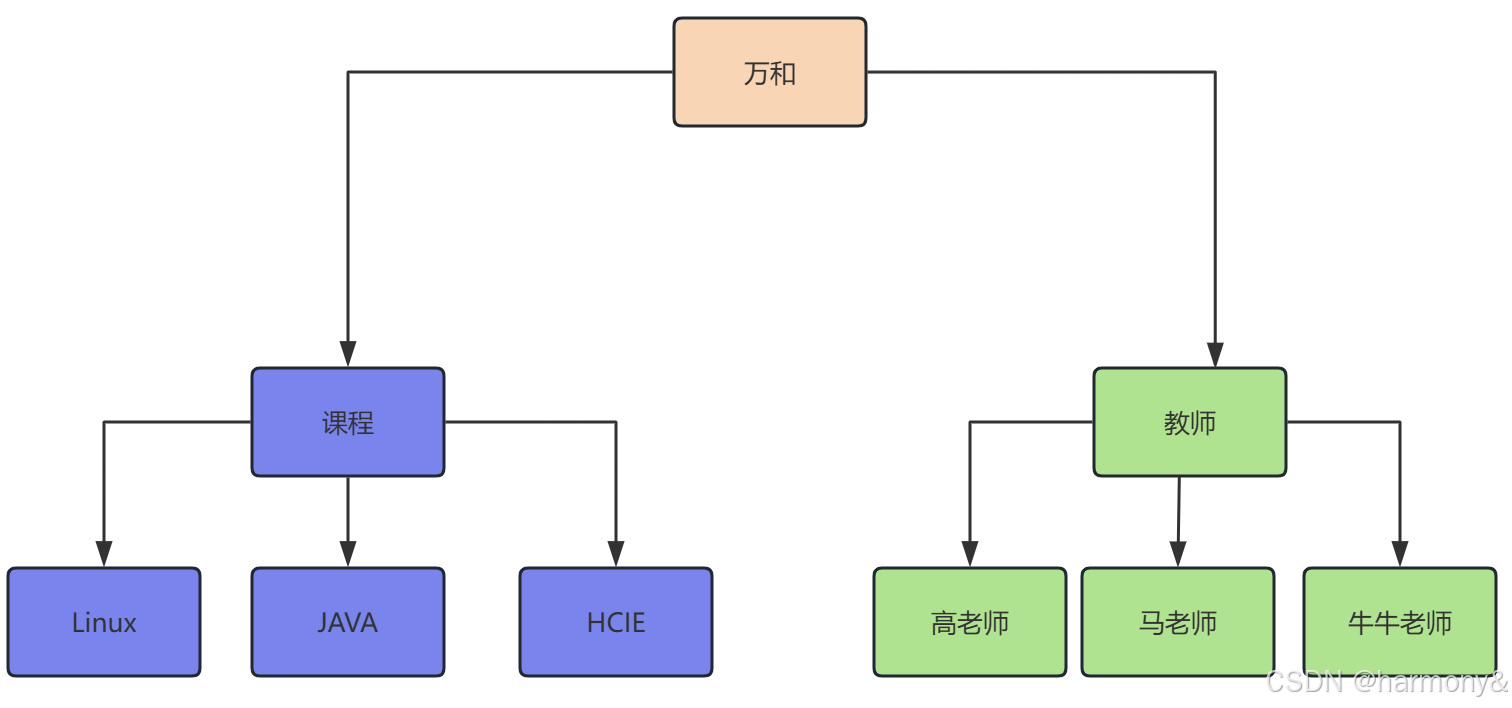
层次数据库
层次模型数据库系统是最早研制成功的数据库系统,这种数据库中的数据被组织成一个树状模型,这种结构简单,但缺乏灵活性,各数据之间仅限于一对多的关系。
这种数据库最成功的典型代表是IBM的IMS(信息管理系统)。
网状数据库
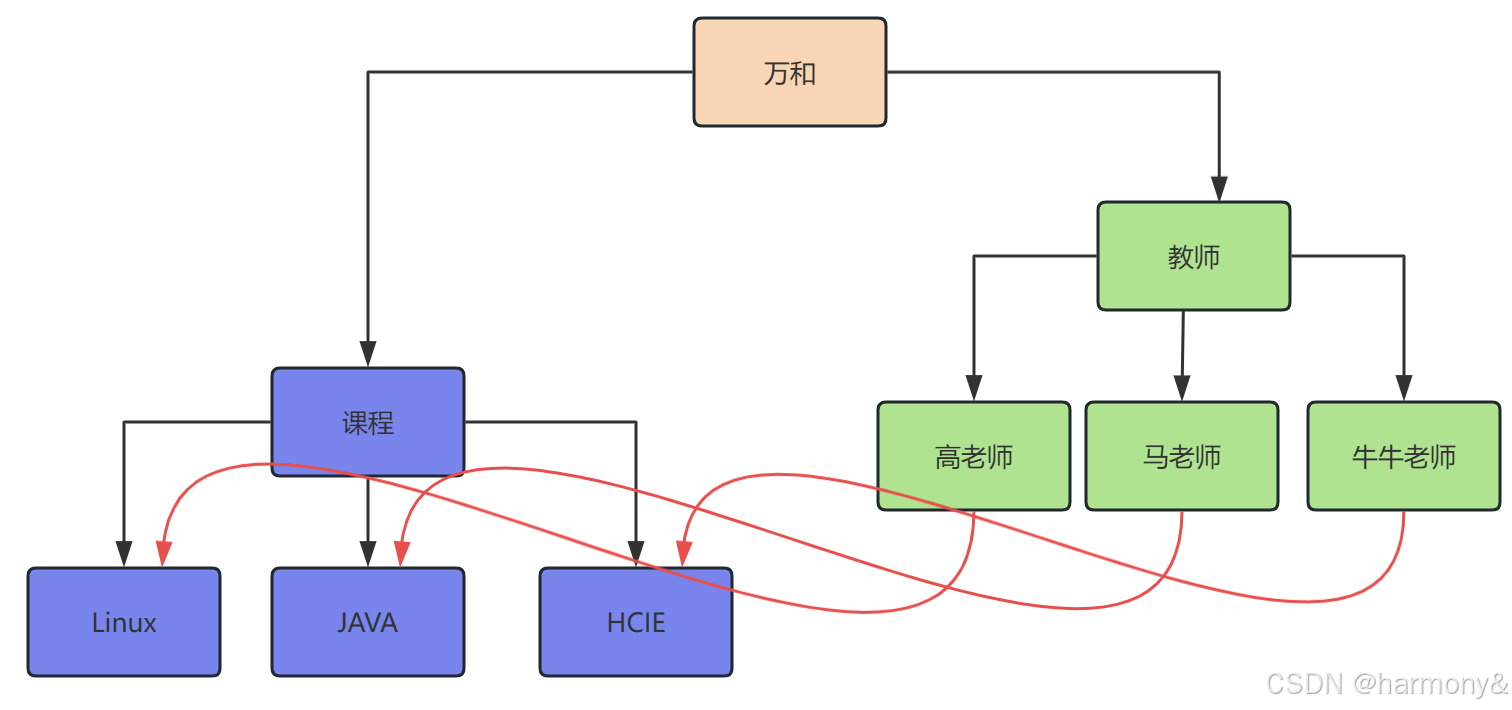
网状数据库是采用网状原理和方法,以网状数据模型为基础建立的数据库。
网状数据模型是以记录类型为结点的网络结构,即一个结点可以有一个或多个下级结点,也可以有一个或多个上级结点,两个结点之间甚至可以有多种联系,两个记录类型之间的值可以是多对多的联系。
关系型数据库管理系统
关系数据库管理系统:Relational DatabaseManagement System(RDBMS)
是指包括相互联系的逻辑组织和存取这些数据的一套程序(数据库管理系统软件)。关系数据库管理系统就是管理关系数据库,并将数据逻辑组织的系统。
常见的关系型数据库管理系统有Oracle,MySQL,DB2,SQLServer等。
关系型数据库,是指采用了关系模型来组织数据的数据库,其以行和列的形式存储数据,以便于用户理解,关系型数据库这一系列的行和列被称为表,一组表组成了数据库。用户通过查询来检索数据库中的数据,而查询是一个用于限定数据库中某些区域的执行代码。关系模型可以简单理解为二维表格模型,而一个关系型数据库就是由二维表及其之间的关系组成的一个数据组织。
关系型数据库中的相关概念
在我们开始学习MySQL 数据库前,让我们先了解下RDBMS的一些术语:
- 数据库: 数据库是一些关联表的集合。
- 数据表: 表是数据的矩阵。在一个数据库中的表看起来像一个简单的电子表格。
- 列(column): 一列(数据元素) 包含了相同类型的数据, 例如邮政编码的数据。
- **行(Row):**一行(元组,或记录)是一组相关的数据,例如一条用户订阅的数据。
- 冗余:存储两倍数据,冗余降低了性能,但提高了数据的安全性。
- 主键(Primary key):主键是唯一的。一个数据表中只能包含一个主键。你可以使用主键来查询数据。
- **外键:**外键用于关联两个表。
- 复合键:复合键(组合键)将多个列作为一个索引键,一般用于复合索引。
- **索引:**使用索引可快速访问数据库表中的特定信息。索引是对数据库表中一列或多列的值进行排序的一种结构。类似于书籍的目录。
- 参照完整性: 参照的完整性要求关系中不允许引用不存在的实体。与实体完整性是关系模型必须满足的完整性约束条件,目的是保证数据的一致性。
MySQL 为关系型数据库(Relational Database Management System), 这种所谓的"关系型"可以理解为"表格"的概念, 一个关系型数据库由一个或数个表格组成, 如图所示的一个表格:
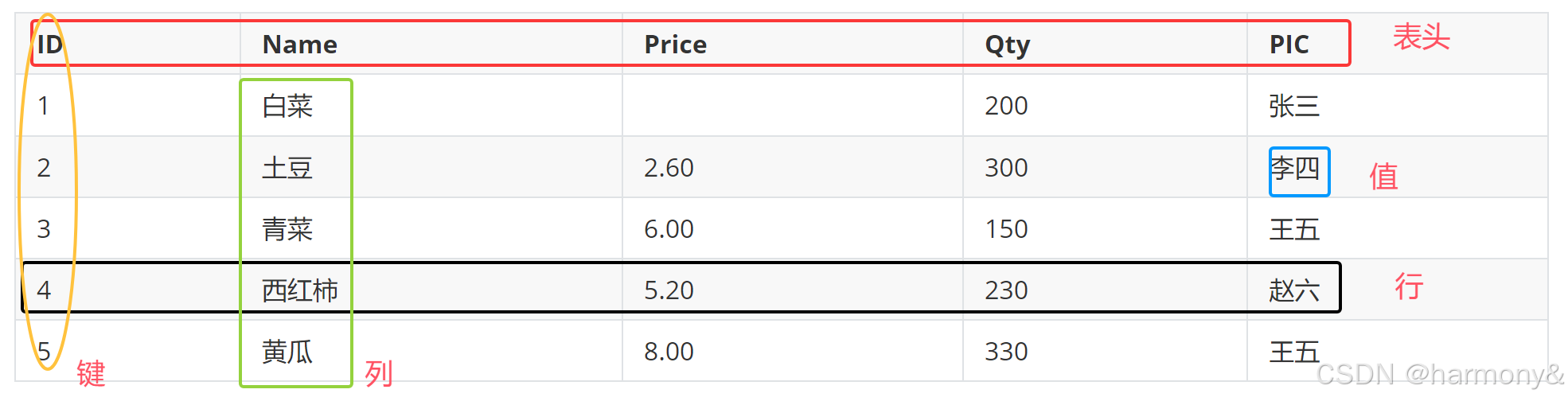
- 表头(header): 每一列的名称;
- 列(col): 具有相同数据类型的数据的集合;
- 行(row): 每一行用来描述某条记录的具体信息;
- 值(value): 行的具体信息, 每个值必须与该列的数据类型相同;
- 键(key): 键的值在当前列中具有唯一性。
常见的关系型数据库系统
MySQL:MySQL,MariaDB,Percona Server
PostgreSQL:PgSQL,EnterpriseDB
Oracle:Oracle
SQLServer:MS SQLServer
DB2
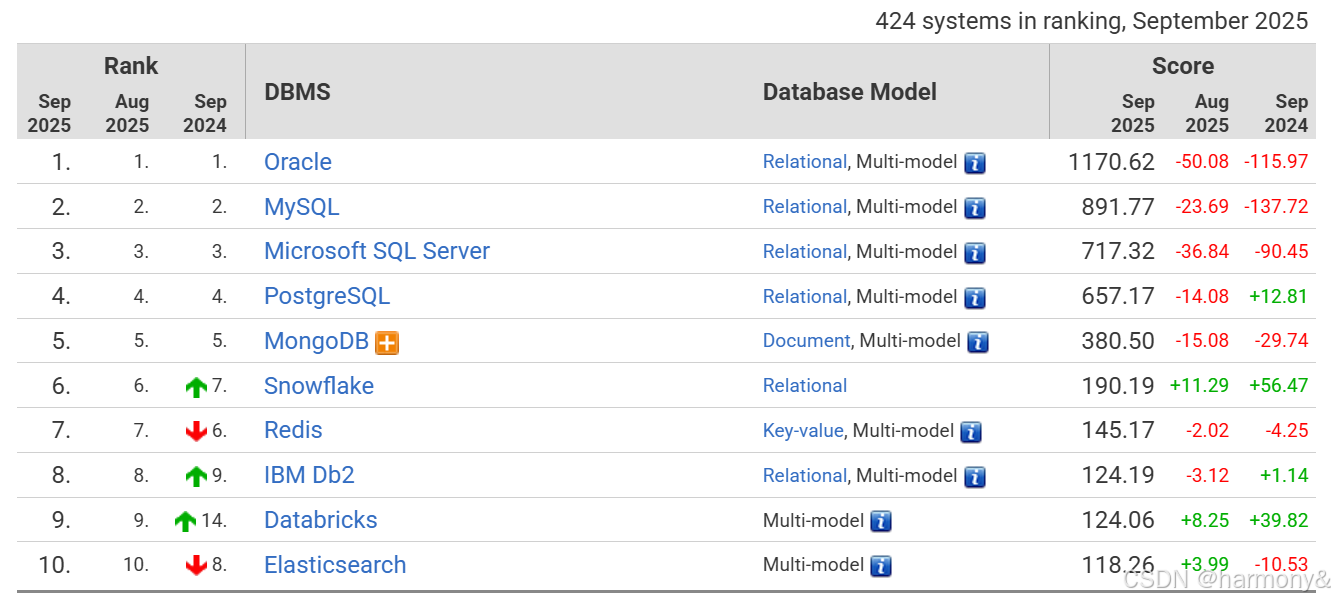
1.3.5数据库软件排名
https://db-engines.com/en/ranking
1.4关系型数据库理论
1.4.1 E-R模型
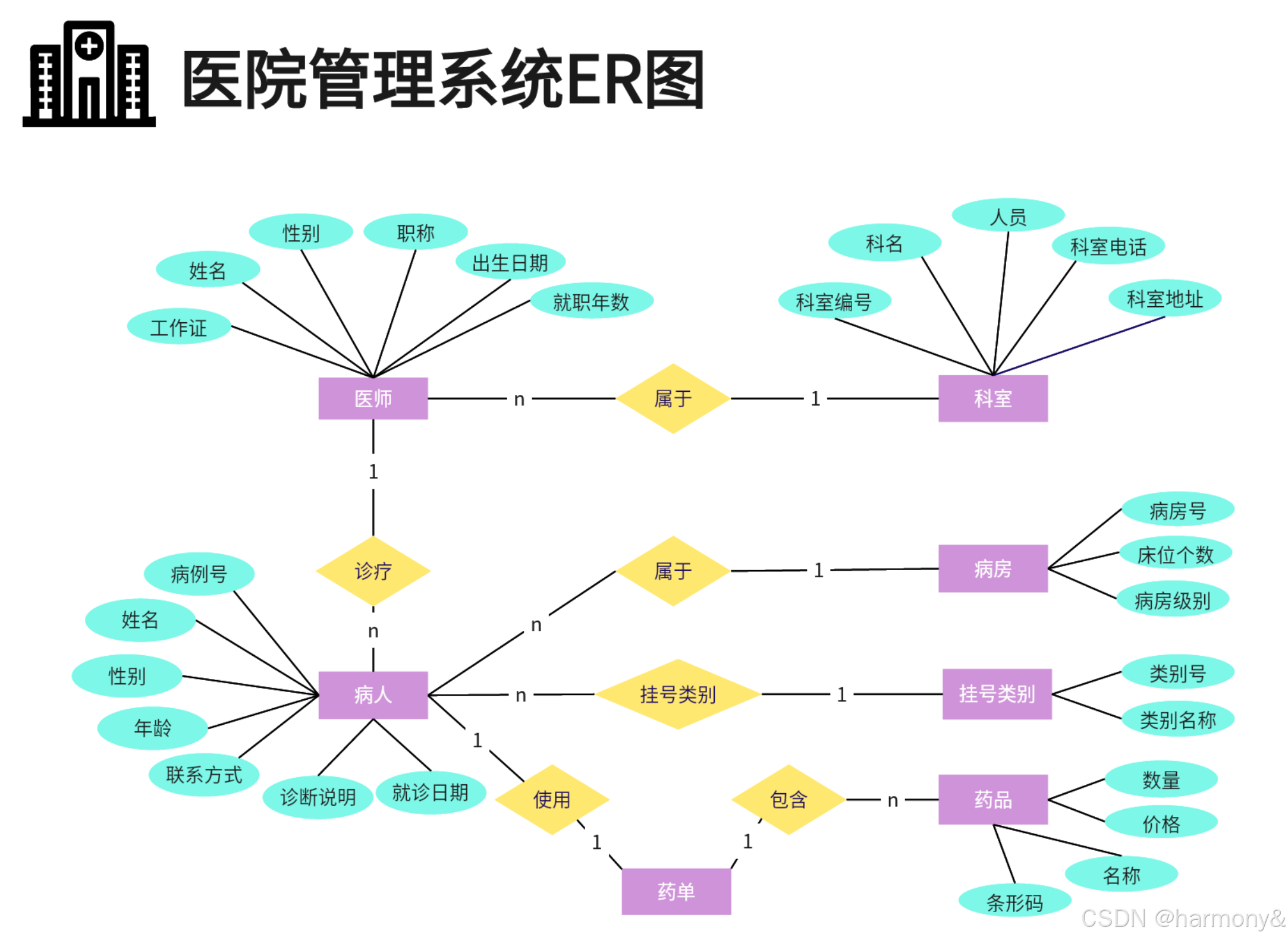
ER模型,全称为实体联系模型、实体关系模型或实体联系模式图(ERD:Entity-relationship model),它提供不受任何DBMS约束的面向用户的表达方法,在数据库设计中被广泛用作数据建模的工具。
E-R图模型的组成是由实体,属性和联系三部份组成。
实体:(Entity)实体是数据的使用者,代表软件系统中客观存在的生活中的实物,同一类实体构成实体集。在ER图中,实体用矩形表示。
属性:(Attribute)实体中的所有特性称为属性,每个属性描述的是实体的单个特性。在ER图中,属性用椭圆形表示。
联系:(Relationship)描述了实体的属性之间的关联规则。在ER图中,联系用菱形表示。ER模型范例:

1.4.2 联系类型
实体间的联系有三种类型:
一对一联系(1:1) :一个 A 对应一个 B,一个 B 对应一个A
例:
- 人 ↔ 身份证
- 丈夫 ↔ 妻子
一对多联系(1:n):一个 A 对应多个 B,一个 B 只对应一个A
例:
- 一个班级 → 多个学生
- 一个老师 → 多个学生
- 一个部门 → 多个员工
多对多联系(m:n):一个 A 对应多个 B,一个 B 对应多个 A
例:
- 学生 ↔ 课程(一个学生选多门课,一门课多个学生)
- 商品 ↔ 订单
学生表一对---
| stu_id | name |
|---|---|
| 1 | 唐三 |
| 2 | 叶凡 |
老师表一对---
| teacher_id | name |
|---|---|
| 1 | gao |
| 2 | ma |
老师与课程一对多
| class_id | name | teacher_id |
|---|---|---|
| 1 | linux | 1 |
| 2 | golang | 1 |
| 3 | python | 2 |
| 4 | java | 2 |
学生与课程多对多
| class_id | stu_id |
|---|---|
| 1 | 1 |
| 1 | 2 |
| 2 | 1 |
| 2 | 2 |
| 3 | 1 |
| 3 | 2 |
1.4.3数据的操作
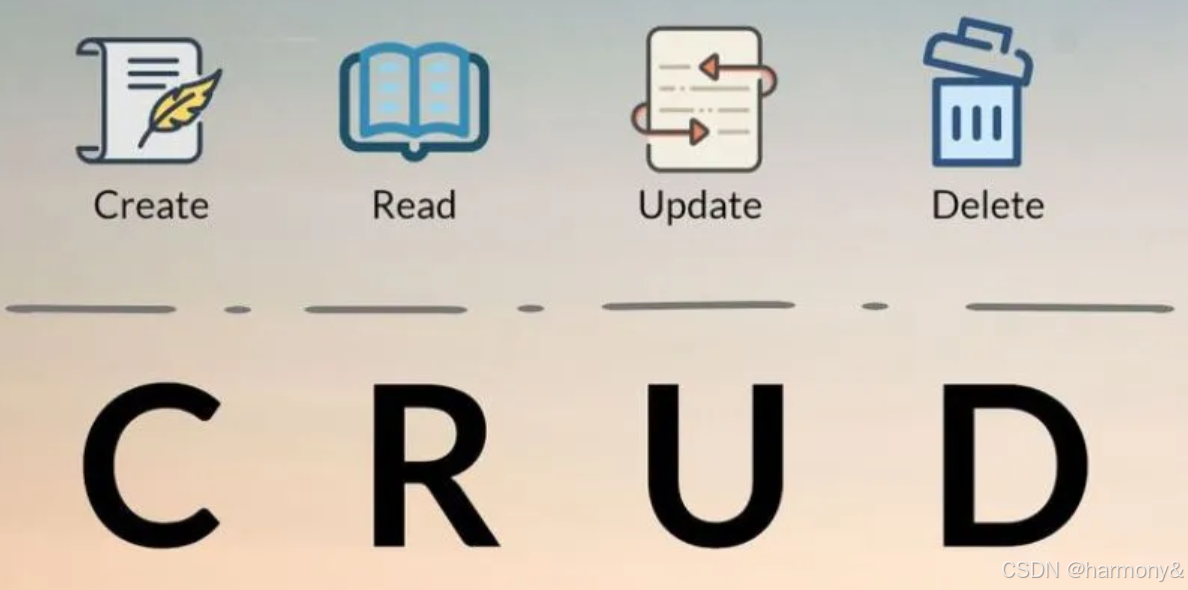
数据库中对数据的操作主要包括增删改查
| 操作描述 | 作用 | SQL关键字 |
|---|---|---|
| Create | 增加数据 | Insert |
| Read | 读取数据 | Select |
| Update | 更新数据 | Update |
| Delete | 删除数据 | Delete |
1.4.4数据库的正规化分析(理论)
数据库规范化,又称数据库或资料库的正规化、标准化,是数据库设计中的一系列原理和技术,以减少数据库中数据冗余,增进数据的一致性。设计关系数据库时,遵从不同的规范要求,设计出合理的关系型数据库,不同的规范要求被称为不同范式,各种范式呈递次规范,越高的范式数据库冗余越小。
目前关系数据库有六种范式:第一范式(1NF)、第二范式(2NF)、第三范式(3NF)、巴德斯科范式(BCNF)、第四范式(4NF)和第五范式(5NF,又称完美范式)。满足最低要求的范式是第一范式(1NF)。在第一范式的基础上进一步满足更多规范要求的称为第二范式(2NF),其余范式以次类推。一般数据库只需满足第三范式(3NF)即可。
第一范式1NF(确保每列保持原子性)
第一范式是最基本的范式。如果数据库表中的所有字段值都是不可分解的原子值,就说明该数据库表满足了第一范式。
第一范式需要根据系统的实际需求来定。其核心是要保证数据表中的列里面没有重复值,即实体中的某个属性不能有多个值或者不能有重复的属性,确保每一列的原子性。
列重复
| id | teacher_name | class_1 | class_2 | class_3 |
|---|---|---|---|---|
| 1 | ma | golang | linux | python |
| 2 | gao | golang | linu | |
| 3 | ma | golang |
列不重复
| id | teacher_name | class |
|---|---|---|
| 1 | ma | golang |
| 2 | ma | linux |
| 3 | ma | python |
| 4 | gao | golang |
| 5 | gao | linux |
| 6 | ma | golang |
第一范式(1NF)------原子性
核心要求 :表中的每个字段都必须是不可再分的原子值。
反例:
学生ID | 联系方式
001 | 13800138000, zhang@example.com→ "联系方式"包含多个值,违反 1NF。
正例:
学生ID | 手机号 | 邮箱
001 | 13800138000 | zhang@example.com💡 简单说:每一列只能存一个值,不能是列表、集合或复合结构。
第二范式2NF(确保表中的每列都和主键相关)
第二范式在第一范式的基础之上更进一层。第二范式需要确保数据库表中的每一列都和主键相关,而不能只与主键的某一部分相关(主要针对联合主键而言)。也就是说在一个数据库表中,一个表中只能保存一种数据,不可以把多种数据保存在同一张数据库表中。
teacher_name 和city组成联合主键,city_code与city------对应,city_code依赖了部份主键,违反了第二范式
| teacher_name | city | age | city_code |
|---|---|---|---|
| gao | bj | 22 | 010 |
| ma | bj | 33 | 010 |
| gao | sh | 44 | 021 |
teacher_name与ctiy_id组成联合主键,再用city_id关联city_name和city_code,这样符合第二范式
| teacher_name | city_id | age |
|---|---|---|
| gao | 1 | 22 |
| ma | 1 | 33 |
| gao | 2 | 44 |
| city_id | city_name | city_code |
|---|---|---|
| 1 | bj | 010 |
| 2 | sh | 021 |
第二范式(2NF)------消除部分依赖
前提 :已满足 1NF
核心要求 :所有非主键字段必须完全依赖于整个主键(不能只依赖主键的一部分)。
适用于复合主键场景。
部分依赖:非主属性只依赖于主键中的某一部分。
反例(订单明细表):
订单ID | 商品ID | 商品名称 | 数量
1001   | P001   | 苹果     | 5
主键 = (订单ID, 商品ID)
但"商品名称"只依赖于"商品ID",不依赖"订单ID" → 违反 2NF。
解决方法:拆表
- 商品表(商品ID, 商品名称)
- 订单明细表(订单ID, 商品ID, 数量)
💡 简单说:非主键字段不能"只认主键的一部分"。
第三范式3NF(确保每列都和主键列直接相关,而不是间接相关)
第三范式需要确保数据表中的每一列数据都和主键直接相关,而不能间接相关。
必须先满足第一范式才能满足第二范式,必须同时满足第一第二范式才能满足第三范式。
teacher 表一对一
| teacher_id | teacher_name |
|---|---|
| 1 | ma |
| 2 | gao |
| 3 | ma |
class表一对一
| class_id | class_name |
|---|---|
| 1 | golang |
| 2 | linux |
| 3 | python |
teacher与class多对多
| teacher_id | class_id |
|---|---|
| 1 | 1 |
| 1 | 2 |
| 1 | 3 |
| 2 | 1 |
| 2 | 2 |
| 3 | 1 |
第三范式(3NF)------消除传递依赖
前提 :已满足 2NF
核心要求 :非主键字段之间不能有依赖关系(即不能存在"传递依赖")。
传递依赖:A → B → C,则 C 传递依赖于 A。
所有非主属性必须直接依赖于主键,不能通过其他非主属性间接依赖。
反例:
学生ID | 学院ID   | 学院地址
2001    | CS01   | 北京中关村
主键 = 学生ID
依赖关系:学生ID → 学院ID → 学院地址
→ "学院地址"传递依赖于"学生ID",违反 3NF。
解决方法:拆表
- 学生表(学生ID, 学院ID)
- 学院表(学院ID, 学院地址)
💡 简单说:非主键字段之间不能"互相推导"。
总结:
总结对比
范式 核心目标 关键规则 1NF 原子性 字段不可再分 2NF 消除部分依赖 非主属性必须完全依赖整个主键 3NF 消除传递依赖 非主属性之间不能相互依赖 越高范式,冗余越少,表越多。
实际开发:一般满足 3NF 即可。
1.4.5 SQL结构化查询语言
SQL:(StructureQueryLanguage),结构化查询语言。是一种数据库查询和程序设计语言,用于存取数据以及查询、更新和管理关系数据库系统,SQL语句就是用SQL语言写的用于操作数据库的语句。
关系型数据库一般工作于C/S模式下,使用专有协议进行通信,服务端程序监听特有端口,客户端程序发送查询语句到服务端,服务端将查询结果返回给客户端。
MySQL自带CLI接口,GUI接口可以使用第三方工具实现,在应用程序或后端开发语言中,使用相应的编程语言下的数据库驱动来进行与数据库服务端的通信。
2MySQL安装和基本使用
2.1MySQL介绍

2.1.1 MySQL 历史
MySQL 之父
关于 MariaDB、MySQL、MaxDB 名字的由来,这里有个不得不说的小插曲。Monty 有一个女儿,名叫 My,因此他将自己开发的数据库命名为 MySQL。Monty 还有一个儿子,名为 Max,因此在 2003 年,SAP 公司与 MySQL 公司建立合作伙伴关系后,Monty 又将与 SAP 合作开发的数据库命名为 MaxDB。而现在的 MariaDB 中的 Maria 是 Monty 小孙女(小女儿?)的名字。

Michael "Monty" Widenius, 1962 年 3 月 3 日出生于芬兰赫尔辛基。
开源 MySQL 数据库的创始成员、MySQL AB 公司的首席技术官、MySQL 数据库第一行代码的作者、MySQL 数据库命名人、MariaDB 创始人兼首席技术官;独自完成撰写 MySQL 数据库服务器端 95% 的代码。

MySQL历史
MySQL 的海豚标志的名字叫 "sakila",它是由 MySQL AB 的创始人从用户在 "海豚命名" 的竞赛中建议的大量的名字表中选出的。获胜的名字是由来自非洲斯威士兰的开源软件开发者 Ambrose Twebaze 提供。根据 Ambrose 所说,Sakila 来自一种叫 SiSwati 的斯威士兰方言,也是在 Ambrose 的家乡乌干达附近的坦桑尼亚的 Arusha 的一个小镇的名字
MySQL 的历史可以追溯到 1979 年。当时 Allan Larsson 和 Michael Widenius (Monty) 开了一家自己的咨询公司,取名 TcX,名字的由来已无从考证。有道是" 前世尽付真情,今生亦现福缘积厚"。那年一个夜黑风高的晚上,Michael 基于 BASIC 语言写出了他的第一款数据库报表工具 UNIREG。
有当年的天气记录为证,Michael 写完该工具时极光异常明亮,炫彩无比。大凡重大事情的发生,后来的著述人都会记录有一些类似的怪现象。比如刮风、下雨、冒仙气什么的,还有天上星星异常闪烁等等,反正就是说明这种事情很不简单。
最初的 UNIREG 是运行在瑞典人制造的 ABC800 计算机上的。ABC800 的内存只有 32KB,CPU 是频率只有 4MHz 的 Z80。在 1983 年 Monty 遇到了 David Axmark,两人相见恨晚,开始合作运营 TcX,Monty 负责技术,David 搞管理。后来 TcX 将 UNIREG 移植到其他更加强大的硬件平台,主要是 Sun 的平台。

一次 Monty 接到了一个项目,需要为当时的 UNIREG 提供更加通用的 SQL 接口,Monty 找到了 David Hughes --mSQL 的发明人,商讨合作事宜。然而,经过一番测试后,他们发现 mSQL 的速度并不尽如人意,无法满足客户的需求。
遇到这种问题,程序员出身的 Monty 无法委曲求全,毅然采取了革命性的态度--重新设计整个系统。1995 年 5 月 23 日,MySQL 的第一个内部版本发行了,并在第二年对外公布了 MySQL 官方正式发行版 (3.11.1)。有趣的是,第一个 MySQL 正式版恰巧只能运行在 Sun Solaris 上,仿佛昭示了它日后被 Sun 收购的命运。
在接下来的两年中,MySQL 被移植到不同的平台,同时加入了不少新的特性。到 1998 时,MySQL 能够运行在 10 多种操作系统之上,其中包括应用非常广泛的 FreeBSD、Linux、Windows 95 和 Windows NT 等。很快 MySQL 3.22 也发布了,但它仍然存在很多问题--如不支持事务操作、子查询、外键、存储过程和视图等功能。正因为这些缺陷,当时许多 Oracle 和 SQL Server 的用户对 MySQL 根本不屑一顾。
大概在 1999 的冬天,下了很大一场雪。然后独立的商业公司 MySQL AB 就在瑞典的中部城市 Uppsala 成立了。并于同年发布了包含事务型存储引擎 BDB 的 MySQL 3.23。在集成 BDB 存储引擎的过程中,MySQL 开发团队得到了很好的锻炼,为后来能将 InnoDB 整合以及开发开放插件式的存储引擎架构打下了坚实的基础。
MySQL 从诞生之初就提供了双重的授权标准:个人使用是免费的,如果用于商业网站搭建或者 Windows 平台下就必须购买商业许可证。在 2000 年的时候 MySQL 做了一个重大的决定,改换成了 GPL 许可模式,也就是说商业用户也无需再购买许可证,但必须把他们的源码公开。虽然 MySQL AB 因此在收入上遭受了巨大的打击,损失了将近 80% 的收入,但他们依然坚持了 GPL 许可模式。
与此同时,芬兰公司 Heikki 开始接触 MySQL AB,讨论将 Heikki 的存储引擎 InnoDB 整合到 MySQL 数据库中的可行性。双方的合作非常顺利,并于 2001 年推出 MySQL 4.0 Alpha 版本。经过两年的公开测试和应用,到了 2003 年,包含 InnoDB 的 MySQL 已经变得非常稳定了。随即在同一年,MySQL 推出 4.1 版,第一次使得 MySQL 支持子查询,支持 Unicode 和预编译 SQL 等功能。
MySQL 4.1 还在 Alpha 版时,公司已决定并行开发 5.0 版。因为他们打算加快 MySQL 的开发速度以适应日益苛刻的市场需求。这个新版本是有史以来 MySQL 最大的变化,添加了存储过程、服务端游标、触发器、查询优化以及分布式事务等在大家看来一个" 正常数据库管理系统" 应当拥有的一整套功能。
2008 年 2 月,当时的业界开源老大 Sun Microsystems 动用 10 亿美元收购了 MySQL,造就了开源软件的收购最高价。这次交易给开源交易设立了一个新的基准。在此之前的交易金额 (JBoss、Zimbra、XenSource、Gluecode) 从没接近过 10 亿美元,全部加起来才差不多与 Sun Microsystems 购买 MySQL 的花费持平。MySQL 被收购之后,MySQL 图标停止使用,取而代之的是 Sun/MySQL 图标。
MySQL 和 Sun 合并之后,推出了 MySQL 5.1GA 版和 MySQL 5.4 Beta 版。5.4 的推出照搬了 4.1 和 5.0 当时的开发模式,让 5.4 和 6.0 并行处于 Beta 开发阶段。
螳螂捕蝉,黄雀在后。2009 年,数据库老大 Oracle 大笔一挥,开出 74 亿美元的支票,将 Sun Microsystems 和 MySQL 通盘收于旗下。
这里附带说明一下 Drizzle,它是 Sun/MySQL 的 Brian 在 2008 年提出的一个计划。目标是将开发一个更小、更轻、更快的数据库,用作云计算 (Cloud Computing) 和 Web 应用的基础架构。
标志性事件
1999 年,MySQL AB 在瑞典正式宣布成立。
2000 年,ISAM 华丽转身 MyISAM 存储引擎。同年 MySQL 开放了自己的源代码,并且基于 GPL 许可协议。同年 9 月 innoDB 推出。
2003 年,MySQL4.0 发布,正式集成 innodb
2005 年,MySQL 5.0 发布。同年 Oracle 把 InnoDB 引擎的开发公司 innobase 收购完成。MySQL 明确地表现出迈向高性能数据库的发展步伐。
2006 年,sun 公司收购了 MySQL 公司,出价 10 亿美元。
2009 年,Oracle 公司收购 sun,将 MySQL 纳入囊中。
2010 年,MySQL 5.5 正式版发布,Oracle 完成了大量改进,并将 innodb 改成默认引擎。
2013 年,MySQL 5.6 GA 版本发布。
近期 - MySQL 5.7 GA 版本横空出世,其性能、新特性、性能分析带来了质的改变。
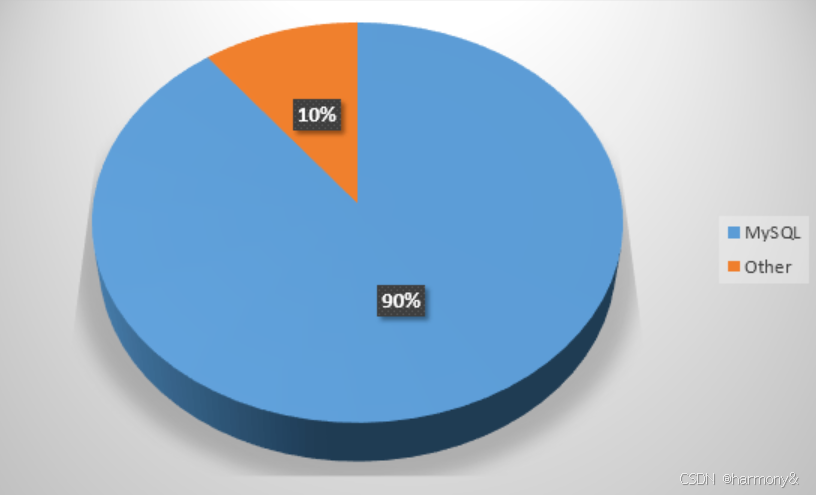
全球最大网站Top20,90%在使用Mysql
-
WIKipedia.org - 维基百科
-
Live.com -- 微软新的电子邮件服务
-
qq.com -- 腾讯
-
Microsoft.com -- 微软产品 / 更新 / 下载
-
Baidu.com -- 百度
-
Msn.com -- 微软自有互联网信息
-
Blogger.com -- 博客平台
-
ASK.com - 搜索引擎
-
Taobao.com 淘宝
-
Twiter.com -- 实时通讯平台
-
Bing.com -- 必应
-
Sohu.com -- 搜狐
-
Apple.com -- 苹果
-
WrodPress.com -- 成行经历
-
Sina.com -- 新浪
-
Amazon.com - 亚马逊
全球MySQL行业应用

国内MySQL行业应用

2.1.2 MySQL 系列
尽管 MySQL 是最受欢迎的程序之一,但是许多开发人员认为有必要将其拆分成其他项目,并且每个分支项目都有自己的专长。该需求以及 Oracle 对核心产品增长缓慢的担忧,导致出现了许多开发人员感兴趣的子项目和分支。本文将讨论受人们关注的三个流行 MySQL 分支:Drizzle、MariaDB 和 Percona Server(包括 XtraDB 引擎)
MySQL
官方 MySQL,前身 MySQL AB / SUM / 最后被 Oracle 公司收入麾下。
Percona
Percona Server 就是这样一款产品,由领先的 MySQL 咨询公司 Percona 发布。Percona Server 是一款独立的数据库产品,为用户提供了换出其 MySQL 安装并换入 Percona Server 产品的能力。通过这样做,就可以利用 XtraDB 存储引擎。Percona Server 声称可以完全与 MySQL 兼容,因此从理论上讲,您无需更改软件中的任何代码。这确实是一个很大的优势,适合在您寻找快速性能改进时控制质量。因此,采用 Percona Server 的一个很好的理由是,利用 XtraDB 引擎来尽可能地减少代码更改。
此外,他们是 XtraDB 存储引擎的原作者。Percona 将此代码用作开源代码,因此您可以在其他产品中找到它,但引擎的最初创建者与编写此产品的是同一个人,所以您可以随心所欲地使用此信息。
Percona 团队的最终声明是 "Percona Server 是由 Oracle 发布的最接近官方 MySQL Enterprise 发行版的版本",因此与其他更改了大量基本核心 MySQL 代码的分支有所区别。Percona Server 的一个缺点是他们自己管理代码,不接受外部开发人员的贡献,以这种方式确保他们对产品中所包含功能的控制。
下面是 Percona Server 的声明,该声明来自它们自己的网站:
- 可扩展性:处理更多事务;在强大的服务器上进行扩展
- 性能:使用了 XtraDB 的 Percona Server 速度非常快
- 可靠性:避免损坏,提供崩溃安全 (crash-safe) 复制
- 管理:在线备份,在线表格导入 / 导出
- 诊断:高级分析和检测
- 灵活性:可变的页面大小,改进的缓冲池管理
MariaDB
MySQL 之父 Widenius 先生离开了 Sun 之后,觉得依靠 Sun/Oracle 来发 展 MySQL,实在很不靠谱,于是决定另开分支,这个分支的名字叫做 MariaDB;
在卖出 MySQL 之后 Widenius 发现两个主要问题:
-
MySQL 核心开发团队是封闭的,完全没有 Oracle 之外的成员参加。很多高手即使 有心做贡献,也没办法做到
-
MySQL 新版本的发布速度,在 Oracle 收购 Sun 之后大为减缓。Widenius 用数据比 较了收购之前和之后新版本的发布速度。有很多 bugfix 和新的 feature,都没有及 时加入到发布版本之中
目标是提供一个由社区开发的、稳定的、总是免费的 MySQL 分支,在用 户级别上兼容主流版本。我们为自己的版本和上游、社区版的互操作性 提高而努力;Monty Program 公司承诺 MariaDB 将会一直保持独立和开源。值得一提的是,Fedora 及 OpenSUSE Linux 更宣布将在 MariaDB 推出下 一个版本后抛弃 MySQL 使用 MariaDB。
MariaDB 提供了 MySQL 提供的标准存储引擎,即 MyISAM 和 InnoDB。因此,实际上,可以将它视为 MySQL 的扩展集,它不仅提供 MySQL 提供的所有功能,还提供其他功能。MariaDB 还声称自己是 MySQL 的替代,因此从 MySQL 切换到 MariaDB 时,无需更改任何基本代码即可安装它。
最后可能也是最重要的一点是,MariaDB 的主要创建者是 Monty Widenius,也是 MySQL 的初始创建者。Monty 成立了一家名为 Monty Program 的公司来管理 MariaDB 的开发,这家公司雇佣开发人员来编写和改进 MariaDB 产品。这既是一件好事,也是一件坏事:有利的一面在于他们是 Maria 功能和 bug 修复的佼佼者,但公司不是以赢利为目的,而是由产品驱动的,这可能会带来问题,因为没有赢利的公司不一定能长久维持下去。
2.1.3 MySQL 的特性
- MySQL是基于开源协议发布的,可以免费使用,也可以基于源码进行二次开发。
- MySQL使用标准SQL语言进行管理。
- MySQL可以运行于多个系统上,具有跨平台特性,并且支持多种语言。
- MySQL使用插件式存储引擎,不同的存储引擎,有着不同的功能和特性,使用者可以根据需要灵活选择。
- MySQL基于单进程,多线程的模式进行工作。
- MySQL提供了大量的测试组件和诸多的扩展。
2.2 MySQL安装
参考mysql安装手册
2.3 MySQL多实例
2.3.1数据库多实例介绍
什么是数据库多实例
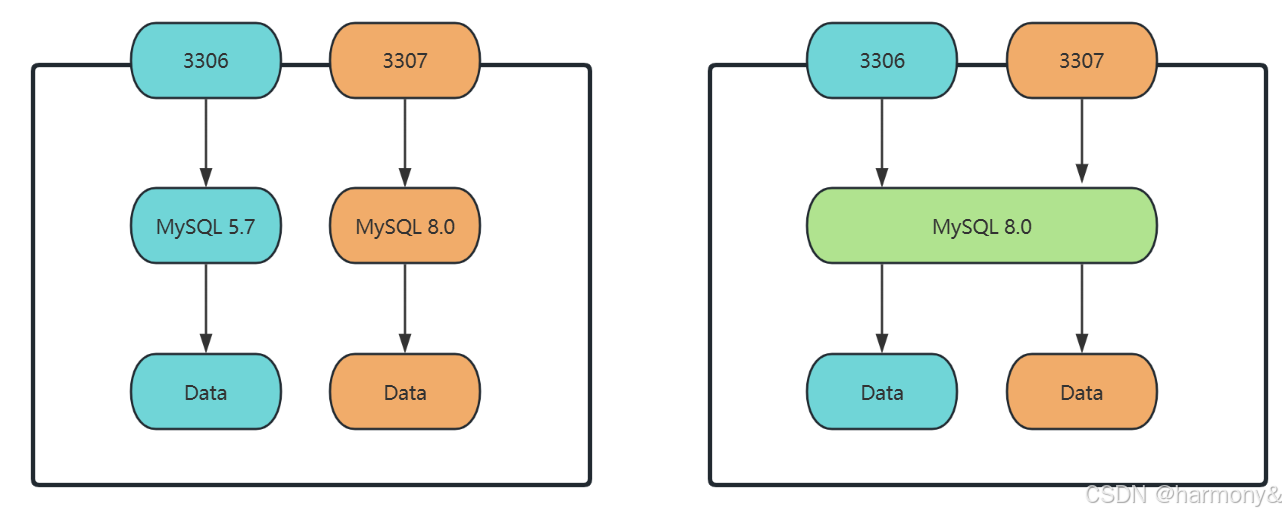
拿MySQL数据库来说明,就是在一台服务器上运行多个MySQL服务端进程,每个进程监听一个端口(3306,3307,3308),维护一套属于其自己的配置和数据,客户端使用不同的端口来连接具体服端进程,从而实现对不同的实例的操作。
多实例的优点
- 节约硬件资源:在某些场景下(比如说测试,调研,新旧业务并存等),需要配置不同的MySQL数据库版本,而又没有足够多的服务器资源,则可以选择在一台服务器上用不同的版本实现多开来满足需求。
- 便于对比:在一个完全相同的硬件环境中,运行不同的MySQL版本,使用相同的参数进行测试,调研时,可以最大程度的减少外部环境因素的影响,便于得出更准确的结论。
- 便于管理:在一台服务器上运行多个实例,同理,只需要在这一台服务器上配置安全规则,就可以完成对多个实例的访问授权,而且对于数据库的备份,停启等工作,也只需要在这一台服务器上完成。
多实例的缺点
- 资源抢占:一台服务器上运行多个服务实例,资源总量恒定,一个实例占用的资源无法被另一个实例所使用,在这种情况下,服务性能会受到影响,无法体现MySQL服务的实际性能。
- 存在单点风险:一台服务器上部署多个服务实例,如果该服务器当机,则这多个服务实例都会受影响。
2.3.2 MySQL多实例配置方案
可以用不同的MySQL版本实现多实例,也可以用相同的MySQL版本实现多实例。
2.4MySQL组成和常用工具
2.4.1 MySQL主要组成
mysql基于C/S模式提供服务,主要有客户端程序和服务端程序组成,另外还有一些管理工具。
服务端主要组成
| 程序 | 功能 |
|---|---|
| mysqld_safe | 安全启动脚本 |
| mysqld | 服务端程序,是mysql服务的核心程序 |
| mysqld_multi | 多实例工具 |
客户端主要组成
| 程序 | 功能 |
|---|---|
| mysql | 基于mysql协议的交互式CLI工具 |
| mysqldump | 备份工具 |
| mysqladmin | 服务端管理工具 |
| mysqlimport | 数据导入工具 |
MyISAM存储引擎的管理工具
| 程序 | 功能 |
|---|---|
| myisamchk | 检测MyISAM库 |
| myisampack | 打包MyISAM表,只读 |
配置文件
不同版本配置文件略有不同
bash
[root@localhost ~]# cat /etc/my.cnf
#
# This group is read both both by the client and the server
# use it for options that affect everything
#
[client-server]

#
# include all files from the config directory
#
!includedir /etc/my.cnf.d

[root@localhost ~]# tree /etc/my.cnf.d/
/etc/my.cnf.d/
├── client.cnf                  #客户端配置
├── mysql-default-authentication-plugin.cnf
└── mysql-server.cnf           #服务器端配置

0 directories, 3 files
生效顺序
bash
[root@localhost ~]# mysql --help | grep my.cnf
                      order of preference, my.cnf, $MYSQL_TCP_PORT,
/etc/my.cnf /etc/mysql/my.cnf ~/.my.cnf
2.4.2 MySQL中的用户账户
详见MySQL用户管理
2.4.3 MySQL 命令类型
MySQL中的命令分为两类,分别是客户端命令和服务端命令。
客户端命令在本地执行。服务端命令发送到服务端执行,再返回执行结果到客户端上。
客户端命令和服务端命令,都是通过MySQL客户端工具进行输入输出。
查看所有客户端命令
mysql
mysql> ?

For information about MySQL products and services, visit:
   http://www.mysql.com/
For developer information, including the MySQL Reference Manual, visit:
   http://dev.mysql.com/
To buy MySQL Enterprise support, training, or other products, visit:
   https://shop.mysql.com/

List of all MySQL commands:
Note that all text commands must be first on line and end with ';'
?         (\?) Synonym for `help'.
clear     (\c) Clear the current input statement.
connect   (\r) Reconnect to the server. Optional arguments are db and host.
delimiter (\d) Set statement delimiter.
edit      (\e) Edit command with $EDITOR.
ego       (\G) Send command to mysql server, display result vertically.
exit      (\q) Exit mysql. Same as quit.
go        (\g) Send command to mysql server.
help      (\h) Display this help.
nopager   (\n) Disable pager, print to stdout.
notee     (\t) Don't write into outfile.
pager     (\P) Set PAGER [to_pager]. Print the query results via PAGER.
print     (\p) Print current command.
prompt    (\R) Change your mysql prompt.
quit      (\q) Quit mysql.
rehash    (\#) Rebuild completion hash.
source    (\.) Execute an SQL script file. Takes a file name as an argument.
status    (\s) Get status information from the server.
system    (\!) Execute a system shell command.
tee       (\T) Set outfile [to_outfile]. Append everything into given outfile.
use       (\u) Use another database. Takes database name as argument.
charset   (\C) Switch to another charset. Might be needed for processing binlog with multi-byte charsets.
warnings  (\W) Show warnings after every statement.
nowarning (\w) Don't show warnings after every statement.
resetconnection(\x) Clean session context.
query_attributes Sets string parameters (name1 value1 name2 value2 ...) for the next query to pick up.

For server side help, type 'help contents'
查看所有服务端命令
mysql
mysql> help contents
You asked for help about help category: "Contents"
For more information, type 'help <item>', where <item> is one of the following
categories:
   Account Management
   Administration
   Components
   Compound Statements
   Contents
   Data Definition
   Data Manipulation
   Data Types
   Functions
   Geographic Features
   Help Metadata
   Language Structure
   Loadable Functions
   Plugins
   Prepared Statements
   Replication Statements
   Storage Engines
   Table Maintenance
   Transactions
   Utility
查看服务端命令具体项
mysql
mysql> help Administration
You asked for help about help category: "Administration"
For more information, type 'help <item>', where <item> is one of the following
topics:
   BINLOG
   CACHE INDEX
   FLUSH
   HELP COMMAND
   KILL
   LOAD INDEX
   RESET
   RESET PERSIST
   RESTART
   SET
   SET CHARACTER SET
   SET CHARSET
   SET NAMES
   SHOW
   SHOW BINARY LOGS
   SHOW BINLOG EVENTS
   SHOW CHARACTER SET
   SHOW COLLATION
   SHOW COLUMNS
   SHOW CREATE DATABASE
   SHOW CREATE EVENT
   SHOW CREATE FUNCTION
   SHOW CREATE PROCEDURE
   SHOW CREATE SCHEMA
   SHOW CREATE TABLE
   SHOW CREATE TRIGGER
   SHOW CREATE USER
   SHOW CREATE VIEW
   SHOW DATABASES
   SHOW ENGINE
   SHOW ENGINES
   SHOW ERRORS
   SHOW EVENTS
   SHOW FIELDS
   SHOW FUNCTION CODE
   SHOW FUNCTION STATUS
   SHOW GRANTS
   SHOW INDEX
   SHOW MASTER LOGS
   SHOW MASTER STATUS
   SHOW OPEN TABLES
   SHOW PLUGINS
   SHOW PRIVILEGES
   SHOW PROCEDURE CODE
   SHOW PROCEDURE STATUS
   SHOW PROCESSLIST
   SHOW PROFILE
   SHOW PROFILES
   SHOW RELAYLOG EVENTS
   SHOW REPLICA STATUS
   SHOW REPLICAS
   SHOW SCHEMAS
   SHOW SLAVE HOSTS
   SHOW SLAVE STATUS
   SHOW STATUS
   SHOW TABLE STATUS
   SHOW TABLES
   SHOW TRIGGERS
   SHOW VARIABLES
   SHOW WARNINGS
   SHUTDOWN
查看详细帮助
mysql
mysql> help BINLOG
Name: 'BINLOG'
Description:
Syntax:
BINLOG 'str'

BINLOG is an internal-use statement. It is generated by the mysqlbinlog
program as the printable representation of certain events in binary log
files. (See https://dev.mysql.com/doc/refman/8.0/en/mysqlbinlog.html.)
The 'str' value is a base 64-encoded string the that server decodes to
determine the data change indicated by the corresponding event.

To execute BINLOG statements when applying mysqlbinlog output, a user
account requires the BINLOG_ADMIN privilege (or the deprecated SUPER
privilege), or the REPLICATION_APPLIER privilege plus the appropriate
privileges to execute each log event.

URL: https://dev.mysql.com/doc/refman/8.0/en/binlog.html
2.4.4MySQL客户端使用
MySQL服务基于C/S架构,用户主要使用客户端工具来与远程服务端进行连接,从而与MySQL服务进行交互。
2.4.4.1MySQL客户端常用选项
格式:
bash
[root@localhost ~]# mysql --help
Usage: mysql [OPTIONS] [database]

#常用选项
-V|--version				#显示客户端版本
-u|--user=name				#指定远程连接用户名
-p|--password[=name]		#指定密码,默认为空
-h|--host=host				#指定服务端主机
-P|--port=port				#指定端口,默认3306
-S|--socket=name			#指定连接时使用的socket文件,该文件在服务端启动后生成
-D|--database=db			#指定数据库
-H|--html					#以html格式输出
-X|--xml					#以xml格式输出
-t|--table					#以table格式输出,默认项
-E|--vertical				#垂直显示执行结果
-v|--verbose				#显示详细信息,配合-t选项
-C|--compress				#启用压缩
-G|--named-commands			#启用长命令
-e|--execute=sql			#执行完就退出,非交互式运行
-prompt=name				#修改命令提示符
--line-numbers				#输出行号
--print-defaults			#打印参数列表,放在最前面
--connect-timeout=N			#连接超时时长,单位S
--max-allowed-packet=N		#一次查交互发送或反回数据的大小,默认16MB,最大值为1GB,最小值为4096字节
范例:
bash
#免密登录
[root@localhost ~]# mysql -uroot -pHuawei@123
mysql> alter user root@localhost identified by '';        #将mysql root账号密码设置为空
mysql> quit                                               #退出mysql

#显示版本
[root@localhost ~]# mysql -V
mysql  Ver 8.0.26 for Linux on x86_64 (Source distribution)

#指定用户名,主机,端口
[root@localhost ~]# mysql -uroot -h127.0.0.1 -P3306
Welcome to the MySQL monitor.  Commands end with ; or \g.
Your MySQL connection id is 22
Server version: 8.0.26 Source distribution

Copyright (c) 2000, 2021, Oracle and/or its affiliates.

Oracle is a registered trademark of Oracle Corporation and/or its
affiliates. Other names may be trademarks of their respective
owners.

Type 'help;' or '\h' for help. Type '\c' to clear the current input statement.

mysql>

#使用主机名
[root@localhost ~]# mysql --user=root --host=localhost --port=3306
Welcome to the MySQL monitor.  Commands end with ; or \g.
Your MySQL connection id is 23
Server version: 8.0.26 Source distribution

Copyright (c) 2000, 2021, Oracle and/or its affiliates.

Oracle is a registered trademark of Oracle Corporation and/or its
affiliates. Other names may be trademarks of their respective
owners.

Type 'help;' or '\h' for help. Type '\c' to clear the current input statement.

mysql>

#默认使用root连接,密码为空
[root@localhost ~]# mysql
Welcome to the MySQL monitor.  Commands end with ; or \g.
Your MySQL connection id is 24
Server version: 8.0.26 Source distribution

Copyright (c) 2000, 2021, Oracle and/or its affiliates.

Oracle is a registered trademark of Oracle Corporation and/or its
affiliates. Other names may be trademarks of their respective
owners.

Type 'help;' or '\h' for help. Type '\c' to clear the current input statement.

#打印参数列表,并不连接服务端,--print-defaults要放在第一个
[root@localhost ~]# mysql --print-defaults -uroot -hlocalhost --connect-timeout=2
mysql would have been started with the following arguments:
-uroot -hlocalhost --connect-timeout=2

#以html格式显示输出
[root@localhost ~]# mysql -H
Welcome to the MySQL monitor.  Commands end with ; or \g.
Your MySQL connection id is 25
Server version: 8.0.26 Source distribution

Copyright (c) 2000, 2021, Oracle and/or its affiliates.

Oracle is a registered trademark of Oracle Corporation and/or its
affiliates. Other names may be trademarks of their respective
owners.

Type 'help;' or '\h' for help. Type '\c' to clear the current input statement.

mysql> select version();
<TABLE BORDER=1><TR><TH>version()</TH></TR><TR><TD>8.0.26</TD></TR></TABLE>1 row in set (0.00 sec)
范例:执行完退出,非交互式执行
bash
#环境准备
[root@localhost ~]# vim /root/test.sql
show databases;

#执行客户端命令
[root@localhost ~]# mysql -e "source /root/test.sql"
+--------------------+
| Database           |
+--------------------+
| information_schema |
| mysql              |
| performance_schema |
| sys                |
+--------------------+

#管道执行
[root@localhost ~]# cat test.sql | mysql
Database
information_schema
mysql
performance_schema
sys

#标准输入重定向执行
[root@localhost ~]# mysql -uroot < test.sql
Database
information_schema
mysql
performance_schema
sys

#以table格式输出
[root@localhost ~]# mysql -e "show databases;"
+--------------------+
| Database           |
+--------------------+
| information_schema |
| mysql              |
| performance_schema |
| sys                |
+--------------------+

#垂直显示
[root@localhost ~]# mysql -e "show databases;" -E
*************************** 1. row ***************************
Database: information_schema
*************************** 2. row ***************************
Database: mysql
*************************** 3. row ***************************
Database: performance_schema
*************************** 4. row ***************************
Database: sys
范例:修改提示符
bash
[root@localhost ~]# mysql --prompt=[test]
Welcome to the MySQL monitor.  Commands end with ; or \g.
Your MySQL connection id is 37
Server version: 8.0.26 Source distribution

Copyright (c) 2000, 2021, Oracle and/or its affiliates.

Oracle is a registered trademark of Oracle Corporation and/or its
affiliates. Other names may be trademarks of their respective
owners.

Type 'help;' or '\h' for help. Type '\c' to clear the current input statement.

[test]
范例:指定数据库
bash
#默认
[root@localhost ~]# mysql
Welcome to the MySQL monitor.  Commands end with ; or \g.
Your MySQL connection id is 38
Server version: 8.0.26 Source distribution

Copyright (c) 2000, 2021, Oracle and/or its affiliates.

Oracle is a registered trademark of Oracle Corporation and/or its
affiliates. Other names may be trademarks of their respective
owners.

Type 'help;' or '\h' for help. Type '\c' to clear the current input statement.

mysql> SHOW DATABASES;
+--------------------+
| Database           |
+--------------------+
| information_schema |
| mysql              |
| performance_schema |
| sys                |
+--------------------+
4 rows in set (0.00 sec)

mysql>

#指定数据库
[root@localhost ~]# mysql information_schema
Reading table information for completion of table and column names
You can turn off this feature to get a quicker startup with -A

Welcome to the MySQL monitor.  Commands end with ; or \g.
Your MySQL connection id is 41
Server version: 8.0.26 Source distribution

Copyright (c) 2000, 2021, Oracle and/or its affiliates.

Oracle is a registered trademark of Oracle Corporation and/or its
affiliates. Other names may be trademarks of their respective
owners.

Type 'help;' or '\h' for help. Type '\c' to clear the current input statement.

mysql> SELECT DATABASE();
+--------------------+
| DATABASE()         |
+--------------------+
| information_schema |
+--------------------+
1 row in set (0.01 sec)

mysql>
2.4.4.2 MySQL客户端常用命令
bash
mysql> ?

For information about MySQL products and services, visit:
   http://www.mysql.com/
For developer information, including the MySQL Reference Manual, visit:
   http://dev.mysql.com/
To buy MySQL Enterprise support, training, or other products, visit:
   https://shop.mysql.com/

List of all MySQL commands:
Note that all text commands must be first on line and end with ';'
?         (\?) Synonym for `help'.
clear     (\c) Clear the current input statement.
connect   (\r) Reconnect to the server. Optional arguments are db and host.
delimiter (\d) Set statement delimiter.
edit      (\e) Edit command with $EDITOR.
ego       (\G) Send command to mysql server, display result vertically.
exit      (\q) Exit mysql. Same as quit.
go        (\g) Send command to mysql server.
help      (\h) Display this help.
nopager   (\n) Disable pager, print to stdout.
notee     (\t) Don't write into outfile.
pager     (\P) Set PAGER [to_pager]. Print the query results via PAGER.
print     (\p) Print current command.
prompt    (\R) Change your mysql prompt.
quit      (\q) Quit mysql.
rehash    (\#) Rebuild completion hash.
source    (\.) Execute an SQL script file. Takes a file name as an argument.
status    (\s) Get status information from the server.
system    (\!) Execute a system shell command.
tee       (\T) Set outfile [to_outfile]. Append everything into given outfile.
use       (\u) Use another database. Takes database name as argument.
charset   (\C) Switch to another charset. Might be needed for processing binlog with multi-byte charsets.
warnings  (\W) Show warnings after every statement.
nowarning (\w) Don't show warnings after every statement.
resetconnection(\x) Clean session context.
query_attributes Sets string parameters (name1 value1 name2 value2 ...) for the next query to pick up.

For server side help, type 'help contents'
范例:显示当前数据库
mysql
#显示当前数据库
mysql> \s
--------------
mysql  Ver 8.0.26 for Linux on x86_64 (Source distribution)

Connection id:          8                              #连接ID
Current database:                                      #当前使用的数据库
Current user:           root@localhost                 #连接使用的用户名
SSL:                    Not in use                     #是否使用ssl
Current pager:          stdout
Using outfile:          ''
Using delimiter:        ;
Server version:         8.0.26 Source distribution     #版本
Protocol version:       10                             #协议版本
Connection:             Localhost via UNIX socket
Server characterset:    utf8mb4                        #服务器编码
Db     characterset:    utf8mb4                        #数据库编码
Client characterset:    utf8mb4                        #客户端编码
Conn.  characterset:    utf8mb4
UNIX socket:            /var/lib/mysql/mysql.sock      #连接使用的socket文件
Binary data as:         Hexadecimal
Uptime:                 28 min 46 sec                  #服务器运行时长

Threads: 2  Questions: 6  Slow queries: 0  Opens: 117  Flush tables: 3  Open tables: 36  Queries per second avg: 0.003
--------------
范例:切换数据库
mysql
mysql> use mysql;
Reading table information for completion of table and column names
You can turn off this feature to get a quicker startup with -A

Database changed
mysql>
范例:调用系统命令
bash
mysql> \! hostname          #查看宿主机主机名,!号后面有空格
localhost.localdomain
mysql> \! clear             #清屏
范例:修改提示符
mysql
mysql> prompt [\h--\D]
PROMPT set to '[\h--\D]'
[localhost--Mon Sep 15 22:09:09 2025]

[localhost--Mon Sep 15 22:10:01 2025]\R abcd
PROMPT set to 'abcd'
abcd
abcd
在配置文件中修改提示符
bash
[root@localhost ~]# vim /etc/my.cnf.d/client.cnf
[client]
prompt=(\\u@\\h) [\\d]>\\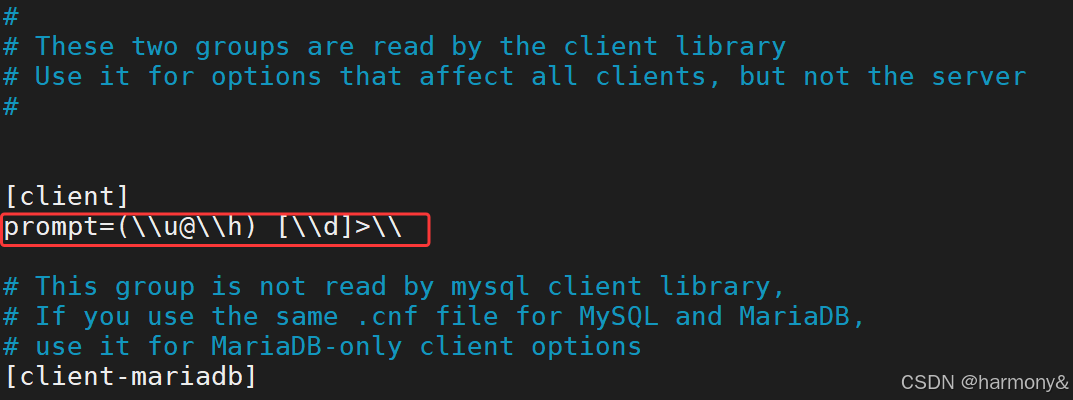
mysql
[root@localhost ~]# mysql         #验证效果
Welcome to the MySQL monitor.  Commands end with ; or \g.
Your MySQL connection id is 12
Server version: 8.0.26 Source distribution

Copyright (c) 2000, 2021, Oracle and/or its affiliates.

Oracle is a registered trademark of Oracle Corporation and/or its
affiliates. Other names may be trademarks of their respective
owners.

Type 'help;' or '\h' for help. Type '\c' to clear the current input statement.

(root@localhost) [(none)]>       #效果
提示符中可用的变量,全部可用的替换符用man mysql查看
bash
\C	#计数器
\D	#年月日时分秒
\d	#当前使用的数据库
\h	#服务器主机名
\l  #命令分隔符,默认;
\m	#当前时间,分钟
\n	#换行
\O	#月份,以英文显示
\o	#月份,数字显示
\P	#pm/am
\R	#小时,24小时制
\r	#小时,12小时制
\S	#分号
\s	#秒,数字显示
\t	#tab键
\U	#客户端用户名和主机
\u	#客户端用户名
\v	#服务端版本
\w	#星期几,英文显示
\Y	#年份,四位,数字显示
\y	#年份,两位,数字显示
范例:执行SQL脚本
bash
[root@localhost ~]# vim test.sql
show databases;

mysql> \. /root/test.sql
+--------------------+
| Database           |
+--------------------+
| information_schema |
| mysql              |
| performance_schema |
| sys                |
+--------------------+
4 rows in set (0.00 sec)
范例:重连
bash
[root@localhost ~]# mysql
Welcome to the MySQL monitor.  Commands end with ; or \g.
Your MySQL connection id is 19
Server version: 8.0.26 Source distribution

Copyright (c) 2000, 2021, Oracle and/or its affiliates.

Oracle is a registered trademark of Oracle Corporation and/or its
affiliates. Other names may be trademarks of their respective
owners.

Type 'help;' or '\h' for help. Type '\c' to clear the current input statement.

mysql> \r
Connection id:    20
Current database: *** NONE ***

mysql> use mysql
Reading table information for completion of table and column names
You can turn off this feature to get a quicker startup with -A

Database changed
mysql> \r
Connection id:    21
Current database: mysql

mysql>
范例:往文件中保存输出结果
bash
mysql> tee db.txt                 #设置写到文件db.txt
Logging to file 'db.txt'
mysql> select version();          #执行SQL语句
+-----------+
| version() |
+-----------+
| 8.0.26    |
+-----------+
1 row in set (0.00 sec)

mysql> \t                        #设置不写文件
Outfile disabled.

mysql> show databases;          #执行SQL语句
+--------------------+
| Database           |
+--------------------+
| information_schema |
| mysql              |
| performance_schema |
| sys                |
+--------------------+
4 rows in set (0.00 sec)

mysql> quit                     #退出
Bye
[root@localhost ~]# cat db.txt         #只记录了\t之前的命令
mysql> select version();
+-----------+
| version() |
+-----------+
| 8.0.26    |
+-----------+
1 row in set (0.00 sec)

mysql> \t
[root@localhost ~]#
范例:自定义
bash
#两条查询语句,默认用;分隔
mysql> select version();show databases;
+-----------+
| version() |
+-----------+
| 8.0.26    |
+-----------+
1 row in set (0.00 sec)

+--------------------+
| Database           |
+--------------------+
| information_schema |
| mysql              |
| performance_schema |
| sys                |
+--------------------+
4 rows in set (0.01 sec)


#设置$分隔
mysql> \d $

mysql> select version()$show databases$
+-----------+
| version() |
+-----------+
| 8.0.26    |
+-----------+
1 row in set (0.01 sec)

+--------------------+
| Database           |
+--------------------+
| information_schema |
| mysql              |
| performance_schema |
| sys                |
+--------------------+
4 rows in set (0.00 sec)
范例:发送语句到服务端
bash
mysql> select version();
+-----------+
| version() |
+-----------+
| 8.0.26    |
+-----------+
1 row in set (0.01 sec)

mysql> select version()\g
+-----------+
| version() |
+-----------+
| 8.0.26    |
+-----------+
1 row in set (0.00 sec)

mysql> select version()\G
*************************** 1. row ***************************
version(): 8.0.26
1 row in set (0.00 sec)

#开启长命令格式
[root@localhost ~]# mysql --named-commands
Welcome to the MySQL monitor.  Commands end with ; or \g.
Your MySQL connection id is 26
Server version: 8.0.26 Source distribution

Copyright (c) 2000, 2021, Oracle and/or its affiliates.

Oracle is a registered trademark of Oracle Corporation and/or its
affiliates. Other names may be trademarks of their respective
owners.

Type 'help;' or '\h' for help. Type '\c' to clear the current input statement.

mysql> select version()        #这里要断句
    -> go
+-----------+
| version() |
+-----------+
| 8.0.26    |
+-----------+
1 row in set (0.00 sec)

mysql> select version()       #这里要断句
    -> ego
*************************** 1. row ***************************
version(): 8.0.26
1 row in set (0.00 sec)
范例:只输出不执行
bash
mysql> select version()\p
--------------
select version()
--------------

    ->
2.4.4.3 mysqladmin工具
mysqladmin也是用于管理mysql服务的本地工具
格式
bash
[root@localhost ~]# mysqladmin --help
mysqladmin  Ver 8.0.26 for Linux on x86_64 (Source distribution)
Copyright (c) 2000, 2021, Oracle and/or its affiliates.

Oracle is a registered trademark of Oracle Corporation and/or its
affiliates. Other names may be trademarks of their respective
owners.

Administration program for the mysqld daemon.
Usage: mysqladmin [OPTIONS] command command....
  --bind-address=name IP address to bind to.
  -c, --count=#       Number of iterations to make. This works with -i         #总共执行多少次,配合-i选项使用
                      (--sleep) only.
  -#, --debug[=#]     This is a non-debug version. Catch this and exit.
  --debug-check       This is a non-debug version. Catch this and exit.
  --debug-info        This is a non-debug version. Catch this and exit.
  -f, --force         Don't ask for confirmation on drop database; with
                      multiple commands, continue even if an error occurs.
  -C, --compress      Use compression in server/client protocol.           #启用压缩
  --character-sets-dir=name
                      Directory for character set files.
  --default-character-set=name
                      Set the default character set.
  -?, --help          Display this help and exit.            #显示帮助信息
  -h, --host=name     Connect to host.                       #指定服务器地址
  -b, --no-beep       Turn off beep on error.
  -p, --password[=name]                                      #指定连接服务器的密码
                      Password to use when connecting to server. If password is
                      not given it's asked from the tty.
  -P, --port=#        Port number to use for connection or 0 for default to, in    #指定服务器端口,默认3306
                      order of preference, my.cnf, $MYSQL_TCP_PORT,
                      /etc/services, built-in default (3306).
  --protocol=name     The protocol to use for connection (tcp, socket, pipe,       #指定连接方式(tcp\socket\pipe\memory)
                      memory).
  -r, --relative      Show difference between current and previous values when
                      used with -i. Currently only works with extended-status.
  -s, --silent        Silently exit if one can't connect to server.        #如果无法连接,则静默退出
  -S, --socket=name   The socket file to use for connection.               #指定连接时使用socket文件
  -i, --sleep=#       Execute commands repeatedly with a sleep between.   #持续执行命令,间隔N秒执行一次
  --ssl-mode=name     SSL connection mode.
  --ssl-ca=name       CA file in PEM format.
  --ssl-capath=name   CA directory.
  --ssl-cert=name     X509 cert in PEM format.
  --ssl-cipher=name   SSL cipher to use.
  --ssl-key=name      X509 key in PEM format.
  --ssl-crl=name      Certificate revocation list.
  --ssl-crlpath=name  Certificate revocation list path.
  --tls-version=name  TLS version to use, permitted values are: TLSv1, TLSv1.1,
                      TLSv1.2, TLSv1.3
  --ssl-fips-mode=name
                      SSL FIPS mode (applies only for OpenSSL); permitted
                      values are: OFF, ON, STRICT
  --tls-ciphersuites=name
                      TLS v1.3 cipher to use.
  --server-public-key-path=name
                      File path to the server public RSA key in PEM format.
  --get-server-public-key
                      Get server public key
  -u, --user=name     User for login if not current user.             #指定用户名
  -v, --verbose       Write more information.
  -V, --version       Output version information and exit.             #显示客户端版本
  -E, --vertical      Print output vertically. Is similar to --relative, but
                      prints output vertically.
  -w, --wait[=#]      Wait and retry if connection is down.           #如果连接失败,是否等待重试,如果指定了具体数字,则表示重试几次
  --connect-timeout=#                                          #指定连接超时时长
  --shutdown-timeout=#                                         #指定关机超时时长
  --plugin-dir=name   Directory for client-side plugins.       #客户端插件目录
  --default-auth=name Default authentication client-side plugin to use.
  --enable-cleartext-plugin
                      Enable/disable the clear text authentication plugin.
  --show-warnings     Show warnings after execution
  --compression-algorithms=name
                      Use compression algorithm in server/client protocol.
                      Valid values are any combination of
                      'zstd','zlib','uncompressed'.
  --zstd-compression-level=#
                      Use this compression level in the client/server protocol,
                      in case --compression-algorithms=zstd. Valid range is
                      between 1 and 22, inclusive. Default is 3.

Variables (--variable-name=value)
and boolean options {FALSE|TRUE}  Value (after reading options)
--------------------------------- ----------------------------------------
bind-address                      (No default value)
count                             0
force                             FALSE
compress                          FALSE
character-sets-dir                (No default value)
default-character-set             auto
host                              (No default value)
no-beep                           FALSE
port                              0
relative                          FALSE
socket                            (No default value)
sleep                             0
ssl-ca                            (No default value)
ssl-capath                        (No default value)
ssl-cert                          (No default value)
ssl-cipher                        (No default value)
ssl-key                           (No default value)
ssl-crl                           (No default value)
ssl-crlpath                       (No default value)
tls-version                       (No default value)
tls-ciphersuites                  (No default value)
server-public-key-path            (No default value)
get-server-public-key             FALSE
user                              (No default value)
verbose                           FALSE
vertical                          FALSE
connect-timeout                   43200
shutdown-timeout                  3600
plugin-dir                        (No default value)
default-auth                      (No default value)
enable-cleartext-plugin           FALSE
show-warnings                     FALSE
compression-algorithms            (No default value)
zstd-compression-level            3

Default options are read from the following files in the given order:
/etc/my.cnf /etc/mysql/my.cnf ~/.my.cnf
The following groups are read: mysqladmin client
The following options may be given as the first argument:
--print-defaults        Print the program argument list and exit.            #显示运行参数
--no-defaults           Don't read default options from any option file,
                        except for login file.
--defaults-file=#       Only read default options from the given file #.      #从指定文件中读取选项
--defaults-extra-file=# Read this file after the global files are read.
--defaults-group-suffix=#
                        Also read groups with concat(group, suffix)
--login-path=#          Read this path from the login file.

Where command is a one or more of: (Commands may be shortened)
  create databasename   Create a new database                  #创建新的数据库
  debug                 Instruct server to write debug information to log      #开启调试模式,将调试信息写入log
  drop databasename     Delete a database and all its tables       #删除指定数据库
  extended-status       Gives an extended status message from the server       #显示扩展状态
  flush-hosts           Flush all cached hosts                 #刷新所有缓存的主机
  flush-logs            Flush all logs                         #刷新所有日志
  flush-status          Clear status variables                 #刷新状态变量
  flush-tables          Flush all tables                       #刷新所有表,会强制关闭已打开的表
  flush-threads         Flush the thread cache                 #刷新线程缓存
  flush-privileges      Reload grant tables (same as reload)   #刷新访问权限
  kill id,id,...        Kill mysql threads
  password [new-password] Change old password to new-password in current format    #修改密码
  ping                  Check if mysqld is alive               #心跳检测
  processlist           Show list of active threads in server  #显示活动线程列表
  reload                Reload grant tables                    #刷新授权信息
  refresh               Flush all tables and close and open logfiles   #刷新所有数据库表,重新打开日志文件
  shutdown              Take server down                       #关闭服务
  status                Gives a short status message from the server      #简短显示服务端状态
  start-replica         Start replication
  start-slave           Deprecated: use start-replica instead            #开启主从同步
  stop-replica          Stop replication
  stop-slave            Deprecated: use stop-replica instead             #停止主从同步
  variables             Prints variables available                       #显示服务端所有变量
  version               Get version info from server                     #显示客户端和服务端版本
范例:显示版本信息
bash
#客户端版本
[root@localhost ~]# mysqladmin -V
mysqladmin  Ver 8.0.26 for Linux on x86_64 (Source distribution)

#客户端和服务端版本信息
[root@localhost ~]# mysqladmin version
mysqladmin  Ver 8.0.26 for Linux on x86_64 (Source distribution)
Copyright (c) 2000, 2021, Oracle and/or its affiliates.

Oracle is a registered trademark of Oracle Corporation and/or its
affiliates. Other names may be trademarks of their respective
owners.

Server version          8.0.26
Protocol version        10
Connection              Localhost via UNIX socket
UNIX socket             /var/lib/mysql/mysql.sock
Uptime:                 1 hour 44 min 34 sec

Threads: 4  Questions: 189  Slow queries: 0  Opens: 287  Flush tables: 3  Open tables: 206  Queries per second avg: 0.030
范例:显示状态信息
bash
[root@localhost ~]# mysqladmin status
Uptime: 6352  Threads: 4  Questions: 191  Slow queries: 0  Opens: 287  Flush tables: 3  Open tables: 206  Queries per second avg: 0.030
范例:设置连接超时
bash
[root@localhost ~]# mysqladmin -h1.2.3.4 --connect-timeout=2 ping
mysqladmin: connect to server at '1.2.3.4' failed
error: 'Can't connect to MySQL server on '1.2.3.4:3306' (110)'
Check that mysqld is running on 1.2.3.4 and that the port is 3306.
You can check this by doing 'telnet 1.2.3.4 3306'
[root@localhost ~]# echo $?
1

#静默退出,不输出错误信息
[root@localhost ~]# mysqladmin -h1.2.3.4 --connect-timeout=2 -s ping
[root@localhost ~]# echo $?
1
范例:持续执行
bash
#每秒执行一次ping命令,一直执行下去
[root@localhost ~]# mysqladmin -i 1 ping
mysqld is alive
mysqld is alive
mysqld is alive
......

#每秒执行一次ping命令,总共执行3次
[root@localhost ~]# mysqladmin -i 1 -c 3 ping
mysqld is alive
mysqld is alive
mysqld is alive
范例:关闭服务
bash
#mysqladmin只能关闭服务,不能启动服务
[root@localhost ~]# mysqladmin shutdown

[root@localhost ~]# mysqladmin ping
mysqladmin: connect to server at 'localhost' failed
error: 'Can't connect to local MySQL server through socket '/var/lib/mysql/mysql.sock' (2)'
Check that mysqld is running and that the socket: '/var/lib/mysql/mysql.sock' exists!

[root@localhost ~]# echo $?
1

[root@localhost ~]# systemctl start mysqld
范例:创建数据库和删除数据库
bash
#创建
[root@localhost ~]# mysqladmin create mysqladmin-db1
[root@localhost ~]# mysqladmin create mysqladmin-db2
[root@localhost ~]# mysql -e 'show databases'
+--------------------+
| Database           |
+--------------------+
| information_schema |
| mysql              |
| mysqladmin-db1     |
| mysqladmin-db2     |
| performance_schema |
| sys                |
+--------------------+

#删除
[root@localhost ~]# mysqladmin drop mysqladmin-db1
Dropping the database is potentially a very bad thing to do.
Any data stored in the database will be destroyed.

Do you really want to drop the 'mysqladmin-db1' database [y/N] y      #回答y确认
Database "mysqladmin-db1" dropped

[root@localhost ~]# mysqladmin -f drop mysqladmin-db2      #强制删除,不需要确认
Database "mysqladmin-db2" dropped

[root@localhost ~]# mysql -e 'show databases'     #验证mysqladmin-db1和mysqladmin-db2已经删除
+--------------------+
| Database           |
+--------------------+
| information_schema |
| mysql              |
| performance_schema |
| sys                |
+--------------------+
[root@localhost ~]#
范例:修改连接密码
bash
#旧密码为空,root用户,localhost主机连接
[root@localhost ~]# mysqladmin password 123456             #设置密码为123456
mysqladmin: [Warning] Using a password on the command line interface can be insecure.
Warning: Since password will be sent to server in plain text, use ssl connection to ensure password safety.

[root@localhost ~]# mysqladmin ping                  #不使用密码不行
mysqladmin: connect to server at 'localhost' failed
error: 'Access denied for user 'root'@'localhost' (using password: NO)'

[root@localhost ~]# mysqladmin -uroot -hlocalhost -p123456 ping       #使用密码123456
mysqladmin: [Warning] Using a password on the command line interface can be insecure.
mysqld is alive

#用旧密码修改新密码
[root@localhost ~]# mysqladmin -uroot -p123456 -hlocalhost password abcde      #更改密码为abcde
mysqladmin: [Warning] Using a password on the command line interface can be insecure.
Warning: Since password will be sent to server in plain text, use ssl connection to ensure password safety.

[root@localhost ~]# mysqladmin -uroot -p123456 -hlocalhost ping         #使用原密码测试不行
mysqladmin: [Warning] Using a password on the command line interface can be insecure.
mysqladmin: connect to server at 'localhost' failed
error: 'Access denied for user 'root'@'localhost' (using password: YES)'

[root@localhost ~]# mysqladmin -uroot -pabcde -hlocalhost ping       #使用新密码测试
mysqladmin: [Warning] Using a password on the command line interface can be insecure.
mysqld is alive
2.4.4.4 mycli 工具
MyCLI是基于Python开发的MySQL的命令行工具,具有自动完成和语法突出显示功能
bash
[root@localhost ~]# yum install -y python39
[root@localhost ~]# pip3.9 config set global.index-url https://pypi.tuna.tsinghua.edu.cn/simple
Writing to /root/.config/pip/pip.conf
[root@localhost ~]# pip3 install mycli==1.2.0

#使用
[root@localhost ~]# mycli -uroot -pabcde
Connecting to socket /var/lib/mysql/mysql.sock, owned by user mysql
MySQL
mycli 1.38.4
Home: http://mycli.net
Bug tracker: https://github.com/dbcli/mycli/issues
Thanks to the contributor - Artem Bezsmertnyi
MySQL root@(none):(none)>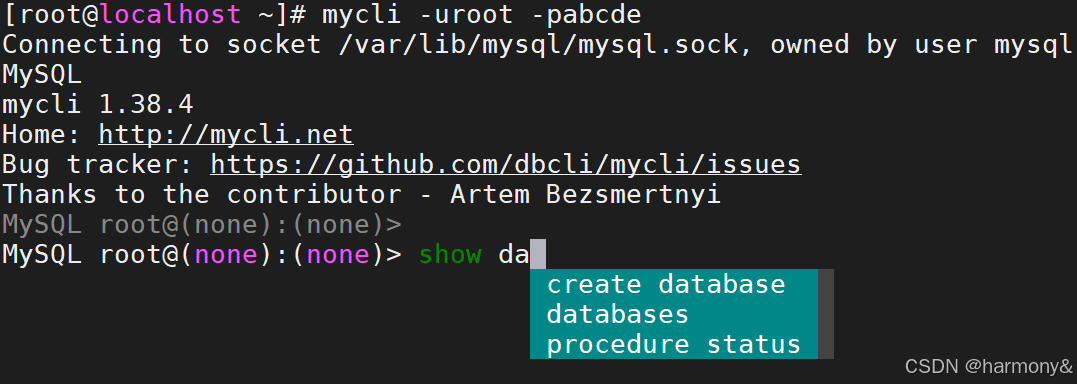
3 SQL 语言
3.1关系型数据库的构成
| 组件 | 关键字 | 说明 |
|---|---|---|
| 数据库 | database | 表的集合,一个数据库中可以有多个表,在文件系统中表出就是一个目录 |
| 表 | table | 在数据库中以二维表的形式出现,有行和列,数据库中的数据就是存放于表中的 |
| 索引 | index | 索引通常建立在一个列上,用以加快数据查询速度 |
| 视图 | view | 用SQL语言构建的虚拟表,可以临时把两个或多个表以逻辑关系关联上,对外提供查询 |
| 存储过程 | procedure | 存储过程是一组为了完成特定功能的SQL语句集合,客户端可以直接调用 |
| 存储函数 | function | 存储函数和存储过程一样,都是SQL语句集合,但可以使用参数 |
| 触发器 | tigger | 触发器也是有SQL语句的集合组成,但需要达到触发条件才能调用 |
| 事件调度器 | event scheduler | 数据库中的计划任务 |
| 用户 | user | 连接服务端时的用户名 |
| 权限 | privilege | 每个用户可以对哪些数据库或表进行操作,在什么IP能连接 |
3.2 SQL语言介绍
SQL:(Structured Query Language)结构化查询语言。
- SQL语言是对IBM公司San Jose,California研究实验室的埃德加·科德的关系模型的第一个商业化语言实现。尽管SQL并非完全按照科德的关系模型设计,但其依然成为最为广泛运用的数据库语言
- 1970年代初,由埃德加·科德发表将资料组成表格的应用原则(Codd's Relational Algebra)。
- 1974年,同一实验室的D.D.Chamberlin 和 R.F.Boyce对Codd's Relational Algebra在研制关系数据库管理系统System R中,研制出一套规范语言SEQUEL(Structured English Query Language)。
- 1976年11月的IBM Journal of R&D上公布新版本的 SQL(叫SEQUEL/2)。1980年改名为SQL。
- 1979年ORACLE公司首先提供商用的SQL,IBM公司在DB2和SQL/DS数据库系统中也实现了SQL。
- 1986年10月美国国家标准学会ANSI采用SQL作为关系数据库管理系统的标准语言(ANSIX3.135-1986)。
- 1987年成为国际标准化组织((ISO)采纳为国际标准。
- 1989年美国ANSI采纳在ANSIX3.135-1989报告中定义的关系数据库管理系统的SQL标准语言,称为 ANSI SQL 89。
- 后续SQL标准经过了一系列的增订,加入了大量新特性,有各种版本:ANSISQL,SQL-1986,SQL-1989,SQL-1992,SQL-1999,SQL-2003,SQL-2008,SQL-2011。
- 目前,所有主要的关系数据库管理系统支持某些形式的SQL,大部分数据库至少遵守ANSISQL89标准。
- 虽然有这一标准的存在,但大部分的SQL代码在不同的数据库系统中并不具有完全的跨平台性。
- 业内标准微软和 Sybase 的T-SQL,Oracle 的 PL/SQL。
3.2.1 SQL 语言规范
- 在数据库系统中,SQL语句不区分大小写,建议用大写。
- SQL语句可单行或多行书写,默认以 **;**结尾。
- 关键词不能跨多行或简写。
- 用空格和TAB缩进来提高语句的可读性。
- 子句通常位于独立行,便于编辑,提高可读性。
bash
#不区分大小写
mysql> select @@hostname;
+-----------------------+
| @@hostname            |
+-----------------------+
| localhost.localdomain |
+-----------------------+
1 row in set (0.00 sec)

mysql> SELect @@HOSTname;
+-----------------------+
| @@HOSTname            |
+-----------------------+
| localhost.localdomain |
+-----------------------+
1 row in set (0.00 sec)

#区分大小写
mysql> SELect user,host from mysql.user;
+------------------+-----------+
| user             | host      |
+------------------+-----------+
| mysql.infoschema | localhost |
| mysql.session    | localhost |
| mysql.sys        | localhost |
| root             | localhost |
+------------------+-----------+
4 rows in set (0.01 sec)

mysql> SELect user,host from mysql.USER;
ERROR 1146 (42S02): Table 'mysql.USER' doesn't exist
mysql> SELect user,HOST from mysql.USER;
ERROR 1146 (42S02): Table 'mysql.USER' doesn't exist

#字段不区分大小写,库名表名区分大小写
mysql> SELect user,HOST from mysql.user;
+------------------+-----------+
| user             | HOST      |
+------------------+-----------+
| mysql.infoschema | localhost |
| mysql.session    | localhost |
| mysql.sys        | localhost |
| root             | localhost |
+------------------+-----------+
范例:跨行
bash
mysql> show databases;
+--------------------+
| Database           |
+--------------------+
| information_schema |
| mysql              |
| performance_schema |
| sys                |
+--------------------+
4 rows in set (0.01 sec)

mysql> show
    -> databases;
+--------------------+
| Database           |
+--------------------+
| information_schema |
| mysql              |
| performance_schema |
| sys                |
+--------------------+
4 rows in set (0.00 sec)

#关键字不能跨行
mysql> show data
    -> bases;
ERROR 1064 (42000): You have an error in your SQL syntax; check the manual that corresponds to your MySQL server version for the right syntax to use near 'data
bases' at line 1
SQL语言中的注释
SQL语言中的标准注释
mysql
-- select version()\G       #单行注释
/*                            #多行注释
select version()\G
select version()\G
*/
select version()\G
范例:
sql
[root@localhost ~]# vim test.sql
-- select version()\G
/*
select version()\G
select version()\G
*/
select version()\G

[root@localhost ~]# mysql < test.sql
*************************** 1. row ***************************
version(): 8.0.26
MySQL中的注释
bash
# select version()\G;           #MySQL中的注释
select version()\G;
范例:
bash
[root@localhost ~]# cat test.sql
# select version()\G;
# select version()\G;
select version()\G;

[root@localhost ~]# mysql < test.sql
*************************** 1. row ***************************
version(): 8.0.26
3.2.2数据库对象和命名
数据库中的组件(对象)
bash
数据库、表、索引、视图、用户、存储过程、函数、触发器、事件调度器等组件命名规则
- 可以包括字母,数字和三个特殊字符(#_$)
- 不能使用MySQL的保留字
3.2.3 SQL 语句分类
| SQL语句类型 | 说明 | 具体语句 |
|---|---|---|
| DDL | Data Defination Language数据定义语言 | CREATE,DROP,ALTER |
| DML | Data Mainpulation Language数据操纵语言 | INSERT,DELETE,UPDATE |
| DQL | Data Query Language数据查询语言 | SELECT |
| DCL | Data Control Language数据控制语言 | GRANT,REVOKE |
| TCL | Transaction Control Language事务控制语言 | BEGIN,COMMIT,ROLLBACK,SAVEPOINT |
DDL:定义结构(建库、建表、删表)
DML:操作表中数据(增、删、改)
DQL:查询表中数据(SELECT)
DCL:权限控制(授权、收权)
TCL:事务控制(提交、回滚)
3.2.4 SQL 语句构成
关键字keyword组成子句clause,多条clause组成语句
mysql
mysql> SELECT host,user,authentication_string FROM mysql.user WHERE authentication_string = '';
+-----------+------+-----------------------+
| host      | user | authentication_string |
+-----------+------+-----------------------+
| localhost | root |                       |
+-----------+------+-----------------------+
1 row in set (0.00 sec)
说明:
bash
SELECT host,user,authentication_string        #select子句
FROM mysql.user                               #from子句
WHERE authentication_string = '';             #where子句
命令行下查看帮助
mysql
mysql> help contents;
You asked for help about help category: "Contents"
For more information, type 'help <item>', where <item> is one of the following
categories:
   Account Management
   Administration
   Components
   Compound Statements
   Contents
   Data Definition
   Data Manipulation
   Data Types
   Functions
   Geographic Features
   Help Metadata
   Language Structure
   Loadable Functions
   Plugins
   Prepared Statements
   Replication Statements
   Storage Engines
   Table Maintenance
   Transactions
   Utility

mysql> help Data Definition         #查看DDL帮助
You asked for help about help category: "Data Definition"
For more information, type 'help <item>', where <item> is one of the following
topics:
   ALTER DATABASE
   ALTER EVENT
   ALTER FUNCTION
   ALTER INSTANCE
   ALTER LOGFILE GROUP
   ALTER PROCEDURE
   ALTER SCHEMA
   ALTER SERVER
   ALTER TABLE
   ALTER TABLESPACE
   ALTER VIEW
   CREATE DATABASE
   CREATE EVENT
   CREATE FUNCTION
   CREATE INDEX
   CREATE LOGFILE GROUP
   CREATE PROCEDURE
   CREATE SCHEMA
   CREATE SERVER
   CREATE SPATIAL REFERENCE SYSTEM
   CREATE TABLE
   CREATE TABLESPACE
   CREATE TRIGGER
   CREATE VIEW
   DROP DATABASE
   DROP EVENT
   DROP FUNCTION
   DROP INDEX
   DROP PROCEDURE
   DROP SCHEMA
   DROP SERVER
   DROP SPATIAL REFERENCE SYSTEM
   DROP TABLE
   DROP TABLESPACE
   DROP TRIGGER
   DROP VIEW
   FOREIGN KEY
   RENAME TABLE
   TRUNCATE TABLE

mysql> help CREATE DATABASE;
Name: 'CREATE DATABASE'
Description:
Syntax:
CREATE {DATABASE | SCHEMA} [IF NOT EXISTS] db_name
    [create_option] ...

create_option: [DEFAULT] {
    CHARACTER SET [=] charset_name
  | COLLATE [=] collation_name
  | ENCRYPTION [=] {'Y' | 'N'}
}

CREATE DATABASE creates a database with the given name. To use this
statement, you need the CREATE privilege for the database. CREATE
SCHEMA is a synonym for CREATE DATABASE.

URL: https://dev.mysql.com/doc/refman/8.0/en/create-database.html
3.2.5字符集和排序
早期MySQL版本默认为latin1,从MySQL8.0开始默认字符集已经为utf8mb4
查看当前版本可用的字符集
mysql
mysql> show CHARACTER SET;                #查看所有支持的字符集
+----------+---------------------------------+---------------------+--------+
| Charset  | Description                     | Default collation   | Maxlen |
+----------+---------------------------------+---------------------+--------+
| armscii8 | ARMSCII-8 Armenian              | armscii8_general_ci |      1 |
| ascii    | US ASCII                        | ascii_general_ci    |      1 |
| big5     | Big5 Traditional Chinese        | big5_chinese_ci     |      2 |
| binary   | Binary pseudo charset           | binary              |      1 |
| cp1250   | Windows Central European        | cp1250_general_ci   |      1 |
| cp1251   | Windows Cyrillic                | cp1251_general_ci   |      1 |
| cp1256   | Windows Arabic                  | cp1256_general_ci   |      1 |
| cp1257   | Windows Baltic                  | cp1257_general_ci   |      1 |
| cp850    | DOS West European               | cp850_general_ci    |      1 |
| cp852    | DOS Central European            | cp852_general_ci    |      1 |
| cp866    | DOS Russian                     | cp866_general_ci    |      1 |
| cp932    | SJIS for Windows Japanese       | cp932_japanese_ci   |      2 |
| dec8     | DEC West European               | dec8_swedish_ci     |      1 |
| eucjpms  | UJIS for Windows Japanese       | eucjpms_japanese_ci |      3 |
| euckr    | EUC-KR Korean                   | euckr_korean_ci     |      2 |
| gb18030  | China National Standard GB18030 | gb18030_chinese_ci  |      4 |
| gb2312   | GB2312 Simplified Chinese       | gb2312_chinese_ci   |      2 |
| gbk      | GBK Simplified Chinese          | gbk_chinese_ci      |      2 |
| geostd8  | GEOSTD8 Georgian                | geostd8_general_ci  |      1 |
| greek    | ISO 8859-7 Greek                | greek_general_ci    |      1 |
| hebrew   | ISO 8859-8 Hebrew               | hebrew_general_ci   |      1 |
| hp8      | HP West European                | hp8_english_ci      |      1 |
| keybcs2  | DOS Kamenicky Czech-Slovak      | keybcs2_general_ci  |      1 |
| koi8r    | KOI8-R Relcom Russian           | koi8r_general_ci    |      1 |
| koi8u    | KOI8-U Ukrainian                | koi8u_general_ci    |      1 |
| latin1   | cp1252 West European            | latin1_swedish_ci   |      1 |
| latin2   | ISO 8859-2 Central European     | latin2_general_ci   |      1 |
| latin5   | ISO 8859-9 Turkish              | latin5_turkish_ci   |      1 |
| latin7   | ISO 8859-13 Baltic              | latin7_general_ci   |      1 |
| macce    | Mac Central European            | macce_general_ci    |      1 |
| macroman | Mac West European               | macroman_general_ci |      1 |
| sjis     | Shift-JIS Japanese              | sjis_japanese_ci    |      2 |
| swe7     | 7bit Swedish                    | swe7_swedish_ci     |      1 |
| tis620   | TIS620 Thai                     | tis620_thai_ci      |      1 |
| ucs2     | UCS-2 Unicode                   | ucs2_general_ci     |      2 |
| ujis     | EUC-JP Japanese                 | ujis_japanese_ci    |      3 |
| utf16    | UTF-16 Unicode                  | utf16_general_ci    |      4 |
| utf16le  | UTF-16LE Unicode                | utf16le_general_ci  |      4 |
| utf32    | UTF-32 Unicode                  | utf32_general_ci    |      4 |
| utf8     | UTF-8 Unicode                   | utf8_general_ci     |      3 |
| utf8mb4  | UTF-8 Unicode                   | utf8mb4_0900_ai_ci  |      4 |
+----------+---------------------------------+---------------------+--------+
41 rows in set (0.00 sec)

mysql> show CHARSET;                #查看所有支持的字符集
查看当前默认字符集
bash
mysql> show variables like 'character%';
+--------------------------+----------------------------+
| Variable_name            | Value                      |
+--------------------------+----------------------------+
| character_set_client     | utf8mb4                    |
| character_set_connection | utf8mb4                    |
| character_set_database   | utf8mb4                    |
| character_set_filesystem | binary                     |
| character_set_results    | utf8mb4                    |
| character_set_server     | utf8mb4                    |
| character_set_system     | utf8mb3                    |
| character_sets_dir       | /usr/share/mysql/charsets/ |
+--------------------------+----------------------------+
8 rows in set (0.01 sec)
修改mysql-server的默认字符集
bash
[root@localhost ~]# vim /etc/my.cnf.d/mysql-server.cnf
[mysqld]
datadir=/var/lib/mysql
socket=/var/lib/mysql/mysql.sock
log-error=/var/log/mysql/mysqld.log
pid-file=/run/mysqld/mysqld.pid
character-set-server=latin1                #新加一行

[root@localhost ~]# vim /etc/my.cnf.d/client.cnf
[client]
default-character-set=latin1               #新加一ha

[root@localhost ~]# systemctl restart mysqld        #重启服务

mysql> show variables like 'character%';
+--------------------------+----------------------------+
| Variable_name            | Value                      |
+--------------------------+----------------------------+
| character_set_client     | latin1                     |
| character_set_connection | latin1                     |
| character_set_database   | latin1                     |
| character_set_filesystem | binary                     |
| character_set_results    | latin1                     |
| character_set_server     | latin1                     |
| character_set_system     | utf8mb3                    |
| character_sets_dir       | /usr/share/mysql/charsets/ |
+--------------------------+----------------------------+
8 rows in set (0.00 sec)

#再改回来,或者还原快照
查看当前版本可用的排序规则
bash
mysql> SHOW COLLATION;
+----------------------------+----------+-----+---------+----------+---------+---------------+
| Collation | Charset | Id | Default | Compiled | Sortlen | Pad_attribute |
+----------------------------+----------+-----+---------+----------+---------+---------------+
| armscii8_bin | armscii8 | 64 | | Yes | 1 | PAD SPACE |
| armscii8_general_ci | armscii8 | 32 | Yes | Yes | 1 | PAD SPACE |
| ascii_bin | ascii | 65 | | Yes | 1 | PAD SPACE |
| ascii_general_ci | ascii | 11 | Yes | Yes | 1 | PAD SPACE |
| big5_bin | big5 | 84 | | Yes | 1 | PAD SPACE |
| big5_chinese_ci | big5 | 1 | Yes | Yes | 1 | PAD SPACE |
| binary | binary | 63 | Yes | Yes | 1 | NO PAD |
| cp1250_bin | cp1250 | 66 | | Yes | 1 | PAD SPACE |
| cp1250_croatian_ci | cp1250 | 44 | | Yes | 1 | PAD SPACE |
| cp1250_czech_cs | cp1250 | 34 | | Yes | 2 | PAD SPACE |
| cp1250_general_ci | cp1250 | 26 | Yes | Yes | 1 | PAD SPACE |
| cp1250_polish_ci | cp1250 | 99 | | Yes | 1 | PAD SPACE |
| cp1251_bin | cp1251 | 50 | | Yes | 1 | PAD SPACE |
| cp1251_bulgarian_ci | cp1251 | 14 | | Yes | 1 | PAD SPACE |
| cp1251_general_ci | cp1251 | 51 | Yes | Yes | 1 | PAD SPACE |
| cp1251_general_cs | cp1251 | 52 | | Yes | 1 | PAD SPACE |
| cp1251_ukrainian_ci | cp1251 | 23 | | Yes | 1 | PAD SPACE |
| cp1256_bin | cp1256 | 67 | | Yes | 1 | PAD SPACE |
| cp1256_general_ci | cp1256 | 57 | Yes | Yes | 1 | PAD SPACE |
| cp1257_bin | cp1257 | 58 | | Yes | 1 | PAD SPACE |
| cp1257_general_ci | cp1257 | 59 | Yes | Yes | 1 | PAD SPACE |
| cp1257_lithuanian_ci | cp1257 | 29 | | Yes | 1 | PAD SPACE |
| cp850_bin | cp850 | 80 | | Yes | 1 | PAD SPACE |
| cp850_general_ci | cp850 | 4 | Yes | Yes | 1 | PAD SPACE |
| cp852_bin | cp852 | 81 | | Yes | 1 | PAD SPACE |
| cp852_general_ci | cp852 | 40 | Yes | Yes | 1 | PAD SPACE |
| cp866_bin | cp866 | 68 | | Yes | 1 | PAD SPACE |
| cp866_general_ci | cp866 | 36 | Yes | Yes | 1 | PAD SPACE |
| cp932_bin | cp932 | 96 | | Yes | 1 | PAD SPACE |
| cp932_japanese_ci | cp932 | 95 | Yes | Yes | 1 | PAD SPACE |
| dec8_bin | dec8 | 69 | | Yes | 1 | PAD SPACE |
| dec8_swedish_ci | dec8 | 3 | Yes | Yes | 1 | PAD SPACE |
| eucjpms_bin | eucjpms | 98 | | Yes | 1 | PAD SPACE |
| eucjpms_japanese_ci | eucjpms | 97 | Yes | Yes | 1 | PAD SPACE |
| euckr_bin | euckr | 85 | | Yes | 1 | PAD SPACE |
| euckr_korean_ci | euckr | 19 | Yes | Yes | 1 | PAD SPACE |
| gb18030_bin | gb18030 | 249 | | Yes | 1 | PAD SPACE |
| gb18030_chinese_ci | gb18030 | 248 | Yes | Yes | 2 | PAD SPACE |
| gb18030_unicode_520_ci | gb18030 | 250 | | Yes | 8 | PAD SPACE |
| gb2312_bin | gb2312 | 86 | | Yes | 1 | PAD SPACE |
| gb2312_chinese_ci | gb2312 | 24 | Yes | Yes | 1 | PAD SPACE |
| gbk_bin | gbk | 87 | | Yes | 1 | PAD SPACE |
| gbk_chinese_ci | gbk | 28 | Yes | Yes | 1 | PAD SPACE |
| geostd8_bin | geostd8 | 93 | | Yes | 1 | PAD SPACE |
| geostd8_general_ci | geostd8 | 92 | Yes | Yes | 1 | PAD SPACE |
| greek_bin | greek | 70 | | Yes | 1 | PAD SPACE |
| greek_general_ci | greek | 25 | Yes | Yes | 1 | PAD SPACE |
| hebrew_bin | hebrew | 71 | | Yes | 1 | PAD SPACE |
| hebrew_general_ci | hebrew | 16 | Yes | Yes | 1 | PAD SPACE |
| hp8_bin | hp8 | 72 | | Yes | 1 | PAD SPACE |
| hp8_english_ci | hp8 | 6 | Yes | Yes | 1 | PAD SPACE |
| keybcs2_bin | keybcs2 | 73 | | Yes | 1 | PAD SPACE |
| keybcs2_general_ci | keybcs2 | 37 | Yes | Yes | 1 | PAD SPACE |
| koi8r_bin | koi8r | 74 | | Yes | 1 | PAD SPACE |
| koi8r_general_ci | koi8r | 7 | Yes | Yes | 1 | PAD SPACE |
| koi8u_bin | koi8u | 75 | | Yes | 1 | PAD SPACE |
| koi8u_general_ci | koi8u | 22 | Yes | Yes | 1 | PAD SPACE |
| latin1_bin | latin1 | 47 | | Yes | 1 | PAD SPACE |
| latin1_danish_ci | latin1 | 15 | | Yes | 1 | PAD SPACE |
| latin1_general_ci | latin1 | 48 | | Yes | 1 | PAD SPACE |
| latin1_general_cs | latin1 | 49 | | Yes | 1 | PAD SPACE |
| latin1_german1_ci | latin1 | 5 | | Yes | 1 | PAD SPACE |
| latin1_german2_ci | latin1 | 31 | | Yes | 2 | PAD SPACE |
| latin1_spanish_ci | latin1 | 94 | | Yes | 1 | PAD SPACE |
| latin1_swedish_ci | latin1 | 8 | Yes | Yes | 1 | PAD SPACE |
| latin2_bin | latin2 | 77 | | Yes | 1 | PAD SPACE |
| latin2_croatian_ci | latin2 | 27 | | Yes | 1 | PAD SPACE |
| latin2_czech_cs | latin2 | 2 | | Yes | 4 | PAD SPACE |
| latin2_general_ci | latin2 | 9 | Yes | Yes | 1 | PAD SPACE |
| latin2_hungarian_ci | latin2 | 21 | | Yes | 1 | PAD SPACE |
| latin5_bin | latin5 | 78 | | Yes | 1 | PAD SPACE |
| latin5_turkish_ci | latin5 | 30 | Yes | Yes | 1 | PAD SPACE |
| latin7_bin | latin7 | 79 | | Yes | 1 | PAD SPACE |
| latin7_estonian_cs | latin7 | 20 | | Yes | 1 | PAD SPACE |
| latin7_general_ci | latin7 | 41 | Yes | Yes | 1 | PAD SPACE |
| latin7_general_cs | latin7 | 42 | | Yes | 1 | PAD SPACE |
| macce_bin | macce | 43 | | Yes | 1 | PAD SPACE |
| macce_general_ci | macce | 38 | Yes | Yes | 1 | PAD SPACE |
| macroman_bin | macroman | 53 | | Yes | 1 | PAD SPACE |
| macroman_general_ci | macroman | 39 | Yes | Yes | 1 | PAD SPACE |
| sjis_bin | sjis | 88 | | Yes | 1 | PAD SPACE |
| sjis_japanese_ci | sjis | 13 | Yes | Yes | 1 | PAD SPACE |
| swe7_bin | swe7 | 82 | | Yes | 1 | PAD SPACE |
| swe7_swedish_ci | swe7 | 10 | Yes | Yes | 1 | PAD SPACE |
| tis620_bin | tis620 | 89 | | Yes | 1 | PAD SPACE |
| tis620_thai_ci | tis620 | 18 | Yes | Yes | 4 | PAD SPACE |
| ucs2_bin | ucs2 | 90 | | Yes | 1 | PAD SPACE |
| ucs2_croatian_ci | ucs2 | 149 | | Yes | 8 | PAD SPACE |
| ucs2_czech_ci | ucs2 | 138 | | Yes | 8 | PAD SPACE |
| ucs2_danish_ci | ucs2 | 139 | | Yes | 8 | PAD SPACE |
| ucs2_esperanto_ci | ucs2 | 145 | | Yes | 8 | PAD SPACE |
| ucs2_estonian_ci | ucs2 | 134 | | Yes | 8 | PAD SPACE |
| ucs2_general_ci | ucs2 | 35 | Yes | Yes | 1 | PAD SPACE |
| ucs2_general_mysql500_ci | ucs2 | 159 | | Yes | 1 | PAD SPACE |
| ucs2_german2_ci | ucs2 | 148 | | Yes | 8 | PAD SPACE |
| ucs2_hungarian_ci | ucs2 | 146 | | Yes | 8 | PAD SPACE |
| ucs2_icelandic_ci | ucs2 | 129 | | Yes | 8 | PAD SPACE |
| ucs2_latvian_ci | ucs2 | 130 | | Yes | 8 | PAD SPACE |
| ucs2_lithuanian_ci | ucs2 | 140 | | Yes | 8 | PAD SPACE |
| ucs2_persian_ci | ucs2 | 144 | | Yes | 8 | PAD SPACE |
| ucs2_polish_ci | ucs2 | 133 | | Yes | 8 | PAD SPACE |
| ucs2_romanian_ci | ucs2 | 131 | | Yes | 8 | PAD SPACE |
| ucs2_roman_ci | ucs2 | 143 | | Yes | 8 | PAD SPACE |
| ucs2_sinhala_ci | ucs2 | 147 | | Yes | 8 | PAD SPACE |
| ucs2_slovak_ci | ucs2 | 141 | | Yes | 8 | PAD SPACE |
| ucs2_slovenian_ci | ucs2 | 132 | | Yes | 8 | PAD SPACE |
| ucs2_spanish2_ci | ucs2 | 142 | | Yes | 8 | PAD SPACE |
| ucs2_spanish_ci | ucs2 | 135 | | Yes | 8 | PAD SPACE |
| ucs2_swedish_ci | ucs2 | 136 | | Yes | 8 | PAD SPACE |
| ucs2_turkish_ci | ucs2 | 137 | | Yes | 8 | PAD SPACE |
| ucs2_unicode_520_ci | ucs2 | 150 | | Yes | 8 | PAD SPACE |
| ucs2_unicode_ci | ucs2 | 128 | | Yes | 8 | PAD SPACE |
| ucs2_vietnamese_ci | ucs2 | 151 | | Yes | 8 | PAD SPACE |
| ujis_bin | ujis | 91 | | Yes | 1 | PAD SPACE |
| ujis_japanese_ci | ujis | 12 | Yes | Yes | 1 | PAD SPACE |
| utf16le_bin | utf16le | 62 | | Yes | 1 | PAD SPACE |
| utf16le_general_ci | utf16le | 56 | Yes | Yes | 1 | PAD SPACE |
| utf16_bin | utf16 | 55 | | Yes | 1 | PAD SPACE |
| utf16_croatian_ci | utf16 | 122 | | Yes | 8 | PAD SPACE |
| utf16_czech_ci | utf16 | 111 | | Yes | 8 | PAD SPACE |
| utf16_danish_ci | utf16 | 112 | | Yes | 8 | PAD SPACE |
| utf16_esperanto_ci | utf16 | 118 | | Yes | 8 | PAD SPACE |
| utf16_estonian_ci | utf16 | 107 | | Yes | 8 | PAD SPACE |
| utf16_general_ci | utf16 | 54 | Yes | Yes | 1 | PAD SPACE |
| utf16_german2_ci | utf16 | 121 | | Yes | 8 | PAD SPACE |
| utf16_hungarian_ci | utf16 | 119 | | Yes | 8 | PAD SPACE |
| utf16_icelandic_ci | utf16 | 102 | | Yes | 8 | PAD SPACE |
| utf16_latvian_ci | utf16 | 103 | | Yes | 8 | PAD SPACE |
| utf16_lithuanian_ci | utf16 | 113 | | Yes | 8 | PAD SPACE |
| utf16_persian_ci | utf16 | 117 | | Yes | 8 | PAD SPACE |
| utf16_polish_ci | utf16 | 106 | | Yes | 8 | PAD SPACE |
| utf16_romanian_ci | utf16 | 104 | | Yes | 8 | PAD SPACE |
| utf16_roman_ci | utf16 | 116 | | Yes | 8 | PAD SPACE |
| utf16_sinhala_ci | utf16 | 120 | | Yes | 8 | PAD SPACE |
| utf16_slovak_ci | utf16 | 114 | | Yes | 8 | PAD SPACE |
| utf16_slovenian_ci | utf16 | 105 | | Yes | 8 | PAD SPACE |
| utf16_spanish2_ci | utf16 | 115 | | Yes | 8 | PAD SPACE |
| utf16_spanish_ci | utf16 | 108 | | Yes | 8 | PAD SPACE |
| utf16_swedish_ci | utf16 | 109 | | Yes | 8 | PAD SPACE |
| utf16_turkish_ci | utf16 | 110 | | Yes | 8 | PAD SPACE |
| utf16_unicode_520_ci | utf16 | 123 | | Yes | 8 | PAD SPACE |
| utf16_unicode_ci | utf16 | 101 | | Yes | 8 | PAD SPACE |
| utf16_vietnamese_ci | utf16 | 124 | | Yes | 8 | PAD SPACE |
| utf32_bin | utf32 | 61 | | Yes | 1 | PAD SPACE |
| utf32_croatian_ci | utf32 | 181 | | Yes | 8 | PAD SPACE |
| utf32_czech_ci | utf32 | 170 | | Yes | 8 | PAD SPACE |
| utf32_danish_ci | utf32 | 171 | | Yes | 8 | PAD SPACE |
| utf32_esperanto_ci | utf32 | 177 | | Yes | 8 | PAD SPACE |
| utf32_estonian_ci | utf32 | 166 | | Yes | 8 | PAD SPACE |
| utf32_general_ci | utf32 | 60 | Yes | Yes | 1 | PAD SPACE |
| utf32_german2_ci | utf32 | 180 | | Yes | 8 | PAD SPACE |
| utf32_hungarian_ci | utf32 | 178 | | Yes | 8 | PAD SPACE |
| utf32_icelandic_ci | utf32 | 161 | | Yes | 8 | PAD SPACE |
| utf32_latvian_ci | utf32 | 162 | | Yes | 8 | PAD SPACE |
| utf32_lithuanian_ci | utf32 | 172 | | Yes | 8 | PAD SPACE |
| utf32_persian_ci | utf32 | 176 | | Yes | 8 | PAD SPACE |
| utf32_polish_ci | utf32 | 165 | | Yes | 8 | PAD SPACE |
| utf32_romanian_ci | utf32 | 163 | | Yes | 8 | PAD SPACE |
| utf32_roman_ci | utf32 | 175 | | Yes | 8 | PAD SPACE |
| utf32_sinhala_ci | utf32 | 179 | | Yes | 8 | PAD SPACE |
| utf32_slovak_ci | utf32 | 173 | | Yes | 8 | PAD SPACE |
| utf32_slovenian_ci | utf32 | 164 | | Yes | 8 | PAD SPACE |
| utf32_spanish2_ci | utf32 | 174 | | Yes | 8 | PAD SPACE |
| utf32_spanish_ci | utf32 | 167 | | Yes | 8 | PAD SPACE |
| utf32_swedish_ci | utf32 | 168 | | Yes | 8 | PAD SPACE |
| utf32_turkish_ci | utf32 | 169 | | Yes | 8 | PAD SPACE |
| utf32_unicode_520_ci | utf32 | 182 | | Yes | 8 | PAD SPACE |
| utf32_unicode_ci | utf32 | 160 | | Yes | 8 | PAD SPACE |
| utf32_vietnamese_ci | utf32 | 183 | | Yes | 8 | PAD SPACE |
| utf8mb4_0900_ai_ci | utf8mb4 | 255 | Yes | Yes | 0 | NO PAD |
| utf8mb4_0900_as_ci | utf8mb4 | 305 | | Yes | 0 | NO PAD |
| utf8mb4_0900_as_cs | utf8mb4 | 278 | | Yes | 0 | NO PAD |
| utf8mb4_0900_bin | utf8mb4 | 309 | | Yes | 1 | NO PAD |
| utf8mb4_bin | utf8mb4 | 46 | | Yes | 1 | PAD SPACE |
| utf8mb4_croatian_ci | utf8mb4 | 245 | | Yes | 8 | PAD SPACE |
| utf8mb4_cs_0900_ai_ci | utf8mb4 | 266 | | Yes | 0 | NO PAD |
| utf8mb4_cs_0900_as_cs | utf8mb4 | 289 | | Yes | 0 | NO PAD |
| utf8mb4_czech_ci | utf8mb4 | 234 | | Yes | 8 | PAD SPACE |
| utf8mb4_danish_ci | utf8mb4 | 235 | | Yes | 8 | PAD SPACE |
| utf8mb4_da_0900_ai_ci | utf8mb4 | 267 | | Yes | 0 | NO PAD |
| utf8mb4_da_0900_as_cs | utf8mb4 | 290 | | Yes | 0 | NO PAD |
| utf8mb4_de_pb_0900_ai_ci | utf8mb4 | 256 | | Yes | 0 | NO PAD |
| utf8mb4_de_pb_0900_as_cs | utf8mb4 | 279 | | Yes | 0 | NO PAD |
| utf8mb4_eo_0900_ai_ci | utf8mb4 | 273 | | Yes | 0 | NO PAD |
| utf8mb4_eo_0900_as_cs | utf8mb4 | 296 | | Yes | 0 | NO PAD |
| utf8mb4_esperanto_ci | utf8mb4 | 241 | | Yes | 8 | PAD SPACE |
| utf8mb4_estonian_ci | utf8mb4 | 230 | | Yes | 8 | PAD SPACE |
| utf8mb4_es_0900_ai_ci | utf8mb4 | 263 | | Yes | 0 | NO PAD |
| utf8mb4_es_0900_as_cs | utf8mb4 | 286 | | Yes | 0 | NO PAD |
| utf8mb4_es_trad_0900_ai_ci | utf8mb4 | 270 | | Yes | 0 | NO PAD |
| utf8mb4_es_trad_0900_as_cs | utf8mb4 | 293 | | Yes | 0 | NO PAD |
| utf8mb4_et_0900_ai_ci | utf8mb4 | 262 | | Yes | 0 | NO PAD |
| utf8mb4_et_0900_as_cs | utf8mb4 | 285 | | Yes | 0 | NO PAD |
| utf8mb4_general_ci | utf8mb4 | 45 | | Yes | 1 | PAD SPACE |
| utf8mb4_german2_ci | utf8mb4 | 244 | | Yes | 8 | PAD SPACE |
| utf8mb4_hr_0900_ai_ci | utf8mb4 | 275 | | Yes | 0 | NO PAD |
| utf8mb4_hr_0900_as_cs | utf8mb4 | 298 | | Yes | 0 | NO PAD |
| utf8mb4_hungarian_ci | utf8mb4 | 242 | | Yes | 8 | PAD SPACE |
| utf8mb4_hu_0900_ai_ci | utf8mb4 | 274 | | Yes | 0 | NO PAD |
| utf8mb4_hu_0900_as_cs | utf8mb4 | 297 | | Yes | 0 | NO PAD |
| utf8mb4_icelandic_ci | utf8mb4 | 225 | | Yes | 8 | PAD SPACE |
| utf8mb4_is_0900_ai_ci | utf8mb4 | 257 | | Yes | 0 | NO PAD |
| utf8mb4_is_0900_as_cs | utf8mb4 | 280 | | Yes | 0 | NO PAD |
| utf8mb4_ja_0900_as_cs | utf8mb4 | 303 | | Yes | 0 | NO PAD |
| utf8mb4_ja_0900_as_cs_ks | utf8mb4 | 304 | | Yes | 24 | NO PAD |
| utf8mb4_latvian_ci | utf8mb4 | 226 | | Yes | 8 | PAD SPACE |
| utf8mb4_la_0900_ai_ci | utf8mb4 | 271 | | Yes | 0 | NO PAD |
| utf8mb4_la_0900_as_cs | utf8mb4 | 294 | | Yes | 0 | NO PAD |
| utf8mb4_lithuanian_ci | utf8mb4 | 236 | | Yes | 8 | PAD SPACE |
| utf8mb4_lt_0900_ai_ci | utf8mb4 | 268 | | Yes | 0 | NO PAD |
| utf8mb4_lt_0900_as_cs | utf8mb4 | 291 | | Yes | 0 | NO PAD |
| utf8mb4_lv_0900_ai_ci | utf8mb4 | 258 | | Yes | 0 | NO PAD |
| utf8mb4_lv_0900_as_cs | utf8mb4 | 281 | | Yes | 0 | NO PAD |
| utf8mb4_persian_ci | utf8mb4 | 240 | | Yes | 8 | PAD SPACE |
| utf8mb4_pl_0900_ai_ci | utf8mb4 | 261 | | Yes | 0 | NO PAD |
| utf8mb4_pl_0900_as_cs | utf8mb4 | 284 | | Yes | 0 | NO PAD |
| utf8mb4_polish_ci | utf8mb4 | 229 | | Yes | 8 | PAD SPACE |
| utf8mb4_romanian_ci | utf8mb4 | 227 | | Yes | 8 | PAD SPACE |
| utf8mb4_roman_ci | utf8mb4 | 239 | | Yes | 8 | PAD SPACE |
| utf8mb4_ro_0900_ai_ci | utf8mb4 | 259 | | Yes | 0 | NO PAD |
| utf8mb4_ro_0900_as_cs | utf8mb4 | 282 | | Yes | 0 | NO PAD |
| utf8mb4_ru_0900_ai_ci | utf8mb4 | 306 | | Yes | 0 | NO PAD |
| utf8mb4_ru_0900_as_cs | utf8mb4 | 307 | | Yes | 0 | NO PAD |
| utf8mb4_sinhala_ci | utf8mb4 | 243 | | Yes | 8 | PAD SPACE |
| utf8mb4_sk_0900_ai_ci | utf8mb4 | 269 | | Yes | 0 | NO PAD |
| utf8mb4_sk_0900_as_cs | utf8mb4 | 292 | | Yes | 0 | NO PAD |
| utf8mb4_slovak_ci | utf8mb4 | 237 | | Yes | 8 | PAD SPACE |
| utf8mb4_slovenian_ci | utf8mb4 | 228 | | Yes | 8 | PAD SPACE |
| utf8mb4_sl_0900_ai_ci | utf8mb4 | 260 | | Yes | 0 | NO PAD |
| utf8mb4_sl_0900_as_cs | utf8mb4 | 283 | | Yes | 0 | NO PAD |
| utf8mb4_spanish2_ci | utf8mb4 | 238 | | Yes | 8 | PAD SPACE |
| utf8mb4_spanish_ci | utf8mb4 | 231 | | Yes | 8 | PAD SPACE |
| utf8mb4_sv_0900_ai_ci | utf8mb4 | 264 | | Yes | 0 | NO PAD |
| utf8mb4_sv_0900_as_cs | utf8mb4 | 287 | | Yes | 0 | NO PAD |
| utf8mb4_swedish_ci | utf8mb4 | 232 | | Yes | 8 | PAD SPACE |
| utf8mb4_tr_0900_ai_ci | utf8mb4 | 265 | | Yes | 0 | NO PAD |
| utf8mb4_tr_0900_as_cs | utf8mb4 | 288 | | Yes | 0 | NO PAD |
| utf8mb4_turkish_ci | utf8mb4 | 233 | | Yes | 8 | PAD SPACE |
| utf8mb4_unicode_520_ci | utf8mb4 | 246 | | Yes | 8 | PAD SPACE |
| utf8mb4_unicode_ci | utf8mb4 | 224 | | Yes | 8 | PAD SPACE |
| utf8mb4_vietnamese_ci | utf8mb4 | 247 | | Yes | 8 | PAD SPACE |
| utf8mb4_vi_0900_ai_ci | utf8mb4 | 277 | | Yes | 0 | NO PAD |
| utf8mb4_vi_0900_as_cs | utf8mb4 | 300 | | Yes | 0 | NO PAD |
| utf8mb4_zh_0900_as_cs | utf8mb4 | 308 | | Yes | 0 | NO PAD |
| utf8_bin | utf8 | 83 | | Yes | 1 | PAD SPACE |
| utf8_croatian_ci | utf8 | 213 | | Yes | 8 | PAD SPACE |
| utf8_czech_ci | utf8 | 202 | | Yes | 8 | PAD SPACE |
| utf8_danish_ci | utf8 | 203 | | Yes | 8 | PAD SPACE |
| utf8_esperanto_ci | utf8 | 209 | | Yes | 8 | PAD SPACE |
| utf8_estonian_ci | utf8 | 198 | | Yes | 8 | PAD SPACE |
| utf8_general_ci | utf8 | 33 | Yes | Yes | 1 | PAD SPACE |
| utf8_general_mysql500_ci | utf8 | 223 | | Yes | 1 | PAD SPACE |
| utf8_german2_ci | utf8 | 212 | | Yes | 8 | PAD SPACE |
| utf8_hungarian_ci | utf8 | 210 | | Yes | 8 | PAD SPACE |
| utf8_icelandic_ci | utf8 | 193 | | Yes | 8 | PAD SPACE |
| utf8_latvian_ci | utf8 | 194 | | Yes | 8 | PAD SPACE |
| utf8_lithuanian_ci | utf8 | 204 | | Yes | 8 | PAD SPACE |
| utf8_persian_ci | utf8 | 208 | | Yes | 8 | PAD SPACE |
| utf8_polish_ci | utf8 | 197 | | Yes | 8 | PAD SPACE |
| utf8_romanian_ci | utf8 | 195 | | Yes | 8 | PAD SPACE |
| utf8_roman_ci | utf8 | 207 | | Yes | 8 | PAD SPACE |
| utf8_sinhala_ci | utf8 | 211 | | Yes | 8 | PAD SPACE |
| utf8_slovak_ci | utf8 | 205 | | Yes | 8 | PAD SPACE |
| utf8_slovenian_ci | utf8 | 196 | | Yes | 8 | PAD SPACE |
| utf8_spanish2_ci | utf8 | 206 | | Yes | 8 | PAD SPACE |
| utf8_spanish_ci | utf8 | 199 | | Yes | 8 | PAD SPACE |
| utf8_swedish_ci | utf8 | 200 | | Yes | 8 | PAD SPACE |
| utf8_tolower_ci | utf8 | 76 | | Yes | 1 | PAD SPACE |
| utf8_turkish_ci | utf8 | 201 | | Yes | 8 | PAD SPACE |
| utf8_unicode_520_ci | utf8 | 214 | | Yes | 8 | PAD SPACE |
| utf8_unicode_ci | utf8 | 192 | | Yes | 8 | PAD SPACE |
| utf8_vietnamese_ci | utf8 | 215 | | Yes | 8 | PAD SPACE |
+----------------------------+----------+-----+---------+----------+---------+---------------+
272 rows in set (0.01 sec)
#utf8_general_ci 不区分大小写
#utf8_bin 区分大小写查看当前使用的排序规则
bash
mysql> SHOW VARIABLES LIKE 'collation%';
+----------------------+--------------------+
| Variable_name        | Value              |
+----------------------+--------------------+
| collation_connection | utf8mb4_0900_ai_ci |
| collation_database   | utf8mb4_0900_ai_ci |
| collation_server     | utf8mb4_0900_ai_ci |
+----------------------+--------------------+
3 rows in set (0.01 sec)
生产环境中,使用uf8mb4编码,使用默认排序规则
3.3管理数据库
3.3.1查看数据库列表
格式:
mysql
SHOW DATABASES;范例:
bash
#默认这四个系统库,不能删除
mysql> SHOW DATABASES;
+--------------------+
| Database           |
+--------------------+
| information_schema |
| mysql              |
| performance_schema |
| sys                |
+--------------------+
4 rows in set (0.01 sec)
3.3.2 创建数据库
格式:
bash
mysql> help create database;
Name: 'CREATE DATABASE'
Description:
Syntax:
CREATE {DATABASE | SCHEMA} [IF NOT EXISTS] db_name
    [create_option] ...

create_option: [DEFAULT] {
    CHARACTER SET [=] charset_name
  | COLLATE [=] collation_name
  | ENCRYPTION [=] {'Y' | 'N'}
}

CREATE DATABASE creates a database with the given name. To use this
statement, you need the CREATE privilege for the database. CREATE
SCHEMA is a synonym for CREATE DATABASE.

URL: https://dev.mysql.com/doc/refman/8.0/en/create-database.html
格式:查询数据库创建语句
mysql
SHOW CREATE DATABASE DBNAME;范例:
bash
mysql> create database testdb1;
Query OK, 1 row affected (0.00 sec)

#如果已存在,再次创建会报错
mysql> create database testdb1;
ERROR 1007 (HY000): Can't create database 'testdb1'; database exists

#不报错,但也没有创建,if not exists表示如果不存在则创建
mysql> create database if not exists testdb1;
Query OK, 1 row affected, 1 warning (0.00 sec)

#查看数据库列表
mysql> SHOW DATABASES;
+--------------------+
| Database           |
+--------------------+
| information_schema |
| mysql              |
| performance_schema |
| sys                |
| testdb1            |
+--------------------+
5 rows in set (0.01 sec)

#查看创建语句,包含默认字符集
mysql> SHOW CREATE DATABASE testdb1;
+----------+-----------------------------------------------------------------------------------------------------------------------------------+
| Database | Create Database                                                                                                                   |
+----------+-----------------------------------------------------------------------------------------------------------------------------------+
| testdb1  | CREATE DATABASE `testdb1` /*!40100 DEFAULT CHARACTER SET utf8mb4 COLLATE utf8mb4_0900_ai_ci */ /*!80016 DEFAULT ENCRYPTION='N' */ |
+----------+-----------------------------------------------------------------------------------------------------------------------------------+
1 row in set (0.00 sec)

#创建时指定字符集
mysql> create database testdb2 DEFAULT CHARACTER SET latin1;
Query OK, 1 row affected (0.01 sec)

#查看创建语句
mysql> show create database testdb2;
+----------+-------------------------------------------------------------------------------------------------------+
| Database | Create Database                                                                                       |
+----------+-------------------------------------------------------------------------------------------------------+
| testdb2  | CREATE DATABASE `testdb2` /*!40100 DEFAULT CHARACTER SET latin1 */ /*!80016 DEFAULT ENCRYPTION='N' */ |
+----------+-------------------------------------------------------------------------------------------------------+
1 row in set (0.00 sec)
创建两个数据库,本质上是在硬盘上创建了两个目录
bash
[root@localhost ~]# ls -d /var/lib/mysql/testdb*
/var/lib/mysql/testdb1  /var/lib/mysql/testdb2
3.3.3 修改数据库
bash
mysql> help ALTER DATABASE;
Name: 'ALTER DATABASE'
Description:
Syntax:
ALTER {DATABASE | SCHEMA} [db_name]
    alter_option ...

alter_option: {
    [DEFAULT] CHARACTER SET [=] charset_name
  | [DEFAULT] COLLATE [=] collation_name
  | [DEFAULT] ENCRYPTION [=] {'Y' | 'N'}
  | READ ONLY [=] {DEFAULT | 0 | 1}
}
范例:修改字符集
mysql
mysql> ALTER DATABASE testdb2 character set utf8mb4 COLLATE utf8mb4_0900_ai_ci;
Query OK, 1 row affected (0.00 sec)

mysql> show create database testdb2\G
*************************** 1. row ***************************
       Database: testdb2
Create Database: CREATE DATABASE `testdb2` /*!40100 DEFAULT CHARACTER SET utf8mb4 COLLATE utf8mb4_0900_ai_ci */ /*!80016 DEFAULT ENCRYPTION='N' */
1 row in set (0.00 sec)
3.3.4删除数据库
格式:
bash
mysql> help DROP DATABASE
Name: 'DROP DATABASE'
Description:
Syntax:
DROP {DATABASE | SCHEMA} [IF EXISTS] db_name
范例:
bash
mysql> SHOW DATABASES;
+--------------------+
| Database           |
+--------------------+
| information_schema |
| mysql              |
| performance_schema |
| sys                |
| testdb1            |
| testdb2            |
+--------------------+
6 rows in set (0.00 sec)

#删除数据库
mysql> DROP DATABASE testdb2;
Query OK, 0 rows affected (0.00 sec)

#删除不存在的库
mysql> DROP DATABASE testdb2;
ERROR 1008 (HY000): Can't drop database 'testdb2'; database doesn't exist

#加if exists判断
mysql> DROP DATABASE IF EXISTS testdb2;
Query OK, 0 rows affected, 1 warning (0.00 sec)

mysql> SHOW DATABASES;
+--------------------+
| Database           |
+--------------------+
| information_schema |
| mysql              |
| performance_schema |
| sys                |
| testdb1            |
+--------------------+
5 rows in set (0.00 sec)

#testdb2对应的目录已不存在
[root@localhost ~]# ls -d /var/lib/mysql/testdb* -d
/var/lib/mysql/testdb1
mysqladmin命令也可以创建和删除数据库
bash
#创建数据库db1
[root@localhost ~]# mysqladmin create db1

mysql> show databases;
+--------------------+
| Database           |
+--------------------+
| db1                |
| information_schema |
| mysql              |
| performance_schema |
| sys                |
| testdb1            |
+--------------------+
6 rows in set (0.00 sec)

#删除数据库db1
[root@localhost ~]# mysqladmin drop testdb1
Dropping the database is potentially a very bad thing to do.
Any data stored in the database will be destroyed.

Do you really want to drop the 'testdb1' database [y/N] y            #回答Y
Database "testdb1" dropped

mysql> show databases;
+--------------------+
| Database           |
+--------------------+
| db1                |
| information_schema |
| mysql              |
| performance_schema |
| sys                |
+--------------------+
5 rows in set (0.00 sec)
删库跑路


3.4数据类型
核心定义:数据库数据类型,是对数据库表中字段(列)所存储数据的类型、范围、格式进行的规范定义。简单说,就是规定"某一列只能存什么类型的数据",比如只能存数字、只能存文字,目的是保证数据存储的规范性、节省存储空间、提高查询效率,避免无效数据插入。
核心作用
- 规范数据:限制字段可存储的数据种类(如手机号字段只能存数字,不能存文字),避免数据混乱;
- 节省空间:不同数据类型占用存储空间不同(如整数比字符串占用空间小),合理选择可减少资源浪费;
- 提升效率:数据库可根据数据类型优化查询、排序操作,加快数据处理速度;
- 保证数据完整性:避免插入不符合要求的数据(如给"年龄"字段插入文字),减少数据错误。
MySQL 中定义数据字段的类型对你数据库的优化是非常重要的。
MySQL 支持多种类型,大致可以分为三类:数值、日期/时间和字符串(字符)类型。
对于任何一个数据表,每一行的每一列对应的元素都是下列数据类型的一种。
| 类型 | 关键字 |
|---|---|
| 整数类型 | TINYINT SMALLINT MEDIUMINT INT (INTEGER) BIGINT |
| 浮点类型 | FLOAT DOUBLE |
| 定点数类型 | DECIMAL |
| 位类型 | BIT |
| 日期时间类型 | YEAR TIME DATE DATETIME TIMESTAMP |
| 文本字符串类型 | CHAR VARCHAR TINYTEXT TEXT MEDIUMTEXT LONGTEXT |
| 枚举类型 | ENUM |
| 集合类型 | SET |
| 二进制字符串类型 | BINARY VARBINARY TINYBLOB BLOB MEDIUMBLOB LONGBLOB |
| JSON 类型 | JSON对象 JSON 数组 |
| 空间数据类型 (单值类型) | GEOMETRY POINT LINESTRING POLYGON |
| 空间数据类型 (集合类型) | MULTIPOINT MULTILINESTRING MULTIPOLYGON GEOMETRYCOLLECTION |
在常见数据表时,除了可以指定列的数据类型,还可以指定列的属性。
| 关键字 | 含义 |
|---|---|
| NULL | 数据列可包含 NULL 值 |
| NOT NULL | 数据列不允许包含 NULL 值 |
| DEFAULT | 默认值 |
| PRIMARY KEY | 主键 |
| AUTO_INCREMENT | 自动递增,适用于整数类型 |
| UNSIGNED | 无符号 |
| CHARACTER SET name | 指定一个字符集 |
常见数据库(MySQL)核心数据类型(必考分类)
- 数值类型(存储数字,最常用)
用于存储整数、小数等数值,按范围和精度分为两类:
- 整数类型:INT(最常用,存储-2147483648~2147483647,如年龄、学号)、TINYINT(小整数,如性别0/1)、BIGINT(大整数,如手机号、身份证号);
- 小数类型:DECIMAL(高精度小数,如金额、价格,推荐使用,避免精度丢失)、FLOAT(单精度小数)、DOUBLE(双精度小数)。
- 字符串类型(存储文字、符号,最常用)
- VARCHAR(n):可变长度字符串,n表示最大长度(如姓名、地址,推荐使用,节省空间);
- CHAR(n):固定长度字符串,n表示固定长度(如身份证号、手机号,长度固定的场景);
- TEXT:存储长文本(如备注、简介,长度超过VARCHAR上限时使用)。
- 日期时间类型(存储时间相关数据)
- DATETIME:存储日期+时间(如注册时间、交易时间,格式:YYYY-MM-DD HH:MM:SS);
- DATE:只存储日期(如出生日期,格式:YYYY-MM-DD);
- TIME:只存储时间(如打卡时间,格式:HH:MM:SS);
- TIMESTAMP:时间戳,自动记录数据插入/更新时间,范围比DATETIME小。
- 其他常用类型
- BOOLEAN:布尔类型,存储TRUE(1)或FALSE(0),如"是否有效""是否审核";
- ENUM:枚举类型,只能从预设的选项中选择一个值(如性别:'男','女')。
3.4.1数值型
MySQL 支持所有标准 SQL 数值数据类型。
这些类型包括严格数值数据类型(INTEGER、SMALLINT、DECIMAL 和 NUMERIC),以及近似数值数据类型(FLOAT、REAL 和 DOUBLE PRECISION)。
关键字INT是INTEGER的同义词,关键字DEC是DECIMAL的同义词。
BIT数据类型保存位字段值,并且支持 MyISAM、MEMORY、InnoDB 和 BDB表。
作为 SQL 标准的扩展,MySQL 也支持整数类型 TINYINT、MEDIUMINT 和 BIGINT。下面的表显示了需要的每个整数类型的存储和范围。
| 类型 | 大小 | 范围(有符号) | 范围(无符号) | 用途 |
|---|---|---|---|---|
| TINYINT | 1 Bytes | (-128,127) | (0,255) | 小整数值 |
| SMALLINT | 2 Bytes | (-32 768,32 767) | (0,65 535) | 大整数值 |
| MEDIUMINT | 3 Bytes | (-8 388 608,8 388 607) | (0,16 777 215) | 大整数值 |
| INT或INTEGER | 4 Bytes | (-2 147 483 648,2 147 483 647) | (0,4 294 967 295) | 大整数值 |
| BIGINT | 8 Bytes | (-9 223 372 036 854 775 808 ,9 223 372 036 854 775 807) | (0,18 446 744 073 709 551 615) | 极大整数值 |
| FLOAT | 4 Bytes | (-3.402 823 466 E+38,-1.175 494 351 E-38),0,(1.175 494 351 E-38,3.402 823 466 351 E+38) | 0,(1.175 494 351 E-38,3.402 823 466 E+38) | 单精度 浮点数值 |
| DOUBLE | 8 Bytes | (-1.797 693 134 862 315 7 E+308,-2.225 073 858 507 201 4 E-308),0,(2.225 073 858 507 201 4 E-308,1.797 693 134 862 315 7 E+308) | 0,(2.225 073 858 507 201 4 E-308,1.797 693 134 862 315 7 E+308) | 双精度 浮点数值 |
| DECIMAL | 对DECIMAL(M,D) ,如果M>D,为M+2否则为D+2 | 依赖于M和D的值 | 依赖于M和D的值 | 小数值 |
3.4.2日期和时间型
表示时间值的日期和时间类型为DATETIME、DATE、TIMESTAMP、TIME和YEAR。
每个时间类型有一个有效值范围和一个"零"值,当指定不合法的MySQL不能表示的值时使用"零"值。
TIMESTAMP类型有专有的自动更新特性,将在后面描述。
| 类型 | 大小 ( bytes) | 范围 | 格式 | 用途 |
|---|---|---|---|---|
| DATE | 3 | 1000-01-01/9999-12-31 | YYYY-MM-DD | 日期值 |
| TIME | 3 | '-838:59:59'/'838:59:59' | HH:MM:SS | 时间值或持续时间 |
| YEAR | 1 | 1901/2155 | YYYY | 年份值 |
| DATETIME | 8 | '1000-01-01 00:00:00' 到 '9999-12-31 23:59:59' | YYYY-MM-DD hh:mm:ss | 混合日期和时间值 |
| TIMESTAMP | 4 | '1970-01-01 00:00:01' UTC 到 '2038-01-19 03:14:07' UTC结束时间是第 2147483647 秒,北京时间 2038-1-19 11:14:07,格林尼治时间 2038年1月19日 凌晨 03:14:07 | YYYY-MM-DD hh:mm:ss | 混合日期和时间值,时间戳 |
3.4.3字符串类型
字符串类型指CHAR、VARCHAR、BINARY、VARBINARY、BLOB、TEXT、ENUM和SET。该节描述了这些类型如何工作以及如何在查询中使用这些类型。
| 类型 | 大小 | 用途 |
|---|---|---|
| CHAR | 0-255 bytes | 定长字符串 |
| VARCHAR | 0-65535 bytes | 变长字符串 |
| TINYBLOB | 0-255 bytes | 不超过 255 个字符的二进制字符串 |
| TINYTEXT | 0-255 bytes | 短文本字符串 |
| BLOB | 0-65 535 bytes | 二进制形式的长文本数据 |
| TEXT | 0-65 535 bytes | 长文本数据 |
| MEDIUMBLOB | 0-16 777 215 bytes | 二进制形式的中等长度文本数据 |
| MEDIUMTEXT | 0-16 777 215 bytes | 中等长度文本数据 |
| LONGBLOB | 0-4 294 967 295 bytes | 二进制形式的极大文本数据 |
| LONGTEXT | 0-4 294 967 295 bytes | 极大文本数据 |
注意:char(n) 和 varchar(n) 中括号中 n 代表字符的个数,并不代表字节个数,比如 CHAR(30) 就可以存储 30 个字符。
CHAR 和 VARCHAR 类型类似,但它们保存和检索的方式不同。它们的最大长度和是否尾部空格被保留等方面也不同。在存储或检索过程中不进行大小写转换。
BINARY 和 VARBINARY 类似于 CHAR 和 VARCHAR,不同的是它们包含二进制字符串而不要非二进制字符串。也就是说,它们包含字节字符串而不是字符字符串。这说明它们没有字符集,并且排序和比较基于列值字节的数值值。
BLOB 是一个二进制大对象,可以容纳可变数量的数据。有 4 种 BLOB 类型:TINYBLOB、BLOB、MEDIUMBLOB 和 LONGBLOB。它们区别在于可容纳存储范围不同。
有 4 种 TEXT 类型:TINYTEXT、TEXT、MEDIUMTEXT 和 LONGTEXT。对应的这 4 种 BLOB 类型,可存储的最大长度不同,可根据实际情况选择。
3.5 DDL 语句
DDL语句主要用来操作数据库中的表。
同一个库中不同表可以使用不同的存储引擎,但建议使用同一种存储引擎。
3.5.1创建表
格式
bash
#帮助
mysql> help create table
Name: 'CREATE TABLE'
Description:
Syntax:
CREATE [TEMPORARY] TABLE [IF NOT EXISTS] tbl_name
    (create_definition,...)
    [table_options]
    [partition_options]

CREATE [TEMPORARY] TABLE [IF NOT EXISTS] tbl_name
    [(create_definition,...)]
    [table_options]
    [partition_options]
    [IGNORE | REPLACE]
    [AS] query_expression

CREATE [TEMPORARY] TABLE [IF NOT EXISTS] tbl_name
    { LIKE old_tbl_name | (LIKE old_tbl_name) }
.....
直接创建
bash
CREATE TABLE [IF NOT EXISTS] 'tbl_name' (col1 type1 修饰符,col2 type2 修饰符,...)

#字段格式
col type1              #定义字段数据类型
PRIMARY KEY(col1,...)  #将该字段设为主键
INDEX(col1,...)        #设置为索引
UNIQUE KEY(COL1,...)   #设置为联合主键

#表选项
ENGINE [=] engine_name
ROW_FORMAT [=] {DEFAULT|DYNAMIC|FIXED|COMPRESSED|REDUNDANT|COMPACT}
范例
mysql
CREATE TABLE student (
id int UNSIGNED AUTO_INCREMENT PRIMARY KEY,
name VARCHAR(20) NOT NULL,
age tinyint UNSIGNED,
#height DECIMAL(5,2),
gender ENUM('M','F') default 'M'
)ENGINE=InnoDB AUTO_INCREMENT=10 DEFAULT CHARSET=utf8mb4;

#选择数据库
mysql> use db1;
Database changed

#执行SQL语句
mysql> CREATE TABLE student (
    -> id int UNSIGNED AUTO_INCREMENT PRIMARY KEY,
    -> name VARCHAR(20) NOT NULL,
    -> age tinyint UNSIGNED,
    -> #height DECIMAL(5,2),
    -> gender ENUM('M','F') default 'M'
    -> )ENGINE=InnoDB AUTO_INCREMENT=10 DEFAULT CHARSET=utf8mb4;
Query OK, 0 rows affected (0.02 sec)

#查看
mysql> show tables;
+---------------+
| Tables_in_db1 |
+---------------+
| student       |
+---------------+
1 row in set (0.00 sec)

#查看结构
mysql> desc student;
+--------+------------------+------+-----+---------+----------------+
| Field  | Type             | Null | Key | Default | Extra          |
+--------+------------------+------+-----+---------+----------------+
| id     | int unsigned     | NO   | PRI | NULL    | auto_increment |
| name   | varchar(20)      | NO   |     | NULL    |                |
| age    | tinyint unsigned | YES  |     | NULL    |                |
| gender | enum('M','F')    | YES  |     | M       |                |
+--------+------------------+------+-----+---------+----------------+
4 rows in set (0.00 sec)

#插入一条数据
mysql> insert student (name,age)values('xiaoming',20);
Query OK, 1 row affected (0.01 sec)

#查询表中的所有数据
mysql> select * from student;
+----+----------+------+--------+
| id | name     | age  | gender |
+----+----------+------+--------+
| 10 | xiaoming |   20 | M      |
+----+----------+------+--------+
1 row in set (0.00 sec)

#再次插入一条数据
mysql> insert student(name,age,gender)values('xiaohong',18,'f');
Query OK, 1 row affected (0.00 sec)

mysql> select * from student;
+----+----------+------+--------+
| id | name     | age  | gender |
+----+----------+------+--------+
| 10 | xiaoming |   20 | M      |
| 11 | xiaohong |   18 | F      |
+----+----------+------+--------+
2 rows in set (0.00 sec)
通过查询现存表创建,新表会被直接插入查询而来的数据
范例
bash
mysql> desc student;
+--------+------------------+------+-----+---------+----------------+
| Field  | Type             | Null | Key | Default | Extra          |
+--------+------------------+------+-----+---------+----------------+
| id     | int unsigned     | NO   | PRI | NULL    | auto_increment |
| name   | varchar(20)      | NO   |     | NULL    |                |
| age    | tinyint unsigned | YES  |     | NULL    |                |
| gender | enum('M','F')    | YES  |     | M       |                |
+--------+------------------+------+-----+---------+----------------+
4 rows in set (0.00 sec)

#查询其他表创建
mysql> create table student2 select name,age from student;
Query OK, 2 rows affected (0.01 sec)
Records: 2  Duplicates: 0  Warnings: 0

#查看
mysql> show tables;
+---------------+
| Tables_in_db1 |
+---------------+
| student       |
| student2      |
+---------------+
2 rows in set (0.00 sec)

#查看结构
mysql> desc student2;
+-------+------------------+------+-----+---------+-------+
| Field | Type             | Null | Key | Default | Extra |
+-------+------------------+------+-----+---------+-------+
| name  | varchar(20)      | NO   |     | NULL    |       |
| age   | tinyint unsigned | YES  |     | NULL    |       |
+-------+------------------+------+-----+---------+-------+
2 rows in set (0.00 sec)

#数据也复制过来了
mysql> select * from student2;
+----------+------+
| name     | age  |
+----------+------+
| xiaoming |   20 |
| xiaohong |   18 |
+----------+------+
2 rows in set (0.00 sec)
通过复制现存的表的表结构创建,但不复制数据
范例
mysql
mysql> desc student;
+--------+------------------+------+-----+---------+----------------+
| Field  | Type             | Null | Key | Default | Extra          |
+--------+------------------+------+-----+---------+----------------+
| id     | int unsigned     | NO   | PRI | NULL    | auto_increment |
| name   | varchar(20)      | NO   |     | NULL    |                |
| age    | tinyint unsigned | YES  |     | NULL    |                |
| gender | enum('M','F')    | YES  |     | M       |                |
+--------+------------------+------+-----+---------+----------------+
4 rows in set (0.00 sec)

mysql> create table student3 like student;
Query OK, 0 rows affected (0.01 sec)

mysql> show tables;
+---------------+
| Tables_in_db1 |
+---------------+
| student       |
| student2      |
| student3      |
+---------------+
3 rows in set (0.00 sec)

mysql> desc student3;
+--------+------------------+------+-----+---------+----------------+
| Field  | Type             | Null | Key | Default | Extra          |
+--------+------------------+------+-----+---------+----------------+
| id     | int unsigned     | NO   | PRI | NULL    | auto_increment |
| name   | varchar(20)      | NO   |     | NULL    |                |
| age    | tinyint unsigned | YES  |     | NULL    |                |
| gender | enum('M','F')    | YES  |     | M       |                |
+--------+------------------+------+-----+---------+----------------+
4 rows in set (0.00 sec)

mysql> select * from student3;
Empty set (0.00 sec)
3.5.2查看表
格式
bash
mysql> help show tables
Name: 'SHOW TABLES'
Description:
Syntax:
SHOW [EXTENDED] [FULL] TABLES
    [{FROM | IN} db_name]
    [LIKE 'pattern' | WHERE expr]
列出数据库中的表
格式
bash
SHOW TABLES [FROM db_name]范例
bash
#查看当前库中所有表
mysql> show tables;
+---------------+
| Tables_in_db1 |
+---------------+
| student       |
| student2      |
| student3      |
+---------------+
3 rows in set (0.00 sec)

#查看指定库中的表
mysql> show tables from db1;
+---------------+
| Tables_in_db1 |
+---------------+
| student       |
| student2      |
| student3      |
+---------------+
3 rows in set (0.00 sec)
查看建表语句
格式
bash
SHOW CREATE TABLE [db_name.]tbl_name范例
bash
mysql> show create table student;
+---------+---------------------------------------------------------------------------------------------------------------------------------------------------------------------------------------------------------------------------------------------------------------------------------------------+
| Table   | Create Table                                                                                                                                                                                                                                                                                |
+---------+---------------------------------------------------------------------------------------------------------------------------------------------------------------------------------------------------------------------------------------------------------------------------------------------+
| student | CREATE TABLE `student` (
  `id` int unsigned NOT NULL AUTO_INCREMENT,
  `name` varchar(20) NOT NULL,
  `age` tinyint unsigned DEFAULT NULL,
  `gender` enum('M','F') DEFAULT 'M',
  PRIMARY KEY (`id`)
) ENGINE=InnoDB AUTO_INCREMENT=12 DEFAULT CHARSET=utf8mb4 COLLATE=utf8mb4_0900_ai_ci |
+---------+---------------------------------------------------------------------------------------------------------------------------------------------------------------------------------------------------------------------------------------------------------------------------------------------+
1 row in set (0.00 sec)


#查看指定数据库的数据表
mysql> show create table db1.student\G
*************************** 1. row ***************************
       Table: student
Create Table: CREATE TABLE `student` (
  `id` int unsigned NOT NULL AUTO_INCREMENT,
  `name` varchar(20) NOT NULL,
  `age` tinyint unsigned DEFAULT NULL,
  `gender` enum('M','F') DEFAULT 'M',
  PRIMARY KEY (`id`)
) ENGINE=InnoDB AUTO_INCREMENT=12 DEFAULT CHARSET=utf8mb4 COLLATE=utf8mb4_0900_ai_ci
1 row in set (0.00 sec)
查看表结构
格式
bash
DESC [db_name.]tbl_name
SHOW COLUMNS FROM [db_name.]tbl_name
范例
bash
mysql> desc student;
+--------+------------------+------+-----+---------+----------------+
| Field  | Type             | Null | Key | Default | Extra          |
+--------+------------------+------+-----+---------+----------------+
| id     | int unsigned     | NO   | PRI | NULL    | auto_increment |
| name   | varchar(20)      | NO   |     | NULL    |                |
| age    | tinyint unsigned | YES  |     | NULL    |                |
| gender | enum('M','F')    | YES  |     | M       |                |
+--------+------------------+------+-----+---------+----------------+
4 rows in set (0.00 sec)

mysql> show columns from student;
+--------+------------------+------+-----+---------+----------------+
| Field  | Type             | Null | Key | Default | Extra          |
+--------+------------------+------+-----+---------+----------------+
| id     | int unsigned     | NO   | PRI | NULL    | auto_increment |
| name   | varchar(20)      | NO   |     | NULL    |                |
| age    | tinyint unsigned | YES  |     | NULL    |                |
| gender | enum('M','F')    | YES  |     | M       |                |
+--------+------------------+------+-----+---------+----------------+
4 rows in set (0.00 sec)
查看表状态
格式
bash
SHOW TABLE STATUS LIKE 'tbl_name'范例
bash
mysql> SHOW TABLE STATUS LIKE 'student';
+---------+--------+---------+------------+------+----------------+-------------+-----------------+--------------+-----------+----------------+---------------------+---------------------+------------+--------------------+----------+----------------+---------+
| Name    | Engine | Version | Row_format | Rows | Avg_row_length | Data_length | Max_data_length | Index_length | Data_free | Auto_increment | Create_time         | Update_time         | Check_time | Collation          | Checksum | Create_options | Comment |
+---------+--------+---------+------------+------+----------------+-------------+-----------------+--------------+-----------+----------------+---------------------+---------------------+------------+--------------------+----------+----------------+---------+
| student | InnoDB |      10 | Dynamic    |    2 |           8192 |       16384 |               0 |            0 |         0 |             12 | 2025-09-18 22:10:21 | 2025-09-18 22:24:45 | NULL       | utf8mb4_0900_ai_ci |     NULL |                |         |
+---------+--------+---------+------------+------+----------------+-------------+-----------------+--------------+-----------+----------------+---------------------+---------------------+------------+--------------------+----------+----------------+---------+
1 row in set (0.00 sec)

mysql> SHOW TABLE STATUS LIKE 'student'\G
*************************** 1. row ***************************
           Name: student
         Engine: InnoDB
        Version: 10
     Row_format: Dynamic
           Rows: 2
 Avg_row_length: 8192
    Data_length: 16384
Max_data_length: 0
   Index_length: 0
      Data_free: 0
 Auto_increment: 12
    Create_time: 2025-09-18 22:10:21
    Update_time: 2025-09-18 22:24:45
     Check_time: NULL
      Collation: utf8mb4_0900_ai_ci
       Checksum: NULL
 Create_options:
        Comment:
1 row in set (0.01 sec)

#不能有库名
mysql> SHOW TABLE STATUS LIKE 'db1.student'\G
Empty set (0.00 sec)
查看库中所有表状态
格式
mysql
SHOW TABLE STATUS FROM db_name范例
bash
mysql> SHOW TABLE STATUS FROM db1\G
*************************** 1. row ***************************
           Name: student
         Engine: InnoDB
        Version: 10
     Row_format: Dynamic
           Rows: 2
 Avg_row_length: 8192
    Data_length: 16384
Max_data_length: 0
   Index_length: 0
      Data_free: 0
 Auto_increment: 12
    Create_time: 2025-09-18 22:10:21
    Update_time: 2025-09-18 22:24:45
     Check_time: NULL
      Collation: utf8mb4_0900_ai_ci
       Checksum: NULL
 Create_options:
        Comment:
*************************** 2. row ***************************
           Name: student2
         Engine: InnoDB
        Version: 10
     Row_format: Dynamic
           Rows: 2
 Avg_row_length: 8192
    Data_length: 16384
Max_data_length: 0
   Index_length: 0
      Data_free: 0
 Auto_increment: NULL
    Create_time: 2025-09-18 22:35:06
    Update_time: 2025-09-18 22:35:06
     Check_time: NULL
      Collation: utf8mb4_0900_ai_ci
       Checksum: NULL
 Create_options:
        Comment:
*************************** 3. row ***************************
           Name: student3
         Engine: InnoDB
        Version: 10
     Row_format: Dynamic
           Rows: 0
 Avg_row_length: 0
    Data_length: 16384
Max_data_length: 0
   Index_length: 0
      Data_free: 0
 Auto_increment: 1
    Create_time: 2025-09-18 22:49:14
    Update_time: NULL
     Check_time: NULL
      Collation: utf8mb4_0900_ai_ci
       Checksum: NULL
 Create_options:
        Comment:
3 rows in set (0.01 sec)
查看当前MySQL服务支持的引擎
格式
mysql
SHOW ENGINES范例
mysql
mysql> SHOW ENGINES;
+--------------------+---------+----------------------------------------------------------------+--------------+------+------------+
| Engine             | Support | Comment                                                        | Transactions | XA   | Savepoints |
+--------------------+---------+----------------------------------------------------------------+--------------+------+------------+
| FEDERATED          | NO      | Federated MySQL storage engine                                 | NULL         | NULL | NULL       |
| MEMORY             | YES     | Hash based, stored in memory, useful for temporary tables      | NO           | NO   | NO         |
| InnoDB             | DEFAULT | Supports transactions, row-level locking, and foreign keys     | YES          | YES  | YES        |
| PERFORMANCE_SCHEMA | YES     | Performance Schema                                             | NO           | NO   | NO         |
| MyISAM             | YES     | MyISAM storage engine                                          | NO           | NO   | NO         |
| MRG_MYISAM         | YES     | Collection of identical MyISAM tables                          | NO           | NO   | NO         |
| BLACKHOLE          | YES     | /dev/null storage engine (anything you write to it disappears) | NO           | NO   | NO         |
| CSV                | YES     | CSV storage engine                                             | NO           | NO   | NO         |
| ARCHIVE            | YES     | Archive storage engine                                         | NO           | NO   | NO         |
+--------------------+---------+----------------------------------------------------------------+--------------+------+------------+
9 rows in set (0.01 sec)

mysql> SHOW ENGINES\G
*************************** 1. row ***************************
      Engine: FEDERATED
     Support: NO
     Comment: Federated MySQL storage engine
Transactions: NULL
          XA: NULL
  Savepoints: NULL
*************************** 2. row ***************************
      Engine: MEMORY
     Support: YES
     Comment: Hash based, stored in memory, useful for temporary tables
Transactions: NO
          XA: NO
  Savepoints: NO
*************************** 3. row ***************************
      Engine: InnoDB
     Support: DEFAULT
     Comment: Supports transactions, row-level locking, and foreign keys
Transactions: YES
          XA: YES
  Savepoints: YES
*************************** 4. row ***************************
      Engine: PERFORMANCE_SCHEMA
     Support: YES
     Comment: Performance Schema
Transactions: NO
          XA: NO
  Savepoints: NO
*************************** 5. row ***************************
      Engine: MyISAM
     Support: YES
     Comment: MyISAM storage engine
Transactions: NO
          XA: NO
  Savepoints: NO
*************************** 6. row ***************************
      Engine: MRG_MYISAM
     Support: YES
     Comment: Collection of identical MyISAM tables
Transactions: NO
          XA: NO
  Savepoints: NO
*************************** 7. row ***************************
      Engine: BLACKHOLE
     Support: YES
     Comment: /dev/null storage engine (anything you write to it disappears)
Transactions: NO
          XA: NO
  Savepoints: NO
*************************** 8. row ***************************
      Engine: CSV
     Support: YES
     Comment: CSV storage engine
Transactions: NO
          XA: NO
  Savepoints: NO
*************************** 9. row ***************************
      Engine: ARCHIVE
     Support: YES
     Comment: Archive storage engine
Transactions: NO
          XA: NO
  Savepoints: NO
9 rows in set (0.00 sec)
3.5.3修改和删除表
mysql
ALTER TABLE tbl_name
    [alter_option [, alter_option] ...]
    [partition_options]
mysql
{ ADD COLUMN <列名> <类型>
| CHANGE COLUMN <旧列名> <新列名> <新列类型>
| ALTER COLUMN <列名> { SET DEFAULT <默认值>丨DROP DEFAULT }
| MODIFY COLUMN <列名> <类型>
| DROP COLUMN <列名>
| RENAME TO <新表名> }
范例
bash
#修改表名
mysql> ALTER TABLE student RENAME stu;
Query OK, 0 rows affected (0.01 sec)

mysql> show tables;
+---------------+
| Tables_in_db1 |
+---------------+
| stu           |
| student2      |
| student3      |
+---------------+
3 rows in set (0.00 sec)

mysql> desc stu;
+--------+------------------+------+-----+---------+----------------+
| Field  | Type             | Null | Key | Default | Extra          |
+--------+------------------+------+-----+---------+----------------+
| id     | int unsigned     | NO   | PRI | NULL    | auto_increment |
| name   | varchar(20)      | NO   |     | NULL    |                |
| age    | tinyint unsigned | YES  |     | NULL    |                |
| gender | enum('M','F')    | YES  |     | M       |                |
+--------+------------------+------+-----+---------+----------------+
4 rows in set (0.00 sec)

#添加表字段
mysql> ALTER TABLE stu ADD phone varchar(11) AFTER name;
Query OK, 0 rows affected (0.01 sec)
Records: 0  Duplicates: 0  Warnings: 0

mysql> desc stu;
+--------+------------------+------+-----+---------+----------------+
| Field  | Type             | Null | Key | Default | Extra          |
+--------+------------------+------+-----+---------+----------------+
| id     | int unsigned     | NO   | PRI | NULL    | auto_increment |
| name   | varchar(20)      | NO   |     | NULL    |                |
| phone  | varchar(11)      | YES  |     | NULL    |                |
| age    | tinyint unsigned | YES  |     | NULL    |                |
| gender | enum('M','F')    | YES  |     | M       |                |
+--------+------------------+------+-----+---------+----------------+
5 rows in set (0.00 sec)

#修改字段类型
mysql> ALTER TABLE stu MODIFY phone int;
Query OK, 2 rows affected (0.01 sec)
Records: 2  Duplicates: 0  Warnings: 0

mysql> desc stu;
+--------+------------------+------+-----+---------+----------------+
| Field  | Type             | Null | Key | Default | Extra          |
+--------+------------------+------+-----+---------+----------------+
| id     | int unsigned     | NO   | PRI | NULL    | auto_increment |
| name   | varchar(20)      | NO   |     | NULL    |                |
| phone  | int              | YES  |     | NULL    |                |
| age    | tinyint unsigned | YES  |     | NULL    |                |
| gender | enum('M','F')    | YES  |     | M       |                |
+--------+------------------+------+-----+---------+----------------+
5 rows in set (0.00 sec)

#修改字段名称和类型
mysql> ALTER TABLE stu CHANGE COLUMN phone mobile char(11);
Query OK, 2 rows affected (0.02 sec)
Records: 2  Duplicates: 0  Warnings: 0

mysql> desc stu;
+--------+------------------+------+-----+---------+----------------+
| Field  | Type             | Null | Key | Default | Extra          |
+--------+------------------+------+-----+---------+----------------+
| id     | int unsigned     | NO   | PRI | NULL    | auto_increment |
| name   | varchar(20)      | NO   |     | NULL    |                |
| mobile | char(11)         | YES  |     | NULL    |                |
| age    | tinyint unsigned | YES  |     | NULL    |                |
| gender | enum('M','F')    | YES  |     | M       |                |
+--------+------------------+------+-----+---------+----------------+
5 rows in set (0.00 sec)

#删除字段
mysql> ALTER TABLE stu DROP COLUMN mobile;
Query OK, 0 rows affected (0.02 sec)
Records: 0  Duplicates: 0  Warnings: 0

mysql> desc stu;
+--------+------------------+------+-----+---------+----------------+
| Field  | Type             | Null | Key | Default | Extra          |
+--------+------------------+------+-----+---------+----------------+
| id     | int unsigned     | NO   | PRI | NULL    | auto_increment |
| name   | varchar(20)      | NO   |     | NULL    |                |
| age    | tinyint unsigned | YES  |     | NULL    |                |
| gender | enum('M','F')    | YES  |     | M       |                |
+--------+------------------+------+-----+---------+----------------+
4 rows in set (0.00 sec)

#修改表字符集
mysql> ALTER TABLE stu character SET utf8;
Query OK, 0 rows affected, 1 warning (0.00 sec)
Records: 0  Duplicates: 0  Warnings: 1

#同时修改数据类型和字符集,只修改字符集,类型也不能少
mysql> ALTER TABLE stu CHANGE name name char(30) character set utf8;
Query OK, 2 rows affected, 1 warning (0.02 sec)
Records: 2  Duplicates: 0  Warnings: 1

#设置字段默认值
mysql> alter table stu alter column gender set default 'M';
Query OK, 0 rows affected (0.01 sec)
Records: 0  Duplicates: 0  Warnings: 0

#添加字段和修改字段
mysql> ALTER TABLE stu ADD is_del bool DEFAULT false;
Query OK, 0 rows affected (0.00 sec)
Records: 0  Duplicates: 0  Warnings: 0

mysql> ALTER TABLE stu modify is_del bool DEFAULT true;
Query OK, 0 rows affected (0.00 sec)
Records: 0  Duplicates: 0  Warnings: 0
范例
bash
mysql> create table stu2 select * from stu;
Query OK, 2 rows affected (0.01 sec)
Records: 2  Duplicates: 0  Warnings: 0

mysql> desc stu2;
+--------+------------------+------+-----+---------+-------+
| Field  | Type             | Null | Key | Default | Extra |
+--------+------------------+------+-----+---------+-------+
| id     | int unsigned     | NO   |     | 0       |       |
| name   | char(30)         | YES  |     | NULL    |       |
| age    | tinyint unsigned | YES  |     | NULL    |       |
| gender | enum('M','F')    | YES  |     | M       |       |
| is_del | tinyint(1)       | YES  |     | 1       |       |
+--------+------------------+------+-----+---------+-------+
5 rows in set (0.00 sec)

#添加主键
mysql> ALTER TABLE stu2 ADD PRIMARY KEY (id);
Query OK, 0 rows affected (0.02 sec)
Records: 0  Duplicates: 0  Warnings: 0

mysql> desc stu2;
+--------+------------------+------+-----+---------+-------+
| Field  | Type             | Null | Key | Default | Extra |
+--------+------------------+------+-----+---------+-------+
| id     | int unsigned     | NO   | PRI | 0       |       |
| name   | char(30)         | YES  |     | NULL    |       |
| age    | tinyint unsigned | YES  |     | NULL    |       |
| gender | enum('M','F')    | YES  |     | M       |       |
| is_del | tinyint(1)       | YES  |     | 1       |       |
+--------+------------------+------+-----+---------+-------+
5 rows in set (0.00 sec)

#删除主键
mysql> ALTER TABLE stu2 DROP PRIMARY KEY;
Query OK, 2 rows affected (0.02 sec)
Records: 2  Duplicates: 0  Warnings: 0

mysql> desc stu2;
+--------+------------------+------+-----+---------+-------+
| Field  | Type             | Null | Key | Default | Extra |
+--------+------------------+------+-----+---------+-------+
| id     | int unsigned     | NO   |     | 0       |       |
| name   | char(30)         | YES  |     | NULL    |       |
| age    | tinyint unsigned | YES  |     | NULL    |       |
| gender | enum('M','F')    | YES  |     | M       |       |
| is_del | tinyint(1)       | YES  |     | 1       |       |
+--------+------------------+------+-----+---------+-------+
5 rows in set (0.00 sec)
删除表
格式
bash
DROP [TEMPORARY] TABLE [IF EXISTS]
    tbl_name [, tbl_name] ...
    [RESTRICT | CASCADE]
范例
bash
mysql> show tables;
+---------------+
| Tables_in_db1 |
+---------------+
| stu           |
| stu2          |
| student2      |
| student3      |
+---------------+
4 rows in set (0.00 sec)

mysql> drop table student2;drop table db1.student3;
Query OK, 0 rows affected (0.01 sec)
Query OK, 0 rows affected (0.01 sec)

mysql> show tables;
+---------------+
| Tables_in_db1 |
+---------------+
| stu           |
| stu2          |
+---------------+
2 rows in set (0.00 sec)
3.6 DML 语句
DML语句包括INSERT,UDPATE,DELETE
3.6.1插入数据
INSERT可以一次往表中插入一条或多条记录
格式
bash
mysql> help INSERT
Name: 'INSERT'
Description:
Syntax:
INSERT [LOW_PRIORITY | DELAYED | HIGH_PRIORITY] [IGNORE]
    [INTO] tbl_name
    [PARTITION (partition_name [, partition_name] ...)]
    [(col_name [, col_name] ...)]
    { {VALUES | VALUE} (value_list) [, (value_list)] ...
      |
      VALUES row_constructor_list
    }
    [AS row_alias[(col_alias [, col_alias] ...)]]
    [ON DUPLICATE KEY UPDATE assignment_list]

INSERT [LOW_PRIORITY | DELAYED | HIGH_PRIORITY] [IGNORE]
    [INTO] tbl_name
    [PARTITION (partition_name [, partition_name] ...)]
    [AS row_alias[(col_alias [, col_alias] ...)]]
    SET assignment_list
    [ON DUPLICATE KEY UPDATE assignment_list]

INSERT [LOW_PRIORITY | HIGH_PRIORITY] [IGNORE]
    [INTO] tbl_name
    [PARTITION (partition_name [, partition_name] ...)]
    [(col_name [, col_name] ...)]
    [AS row_alias[(col_alias [, col_alias] ...)]]
    {SELECT ... | TABLE table_name}
    [ON DUPLICATE KEY UPDATE assignment_list]
简化格式
bash
INSERT tbl_name [(col1,...)] VALUES (val1,...),(val21,...)范例
bash
mysql> select * from stu;
+----+----------+------+--------+--------+
| id | name     | age  | gender | is_del |
+----+----------+------+--------+--------+
| 10 | xiaoming |   20 | M      |      0 |
| 11 | xiaohong |   18 | F      |      0 |
+----+----------+------+--------+--------+
2 rows in set (0.00 sec)

#给出所有字段值(给出所有字段值,可以不用标明字段,只要顺序一一对应即可)
mysql> INSERT INTO stu VALUES(12,'xiaoli',19,'F',0);
Query OK, 1 row affected (0.01 sec)

#只给出部分字段值,因为有些字段值有默认值
mysql> INSERT INTO stu(name,age)VALUES('xiaozhou',20);
Query OK, 1 row affected (0.02 sec)

#一次插入多条
mysql> INSERT INTO stu (name,age)VALUES('test1',20),('test2',21),('test3',22);
Query OK, 3 rows affected (0.01 sec)
Records: 3  Duplicates: 0  Warnings: 0

#有默认值的用默认值,没有默认值的用NULL值
mysql> INSERT stu (age,is_del)VALUES(23,0);
Query OK, 1 row affected (0.00 sec)

#查看
mysql> select * from stu;
+----+----------+------+--------+--------+
| id | name     | age  | gender | is_del |
+----+----------+------+--------+--------+
| 10 | xiaoming |   20 | M      |      0 |
| 11 | xiaohong |   18 | F      |      0 |
| 12 | xiaoli   |   19 | F      |      0 |
| 13 | xiaozhou |   20 | M      |      1 |
| 14 | test1    |   20 | M      |      1 |
| 15 | test2    |   21 | M      |      1 |
| 16 | test3    |   22 | M      |      1 |
| 17 | NULL     |   23 | M      |      0 |
+----+----------+------+--------+--------+
8 rows in set (0.00 sec)

#如果记录不存在就新增,如果存在就更新
mysql> SELECT * FROM stu WHERE id=12;
+----+--------+------+--------+--------+
| id | name   | age  | gender | is_del |
+----+--------+------+--------+--------+
| 12 | xiaoli |   19 | F      |      0 |
+----+--------+------+--------+--------+
1 row in set (0.00 sec)

mysql> INSERT INTO stu (id,name)VALUES(12,'zhangsan');
ERROR 1062 (23000): Duplicate entry '12' for key 'stu.PRIMARY'

mysql> INSERT INTO stu (id,name)VALUES(12,'zhangsan') ON DUPLICATE KEY UPDATE name='zhangsan';
Query OK, 2 rows affected (0.00 sec)

mysql> SELECT * FROM stu WHERE id=12;
+----+----------+------+--------+--------+
| id | name     | age  | gender | is_del |
+----+----------+------+--------+--------+
| 12 | zhangsan |   19 | F      |      0 |
+----+----------+------+--------+--------+
1 row in set (0.00 sec)

#将查询结果当值插入
mysql> insert into stu (name,age,gender) select name,age,gender from stu where id=11;
Query OK, 1 row affected (0.01 sec)
Records: 1  Duplicates: 0  Warnings: 0

mysql> select * from stu;
+----+----------+------+--------+--------+
| id | name     | age  | gender | is_del |
+----+----------+------+--------+--------+
| 10 | xiaoming |   20 | M      |      0 |
| 11 | xiaohong |   18 | F      |      0 |
| 12 | zhangsan |   19 | F      |      0 |
| 13 | xiaozhou |   20 | M      |      1 |
| 14 | test1    |   20 | M      |      1 |
| 15 | test2    |   21 | M      |      1 |
| 16 | test3    |   22 | M      |      1 |
| 17 | NULL     |   23 | M      |      0 |
| 18 | xiaohong |   18 | F      |      1 |
+----+----------+------+--------+--------+
9 rows in set (0.00 sec)

mysql> insert into stu (name,age,gender) select name,age,gender from stu where id in (11,12);
Query OK, 2 rows affected (0.01 sec)
Records: 2  Duplicates: 0  Warnings: 0

mysql> select * from stu;
+----+----------+------+--------+--------+
| id | name     | age  | gender | is_del |
+----+----------+------+--------+--------+
| 10 | xiaoming |   20 | M      |      0 |
| 11 | xiaohong |   18 | F      |      0 |
| 12 | zhangsan |   19 | F      |      0 |
| 13 | xiaozhou |   20 | M      |      1 |
| 14 | test1    |   20 | M      |      1 |
| 15 | test2    |   21 | M      |      1 |
| 16 | test3    |   22 | M      |      1 |
| 17 | NULL     |   23 | M      |      0 |
| 18 | xiaohong |   18 | F      |      1 |
| 19 | xiaohong |   18 | F      |      1 |
| 20 | zhangsan |   19 | F      |      1 |
+----+----------+------+--------+--------+
11 rows in set (0.00 sec)
3.6.2 更新数据
更新数据一定要加条件限制,没有条件则会更新表中所有记录。
mysql
UPDATE [LOW_PRIORITY] [IGNORE] table_reference
    SET assignment_list
    [WHERE where_condition]
    [ORDER BY ...]
    [LIMIT row_count]
范例
bash
#不加条件表示更新所有
mysql> UPDATE stu set age=30,gender='F';
Query OK, 11 rows affected (0.00 sec)
Rows matched: 11  Changed: 11  Warnings: 0

mysql> select * from stu;
+----+----------+------+--------+--------+
| id | name     | age  | gender | is_del |
+----+----------+------+--------+--------+
| 10 | xiaoming |   30 | F      |      0 |
| 11 | xiaohong |   30 | F      |      0 |
| 12 | zhangsan |   30 | F      |      0 |
| 13 | xiaozhou |   30 | F      |      1 |
| 14 | test1    |   30 | F      |      1 |
| 15 | test2    |   30 | F      |      1 |
| 16 | test3    |   30 | F      |      1 |
| 17 | NULL     |   30 | F      |      0 |
| 18 | xiaohong |   30 | F      |      1 |
| 19 | xiaohong |   30 | F      |      1 |
| 20 | zhangsan |   30 | F      |      1 |
+----+----------+------+--------+--------+
11 rows in set (0.00 sec)

#根据条件更新
mysql> update stu set age=31 WHERE id>15;
Query OK, 5 rows affected (0.01 sec)
Rows matched: 5  Changed: 5  Warnings: 0

mysql> select * from stu;
+----+----------+------+--------+--------+
| id | name     | age  | gender | is_del |
+----+----------+------+--------+--------+
| 10 | xiaoming |   30 | F      |      0 |
| 11 | xiaohong |   30 | F      |      0 |
| 12 | zhangsan |   30 | F      |      0 |
| 13 | xiaozhou |   30 | F      |      1 |
| 14 | test1    |   30 | F      |      1 |
| 15 | test2    |   30 | F      |      1 |
| 16 | test3    |   31 | F      |      1 |
| 17 | NULL     |   31 | F      |      0 |
| 18 | xiaohong |   31 | F      |      1 |
| 19 | xiaohong |   31 | F      |      1 |
| 20 | zhangsan |   31 | F      |      1 |
+----+----------+------+--------+--------+
11 rows in set (0.00 sec)

#多个条件,满足任何一个条件都更新 OR 可以写成 ||
mysql> update stu set age=21,gender='M' where (id=15 OR name is null);
Query OK, 2 rows affected (0.01 sec)
Rows matched: 2  Changed: 2  Warnings: 0

mysql> select * from stu;
+----+----------+------+--------+--------+
| id | name     | age  | gender | is_del |
+----+----------+------+--------+--------+
| 10 | xiaoming |   30 | F      |      0 |
| 11 | xiaohong |   30 | F      |      0 |
| 12 | zhangsan |   30 | F      |      0 |
| 13 | xiaozhou |   30 | F      |      1 |
| 14 | test1    |   30 | F      |      1 |
| 15 | test2    |   21 | M      |      1 |
| 16 | test3    |   31 | F      |      1 |
| 17 | NULL     |   21 | M      |      0 |
| 18 | xiaohong |   31 | F      |      1 |
| 19 | xiaohong |   31 | F      |      1 |
| 20 | zhangsan |   31 | F      |      1 |
+----+----------+------+--------+--------+
11 rows in set (0.00 sec)

#多个条件满足,AND 可以写成 &&
mysql> update stu set age=22,gender='M' WHERE (id=17 AND name is null);
Query OK, 1 row affected (0.02 sec)
Rows matched: 1  Changed: 1  Warnings: 0

mysql> select * from stu;
+----+----------+------+--------+--------+
| id | name     | age  | gender | is_del |
+----+----------+------+--------+--------+
| 10 | xiaoming |   30 | F      |      0 |
| 11 | xiaohong |   30 | F      |      0 |
| 12 | zhangsan |   30 | F      |      0 |
| 13 | xiaozhou |   30 | F      |      1 |
| 14 | test1    |   30 | F      |      1 |
| 15 | test2    |   21 | M      |      1 |
| 16 | test3    |   31 | F      |      1 |
| 17 | NULL     |   22 | M      |      0 |
| 18 | xiaohong |   31 | F      |      1 |
| 19 | xiaohong |   31 | F      |      1 |
| 20 | zhangsan |   31 | F      |      1 |
+----+----------+------+--------+--------+
11 rows in set (0.00 sec)

#NULL要写 IS NULL
mysql> update stu set gender='F' where name=NULL;
Query OK, 0 rows affected (0.01 sec)
Rows matched: 0  Changed: 0  Warnings: 0

mysql> update stu set gender='F' where name IS NULL;
Query OK, 0 rows affected (0.00 sec)
Rows matched: 0  Changed: 0  Warnings: 0
保证无法在没有条件的情况下更新所有
bash
-U, --i-am-a-dummy  Synonym for option --safe-updates, -U.
[root@localhost ~]# mysql -U

#该配置还可以写到配置文件中
[root@localhost ~]# vim /etc/my.cnf.d/client.cnf
[client]
safe-updates

#无法完全更新
mysql> update stu set age=22;
ERROR 1175 (HY000): You are using safe update mode and you tried to update a table without a WHERE that uses a KEY column.

mysql> update stu set age=23 where name='test3';
ERROR 1175 (HY000): You are using safe update mode and you tried to update a table without a WHERE that uses a KEY column.

#必须要指定主键
mysql> UPDATE stu SET age=23 WHERE id=17;
Query OK, 1 row affected (0.00 sec)
Rows matched: 1  Changed: 1  Warnings: 0

mysql> select * from stu;
+----+----------+------+--------+--------+
| id | name     | age  | gender | is_del |
+----+----------+------+--------+--------+
| 10 | xiaoming |   30 | F      |      0 |
| 11 | xiaohong |   30 | F      |      0 |
| 12 | zhangsan |   30 | F      |      0 |
| 13 | xiaozhou |   30 | F      |      1 |
| 14 | test1    |   30 | F      |      1 |
| 15 | test2    |   21 | M      |      1 |
| 16 | test3    |   31 | F      |      1 |
| 17 | NULL     |   23 | F      |      0 |
| 18 | xiaohong |   31 | F      |      1 |
| 19 | xiaohong |   31 | F      |      1 |
| 20 | zhangsan |   31 | F      |      1 |
+----+----------+------+--------+--------+
11 rows in set (0.00 sec)
3.6.3 删除数据
格式
bash
DELETE [LOW_PRIORITY] [QUICK] [IGNORE]
    tbl_name[.*] [, tbl_name[.*]] ...
    FROM table_references
    [WHERE where_condition]

DELETE [LOW_PRIORITY] [QUICK] [IGNORE]
    FROM tbl_name[.*] [, tbl_name[.*]] ...
    USING table_references
    [WHERE where_condition]
范例
bash
#查看全部数据
mysql> select * from stu;
+----+----------+------+--------+--------+
| id | name     | age  | gender | is_del |
+----+----------+------+--------+--------+
| 10 | xiaoming |   30 | F      |      0 |
| 11 | xiaohong |   30 | F      |      0 |
| 12 | zhangsan |   30 | F      |      0 |
| 13 | xiaozhou |   30 | F      |      1 |
| 14 | test1    |   30 | F      |      1 |
| 15 | test2    |   21 | M      |      1 |
| 16 | test3    |   31 | F      |      1 |
| 17 | NULL     |   23 | F      |      0 |
| 18 | xiaohong |   31 | F      |      1 |
| 19 | xiaohong |   31 | F      |      1 |
| 20 | zhangsan |   31 | F      |      1 |
+----+----------+------+--------+--------+
11 rows in set (0.00 sec)

#根据条件删除
mysql> delete from stu where id=10;
Query OK, 1 row affected (0.00 sec)

mysql> select * from stu;
+----+----------+------+--------+--------+
| id | name     | age  | gender | is_del |
+----+----------+------+--------+--------+
| 11 | xiaohong |   30 | F      |      0 |
| 12 | zhangsan |   30 | F      |      0 |
| 13 | xiaozhou |   30 | F      |      1 |
| 14 | test1    |   30 | F      |      1 |
| 15 | test2    |   21 | M      |      1 |
| 16 | test3    |   31 | F      |      1 |
| 17 | NULL     |   23 | F      |      0 |
| 18 | xiaohong |   31 | F      |      1 |
| 19 | xiaohong |   31 | F      |      1 |
| 20 | zhangsan |   31 | F      |      1 |
+----+----------+------+--------+--------+
10 rows in set (0.00 sec)
在直实生产环境中,一般不会对数据做物理删除,而是用字段来标记为逻辑删除,将对应字段值设为某个特定项(is_del ),(is_del=1)认为是己删除
bash
mysql> UPDATE stu SET is_del=1 WHERE id=11;
Query OK, 0 rows affected (0.00 sec)
Rows matched: 1  Changed: 0  Warnings: 0

mysql> select * from stu;
+----+----------+------+--------+--------+
| id | name     | age  | gender | is_del |
+----+----------+------+--------+--------+
| 11 | xiaohong |   30 | F      |      1 |
| 12 | zhangsan |   30 | F      |      0 |
| 13 | xiaozhou |   30 | F      |      1 |
| 14 | test1    |   30 | F      |      1 |
| 15 | test2    |   21 | M      |      1 |
| 16 | test3    |   31 | F      |      1 |
| 17 | NULL     |   23 | F      |      0 |
| 18 | xiaohong |   31 | F      |      1 |
| 19 | xiaohong |   31 | F      |      1 |
| 20 | zhangsan |   31 | F      |      1 |
+----+----------+------+--------+--------+
10 rows in set (0.00 sec)
清空表
bash
TRUNCATE TABLE tbl_name;   #DDL语句,不支持事务,效率更高
DELETE FROM tbl_name;      #DML语句