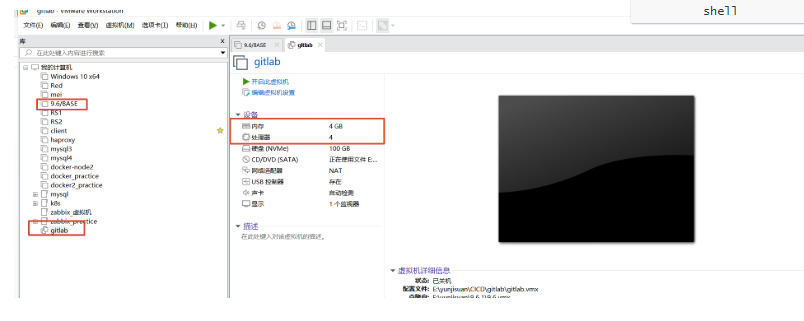
准备一台主机,内存需 4GB,处理器需 4 核。
vmset.sh ens160 172.25.254.10 gitlab
安装git
#在rhel9的系统中默认自带git
root@CICD-node1 \~# dnf install git -y
#设定命令补全功能
root@CICD-node1 \~# mkdir timinglee
root@CICD-node1 timinglee# echo "source /usr/share/bash-completion/completions/git" >> ~/.bashrc
root@CICD-node1 timinglee# source ~/.bashrc
#效果, 补齐 git 按住 Tab补全键
root@gitlab \~# git
add branch clone format-patch init notes refs revert sparse-checkout
初始化
root@CICD-node1 timinglee# git init
提示:使用 'master' 作为初始分支的名称。这个默认分支名称可能会更改。要在新仓库中
提示:配置使用初始分支名,并消除这条警告,请执行:
提示:
提示: git config --global init.defaultBranch <名称>
提示:
提示:除了 'master' 之外,通常选定的名字有 'main'、'trunk' 和 'development'。
提示:可以通过以下命令重命名刚创建的分支:
提示:
提示: git branch -m <name>
已初始化空的 Git 仓库于 /root/timinglee/.git/
root@CICD-node1 timinglee# ls -a
. .. .git
root@CICD-node1 timinglee# ls .git/
branches config description HEAD hooks info objects refs
#设定用户信息
root@CICD-node1 timinglee# git config --global user.name "timinglee"
root@CICD-node1 timinglee# git config --global user.email "timinglee@timinglee.org"
#查看当前文件状态
root@CICD-node1 timinglee# git status
位于分支 master
尚无提交
无文件要提交(创建/拷贝文件并使用 "git add" 建立跟踪)
root@CICD-node1 timinglee# git status -s #简化输出
.git目录是git跟踪管理版本库的,没事别瞎溜达
#总结一下用法,简洁命令
root@CICD-node1 timinglee# git status -s #查看状态
root@CICD-node1 timinglee# git add README.md #提交到暂存区
root@CICD-node1 timinglee# git commit -m "add README.md" #查看到是否到库里面
root@CICD-node1 timinglee# git checkout -- README.md #撤销修改(在库里面修改,并退出来)
root@CICD-node1 timinglee# git restore --staged README.md ##(从暂存区撤销)
root@gitlab timinglee# git diff #查看已暂存和未暂存的修改变化
root@gitlab timinglee# git commit -a -m "update v3" #跳过使用暂存区
root@CICD-node1 timinglee# git reflog #查看提交动作
16141e7 HEAD@{1}: commit: add lee.txt
root@CICD-node1 timinglee# git reset --hard 16141 #版本回退到删除之前
root@gitlab timinglee# ls
root@gitlab timinglee# touch README.md
root@gitlab timinglee# vim README.md
hell timinglee v1
root@CICD-node1 timinglee# git status -s
?? README.md #?? 新建文件未添加到版本库
root@CICD-node1 timinglee# git add README.md
root@CICD-node1 timinglee# git status -s
A README.md #A 已添加到暂存区
#提交暂存区的数据
root@CICD-node1 timinglee# git commit -m "add README.md"
master(根提交) 74625b0 add README.md
1 file changed, 1 insertion(+)
create mode 100644 README.md
root@CICD-node1 timinglee# git status -s #无任何显示,标识已经提交到版本库
#再次修改
root@CICD-node1 timinglee# vim README.md
timnglee
timnglee
root@CICD-node1 timinglee# git status -s
M README.md #右M 表示文件在工作区被修改
#撤销修改(在库里面修改,并退出来)
root@CICD-node1 timinglee# git checkout -- README.md
从索引区更新了 1 个路径
root@CICD-node1 timinglee# cat README.md
hell timinglee v1
#从新修改
root@CICD-node1 timinglee# echo timinglee>> README.md
root@CICD-node1 timinglee# git add README.md
root@CICD-node1 timinglee# git status -s
M README.md #左M表示文件已经在版本库中并被跟踪,
#(从暂存区撤销)
root@CICD-node1 timinglee# git restore --staged README.md
root@CICD-node1 timinglee# git status -s
#同时有暂存文件和更新文件
root@CICD-node1 timinglee# echo timinglee2 >> README.md
root@CICD-node1 timinglee# git add README.md
root@CICD-node1 timinglee# echo timinglee3 >> README.md
root@CICD-node1 timinglee# git status -s
MM README.md #MM表示有一部分在暂存区,还有一部分没有提交
#如果现在提交只能提交在暂存区中的部分(commit必须先走git add 才能提交到库里面)
root@CICD-node1 timinglee# git commit -m "update v2"
master dc9b45f update v2
1 file changed, 1 insertion(+)
root@CICD-node1 timinglee# git status -s
#查看已暂存和未暂存的修改变化
root@gitlab timinglee# git diff
diff --git a/README.md b/README.md
index 2a8a6c8..22ef2b7 100644
--- a/README.md
+++ b/README.md
@@ -1,3 +1,4 @@
hello timinglee v1
timinglee
timinglee2
+timinglee3
root@gitlab timinglee# git status -s
#跳过使用暂存区,
root@gitlab timinglee# git commit -a -m "update v3"
master bfcc2b7 update v3
1 file changed, 1 insertion(+)
root@gitlab timinglee# git status -s
root@gitlab timinglee# git diff
root@gitlab timinglee#
#撤销工作区中删除动作
root@CICD-node1 timinglee# touch lee.txt
root@CICD-node1 timinglee#vim lee.txt
test
root@CICD-node1 timinglee# git add lee.txt
root@gitlab timinglee# git status -s
A lee.txt #这里的A 表示没有在库里面有数据,只是在暂存区有数据
root@gitlab timinglee# git commit -m "add lee.txt"
master 8963a94 add lee.txt
1 file changed, 0 insertions(+), 0 deletions(-)
create mode 100644 lee.txt
root@gitlab timinglee# git status -s
root@gitlab timinglee# rm -f lee.txt
root@gitlab timinglee# git status -s
D lee.txt
root@gitlab timinglee# git checkout -- lee.txt #从库里面恢复
root@gitlab timinglee# ls
lee.txt README.md
root@gitlab timinglee# git status -s
root@gitlab timinglee#
#从库里面删除数据
root@CICD-node1 timinglee# git rm lee.txt
rm 'lee.txt'
root@CICD-node1 timinglee# git status -s
D lee.txt
root@CICD-node1 timinglee# git commit -m "delete lee.txt"
master 85483db delete lee.txt
1 file changed, 0 insertions(+), 0 deletions(-)
delete mode 100644 lee.txt
root@CICD-node1 timinglee# git status -s
root@CICD-node1 timinglee# git reflog #查看提交动作
85483db (HEAD -> master) HEAD@{0}: commit: delete lee.txt
16141e7 HEAD@{1}: commit: add lee.txt
3579560 HEAD@{2}: commit: update v3
dc9b45f HEAD@{3}: commit: update v2
6a14bb5 HEAD@{4}: commit: update v1
74625b0 HEAD@{5}: commit (initial): add README.md
#版本回退到删除之前
root@CICD-node1 timinglee# git reset --hard 16141e7
HEAD 现在位于 16141e7 add lee.txt
root@CICD-node1 timinglee# ls
dir1 lee.txt README.md
git对于文件如何忽略
在做软件开发时对源码编译会产生一些临时文件,我们在提交时需要忽略这些临时文
root@CICD-node1 timinglee# mkdir dir1/
root@CICD-node1 timinglee# touch dir1/.file2
root@CICD-node1 timinglee# git status -s
?? .file1
?? dir1/
root@CICD-node1 timinglee# echo .file1 > .gitignore
root@CICD-node1 timinglee# git status -s
?? .gitignore
?? dir1/
root@CICD-node1 timinglee# echo ".*" > .gitignore
root@CICD-node1 timinglee# git status -s
部署git代码仓库
官网:https://about.gitlab.com/install/
中文站点: GitLab下载与安装指南 - 官方免费试用版 - 极狐GitLab
官方包地址:Index of gitlab/gitlab-ce/
老师的安装方式
(Index of /gitlab/gitlab-ce/el/9/x86_64/Packages/g/)
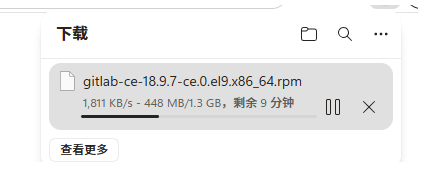
需要安装包gitlab-ce-18.9.7-ce.0.el9.x86_64.rpm 已经在
C:\Users\姚永强\Desktop\高级课\自己总结的文件\CICID\software
上传到gitlab主机上的root
#在安装包之前需配置好软件仓库来解决依赖性
root@CICD-node1 \~# dnf install -y curl policycoreutils-python-utils openssh-server perl
#由于版本更新,需要安装对应的包,系统的包有依赖又删不掉,知道匹配系统的包了(执行这条命令就行了)
dnf install policycoreutils-python-utils openssh-server perl --nobest
#安装离线安装包,
root@gitlab \~# rpm -ivh gitlab-ce-18.9.7-ce.0.el9.x86_64.rpm
配置gitlab
root@CICD-node1 gitlab# vim /etc/gitlab/gitlab.rb
32
external_url 'http://172.25.254.10' #自己本地电脑的ip
#修改配置文件后需利用gitlab-crt来生效,
root@CICD-node1 gitlab# gitlab-ctl reconfigure
#执行命令成功后会把所有组件全部启动起来
登陆gitlab
用户名默认为 root 。如果在安装过程中指定了初始密码,则用初始密码登录,如果未指定密码,则系统会随机生成一个密码并存储在 /etc/gitlab/initial_root_password 文件中, 查看随机密码并使用 root 用户名登录。
!WARNING
注意:出于安全原因,24 小时后,/etc/gitlab/initial_root_password 会被第一次 gitlab-ctl reconfigure 自动删除,因此若使用随机密码登录,建议安装成功初始登录成功之后,立即修改初始密
#查看原始密码
root@CICD-node1 gitlab# cat /etc/gitlab/initial_root_password
WARNING: This value is valid only in the following conditions
1. If provided manually (either via `GITLAB_ROOT_PASSWORD` environment variable or via `gitlab_rails'initial_root_password'` setting in `gitlab.rb`, it was provided before database was seeded for the first time (usually, the first reconfigure run).
2. Password hasn't been changed manually, either via UI or via command line.
If the password shown here doesn't work, you must reset the admin password following https://docs.gitlab.com/ee/security/reset_user_password.html#reset-your-root-password.
Password: jN9lq6NSP8a2V+4n57djzWlEGP7RZ43DSIse8sXJGTQ= #密码
NOTE: This file will be automatically deleted in the first reconfigure run after 24 hours.
浏览器输入172.25.254.10 但是有时候数输入之后是不成功的,可能别的程序在占用80端口,可以使用netstat -tulnp | grep 80 查看
tcp 0 0 0.0.0.0:80 0.0.0.0:* LISTEN 164738/nginx: maste (正确的)
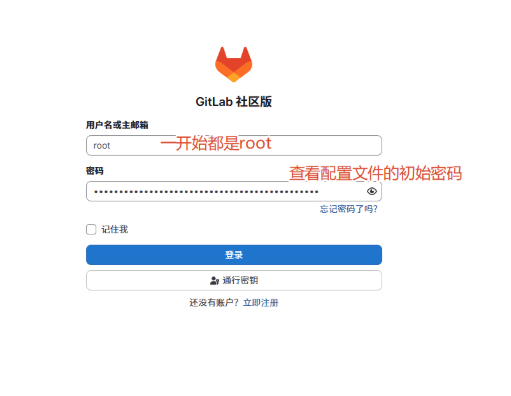
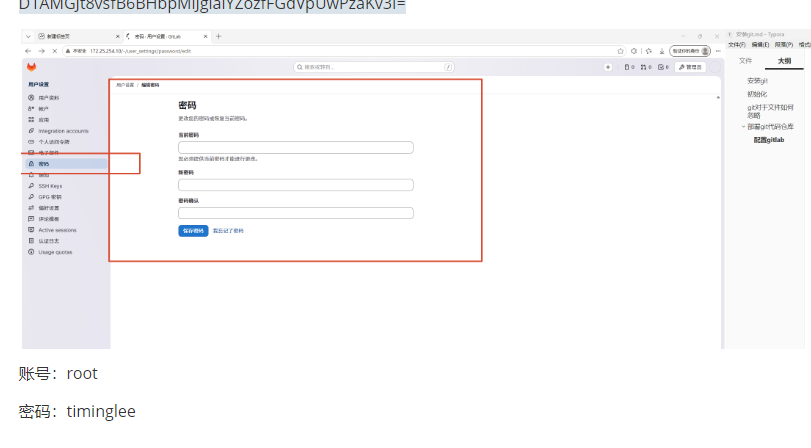
修改密码
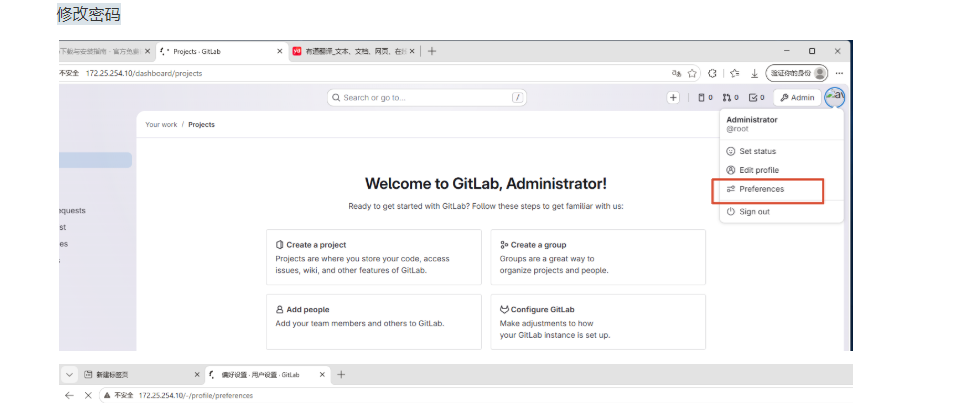
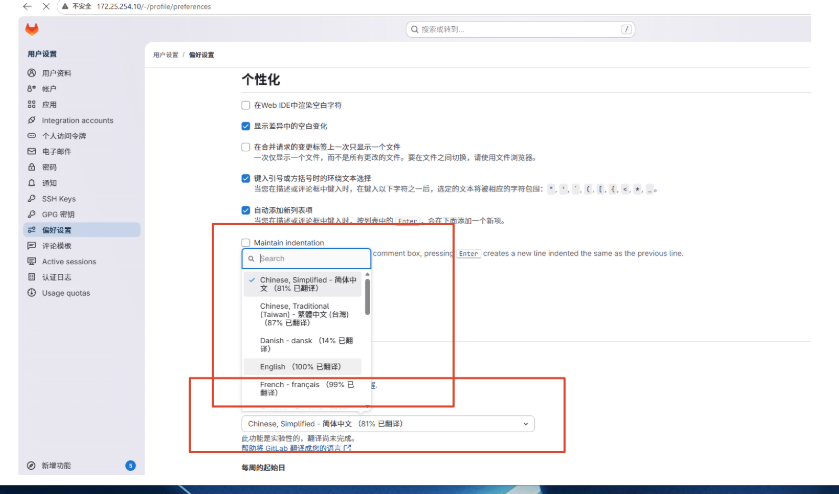
#修改密码
D1AMGJt8vsfB6BHbpMlJgiaiYZozfFGdVpUwPzaKv3I=
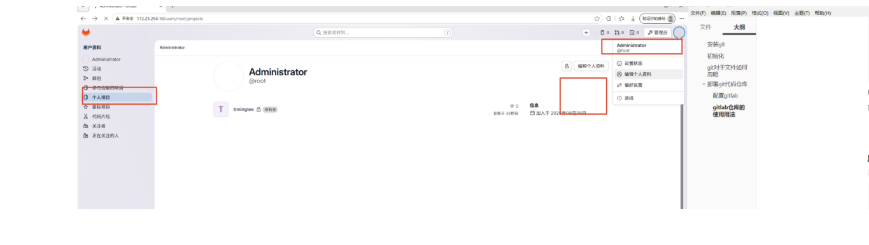
gitlab仓库的使用用法
新建项目
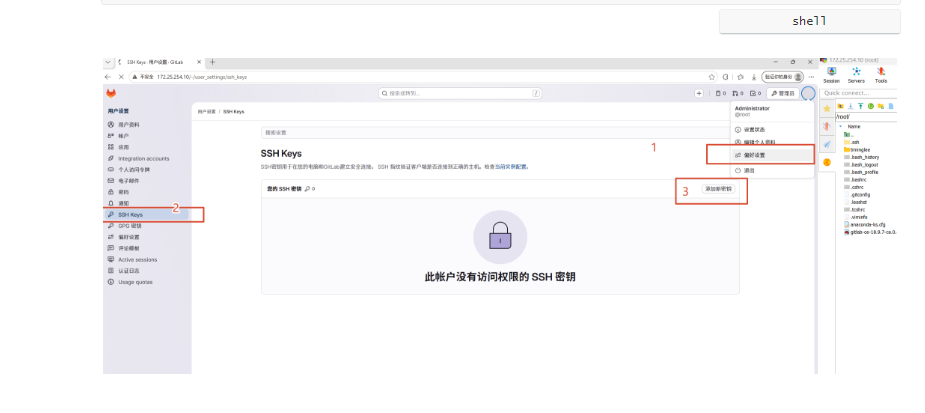
#生成sshd密钥
root@CICD-node1 \~# ssh-keygen
Generating public/private rsa key pair.
Enter file in which to save the key (/root/.ssh/id_rsa):
Enter passphrase (empty for no passphrase):
Enter same passphrase again:
Your identification has been saved in /root/.ssh/id_rsa
Your public key has been saved in /root/.ssh/id_rsa.pub
The key fingerprint is:
SHA256:QuEqZNMwIrNC3yV1yPMhYBtxqyDO2mcdMH9/D07qjmo root@CICD-node1.timinglee.org
The key's randomart image is:
+---RSA 3072----+
|+.o **+.. |
|o+.+o.**o. |
|o.+o+oo.+ . |
|+o...*. . |
| o. ..+ S |
|.. . . + . |
|. . o . . + |
| o E . = o |
| ....o+ . . |
+----SHA256-----+
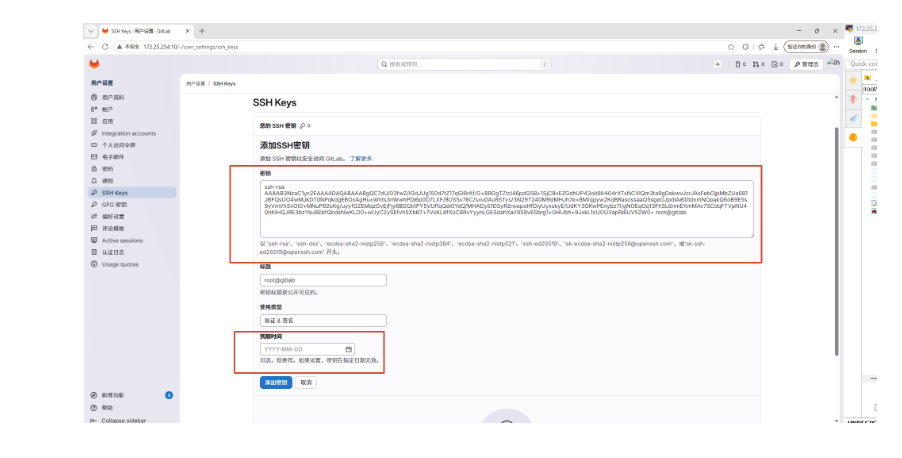
root@CICD-node1 \~# cat .ssh/id_rsa.pub
ssh-rsa AAAAB3NzaC1yc2EAAAADAQABAAABgQDO2nM+6+YAYVqCag/AqAipxJFF8rA7Trj5jh16eg9kaiIH6ftCBIQKM2tSbm63j/QLahfZa5sA3EJvXm/9HgWgAuz1f6ATvxasSpTfkrshBnnfFlA2JVzh2EVTkD3rkiJoOSTs8GVSxotUhPy716qfQI9nnK3oXlQhcLTVxmHTxzNMKG2T8WZyNALnUxevf1LDfBHJZt+2DcYET16wf5BwqMbUQs3TRb2rrlXIzVM1wZDHXHog+AQrXUzESWYLQK22BS+4c4iHStjzN+/v/gqH9T8oTPrA+P9oHifzk8aLrdSKYSZttlYgt7QOEqD5BzaRq/yNxfRm7acvqZY4EhlaK1cw1QAmTYsnqbyWRCzIa/yWtH02atzVeP65zCeqBIEch7vqR2YG2M8CjCvWgrtps3b1M5Hn9lxzwegXYBxx7vXOrh6M49OdyD7HYpzA1ePhM0VAaauQnHzwlJMNtElz2gVVzk90d1ZcNBvwm+BK+njSQ/NZhQXKgxKVWwRA3p0= root@CICD-node1.timinglee.org
root@CICD-node1 \~# rm -rf timinglee
root@CICD-node1 \~# git clone git@172.25.254.10:root/timinglee.git
正克隆到 'timinglee'...
The authenticity of host '172.25.254.80 (172.25.254.80)' can't be established.
ED25519 key fingerprint is SHA256:G3bSH82EUaYIfG+I6cDLyKgyKY2DngMYwt5U1Ch71jI.
This key is not known by any other names
Are you sure you want to continue connecting (yes/no/fingerprint)? yes
Warning: Permanently added '172.25.254.80' (ED25519) to the list of known hosts.
remote: Enumerating objects: 3, done.
remote: Counting objects: 100% (3/3), done.
remote: Compressing objects: 100% (2/2), done.
remote: Total 3 (delta 0), reused 0 (delta 0), pack-reused 0 (from 0)
接收对象中: 100% (3/3), 完成.
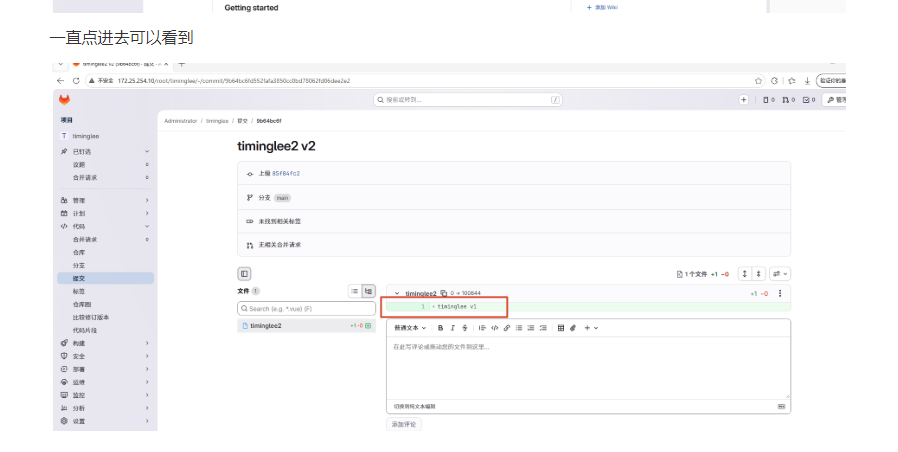
root@gitlab timinglee# vim timinglee2
timinglee v1
root@gitlab timinglee# git add timinglee2
root@gitlab timinglee# git commit -m "timinglee2 v2"
main 9b64bc6 timinglee2 v2
1 file changed, 1 insertion(+)
create mode 100644 timinglee2
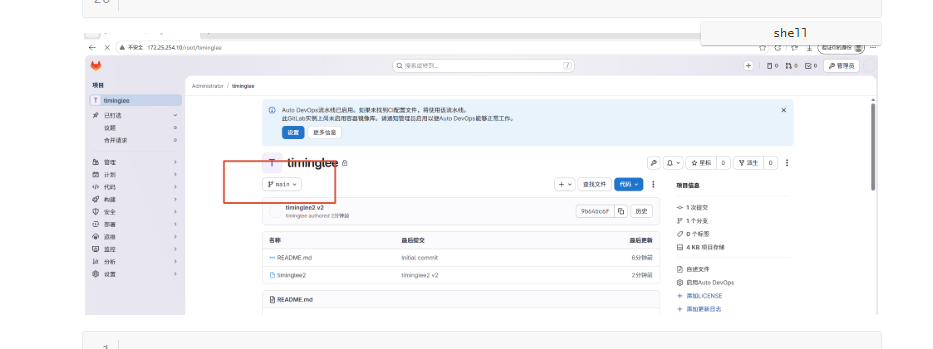
root@gitlab timinglee# git push -u origin main
Warning: Permanently added '172.25.254.10' (ED25519) to the list of known hosts.
枚举对象中: 4, 完成.
对象计数中: 100% (4/4), 完成.
使用 4 个线程进行压缩
压缩对象中: 100% (2/2), 完成.
写入对象中: 100% (3/3), 281 字节 | 281.00 KiB/s, 完成.
总共 3(差异 0),复用 0(差异 0),包复用 0(来自 0 个包)
To 172.25.254.10:root/timinglee.git
85f84fc..9b64bc6 main -> main
分支 'main' 设置为跟踪 'origin/main'。
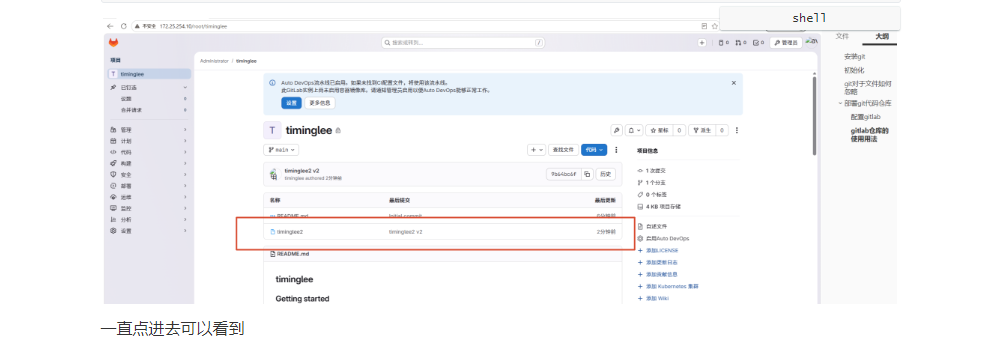
root@gitlab timinglee# vim timinglee2
timinglee v1
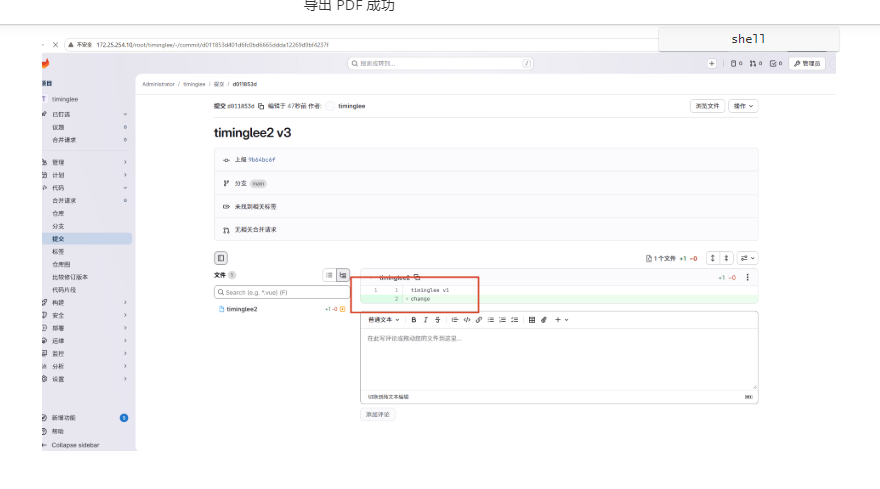
change
root@gitlab timinglee# git commit -a -m "timinglee2 v3"
root@gitlab timinglee# git push -u origin main
Warning: Permanently added '172.25.254.10' (ED25519) to the list of known hosts.
枚举对象中: 5, 完成.
对象计数中: 100% (5/5), 完成.
使用 4 个线程进行压缩
压缩对象中: 100% (2/2), 完成.
写入对象中: 100% (3/3), 290 字节 | 290.00 KiB/s, 完成.
总共 3(差异 0),复用 0(差异 0),包复用 0(来自 0 个包)
To 172.25.254.10:root/timinglee.git
9b64bc6..d011853 main -> main
分支 'main' 设置为跟踪 'origin/main'。
root@gitlab timinglee#
如何让21主机的代码上传到gitlab服务器上
#在rhel9的系统中默认自带git
root@yaotest \~# dnf install git -y
#设定命令补全功能
root@yaotest \~# echo "source /usr/share/bash-completion/completions/git" >> ~/.bashrc
root@yaotest \~# source ~/.bashrc
#效果, 补齐 git 按住 Tab补全键
root@gitlab \~# git
add branch clone format-patch init notes refs revert sparse-checkout
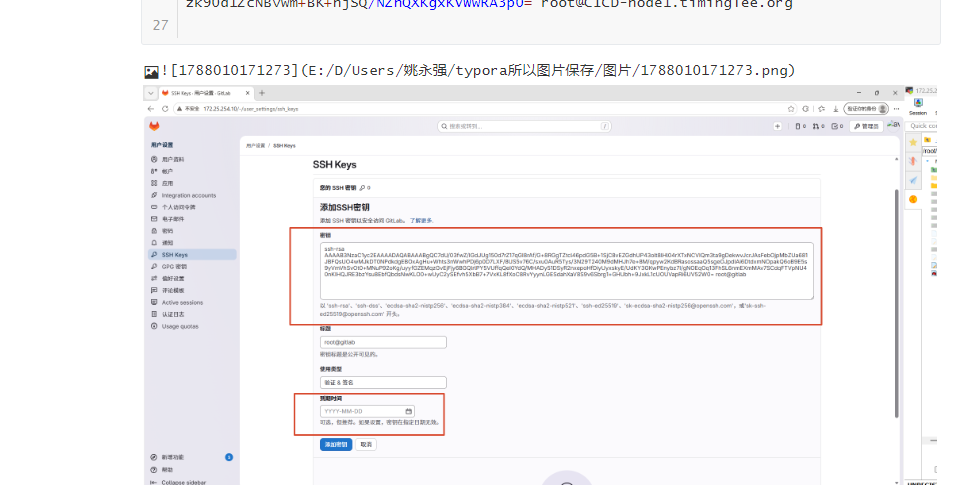
#提交gitlab主机中用户信息登记,名字加邮箱
root@yaotest yao_test_ssh# git config --global user.name "yao"
root@yaotest yao_test_ssh# git config --global user.email "19194428207@163.com"
#生成sshd密钥root@yaotest \~# ssh-keygen
Generating public/private rsa key pair.
Enter file in which to save the key (/root/.ssh/id_rsa):
Enter passphrase (empty for no passphrase):
Enter same passphrase again:
Your identification has been saved in /root/.ssh/id_rsa
Your public key has been saved in /root/.ssh/id_rsa.pub
The key fingerprint is:
SHA256:QuEqZNMwIrNC3yV1yPMhYBtxqyDO2mcdMH9/D07qjmo root@CICD-node1.timinglee.org
The key's randomart image is:
+---RSA 3072----+
|+.o **+.. |
|o+.+o.**o. |
|o.+o+oo.+ . |
|+o...*. . |
| o. ..+ S |
|.. . . + . |
|. . o . . + |
| o E . = o |
| ....o+ . . |
+----SHA256-----+
root@yaotest \~# cat .ssh/id_rsa.pub
ssh-rsa AAAAB3NzaC1yc2EAAAADAQABAAABgQDO2nM+6+YAYVqCag/AqAipxJFF8rA7Trj5jh16eg9kaiIH6ftCBIQKM2tSbm63j/QLahfZa5sA3EJvXm/9HgWgAuz1f6ATvxasSpTfkrshBnnfFlA2JVzh2EVTkD3rkiJoOSTs8GVSxotUhPy716qfQI9nnK3oXlQhcLTVxmHTxzNMKG2T8WZyNALnUxevf1LDfBHJZt+2DcYET16wf5BwqMbUQs3TRb2rrlXIzVM1wZDHXHog+AQrXUzESWYLQK22BS+4c4iHStjzN+/v/gqH9T8oTPrA+P9oHifzk8aLrdSKYSZttlYgt7QOEqD5BzaRq/yNxfRm7acvqZY4EhlaK1cw1QAmTYsnqbyWRCzIa/yWtH02atzVeP65zCeqBIEch7vqR2YG2M8CjCvWgrtps3b1M5Hn9lxzwegXYBxx7vXOrh6M49OdyD7HYpzA1ePhM0VAaauQnHzwlJMNtElz2gVVzk90d1ZcNBvwm+BK+njSQ/NZhQXKgxKVWwRA3p0= root@CICD-node1.timinglee.org
#测试是否链接成功
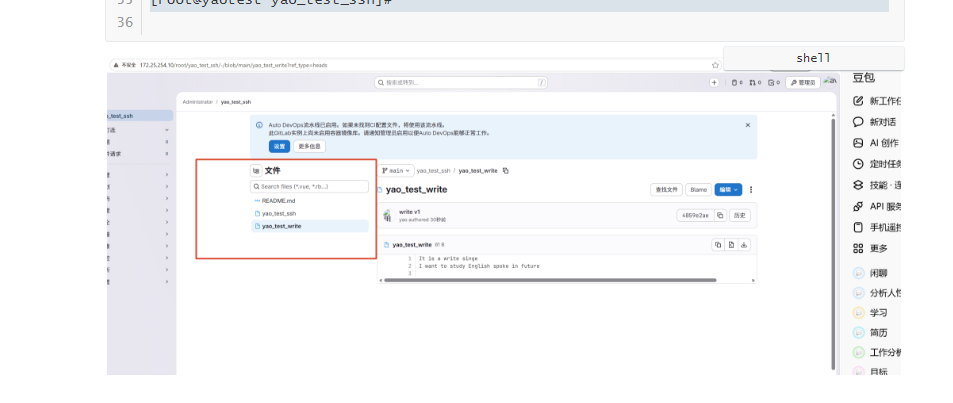
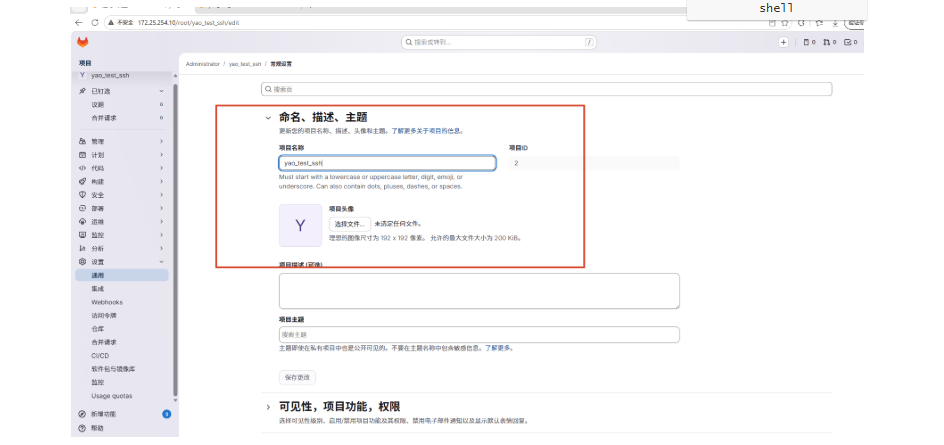
root@yaotest \~# git clone git@172.25.254.10:root/yao_test_ssh.git
正克隆到 'yao_test_ssh'...
Warning: Permanently added '172.25.254.10' (ED25519) to the list of known hosts.
remote: Enumerating objects: 3, done.
remote: Counting objects: 100% (3/3), done.
remote: Compressing objects: 100% (2/2), done.
remote: Total 3 (delta 0), reused 0 (delta 0), pack-reused 0 (from 0)
接收对象中: 100% (3/3), 完成.
root@yaotest \~# cd yao_test_ssh/
root@yaotest yao_test_ssh# vim yao_test_ssh
root@yaotest yao_test_ssh# git add yao_test_ssh
-m message(备注,说明)
root@yaotest yao_test_ssh# git commit -m "test v1"
main 1cbb94c test v1
1 file changed, 2 insertions(+)
create mode 100644 yao_test_ssh
#默认就是这个,推送
root@yaotest yao_test_ssh# git push -u origin main
Warning: Permanently added '172.25.254.10' (ED25519) to the list of known hosts.
枚举对象中: 4, 完成.
对象计数中: 100% (4/4), 完成.
使用 4 个线程进行压缩
压缩对象中: 100% (3/3), 完成.
写入对象中: 100% (3/3), 314 字节 | 314.00 KiB/s, 完成.
总共 3(差异 0),复用 0(差异 0),包复用 0(来自 0 个包)
To 172.25.254.10:root/yao_test_ssh.git
0ba49e9..1cbb94c main -> main
分支 'main' 设置为跟踪 'origin/main'。
root@yaotest yao_test_ssh#