大家好,数据库是后端开发的核心组件,不同类型的数据库适用于不同的场景。本文将系统性地讲解三大主流数据库:MySQL(关系型) 、MongoDB(文档型) 和 Redis(键值型),涵盖安装配置、基本操作、核心概念和实际应用场景。
一、MySQL 关系型数据库
MySQL 是最流行的开源关系型数据库,采用表格结构存储数据,支持 ACID 事务和 SQL 查询。
1.1 安装与配置
# 下载 MySQL APT 配置包
wget https://dev.mysql.com/get/mysql-apt-config_0.8.40-1_all.deb

# 安装配置包
sudo dpkg -i mysql-apt-config_0.8.40-1_all.deb

# 更新软件源
sudo apt update

# 安装 MySQL 服务端
sudo apt install mysql-server

# 查看服务状态
sudo systemctl status mysql
# 或
sudo service mysql status

# 启动/停止/重启
sudo systemctl start mysql
sudo systemctl stop mysql
sudo systemctl restart mysql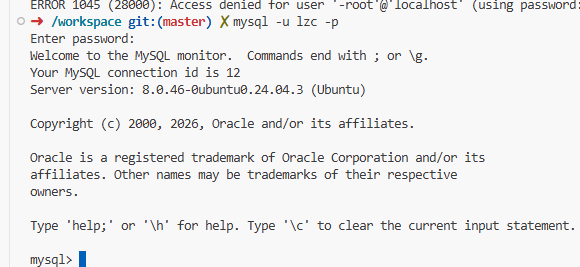
1.2 登录与基础操作
# 登录 MySQL(Ubuntu root 用户可免密登录)
mysql -u root -p

# 查看所有数据库
show databases;

# 创建数据库(指定字符集)
create database qiku character set utf8mb4;
create database if not exists qiku;

# 切换数据库
use qiku;

# 查看当前数据库
select database();

# 删除数据库
drop database qiku;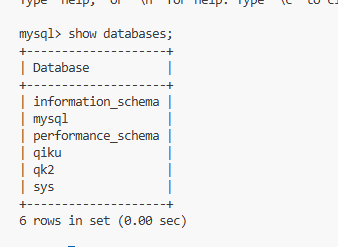
1.3 表操作(DDL)
-- 查看所有表
show tables;

-- 创建表
create table students (
    id int primary key auto_increment,
    name varchar(50) not null,
    age int,
    class varchar(20),
    gender enum('男', '女'),
    created_at datetime default current_timestamp
);

-- 查看表结构
desc students;

-- 修改表
alter table students add phone varchar(20);          -- 添加列
alter table students drop phone;                     -- 删除列
alter table students rename to student_info;         -- 重命名表
alter table students change name student_name varchar(50);  -- 修改列名
alter table students modify age tinyint;             -- 修改列类型

-- 删除表
drop table students;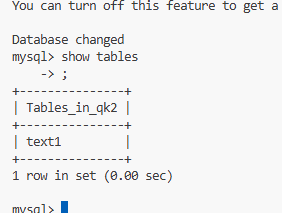
1.4 约束条件
| 约束 | 说明 | 示例 |
|---|---|---|
primary key |
主键,唯一标识一行 | id int primary key |
foreign key |
外键,关联其他表 | foreign key(cid) references category(id) |
not null |
不能为空 | name varchar(50) not null |
unique |
唯一,不能重复 | email varchar(100) unique |
auto_increment |
自动递增 | id int auto_increment |
default |
默认值 | status varchar(20) default 'active' |
check |
条件检查 | check(age > 0) |
1.5 外键约束详解
-- 创建表时添加外键
create table orders (
    id int primary key,
    user_id int,
    constraint fk_user_id foreign key(user_id)
        references users(id)
        on delete cascade
        on update cascade
);

-- 给已存在的表添加外键
alter table orders
add constraint fk_user_id
foreign key(user_id) references users(id)
on delete cascade on update cascade;

-- 删除外键
alter table orders drop foreign key fk_user_id;级联操作说明:
| 选项 | 说明 |
|---|---|
cascade |
父表变更时,子表同步变更 |
set null |
父表删除时,子表外键设为 NULL |
restrict |
如果有子记录,禁止删除父记录 |
1.6 数据类型
| 分类 | 类型 | 说明 |
|---|---|---|
| 数值 | int |
整数(4字节) |
bigint |
大整数(8字节) | |
smallint |
小整数(2字节) | |
tinyint |
微整数(1字节,适合状态值) | |
| 字符 | varchar(n) |
变长字符串 |
char(n) |
固定长度字符串 | |
text |
长文本 | |
| 二进制 | blob |
二进制数据 |
| 枚举 | enum('A','B') |
枚举值 |
| 时间 | datetime |
绝对时间 |
timestamp |
自动时区转换 | |
date |
日期 | |
time |
时间 |
-- 时间字段的常用写法
created_at datetime default current_timestamp
updated_at timestamp default current_timestamp on update current_timestamp

-- 软删除设计
is_delete tinyint default 0   -- 0:未删除, 1:已删除
1.7 数据操作(DML)
-- 插入数据
insert into students (name, age, class, gender)
values ('张三', 20, '计算机1班', '男');

insert into students values (null, '李四', 21, '计算机2班', '女', now());

-- 查询数据
select * from students;
select name, age from students where age > 18;

-- 更新数据
update students set age = 22 where name = '张三';

-- 删除数据(物理删除)
delete from students where id = 1;

-- 软删除(逻辑删除)
update students set is_delete = 1 where id = 1;
1.8 高级查询
-- 比较运算
select * from students where age > 18;
select * from students where age between 18 and 22;

-- 逻辑运算
select * from students where age > 18 and gender = '男';
select * from students where age > 22 or class = '计算机1班';

-- 集合查询
select * from students where class in ('计算机1班', '计算机2班');
select * from students where class not in ('计算机3班');

-- 模糊查询
select * from students where name like '张%';    -- 以张开头
select * from students where name like '%三%';   -- 包含三
select * from students where name like '_三';    -- 第二个字是三

-- NULL 判断
select * from students where phone is null;
select * from students where phone is not null;

-- 排序(order by)
select * from students order by age desc;        -- 降序
select * from students order by age asc;         -- 升序(默认)
select * from students order by age desc, name asc;  -- 多字段排序

-- 分页(limit)
select * from students limit 5;                   -- 前5条
select * from students limit 5, 10;               -- 从第5条开始取10条
-- 第 page 页:limit (page-1)*size, size

-- 去重
select distinct class from students;
1.9 聚合函数与分组
-- 聚合函数
select count(*) from students;                    -- 总行数
select avg(age) from students;                    -- 平均年龄
select max(age), min(age) from students;          -- 最大/最小
select sum(age) from students;                    -- 年龄总和

-- 分组(group by)
select class, count(*) as student_count
from students
group by class;

-- 分组过滤(having)
select class, count(*) as student_count
from students
group by class
having student_count > 2;

-- 取别名(as)
select count(*) as total from students;
1.10 多表连接
-- 内连接(inner join):只返回匹配的数据
select s.name, c.name as class_name
from students s
inner join classes c on s.class_id = c.id;

-- 左外连接(left join):返回左表所有数据
select s.name, c.name as class_name
from students s
left join classes c on s.class_id = c.id;

-- 右外连接(right join):返回右表所有数据
select s.name, c.name as class_name
from students s
right join classes c on s.class_id = c.id;

-- 笛卡尔连接(cross join)
select * from students, classes;
-- 等价于
select * from students cross join classes;

-- 全连接(full join):MySQL 不直接支持,用 union 模拟
select * from students left join classes on students.class_id = classes.id
union
select * from students right join classes on students.class_id = classes.id;
1.11 子查询与嵌套查询
-- 子查询
select * from students
where class_id in (select id from classes where status = 'active');

-- 查询分数高于平均分的学生
select * from scores
where score > (select avg(score) from scores);
1.12 视图(View)
视图是虚拟表,不存储实际数据,修改视图会影响原表。
-- 创建视图
create view student_view as
select id, name, age, class from students where age > 18;

-- 使用视图
select * from student_view;

-- 删除视图
drop view student_view;
1.13 存储函数
存储函数是预编译的 SQL 代码块,接收参数并返回一个值。
-- 创建存储函数
delimiter //
create function get_student_count(class_name varchar(20))
returns int
deterministic
begin
    declare count int;
    select count(*) into count from students where class = class_name;
    return count;
end //
delimiter ;

-- 调用
select get_student_count('计算机1班');
1.14 索引
索引用于加速查询,但会降低写入性能。
-- 创建索引
create index idx_name on students(name);

-- 查看索引
show index from students;

-- 删除索引
drop index idx_name on students;索引使用建议:
-
数据量大时建立索引
-
在查询频繁的列建立索引
-
在修改频繁的列减少索引
1.15 事务(ACID)
-- 开启事务
begin;
-- 或
start transaction;

-- 执行操作
update accounts set balance = balance - 100 where id = 1;
update accounts set balance = balance + 100 where id = 2;

-- 提交(确认)
commit;

-- 回滚(撤销)
rollback;
ACID 特性:
| 特性 | 说明 |
|---|---|
| 原子性(Atomicity) | 事务要么全部成功,要么全部失败 |
| 一致性(Consistency) | 事务前后数据保持一致状态 |
| 隔离性(Isolation) | 并发事务互不干扰 |
| 持久性(Durability) | 提交后数据永久保存 |
1.16 存储引擎
| 引擎 | 特点 |
|---|---|
| InnoDB(默认) | 支持事务、行级锁、外键,性能均衡 |
| MyISAM | 不支持事务、表级锁,查询速度快 |
| Memory | 数据存储在内存,重启丢失 |
| CSV | 以 CSV 格式存储 |
-- 查看存储引擎
show engines;

-- 指定存储引擎
create table test (
    id int
) engine=MyISAM;
1.17 备份与恢复
# 备份
mysqldump -u root -p 数据库名 > backup.sql

# 备份所有数据库
mysqldump -u root -p --all-databases > all_backup.sql

# 恢复(先创建空数据库)
mysql -u root -p 数据库名 < backup.sql
二、MongoDB 文档型数据库
MongoDB 是 NoSQL 数据库,以 BSON(类似 JSON)格式存储文档,适合灵活的数据结构。
2.1 安装与启动
# 下载 MongoDB
wget https://fastdl.mongodb.org/linux/mongodb-linux-x86_64-ubuntu2004-5.0.21.tgz

# 解压并安装
tar -zxvf mongodb-linux-x86_64-ubuntu2004-5.0.21.tgz

# 创建配置文件 /etc/systemd/system/mongod.service

# 启动 MongoDB
mongod --config /etc/mongod.conf

# 客户端连接
mongo
2.2 数据库操作
// 查看所有数据库
show dbs;

// 切换/创建数据库
use mydb;

// 查看当前数据库
db;

// 删除数据库
db.dropDatabase();
2.3 集合(表)操作
// 查看所有集合
show collections;

// 创建集合
db.createCollection("users");

// 删除集合
db.users.drop();
2.4 文档(行)操作
// 插入单个文档
db.users.insertOne({name: "马云", age: 55, city: "杭州"});

// 插入多个文档
db.users.insertMany([
    {name: "马化腾", age: 52, city: "深圳"},
    {name: "张飞", age: 30, city: "北京"}
]);

// 查询所有
db.users.find();

// 条件查询
db.users.find({name: "马云"});
db.users.find({age: {$gt: 20}});     // 大于
db.users.find({age: {$lt: 30}});     // 小于
db.users.find({age: {$gte: 20}});    // 大于等于
db.users.find({age: {$in: [10, 20, 30]}});  // 在集合中

// 更新
db.users.updateOne(
    {name: "马加爵"},
    {$set: {age: 20}}
);

// 删除
db.users.deleteOne({age: 20});
db.users.deleteMany({age: {$gt: 20}});

// 创建索引
db.users.createIndex({name: 1});
2.5 Python 中使用 MongoDB
from pymongo import MongoClient

client = MongoClient('mongodb://localhost:27017')
db = client['mydb']
collection = db['users']

# 插入
collection.insert_one({"name": "张三", "age": 25})

# 查询
for doc in collection.find({"age": {"$gt": 18}}):
    print(doc)

# 更新
collection.update_one({"name": "张三"}, {"$set": {"age": 26}})

# 删除
collection.delete_one({"name": "张三"})
三、Redis 键值型数据库
Redis 是内存数据库,支持多种数据结构,常用于缓存、会话存储、消息队列等。
3.1 安装与配置
# 安装 Redis
apt install redis-server

# 配置文件位置
/etc/redis/redis.conf

# 启动 Redis
redis-server /etc/redis/redis.conf

# 连接 Redis
redis-cli

# 配置文件关键参数
bind 0.0.0.0          # 允许远程连接
port 6379             # 端口
daemonize yes         # 后台运行
requirepass 密码       # 设置密码
maxmemory 2gb         # 最大内存
maxclients 10000      # 最大连接数

# 持久化配置
save 900 1            # 900秒内1个key变化则保存
appendonly yes        # 开启 AOF 持久化
appendfsync everysec  # 每秒同步
3.2 通用命令
# 键操作
keys *                # 查看所有键
type key              # 查看类型
del key               # 删除键
exists key            # 判断是否存在
expire key 60         # 设置过期时间(60秒)
ttl key               # 查看剩余时间
3.3 字符串(String)
# 添加
set name "张三"
mset name "张三" age "25" city "北京"

# 查询
get name
mget name age city

# 自增/自减
incr age              # +1
incrby age 5          # +5
decr age              # -1
decrby age 3          # -3

# 长度
strlen name
3.4 列表(List)
# 插入(左/右)
lpush list a b c      # 从左边插入
rpush list x y z      # 从右边插入

# 查询
lrange list 0 -1      # 查看所有
lindex list 0         # 查看指定位置

# 删除
lpop list             # 从左边弹出
rpop list             # 从右边弹出

# 长度
llen list
3.5 哈希(Hash)
# 插入
hset user name "张三"
hmset user name "张三" age "25" city "北京"

# 查询
hget user name
hmget user name age
hgetall user          # 获取所有

# 删除
hdel user age

# 长度
hlen user

# 判断是否存在
hexists user name
3.6 集合(Set)
# 添加
sadd fruits apple banana orange

# 查询
smembers fruits       # 查看所有
sismember fruits apple # 判断是否存在

# 删除
srem fruits apple

# 个数
scard fruits

# 集合运算
sinter set1 set2      # 交集
sunion set1 set2      # 并集
sdiff set1 set2       # 差集
3.7 有序集合(Sorted Set)
# 添加(带权重)
zadd rank 100 "张三"
zadd rank 90 "李四"
zadd rank 80 "王五"

# 查询
zrange rank 0 -1      # 按索引
zrange rank 0 -1 withscores  # 带分数
zrangebyscore rank 80 100   # 按分数范围

# 返回权重
zscore rank "张三"

# 删除
zrem rank "王五"

# 个数
zcard rank
3.8 Python 中使用 Redis
import redis

r = redis.Redis(host='localhost', port=6379, db=0, password='密码')

# 字符串
r.set('name', '张三')
print(r.get('name'))

# 哈希
r.hset('user', 'name', '张三')
r.hset('user', 'age', 25)
print(r.hgetall('user'))

# 列表
r.lpush('list', 1, 2, 3)
print(r.lrange('list', 0, -1))

# 集合
r.sadd('set', 'a', 'b', 'c')
print(r.smembers('set'))
3.9 Redis 持久化
| 方式 | 说明 |
|---|---|
| RDB | 定时生成数据快照(dump.rdb) |
| AOF | 记录所有写操作,追加到日志文件 |
# 配置持久化
save 900 1            # RDB 触发条件
appendonly yes        # 开启 AOF
appendfsync everysec  # AOF 同步策略
3.10 主从复制
# 从节点配置
replicaof <masterip> <masterport>
masterauth <password>
四、三大数据库对比
| 对比项 | MySQL | MongoDB | Redis |
|---|---|---|---|
| 类型 | 关系型(SQL) | 文档型(NoSQL) | 键值型(NoSQL) |
| 数据存储 | 表格 + 行 | BSON 文档 | 键值对 |
| 数据结构 | 固定 schema | 灵活 schema | 多种数据结构 |
| 事务支持 | ✅ ACID | ✅ 多文档事务 | 部分支持 |
| 持久化 | 磁盘 | 磁盘 | 内存 + 持久化 |
| 查询语言 | SQL | JavaScript | 命令 |
| 适用场景 | 复杂业务、事务 | 日志、灵活数据 | 缓存、会话、消息队列 |
| 性能 | 中等 | 较高 | 极高 |
五、总结
| 数据库 | 核心命令/操作 |
|---|---|
| MySQL | create database、create table、insert、select、join、group by |
| MySQL 约束 | primary key、foreign key、not null、unique、auto_increment |
| MySQL 事务 | begin、commit、rollback |
| MongoDB | use db、db.collection.insertOne()、db.collection.find() |
| Redis 字符串 | set、get、incr、decr |
| Redis 哈希 | hset、hget、hgetall、hdel |
| Redis 列表 | lpush、rpush、lpop、rpop、lrange |
| Redis 集合 | sadd、smembers、sinter、sunion、sdiff |
| Redis 有序集合 | zadd、zrange、zrangebyscore、zscore |
MySQL 适合关系型数据与复杂事务,MongoDB 适合灵活的数据结构与快速迭代,Redis 适合高速缓存与实时场景。实际项目中常常三者结合使用------MySQL 存储核心业务数据,MongoDB 存储日志或扩展数据,Redis 作为缓存层提升响应速度。掌握这三种数据库,就能应对绝大多数后端开发场景。
如果觉得这篇内容对你有帮助,欢迎收藏备用。