第二十二节:进阶:用户管理新增、编辑弹窗 + 表单校验
🎯本节目标
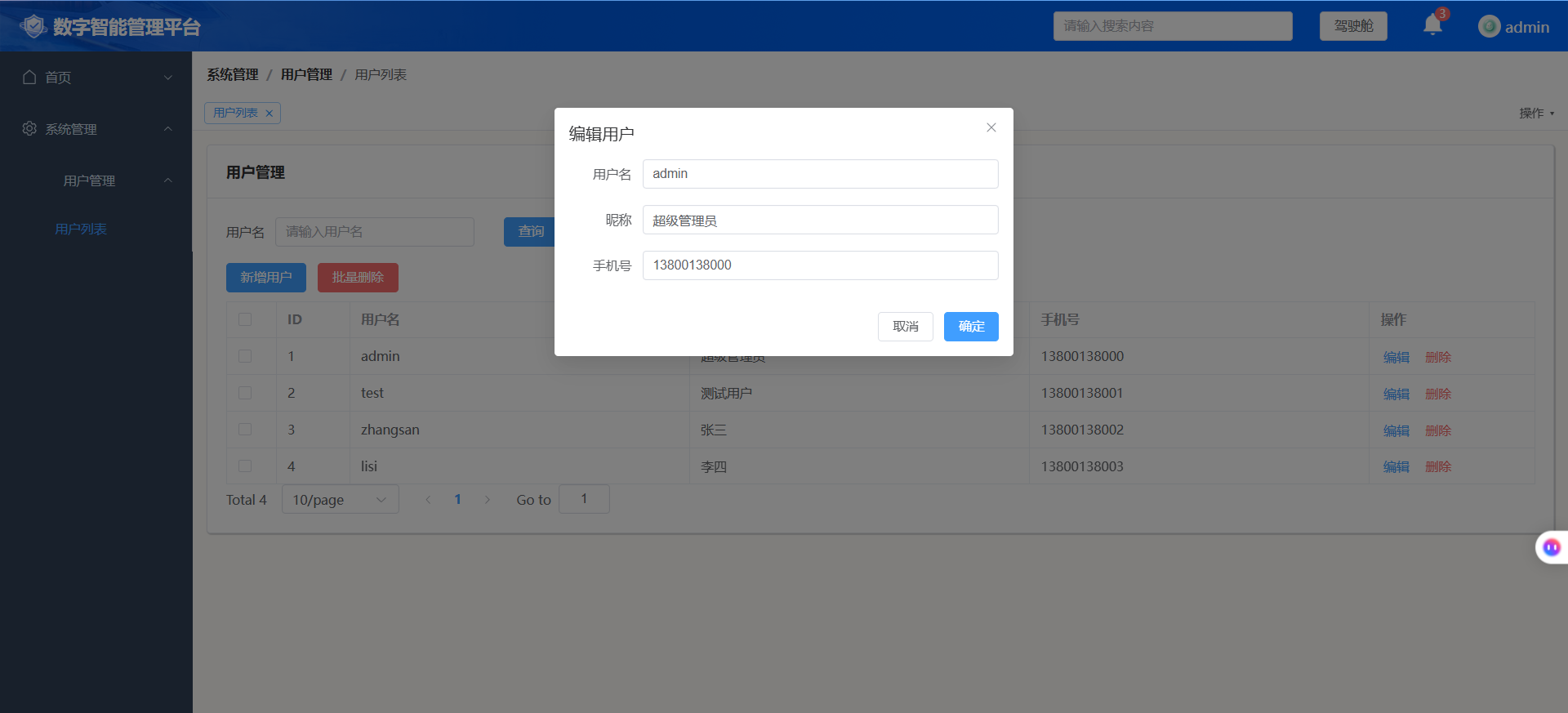
- 实现新增用户弹窗、编辑用户弹窗,复用同一个弹窗组件
- 表单校验(用户名必填、手机号格式校验等)
- 区分新增模式 / 编辑模式;编辑回显原有数据
- mock 新增、修改接口;提交后刷新列表
- 配合
v‑perm权限控制按钮显示
文件:src/views/system/user/index.vue,在现有页面基础上扩展弹窗。
步骤 1:页面模板补充弹窗代码
在 el‑table 后面增加 el‑dialog 弹窗
<template>
  <div class="user-container">
    <div class="search-form">
      <el-input v-model="queryParams.username" placeholder="请输入用户名" style="width:220px"></el-input>
      <el-button type="primary" @click="getUserList">查询</el-button>
      <el-button @click="resetQuery">重置</el-button>
    </div>

    <div class="btn-group" style="margin:12px 0">
      <el-button type="primary" v-perm="'system:user:add'" @click="openAddDialog">新增用户</el-button>
      <el-button type="danger" v-perm="'system:user:remove'" @click="handleBatchDelete">批量删除</el-button>
    </div>

    <el-table
      :data="tableData"
      border
      @selection-change="handleSelectionChange"
    >
      <el-table-column type="selection" width="55" />
      <el-table-column prop="id" label="ID" width="80"/>
      <el-table-column prop="username" label="用户名"/>
      <el-table-column prop="nickName" label="昵称"/>
      <el-table-column prop="phone" label="手机号"/>
      <el-table-column label="操作" width="180">
        <template #default="scope">
          <el-button link type="primary" v-perm="'system:user:edit'" @click="openEditDialog(scope.row)">编辑</el-button>
          <el-button link type="danger" v-perm="'system:user:remove'" @click="handleSingleDelete(scope.row)">删除</el-button>
        </template>
      </el-table-column>
    </el-table>

    <el-pagination
      v-model:current-page="queryParams.pageNum"
      v-model:page-size="queryParams.pageSize"
      :total="total"
      @change="getUserList"
    />

    <!-- ========== 新增/编辑弹窗 ========== -->
    <el-dialog
      v-model="dialogVisible"
      :title="isEdit ? '编辑用户' : '新增用户'"
      width="520px"
      @close="dialogClose"
    >
      <!-- el-form表单,绑定校验规则 -->
      <el-form
        ref="userFormRef"
        :model="userForm"
        :rules="userFormRules"
        label-width="90px"
      >
        <!-- id编辑时才存在,新增隐藏 -->
        <el-form-item v-if="isEdit" label="用户ID" prop="id">
          <el-input v-model="userForm.id" disabled />
        </el-form-item>

        <el-form-item label="用户名" prop="username">
          <el-input v-model="userForm.username" placeholder="请输入用户名"></el-input>
        </el-form-item>

        <el-form-item label="昵称" prop="nickName">
          <el-input v-model="userForm.nickName" placeholder="请输入昵称"></el-input>
        </el-form-item>

        <el-form-item label="手机号" prop="phone">
          <el-input v-model="userForm.phone" placeholder="请输入手机号"></el-input>
        </el-form-item>
      </el-form>

      <template #footer>
        <el-button @click="dialogVisible = false">取消</el-button>
        <el-button type="primary" @click="submitForm">确定</el-button>
      </template>
    </el-dialog>
  </div>
</template>
步骤 2:script‑setup 完整逻辑
<script setup>
import { ref, reactive } from 'vue'
import { ElMessage, ElMessageBox } from 'element-plus'
import { getUserListApi, deleteUserApi, batchDeleteUserApi, addUserApi, updateUserApi } from '@/api/system/user'

const tableData = ref([])
const total = ref(0)
// 批量删除选中
const multipleSelection = ref([])

const queryParams = reactive({
  pageNum: 1,
  pageSize: 10,
  username: ''
})

// --------弹窗相关状态--------
const dialogVisible = ref(false)
// true=编辑模式 false=新增模式
const isEdit = ref(false)
// 表单ref,用于做表单校验
const userFormRef = ref(null)

// 表单数据
const userForm = reactive({
  id: null,
  username: '',
  nickName: '',
  phone: ''
})

// ✅表单校验规则
const userFormRules = {
  username: [
    { required: true, message: '用户名不能为空', trigger: 'blur' }
  ],
  nickName: [
    { required: true, message: '昵称不能为空', trigger: 'blur' }
  ],
  phone: [
    { required: true, message: '手机号不能为空', trigger: 'blur' },
    { pattern: /^1[3-9]\d{9}$/, message: '手机号格式不正确', trigger: 'blur' }
  ]
}

// 多选事件
const handleSelectionChange = (val) => {
  multipleSelection.value = val
}

// 获取列表
const getUserList = async () => {
  const res = await getUserListApi(queryParams)
  tableData.value = res.data.records
  total.value = res.data.total
}

// 单条删除
const handleSingleDelete = (row) => {
  ElMessageBox.confirm('确定删除该用户?', '提示', { type: 'warning' }).then(async () => {
    await deleteUserApi(row.id)
    ElMessage.success('删除成功')
    getUserList()
  })
}

// 批量删除
const handleBatchDelete = () => {
  if (!multipleSelection.value || multipleSelection.value.length === 0) {
    ElMessage.warning('请先勾选要删除的数据!')
    return
  }
  const idList = multipleSelection.value.map(item => item.id)
  ElMessageBox.confirm(`确定删除选中 ${idList.length} 条记录?该操作不可恢复`, '警告', { type: 'danger' })
    .then(async () => {
      await batchDeleteUserApi({ ids: idList })
      ElMessage.success('批量删除成功')
      multipleSelection.value = []
      getUserList()
    })
}

// 打开新增弹窗
const openAddDialog = () => {
  isEdit.value = false
  dialogVisible.value = true
  // 清空表单
  resetForm()
}

// 打开编辑弹窗,回显行数据
const openEditDialog = (row) => {
  isEdit.value = true
  dialogVisible.value = true
  // 把当前行赋值给表单
  Object.assign(userForm, { ...row })
}

// 重置表单、清空校验提示
const resetForm = () => {
  userForm.id = null
  userForm.username = ''
  userForm.nickName = ''
  userForm.phone = ''
  // 清除校验错误提示
  userFormRef.value?.clearValidate()
}

// 弹窗关闭回调
const dialogClose = () => {
  resetForm()
}

// 提交表单
const submitForm = async () => {
  // 执行表单校验
  await userFormRef.value.validate()

  if (isEdit.value) {
    // 编辑,调用修改接口
    await updateUserApi(userForm)
    ElMessage.success('修改用户成功')
  } else {
    // 新增,调用新增接口
    await addUserApi(userForm)
    ElMessage.success('新增用户成功')
  }
  // 关闭弹窗,刷新列表
  dialogVisible.value = false
  getUserList()
}

// 查询重置
const resetQuery = () => {
  queryParams.username = ''
  getUserList()
}

getUserList()
</script>
步骤 3:api/user.js 添加新增、修改接口
import request from '@/utils/request'

// 获取用户列表
export function getUserListApi(params){
  return request({url:'/api/user/list',method:'get',params})
}
// 单条删除
export function deleteUserApi(id){
  return request({url:`/api/user/${id}`,method:'delete'})
}
// 批量删除
export function batchDeleteUserApi(data){
  return request({url:'/api/user/batchRemove',method:'delete',data})
}
// ✅新增用户
export function addUserApi(data){
  return request({url:'/api/user/add',method:'post',data})
}
// ✅修改用户
export function updateUserApi(data){
  return request({url:'/api/user/update',method:'put',data})
}
步骤 4:mock/index.js 添加新增、修改模拟接口
// 新增用户
'/api/user/add': ({ body }) => {
  console.log('新增用户数据', body)
  return { code:200, msg:'新增成功', data:null }
},
// 修改用户
'/api/user/update': ({ body }) => {
  console.log('编辑用户数据', body)
  return { code:200, msg:'修改成功', data:null }
}
✅测试清单
- 点击【新增用户】:弹窗打开,表单清空,标题显示
新增用户 - 不填内容直接点确定:触发表单校验,用户名、昵称、手机号提示不能为空
- 手机号输入错误格式,触发正则校验提示
- 填写正确表单提交,mock 接收参数,提示新增成功,列表刷新
- 点击【编辑】,弹窗回显当前行数据,标题切换为
编辑用户,ID 字段禁用 - 修改字段提交,提示修改成功,列表刷新
- 关闭弹窗,校验错误提示自动清除
- 权限:
perms:[],新增、编辑按钮自动消失
常见坑
el‑form必须绑定ref,validate()才可以执行校验;关闭弹窗调用clearValidate()清除红色报错- 编辑模式使用
Object.assign拷贝行数据,不要直接赋值引用对象,会导致表格数据实时篡改 - mock 环境下只是模拟返回,不会真正持久保存,刷新页面数据会复原。