ROS2动力学控制器项目
https://github.com/Tianyi-Wang-1206/ROS-2-Dynamics-Controller-for-Lightweight-6-Axis-Robotic-Arms
ROS 2 Dynamics Controller for Lightweight 6-Axis Robotic Arms
This repository presents a high-fidelity, mathematically rigorous 6-axis robotic arm simulation. Initiated by an asynchronous and detailed GUI (based on PyQt5), the system orchestrates high-level motion using MoveIt2 , leveraging TRAC-IK for robust numerical solutions to inverse kinematics and the Pilz trajectory planning engine for deterministic Cartesian paths (LIN/CIRC). At the core, Controller Chaining (based on ros2_control ) interpolates these trajectories into a tight 1000Hz reference for a custom Computed Torque Control (CTC) controller. To ensure physical realism, the CTC bypasses MuJoCo 's default PID joints to run the physics engine in pure effort mode . The CTC processes the feedback states via a Kalman Filter state observation model to reconstruct noise-free joint velocities, and executes Pinocchio dynamics calculations to compute rigid-body inertia, gravity, and Coriolis matrices. Combined with friction/armature compensation (smoothly neutralizing viscous damping, Coulomb stiction, and motor rotor inertia), this architecture achieves a tracking precision of <0.01 mm.
To bridge the gap between nominal simulation parameters and real-world physical discrepancies, an automated system identification (SysID) framework is integrated to extract joint-level viscous/Coulomb friction and motor armature coefficients, which are difficult to measure directly during manufacturing. Utilizing a bounded Fourier excitation trajectory coupled with an offline Least-Squares solver, the identified parameters align closely with the ground-truth physical properties defined in the URDF and MuJoCo XML files. Furthermore, the architecture incorporates a robust software emergency stop (E-Stop) and active recovery state machine. Upon triggering, it overrides high-level commands to execute precise, limit-aware deceleration trajectories that safely halt the manipulator, while providing a seamless recovery sequence back to the active closed-loop tracking state.
To facilitate real-time diagnostics and visual verification of tracking performance, the framework incorporates a synchronized "shadow robot" virtual twin. This visualization layer is driven directly by the real-time C++ CTC controller via a lock-free
RealtimePublisher. It renders the exact internal target commands (q_target_) at 1000Hz (downsampled to 200Hz for RViz), representing the manipulator's theoretical kinematic state under zero-disturbance conditions. The shadow robot depicts pure kinematic targets, while the closed-loop CTC controller forces the physical manipulator to overcome physical disturbances (gravity, Coriolis, joint friction, etc.) to track this reference. Under standard operating conditions (including software E-Stop), the physical robot tracks the shadow twin tightly (deviation is indistinguishable to the human eye). However, there will be significant visible tracking deviation during System Identification because the friction and motor armature compensations are temporarily deactivated, allowing the algorithm to isolate and extract these specific raw unmodeled dynamics.For detailed mathematical derivations, please refer to Theory.pdf.
⚠️ Notice: The robot model used in this simulation is the UFactory Lite6 , sourced from the official MuJoCo Menagerie. This repository is an independent open-source project designed for research and educational purposes.
📑 Table of Contents
- System Architecture
- Core Features & Demonstrations
- Quick Start & Reproduction Guide
- Future Work
- Acknowledgements
- Disclaimer
- Contact
🧠 System Architecture
The system's architecture is illustrated in the diagram below:
🎥 Core Features & Demonstrations
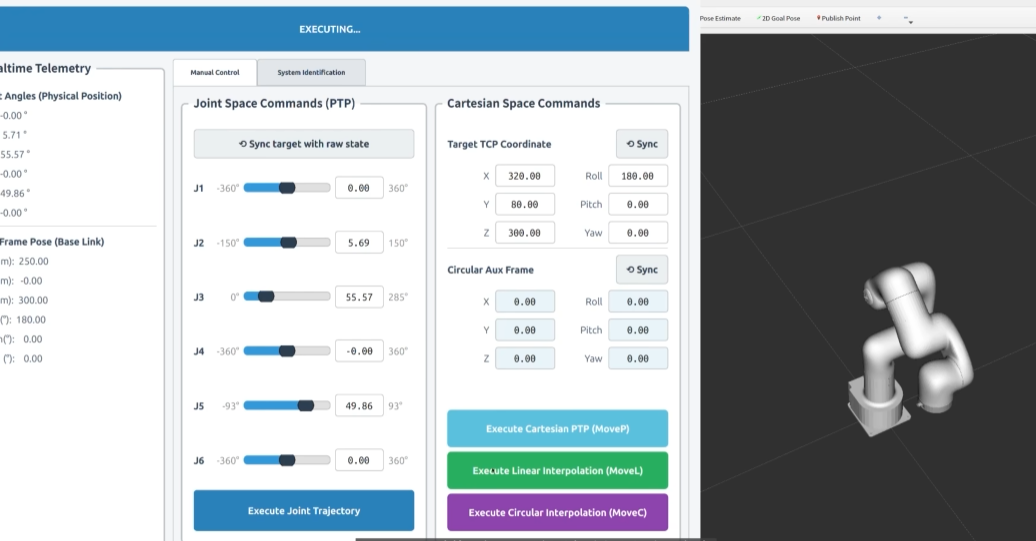
1. Industrial Motion Planning (PTP, MoveL, MoveC)
- PTP (Point-to-Point): Joint space planning to specific angles or Cartesian poses (MoveP) via TRAC-IK:
- MoveL: Deterministic linear Cartesian interpolation via the Pilz planner:
- MoveC: Circular Cartesian interpolation using an auxiliary midpoint frame:
(Note: For MoveL and MoveC, it is recommended to lower the velocity and acceleration scale, to make sure that the trajectory planning doesn't exceed the robot's physical limits; otherwise, trajectory planning may fail.)
2. Automated System Identification
- The automated system identification executes bounded Fourier excitation trajectories, records q,q˙,τ, and utilizes Least Squares Optimization to extract exact Armature, Viscous Friction, and Coulomb Friction matrices.
3. The "Shadow Robot" Debugging Twin
- This is a collision-free, cyan-colored digital twin that runs alongside the main robot. It reflects the controller's target commands, allowing instant visual verification of tracking error and dynamic deviations.
4. Software E-Stop and Recovery
- The emergency stop overrides MoveIt and generates a safe deceleration trajectory based on physical kinematic limits.
🚀 Quick Start & Reproduction Guide
You can run this project using either a containerized Docker environment (recommended for avoiding dependency conflicts) or natively on Ubuntu 22.04.
📋 Prerequisites
Download the repository and organize your workspace as follows:
~/lite6_ws/
├── mujoco-3.9.0/          # MuJoCo binaries (provided in this repository)
├── src/                   # Source code (lite6_bringup, lite6_controllers, etc.)
├── Dockerfile             # Docker configuration
├── run_docker.sh          # Container boot script
└── README.md
🐳 Option A: Docker Deployment
This method isolates the environment and requires no local ROS 2 installation. Ensure you have a Linux host (Ubuntu 22.04 or higher), Docker and the NVIDIA Container Toolkit (recommended for GUI rendering and GPU acceleration).
1. Start the Docker Environment:
cd ~/lite6_ws
chmod +x ./run_docker.sh
./run_docker.sh
(Note: The script automatically detects your GPU and chooses suitable drivers if you are using an Intel/AMD GPU or no GPU. It also automatically mounts the
srcfolder, so you do not need to rebuild the image when modifying code).2. Build and Launch (Inside Docker):
colcon build --symlink-install
source install/setup.bash
ros2 launch lite6_bringup system_bringup.launch.py
💻 Option B: Native Deployment (Ubuntu 22.04)
If you prefer running natively, ensure you have ROS2 Humble installed on your host machine.
1. Setup MuJoCo Binaries: Move the provided MuJoCo binaries to your home directory and link them to your
.bashrc.
mkdir -p ~/.mujoco
cp -r ~/lite6_ws/mujoco-3.9.0 ~/.mujoco/

# Add MuJoCo paths to your bash profile
echo 'export MUJOCO_DIR=~/.mujoco/mujoco-3.9.0' >> ~/.bashrc
echo 'export LD_LIBRARY_PATH=$LD_LIBRARY_PATH:$MUJOCO_DIR/lib' >> ~/.bashrc
source ~/.bashrc
2. Install ROS 2 Dependencies (
rosdep): Userosdepto automatically install all required packages (Pinocchio, MoveIt2, etc.).
cd ~/lite6_ws
rosdep update
rosdep install --from-paths src --ignore-src -r -y
3. Compile and Launch:
colcon build --symlink-install
source install/setup.bash
ros2 launch lite6_bringup system_bringup.launch.py
🔮 Future Work
This framework is actively evolving. Upcoming features include:
- Analytical Inverse Kinematics via Symbolic Computation: Transitioning from the current numerical IK solver to a mathematically exact, closed-form analytical IK solution. Derived using symbolic computation software, this will reduce IK computation time from milliseconds to nanoseconds, guarantee thread safety, and provide all possible joint configurations instantly.
- Deterministic Trajectory Planning: Instead of using sampling-based trajectory planners, we combine analytical IK solutions with time parameterization to achieve deterministic trajectory planning for MoveJ, MoveP, MoveL, and MoveC commands.
- Collision Detection: When calculating IK and planning trajectories, the collision mesh of the robot model is computed to prevent the robot from colliding with itself or the worktable.
(Note: These new features have been implemented; please refer to link)
🙏 Acknowledgements
I would like to sincerely thank the creators and maintainers of the following open-source projects and organizations:
📌 Disclaimer
This is a personal, open-source project. I am not affiliated with, sponsored by, or endorsed by any commercial entities mentioned in this repository. All trademarks and registered trademarks are the property of their respective owners. The software is provided "as is", without warranty of any kind.