环境: VS2022+.Net Framework4.8
NuGet包:CommunityToolkit.Mvvm 8.4.2
Microsoft.Xaml.Behaviors.Wpf 1.1.158
程序名:WpfA_MvvmCmdBinding
一、功能概述
这是一个完整的WPF MVVM示例程序,展示了MVVM设计模式下的各种数据绑定、命令绑定和控件交互技术。
1、 数据绑定演示
| 功能 | 控件 | 绑定方式 |
|---|---|---|
| 文本绑定 | TextBox | OneWay/TwoWay |
| 数值绑定 | TextBox | StringFormat格式化 |
| 布尔绑定 | CheckBox | TwoWay |
| 枚举绑定 | RadioButton | 使用转换器 |
| 控件间绑定 | TextBox | ElementName绑定 |
| 转换器绑定 | Label | BoolToVisibility |
2、命令绑定演示
- Loaded事件:窗口加载时触发,传递窗口实例
- MouseMove事件:鼠标移动时显示坐标
- MouseDown事件:鼠标点击判断按键类型
- 普通命令:无参数按钮命令
- 带参数命令:传递字符串参数
3、数据集合展示
- DataGrid:显示数据集合,支持列自定义
- ListView:使用GridView显示数据
- ListBox:数据模板绑定
- TreeView:层级数据展示
- ContextMenu:右键菜单绑定
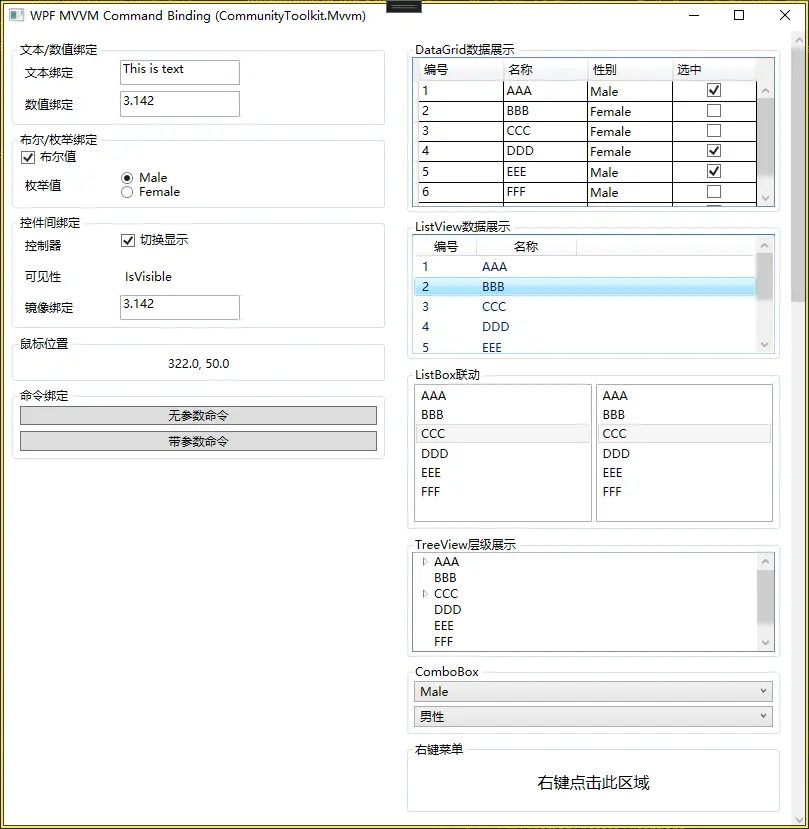
二、技术栈分析
1. MVVM框架 - CommunityToolkit.Mvvm
- 属性定义:ObservableProperty 特性
命令定义:RelayCommand 特性
刷新命令状态:调用 RelayCommand.NotifyCanExecuteChanged()
2. XAML技术
- 数据上下文:Window.DataContext绑定ViewModel
资源引用:ObjectDataProvider获取枚举值
值转换器:IValueConverter实现类型转换
事件触发器:通过Interaction.Triggers绑定事件到命令
3. 绑定模式
- TwoWay:双向绑定(如枚举选择)
OneWay:单向绑定(如数据显示)
OneTime:一次性绑定
4. 转换器
- BoolToVisibilityConverter:bool ↔ Visibility
EnumToBoolConverter:枚举 ↔ bool(用于RadioButton)
三、程序
1、项目结构
- WpfA_MvvmCmdBinding/
├── App.xaml
├── App.xaml.cs
├── MainWindow.xaml
├── MainWindow.xaml.cs
├── Model/
│ ├── DataModel.cs
│ └── Gender.cs
├── ViewModel/
│ └── ViewModelMain.cs
├── Converter/
│ ├── BoolToVisibilityConverter.cs
│ └── EnumToBoolConverter.cs
├── ViewModelLocator/
│ └── ViewModelLocator.xaml
└── WpfA_MvvmCmdBinding.csproj
2、MainWindow.xaml
<Window x:Class="WpfA_MvvmCmdBinding.MainWindow"
        xmlns="http://schemas.microsoft.com/winfx/2006/xaml/presentation"
        xmlns:x="http://schemas.microsoft.com/winfx/2006/xaml"
        xmlns:d="http://schemas.microsoft.com/expression/blend/2008"
        xmlns:mc="http://schemas.openxmlformats.org/markup-compatibility/2006"
        xmlns:core="clr-namespace:System;assembly=mscorlib"
        xmlns:model="clr-namespace:WpfA_MvvmCmdBinding.Model"
        xmlns:converter="clr-namespace:WpfA_MvvmCmdBinding.Converter"
        xmlns:mvvm="http://schemas.microsoft.com/xaml/behaviors"
        xmlns:vm="clr-namespace:WpfA_MvvmCmdBinding.ViewModel"
        Name="MVVMWindow"
        mc:Ignorable="d"
        Title="WPF MVVM Command Binding (CommunityToolkit.Mvvm)"
        Height="550" Width="700">

    <Window.Resources>
        <!-- 获取枚举值 -->
        <ObjectDataProvider x:Key="GenderValues"
                            MethodName="GetValues"
                            ObjectType="{x:Type core:Enum}">
            <ObjectDataProvider.MethodParameters>
                <x:Type Type="model:Gender"/>
            </ObjectDataProvider.MethodParameters>
        </ObjectDataProvider>

        <!-- 转换器 -->
        <converter:BoolToVisibilityConverter x:Key="BoolToVisibility"/>
        <converter:EnumToBoolConverter x:Key="EnumToBool"/>

        <!-- 数据模板 -->
        <DataTemplate x:Key="GenderTemplate">
            <TextBlock Text="{Binding Type}" Margin="2"/>
        </DataTemplate>
    </Window.Resources>

    <!-- 设置数据上下文 -->
    <Window.DataContext>
        <vm:ViewModelMain/>
    </Window.DataContext>

    <!-- 事件触发器 -->
    <mvvm:Interaction.Triggers>
        <mvvm:EventTrigger EventName="Loaded">
            <mvvm:InvokeCommandAction Command="{Binding LoadedCommand}"
                                      CommandParameter="{Binding ElementName=MVVMWindow}"/>
        </mvvm:EventTrigger>
        <mvvm:EventTrigger EventName="MouseMove">
            <mvvm:InvokeCommandAction Command="{Binding MouseMoveCommand}"
                                      PassEventArgsToCommand="True"/>
        </mvvm:EventTrigger>
    </mvvm:Interaction.Triggers>

    <ScrollViewer VerticalScrollBarVisibility="Auto">
        <UniformGrid Rows="3" Columns="2">

            <!-- 左侧列 -->
            <StackPanel Margin="10">

                <!-- 文本绑定 -->
                <GroupBox Header="文本/数值绑定" Margin="0,0,0,5">
                    <StackPanel>
                        <StackPanel Orientation="Horizontal" Margin="3">
                            <Label Content="文本绑定" Width="100"/>
                            <TextBox Text="{Binding BindingText}" MinWidth="120"/>
                        </StackPanel>
                        <StackPanel Orientation="Horizontal" Margin="3">
                            <Label Content="数值绑定" Width="100"/>
                            <TextBox x:Name="TextValue"
                                     Text="{Binding BindingNumber, StringFormat={}{0:F3}}"
                                     MinWidth="120"/>
                        </StackPanel>
                    </StackPanel>
                </GroupBox>

                <!-- 布尔/枚举绑定 -->
                <GroupBox Header="布尔/枚举绑定" Margin="0,0,0,5">
                    <StackPanel>
                        <CheckBox Content="布尔值"
                                  IsChecked="{Binding BoolIsChecked}"
                                  Margin="3"/>
                        <StackPanel Orientation="Horizontal" Margin="3">
                            <Label Content="枚举值" Width="100" VerticalAlignment="Center"/>
                            <StackPanel>
                                <RadioButton Content="Male"
                                             IsChecked="{Binding BindingEnum, Mode=TwoWay, Converter={StaticResource EnumToBool}, ConverterParameter=0}"/>
                                <RadioButton Content="Female"
                                             IsChecked="{Binding BindingEnum, Mode=TwoWay, Converter={StaticResource EnumToBool}, ConverterParameter=1}"/>
                            </StackPanel>
                        </StackPanel>
                    </StackPanel>
                </GroupBox>

                <!-- 控件间绑定 -->
                <GroupBox Header="控件间绑定" Margin="0,0,0,5">
                    <StackPanel>
                        <StackPanel Orientation="Horizontal" Margin="3">
                            <Label Content="控制器" Width="100"/>
                            <CheckBox Name="CheckBoxControl"
                                      IsChecked="True"
                                      Content="切换显示"/>
                        </StackPanel>
                        <StackPanel Orientation="Horizontal" Margin="3">
                            <Label Content="可见性" Width="100"/>
                            <Label Content="IsVisible"
                                   Visibility="{Binding ElementName=CheckBoxControl, Path=IsChecked, Converter={StaticResource BoolToVisibility}}"/>
                        </StackPanel>
                        <StackPanel Orientation="Horizontal" Margin="3">
                            <Label Content="镜像绑定" Width="100"/>
                            <TextBox Text="{Binding ElementName=TextValue, Path=Text}" MinWidth="120"/>
                        </StackPanel>
                    </StackPanel>
                </GroupBox>

                <!-- 鼠标位置 -->
                <GroupBox Header="鼠标位置" Margin="0,0,0,5">
                    <StackPanel>
                        <Label Content="{Binding ShowingText}" HorizontalAlignment="Center"/>
                    </StackPanel>
                </GroupBox>

                <!-- 命令按钮 -->
                <GroupBox Header="命令绑定" Margin="0,0,0,5">
                    <StackPanel>
                        <Button Content="无参数命令" Margin="3"
                                Command="{Binding WithoutParameterCommand}"/>
                        <Button Content="带参数命令" Margin="3"
                                Command="{Binding WithParameterCommand}"
                                CommandParameter="Hello World!"/>
                    </StackPanel>
                </GroupBox>
            </StackPanel>

            <!-- 右侧列 -->
            <StackPanel Margin="10">

                <!-- DataGrid -->
                <GroupBox Header="DataGrid数据展示" Margin="0,0,0,5">
                    <DataGrid ItemsSource="{Binding DataList}"
                              AutoGenerateColumns="False"
                              MaxHeight="150">
                        <DataGrid.Columns>
                            <DataGridTextColumn Binding="{Binding Number}"
                                                Header="编号" Width="*"/>
                            <DataGridTextColumn Binding="{Binding Name}"
                                                Header="名称" Width="*"/>
                            <DataGridComboBoxColumn ItemsSource="{Binding Source={StaticResource GenderValues}}"
                                                     SelectedValueBinding="{Binding Type}"
                                                     Header="性别" Width="*"/>
                            <DataGridCheckBoxColumn Binding="{Binding IsChecked}"
                                                    Header="选中" Width="*"/>
                        </DataGrid.Columns>
                    </DataGrid>
                </GroupBox>

                <!-- ListView -->
                <GroupBox Header="ListView数据展示" Margin="0,0,0,5">
                    <ListView ItemsSource="{Binding DataList}" MaxHeight="120">
                        <ListView.View>
                            <GridView>
                                <GridViewColumn Width="60" Header="编号"
                                                DisplayMemberBinding="{Binding Number}"/>
                                <GridViewColumn Width="100" Header="名称"
                                                DisplayMemberBinding="{Binding Name}"/>
                            </GridView>
                        </ListView.View>
                    </ListView>
                </GroupBox>

                <!-- ListBox联动 -->
                <GroupBox Header="ListBox联动" Margin="0,0,0,5">
                    <UniformGrid Rows="1" Columns="2">
                        <ListBox x:Name="listBox" SelectedIndex="0" Margin="2">
                            <ListBoxItem Content="AAA"/>
                            <ListBoxItem Content="BBB"/>
                            <ListBoxItem Content="CCC"/>
                            <ListBoxItem Content="DDD"/>
                            <ListBoxItem Content="EEE"/>
                            <ListBoxItem Content="FFF"/>
                        </ListBox>
                        <ListBox SelectedIndex="{Binding ElementName=listBox, Path=SelectedIndex}"
                                 Margin="2"
                                 ItemsSource="{Binding DataList}">
                            <ListBox.ItemTemplate>
                                <DataTemplate>
                                    <TextBlock Text="{Binding Name}"/>
                                </DataTemplate>
                            </ListBox.ItemTemplate>
                        </ListBox>
                    </UniformGrid>
                </GroupBox>

                <!-- TreeView -->
                <GroupBox Header="TreeView层级展示" Margin="0,0,0,5">
                    <TreeView ItemsSource="{Binding DataList}" MaxHeight="100">
                        <TreeView.ItemTemplate>
                            <HierarchicalDataTemplate ItemsSource="{Binding DataList}">
                                <TextBlock Text="{Binding Name}"/>
                            </HierarchicalDataTemplate>
                        </TreeView.ItemTemplate>
                    </TreeView>
                </GroupBox>

                <!-- ComboBox -->
                <GroupBox Header="ComboBox" Margin="0,0,0,5">
                    <StackPanel>
                        <ComboBox ItemsSource="{Binding Source={StaticResource GenderValues}}"
                                  SelectedIndex="0" Margin="2"/>
                        <ComboBox ItemsSource="{Binding EnumsDescription}"
                                  DisplayMemberPath="Value"
                                  SelectedValuePath="Key"
                                  SelectedValue="{Binding ExampleProperty}"
                                  Margin="2"/>
                    </StackPanel>
                </GroupBox>

                <!-- ContextMenu区域 -->
                <GroupBox Header="右键菜单" Margin="0,0,0,5">
                    <Border Background="Transparent" Height="50">
                        <TextBlock Text="右键点击此区域"
                                   HorizontalAlignment="Center"
                                   VerticalAlignment="Center"
                                   FontSize="16"/>
                        <Border.ContextMenu>
                            <ContextMenu ItemsSource="{Binding DataList}">
                                <ContextMenu.ItemTemplate>
                                    <HierarchicalDataTemplate ItemsSource="{Binding DataList}">
                                        <MenuItem Header="{Binding Name}"/>
                                    </HierarchicalDataTemplate>
                                </ContextMenu.ItemTemplate>
                            </ContextMenu>
                        </Border.ContextMenu>
                    </Border>
                </GroupBox>

            </StackPanel>

        </UniformGrid>
    </ScrollViewer>
</Window>
3、MainWindow.xaml.cs
using System.Windows;

namespace WpfA_MvvmCmdBinding
{
    public partial class MainWindow : Window
    {
        public MainWindow()
        {
            InitializeComponent();
        }
    }
}
4、DataModel.cs
using System.Collections.ObjectModel;

namespace WpfA_MvvmCmdBinding.Model
{
    public class DataModel
    {
        public int Number { get; set; }
        public string Name { get; set; }
        public Gender Type { get; set; }
        public bool IsChecked { get; set; }
        public ObservableCollection<DataModel> DataList { get; set; }
    }
}
5、 Gender.cs
using System.ComponentModel;

namespace WpfA_MvvmCmdBinding.Model
{
    public enum Gender
    {
        [Description("男性")]
        Male = 0,
        [Description("女性")]
        Female = 1
    }
}
6、ViewModelMain.cs
using CommunityToolkit.Mvvm.ComponentModel;
using CommunityToolkit.Mvvm.Input;
using System;
using System.Collections.Generic;
using System.Collections.ObjectModel;
using System.ComponentModel;
using System.Reflection;
using System.Windows;
using System.Windows.Input;
using WpfA_MvvmCmdBinding.Model;

namespace WpfA_MvvmCmdBinding.ViewModel
{
    public class ViewModelMain : ObservableObject
    {
        #region 属性(手动实现)

        private string _bindingText = "This is text";
        public string BindingText
        {
            get => _bindingText;
            set => SetProperty(ref _bindingText, value);
        }

        private double _bindingNumber = 3.14159;
        public double BindingNumber
        {
            get => _bindingNumber;
            set => SetProperty(ref _bindingNumber, value);
        }

        private bool _boolIsChecked = true;
        public bool BoolIsChecked
        {
            get => _boolIsChecked;
            set => SetProperty(ref _boolIsChecked, value);
        }

        private Gender _bindingEnum = Gender.Male;
        public Gender BindingEnum
        {
            get => _bindingEnum;
            set => SetProperty(ref _bindingEnum, value);
        }

        private string _showingText = string.Empty;
        public string ShowingText
        {
            get => _showingText;
            set => SetProperty(ref _showingText, value);
        }

        private ObservableCollection<DataModel> _dataList;
        public ObservableCollection<DataModel> DataList
        {
            get => _dataList;
            set => SetProperty(ref _dataList, value);
        }

        private Gender _exampleProperty = Gender.Male;
        public Gender ExampleProperty
        {
            get => _exampleProperty;
            set => SetProperty(ref _exampleProperty, value);
        }

        #endregion

        #region 计算属性

        public Dictionary<Gender, string> EnumsDescription
        {
            get
            {
                var pairs = new Dictionary<Gender, string>();
                foreach (Gender item in Enum.GetValues(typeof(Gender)))
                {
                    var field = item.GetType().GetField(item.ToString());
                    var attr = field?.GetCustomAttribute<DescriptionAttribute>();
                    pairs.Add(item, attr?.Description ?? item.ToString());
                }
                return pairs;
            }
        }

        #endregion

        #region 命令

        public ICommand LoadedCommand { get; }
        public ICommand MouseMoveCommand { get; }
        public ICommand WithoutParameterCommand { get; }
        public ICommand WithParameterCommand { get; }
        public ICommand MouseDownCommand { get; }

        #endregion

        #region 构造函数

        public ViewModelMain()
        {
            LoadedCommand = new RelayCommand<Window>(Loaded);
            MouseMoveCommand = new RelayCommand<MouseEventArgs>(MouseMove);
            WithoutParameterCommand = new RelayCommand(WithoutParameter);
            WithParameterCommand = new RelayCommand<string>(WithParameter);
            MouseDownCommand = new RelayCommand<MouseButtonEventArgs>(MouseDown);

            _dataList = GetSampleData();
        }

        #endregion

        #region 命令方法

        private void Loaded(Window window)
        {
            MessageBox.Show($"MainWindow Loaded: {window.ActualWidth} * {window.ActualHeight}");
        }

        private void MouseMove(MouseEventArgs e)
        {
            var point = e.GetPosition(e.Device.Target);
            ShowingText = $"{point.X:F1}, {point.Y:F1}";
        }

        private void WithoutParameter()
        {
            MessageBox.Show("Command Binding without parameter");
        }

        private void WithParameter(string info)
        {
            MessageBox.Show($"Command Binding with parameter: {info}");
        }

        private void MouseDown(MouseButtonEventArgs e)
        {
            if (e.LeftButton == MouseButtonState.Pressed)
                MessageBox.Show("Left mouse button down.");
            else if (e.RightButton == MouseButtonState.Pressed)
                MessageBox.Show("Right mouse button down.");
            else if (e.MiddleButton == MouseButtonState.Pressed)
                MessageBox.Show("Middle mouse button down.");
        }

        #endregion

        #region 辅助方法

        private ObservableCollection<DataModel> GetSampleData()
        {
            return new ObservableCollection<DataModel>
            {
                new DataModel
                {
                    Number = 1,
                    Name = "AAA",
                    Type = Gender.Male,
                    IsChecked = true,
                    DataList = new ObservableCollection<DataModel>
                    {
                        new DataModel { Name = "AAA-1" },
                        new DataModel { Name = "AAA-2" }
                    }
                },
                new DataModel { Number = 2, Name = "BBB", Type = Gender.Female, IsChecked = false },
                new DataModel
                {
                    Number = 3,
                    Name = "CCC",
                    Type = Gender.Female,
                    IsChecked = false,
                    DataList = new ObservableCollection<DataModel>
                    {
                        new DataModel { Name = "CCC-1" }
                    }
                },
                new DataModel { Number = 4, Name = "DDD", Type = Gender.Female, IsChecked = true },
                new DataModel { Number = 5, Name = "EEE", Type = Gender.Male, IsChecked = true },
                new DataModel { Number = 6, Name = "FFF", Type = Gender.Male, IsChecked = false }
            };
        }

        #endregion
    }
}
7、 BoolToVisibilityConverter.cs
using System;
using System.Globalization;
using System.Windows;
using System.Windows.Data;

namespace WpfA_MvvmCmdBinding.Converter
{
    public class BoolToVisibilityConverter : IValueConverter
    {
        public object Convert(object value, Type targetType, object parameter, CultureInfo culture)
        {
            if (value == null) return Visibility.Visible;
            return (bool)value ? Visibility.Visible : Visibility.Collapsed;
        }

        public object ConvertBack(object value, Type targetType, object parameter, CultureInfo culture)
        {
            throw new NotImplementedException();
        }
    }
}
8、EnumToBoolConverter.cs
using System;
using System.Globalization;
using System.Windows.Data;
using WpfA_MvvmCmdBinding.Model;

namespace WpfA_MvvmCmdBinding.Converter
{
    public class EnumToBoolConverter : IValueConverter
    {
        public object Convert(object value, Type targetType, object parameter, CultureInfo culture)
        {
            if (value == null || parameter == null) return false;
            Gender current = (Gender)value;
            int target = int.Parse(parameter.ToString());
            return current == (Gender)target;
        }

        public object ConvertBack(object value, Type targetType, object parameter, CultureInfo culture)
        {
            if (!(bool)value || parameter == null) return null;
            return (Gender)int.Parse(parameter.ToString());
        }
    }
}
9、 ViewModelLocator.xaml
-
添加 新建项,选 资源字典(WPF)
<vm:ViewModelMain x:Key="MainViewModel"/>
四、资料
【1.7 MVVM:数据绑定、命令绑定】WPF案例代码解析 - 知乎](https://zhuanlan.zhihu.com/p/397674422)