🎬 2.10让插画动起来
官方说它是"超简单、所有人都能学会"的动画工具------这话一点不夸张。
但简单不等于简陋,一旦你弄懂它背后的"帧逻辑",就能用几层画布,让静态作品拥有呼吸感。
✨ 先看效果:
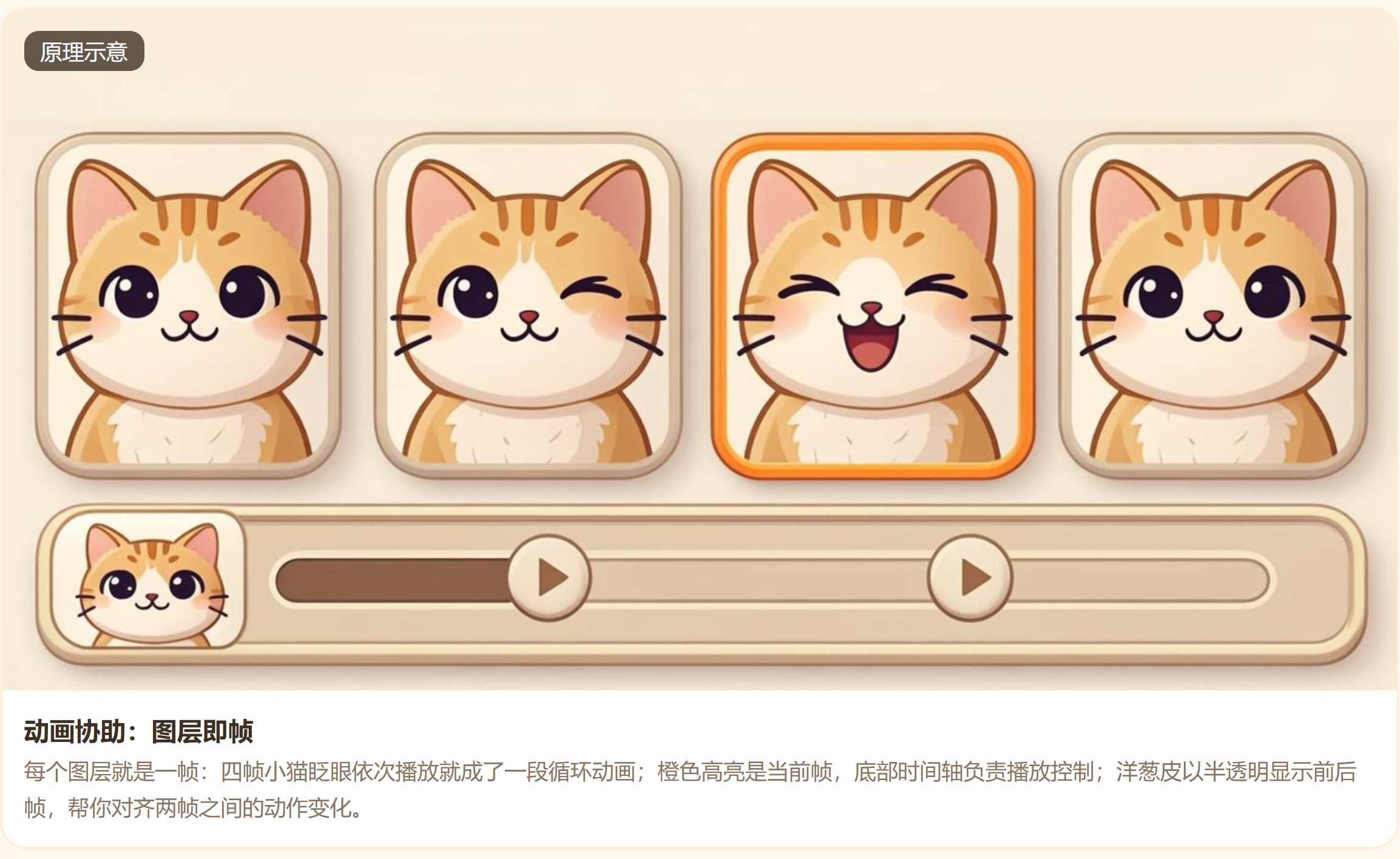
一只小猫,眼睛半闭 → 全闭 → 再睁开。
只需 4 个图层 ,按顺序播放,一个俏皮的眨眼循环就诞生了。
这就是动画协助的魔力------不需要时间轴关键帧,不需要补间计算,你画的每一层,就是动画的每一格 。
🧠 帧动画 + 洋葱皮
Procreate 的做法极其朴素:🔹 动画 = 连续播放的静止画面
🔹 洋葱皮(Onion Skin)------你的"透光台"
传统手绘动画师会在灯箱上叠放几张半透明纸,对照上一张的位置画下一张。
Procreate 把这项功能直接搬进屏幕:
- 前帧 以淡红色半透明显示
- 后帧 以淡绿色半透明显示(可自定义颜色)
- 你可以一边画当前帧,一边看到前后帧的轮廓,精准控制动作的位移幅度 和变形节奏
#mermaid-svg-ISGcJJnfhTziPN6I{font-family:"trebuchet ms",verdana,arial,sans-serif;font-size:16px;fill:#333;}@keyframes edge-animation-frame{from{stroke-dashoffset:0;}}@keyframes dash{to{stroke-dashoffset:0;}}#mermaid-svg-ISGcJJnfhTziPN6I .edge-animation-slow{stroke-dasharray:9,5!important;stroke-dashoffset:900;animation:dash 50s linear infinite;stroke-linecap:round;}#mermaid-svg-ISGcJJnfhTziPN6I .edge-animation-fast{stroke-dasharray:9,5!important;stroke-dashoffset:900;animation:dash 20s linear infinite;stroke-linecap:round;}#mermaid-svg-ISGcJJnfhTziPN6I .error-icon{fill:#552222;}#mermaid-svg-ISGcJJnfhTziPN6I .error-text{fill:#552222;stroke:#552222;}#mermaid-svg-ISGcJJnfhTziPN6I .edge-thickness-normal{stroke-width:1px;}#mermaid-svg-ISGcJJnfhTziPN6I .edge-thickness-thick{stroke-width:3.5px;}#mermaid-svg-ISGcJJnfhTziPN6I .edge-pattern-solid{stroke-dasharray:0;}#mermaid-svg-ISGcJJnfhTziPN6I .edge-thickness-invisible{stroke-width:0;fill:none;}#mermaid-svg-ISGcJJnfhTziPN6I .edge-pattern-dashed{stroke-dasharray:3;}#mermaid-svg-ISGcJJnfhTziPN6I .edge-pattern-dotted{stroke-dasharray:2;}#mermaid-svg-ISGcJJnfhTziPN6I .marker{fill:#333333;stroke:#333333;}#mermaid-svg-ISGcJJnfhTziPN6I .marker.cross{stroke:#333333;}#mermaid-svg-ISGcJJnfhTziPN6I svg{font-family:"trebuchet ms",verdana,arial,sans-serif;font-size:16px;}#mermaid-svg-ISGcJJnfhTziPN6I p{margin:0;}#mermaid-svg-ISGcJJnfhTziPN6I .label{font-family:"trebuchet ms",verdana,arial,sans-serif;color:#333;}#mermaid-svg-ISGcJJnfhTziPN6I .cluster-label text{fill:#333;}#mermaid-svg-ISGcJJnfhTziPN6I .cluster-label span{color:#333;}#mermaid-svg-ISGcJJnfhTziPN6I .cluster-label span p{background-color:transparent;}#mermaid-svg-ISGcJJnfhTziPN6I .label text,#mermaid-svg-ISGcJJnfhTziPN6I span{fill:#333;color:#333;}#mermaid-svg-ISGcJJnfhTziPN6I .node rect,#mermaid-svg-ISGcJJnfhTziPN6I .node circle,#mermaid-svg-ISGcJJnfhTziPN6I .node ellipse,#mermaid-svg-ISGcJJnfhTziPN6I .node polygon,#mermaid-svg-ISGcJJnfhTziPN6I .node path{fill:#ECECFF;stroke:#9370DB;stroke-width:1px;}#mermaid-svg-ISGcJJnfhTziPN6I .rough-node .label text,#mermaid-svg-ISGcJJnfhTziPN6I .node .label text,#mermaid-svg-ISGcJJnfhTziPN6I .image-shape .label,#mermaid-svg-ISGcJJnfhTziPN6I .icon-shape .label{text-anchor:middle;}#mermaid-svg-ISGcJJnfhTziPN6I .node .katex path{fill:#000;stroke:#000;stroke-width:1px;}#mermaid-svg-ISGcJJnfhTziPN6I .rough-node .label,#mermaid-svg-ISGcJJnfhTziPN6I .node .label,#mermaid-svg-ISGcJJnfhTziPN6I .image-shape .label,#mermaid-svg-ISGcJJnfhTziPN6I .icon-shape .label{text-align:center;}#mermaid-svg-ISGcJJnfhTziPN6I .node.clickable{cursor:pointer;}#mermaid-svg-ISGcJJnfhTziPN6I .root .anchor path{fill:#333333!important;stroke-width:0;stroke:#333333;}#mermaid-svg-ISGcJJnfhTziPN6I .arrowheadPath{fill:#333333;}#mermaid-svg-ISGcJJnfhTziPN6I .edgePath .path{stroke:#333333;stroke-width:2.0px;}#mermaid-svg-ISGcJJnfhTziPN6I .flowchart-link{stroke:#333333;fill:none;}#mermaid-svg-ISGcJJnfhTziPN6I .edgeLabel{background-color:rgba(232,232,232, 0.8);text-align:center;}#mermaid-svg-ISGcJJnfhTziPN6I .edgeLabel p{background-color:rgba(232,232,232, 0.8);}#mermaid-svg-ISGcJJnfhTziPN6I .edgeLabel rect{opacity:0.5;background-color:rgba(232,232,232, 0.8);fill:rgba(232,232,232, 0.8);}#mermaid-svg-ISGcJJnfhTziPN6I .labelBkg{background-color:rgba(232, 232, 232, 0.5);}#mermaid-svg-ISGcJJnfhTziPN6I .cluster rect{fill:#ffffde;stroke:#aaaa33;stroke-width:1px;}#mermaid-svg-ISGcJJnfhTziPN6I .cluster text{fill:#333;}#mermaid-svg-ISGcJJnfhTziPN6I .cluster span{color:#333;}#mermaid-svg-ISGcJJnfhTziPN6I div.mermaidTooltip{position:absolute;text-align:center;max-width:200px;padding:2px;font-family:"trebuchet ms",verdana,arial,sans-serif;font-size:12px;background:hsl(80, 100%, 96.2745098039%);border:1px solid #aaaa33;border-radius:2px;pointer-events:none;z-index:100;}#mermaid-svg-ISGcJJnfhTziPN6I .flowchartTitleText{text-anchor:middle;font-size:18px;fill:#333;}#mermaid-svg-ISGcJJnfhTziPN6I rect.text{fill:none;stroke-width:0;}#mermaid-svg-ISGcJJnfhTziPN6I .icon-shape,#mermaid-svg-ISGcJJnfhTziPN6I .image-shape{background-color:rgba(232,232,232, 0.8);text-align:center;}#mermaid-svg-ISGcJJnfhTziPN6I .icon-shape p,#mermaid-svg-ISGcJJnfhTziPN6I .image-shape p{background-color:rgba(232,232,232, 0.8);padding:2px;}#mermaid-svg-ISGcJJnfhTziPN6I .icon-shape .label rect,#mermaid-svg-ISGcJJnfhTziPN6I .image-shape .label rect{opacity:0.5;background-color:rgba(232,232,232, 0.8);fill:rgba(232,232,232, 0.8);}#mermaid-svg-ISGcJJnfhTziPN6I .label-icon{display:inline-block;height:1em;overflow:visible;vertical-align:-0.125em;}#mermaid-svg-ISGcJJnfhTziPN6I .node .label-icon path{fill:currentColor;stroke:revert;stroke-width:revert;}#mermaid-svg-ISGcJJnfhTziPN6I :root{--mermaid-font-family:"trebuchet ms",verdana,arial,sans-serif;} 洋葱皮显示效果
对齐动作路径
预判下一步
前一帧
半透明红色
当前帧
实色绘制
后一帧
半透明绿色
🧑🎨 小技巧:做 2~4 帧的短循环(眨眼、飘雪、烛光摇曳、旗帜飘动)最能体现"少即是多"------帧数越少,文件越小,导出越快,而且观感上反而更干净利落。
🛠 实操:
1️⃣ 开启动画协助
- 点击 「操作」→「画布」→「动画协助」
- 底部立刻弹出时间轴面板,每个图层变成一帧,按从上到下的顺序排列(顶部图层 = 第 1 帧)
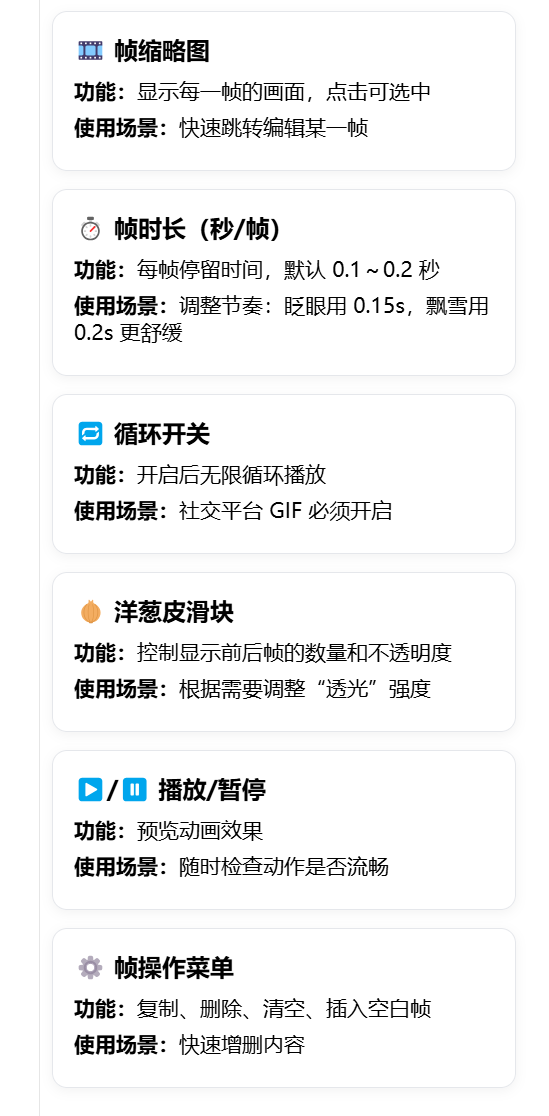
2️⃣ 时间轴面板控件
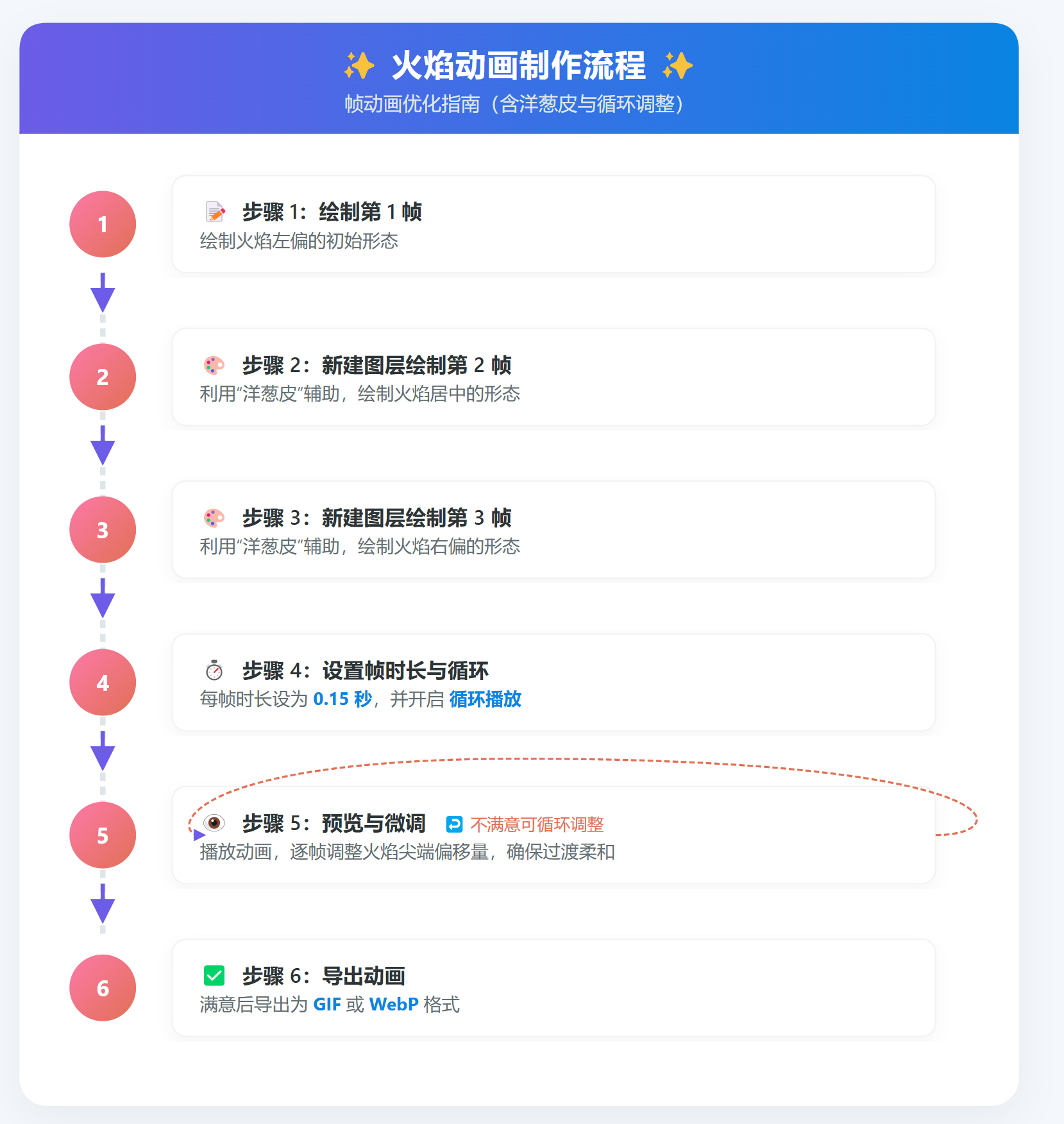
3️⃣ 制作一个简单循环
📤 导出格式
在 「操作」→「视频」 中,你可以导出四种格式:
| 格式 | 特点 | 推荐场景 |
|---|---|---|
| 动画 GIF | 兼容性极强,文件适中,颜色支持 256 色 | 微信、微博、小红书等社交平台,适合简单色彩插画 |
| 动画 PNG | 无损透明背景,文件较大 | 需保留透明通道的素材,或用于二次剪辑 |
| 动画 MP4 | 高压缩比,画质好,颜色丰富 | 朋友圈视频、短视频平台,通用性最强 |
| HEVC (H.265) | 体积比 MP4 再小 30%~50%,画质同等 | 苹果设备间分享,或追求极致存储效率 |
💡 小建议:发社交平台首选 GIF (自动循环无压力);要高清展示或带背景音乐,选 MP4/HEVC。
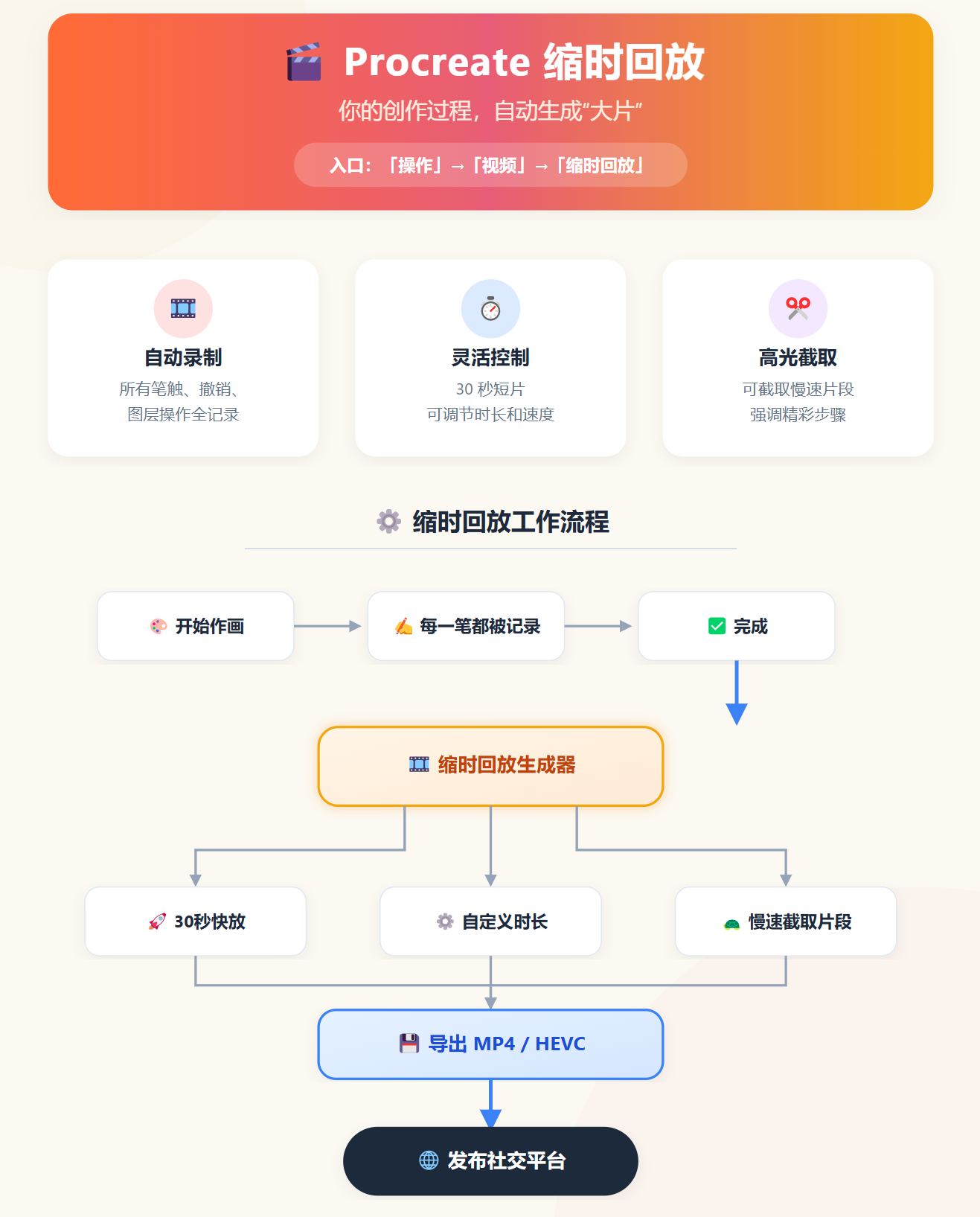
🎁 附加惊喜:不做动画,也能用上"缩时回放"
🎉 动画协助 不是为专业动画师准备的庞然大物,而是给每一位插画师的"小火花"------
用 2~4 帧,让角色眨个眼,让烛火摇一摇,让雪花飘起来。
然后,再顺手把作画过程导成短视频,让更多人看到你笔下的生命力。
试试看,你的画会自己讲故事。 ✨🖌️