Rust+Slint 实现左右伸缩式图片浏览器源码分享
- 一、效果展示
- 二、源码分享
- 三、实现原理
-
- [1、 组件化设计:AccordionCard](#1、 组件化设计:AccordionCard)
- 2、主窗口与动态布局
- [3、 Rust 后端与构建流程](#3、 Rust 后端与构建流程)
- [4、 技术要点总结](#4、 技术要点总结)
一、效果展示
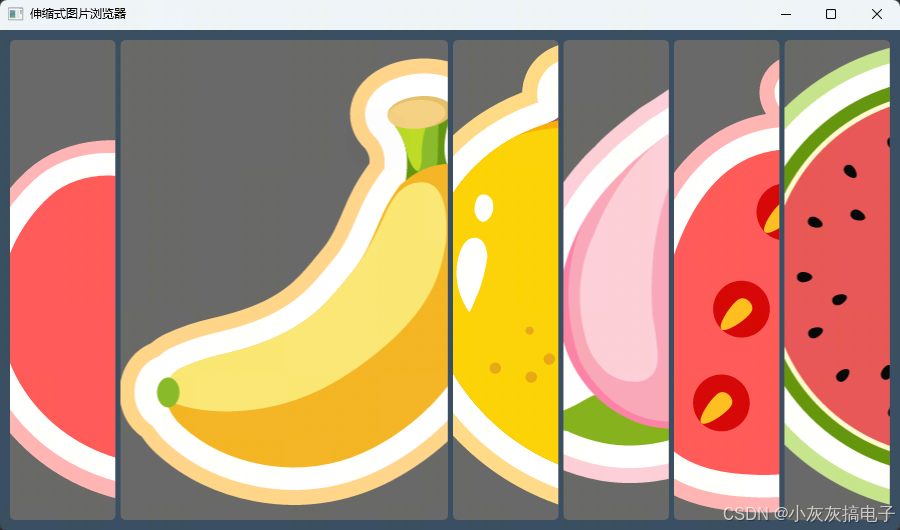
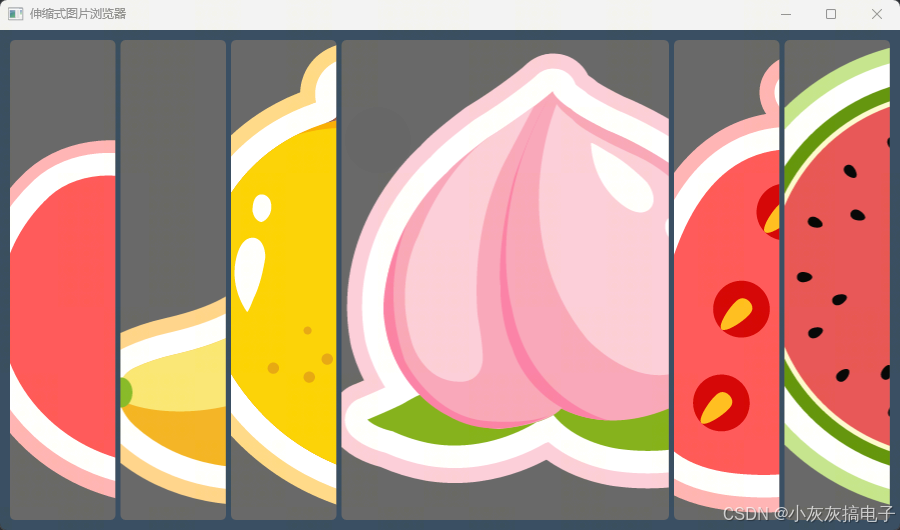
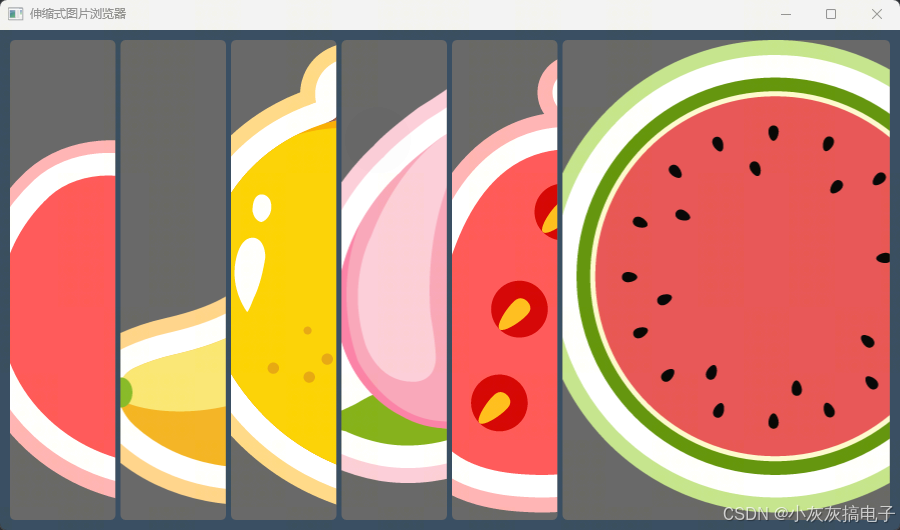
二、源码分享
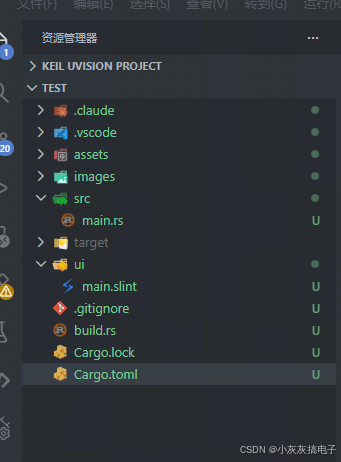
1、工程结构
2、main.rs
rust
slint::include_modules!();

fn main() -> Result<(), slint::PlatformError> {
    let main_window = MainWindow::new()?;
    main_window.run()
}3、build.rs
rust
fn main() {
    // 编译 Slint UI
    slint_build::compile("ui/main.slint").unwrap();
}
4、main.slint
rust
component AccordionCard inherits Rectangle {
    in property <image> source;

    border-radius: 5px;
    clip: true;
    min-width: 50px;
    preferred-width: 0px;
    background: #646464;

    ta := TouchArea {
        width: 100%;
        height: 100%;
    }

    // 动画拉伸属性:悬停时从 1 平滑过渡到 5
    property <float> my-stretch: ta.has-hover ? 5.0 : 1.0;
    animate my-stretch { duration: 280ms; easing: ease-out; }
    horizontal-stretch: my-stretch;

    Image {
        source: root.source;
        width: 100%;
        height: 100%;
        image-fit: cover;
    }
}

export component MainWindow inherits Window {
    preferred-width: 900px;
    preferred-height: 500px;
    title: "伸缩式图片浏览器";
    background: #34495E;

    HorizontalLayout {
        spacing: 5px;
        padding-left: 10px;
        padding-right: 10px;
        padding-top: 10px;
        padding-bottom: 10px;

        for img in [
            @image-url("../images/apple.svg"),
            @image-url("../images/banana.svg"),
            @image-url("../images/mango.svg"),
            @image-url("../images/peach.svg"),
            @image-url("../images/strawberry.svg"),
            @image-url("../images/watermelon.svg"),
        ] : AccordionCard {
            source: img;
        }
    }
}
5、Cargo.toml
rust
[package]
name = "sokoban"
version = "0.1.0"
edition = "2024"

[dependencies]
slint = "1.16.1"

[build-dependencies]
slint-build = "1.16.1"
三、实现原理
本项目的核心是利用 Slint UI 框架 的声明式语法和动画系统,结合 Rust 的高性能特性,实现一个具有悬停伸缩效果的图片浏览器。其实现原理可分为以下几个关键部分:
1、 组件化设计:AccordionCard
在 main.slint 文件中,我们定义了一个可复用的 AccordionCard 组件,它继承自 Rectangle。这是整个效果的核心载体。
- 属性绑定 :通过
in property <image> source;声明了一个输入属性,用于接收外部传入的图片资源。 - 悬停检测 :组件内部包含一个覆盖整个区域的
TouchArea(ta)。TouchArea能够检测鼠标悬停 (has-hover) 事件。 - 动画属性 :定义了一个自定义属性
my-stretch,其值由悬停状态决定:ta.has-hover ? 5.0 : 1.0。这意味着悬停时目标拉伸倍数为5,否则为1。 - 平滑过渡 :通过
animate my-stretch { duration: 280ms; easing: ease-out; }声明,使my-stretch属性的变化在280毫秒内以"缓出"的动画曲线完成,从而产生平滑的伸缩效果。 - 布局控制 :最终将
my-stretch属性赋值给horizontal-stretch,控制组件在水平方向上的拉伸因子,直接影响其在HorizontalLayout中所占的空间比例。
2、主窗口与动态布局
MainWindow 组件是应用的根窗口。
- 布局管理 :使用
HorizontalLayout作为容器,它默认会将其子组件(即多个AccordionCard)在水平方向上依次排列。 - 数据驱动UI :通过
for...in循环语法,动态创建一组AccordionCard实例。循环遍历一个图片URL数组,并将每张图片 (img) 作为source属性传递给对应的卡片。 - 交互联动 :当用户鼠标悬停在某个卡片上时,该卡片的
my-stretch属性变为5,触发动画并横向扩展。HorizontalLayout会立即重新计算所有子组件的尺寸,由于其他卡片未悬停(stretch为1),布局空间会自然向被悬停的卡片倾斜,形成"左右伸缩"的视觉效果。
3、 Rust 后端与构建流程
Rust 代码 (main.rs) 非常简洁,体现了 Slint 框架"声明式UI,逻辑与呈现分离"的特点。
- 模块引入 :
slint::include_modules!()是一个宏,它在编译时将main.slint中定义的 UI 组件(如MainWindow)转换为 Rust 代码并包含进来。 - 窗口生命周期 :
main函数中,创建MainWindow新实例并调用run()方法,启动事件循环,使窗口保持响应直到关闭。 - 构建脚本 :
build.rs在项目编译时执行,调用slint_build::compile函数预编译ui/main.slint文件,将其转换为高效的 Rust 代码,这是集成 Slint UI 的必要步骤。
4、 技术要点总结
- 声明式与响应式 :整个UI效果完全在
.slint文件中通过声明属性、绑定和动画完成,无需编写冗长的命令式布局或动画代码。 - 属性绑定与动画系统 :利用
property和animate关键字,轻松实现了状态(悬停)到样式(宽度)的响应式绑定与平滑过渡。 - 布局引擎的灵活性 :
HorizontalLayout与horizontal-stretch属性的配合,使得实现这种动态伸缩布局变得非常简单。 - 高效的 Rust 集成:编译时处理 UI 定义,保证了运行时的性能,同时享受 Rust 的安全性与生态。
通过以上机制,我们仅用百行左右的代码,就实现了一个视觉效果流畅、交互自然的伸缩式图片浏览器。
