环境: VS2022+.Net Framework4.8
程序名:WPFA_DataGrid
一、功能概述
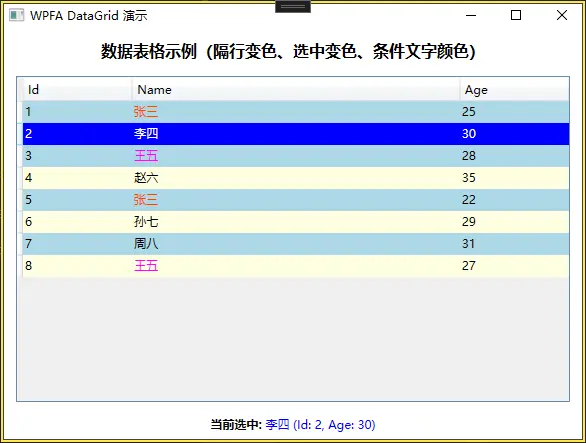
该程序实现了一个具有丰富视觉交互效果的DataGrid数据表格控件,主要功能包括:
- 隔行变色:奇数行显示为LightBlue,偶数行显示为LightYellow
- 选中状态反馈:行或单元格被选中时背景变为蓝色
- 失去焦点状态:当DataGrid失去焦点但仍有选中项时,背景变为粉色
- 条件文字颜色:Name列中,值为"张三"时显示为OrangeRed,"王五"时显示为Magenta
- 数据绑定:显示Id、Name、Age三列数据
二、技术栈分析
-
WPF (Windows Presentation Foundation):使用XAML构建UI
-
样式与触发器:使用Style和Trigger实现动态视觉变化
-
DataGrid控件:WPF中的数据表格控件
-
数据绑定:使用{Binding}实现MVVM模式的数据绑定
-
资源字典:将样式集中管理在Style.xaml中
-
多触发器:使用MultiTrigger实现复合条件判断
三、程序
1、项目结构
- WPFA_DataGrid/
├── WPFA_DataGrid.csproj
├── App.xaml
├── App.xaml.cs
├── MainWindow.xaml
├── MainWindow.xaml.cs
├── Style.xaml
├── Models/
│ └── Person.cs
└── ViewModels/
└── MainViewModel.cs
2、Style.xaml
新建一个资源字典文件
<ResourceDictionary xmlns="http://schemas.microsoft.com/winfx/2006/xaml/presentation"
                    xmlns:x="http://schemas.microsoft.com/winfx/2006/xaml">

    <!-- DataGrid 行样式 -->
    <Style x:Key="MyDataGridRowSytle" TargetType="DataGridRow">
        <Setter Property="Height" Value="22"/>
        <Setter Property="Foreground" Value="Black"/>
        <Setter Property="VerticalAlignment" Value="Center"/>
        <Setter Property="HorizontalAlignment" Value="Left"/>
        <Setter Property="BorderThickness" Value="0"/>
        <Style.Triggers>
            <!-- 隔行换色 -->
            <Trigger Property="AlternationIndex" Value="0">
                <Setter Property="Background" Value="LightBlue"/>
            </Trigger>
            <Trigger Property="AlternationIndex" Value="1">
                <Setter Property="Background" Value="LightYellow"/>
            </Trigger>
            <!-- 选中时背景颜色 -->
            <Trigger Property="IsSelected" Value="True">
                <Setter Property="Background" Value="Blue"/>
            </Trigger>
            <MultiTrigger>
                <!-- 失去焦点时背景颜色 -->
                <MultiTrigger.Conditions>
                    <Condition Property="IsSelected" Value="true"/>
                    <Condition Property="Selector.IsSelectionActive" Value="false"/>
                </MultiTrigger.Conditions>
                <Setter Property="Background" Value="Pink"/>
            </MultiTrigger>
        </Style.Triggers>
    </Style>

    <!-- DataGrid 单元格样式 -->
    <Style x:Key="MyDataGridCellSytle" TargetType="DataGridCell">
        <Setter Property="VerticalContentAlignment" Value="Center"/>
        <Setter Property="VerticalAlignment" Value="Center"/>
        <Setter Property="BorderThickness" Value="0"/>
        <Style.Triggers>
            <Trigger Property="IsSelected" Value="True">
                <Setter Property="Background" Value="Blue"/>
            </Trigger>
            <MultiTrigger>
                <MultiTrigger.Conditions>
                    <Condition Property="IsSelected" Value="true"/>
                    <Condition Property="Selector.IsSelectionActive" Value="false"/>
                </MultiTrigger.Conditions>
                <Setter Property="Background" Value="Pink"/>
            </MultiTrigger>
        </Style.Triggers>
    </Style>

    <!-- DataGrid 单元格样式(带条件文字颜色) -->
    <Style x:Key="MyDataGridSingleCellSytle" TargetType="DataGridCell">
        <Setter Property="VerticalContentAlignment" Value="Center"/>
        <Setter Property="VerticalAlignment" Value="Center"/>
        <Setter Property="BorderThickness" Value="0"/>
        <Style.Triggers>
            <Trigger Property="IsSelected" Value="True">
                <Setter Property="Background" Value="Blue"/>
            </Trigger>
            <MultiTrigger>
                <MultiTrigger.Conditions>
                    <Condition Property="IsSelected" Value="true"/>
                    <Condition Property="Selector.IsSelectionActive" Value="false"/>
                </MultiTrigger.Conditions>
                <Setter Property="Background" Value="Pink"/>
            </MultiTrigger>
            <!-- 根据绑定值设置文字颜色 -->
            <DataTrigger Binding="{Binding Name}" Value="张三">
                <Setter Property="Foreground" Value="OrangeRed"/>
            </DataTrigger>
            <DataTrigger Binding="{Binding Name}" Value="王五">
                <Setter Property="Foreground" Value="Magenta"/>
            </DataTrigger>
        </Style.Triggers>
    </Style>
</ResourceDictionary>
3、App.xaml
在 App.xaml 中添加引用资源文件
<Application x:Class="WPFA_DataGrid.App"
             xmlns="http://schemas.microsoft.com/winfx/2006/xaml/presentation"
             xmlns:x="http://schemas.microsoft.com/winfx/2006/xaml"
             StartupUri="MainWindow.xaml">
    <Application.Resources>
        <ResourceDictionary>
            <ResourceDictionary.MergedDictionaries>
                <ResourceDictionary Source="Style.xaml"/>
            </ResourceDictionary.MergedDictionaries>
        </ResourceDictionary>
    </Application.Resources>
</Application>
4、Person.cs
using System.ComponentModel;

namespace WPFA_DataGrid.Models
{
    public class Person : INotifyPropertyChanged
    {
        private int _id;
        private string _name;
        private int _age;

        public int Id
        {
            get => _id;
            set
            {
                if (_id != value)
                {
                    _id = value;
                    OnPropertyChanged(nameof(Id));
                }
            }
        }

        public string Name
        {
            get => _name;
            set
            {
                if (_name != value)
                {
                    _name = value;
                    OnPropertyChanged(nameof(Name));
                }
            }
        }

        public int Age
        {
            get => _age;
            set
            {
                if (_age != value)
                {
                    _age = value;
                    OnPropertyChanged(nameof(Age));
                }
            }
        }

        public event PropertyChangedEventHandler PropertyChanged;

        protected virtual void OnPropertyChanged(string propertyName)
        {
            PropertyChanged?.Invoke(this, new PropertyChangedEventArgs(propertyName));
        }
    }
}
5、MainViewModel.cs
using System.Collections.ObjectModel;
using System.ComponentModel;
using WPFA_DataGrid.Models;

namespace WPFA_DataGrid.ViewModels
{
    public class MainViewModel : INotifyPropertyChanged
    {
        private ObservableCollection<Person> _persons;

        public ObservableCollection<Person> Persons
        {
            get => _persons;
            set
            {
                if (_persons != value)
                {
                    _persons = value;
                    OnPropertyChanged(nameof(Persons));
                }
            }
        }

        public MainViewModel()
        {
            // 初始化测试数据
            Persons = new ObservableCollection<Person>
            {
                new Person { Id = 1, Name = "张三", Age = 25 },
                new Person { Id = 2, Name = "李四", Age = 30 },
                new Person { Id = 3, Name = "王五", Age = 28 },
                new Person { Id = 4, Name = "赵六", Age = 35 },
                new Person { Id = 5, Name = "张三", Age = 22 },
                new Person { Id = 6, Name = "孙七", Age = 29 },
                new Person { Id = 7, Name = "周八", Age = 31 },
                new Person { Id = 8, Name = "王五", Age = 27 }
            };
        }

        public event PropertyChangedEventHandler PropertyChanged;

        protected virtual void OnPropertyChanged(string propertyName)
        {
            PropertyChanged?.Invoke(this, new PropertyChangedEventArgs(propertyName));
        }
    }
}
6、MainWindow.xaml
<Window x:Class="WPFA_DataGrid.MainWindow"
        xmlns="http://schemas.microsoft.com/winfx/2006/xaml/presentation"
        xmlns:x="http://schemas.microsoft.com/winfx/2006/xaml"
        xmlns:vm="clr-namespace:WPFA_DataGrid.ViewModels"
        Title="WPFA DataGrid 演示" Height="450" Width="600"
        WindowStartupLocation="CenterScreen">
    <Window.DataContext>
        <vm:MainViewModel/>
    </Window.DataContext>

    <Grid Margin="10">
        <Grid.RowDefinitions>
            <RowDefinition Height="Auto"/>
            <RowDefinition Height="*"/>
            <RowDefinition Height="Auto"/>
        </Grid.RowDefinitions>

        <TextBlock Grid.Row="0" Text="数据表格示例(隔行变色、选中变色、条件文字颜色)"
                   FontSize="16" FontWeight="Bold" Margin="0,0,0,10" HorizontalAlignment="Center"/>

        <DataGrid Grid.Row="1" x:Name="DG_Data" Margin="5"
                  CanUserSortColumns="False" CanUserReorderColumns="False"
                  CanUserAddRows="False" AutoGenerateColumns="False"
                  CanUserResizeColumns="False" CanUserResizeRows="False"
                  AlternationCount="2" GridLinesVisibility="None"
                  CellStyle="{DynamicResource MyDataGridCellSytle}"
                  RowStyle="{DynamicResource MyDataGridRowSytle}"
                  ItemsSource="{Binding Persons}"
                  SelectionChanged="DG_Data_SelectionChanged">
            <DataGrid.Columns>
                <DataGridTextColumn Header="Id" Binding="{Binding Id}" Width="*"/>
                <DataGridTextColumn Header="Name" Binding="{Binding Name}" Width="3*"
                                    CellStyle="{DynamicResource MyDataGridSingleCellSytle}"/>
                <DataGridTextColumn Header="Age" Binding="{Binding Age}" Width="*"/>
            </DataGrid.Columns>
        </DataGrid>

        <StackPanel Grid.Row="2" Orientation="Horizontal" HorizontalAlignment="Center" Margin="0,10,0,0">
            <TextBlock Text="当前选中: " FontWeight="Bold" VerticalAlignment="Center"/>
            <TextBlock x:Name="TxtSelectionInfo" Text="无" VerticalAlignment="Center" Foreground="Blue"/>
        </StackPanel>
    </Grid>
</Window>
##7、MainWindow.xaml.cs
using System;
using System.Windows;
using System.Windows.Controls;
using WPFA_DataGrid.Models;

namespace WPFA_DataGrid
{
    public partial class MainWindow : Window
    {
        public MainWindow()
        {
            InitializeComponent();
        }

        private void DG_Data_SelectionChanged(object sender, SelectionChangedEventArgs e)
        {
            if (DG_Data.SelectedItem is Person person)
            {
                TxtSelectionInfo.Text = $"{person.Name} (Id: {person.Id}, Age: {person.Age})";
            }
            else
            {
                TxtSelectionInfo.Text = "无";
            }
        }
    }
}
四、资料
【1.25 DataGrid样式:单元格颜色、隔行颜色、选中颜色、失去焦点颜色】WPF案例代码解析 - 知乎]
(https://zhuanlan.zhihu.com/p/557577575)