一、最基础的 Agent Loop。
修改代码
python
from openai import OpenAI
import json

client = OpenAI()
def calculator(a, b):
    return a * b

tools = [
    {
        "type": "function",
        "name": "calculator",
        "description": "计算两个数字的乘积",
        "parameters": {
            "type": "object",
            "properties": {
                "a": {
                    "type": "number",
                    "description": "第一个数字"
                },
                "b": {
                    "type": "number",
                    "description": "第二个数字"
                }
            },
            "required": ["a", "b"],
            "additionalProperties": False
        }
    }
]

response = client.responses.create(
    model="gpt-5.6-sol",
    input="请调用 calculator 工具,计算 123 × 456",
    tools=tools,
    tool_choice="required"
)

# 找到 LLM 发出的工具调用
for item in response.output:

    if item.type == "function_call":

        print("========== Tool Call ==========")
        print("工具名称:", item.name)
        print("参数:", item.arguments)
        print("Call ID:", item.call_id)

        # JSON字符串 → Python字典
        arguments = json.loads(item.arguments)

        # 真正执行Python函数
        result = calculator(
            arguments["a"],
            arguments["b"]
        )

        print("========== Tool Result ==========")
        print(result)

         # 第二次请求:把工具结果交给 LLM
        response2 = client.responses.create(
            model="gpt-5.6-sol",
            input=[
                *response.output,
                {
                    "type": "function_call_output",
                    "call_id": item.call_id,
                    "output": str(result)
                }
            ],
            tools=tools
        )

        print("========== Final Answer ==========")
        print(response2.output_text)
告诉 LLM 这是工具执行完之后返回给你的结果。:
"type": "function_call_output"
这个结果对应你刚才发出的那一次 calculator 调用
"call_id": item.call_id
【*response.output】把第一次 LLM 的输出上下文带过去。让LLM知道刚才我让你调用了 calculator,现在这是那个调用的结果。
运行输出:
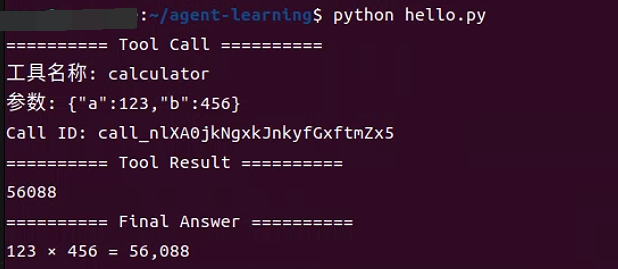
已经亲手完成了一个最小 Agent Loop!!
二、完整过程
┌──────────────┐
│ LLM │
└──────┬───────┘
│
Function Call
│
↓
┌──────────────┐
│ Python │
└──────┬───────┘
│
calculator(123,456)
│
↓
56088
│
Tool Output
│
↓
┌──────────────┐
│ LLM │
└──────┬───────┘
│
↓
"123 × 456 = 56,088"
【注意】把这个过程彻底搞懂,而不是继续加代码。尤其是 tools、function_call、function_call_output、call_id、两次 responses.create() 这几个东西弄明白!