摘要:AI Agent 之所以能被称为"智能体"而非"工具调用器",关键在于它具备一个完整的认知闭环------感知、规划、执行、反思、记忆。这五个阶段不是线性流水线,而是一个持续运转的循环系统:Agent 通过感知理解用户意图与环境状态,通过规划拆解任务路径,通过执行调用工具完成具体操作,通过反思评估结果并调整策略,通过记忆将经验沉淀为可复用的知识。本文将深入拆解这五个核心能力的工程实现,提供完整的代码示例,并对比 ReAct、Plan-Execute、Reflexion 三种主流规划模式的优劣。无论你是在构建客服 Agent、数据分析 Agent 还是自主编程 Agent,这个核心循环都是你必须掌握的基础架构。
版本声明:本文内容基于 2024-2025 年主流 Agent 框架(LangGraph、AutoGen、CrewAI 等)的工程实践总结,代码示例使用 Python + LangChain/LangGraph 生态。适用于具备一定 LLM 应用开发经验的工程师。
适用边界:本文聚焦于基于 LLM 的 Agent 系统,不涵盖传统强化学习 Agent 或符号 AI Agent。代码示例为教学性质,生产环境需补充异常处理、并发控制、安全校验等工程能力。
文章目录
-
- [一、Agent 核心循环的提出:为什么不是线性执行而是循环](#一、Agent 核心循环的提出:为什么不是线性执行而是循环)
-
- [1.1 从函数调用到认知循环](#1.1 从函数调用到认知循环)
- [1.2 核心循环的五阶段](#1.2 核心循环的五阶段)
- [1.3 为什么必须是循环](#1.3 为什么必须是循环)
- [1.4 循环的终止条件](#1.4 循环的终止条件)
- 二、感知(Perceive):意图理解与上下文构建
-
- [2.1 感知不只是"理解用户说了什么"](#2.1 感知不只是"理解用户说了什么")
- [2.2 感知阶段的工程实现](#2.2 感知阶段的工程实现)
- [2.3 多模态感知](#2.3 多模态感知)
- [三、规划(Plan):ReAct vs Plan-Execute vs Reflexion 三种模式对比](#三、规划(Plan):ReAct vs Plan-Execute vs Reflexion 三种模式对比)
-
- [3.1 规划是 Agent 的大脑](#3.1 规划是 Agent 的大脑)
- [3.2 ReAct 模式:推理+行动](#3.2 ReAct 模式:推理+行动)
- [3.3 Plan-Execute 模式:规划与执行分离](#3.3 Plan-Execute 模式:规划与执行分离)
- [3.4 Reflexion 模式:反思驱动的自我改进](#3.4 Reflexion 模式:反思驱动的自我改进)
- 四、执行(Act):工具调用与结果获取
-
- [4.1 执行层的职责](#4.1 执行层的职责)
- [4.2 工具注册与调用框架](#4.2 工具注册与调用框架)
- [4.3 工具调用的并行执行](#4.3 工具调用的并行执行)
- 五、反思(Reflect):结果评估与计划调整
-
- [5.1 反思是 Agent 的"元认知"](#5.1 反思是 Agent 的"元认知")
- [5.2 反思阶段的工程实现](#5.2 反思阶段的工程实现)
- 六、记忆(Remember):上下文更新与知识沉淀
-
- [6.1 Agent 记忆的三层架构](#6.1 Agent 记忆的三层架构)
- [6.2 记忆系统的工程实现](#6.2 记忆系统的工程实现)
- [6.3 记忆的检索与注入](#6.3 记忆的检索与注入)
- [七、完整循环实现:一个端到端的 Agent 循环代码示例](#七、完整循环实现:一个端到端的 Agent 循环代码示例)
-
- [7.1 整合五个阶段](#7.1 整合五个阶段)
- [7.2 运行一个完整示例](#7.2 运行一个完整示例)
- 八、适用边界与风险提示
-
- [8.1 何时该用循环 Agent,何时不该用](#8.1 何时该用循环 Agent,何时不该用)
- [8.2 主要风险与缓解策略](#8.2 主要风险与缓解策略)
- 九、总结
- 参考资料
一、Agent 核心循环的提出:为什么不是线性执行而是循环
1.1 从函数调用到认知循环
传统的 LLM 应用是线性的:用户输入 → Prompt 拼接 → LLM 生成 → 返回结果。这本质上是把 LLM 当成一个"高级函数"来用。但现实世界的任务远比"一问一答"复杂。
想象一个真实的场景:你让 Agent "帮我分析上个季度的销售数据,找出下滑最严重的区域,并生成一份包含建议的报告"。
这个任务涉及:
- 多步骤:获取数据 → 分析趋势 → 定位问题 → 生成建议 → 输出报告
- 有状态:每一步的结果都是下一步的输入
- 可纠错:如果数据获取失败,需要换一种方式重试
- 需判断:分析结果是否合理?建议是否有依据?
线性流水线无法处理这种复杂性,你需要的是一个循环。
1.2 核心循环的五阶段
#mermaid-svg-ot2xunKMHqZdqfUE{font-family:"trebuchet ms",verdana,arial,sans-serif;font-size:16px;fill:#333;}@keyframes edge-animation-frame{from{stroke-dashoffset:0;}}@keyframes dash{to{stroke-dashoffset:0;}}#mermaid-svg-ot2xunKMHqZdqfUE .edge-animation-slow{stroke-dasharray:9,5!important;stroke-dashoffset:900;animation:dash 50s linear infinite;stroke-linecap:round;}#mermaid-svg-ot2xunKMHqZdqfUE .edge-animation-fast{stroke-dasharray:9,5!important;stroke-dashoffset:900;animation:dash 20s linear infinite;stroke-linecap:round;}#mermaid-svg-ot2xunKMHqZdqfUE .error-icon{fill:#552222;}#mermaid-svg-ot2xunKMHqZdqfUE .error-text{fill:#552222;stroke:#552222;}#mermaid-svg-ot2xunKMHqZdqfUE .edge-thickness-normal{stroke-width:1px;}#mermaid-svg-ot2xunKMHqZdqfUE .edge-thickness-thick{stroke-width:3.5px;}#mermaid-svg-ot2xunKMHqZdqfUE .edge-pattern-solid{stroke-dasharray:0;}#mermaid-svg-ot2xunKMHqZdqfUE .edge-thickness-invisible{stroke-width:0;fill:none;}#mermaid-svg-ot2xunKMHqZdqfUE .edge-pattern-dashed{stroke-dasharray:3;}#mermaid-svg-ot2xunKMHqZdqfUE .edge-pattern-dotted{stroke-dasharray:2;}#mermaid-svg-ot2xunKMHqZdqfUE .marker{fill:#333333;stroke:#333333;}#mermaid-svg-ot2xunKMHqZdqfUE .marker.cross{stroke:#333333;}#mermaid-svg-ot2xunKMHqZdqfUE svg{font-family:"trebuchet ms",verdana,arial,sans-serif;font-size:16px;}#mermaid-svg-ot2xunKMHqZdqfUE p{margin:0;}#mermaid-svg-ot2xunKMHqZdqfUE .label{font-family:"trebuchet ms",verdana,arial,sans-serif;color:#333;}#mermaid-svg-ot2xunKMHqZdqfUE .cluster-label text{fill:#333;}#mermaid-svg-ot2xunKMHqZdqfUE .cluster-label span{color:#333;}#mermaid-svg-ot2xunKMHqZdqfUE .cluster-label span p{background-color:transparent;}#mermaid-svg-ot2xunKMHqZdqfUE .label text,#mermaid-svg-ot2xunKMHqZdqfUE span{fill:#333;color:#333;}#mermaid-svg-ot2xunKMHqZdqfUE .node rect,#mermaid-svg-ot2xunKMHqZdqfUE .node circle,#mermaid-svg-ot2xunKMHqZdqfUE .node ellipse,#mermaid-svg-ot2xunKMHqZdqfUE .node polygon,#mermaid-svg-ot2xunKMHqZdqfUE .node path{fill:#ECECFF;stroke:#9370DB;stroke-width:1px;}#mermaid-svg-ot2xunKMHqZdqfUE .rough-node .label text,#mermaid-svg-ot2xunKMHqZdqfUE .node .label text,#mermaid-svg-ot2xunKMHqZdqfUE .image-shape .label,#mermaid-svg-ot2xunKMHqZdqfUE .icon-shape .label{text-anchor:middle;}#mermaid-svg-ot2xunKMHqZdqfUE .node .katex path{fill:#000;stroke:#000;stroke-width:1px;}#mermaid-svg-ot2xunKMHqZdqfUE .rough-node .label,#mermaid-svg-ot2xunKMHqZdqfUE .node .label,#mermaid-svg-ot2xunKMHqZdqfUE .image-shape .label,#mermaid-svg-ot2xunKMHqZdqfUE .icon-shape .label{text-align:center;}#mermaid-svg-ot2xunKMHqZdqfUE .node.clickable{cursor:pointer;}#mermaid-svg-ot2xunKMHqZdqfUE .root .anchor path{fill:#333333!important;stroke-width:0;stroke:#333333;}#mermaid-svg-ot2xunKMHqZdqfUE .arrowheadPath{fill:#333333;}#mermaid-svg-ot2xunKMHqZdqfUE .edgePath .path{stroke:#333333;stroke-width:2.0px;}#mermaid-svg-ot2xunKMHqZdqfUE .flowchart-link{stroke:#333333;fill:none;}#mermaid-svg-ot2xunKMHqZdqfUE .edgeLabel{background-color:rgba(232,232,232, 0.8);text-align:center;}#mermaid-svg-ot2xunKMHqZdqfUE .edgeLabel p{background-color:rgba(232,232,232, 0.8);}#mermaid-svg-ot2xunKMHqZdqfUE .edgeLabel rect{opacity:0.5;background-color:rgba(232,232,232, 0.8);fill:rgba(232,232,232, 0.8);}#mermaid-svg-ot2xunKMHqZdqfUE .labelBkg{background-color:rgba(232, 232, 232, 0.5);}#mermaid-svg-ot2xunKMHqZdqfUE .cluster rect{fill:#ffffde;stroke:#aaaa33;stroke-width:1px;}#mermaid-svg-ot2xunKMHqZdqfUE .cluster text{fill:#333;}#mermaid-svg-ot2xunKMHqZdqfUE .cluster span{color:#333;}#mermaid-svg-ot2xunKMHqZdqfUE div.mermaidTooltip{position:absolute;text-align:center;max-width:200px;padding:2px;font-family:"trebuchet ms",verdana,arial,sans-serif;font-size:12px;background:hsl(80, 100%, 96.2745098039%);border:1px solid #aaaa33;border-radius:2px;pointer-events:none;z-index:100;}#mermaid-svg-ot2xunKMHqZdqfUE .flowchartTitleText{text-anchor:middle;font-size:18px;fill:#333;}#mermaid-svg-ot2xunKMHqZdqfUE rect.text{fill:none;stroke-width:0;}#mermaid-svg-ot2xunKMHqZdqfUE .icon-shape,#mermaid-svg-ot2xunKMHqZdqfUE .image-shape{background-color:rgba(232,232,232, 0.8);text-align:center;}#mermaid-svg-ot2xunKMHqZdqfUE .icon-shape p,#mermaid-svg-ot2xunKMHqZdqfUE .image-shape p{background-color:rgba(232,232,232, 0.8);padding:2px;}#mermaid-svg-ot2xunKMHqZdqfUE .icon-shape .label rect,#mermaid-svg-ot2xunKMHqZdqfUE .image-shape .label rect{opacity:0.5;background-color:rgba(232,232,232, 0.8);fill:rgba(232,232,232, 0.8);}#mermaid-svg-ot2xunKMHqZdqfUE .label-icon{display:inline-block;height:1em;overflow:visible;vertical-align:-0.125em;}#mermaid-svg-ot2xunKMHqZdqfUE .node .label-icon path{fill:currentColor;stroke:revert;stroke-width:revert;}#mermaid-svg-ot2xunKMHqZdqfUE :root{--mermaid-font-family:"trebuchet ms",verdana,arial,sans-serif;} 下一轮
计划调整
知识检索
感知 Perceive
规划 Plan
执行 Act
反思 Reflect
记忆 Remember
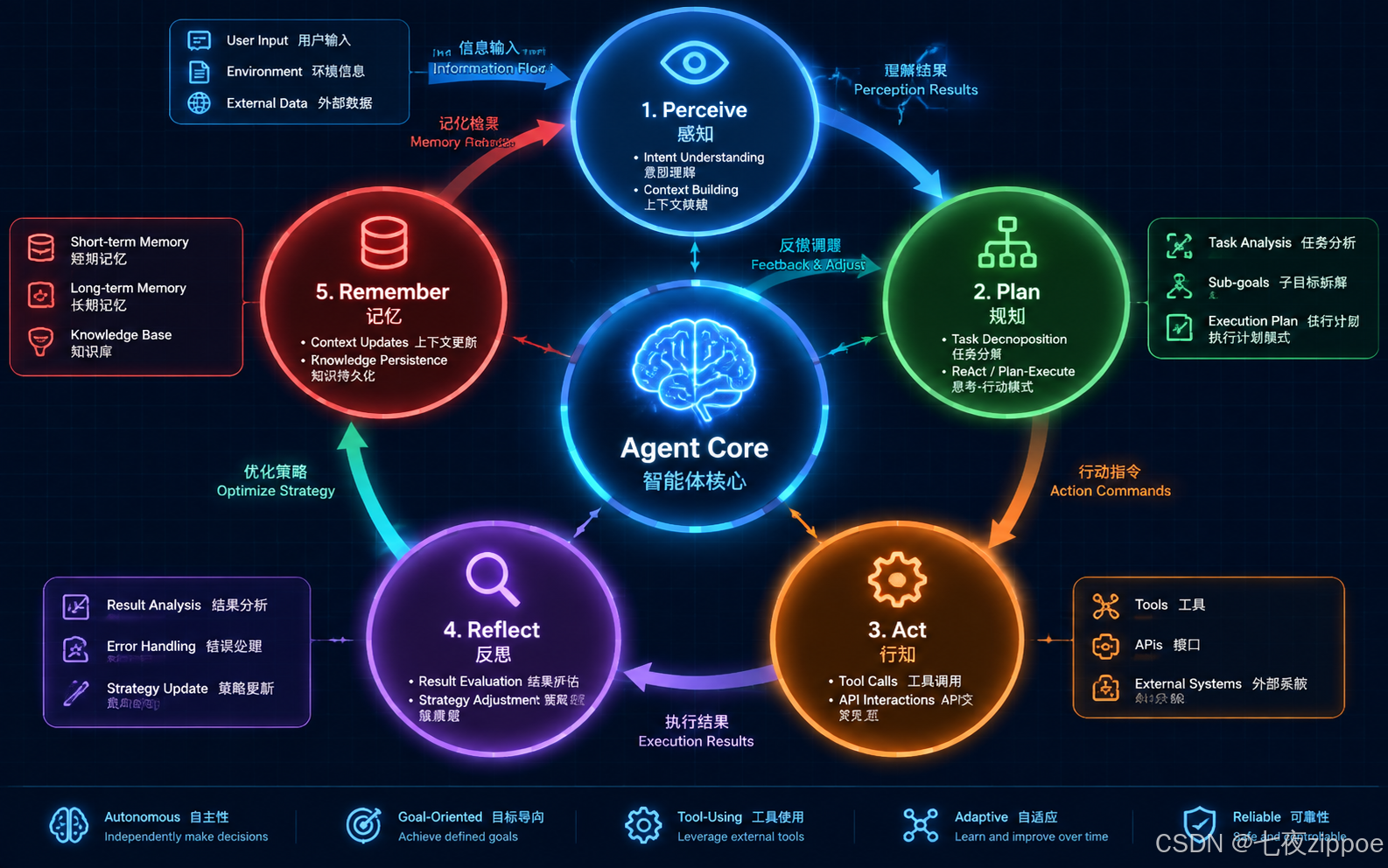
图:Agent 核心循环的五个阶段及其数据流
1.3 为什么必须是循环
| 特性 | 线性执行 | 循环执行 |
|---|---|---|
| 错误处理 | 失败即终止 | 可反思并重试 |
| 复杂任务 | 需人工拆分 | 自动拆解并迭代 |
| 上下文 | 单次传递 | 持续积累与更新 |
| 自适应 | 固定路径 | 动态调整策略 |
| 经验积累 | 无 | 可沉淀为长期记忆 |
循环不是目的,而是让 Agent 具备**自主性(Autonomy)和适应性(Adaptivity)**的必要结构。每一次循环,Agent 都在"学习"------不是训练权重,而是更新上下文、调整策略、积累经验。
1.4 循环的终止条件
Agent 循环不能无限运行,必须有明确的终止条件:
- 任务完成:反思阶段判定目标已达成
- 最大迭代数:硬性上限,防止死循环
- 资源耗尽:Token 预算或时间预算用尽
- 人工干预:用户主动中止或审批节点触发
python
# 基础循环框架的最简结构
class AgentLoop:
    def __init__(self, max_iterations=10):
        self.max_iterations = max_iterations
        self.memory = AgentMemory()

    def run(self, user_input: str) -> str:
        context = self.perceive(user_input)

        for i in range(self.max_iterations):
            plan = self.plan(context)
            result = self.act(plan)
            reflection = self.reflect(result, context)

            if reflection.is_complete:
                self.remember(context, plan, result, reflection)
                return reflection.output

            context = self.update_context(context, result, reflection)
            self.memory.update(context)

        return "达到最大迭代数,任务未完成。"
上面这段代码展示了 Agent 核心循环的最简骨架。AgentLoop 类接收用户输入后进入循环:感知输入、规划步骤、执行动作、反思结果、更新记忆。max_iterations 作为硬性安全阀防止死循环。注意 reflect 阶段返回的 reflection 对象包含 is_complete 标志位,这是循环的主要退出条件。实际工程中,每个方法内部都会调用 LLM 并涉及复杂的 Prompt 工程,但外层结构就是这么简单。
二、感知(Perceive):意图理解与上下文构建
2.1 感知不只是"理解用户说了什么"
感知阶段是 Agent 认知循环的入口,它决定了 Agent 对问题的理解深度。一个优秀的感知模块需要完成三件事:
- 意图识别:用户想要什么?是查询、创建、分析还是混合任务?
- 实体提取:任务涉及哪些具体对象?文件名、时间范围、数据源等。
- 上下文构建:当前对话历史、用户偏好、环境状态是什么?
#mermaid-svg-pZvep39WyDs0I64t{font-family:"trebuchet ms",verdana,arial,sans-serif;font-size:16px;fill:#333;}@keyframes edge-animation-frame{from{stroke-dashoffset:0;}}@keyframes dash{to{stroke-dashoffset:0;}}#mermaid-svg-pZvep39WyDs0I64t .edge-animation-slow{stroke-dasharray:9,5!important;stroke-dashoffset:900;animation:dash 50s linear infinite;stroke-linecap:round;}#mermaid-svg-pZvep39WyDs0I64t .edge-animation-fast{stroke-dasharray:9,5!important;stroke-dashoffset:900;animation:dash 20s linear infinite;stroke-linecap:round;}#mermaid-svg-pZvep39WyDs0I64t .error-icon{fill:#552222;}#mermaid-svg-pZvep39WyDs0I64t .error-text{fill:#552222;stroke:#552222;}#mermaid-svg-pZvep39WyDs0I64t .edge-thickness-normal{stroke-width:1px;}#mermaid-svg-pZvep39WyDs0I64t .edge-thickness-thick{stroke-width:3.5px;}#mermaid-svg-pZvep39WyDs0I64t .edge-pattern-solid{stroke-dasharray:0;}#mermaid-svg-pZvep39WyDs0I64t .edge-thickness-invisible{stroke-width:0;fill:none;}#mermaid-svg-pZvep39WyDs0I64t .edge-pattern-dashed{stroke-dasharray:3;}#mermaid-svg-pZvep39WyDs0I64t .edge-pattern-dotted{stroke-dasharray:2;}#mermaid-svg-pZvep39WyDs0I64t .marker{fill:#333333;stroke:#333333;}#mermaid-svg-pZvep39WyDs0I64t .marker.cross{stroke:#333333;}#mermaid-svg-pZvep39WyDs0I64t svg{font-family:"trebuchet ms",verdana,arial,sans-serif;font-size:16px;}#mermaid-svg-pZvep39WyDs0I64t p{margin:0;}#mermaid-svg-pZvep39WyDs0I64t .edge{stroke-width:3;}#mermaid-svg-pZvep39WyDs0I64t .section--1 rect,#mermaid-svg-pZvep39WyDs0I64t .section--1 path,#mermaid-svg-pZvep39WyDs0I64t .section--1 circle,#mermaid-svg-pZvep39WyDs0I64t .section--1 polygon,#mermaid-svg-pZvep39WyDs0I64t .section--1 path{fill:hsl(240, 100%, 76.2745098039%);}#mermaid-svg-pZvep39WyDs0I64t .section--1 text{fill:#ffffff;}#mermaid-svg-pZvep39WyDs0I64t .node-icon--1{font-size:40px;color:#ffffff;}#mermaid-svg-pZvep39WyDs0I64t .section-edge--1{stroke:hsl(240, 100%, 76.2745098039%);}#mermaid-svg-pZvep39WyDs0I64t .edge-depth--1{stroke-width:17;}#mermaid-svg-pZvep39WyDs0I64t .section--1 line{stroke:hsl(60, 100%, 86.2745098039%);stroke-width:3;}#mermaid-svg-pZvep39WyDs0I64t .disabled,#mermaid-svg-pZvep39WyDs0I64t .disabled circle,#mermaid-svg-pZvep39WyDs0I64t .disabled text{fill:lightgray;}#mermaid-svg-pZvep39WyDs0I64t .disabled text{fill:#efefef;}#mermaid-svg-pZvep39WyDs0I64t .section-0 rect,#mermaid-svg-pZvep39WyDs0I64t .section-0 path,#mermaid-svg-pZvep39WyDs0I64t .section-0 circle,#mermaid-svg-pZvep39WyDs0I64t .section-0 polygon,#mermaid-svg-pZvep39WyDs0I64t .section-0 path{fill:hsl(60, 100%, 73.5294117647%);}#mermaid-svg-pZvep39WyDs0I64t .section-0 text{fill:black;}#mermaid-svg-pZvep39WyDs0I64t .node-icon-0{font-size:40px;color:black;}#mermaid-svg-pZvep39WyDs0I64t .section-edge-0{stroke:hsl(60, 100%, 73.5294117647%);}#mermaid-svg-pZvep39WyDs0I64t .edge-depth-0{stroke-width:14;}#mermaid-svg-pZvep39WyDs0I64t .section-0 line{stroke:hsl(240, 100%, 83.5294117647%);stroke-width:3;}#mermaid-svg-pZvep39WyDs0I64t .disabled,#mermaid-svg-pZvep39WyDs0I64t .disabled circle,#mermaid-svg-pZvep39WyDs0I64t .disabled text{fill:lightgray;}#mermaid-svg-pZvep39WyDs0I64t .disabled text{fill:#efefef;}#mermaid-svg-pZvep39WyDs0I64t .section-1 rect,#mermaid-svg-pZvep39WyDs0I64t .section-1 path,#mermaid-svg-pZvep39WyDs0I64t .section-1 circle,#mermaid-svg-pZvep39WyDs0I64t .section-1 polygon,#mermaid-svg-pZvep39WyDs0I64t .section-1 path{fill:hsl(80, 100%, 76.2745098039%);}#mermaid-svg-pZvep39WyDs0I64t .section-1 text{fill:black;}#mermaid-svg-pZvep39WyDs0I64t .node-icon-1{font-size:40px;color:black;}#mermaid-svg-pZvep39WyDs0I64t .section-edge-1{stroke:hsl(80, 100%, 76.2745098039%);}#mermaid-svg-pZvep39WyDs0I64t .edge-depth-1{stroke-width:11;}#mermaid-svg-pZvep39WyDs0I64t .section-1 line{stroke:hsl(260, 100%, 86.2745098039%);stroke-width:3;}#mermaid-svg-pZvep39WyDs0I64t .disabled,#mermaid-svg-pZvep39WyDs0I64t .disabled circle,#mermaid-svg-pZvep39WyDs0I64t .disabled text{fill:lightgray;}#mermaid-svg-pZvep39WyDs0I64t .disabled text{fill:#efefef;}#mermaid-svg-pZvep39WyDs0I64t .section-2 rect,#mermaid-svg-pZvep39WyDs0I64t .section-2 path,#mermaid-svg-pZvep39WyDs0I64t .section-2 circle,#mermaid-svg-pZvep39WyDs0I64t .section-2 polygon,#mermaid-svg-pZvep39WyDs0I64t .section-2 path{fill:hsl(270, 100%, 76.2745098039%);}#mermaid-svg-pZvep39WyDs0I64t .section-2 text{fill:#ffffff;}#mermaid-svg-pZvep39WyDs0I64t .node-icon-2{font-size:40px;color:#ffffff;}#mermaid-svg-pZvep39WyDs0I64t .section-edge-2{stroke:hsl(270, 100%, 76.2745098039%);}#mermaid-svg-pZvep39WyDs0I64t .edge-depth-2{stroke-width:8;}#mermaid-svg-pZvep39WyDs0I64t .section-2 line{stroke:hsl(90, 100%, 86.2745098039%);stroke-width:3;}#mermaid-svg-pZvep39WyDs0I64t .disabled,#mermaid-svg-pZvep39WyDs0I64t .disabled circle,#mermaid-svg-pZvep39WyDs0I64t .disabled text{fill:lightgray;}#mermaid-svg-pZvep39WyDs0I64t .disabled text{fill:#efefef;}#mermaid-svg-pZvep39WyDs0I64t .section-3 rect,#mermaid-svg-pZvep39WyDs0I64t .section-3 path,#mermaid-svg-pZvep39WyDs0I64t .section-3 circle,#mermaid-svg-pZvep39WyDs0I64t .section-3 polygon,#mermaid-svg-pZvep39WyDs0I64t .section-3 path{fill:hsl(300, 100%, 76.2745098039%);}#mermaid-svg-pZvep39WyDs0I64t .section-3 text{fill:black;}#mermaid-svg-pZvep39WyDs0I64t .node-icon-3{font-size:40px;color:black;}#mermaid-svg-pZvep39WyDs0I64t .section-edge-3{stroke:hsl(300, 100%, 76.2745098039%);}#mermaid-svg-pZvep39WyDs0I64t .edge-depth-3{stroke-width:5;}#mermaid-svg-pZvep39WyDs0I64t .section-3 line{stroke:hsl(120, 100%, 86.2745098039%);stroke-width:3;}#mermaid-svg-pZvep39WyDs0I64t .disabled,#mermaid-svg-pZvep39WyDs0I64t .disabled circle,#mermaid-svg-pZvep39WyDs0I64t .disabled text{fill:lightgray;}#mermaid-svg-pZvep39WyDs0I64t .disabled text{fill:#efefef;}#mermaid-svg-pZvep39WyDs0I64t .section-4 rect,#mermaid-svg-pZvep39WyDs0I64t .section-4 path,#mermaid-svg-pZvep39WyDs0I64t .section-4 circle,#mermaid-svg-pZvep39WyDs0I64t .section-4 polygon,#mermaid-svg-pZvep39WyDs0I64t .section-4 path{fill:hsl(330, 100%, 76.2745098039%);}#mermaid-svg-pZvep39WyDs0I64t .section-4 text{fill:black;}#mermaid-svg-pZvep39WyDs0I64t .node-icon-4{font-size:40px;color:black;}#mermaid-svg-pZvep39WyDs0I64t .section-edge-4{stroke:hsl(330, 100%, 76.2745098039%);}#mermaid-svg-pZvep39WyDs0I64t .edge-depth-4{stroke-width:2;}#mermaid-svg-pZvep39WyDs0I64t .section-4 line{stroke:hsl(150, 100%, 86.2745098039%);stroke-width:3;}#mermaid-svg-pZvep39WyDs0I64t .disabled,#mermaid-svg-pZvep39WyDs0I64t .disabled circle,#mermaid-svg-pZvep39WyDs0I64t .disabled text{fill:lightgray;}#mermaid-svg-pZvep39WyDs0I64t .disabled text{fill:#efefef;}#mermaid-svg-pZvep39WyDs0I64t .section-5 rect,#mermaid-svg-pZvep39WyDs0I64t .section-5 path,#mermaid-svg-pZvep39WyDs0I64t .section-5 circle,#mermaid-svg-pZvep39WyDs0I64t .section-5 polygon,#mermaid-svg-pZvep39WyDs0I64t .section-5 path{fill:hsl(0, 100%, 76.2745098039%);}#mermaid-svg-pZvep39WyDs0I64t .section-5 text{fill:black;}#mermaid-svg-pZvep39WyDs0I64t .node-icon-5{font-size:40px;color:black;}#mermaid-svg-pZvep39WyDs0I64t .section-edge-5{stroke:hsl(0, 100%, 76.2745098039%);}#mermaid-svg-pZvep39WyDs0I64t .edge-depth-5{stroke-width:-1;}#mermaid-svg-pZvep39WyDs0I64t .section-5 line{stroke:hsl(180, 100%, 86.2745098039%);stroke-width:3;}#mermaid-svg-pZvep39WyDs0I64t .disabled,#mermaid-svg-pZvep39WyDs0I64t .disabled circle,#mermaid-svg-pZvep39WyDs0I64t .disabled text{fill:lightgray;}#mermaid-svg-pZvep39WyDs0I64t .disabled text{fill:#efefef;}#mermaid-svg-pZvep39WyDs0I64t .section-6 rect,#mermaid-svg-pZvep39WyDs0I64t .section-6 path,#mermaid-svg-pZvep39WyDs0I64t .section-6 circle,#mermaid-svg-pZvep39WyDs0I64t .section-6 polygon,#mermaid-svg-pZvep39WyDs0I64t .section-6 path{fill:hsl(30, 100%, 76.2745098039%);}#mermaid-svg-pZvep39WyDs0I64t .section-6 text{fill:black;}#mermaid-svg-pZvep39WyDs0I64t .node-icon-6{font-size:40px;color:black;}#mermaid-svg-pZvep39WyDs0I64t .section-edge-6{stroke:hsl(30, 100%, 76.2745098039%);}#mermaid-svg-pZvep39WyDs0I64t .edge-depth-6{stroke-width:-4;}#mermaid-svg-pZvep39WyDs0I64t .section-6 line{stroke:hsl(210, 100%, 86.2745098039%);stroke-width:3;}#mermaid-svg-pZvep39WyDs0I64t .disabled,#mermaid-svg-pZvep39WyDs0I64t .disabled circle,#mermaid-svg-pZvep39WyDs0I64t .disabled text{fill:lightgray;}#mermaid-svg-pZvep39WyDs0I64t .disabled text{fill:#efefef;}#mermaid-svg-pZvep39WyDs0I64t .section-7 rect,#mermaid-svg-pZvep39WyDs0I64t .section-7 path,#mermaid-svg-pZvep39WyDs0I64t .section-7 circle,#mermaid-svg-pZvep39WyDs0I64t .section-7 polygon,#mermaid-svg-pZvep39WyDs0I64t .section-7 path{fill:hsl(90, 100%, 76.2745098039%);}#mermaid-svg-pZvep39WyDs0I64t .section-7 text{fill:black;}#mermaid-svg-pZvep39WyDs0I64t .node-icon-7{font-size:40px;color:black;}#mermaid-svg-pZvep39WyDs0I64t .section-edge-7{stroke:hsl(90, 100%, 76.2745098039%);}#mermaid-svg-pZvep39WyDs0I64t .edge-depth-7{stroke-width:-7;}#mermaid-svg-pZvep39WyDs0I64t .section-7 line{stroke:hsl(270, 100%, 86.2745098039%);stroke-width:3;}#mermaid-svg-pZvep39WyDs0I64t .disabled,#mermaid-svg-pZvep39WyDs0I64t .disabled circle,#mermaid-svg-pZvep39WyDs0I64t .disabled text{fill:lightgray;}#mermaid-svg-pZvep39WyDs0I64t .disabled text{fill:#efefef;}#mermaid-svg-pZvep39WyDs0I64t .section-8 rect,#mermaid-svg-pZvep39WyDs0I64t .section-8 path,#mermaid-svg-pZvep39WyDs0I64t .section-8 circle,#mermaid-svg-pZvep39WyDs0I64t .section-8 polygon,#mermaid-svg-pZvep39WyDs0I64t .section-8 path{fill:hsl(150, 100%, 76.2745098039%);}#mermaid-svg-pZvep39WyDs0I64t .section-8 text{fill:black;}#mermaid-svg-pZvep39WyDs0I64t .node-icon-8{font-size:40px;color:black;}#mermaid-svg-pZvep39WyDs0I64t .section-edge-8{stroke:hsl(150, 100%, 76.2745098039%);}#mermaid-svg-pZvep39WyDs0I64t .edge-depth-8{stroke-width:-10;}#mermaid-svg-pZvep39WyDs0I64t .section-8 line{stroke:hsl(330, 100%, 86.2745098039%);stroke-width:3;}#mermaid-svg-pZvep39WyDs0I64t .disabled,#mermaid-svg-pZvep39WyDs0I64t .disabled circle,#mermaid-svg-pZvep39WyDs0I64t .disabled text{fill:lightgray;}#mermaid-svg-pZvep39WyDs0I64t .disabled text{fill:#efefef;}#mermaid-svg-pZvep39WyDs0I64t .section-9 rect,#mermaid-svg-pZvep39WyDs0I64t .section-9 path,#mermaid-svg-pZvep39WyDs0I64t .section-9 circle,#mermaid-svg-pZvep39WyDs0I64t .section-9 polygon,#mermaid-svg-pZvep39WyDs0I64t .section-9 path{fill:hsl(180, 100%, 76.2745098039%);}#mermaid-svg-pZvep39WyDs0I64t .section-9 text{fill:black;}#mermaid-svg-pZvep39WyDs0I64t .node-icon-9{font-size:40px;color:black;}#mermaid-svg-pZvep39WyDs0I64t .section-edge-9{stroke:hsl(180, 100%, 76.2745098039%);}#mermaid-svg-pZvep39WyDs0I64t .edge-depth-9{stroke-width:-13;}#mermaid-svg-pZvep39WyDs0I64t .section-9 line{stroke:hsl(0, 100%, 86.2745098039%);stroke-width:3;}#mermaid-svg-pZvep39WyDs0I64t .disabled,#mermaid-svg-pZvep39WyDs0I64t .disabled circle,#mermaid-svg-pZvep39WyDs0I64t .disabled text{fill:lightgray;}#mermaid-svg-pZvep39WyDs0I64t .disabled text{fill:#efefef;}#mermaid-svg-pZvep39WyDs0I64t .section-10 rect,#mermaid-svg-pZvep39WyDs0I64t .section-10 path,#mermaid-svg-pZvep39WyDs0I64t .section-10 circle,#mermaid-svg-pZvep39WyDs0I64t .section-10 polygon,#mermaid-svg-pZvep39WyDs0I64t .section-10 path{fill:hsl(210, 100%, 76.2745098039%);}#mermaid-svg-pZvep39WyDs0I64t .section-10 text{fill:black;}#mermaid-svg-pZvep39WyDs0I64t .node-icon-10{font-size:40px;color:black;}#mermaid-svg-pZvep39WyDs0I64t .section-edge-10{stroke:hsl(210, 100%, 76.2745098039%);}#mermaid-svg-pZvep39WyDs0I64t .edge-depth-10{stroke-width:-16;}#mermaid-svg-pZvep39WyDs0I64t .section-10 line{stroke:hsl(30, 100%, 86.2745098039%);stroke-width:3;}#mermaid-svg-pZvep39WyDs0I64t .disabled,#mermaid-svg-pZvep39WyDs0I64t .disabled circle,#mermaid-svg-pZvep39WyDs0I64t .disabled text{fill:lightgray;}#mermaid-svg-pZvep39WyDs0I64t .disabled text{fill:#efefef;}#mermaid-svg-pZvep39WyDs0I64t .section-root rect,#mermaid-svg-pZvep39WyDs0I64t .section-root path,#mermaid-svg-pZvep39WyDs0I64t .section-root circle,#mermaid-svg-pZvep39WyDs0I64t .section-root polygon{fill:hsl(240, 100%, 46.2745098039%);}#mermaid-svg-pZvep39WyDs0I64t .section-root text{fill:#ffffff;}#mermaid-svg-pZvep39WyDs0I64t .section-root span{color:#ffffff;}#mermaid-svg-pZvep39WyDs0I64t .section-2 span{color:#ffffff;}#mermaid-svg-pZvep39WyDs0I64t .icon-container{height:100%;display:flex;justify-content:center;align-items:center;}#mermaid-svg-pZvep39WyDs0I64t .edge{fill:none;}#mermaid-svg-pZvep39WyDs0I64t .mindmap-node-label{dy:1em;alignment-baseline:middle;text-anchor:middle;dominant-baseline:middle;text-align:center;}#mermaid-svg-pZvep39WyDs0I64t :root{--mermaid-font-family:"trebuchet ms",verdana,arial,sans-serif;} 感知 Perceive
意图识别
任务分类
优先级判断
复杂度评估
实体提取
时间范围
文件/资源
参数约束
上下文构建
对话历史
用户画像
环境状态
知识检索
2.2 感知阶段的工程实现
python
from pydantic import BaseModel, Field
from typing import Optional
from enum import Enum

class TaskType(str, Enum):
    QUERY = "query"           # 查询类
    CREATE = "create"         # 创建类
    ANALYZE = "analyze"       # 分析类
    MODIFY = "modify"         # 修改类
    MIXED = "mixed"           # 混合类型

class PerceivedIntent(BaseModel):
    """感知阶段的输出结构"""
    task_type: TaskType = Field(description="任务类型分类")
    primary_goal: str = Field(description="用户的核心目标,一句话概括")
    entities: list[str] = Field(
        default_factory=list,
        description="提取的关键实体:文件名、时间、数据源等"
    )
    constraints: list[str] = Field(
        default_factory=list,
        description="任务约束:格式要求、时间限制等"
    )
    confidence: float = Field(
        ge=0.0, le=1.0,
        description="意图识别置信度"
    )
    needs_clarification: bool = Field(
        default=False,
        description="是否需要向用户澄清"
    )
    clarification_question: Optional[str] = Field(
        default=None,
        description="如需澄清,问题是什么"
    )

PERCEIVE_PROMPT = """你是一个意图感知模块。分析用户输入,提取以下信息:

1. 任务类型:query/create/analyze/modify/mixed
2. 核心目标:一句话概括用户想要什么
3. 关键实体:文件名、时间范围、数据源、API名称等
4. 任务约束:格式要求、时间限制、依赖条件等
5. 置信度:你对意图理解的把握程度(0-1)
6. 是否需要澄清:如果信息不足以开始执行,提出澄清问题

用户输入:{user_input}

对话历史摘要:{conversation_summary}
用户偏好:{user_preferences}
"""

async def perceive(
    user_input: str,
    conversation_summary: str = "",
    user_preferences: str = "",
    llm_client=None
) -> PerceivedIntent:
    """感知阶段:理解用户意图并构建上下文"""

    prompt = PERCEIVE_PROMPT.format(
        user_input=user_input,
        conversation_summary=conversation_summary,
        user_preferences=user_preferences
    )

    # 使用 structured output 确保输出格式
    response = await llm_client.beta.chat.completions.parse(
        model="gpt-4o",
        response_format=PerceivedIntent,
        messages=[{"role": "user", "content": prompt}]
    )

    intent = response.choices[0].message.parsed

    # 如果置信度过低,强制触发澄清
    if intent.confidence < 0.6:
        intent.needs_clarification = True
        if not intent.clarification_question:
            intent.clarification_question = "我需要更多信息来理解您的需求,能否详细描述一下?"

    return intent
这段代码定义了一个完整的感知阶段实现。核心设计点有三个:第一,使用 Pydantic 的 BaseModel 定义结构化输出,确保 LLM 返回的意图信息是强类型的、可验证的;第二,PerceivedIntent 包含 needs_clarification 字段,当置信度低于 0.6 时自动触发澄清流程,避免 Agent 在错误理解的基础上空转;第三,Prompt 中注入了对话历史和用户偏好,这让感知不是孤立的"看一句话",而是基于完整上下文的深度理解。实际生产中,你还需要加入 RAG 检索结果作为额外上下文。
2.3 多模态感知
现代 Agent 的感知不应局限于文本。一个完整的感知系统可能需要同时处理:
- 文本输入:用户消息、文档内容
- 结构化数据:数据库查询结果、API 响应
- 视觉输入:截图、图表、UI 快照
- 环境信号:时间、位置、系统状态
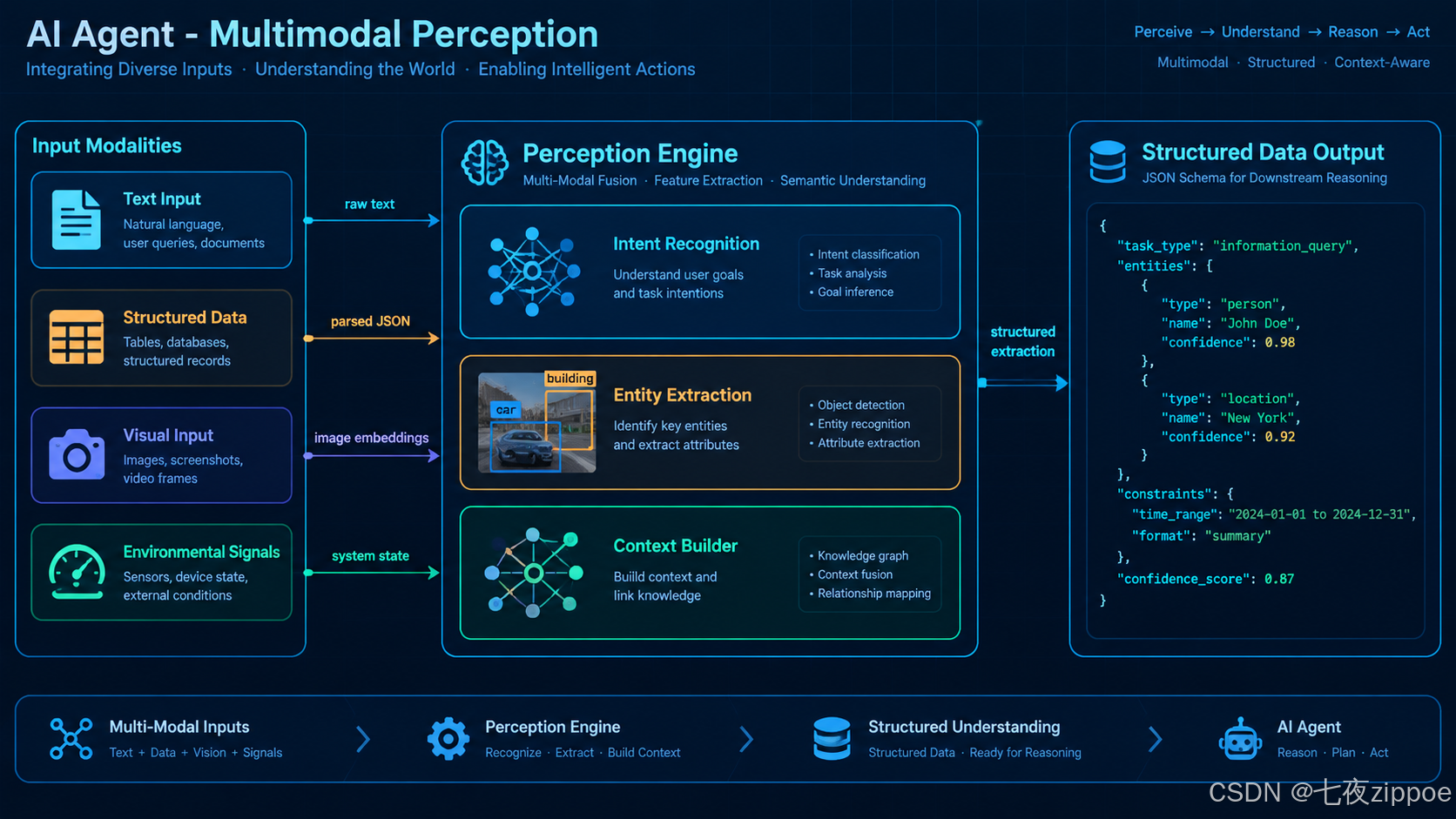
图:Agent 多模态感知系统的数据流向
三、规划(Plan):ReAct vs Plan-Execute vs Reflexion 三种模式对比
3.1 规划是 Agent 的大脑
如果说感知是 Agent 的"眼睛",那规划就是 Agent 的"前额叶皮层"。规划阶段决定 Agent 如何从当前状态到达目标状态------用什么策略、分几步、每步做什么、如何应对失败。
当前主流的规划模式有三种,它们代表了不同的哲学:
| 维度 | ReAct | Plan-Execute | Reflexion |
|---|---|---|---|
| 核心思想 | 边想边做 | 先规划后执行 | 执行后反思改进 |
| 规划粒度 | 单步推理 | 完整计划 | 迭代改进 |
| 执行方式 | 交替推理与行动 | 计划分离执行 | 试错+自我批评 |
| 适用场景 | 简单工具调用 | 复杂多步任务 | 需要质量优化 |
| Token 消耗 | 中等 | 高(双LLM) | 最高(多轮迭代) |
| 错误恢复 | 即时调整 | 需重新规划 | 反思后改进 |
| 实现复杂度 | 低 | 中 | 高 |
3.2 ReAct 模式:推理+行动
ReAct(Reasoning + Acting)是最经典的 Agent 规划模式,由 Yao 等人在 2022 年提出。其核心思想是让 LLM 在每一步都先"思考"再"行动":
工具 Agent 用户 工具 Agent 用户 #mermaid-svg-bL4hkwh3y2SLb1ny{font-family:"trebuchet ms",verdana,arial,sans-serif;font-size:16px;fill:#333;}@keyframes edge-animation-frame{from{stroke-dashoffset:0;}}@keyframes dash{to{stroke-dashoffset:0;}}#mermaid-svg-bL4hkwh3y2SLb1ny .edge-animation-slow{stroke-dasharray:9,5!important;stroke-dashoffset:900;animation:dash 50s linear infinite;stroke-linecap:round;}#mermaid-svg-bL4hkwh3y2SLb1ny .edge-animation-fast{stroke-dasharray:9,5!important;stroke-dashoffset:900;animation:dash 20s linear infinite;stroke-linecap:round;}#mermaid-svg-bL4hkwh3y2SLb1ny .error-icon{fill:#552222;}#mermaid-svg-bL4hkwh3y2SLb1ny .error-text{fill:#552222;stroke:#552222;}#mermaid-svg-bL4hkwh3y2SLb1ny .edge-thickness-normal{stroke-width:1px;}#mermaid-svg-bL4hkwh3y2SLb1ny .edge-thickness-thick{stroke-width:3.5px;}#mermaid-svg-bL4hkwh3y2SLb1ny .edge-pattern-solid{stroke-dasharray:0;}#mermaid-svg-bL4hkwh3y2SLb1ny .edge-thickness-invisible{stroke-width:0;fill:none;}#mermaid-svg-bL4hkwh3y2SLb1ny .edge-pattern-dashed{stroke-dasharray:3;}#mermaid-svg-bL4hkwh3y2SLb1ny .edge-pattern-dotted{stroke-dasharray:2;}#mermaid-svg-bL4hkwh3y2SLb1ny .marker{fill:#333333;stroke:#333333;}#mermaid-svg-bL4hkwh3y2SLb1ny .marker.cross{stroke:#333333;}#mermaid-svg-bL4hkwh3y2SLb1ny svg{font-family:"trebuchet ms",verdana,arial,sans-serif;font-size:16px;}#mermaid-svg-bL4hkwh3y2SLb1ny p{margin:0;}#mermaid-svg-bL4hkwh3y2SLb1ny .actor{stroke:hsl(259.6261682243, 59.7765363128%, 87.9019607843%);fill:#ECECFF;}#mermaid-svg-bL4hkwh3y2SLb1ny text.actor>tspan{fill:black;stroke:none;}#mermaid-svg-bL4hkwh3y2SLb1ny .actor-line{stroke:hsl(259.6261682243, 59.7765363128%, 87.9019607843%);}#mermaid-svg-bL4hkwh3y2SLb1ny .innerArc{stroke-width:1.5;stroke-dasharray:none;}#mermaid-svg-bL4hkwh3y2SLb1ny .messageLine0{stroke-width:1.5;stroke-dasharray:none;stroke:#333;}#mermaid-svg-bL4hkwh3y2SLb1ny .messageLine1{stroke-width:1.5;stroke-dasharray:2,2;stroke:#333;}#mermaid-svg-bL4hkwh3y2SLb1ny #arrowhead path{fill:#333;stroke:#333;}#mermaid-svg-bL4hkwh3y2SLb1ny .sequenceNumber{fill:white;}#mermaid-svg-bL4hkwh3y2SLb1ny #sequencenumber{fill:#333;}#mermaid-svg-bL4hkwh3y2SLb1ny #crosshead path{fill:#333;stroke:#333;}#mermaid-svg-bL4hkwh3y2SLb1ny .messageText{fill:#333;stroke:none;}#mermaid-svg-bL4hkwh3y2SLb1ny .labelBox{stroke:hsl(259.6261682243, 59.7765363128%, 87.9019607843%);fill:#ECECFF;}#mermaid-svg-bL4hkwh3y2SLb1ny .labelText,#mermaid-svg-bL4hkwh3y2SLb1ny .labelText>tspan{fill:black;stroke:none;}#mermaid-svg-bL4hkwh3y2SLb1ny .loopText,#mermaid-svg-bL4hkwh3y2SLb1ny .loopText>tspan{fill:black;stroke:none;}#mermaid-svg-bL4hkwh3y2SLb1ny .loopLine{stroke-width:2px;stroke-dasharray:2,2;stroke:hsl(259.6261682243, 59.7765363128%, 87.9019607843%);fill:hsl(259.6261682243, 59.7765363128%, 87.9019607843%);}#mermaid-svg-bL4hkwh3y2SLb1ny .note{stroke:#aaaa33;fill:#fff5ad;}#mermaid-svg-bL4hkwh3y2SLb1ny .noteText,#mermaid-svg-bL4hkwh3y2SLb1ny .noteText>tspan{fill:black;stroke:none;}#mermaid-svg-bL4hkwh3y2SLb1ny .activation0{fill:#f4f4f4;stroke:#666;}#mermaid-svg-bL4hkwh3y2SLb1ny .activation1{fill:#f4f4f4;stroke:#666;}#mermaid-svg-bL4hkwh3y2SLb1ny .activation2{fill:#f4f4f4;stroke:#666;}#mermaid-svg-bL4hkwh3y2SLb1ny .actorPopupMenu{position:absolute;}#mermaid-svg-bL4hkwh3y2SLb1ny .actorPopupMenuPanel{position:absolute;fill:#ECECFF;box-shadow:0px 8px 16px 0px rgba(0,0,0,0.2);filter:drop-shadow(3px 5px 2px rgb(0 0 0 / 0.4));}#mermaid-svg-bL4hkwh3y2SLb1ny .actor-man line{stroke:hsl(259.6261682243, 59.7765363128%, 87.9019607843%);fill:#ECECFF;}#mermaid-svg-bL4hkwh3y2SLb1ny .actor-man circle,#mermaid-svg-bL4hkwh3y2SLb1ny line{stroke:hsl(259.6261682243, 59.7765363128%, 87.9019607843%);fill:#ECECFF;stroke-width:2px;}#mermaid-svg-bL4hkwh3y2SLb1ny :root{--mermaid-font-family:"trebuchet ms",verdana,arial,sans-serif;} loop ReAct 循环 提出任务 Thought: 分析当前状态 Action: 调用工具 Observation: 返回结果 Thought: 根据结果继续推理 最终答案
python
from dataclasses import dataclass, field
from typing import Any

@dataclass
class ReActStep:
    """ReAct 单步记录"""
    thought: str        # 推理过程
    action: str        # 动作名称
    action_input: dict  # 动作参数
    observation: str = ""  # 观察结果

@dataclass
class ReActState:
    """ReAct 循环状态"""
    steps: list[ReActStep] = field(default_factory=list)
    final_answer: str = ""
    is_finished: bool = False

REACT_SYSTEM_PROMPT = """你是一个使用 ReAct 模式的 Agent。

对于每一步,你必须按以下格式输出:

Thought: <你的推理过程,分析当前状态,决定下一步做什么>
Action: <工具名称>
Action Input: <JSON 格式的工具参数>

当你得出最终答案时,使用:
Thought: <最终推理>
Final Answer: <给用户的回答>

可用工具:
{tools_description}

已知信息:
{observations}

任务:{task}
"""

async def react_step(
    task: str,
    state: ReActState,
    tools: dict[str, Any],
    llm_client=None
) -> ReActState:
    """执行一步 ReAct 推理"""

    # 构建历史观察
    observations = "\n".join([
        f"Step {i+1}: {s.thought} → {s.action}({s.action_input}) → {s.observation}"
        for i, s in enumerate(state.steps)
    ]) or "(尚无历史步骤)"

    prompt = REACT_SYSTEM_PROMPT.format(
        tools_description=format_tools(tools),
        observations=observations,
        task=task
    )

    response = await llm_client.chat.completions.create(
        model="gpt-4o",
        messages=[{"role": "user", "content": prompt}],
        temperature=0.1  # 低温度确保推理稳定
    )

    output = response.choices[0].message.content
    step = parse_react_output(output)

    if step.action == "Final Answer":
        state.final_answer = step.observation
        state.is_finished = True
    else:
        # 执行工具调用
        tool_func = tools.get(step.action)
        if tool_func:
            result = await tool_func(**step.action_input)
            step.observation = str(result)
        else:
            step.observation = f"错误:未知工具 '{step.action}'"

        state.steps.append(step)

    return state

def format_tools(tools: dict) -> str:
    return "\n".join([
        f"- {name}: {func.__doc__ or '无描述'}"
        for name, func in tools.items()
    ])
这段代码实现了 ReAct 模式的核心循环。ReActStep 记录每一步的"思考-行动-观察"三元组,ReActState 维护整个循环的状态。react_step 函数是单步执行器:它将历史步骤的观察结果注入 Prompt,让 LLM 基于已有信息推理下一步。关键设计点在于 temperature=0.1------推理需要确定性,高温度会导致逻辑跳跃。另一个注意点是 parse_react_output(省略实现),它需要鲁棒地解析 LLM 的非结构化输出,实际工程中建议用 structured output 或 function calling 替代文本解析。
3.3 Plan-Execute 模式:规划与执行分离
Plan-Execute 模式将规划和执行解耦为两个独立的阶段:先用一个 Planner LLM 生成完整的多步计划,再用一个 Executor LLM 逐步执行。优势是规划质量更高(不执行动作的干扰),且计划可以人工审查。
python
from pydantic import BaseModel
from typing import Optional

class PlanStep(BaseModel):
    """计划中的单步"""
    step_id: int
    description: str  # 这一步要做什么
    tool: str         # 用什么工具
    parameters: dict  # 工具参数
    depends_on: list[int] = []  # 依赖哪些前置步骤
    expected_output: str = ""    # 预期输出是什么

class Plan(BaseModel):
    """完整执行计划"""
    steps: list[PlanStep]
    estimated_steps: int
    notes: str = ""

PLANNER_PROMPT = """你是一个任务规划专家。将用户任务拆解为可执行的步骤计划。

要求:
1. 每步必须明确使用哪个工具、什么参数
2. 标注步骤间的依赖关系
3. 描述预期输出,便于后续验证
4. 如果任务不明确,在 notes 中说明

可用工具:
{tools_description}

用户任务:{task}
当前上下文:{context}
"""

async def make_plan(
    task: str,
    context: str,
    tools_description: str,
    llm_client=None
) -> Plan:
    """Plan-Execute 的规划阶段"""

    prompt = PLANNER_PROMPT.format(
        tools_description=tools_description,
        task=task,
        context=context
    )

    response = await llm_client.beta.chat.completions.parse(
        model="gpt-4o",
        response_format=Plan,
        messages=[{"role": "user", "content": prompt}]
    )

    return response.choices[0].message.parsed

async def execute_plan(
    plan: Plan,
    tools: dict[str, Any],
    state: ReActState,
    llm_client=None,
    on_step_complete=None
) -> ReActState:
    """Plan-Execute 的执行阶段"""

    completed_steps = {}

    for step in plan.steps:
        # 检查依赖是否满足
        missing_deps = [
            dep for dep in step.depends_on
            if dep not in completed_steps
        ]
        if missing_deps:
            state.steps.append(ReActStep(
                thought=f"跳过步骤 {step.step_id}:依赖 {missing_deps} 未完成",
                action="skip",
                action_input={},
                observation="依赖未满足"
            ))
            continue

        # 执行工具调用
        tool_func = tools.get(step.tool)
        if not tool_func:
            state.steps.append(ReActStep(
                thought=f"工具 {step.tool} 不可用",
                action="error",
                action_input=step.parameters,
                observation=f"工具不存在: {step.tool}"
            ))
            continue

        try:
            # 动态注入前置步骤的输出作为参数
            enriched_params = {**step.parameters}
            for dep_id in step.depends_on:
                dep_result = completed_steps[dep_id]
                enriched_params[f"step_{dep_id}_result"] = dep_result

            result = await tool_func(**enriched_params)
            completed_steps[step.step_id] = result

            state.steps.append(ReActStep(
                thought=step.description,
                action=step.tool,
                action_input=step.parameters,
                observation=str(result)
            ))

            if on_step_complete:
                await on_step_complete(step, result)

        except Exception as e:
            state.steps.append(ReActStep(
                thought=f"步骤 {step.step_id} 执行失败: {e}",
                action="error",
                action_input=step.parameters,
                observation=str(e)
            ))

    state.is_finished = True
    state.final_answer = str(completed_steps)
    return state
Plan-Execute 模式的代码比 ReAct 更复杂,核心区别在于引入了 Plan 和 PlanStep 两个结构化对象。make_plan 函数用 structured output 让 LLM 输出完整计划,包含步骤间的依赖关系(depends_on)和预期输出(expected_output)。execute_plan 按依赖拓扑序执行,支持参数注入------前置步骤的输出可以自动作为后续步骤的参数。这种模式特别适合需要人工审批的场景:你可以在 make_plan 之后插入审批节点,让人检查计划合理性后再执行。
3.4 Reflexion 模式:反思驱动的自我改进
Reflexion 模式在 ReAct 基础上增加了显式的"自我反思"阶段。Agent 不仅执行任务,还在每次尝试后评估自己的表现,生成自我批评,并在下一轮尝试中利用这些批评改进策略。
python
@dataclass
class ReflexionState:
    """Reflexion 模式的完整状态"""
    task: str
    attempts: list[ReActState] = field(default_factory=list)  # 每轮尝试的完整记录
    reflections: list[str] = field(default_factory=list)      # 每轮的反思
    best_answer: str = ""
    best_score: float = 0.0
    current_attempt: int = 0
    max_attempts: int = 3

REFLEXION_PROMPT = """你是一个善于反思的 Agent。

任务:{task}

## 你之前的尝试记录
{previous_attempts}

## 你之前的反思
{previous_reflections}

## 最新一轮的执行记录
{latest_attempt}

请进行自我反思:
1. 这一轮哪些步骤做得好?
2. 哪些步骤出了问题?原因是什么?
3. 下一轮应该怎么改进?
4. 如果任务已完成,给出最终答案和质量评分(0-1)。

输出格式:
Reflection: <你的反思>
Score: <质量评分>
Final Answer: <如已完成则给出答案,否则留空>
"""

async def reflexion_loop(
    task: str,
    tools: dict[str, Any],
    llm_client=None,
    max_attempts: int = 3
) -> ReflexionState:
    """Reflexion 完整循环"""

    state = ReflexionState(task=task, max_attempts=max_attempts)

    while state.current_attempt < state.max_attempts:
        # 1. 执行一轮 ReAct
        react_state = ReActState()
        for _ in range(10):  # 每轮最多 10 步
            react_state = await react_step(
                task=task,
                state=react_state,
                tools=tools,
                llm_client=llm_client
            )
            if react_state.is_finished:
                break

        state.attempts.append(react_state)
        state.current_attempt += 1

        # 2. 反思这一轮的表现
        reflections_text = "\n".join(state.reflections) or "(首次尝试,无历史反思)"
        attempts_text = "\n".join([
            f"尝试 {i+1}: {'成功' if a.is_finished else '未完成'} - {a.final_answer[:200]}"
            for i, a in enumerate(state.attempts)
        ])

        prompt = REFLEXION_PROMPT.format(
            task=task,
            previous_attempts=attempts_text,
            previous_reflections=reflections_text,
            latest_attempt=react_state.final_answer or "未完成"
        )

        response = await llm_client.chat.completions.create(
            model="gpt-4o",
            messages=[{"role": "user", "content": prompt}]
        )

        reflection_result = parse_reflection_output(response.choices[0].message.content)
        state.reflections.append(reflection_result.reflection)

        # 3. 如果反思后认为完成了,评估质量
        if reflection_result.final_answer and reflection_result.score > state.best_score:
            state.best_answer = reflection_result.final_answer
            state.best_score = reflection_result.score

            # 质量足够高,提前退出
            if reflection_result.score >= 0.85:
                break

    return state
Reflexion 是三种模式中最"聪明"但也最"昂贵"的。它维护一个 ReflexionState,记录每一轮尝试(attempts)和对应的反思(reflections)。核心流程是:执行一轮 ReAct → 反思这轮的表现 → 将反思注入下一轮的 Prompt。反思的内容包括"哪里做错了"和"下次怎么改",这实质上是一种语言层面的梯度下降 ------用自然语言描述改进方向,而不是更新模型权重。注意 max_attempts=3 的限制和 score >= 0.85 的提前退出条件,这是控制成本的关键。
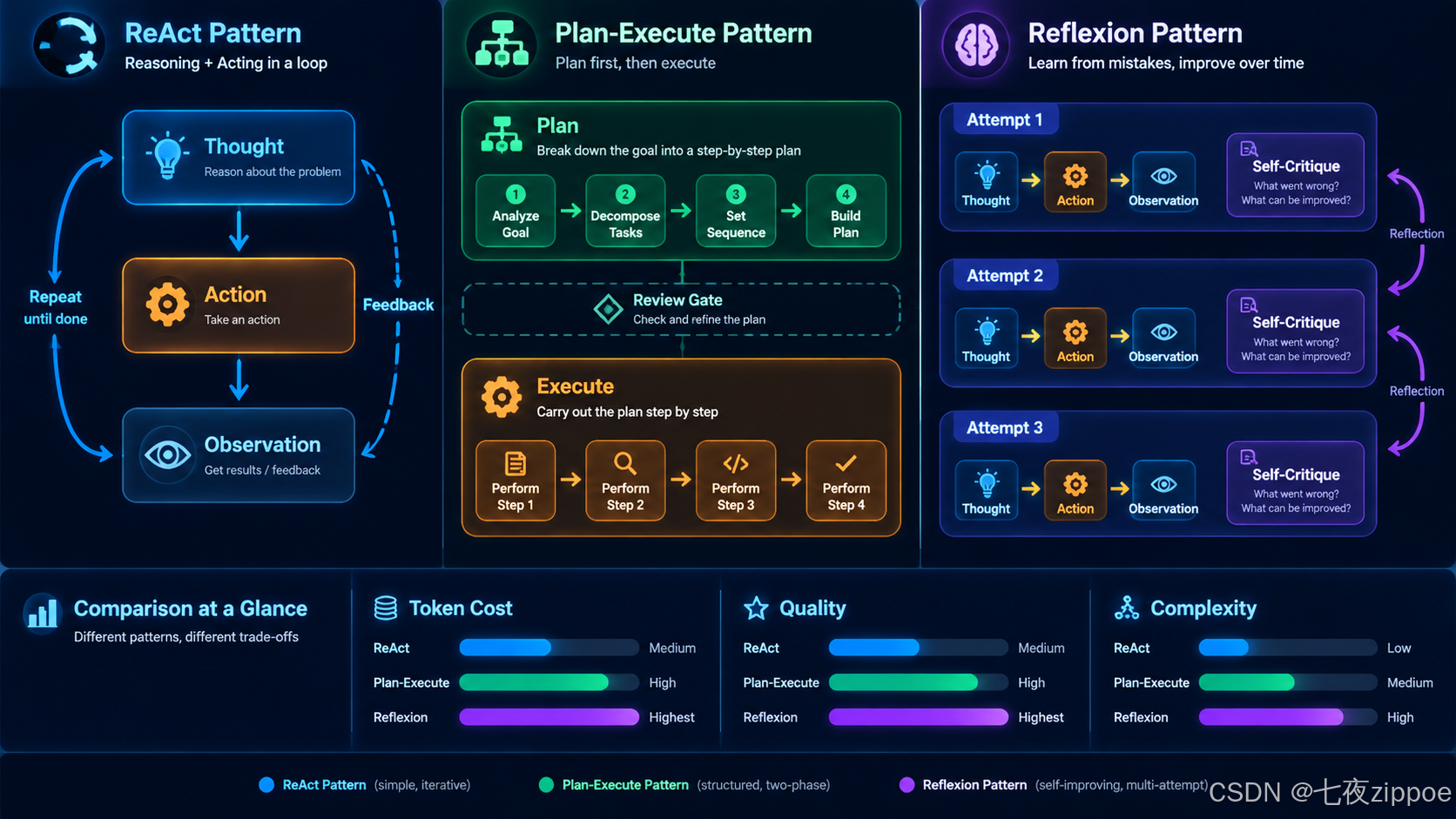
图:ReAct、Plan-Execute、Reflexion 三种规划模式的流程对比
四、执行(Act):工具调用与结果获取
4.1 执行层的职责
执行阶段是 Agent 与外部世界交互的唯一通道。无论规划多么精妙,最终都要通过执行层落地。执行层的核心职责:
- 工具路由:根据计划选择正确的工具
- 参数构造:将计划的抽象参数转化为工具的具体输入
- 结果获取:调用工具并获取返回值
- 异常处理:网络超时、参数错误、权限不足等
- 结果标准化:将异构的工具返回转化为统一格式
4.2 工具注册与调用框架
python
import inspect
import json
from typing import Callable, Any
from dataclasses import dataclass

@dataclass
class ToolDefinition:
    """工具定义"""
    name: str
    description: str
    parameters: dict  # JSON Schema
    func: Callable
    category: str = "general"
    timeout: int = 30  # 秒
    retry_count: int = 2

class ToolRegistry:
    """工具注册中心"""

    def __init__(self):
        self._tools: dict[str, ToolDefinition] = {}

    def register(
        self,
        name: str,
        description: str,
        category: str = "general",
        timeout: int = 30,
        retry_count: int = 2
    ):
        """装饰器:注册工具"""
        def decorator(func: Callable):
            # 自动从函数签名生成参数 Schema
            sig = inspect.signature(func)
            params_schema = self._generate_schema(sig)

            self._tools[name] = ToolDefinition(
                name=name,
                description=description or func.__doc__ or "",
                parameters=params_schema,
                func=func,
                category=category,
                timeout=timeout,
                retry_count=retry_count
            )
            return func
        return decorator

    def _generate_schema(self, sig: inspect.Signature) -> dict:
        """从函数签名自动生成 JSON Schema"""
        properties = {}
        required = []

        for param_name, param in sig.parameters.items():
            if param_name == 'self':
                continue

            param_type = "string"  # 默认
            if param.annotation != inspect.Parameter.empty:
                if param.annotation == int:
                    param_type = "integer"
                elif param.annotation == float:
                    param_type = "number"
                elif param.annotation == bool:
                    param_type = "boolean"
                elif param.annotation == list:
                    param_type = "array"
                elif param.annotation == dict:
                    param_type = "object"

            properties[param_name] = {
                "type": param_type,
                "description": f"Parameter: {param_name}"
            }

            if param.default == inspect.Parameter.empty:
                required.append(param_name)

        return {
            "type": "object",
            "properties": properties,
            "required": required
        }

    async def execute(
        self,
        tool_name: str,
        parameters: dict,
        timeout_override: int = None
    ) -> dict[str, Any]:
        """执行工具调用"""

        if tool_name not in self._tools:
            return {
                "success": False,
                "error": f"Tool '{tool_name}' not found",
                "available_tools": list(self._tools.keys())
            }

        tool = self._tools[tool_name]
        timeout = timeout_override or tool.timeout

        # 参数校验
        validation = self._validate_parameters(parameters, tool.parameters)
        if not validation["valid"]:
            return {
                "success": False,
                "error": f"Parameter validation failed: {validation['errors']}",
                "tool": tool_name
            }

        # 带重试的执行
        for attempt in range(tool.retry_count + 1):
            try:
                result = await asyncio.wait_for(
                    tool.func(**parameters),
                    timeout=timeout
                )
                return {
                    "success": True,
                    "tool": tool_name,
                    "result": result,
                    "attempts": attempt + 1
                }
            except asyncio.TimeoutError:
                if attempt < tool.retry_count:
                    await asyncio.sleep(2 ** attempt)  # 指数退避
                    continue
                return {
                    "success": False,
                    "error": f"Tool '{tool_name}' timed out after {timeout}s",
                    "tool": tool_name,
                    "attempts": attempt + 1
                }
            except Exception as e:
                if attempt < tool.retry_count:
                    await asyncio.sleep(2 ** attempt)
                    continue
                return {
                    "success": False,
                    "error": str(e),
                    "tool": tool_name,
                    "attempts": attempt + 1
                }

    def get_openai_tools_schema(self) -> list[dict]:
        """生成 OpenAI function calling 格式的工具定义"""
        return [
            {
                "type": "function",
                "function": {
                    "name": tool.name,
                    "description": tool.description,
                    "parameters": tool.parameters
                }
            }
            for tool in self._tools.values()
        ]

# 使用示例
import asyncio

registry = ToolRegistry()

@registry.register(
    name="search_web",
    description="搜索网页获取最新信息",
    category="search",
    timeout=15
)
async def search_web(query: str, max_results: int = 5) -> dict:
    """搜索网页并返回结果"""
    # 实际实现中调用搜索 API
    return {"query": query, "results": [f"结果 {i+1}" for i in range(max_results)]}

@registry.register(
    name="read_file",
    description="读取本地文件内容",
    category="file",
    timeout=10
)
async def read_file(file_path: str, encoding: str = "utf-8") -> dict:
    """读取文件内容"""
    with open(file_path, "r", encoding=encoding) as f:
        content = f.read()
return {"file": file_path, "content": content[:10000]} # 限制长度这个工具注册框架是执行层的核心基础设施。ToolRegistry 通过装饰器模式注册工具,自动从 Python 函数签名生成 JSON Schema,这意味着你只需要写普通函数加一个装饰器就完成了工具注册。execute 方法包含三重保护:参数校验、超时控制和指数退避重试。get_openai_tools_schema 方法可以直接生成 OpenAI function calling 兼容的 Schema,实现与 LLM 的无缝对接。实际生产中,你还需要加入权限控制(谁能调什么工具)、调用审计(记录每次工具调用)和限流(防止 API 滥用)。
4.3 工具调用的并行执行
当计划中存在无依赖关系的步骤时,并行执行可以大幅缩短总耗时:
python
async def execute_parallel(
    steps: list[PlanStep],
    tools_registry: ToolRegistry,
    max_concurrency: int = 3
) -> dict[int, Any]:
    """并行执行无依赖的步骤"""

    # 构建依赖图
    dependency_graph = {s.step_id: set(s.depends_on) for s in steps}
    step_map = {s.step_id: s for s in steps}
    results = {}

    # 拓扑排序 + 并行执行
    completed = set()
    remaining = set(step_map.keys())

    semaphore = asyncio.Semaphore(max_concurrency)

    async def execute_with_semaphore(step: PlanStep) -> tuple[int, Any]:
        async with semaphore:
            result = await tools_registry.execute(
                tool_name=step.tool,
                parameters=step.parameters
            )
            return step.step_id, result

    while remaining:
        # 找出所有依赖已满足的步骤
        ready = [
            sid for sid in remaining
            if dependency_graph[sid].issubset(completed)
        ]

        if not ready:
            # 存在循环依赖或缺失依赖
            raise ValueError(f"无法解决的依赖: {remaining}")

        # 并行执行所有就绪步骤
        tasks = [execute_with_semaphore(step_map[sid]) for sid in ready]
        step_results = await asyncio.gather(*tasks, return_exceptions=True)

        for sid, result in step_results:
            if isinstance(result, Exception):
                results[sid] = {"success": False, "error": str(result)}
            else:
                results[sid] = result
            completed.add(sid)
            remaining.discard(sid)

    return results
并行执行是提升 Agent 效率的关键优化。这段代码实现了基于依赖图的并行执行:dependency_graph 记录每个步骤的依赖集合,每轮循环找出所有依赖已满足的步骤,用 asyncio.gather 并行执行。asyncio.Semaphore 控制最大并发数,防止同时调用过多 API 触发限流。注意 return_exceptions=True 参数------即使某个步骤失败,其他步骤的结果仍能正常返回,不会因为一个失败导致全部丢弃。这种设计让 Agent 能够优雅地处理部分失败。
五、反思(Reflect):结果评估与计划调整
5.1 反思是 Agent 的"元认知"
如果说感知、规划、执行是 Agent 的"一线能力",那反思就是 Agent 的"元认知"------对自己思考过程的思考。没有反思的 Agent 是一个"执行机器",它可能反复犯同样的错误。有反思的 Agent 是一个"学习机器",它能从失败中提取经验。
反思阶段需要回答四个问题:
- 结果是否达成目标? ------ 质量评估
- 哪些步骤出了问题? ------ 归因分析
- 为什么会出错? ------ 根因分析
- 下一步该怎么调整? ------ 策略更新
#mermaid-svg-pMu341Id5RabCBer{font-family:"trebuchet ms",verdana,arial,sans-serif;font-size:16px;fill:#333;}@keyframes edge-animation-frame{from{stroke-dashoffset:0;}}@keyframes dash{to{stroke-dashoffset:0;}}#mermaid-svg-pMu341Id5RabCBer .edge-animation-slow{stroke-dasharray:9,5!important;stroke-dashoffset:900;animation:dash 50s linear infinite;stroke-linecap:round;}#mermaid-svg-pMu341Id5RabCBer .edge-animation-fast{stroke-dasharray:9,5!important;stroke-dashoffset:900;animation:dash 20s linear infinite;stroke-linecap:round;}#mermaid-svg-pMu341Id5RabCBer .error-icon{fill:#552222;}#mermaid-svg-pMu341Id5RabCBer .error-text{fill:#552222;stroke:#552222;}#mermaid-svg-pMu341Id5RabCBer .edge-thickness-normal{stroke-width:1px;}#mermaid-svg-pMu341Id5RabCBer .edge-thickness-thick{stroke-width:3.5px;}#mermaid-svg-pMu341Id5RabCBer .edge-pattern-solid{stroke-dasharray:0;}#mermaid-svg-pMu341Id5RabCBer .edge-thickness-invisible{stroke-width:0;fill:none;}#mermaid-svg-pMu341Id5RabCBer .edge-pattern-dashed{stroke-dasharray:3;}#mermaid-svg-pMu341Id5RabCBer .edge-pattern-dotted{stroke-dasharray:2;}#mermaid-svg-pMu341Id5RabCBer .marker{fill:#333333;stroke:#333333;}#mermaid-svg-pMu341Id5RabCBer .marker.cross{stroke:#333333;}#mermaid-svg-pMu341Id5RabCBer svg{font-family:"trebuchet ms",verdana,arial,sans-serif;font-size:16px;}#mermaid-svg-pMu341Id5RabCBer p{margin:0;}#mermaid-svg-pMu341Id5RabCBer .label{font-family:"trebuchet ms",verdana,arial,sans-serif;color:#333;}#mermaid-svg-pMu341Id5RabCBer .cluster-label text{fill:#333;}#mermaid-svg-pMu341Id5RabCBer .cluster-label span{color:#333;}#mermaid-svg-pMu341Id5RabCBer .cluster-label span p{background-color:transparent;}#mermaid-svg-pMu341Id5RabCBer .label text,#mermaid-svg-pMu341Id5RabCBer span{fill:#333;color:#333;}#mermaid-svg-pMu341Id5RabCBer .node rect,#mermaid-svg-pMu341Id5RabCBer .node circle,#mermaid-svg-pMu341Id5RabCBer .node ellipse,#mermaid-svg-pMu341Id5RabCBer .node polygon,#mermaid-svg-pMu341Id5RabCBer .node path{fill:#ECECFF;stroke:#9370DB;stroke-width:1px;}#mermaid-svg-pMu341Id5RabCBer .rough-node .label text,#mermaid-svg-pMu341Id5RabCBer .node .label text,#mermaid-svg-pMu341Id5RabCBer .image-shape .label,#mermaid-svg-pMu341Id5RabCBer .icon-shape .label{text-anchor:middle;}#mermaid-svg-pMu341Id5RabCBer .node .katex path{fill:#000;stroke:#000;stroke-width:1px;}#mermaid-svg-pMu341Id5RabCBer .rough-node .label,#mermaid-svg-pMu341Id5RabCBer .node .label,#mermaid-svg-pMu341Id5RabCBer .image-shape .label,#mermaid-svg-pMu341Id5RabCBer .icon-shape .label{text-align:center;}#mermaid-svg-pMu341Id5RabCBer .node.clickable{cursor:pointer;}#mermaid-svg-pMu341Id5RabCBer .root .anchor path{fill:#333333!important;stroke-width:0;stroke:#333333;}#mermaid-svg-pMu341Id5RabCBer .arrowheadPath{fill:#333333;}#mermaid-svg-pMu341Id5RabCBer .edgePath .path{stroke:#333333;stroke-width:2.0px;}#mermaid-svg-pMu341Id5RabCBer .flowchart-link{stroke:#333333;fill:none;}#mermaid-svg-pMu341Id5RabCBer .edgeLabel{background-color:rgba(232,232,232, 0.8);text-align:center;}#mermaid-svg-pMu341Id5RabCBer .edgeLabel p{background-color:rgba(232,232,232, 0.8);}#mermaid-svg-pMu341Id5RabCBer .edgeLabel rect{opacity:0.5;background-color:rgba(232,232,232, 0.8);fill:rgba(232,232,232, 0.8);}#mermaid-svg-pMu341Id5RabCBer .labelBkg{background-color:rgba(232, 232, 232, 0.5);}#mermaid-svg-pMu341Id5RabCBer .cluster rect{fill:#ffffde;stroke:#aaaa33;stroke-width:1px;}#mermaid-svg-pMu341Id5RabCBer .cluster text{fill:#333;}#mermaid-svg-pMu341Id5RabCBer .cluster span{color:#333;}#mermaid-svg-pMu341Id5RabCBer div.mermaidTooltip{position:absolute;text-align:center;max-width:200px;padding:2px;font-family:"trebuchet ms",verdana,arial,sans-serif;font-size:12px;background:hsl(80, 100%, 96.2745098039%);border:1px solid #aaaa33;border-radius:2px;pointer-events:none;z-index:100;}#mermaid-svg-pMu341Id5RabCBer .flowchartTitleText{text-anchor:middle;font-size:18px;fill:#333;}#mermaid-svg-pMu341Id5RabCBer rect.text{fill:none;stroke-width:0;}#mermaid-svg-pMu341Id5RabCBer .icon-shape,#mermaid-svg-pMu341Id5RabCBer .image-shape{background-color:rgba(232,232,232, 0.8);text-align:center;}#mermaid-svg-pMu341Id5RabCBer .icon-shape p,#mermaid-svg-pMu341Id5RabCBer .image-shape p{background-color:rgba(232,232,232, 0.8);padding:2px;}#mermaid-svg-pMu341Id5RabCBer .icon-shape .label rect,#mermaid-svg-pMu341Id5RabCBer .image-shape .label rect{opacity:0.5;background-color:rgba(232,232,232, 0.8);fill:rgba(232,232,232, 0.8);}#mermaid-svg-pMu341Id5RabCBer .label-icon{display:inline-block;height:1em;overflow:visible;vertical-align:-0.125em;}#mermaid-svg-pMu341Id5RabCBer .node .label-icon path{fill:currentColor;stroke:revert;stroke-width:revert;}#mermaid-svg-pMu341Id5RabCBer :root{--mermaid-font-family:"trebuchet ms",verdana,arial,sans-serif;} 达标
部分达标
未达标
计划错误
工具失败
理解错误
信息不足
执行结果
质量评估
输出最终答案
局部调整计划
根因分析
重新规划
换工具/重试
重新感知
补充信息
继续执行
重新感知
5.2 反思阶段的工程实现
python
from enum import Enum
from pydantic import BaseModel, Field
from typing import Optional

class ReflectionStatus(str, Enum):
    SUCCESS = "success"           # 完全成功
    PARTIAL = "partial"           # 部分成功
    FAILURE = "failure"           # 完全失败
    NEEDS_INFO = "needs_info"     # 信息不足

class RootCause(str, Enum):
    PLANNING_ERROR = "planning_error"      # 计划本身有问题
    TOOL_FAILURE = "tool_failure"          # 工具调用失败
    PERCEPTION_ERROR = "perception_error"  # 意图理解错误
    INSUFFICIENT_INFO = "insufficient_info" # 信息不足
    EXPECTATION_MISMATCH = "expectation_mismatch"  # 结果与预期不符
    NONE = "none"                          # 无错误

class ActionAdjustment(BaseModel):
    """计划调整建议"""
    adjustment_type: str = Field(
        description="调整类型: replan/retry/re_perceive/supplement_info/accept"
    )
    description: str = Field(description="具体调整内容")
    target_step_ids: list[int] = Field(
        default_factory=list,
        description="需要重新执行的步骤ID"
    )
    new_plan: Optional[str] = Field(
        default=None,
        description="如果需要重新规划,新计划的描述"
    )

class ReflectionResult(BaseModel):
    """反思阶段的完整输出"""
    status: ReflectionStatus
    score: float = Field(ge=0.0, le=1.0, description="完成质量评分")
    achieved_goals: list[str] = Field(
        default_factory=list,
        description="已达成的子目标"
    )
    missed_goals: list[str] = Field(
        default_factory=list,
        description="未达成的子目标"
    )
    root_cause: RootCause = Field(description="失败根因(如有)")
    root_cause_analysis: str = Field(description="详细的根因分析")
    adjustment: ActionAdjustment = Field(description="下一步的调整建议")
    lessons_learned: str = Field(
        default="",
        description="从这一轮中学到的经验教训"
    )

REFLECTION_PROMPT = """你是一个 Agent 的反思评估模块。请评估最近一轮执行的结果。

## 原始任务
{task}

## 执行计划
{plan}

## 执行结果
{results}

## 预期输出
{expected_output}

请进行深度反思:

1. **质量评估**:结果是否完全/部分/未达成目标?评分 0-1。
2. **目标对照**:列出已达成和未达成的子目标。
3. **根因分析**:如果未完全成功,根本原因是什么?
   - planning_error: 计划本身有逻辑问题
   - tool_failure: 工具调用失败
   - perception_error: 对用户意图理解有误
   - insufficient_info: 缺少必要信息
   - expectation_mismatch: 结果正确但与预期不符
   - none: 完全成功
4. **调整建议**:下一步该怎么做?
   - replan: 重新规划
   - retry: 重试失败的步骤
   - re_perceive: 重新理解需求
   - supplement_info: 补充信息后继续
   - accept: 接受当前结果
5. **经验教训**:从这一轮中学到什么,避免未来犯同样错误。
"""

async def reflect(
    task: str,
    plan: Plan,
    results: dict[int, Any],
    expected_output: str,
    llm_client=None
) -> ReflectionResult:
    """反思阶段:评估执行结果并生成调整建议"""

    # 格式化执行结果
    results_text = "\n".join([
        f"步骤 {sid}: {str(result)[:500]}"
        for sid, result in results.items()
    ])

    plan_text = "\n".join([
        f"{s.step_id}. {s.description} (工具: {s.tool}, 预期: {s.expected_output})"
        for s in plan.steps
    ])

    prompt = REFLECTION_PROMPT.format(
        task=task,
        plan=plan_text,
        results=results_text,
        expected_output=expected_output
    )

    response = await llm_client.beta.chat.completions.parse(
        model="gpt-4o",
        response_format=ReflectionResult,
        messages=[{"role": "user", "content": prompt}]
    )

    result = response.choices[0].message.parsed

    # 如果评分很低且根因是 perception_error,建议回退到感知阶段
    if result.score < 0.3 and result.root_cause == RootCause.PERCEPTION_ERROR:
        result.adjustment.adjustment_type = "re_perceive"
        result.adjustment.description = "意图理解有误,建议重新感知用户需求"

    return result
反思模块是 Agent 区别于简单工具链的核心。ReflectionResult 是反思的输出结构,包含质量评分、目标对照、根因分析、调整建议和经验教训五个维度。根因分析枚举了五种常见错误类型,每种对应不同的调整策略:planning_error 需要重新规划,tool_failure 需要换工具或重试,perception_error 需要回到感知阶段重新理解需求。注意最后的兜底逻辑------当评分极低且根因是感知错误时,强制将调整策略改为 re_perceive,这是一种安全网设计,防止 Agent 在错误理解的基础上反复重试。lessons_learned 字段是记忆阶段的关键输入,它将被写入 Agent 的长期记忆。
六、记忆(Remember):上下文更新与知识沉淀
6.1 Agent 记忆的三层架构
人类的记忆系统分为感觉记忆、短期记忆和长期记忆。Agent 的记忆系统也遵循类似的三层架构:
| 记忆类型 | 存储介质 | 生命周期 | 容量 | 更新方式 |
|---|---|---|---|---|
| 感觉记忆(工作记忆) | Prompt Context | 单次循环 | ~128K tokens | 每轮自动更新 |
| 短期记忆(对话记忆) | 会话存储 | 单次会话 | 数百条消息 | 追加+摘要压缩 |
| 长期记忆(知识库) | 向量数据库 | 永久 | 无限 | 向量检索+写入 |
图:Agent 记忆系统的三层架构与数据流
gpt-image-2 prompt: A detailed layered architecture diagram of AI Agent memory systems. Top layer labeled Working Memory in light blue showing a prompt window with text tokens, capacity indicator 128K tokens, lifecycle label single loop, contains current task context and recent observations. Middle layer labeled Short-term Memory in amber showing a conversation log with message bubbles and a summarization icon compressing older messages, capacity label hundreds of messages, lifecycle label single session. Bottom layer labeled Long-term Memory in deep red showing a vector database with embedding vectors, knowledge graph nodes, and episodic memory entries, capacity label unlimited, lifecycle label persistent. Arrows flowing downward labeled consolidation and compression, arrows flowing upward labeled retrieval and recall. Side panel showing memory operations: write, read, update, forget. Professional dark tech theme, neon glow on each layer boundary, English labels with Chinese annotations, 16:9 aspect ratio, grid background, highly detailed
6.2 记忆系统的工程实现
python
import time
from abc import ABC, abstractmethod
from dataclasses import dataclass, field
from typing import Any

@dataclass
class MemoryEntry:
    """记忆条目"""
    id: str
    content: str
    memory_type: str  # episodic / semantic / procedural
    timestamp: float = field(default_factory=time.time)
    importance: float = 0.5  # 0-1,影响保留和检索优先级
    metadata: dict = field(default_factory=dict)
    embedding: list[float] = field(default_factory=list)

class MemoryStore(ABC):
    """记忆存储抽象接口"""

    @abstractmethod
    async def store(self, entry: MemoryEntry) -> str:
        """存储记忆"""
        pass

    @abstractmethod
    async def retrieve(
        self, query: str, top_k: int = 5
    ) -> list[MemoryEntry]:
        """检索记忆"""
        pass

    @abstractmethod
    async def update(
        self, entry_id: str, updates: dict
    ) -> bool:
        """更新记忆"""
        pass

    @abstractmethod
    async def forget(
        self, entry_id: str, reason: str = ""
    ) -> bool:
        """遗忘(软删除)"""
        pass

class AgentMemory:
    """Agent 记忆管理器:三层架构"""

    def __init__(
        self,
        vector_store=None,        # 长期记忆后端
        max_working_tokens: int = 8000,
        max_short_term_entries: int = 50
    ):
        self.long_term: MemoryStore = vector_store
        self.short_term: list[MemoryEntry] = []  # 短期记忆
        self.working: dict[str, Any] = {}          # 工作记忆

        self.max_working_tokens = max_working_tokens
        self.max_short_term_entries = max_short_term_entries

    async def remember(
        self,
        content: str,
        memory_type: str = "episodic",
        importance: float = 0.5,
        metadata: dict = None
    ) -> str:
        """记住一条信息:写入短期记忆,重要信息同时写入长期记忆"""

        entry = MemoryEntry(
            id=f"mem_{int(time.time()*1000)}",
            content=content,
            memory_type=memory_type,
            importance=importance,
            metadata=metadata or {}
        )

        # 写入短期记忆
        self.short_term.append(entry)

        # 超出容量时压缩:旧的记忆被摘要
        if len(self.short_term) > self.max_short_term_entries:
            await self._compress_short_term()

        # 高重要度的记忆同时写入长期记忆
        if importance >= 0.7 and self.long_term:
            await self.long_term.store(entry)

        # 更新工作记忆
        self.working[entry.id] = entry.content

        return entry.id

    async def recall(
        self,
        query: str,
        top_k: int = 5
    ) -> list[MemoryEntry]:
        """检索记忆:先搜短期记忆,再搜长期记忆"""

        results = []

        # 1. 搜索短期记忆(简单关键词匹配)
        short_results = [
            e for e in self.short_term
            if query.lower() in e.content.lower()
        ]
        results.extend(short_results[:top_k])

        # 2. 如果不够,搜索长期记忆(向量检索)
        if len(results) < top_k and self.long_term:
            remaining = top_k - len(results)
            long_results = await self.long_term.retrieve(
                query, top_k=remaining
            )
            results.extend(long_results)

        # 按重要度和时间排序
        results.sort(
            key=lambda x: (x.importance, x.timestamp),
            reverse=True
        )

        return results[:top_k]

    async def _compress_short_term(self):
        """压缩短期记忆:将旧记忆摘要后存入长期记忆"""

        # 取出最旧的一半记忆
        to_compress = self.short_term[:len(self.short_term) // 2]
        self.short_term = self.short_term[len(to_compress):]

        if not to_compress or not self.long_term:
            return

        # 生成摘要
        combined_content = "\n".join([
            f"[{e.memory_type}] {e.content}" for e in to_compress
        ])

        summary_entry = MemoryEntry(
            id=f"summary_{int(time.time())}",
            content=f"历史摘要: {combined_content[:500]}...",
            memory_type="semantic",
            importance=0.6,
            metadata={"compressed_from": [e.id for e in to_compress]}
        )

        await self.long_term.store(summary_entry)

    def get_working_context(self) -> dict[str, Any]:
        """获取当前工作记忆(用于注入 Prompt)"""
        return self.working.copy()

    def update_working(self, key: str, value: Any):
        """更新工作记忆中的某个键"""
        self.working[key] = value
AgentMemory 实现了三层记忆架构。working 是工作记忆,即当前循环的上下文,直接注入 Prompt。short_term 是短期记忆,保存最近的交互记录,超出容量时触发 _compress_short_term 进行摘要压缩------将旧记忆合并成一条摘要存入长期记忆。recall 方法实现了两级检索:先在短期记忆中做关键词匹配,不够再查长期记忆的向量库。remember 方法的 importance 参数控制记忆的持久化策略:重要度≥0.7 的记忆同时写入长期记忆,这模拟了人类"重要的事情更容易记住"的机制。
6.3 记忆的检索与注入
记忆只有被检索和使用才有价值。检索到的记忆需要被组织成 Prompt 可用的格式:
python
async def build_context_with_memory(
    user_input: str,
    agent_memory: AgentMemory,
    conversation_history: list[dict],
    llm_client=None
) -> str:
    """构建包含记忆的上下文"""

    # 1. 从记忆中检索相关信息
    memories = await agent_memory.recall(user_input, top_k=5)

    # 2. 格式化记忆
    memory_text = "\n".join([
        f"[{m.memory_type}] {m.content[:200]}"
        for m in memories
    ]) or "(无相关记忆)"

    # 3. 格式化对话历史
    history_text = "\n".join([
        f"{msg['role']}: {msg['content'][:300]}"
        for msg in conversation_history[-10:]  # 最近10轮
    ])

    # 4. 获取工作记忆
    working = agent_memory.get_working_context()
    working_text = "\n".join([
        f"{k}: {str(v)[:200]}" for k, v in working.items()
    ]) or "(空)"

    # 5. 组装上下文
    context = f"""## 长期记忆(检索结果)
{memory_text}

## 工作记忆
{working_text}

## 对话历史
{history_text}

## 当前用户输入
{user_input}
"""

    return context
这段代码展示了记忆如何被检索并注入 Agent 的上下文。build_context_with_memory 将三个层级的记忆组装成结构化文本:长期记忆的检索结果、工作记忆的当前状态、最近 10 轮对话历史。注意每个记忆条目都做了长度截断([:200] 和 [:300]),这是控制 Token 消耗的关键实践。在实际工程中,你还需要考虑记忆的去重(同一信息可能从不同来源被检索到)和冲突解决(新记忆和旧记忆矛盾时以哪个为准)。
七、完整循环实现:一个端到端的 Agent 循环代码示例
7.1 整合五个阶段
将前面讨论的感知、规划、执行、反思、记忆五个阶段整合为一个完整的 Agent 循环:
python
import asyncio
from dataclasses import dataclass, field
from typing import Any, Optional

@dataclass
class AgentConfig:
    """Agent 配置"""
    max_iterations: int = 10
    reflection_threshold: float = 0.7  # 反思评分超过此值则接受结果
    max_reflection_attempts: int = 3   # 最多反思重试次数
    enable_long_term_memory: bool = True
    max_working_tokens: int = 8000

@dataclass
class AgentState:
    """Agent 循环的完整状态"""
    iteration: int = 0
    task: str = ""
    perceived_intent: Optional[PerceivedIntent] = None
    current_plan: Optional[Plan] = None
    execution_results: dict[int, Any] = field(default_factory=dict)
    last_reflection: Optional[ReflectionResult] = None
    history: list[dict] = field(default_factory=list)
    is_complete: bool = False
    final_output: str = ""

class AgentCore:
    """Agent 核心循环引擎"""

    def __init__(
        self,
        config: AgentConfig,
        tools_registry: ToolRegistry,
        llm_client=None
    ):
        self.config = config
        self.tools = tools_registry
        self.llm = llm_client
        self.memory = AgentMemory(
            max_working_tokens=config.max_working_tokens,
            max_short_term_entries=100
        )

    async def run(self, user_input: str) -> str:
        """Agent 主循环"""

        state = AgentState(task=user_input)

        # ========== 阶段1:感知 ==========
        state.perceived_intent = await self.perceive(user_input)

        # 如果需要澄清,直接返回
        if state.perceived_intent.needs_clarification:
            return state.perceived_intent.clarification_question

        # 记住用户意图
        await self.memory.remember(
            content=f"用户请求: {user_input}",
            memory_type="episodic",
            importance=0.8,
            metadata={"intent": state.perceived_intent.task_type.value}
        )

        # ========== 主循环 ==========
        for iteration in range(self.config.max_iterations):
            state.iteration = iteration

            # ========== 阶段2:规划 ==========
            if not state.current_plan or self._needs_replan(state):
                state.current_plan = await self.plan(state)
                state.execution_results = {}  # 重置执行结果

                await self.memory.remember(
                    content=f"迭代{iteration}的计划: {len(state.current_plan.steps)}步",
                    memory_type="procedural",
                    importance=0.6
                )

            # ========== 阶段3:执行 ==========
            results = await self.execute(state)
            state.execution_results.update(results)

            # 记住执行结果
            for sid, result in results.items():
                success = result.get("success", False) if isinstance(result, dict) else True
                await self.memory.remember(
                    content=f"步骤{sid}执行{'成功' if success else '失败'}: {str(result)[:200]}",
                    memory_type="episodic",
                    importance=0.5 if success else 0.8  # 失败更重要
                )

            # ========== 阶段4:反思 ==========
            state.last_reflection = await self.reflect(state)

            # 记住反思结果
            if state.last_reflection.lessons_learned:
                await self.memory.remember(
                    content=f"经验教训: {state.last_reflection.lessons_learned}",
                    memory_type="semantic",
                    importance=0.9  # 经验教训最高优先级
                )

            # ========== 判断是否完成 ==========
            if (state.last_reflection.status == ReflectionStatus.SUCCESS and
                state.last_reflection.score >= self.config.reflection_threshold):
                state.is_complete = True
                state.final_output = self._extract_final_output(state)
                break

            # ========== 阶段5:记忆(已嵌入各阶段)==========
            # 根据反思结果调整策略
            adjustment = state.last_reflection.adjustment
            if adjustment.adjustment_type == "re_perceive":
                # 重新感知
                state.perceived_intent = await self.perceive(user_input)
                state.current_plan = None
            elif adjustment.adjustment_type == "replan":
                state.current_plan = None
            elif adjustment.adjustment_type == "accept":
                state.is_complete = True
                state.final_output = self._extract_final_output(state)
                break

            # 记录历史
            state.history.append({
                "iteration": iteration,
                "plan_steps": len(state.current_plan.steps) if state.current_plan else 0,
                "results_count": len(state.execution_results),
                "reflection_score": state.last_reflection.score,
                "adjustment": adjustment.adjustment_type
            })

        # ========== 后处理 ==========
        if not state.is_complete:
            state.final_output = (
                f"在 {self.config.max_iterations} 次迭代后未完全完成任务。"
                f"最后评分: {state.last_reflection.score:.2f}"
            )

        # 记住最终结果
        await self.memory.remember(
            content=f"任务完成: {state.is_complete}. 输出: {state.final_output[:300]}",
            memory_type="episodic",
            importance=1.0  # 最终结果最高优先级
        )

        return state.final_output

    async def perceive(self, user_input: str) -> PerceivedIntent:
        """感知阶段"""
        conversation_summary = str(self.memory.get_working_context())
        return await perceive(
            user_input=user_input,
            conversation_summary=conversation_summary,
            llm_client=self.llm
        )

    async def plan(self, state: AgentState) -> Plan:
        """规划阶段"""
        context = await self._build_context(state)
        tools_desc = "\n".join([
            f"- {name}: {tool.description}"
            for name, tool in self.tools._tools.items()
        ])
        return await make_plan(
            task=state.perceived_intent.primary_goal,
            context=context,
            tools_description=tools_desc,
            llm_client=self.llm
        )

    async def execute(self, state: AgentState) -> dict[int, Any]:
        """执行阶段"""
        return await execute_parallel(
            steps=state.current_plan.steps,
            tools_registry=self.tools,
            max_concurrency=3
        )

    async def reflect(self, state: AgentState) -> ReflectionResult:
        """反思阶段"""
        expected = state.perceived_intent.primary_goal
        return await reflect(
            task=state.task,
            plan=state.current_plan,
            results=state.execution_results,
            expected_output=expected,
            llm_client=self.llm
        )

    def _needs_replan(self, state: AgentState) -> bool:
        """判断是否需要重新规划"""
        if not state.last_reflection:
            return False
        return state.last_reflection.adjustment.adjustment_type == "replan"

    async def _build_context(self, state: AgentState) -> str:
        """构建上下文"""
        memories = await self.memory.recall(state.task, top_k=5)
        memory_text = "\n".join([m.content[:200] for m in memories])
        return f"相关记忆:\n{memory_text}\n\n用户意图: {state.perceived_intent.primary_goal}"

    def _extract_final_output(self, state: AgentState) -> str:
        """提取最终输出"""
        if state.last_reflection and state.last_reflection.status == ReflectionStatus.SUCCESS:
            # 从执行结果中提取最终答案
            last_result = list(state.execution_results.values())[-1] if state.execution_results else {}
            if isinstance(last_result, dict) and last_result.get("result"):
                return str(last_result["result"])
        return state.last_reflection.lessons_learned or "任务完成"
这是整篇文章的核心代码------一个完整的端到端 Agent 循环引擎。AgentCore 类将五个阶段串联为闭环:perceive 理解意图、plan 生成计划、execute 并行执行工具调用、reflect 评估结果并决定下一步策略、remember 在每个阶段持续写入记忆。关键设计点有四个:第一,_needs_replan 方法根据反思结果动态决定是否重新规划,而不是盲目执行原计划;第二,记忆操作嵌入在每个阶段中而非独立成步------感知后记住意图,执行后记住结果,反思后记住教训;第三,失败比成功更重要(importance=0.8 vs 0.5),因为失败的经验更能指导未来;第四,AgentConfig 的参数都是可调的,reflection_threshold 控制质量门槛,max_iterations 控制成本上限。
7.2 运行一个完整示例
python
# 初始化 Agent
config = AgentConfig(
    max_iterations=5,
    reflection_threshold=0.75,
    max_reflection_attempts=2,
    enable_long_term_memory=True
)

# 注册工具
registry = ToolRegistry()

@registry.register(name="search_web", description="搜索网页", category="search")
async def search_web(query: str, max_results: int = 5) -> dict:
    return {"query": query, "results": [f"搜索结果 {i}" for i in range(max_results)]}

@registry.register(name="analyze_data", description="分析数据", category="analysis")
async def analyze_data(data_source: str, analysis_type: str = "summary") -> dict:
    return {"source": data_source, "type": analysis_type, "summary": "分析完成"}

@registry.register(name="generate_report", description="生成报告", category="output")
async def generate_report(title: str, content: str, format: str = "markdown") -> dict:
    return {"title": title, "format": format, "content": content[:1000]}

# 创建 Agent
agent = AgentCore(
    config=config,
    tools_registry=registry,
    llm_client=llm  # 你的 LLM 客户端
)

# 运行任务
result = await agent.run("分析上个季度销售数据,找出下滑区域,生成建议报告")
print(f"最终结果: {result}")
这段代码展示了如何用前面定义的所有组件组装一个可运行的 Agent。AgentConfig 中 reflection_threshold=0.75 意味着反思评分必须达到 0.75 才接受结果------这是一个质量门槛。三个注册的工具覆盖了"搜索→分析→生成"的典型链路。实际运行时,Agent 会自动规划步骤(先搜索数据源、再分析趋势、最后生成报告),并行执行无依赖的步骤,反思每轮结果,并在必要时重新规划。
八、适用边界与风险提示
8.1 何时该用循环 Agent,何时不该用
Agent 核心循环是一把重武器,不是所有场景都需要。以下是明确的适用与不适用场景:
| 推荐使用 Agent 循环 | 不推荐使用 Agent 循环 |
|---|---|
| 多步骤任务(3步以上) | 单轮问答 |
| 需要工具组合使用 | 固定的处理流程 |
| 任务路径不确定 | 已知最优路径 |
| 需要质量迭代 | 实时性要求极高 |
| 涉及多数据源 | 简单的数据查询 |
8.2 主要风险与缓解策略
1. 成本失控风险
Agent 循环的每一轮都涉及多次 LLM 调用,Token 消耗是线性增长的。5 轮迭代可能消耗 50K+ Tokens。
缓解:
- 设置硬性 Token 预算上限
- 使用更便宜的模型做反思(如 GPT-4o-mini)
- 在 Plan 阶段评估计划复杂度,超阈值则降级为线性执行
2. 幻觉传导风险
Agent 在反思阶段可能"说服自己"错误的答案是正确的,尤其当多轮反思都指向同一错误方向时。
缓解:
- 引入外部验证工具(如事实核查 API)
- 在反思 Prompt 中注入"质疑者"角色
- 对高重要性决策引入人工审批节点
3. 记忆污染风险
长期记忆中可能存储了错误信息,后续检索时被当作"事实"使用。
缓解:
- 记忆写入前过一道验证(如交叉验证多个来源)
- 实现"遗忘"机制,定期清理低置信度记忆
- 区分"事实"和"推测"两种记忆类型
4. 工具调用安全风险
Agent 可能调用不该调用的工具,或用错误参数调用工具导致副作用。
缓解:
- 对有副作用的工具(写入、删除、发送)实现确认机制
- 参数校验在执行层硬性拦截
- 限制 Agent 可用的工具集,按任务类型授权
5. 循环依赖风险
Agent 可能陷入"规划→执行失败→重新规划→再次失败"的死循环。
缓解:
- 强制
max_iterations上限 - 记录失败模式,连续相同失败超阈值时退出
- 引入"升级"机制:多次失败后转人工
九、总结
AI Agent 的核心能力循环------感知、规划、执行、反思、记忆------不是五个独立模块的简单串联,而是一个有机的、自适应的认知系统。本文从工程实现的角度深入拆解了每个阶段:
感知是循环的入口,它决定了 Agent 对问题的理解深度。好的感知不仅仅是"读懂用户说了什么",还包括意图分类、实体提取、上下文构建三个层次。当感知置信度低于阈值时,主动澄清比盲目执行更有价值。
规划是 Agent 的决策中枢。ReAct 适合简单任务和快速原型,Plan-Execute 适合复杂任务和需要审批的场景,Reflexion 适合对质量有高要求但成本可接受的场景。选择哪种模式,取决于你的任务复杂度、成本预算和质量要求。
执行是 Agent 与现实世界的接口。一个健壮的执行层需要工具注册、参数校验、超时控制、重试退避、并行执行五大能力。执行层的设计质量直接决定了 Agent 的可靠性上限。
反思是 Agent 从"工具调用器"进化为"智能体"的关键。没有反思的 Agent 只会执行,有反思的 Agent 会学习。反思的核心是根因分析------不是"结果不对",而是"为什么不对",并据此调整策略。
记忆是 Agent 跨会话连续性的基础。三层记忆架构(工作记忆、短期记忆、长期记忆)模拟了人类记忆的工作机制。记忆的写入要有选择(重要度过滤),检索要高效(向量检索),压缩要有策略(摘要而非丢弃)。
最终,Agent 的质量不是由最强的那个阶段决定的,而是由最弱的那个阶段决定的。一个感知能力很强但执行层不稳定的 Agent,和一个执行层很强但缺乏反思的 Agent,最终表现都不会太好。工程实践的关键是五个阶段的均衡发展和协同优化。
参考资料
- Yao, S. et al. (2022). "ReAct: Synergizing Reasoning and Acting in Language Models." arXiv:2210.03629
- Shinn, N. et al. (2023). "Reflexion: Language Agents with Verbal Reinforcement Learning." arXiv:2303.11366
- Wang, L. et al. (2023). "A Survey on Large Language Model based Autonomous Agents." arXiv:2308.11432
- LangGraph Documentation - https://langchain-ai.github.io/langgraph/
- OpenAI Function Calling Guide - https://platform.openai.com/docs/guides/function-calling
- Sumers, T. et al. (2023). "The Cognitive Architecture of Language Models." Princeton University
- Park, J. et al. (2023). "Generative Agents: Interactive Simulacra of Human Behavior." arXiv:2304.03442
- LangChain Agent Documentation - https://python.langchain.com/docs/modules/agents/